
12 Best Email Apps Alternatives to Superhuman in 2026
Compare the 12 best email apps alternatives to Superhuman on price, free plans, AI features and speed, with every price checked November 5, 2026.
 Shamim Mia, Founder, SerpAstraLast verified November 5, 202615 min read
We compare pricing pages, documentation and public reviews. We never accept payment for rankings.

Key takeaways
- Spark is the best fit for most people leaving Superhuman at $10 a month, with Shortwave's Pro plan at $18 a month the closest AI-first match, and Missive at $18 a month the best shared inbox for teams.
- Six of the twelve tools have genuinely free plans — Spark, Shortwave, Spike, Proton Mail, Newton and Canary Mail — so you can switch without paying on day one.
- The single most important buying factor is what the app runs on: Gmail-only tools like Shortwave and Mimestream are a dead end if your mail lives in Outlook or iCloud.
- Superhuman costs $30 a month per person for its Starter plan, so every paid pick here undercuts it — most by half or more.
On this page
Quick comparison
| Tool | Best for | Starting price | Free plan |
|---|---|---|---|
| Spark | Gmail or Outlook users who want Superhuman's keyboard-first speed at a third of the price, on any provider | $10/mo | Yes (free plan) |
| Shortwave | Gmail users who want an AI assistant to search, summarize and draft mail for them | $18/seat/mo | Yes (free plan) |
| Missive | Small teams that share support@ or sales@ and need assignments, comments and rules in one inbox | $18/mo | No (30-day trial) |
| Front | Support and success teams that run shared inboxes with ticketing, SLAs and a knowledge base | $35/seat/mo | No (14-day trial) |
| HEY | People who want email rethought — screening, batching and a personal blog — and will pay yearly for it | $99/yr | No (14-day trial) |
| Spike | People who want email to read like a chat thread, with notes, tasks and calls in the same app | Free; Pro $8/mo | Yes (free plan) |
| Proton Mail | Privacy-first buyers who want end-to-end encryption and a full suite behind their inbox | Free; Plus $4.99/mo | Yes (free plan) |
| Fastmail | Buyers who want a fast, private, ad-free inbox on their own domain without an app redesign | $4/user/mo | No (30-day trial) |
| Newton | Keyboard-shortcut loyalists who want the classic Newton feel, now with a free plan | Free; Pro $49.99/yr | Yes (free plan) |
| Canary Mail | Mac, Windows, iOS and Android users who want AI triage plus end-to-end encryption in one client | Free; Growth $36/yr | Yes (free plan) |
| Mimestream | Mac users on Gmail who want a fast native app that respects labels, categories and aliases | $4.99/mo | No (14-day trial) |
| Thunderbird | Anyone who wants a capable inbox for $0 and is happy to skip AI features entirely | Free | Yes (free) |
Make one of these tools?
We re-check this list every quarter. Send a correction, request a review, or ask about a clearly labeled sponsored spot.
Request a listingThe best email apps alternatives to Superhuman

Spark
Best for: Gmail or Outlook users who want Superhuman's keyboard-first speed at a third of the price, on any provider
Spark is the closest thing to Superhuman for people who do not want to pay $30 a month: a keyboard-first client with a Smart Inbox that sorts mail into Personal, Notifications and Newsletters, plus snooze, send later, templates and a command palette. It works with Gmail, Outlook, iCloud and any IMAP account, so you keep your existing address, and the free plan covers unlimited accounts with the core triage tools included.
Plus costs $10 a month billed monthly, or $8.25 a month billed annually, and adds Spark +AI writing, summaries and an AI assistant, plus team comments and shared drafts. The catch is the free plan's AI is only a limited preview, and the version 3 redesign drew complaints about speed from long-time users. Buy Spark when you want Superhuman's feel at a third of the price, on any provider.
What we like
- Keyboard-first workflow with a command palette, snooze, send later and templates — the closest Superhuman feel here
- Smart Inbox sorts mail into Personal, Notifications and Newsletters without any setup
- Works with Gmail, Outlook, iCloud and any IMAP account, so you keep your existing address
- Free plan covers unlimited accounts with the core triage tools included
Watch out for
- The free plan's AI is only a limited preview — real AI writing and summaries need Plus at $10/month
- The version 3 redesign drew complaints about speed and stability from long-time users
- Team features such as shared inboxes and assignments sit on the paid plans, not the free plan

Shortwave
Best for: Gmail users who want an AI assistant to search, summarize and draft mail for them
Shortwave is the most AI-first inbox in this list, built around an assistant that searches years of mail in plain language, summarizes long threads and drafts replies in your voice. Bundles group newsletters and automated mail out of the way, splits divide the inbox into focused tabs, and AI autocomplete finishes your sentences as you type. It is the closest thing to Superhuman's promised hour a day back.
Pro costs $18 a seat a month with no annual discount, so a year is $216, and Business at $30 adds five years of AI search history plus read statuses and link tracking. The free plan is real but thin: basic AI, 90 days of search history and a signature on every email you send. Buy Shortwave when your mail lives in Gmail and you want the AI to do the reading.
What we like
- The strongest AI in this list: natural-language search across years of mail, summaries and drafts in your voice
- Bundles and splits organize the inbox into focused tabs with almost no manual sorting
- AI autocomplete, read statuses, link tracking and snippets are built in, not bolted on
- Free plan exists, and every paid plan starts with a 14-day trial that falls back to free
Watch out for
- Gmail and Google Workspace only — Outlook, iCloud and IMAP accounts do not work
- No annual discount: every plan is billed monthly, so Pro costs $216 a year
- The free plan stamps a 'Sent with Shortwave' signature on every email and caps search history at 90 days

Missive
Best for: Small teams that share support@ or sales@ and need assignments, comments and rules in one inbox
Missive is the team inbox for small businesses that answer mail together: shared inboxes for email, SMS and social, with assignments, private comments inside threads and live co-drafting so two people never answer the same customer twice. Conversations become tasks, rules route incoming mail to the right person, and the whole team sees who is handling what. It is the highest-rated team tool here, at 4.7 out of 5 on G2 across 862 reviews.
Starter costs $18 a user a month billed monthly, or $14 billed annually, and covers up to 5 users with the shared inbox and tasks included. The catch is the ceiling: the sixth user forces Productive at $24 a user a month, and the AI assistant only lives on Productive and above. Buy Missive when a shared inbox is the job and the team is small.
What we like
- Shared inboxes with assignments, internal comments and live co-drafting end the forward-and-CC chaos
- Email, SMS and social accounts sit in the same team inbox, so nothing is answered twice
- Rules, integrations and API access arrive on Productive, a step below Front's equivalent tier
- Highest-rated team inbox here at 4.7/5 on G2 across 862 reviews
Watch out for
- No free plan — the 30-day trial is the only way to try it without paying
- AI assistant and automations sit on Productive at $24/user/month, not on Starter
- Starter caps at 5 users, so the sixth seat forces Productive at $24/user/month

Front
Best for: Support and success teams that run shared inboxes with ticketing, SLAs and a knowledge base
Front is the heavyweight shared inbox: email becomes tickets with assignments, internal comments, shared drafts and a no-code knowledge base, so a support team can run its whole queue from one window. AI Topics sorts incoming mail by reason for contact, automation rules route and tag it, and analytics show response times per teammate. More than 9,300 companies use it, and it carries the largest review base here at 4.7 out of 5 on G2.
Starter costs $35 a seat a month, or $25 billed annually, but it is a single channel only and caps at 10 seats, so a team that answers email, SMS and social needs Professional at $65. AI Copilot is a $20 a seat add-on below Enterprise, which pushes the real AI price higher. Buy Front when email is the support desk, not a personal inbox.
What we like
- The most complete shared inbox here: ticketing, assignments, internal comments and shared drafts
- AI Topics and automation rules are included on Starter, not held for the top tier
- A no-code knowledge base is included from the entry plan
- Trusted by more than 9,300 companies, with the largest review base here at 4.7/5 on G2
Watch out for
- Starter is a single channel only and caps at 10 seats — omnichannel needs Professional at $65/seat/month
- AI Copilot costs $20/seat/month extra on Starter and Professional; it is only bundled on Enterprise
- At $35/seat/month billed monthly ($25 billed annually) it is the dearest starting price in this list

HEY
Best for: People who want email rethought — screening, batching and a personal blog — and will pay yearly for it
HEY is the only tool here that rebuilds email instead of speeding it up. A Screener asks every new sender for permission before their mail can reach you, the Imbox holds mail that needs a reply, the Paper Trail files receipts and confirmations, and the Feed collects newsletters to read in one batch. One $99-a-year price covers the address, a calendar and a personal blog, with no tiers to compare and no upsell.
The trade-off is total commitment: HEY only works with @hey.com addresses or your own domain, so your Gmail or Outlook account stays outside, and there is no monthly billing and no free plan — only a 14-day trial. It is also the lowest-rated tool here at 3.9 out of 5 on G2, though on only 15 reviews. Buy HEY when you want less email, not faster email.
What we like
- The Screener decides who may email you at all, so spam and newsletters never reach the inbox
- The Imbox, Paper Trail and Feed split mail by intent instead of one endless chronological list
- One price covers the email address, calendar and a personal blog — no tiers to compare
- No credit card is needed to start the trial, and you can export everything if you cancel
Watch out for
- Annual billing only at $99 a year; there is no monthly option and no free plan
- Works only with @hey.com addresses or your own domain — no Gmail, Outlook or IMAP accounts
- No keyboard-shortcut speed culture: HEY is calm and deliberate, not a Superhuman clone

Spike
Best for: People who want email to read like a chat thread, with notes, tasks and calls in the same app
Spike turns email into a conversation: long threads collapse into chat-style bubbles with read indicators, so a ten-message exchange reads like a messaging app instead of a wall of quoted text. Notes, tasks, a unified calendar and video calls live in the same window, and Spike AI drafts replies and summarizes threads. The free plan covers one account with 1:1 video calls and 10 AI queries, which is enough to live in for a personal inbox.
Pro costs $8 a user a month, or $6 billed annually, and adds a unified inbox for up to 3 addresses, unlimited search history and unlimited AI queries; the $12 tier adds unlimited addresses and 20 GB of storage. The catch is the free plan's 60-day search limit, which hides older mail. Buy Spike when email threads feel like conversations, not documents.
What we like
- Conversational email turns long threads into readable chat-style conversations
- Notes, tasks, calendar and video calls live in the same app, so less app-switching
- Spike AI writes replies and summarizes threads, with 10 free queries on the free plan
- Free plan is genuinely usable for one personal account, with 1:1 video calls included
Watch out for
- The free plan covers one email address and only 60 days of search history
- Pro is $8/user/month billed monthly ($6 billed annually)
- Chat-style threads divide opinion: some people miss the classic message list

Proton Mail
Best for: Privacy-first buyers who want end-to-end encryption and a full suite behind their inbox
Proton Mail is the privacy pick in this list, and the only one where encryption is the product rather than a feature. Mail between Proton users is end-to-end encrypted automatically, stored mail uses zero-access encryption, and the company is based in Switzerland under Swiss privacy law. The free plan is a real encrypted inbox with 1 GB of storage and one address, not a trial that expires.
Mail Plus costs $4.99 a month billed monthly, or $3.99 billed annually, and adds 15 GB of storage, 10 addresses, a custom domain, unlimited folders and catch-all. The catches are the Bridge app, which paid plans need for IMAP access from other clients, and slower search, because encrypted messages cannot be indexed the way Gmail indexes them. Buy Proton Mail when privacy is the requirement, not a preference.
What we like
- End-to-end and zero-access encryption: not even Proton can read your mail
- Free plan is a real encrypted inbox, not a trial, with 150 messages a day
- Mail Plus adds a custom domain, 10 addresses, unlimited folders and catch-all
- One account also opens Proton Calendar, Drive, Pass and VPN on the Unlimited plan
Watch out for
- Mail Plus is $4.99 a month billed monthly; the $3.99 figure needs annual billing
- IMAP/SMTP access for other clients needs the paid Bridge app, not the free plan
- Search is slower than Gmail-style search because messages are encrypted on the server

Fastmail
Best for: Buyers who want a fast, private, ad-free inbox on their own domain without an app redesign
Fastmail is the quiet professional of this list: a fast, ad-free inbox on your own domain, with no redesign to learn and no data mining behind the price. Masked Email generates disposable aliases for sign-ups, rules sort incoming mail, and snooze and scheduled send cover the daily workflow. Every plan includes the same apps and expert human support, and businesses can mix Basic, Standard and Professional seats under one account.
Basic costs $4 a user a month billed monthly, or $3 billed annually, with Standard at $6 and Professional at $10 for more storage and retention. There is no free plan, only a 30-day trial, and no AI writing or triage anywhere — the pitch is speed and privacy, not automation. Buy Fastmail when you want email to be a utility that respects you, not a product to manage.
What we like
- No ads and no tracking anywhere: you pay with money, not with your data
- Masked Email hides your real address behind disposable aliases
- Custom domains, rules, snooze and scheduled send work on every plan
- Mix-and-match plans let a business put heavy users on Professional and light users on Basic
Watch out for
- No free plan — only a 30-day trial, then Basic at $4/user/month
- Basic is the cheapest tier and still lacks the storage and retention of Standard and Professional
- No built-in AI writing or triage; the pitch is speed and privacy, not automation

Newton
Best for: Keyboard-shortcut loyalists who want the classic Newton feel, now with a free plan
Newton is the comeback kid of this list: the keyboard-driven client that shut down, relaunched, and now ships with a genuinely free plan instead of subscription-only access. Read receipts, snooze, send later, templates and shared threads cover the Superhuman checklist, Newton AI drafts replies and triages the inbox, and an MCP server lets Claude and other AI apps read, draft and schedule mail. It works across Gmail, Outlook and IMAP with a unified inbox.
The free plan covers 2 accounts with 15 read receipts a month and 20 AI actions a day, and Pro at $49.99 a year removes the caps and adds unlimited templates and priority support. The caution is the review base: 4.5 out of 5 on G2, but across only 3 reviews. Buy Newton when you loved the original and want its shortcuts back for free.
What we like
- Read receipts, snooze, send later, templates and Tidy Inbox-style triage in one client
- Newton AI drafts replies and triages the inbox, with 20 free actions a day on the free plan
- Works across Gmail, Outlook and IMAP with a unified inbox and cross-device sync
- A genuinely free plan now exists — the old subscription-only model is gone
Watch out for
- Pro is $49.99 a year with no monthly billing option
- The G2 review base is tiny — 3 reviews — so the 4.5/5 score carries little weight
- No custom email service of its own: Newton is a client for Gmail, Outlook and IMAP accounts

Canary Mail
Best for: Mac, Windows, iOS and Android users who want AI triage plus end-to-end encryption in one client
Canary Mail pairs an AI Copilot with serious security in one client that runs on Mac, Windows, iOS and Android. The Copilot triages, drafts and summarizes mail, read receipts and snooze cover the daily workflow, and the Pro+ plan adds PGP end-to-end encryption and SecureSend for mail that must stay private. Your mail is never used to train AI models, and the AI features can be switched off entirely.
The free plan covers 2 devices with the essentials included, Growth costs $36 a year for the AI tools and advanced features, and Pro+ costs $100 a year for the encryption. There is no monthly billing, though both paid plans are also sold as one-time lifetime purchases. Buy Canary Mail when you want AI help and encryption in the same app, on every device.
What we like
- AI Copilot triages, drafts and summarizes mail on the Growth plan
- Pro+ adds PGP end-to-end encryption and SecureSend for sensitive mail
- One licence covers Mac, Windows, iOS and Android on up to 5 devices
- Your mail is never used to train AI models, and AI features can be switched off
Watch out for
- No monthly billing: Growth is $36 a year and Pro+ is $100 a year, or a one-time lifetime purchase
- AI tools and advanced productivity features need Growth; encryption needs Pro+
- Free plan covers 2 devices only, and paid plans are single-user licences

Mimestream
Best for: Mac users on Gmail who want a fast native app that respects labels, categories and aliases
Mimestream is the Mac-native Gmail client, built by a former Apple Mail engineer on the Gmail API, so labels, categories, aliases and categories behave exactly as Google intended instead of being approximated by IMAP. It is fast, stable and quiet: all your Google accounts in one window, on up to 5 devices, with free family sharing for your household. An iOS beta opened in July 2026 for annual subscribers, but the Mac app is the product.
Individual costs $4.99 a month or $49.99 a year, with a 14-day trial and no free plan, and Group seats cost the same $49.99 a year with centralized billing. There is no AI writing or triage, and no Windows or Android version. Buy Mimestream when you live on a Mac, live in Gmail, and want the fastest native way through it.
What we like
- A true native Mac app built on the Gmail API — labels, categories and aliases work as Google intended
- Fast and stable with all your Google accounts in one window, on up to 5 devices
- One licence covers your immediate family in the same household at no extra cost
- No App Store cut: sold direct, with a 30-day refund on annual plans
Watch out for
- Gmail only and macOS only — no Outlook, no IMAP, no Windows, no Android
- No free plan: the 14-day trial is the only free look, then $4.99 a month
- No built-in AI writing or triage; the pitch is speed and native Gmail fidelity

Thunderbird
Best for: Anyone who wants a capable inbox for $0 and is happy to skip AI features entirely
Thunderbird is the free baseline every other tool in this list has to beat: an open-source inbox with no paid tier, no ads and no tracking, maintained by a large community and funded by donations. It works with any IMAP account, supports unified folders, a calendar and tasks, and add-ons extend it with encryption, custom views and integrations. At 4.3 out of 5 on G2 across 340 reviews, it is one of the best-reviewed tools here.
The price is $0 forever, which makes it the right answer for anyone whose budget is the deciding factor. The trade-offs are the absence of AI entirely — no writing, no triage, no summaries — and an interface that looks dated next to Spark or Shortwave. Buy Thunderbird when you want a capable inbox for nothing and are happy to do the triage yourself.
What we like
- Completely free and open source, with no paid tier, no ads and no tracking
- Works with any IMAP account — Gmail, Outlook, Fastmail, your own server
- Add-ons extend it with calendars, tasks, encryption and custom views
- A large community keeps it maintained: 4.3/5 on G2 across 340 reviews
Watch out for
- No AI writing, triage or summaries of any kind — Thunderbird is a classic client
- The interface looks dated next to Spark or Shortwave, and setup takes more clicks
- No official iOS app; mobile is Android only, alongside the desktop apps
Superhuman costs $30 a month per person, and its speed is the reason people pay it — but the same keyboard-first workflow now exists for far less. We ranked the 12 best email apps alternatives to Superhuman by fit for the most common buyer: a Gmail or Outlook user who wants to fly through the inbox, not run a help desk. Every price below was checked on the vendor's own pricing page on November 5, 2026, and the list runs from free plans to $35 a seat a month.
How to choose the best email apps alternatives to Superhuman
- Check what it runs on first. Shortwave and Mimestream are Gmail-only; HEY only works with its own addresses or your domain. If your mail lives in Outlook or iCloud, those four are out before price matters.
- Decide whether AI is the point. Shortwave, Spark Plus and Newton put an AI assistant in the inbox; Fastmail, Mimestream and Thunderbird deliberately offer none. Paying for AI you will switch off is the easiest money to waste here.
- Count the free plan's limits, not its existence. Shortwave caps search history at 90 days and Spike at 60, so a free plan that hides last year's mail is not really free for a heavy user.
- Price the team, not the person. Missive Starter stops at 5 users and Front Starter at 10 seats, so the sixth or eleventh seat changes the plan and the price.
- Try it with your real inbox. Every paid tool here offers a free plan or a 14- to 30-day trial, which is long enough to run a genuine week of mail through it before paying.
Email is one system in your stack, not the whole stack. If the business also needs to be found online, our guide to email marketing software for small business covers the outreach side. And before you publish new pages for the services you sell, run your titles through the free SERP snippet preview tool — it shows exactly how the title and description will look in Google.
Whatever you shortlist, try it with real mail before you pay. The free plans and trials in this list are long enough to run one genuine week — your accounts, your volume, your keyboard habits — and that week tells you more than any review can. Check two things in the trial: that search finds old mail instantly, and that the shortcuts feel natural after a day. If either fails, the next tool on the list is probably the right one.
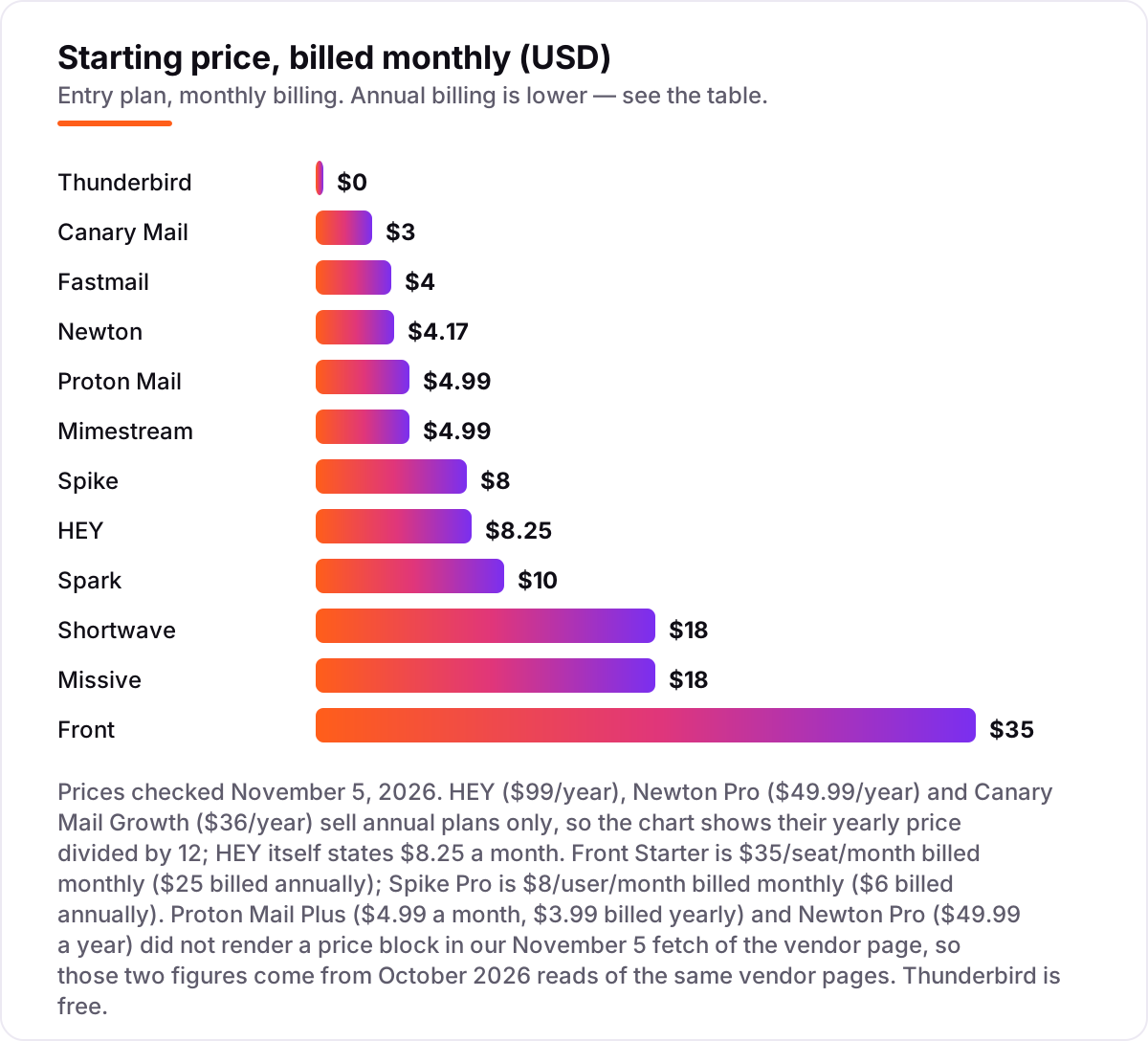
Email app pricing: what you will actually pay
Take a five-person team that all needs the paid plan. On list prices, a year costs $180 on Fastmail Basic billed annually, $480 on Spike Pro, $495 on Spark Plus billed annually, $696 on HEY for Domains, $840 on Missive Starter billed annually, $1,080 on Shortwave Pro and $1,500 on Front Starter billed annually. Superhuman's own Starter plan would cost the same team $1,500 a year on annual billing — the same as Front, and three times Spark Plus.
Two of those numbers need adjusting before they are real. HEY for Domains charges $10 a month for the first user and $12 for each extra user, so the five-person price is $58 a month, or $696 a year. And Missive Starter stops at 5 users, so the sixth person on the team forces Productive at $24 a user a month billed annually — a five-person team fits exactly, a six-person team does not.
For one person the maths is simpler and the free plans matter more. Thunderbird costs $0 forever, Canary Mail Growth is $36 a year, Proton Mail Plus is $47.88 a year billed annually, and Mimestream and Newton Pro are $49.99 a year each. The cheapest paid solo inbox here is Canary Mail at $36 a year, and the dearest solo paid plan is Shortwave Pro at $216 a year with no annual discount at all. If the business also needs its site found while the inbox gets sorted, our monthly SEO service handles the visibility side.
Annual billing cuts the bill on most tools here: Spark Plus drops from $120 to $99 a year, Missive Starter from $216 to $168, Fastmail Basic from $48 to $36, and Proton Mail Plus from $59.88 to $47.88. Shortwave publishes no annual price at all, so the monthly figure is the whole story, and HEY, Newton and Canary Mail sell annual plans only — there is no monthly option to compare against. One more cost to check before you commit: a second mailbox is a second seat on the team tools, so price every shared address before you commit to a plan for the first.
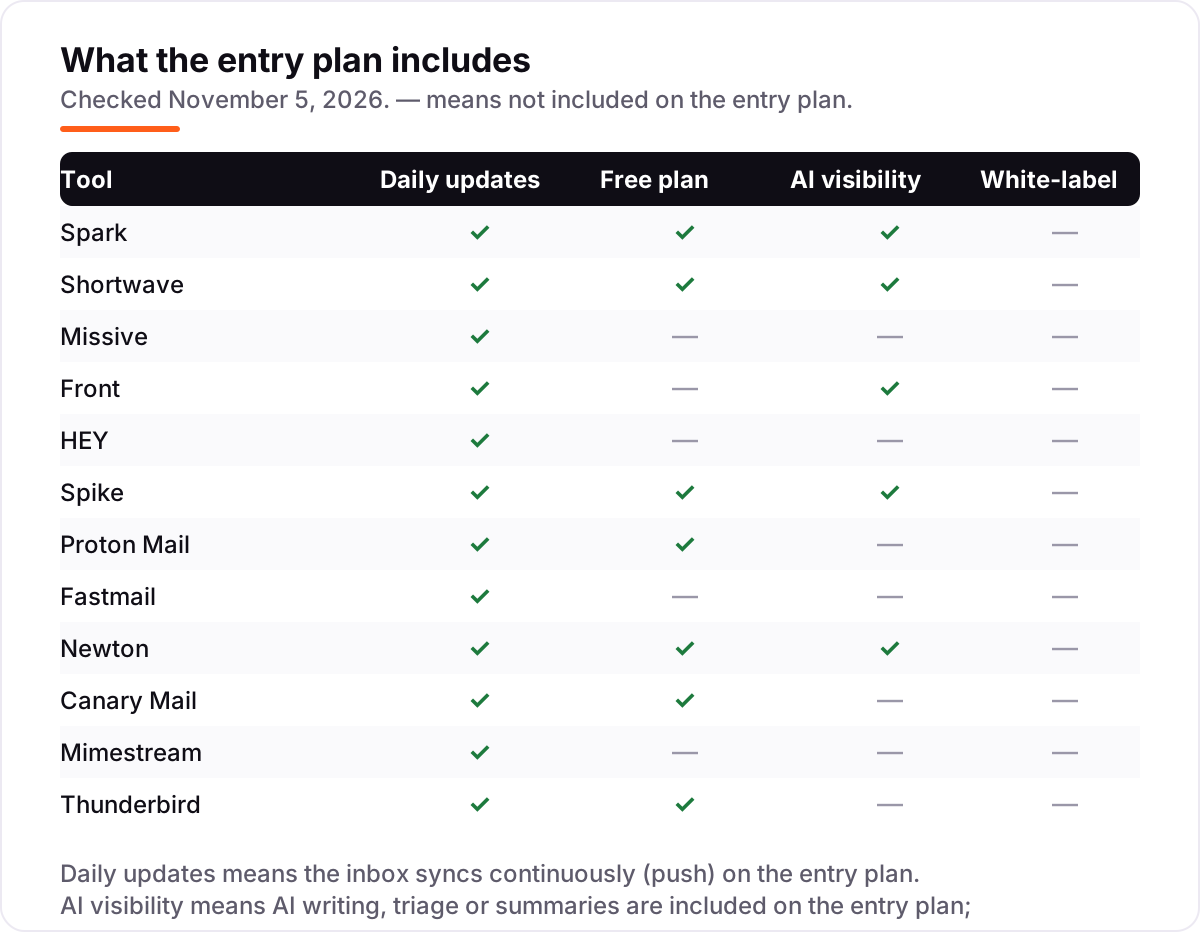
Know the difference: an email client vs an email service
The confusion in this category is between a client and a service. An email client is an app that sits on top of an account you already own — Spark, Shortwave, Spike, Newton, Canary Mail, Mimestream and Thunderbird all work this way, and your address and history stay with Gmail, Outlook or Fastmail. An email service gives you the address itself: HEY only works with @hey.com addresses or your own domain, Proton Mail gives you a @proton.me address, and Fastmail gives you a @fastmail.com address or your domain.
That distinction decides how painful switching is. Moving between clients takes an afternoon: install the app, sign in, and the mail is already there. Moving between services means a new address, telling everyone about it, and running the old inbox in parallel for months. It also decides what happens if you cancel: a client leaves your mail untouched, while a service can take the address with it.
There is a second, quieter confusion: a shared inbox is not a personal inbox. Missive and Front are built for teams answering one address together, with assignments and comments, and they are poor value for one person working alone. Spark, Shortwave and Newton are built for one person moving fast, and they are poor value for a team that needs to know who answered what. Pick the shape first, then the price.
Quick comparison: tool type by need
| Buyer | Best pick | Why |
|---|---|---|
| Solo Gmail or Outlook user who wants speed | Spark | Keyboard-first triage, free plan, Plus is $10/month |
| AI-first inbox on Gmail | Shortwave | AI search and drafting in your voice, Pro is $18/seat/month |
| Small team sharing one inbox | Missive | Assignments and comments built in, Starter is $18/user/month |
| Support team that lives in email | Front | Shared inbox plus ticketing, Starter is $35/seat/month |
| Privacy-first buyer | Proton Mail | End-to-end encryption, free plan, Mail Plus is $4.99/month |
| Mac user on Gmail only | Mimestream | Native Mac app, $4.99/month, labels work as Google intended |
| Free forever, any provider | Thunderbird | Open source, $0, works with any IMAP account |
Mistakes to avoid
- Buying on the headline price. Shortwave Pro at $18 a month has no annual discount, so it costs $216 a year, while Spark Plus at $10 a month drops to $99 a year. Compare twelve-month costs, not monthly stickers.
- Picking a Gmail-only tool for an Outlook inbox. Shortwave and Mimestream do not work with Outlook at all. Check the provider list before the price list.
- Ignoring the seat cap. Missive Starter stops at 5 users and Front Starter at 10 seats. The next person on the team can double the per-seat price overnight.
- Paying for AI you will switch off. Fastmail, Mimestream and Thunderbird offer no AI at all, and Canary Mail lets you switch it off. If you do not trust an assistant reading your mail, buy the tool without one.
- Forgetting the address. HEY and Proton Mail give you a new address, which means telling clients, updating logins and running two inboxes for months. A client that sits on your existing account avoids all of that.
How we chose
We checked each vendor's own pricing page on November 5, 2026 and recorded the starting price exactly as shown, including the annual-billing figure where the page lists one, and we ranked the tools by fit for the most common buyer — a Gmail or Outlook user who wants to move through mail fast — not by brand size. Two prices needed a different route: Proton Mail Plus and Newton Pro did not render a price block in our November 5 fetch of their pages, so those figures come from October 2026 reads of the same vendor pages, and the chart notes it. Superhuman's own pricing page timed out on November 5, so its $30-a-month Starter figure comes from an October 7, 2026 read of Superhuman's site. Mimestream carries no rating because it has no G2 listing, and the Proton Mail rating is from G2's Proton Mail for Business listing, the only Proton Mail listing G2 carries. No vendor paid for a place in this list, and none of the links here are affiliate links.
What to do next
Start with the free plan or trial of your top pick and run one real week of mail through it. Check that search finds old messages instantly, that the shortcuts feel natural after a day, and that your provider actually works with the app before you commit to a year. If the inbox is sorted but new customers are not finding you, our monthly SEO service handles the visibility side — or compare providers in our guide to email marketing software for small business. Once your tools are in place, find out what's holding your rankings back.
Your stack only works if people find you
SerpAstra fixes what keeps your site off page one and makes it easy for AI assistants to recommend.
Get a free audit→Sources we checked (24)
- Spark pricing — sparkmailapp.com/pricing (checked November 5, 2026)
- Shortwave pricing — shortwave.com/pricing (checked November 5, 2026)
- Missive pricing — missiveapp.com/pricing (checked November 5, 2026)
- Front pricing — front.com/pricing (checked November 5, 2026)
- HEY pricing — hey.com/pricing (checked November 5, 2026)
- Spike pricing — spikenow.com/pricing (checked November 5, 2026)
- Proton Mail pricing — proton.me/mail/pricing (checked November 5, 2026)
- Fastmail pricing — fastmail.com/pricing (checked November 5, 2026)
- Newton pricing — newtonhq.com/pricing (checked November 5, 2026)
- Canary Mail pricing — canarymail.io/pricing (checked November 5, 2026)
- Mimestream pricing — mimestream.com/pricing (checked November 5, 2026)
- Thunderbird — thunderbird.net (checked November 5, 2026)
- Superhuman pricing — dove.email/blog/superhuman-pricing, read from Superhuman's own site October 7, 2026
- Spark for Teams on G2 — g2.com/products/spark-for-teams/reviews (checked November 5, 2026)
- Shortwave on G2 — g2.com/products/shortwave-communications-inc-shortwave/reviews (checked November 5, 2026)
- Missive on G2 — g2.com/products/missive/reviews (checked November 5, 2026)
- Front on G2 — g2.com/products/front/reviews (checked November 5, 2026)
- HEY on G2 — g2.com/compare/basecamp-hey-vs-superhuman-mail (checked November 5, 2026)
- Spike on G2 — g2.com/compare/spike-vs-titan-titan (checked November 5, 2026)
- Proton Mail on G2 — g2.com/products/proton-mail-for-business/reviews (checked November 5, 2026)
- Fastmail on G2 — g2.com/products/fastmail/reviews (checked November 5, 2026)
- Newton on G2 — g2.com/products/newtonhq/reviews (checked November 5, 2026)
- Canary Mail on G2 — g2.com/products/canary-mail/reviews (checked November 5, 2026)
- Thunderbird on G2 — g2.com/compare/spike-vs-thunderbird (checked November 5, 2026)
Shamim
Founder of SerpAstra
A full-stack SEO and digital marketer who spends most days on Local SEO for dental practices, AI search visibility and lead generation.
Frequently asked questions
What is the best alternative to Superhuman?
Spark is the best alternative for most people: keyboard-first triage, a Smart Inbox and a free plan, with Plus at $10 a month. Shortwave is the better pick when AI is the point — its assistant searches and drafts across Gmail for $18 a seat a month. Missive wins for teams sharing one inbox.
How much does Superhuman cost?
Superhuman Mail costs $30 a month per person for its Starter plan, or $25 a month billed yearly; the Business plan is $40 a month, or $33 billed yearly. There is no free plan. Every paid tool in this list undercuts the Starter price, most by half or more.
Is there a free alternative to Superhuman?
Yes. Spark, Shortwave, Spike, Proton Mail, Newton and Canary Mail all have genuinely free plans, and Thunderbird is completely free and open source. The free plans vary — Shortwave caps search history at 90 days and Spike at 60 — so check the limit that matters to you before committing.
Which Superhuman alternatives work with Outlook?
Spark, Missive, Front, Spike, Newton, Canary Mail and Thunderbird all work with Outlook accounts, and Proton Mail connects through its Bridge app on paid plans. Shortwave and Mimestream are Gmail-only, so they are a dead end if your mail lives in Outlook or Microsoft 365.
Can I keep my Gmail address when I switch?
Yes, with most tools here. Spark, Shortwave, Spike, Newton, Canary Mail, Mimestream and Thunderbird are clients that sit on top of your existing Gmail account — your address and history stay put. HEY and Proton Mail are services with their own addresses, so switching means a new address or a custom domain.
Do any of these offer a free plan?
Six of the twelve do: Spark, Shortwave, Spike, Proton Mail, Newton and Canary Mail, plus Thunderbird, which is free and open source with no paid tier at all. Missive, Front, HEY, Fastmail and Mimestream offer free trials of 14 to 30 days instead of a permanent free plan.
Which alternative is best for teams?
Missive is the best pick for small teams sharing an inbox, from $18 a user a month, with assignments and comments built in. Front is the better choice once email becomes a support queue, with ticketing and a knowledge base from $35 a seat a month. Shortwave suits Gmail teams that want AI search across shared mail.
Free SEO and AI visibility audit
Find out what is holding your rankings back
Send us your site. Within 2 business days you get a written audit, an AI visibility check and a short fix list ranked by impact. Free, with no contract attached.
Request my free audit→Related guides
 Digital Marketing & Ads11 Best Email Marketing Software for Small Business in 2026, ComparedThe 11 best email marketing software for small business, compared on real 2026 prices, free plans and automation — Brevo starts at $9/month.Read guide →
 Digital Marketing & Ads8 Best Email Marketing Platforms for Startups in 2026, Compared8 best email marketing platforms for startups compared on price, free plans and automation, with real starting prices checked on the vendors’ own pages.Read guide →
 Digital Marketing & Ads10 Best Email Drip Campaign Software in 2026, Compared10 best email drip campaign software tools compared on price, automation depth and free plans. Real starting prices checked November 4, 2026.Read guide →