
10 Best Email Archiving Software in 2026, Compared
Compare the 10 best email archiving software tools on price, retention, legal hold and eDiscovery, with every price checked November 5, 2026.
 Shamim Mia, Founder, SerpAstraLast verified November 5, 202614 min read
We compare pricing pages, documentation and public reviews. We never accept payment for rankings.
Key takeaways
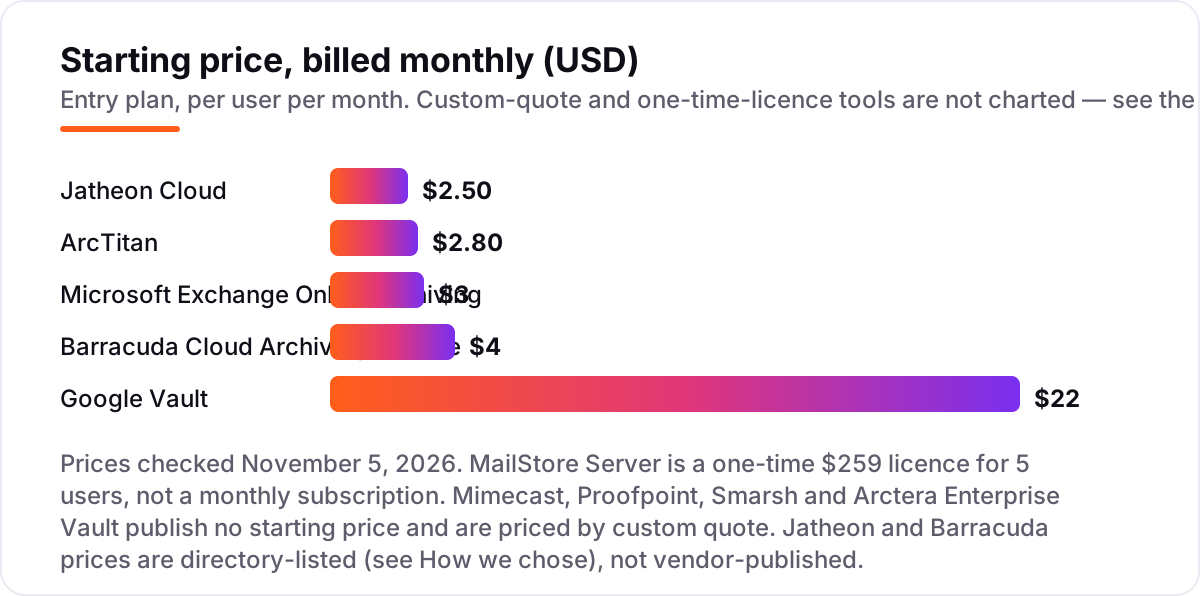
- Microsoft Exchange Online Archiving is the cheapest published archive at $3/user/month; Google Vault arrives with Workspace Business Plus at $22/user/month.
- Jatheon Cloud is the best-rated tool here at 4.7/5 on G2 and the lowest monthly price at $2.50/user/month, with no charge for inactive mailboxes.
- Four of the ten tools publish no price — Mimecast, Proofpoint, Smarsh and Arctera Enterprise Vault are all custom quote, so budget them by sales conversation, not by list price.
- The deciding factor is rarely storage: retention rules, legal hold, inactive-mailbox fees and export costs decide what archiving actually costs.
On this page
Quick comparison
| Tool | Best for | Starting price | Free plan |
|---|---|---|---|
| Microsoft Exchange Online Archiving | Microsoft 365 businesses that want archiving built into Exchange with no separate console to learn | $3/mo | No (30-day trial) |
| Google Vault | Google Workspace businesses that need retention, legal holds and eDiscovery across Gmail and Drive | $22/mo | No (14-day trial) |
| Jatheon Cloud | Small and midsize teams that want a low per-mailbox price with no charge for inactive mailboxes | $2.50/mo | No (30-day trial) |
| ArcTitan | Businesses and MSPs that want unlimited storage and fast search at a low published price | $2.80/mo | No (demo) |
| Barracuda Cloud Archiving Service | Small and midsize businesses that want a simple set-and-forget cloud archive for Microsoft 365 and Exchange | $4/mo | No (free trial) |
| MailStore Server | Small and midsize businesses that want a one-time licence and an archive on their own server | $259 once | No (30-day trial) |
| Mimecast Cloud Archive | Enterprises that want archiving bundled with email security and continuity in one cloud platform | Custom quote | No |
| Proofpoint Enterprise Archive | Enterprises and government teams that need a FedRAMP-authorized archive with fast search across 500+ attachment types | Custom quote | No (free trial) |
| Smarsh Enterprise Archive | Regulated financial firms that must archive email plus Teams, Slack, mobile and social under SEC and FINRA rules | Custom quote | No |
| Arctera Enterprise Vault | Large enterprises that want a proven on-premises archive for Exchange with deep classification and eDiscovery | Custom quote | No |
Make one of these tools?
We re-check this list every quarter. Send a correction, request a review, or ask about a clearly labeled sponsored spot.
Request a listingThe best email archiving software

Microsoft Exchange Online Archiving
Best for: Microsoft 365 businesses that want archiving built into Exchange with no separate console to learn
Exchange Online Archiving is the cheapest published archive in this list and the easiest to adopt for any business already on Microsoft 365. It adds an in-place archive to every mailbox, so users keep working in Outlook while older mail moves out of the primary mailbox. The add-on costs $3 per user a month on a yearly term, and it is included in Exchange Online Plan 2 and Microsoft 365 E3 and E5, which means many businesses own it already.
The limits are scope, not price. The archive starts at 50 GB on Plan 1, and only Plan 2 and higher plans expand it automatically. It archives Exchange mail only, so a business on Gmail needs a second archive. Buy it when your mail already lives in Microsoft 365; look elsewhere when you run mixed platforms.
What we like
- The cheapest published price here at $3/user/month, and it lives inside Exchange, not a separate product
- In-place archive and in-place hold keep every message searchable from Outlook with no new interface
- Included at no extra cost in Exchange Online Plan 2 and Microsoft 365 E3/E5, so many businesses already own it
- 24-hour IT-level phone support and a 99.9% uptime SLA come with the Microsoft cloud
Watch out for
- Only archives Exchange and Microsoft 365 mail — Gmail and other platforms need a separate archive
- The archive mailbox starts at 50 GB on Plan 1; auto-expanding storage needs Plan 2 or higher plans
- No standalone free plan and no per-mailbox pricing for leavers — you pay for every licensed user

Google Vault
Best for: Google Workspace businesses that need retention, legal holds and eDiscovery across Gmail and Drive
Google Vault is the retention and eDiscovery layer for Google Workspace, and it arrives with Business Plus at $22 per user a month on annual billing. Admins set retention rules that outrank user deletion, place legal holds on accounts or search terms, and search and export across Gmail, Drive, Chat, Meet recordings and Groups. There is nothing to install and no second console to learn.
The catch is that Vault is governance, not backup: it cannot restore a lost file, and it only preserves data once a retention rule is in place. Starter and Standard plans do not include it, so the whole team must sit on Business Plus or higher, and leavers' data needs an Archived User licence at $2–$7 a month. Buy Vault when the business already runs on Google Workspace.
What we like
- Retention rules, legal holds and eDiscovery search across Gmail, Drive, Chat, Meet recordings and Groups
- Lives inside Google Workspace, so there is nothing new to install and admins already know the console
- Holds survive account deletion, so a departing employee's mail stays available for legal and audit work
- Audit reports log every Vault search, hold and export for a defensible chain of custody
Watch out for
- Vault is not a backup: it cannot restore a deleted file on demand, and retention only starts once a rule is set
- Only Business Plus and Enterprise plans include Vault, so Starter and Standard teams must upgrade every user
- Former-employee data needs an Archived User licence at $2–$7/user/month on top of the plan price

Jatheon Cloud
Best for: Small and midsize teams that want a low per-mailbox price with no charge for inactive mailboxes
Jatheon Cloud is the best-rated archive in this list at 4.7 out of 5 on G2, and it is also the cheapest monthly price at $2.50 per user a month on the Small and Midsize plan. It archives email plus more than 25 other sources, including chat, social and mobile, with AI classification tags, PII redaction and exports in PST, EML and PDF up to 64 GB per file.
The feature that saves real money is the inactive-mailbox policy: Jatheon charges nothing for departed employees' mail, while Google charges $2–$7 a month per archived user. The trade-off is transparency — Jatheon's own site prices by quote, so the $2.50 figure comes from software directories. Buy it when you want the lowest monthly bill and the highest reviewer rating.
What we like
- The highest G2 rating in this list at 4.7/5, with reviewers praising ease of use and support
- No charge for inactive mailboxes — a real saving for businesses with staff turnover
- Covers email plus 25+ other sources, including chat, social and mobile, in one archive
- AI-powered classification tags, PII redaction and exports up to 64 GB PST files
Watch out for
- Pricing is quote-based on Jatheon's own site — the $2.50 figure comes from software directories, not a vendor price page
- Complex searches can run slowly, according to G2 reviewers, and the on-premises interface is dated
- Smaller review base than the enterprise tools here, so long-term support quality is less proven at scale

ArcTitan
Best for: Businesses and MSPs that want unlimited storage and fast search at a low published price
ArcTitan is a cloud archive from TitanHQ that pairs unlimited storage with a published price of $2.80 per user a month, or $33.60 per user a year. Search runs in under a second, retention policies are granular enough for FINRA and GDPR work, and audit trails are tamper-evident. An Outlook 365 add-in puts the archive inside the mail client users already open.
ArcTitan is also the MSP pick in this list: it is built for service-provider delivery, including white-label branding, and the price drops as user counts rise. The weaknesses are a thin review base at 12 G2 reviews and no self-serve free trial — evaluation runs through a demo. Buy it when you want unlimited storage at the lowest published cloud price.
What we like
- Unlimited email storage with no per-mailbox cap, and search that returns results in under a second
- Published price of $2.80/user/month undercuts every other cloud archive in this list
- Built for MSP delivery, including white-label branding for service providers
- Tamper-evident audit trails and granular retention policies cover FINRA and GDPR needs
Watch out for
- No free trial listed — evaluation is by demo, which slows down a self-serve shortlist
- The $2.80 figure is published on TitanHQ's comparison page, not a dedicated pricing page
- Smallest G2 review base among the cloud tools here, at 12 reviews

Barracuda Cloud Archiving Service
Best for: Small and midsize businesses that want a simple set-and-forget cloud archive for Microsoft 365 and Exchange
Barracuda Cloud Archiving Service is the set-and-forget option in this list: a guided setup wizard gets most customers running in under an hour, with automated discovery and import of PST files across the network. Storage is unlimited per user, capture is journal-based for Microsoft 365 and Exchange, and users reach every message they ever sent or received from mobile or desktop.
Reviewers rate it 4.4 out of 5 on G2 and praise its simplicity, though some call the interface dated. The price needs a note: Barracuda publishes no price of its own, so the $4 per user a month figure comes from Capterra and reseller listings. Buy it when you want the simplest cloud archive and you run Microsoft mail.
What we like
- Guided setup gets most customers running in under an hour, with automated PST discovery and import
- Unlimited storage per user with no hardware or software to install on your side
- Rated 4.4/5 on G2, with reviewers praising simple setup and reliable search
- Journal-based capture for Microsoft 365, Exchange and other mail services in one archive
Watch out for
- No published price on Barracuda's own site — the $4 figure comes from Capterra and reseller listings
- Reviewers note the interface looks dated next to newer cloud archives
- The on-premises Message Archiver appliance is a different product with its own pricing and hardware needs

MailStore Server
Best for: Small and midsize businesses that want a one-time licence and an archive on their own server
MailStore Server breaks the subscription pattern: a starter kit costs $259 once for 5 users, including a year of updates and support, and there is no monthly bill after that. One installation archives Exchange, Microsoft 365, Gmail and IMAP mail into a central archive with retention rules, legal hold and audit logs, and a single server handles up to 2,000 users.
The price of owning the archive is owning the work: you run the server, back it up and maintain it, and the server software is Windows-only with no Mac or mobile client. Reviewers rate it 4.2 out of 5 on G2 and call it reliable and fast to search. Buy it when a one-time payment beats another subscription.
What we like
- A one-time $259 licence for 5 users ends the monthly bill — the cheapest long-term cost here
- Archives Exchange, Microsoft 365, Gmail and IMAP mail into one central, searchable archive
- Retention rules, legal hold and audit logs cover compliance without a cloud subscription
- Rated 4.2/5 on G2, with reviewers calling it reliable, fast to search and easy to run
Watch out for
- Windows-only server and no Mac or mobile client — Mac and mobile users get the web interface only
- You own the server, the backups and the maintenance, unlike the cloud tools here
- Microsoft 365 setup is more involved because of modern authentication, though the documentation covers it

Mimecast Cloud Archive
Best for: Enterprises that want archiving bundled with email security and continuity in one cloud platform
Mimecast Cloud Archive has long set the enterprise standard for cloud archiving: a central, searchable repository that captures email, Teams messages and third-party communications, with a 7-second search SLA and three encrypted copies of every message stored in multiple regions. Retention policies are managed centrally, and continuity and eDiscovery sit in the same platform.
Mimecast prices by employee count rather than mailbox volume, which keeps the bill predictable as mail grows, but there is no published price — every deal is a quote, and archiving usually arrives inside a wider security bundle. Buy it when the business needs proven enterprise scale and already buys Mimecast security.
What we like
- The enterprise standard for cloud archiving, with a 7-second search SLA across millions of records
- Captures email plus Teams and third-party messages, with three encrypted copies in multiple regions
- Pricing by employee count, not mailbox volume, keeps costs predictable as mail volume grows
- Proven at scale in regulated industries, with continuity and eDiscovery in the same platform
Watch out for
- No published price — every deal is a quote, and costs scale with employees rather than mailboxes
- Archiving is usually bought as part of a wider Mimecast bundle, so standalone buyers pay for more than archiving
- Some reviewers describe setup and administration as complex compared with simpler cloud archives

Proofpoint Enterprise Archive
Best for: Enterprises and government teams that need a FedRAMP-authorized archive with fast search across 500+ attachment types
Proofpoint Enterprise Archive is a cloud archive built for compliance and discovery at enterprise scale: a central, searchable repository with near-real-time search across email and more than 500 attachment types, plus social and collaboration content. Legal hold is fully automated, and exports run to PST, CSV, Relativity and EDRM XML without professional-services fees.
It is FedRAMP-authorized, which matters for federal agencies and regulated enterprises, and its DoubleBlind key architecture keeps encryption keys under customer control. There is no published price — deals are quoted, and advanced analytics cost extra. Buy it when compliance certification and search speed matter more than a list price.
What we like
- FedRAMP-authorized cloud archive, trusted by federal agencies and regulated enterprises
- Near-real-time search across email and more than 500 attachment types, plus social and collaboration content
- Fully automated legal hold and export to PST, CSV, Relativity and EDRM XML without professional-services fees
- DoubleBlind key architecture keeps encryption keys under customer control
Watch out for
- No published price — enterprise deals are quoted, and analytics features cost extra on top of the base archive
- Reviewers rate setup and administration below the simpler cloud tools here
- The product has been renamed Proofpoint Archive, so older Enterprise Archive references can confuse buyers

Smarsh Enterprise Archive
Best for: Regulated financial firms that must archive email plus Teams, Slack, mobile and social under SEC and FINRA rules
Smarsh Enterprise Archive is the archive regulated finance runs on: one cloud-native archive for email, Teams, Slack, Zoom, mobile and social — more than 100 channels — with immutable WORM storage for SEC 17a-4, granular retention policies and defensible deletion. Search is faceted and fast at enterprise scale, and exports run to PST, EML, HTML, XML and EDRM formats.
Smarsh says it stewards roughly a quarter of the world's financial-services communications data, which is why it leads this list for regulated firms. The price is the barrier: fees are set per order form, and the Cloud Capture platform lists a $25,000-a-year minimum on AWS Marketplace before per-user content fees. Buy it when the regulator, not the budget, picks the archive.
What we like
- Archives 100+ channels — email, Teams, Slack, Zoom, mobile and social — in one native-format archive
- Immutable WORM storage for SEC 17a-4, granular retention policies and defensible deletion
- Steward of roughly a quarter of the world's financial-services communications data, per Smarsh
- High-performance faceted search and rapid export in PST, EML, HTML, XML and EDRM formats
Watch out for
- No published price — fees are set per order form, with platform, content and implementation charges separated
- The platform minimum on AWS Marketplace is $25,000 a year before per-user content fees, so small teams are priced out
- Reviewers note a steep learning curve and export fees that complicate leaving the platform

Arctera Enterprise Vault
Best for: Large enterprises that want a proven on-premises archive for Exchange with deep classification and eDiscovery
Enterprise Vault is the classic large-enterprise archive: journal archiving for Exchange plus more than 120 content types, advanced classification and Elasticsearch-powered retrieval, proven at 1,000-plus user scale. It deploys on-premises, hybrid or cloud, which suits businesses with strict data-residency rules, and G2 reviewers rate its support quality at 8.7 out of 10.
The product changed hands — Veritas sold its data-compliance business, and the archive is now Arctera Enterprise Vault — but the architecture is the same. Licensing is per user with annual maintenance and no published price, and setup typically needs dedicated administrators and SQL Server. Buy it when the archive must live on your own infrastructure at enterprise scale.
What we like
- The long-running enterprise archive, proven at 1,000+ user scale with journal archiving for Exchange
- Captures 120+ content types with advanced classification and Elasticsearch-powered retrieval
- Flexible deployment: on-premises, hybrid or cloud, to suit strict data-residency rules
- Reviewers rate support quality highest among the enterprise tools here, at 8.7/10 on G2
Watch out for
- No published price — licensing is per user with annual maintenance, and reviewers call it expensive
- Setup is complex and typically needs dedicated administrators plus SQL Server infrastructure
- The interface is dated next to cloud-native archives, and the product is now sold as Arctera, not Veritas
The best email archiving software keeps a tamper-proof copy of every message your business sends and receives, so a legal request, an audit or a regulator never catches you without the record. We ranked the ten tools below by fit for the most common buyer — a business that needs compliant retention without a second IT project — starting with the archives built into Microsoft 365 and Google Workspace, then the standalone cloud archives, and ending with the enterprise platforms. Every price was checked on November 5, 2026.
How to choose the best email archiving software
- Start with the mail you already run. If the business lives in Microsoft 365, Exchange Online Archiving is $3 a user a month and needs no new console. If it lives in Google Workspace, Vault comes with Business Plus. A standalone archive only earns its price when you run mixed platforms or need deeper supervision.
- Check the retention rule, not the storage number. Unlimited storage means little if the retention policy cannot hold a mailbox through a dispute. Every tool here offers legal hold, but only the enterprise platforms add supervision workflows and defensible deletion.
- Count inactive mailboxes. A leaver's mail still needs archiving, and some vendors charge full price for it. Jatheon charges nothing for inactive mailboxes, while Google charges $2–$7 a month for an Archived User licence.
- Ask what an export costs. Leaving an archive should not cost more than joining it. Smarsh and several enterprise platforms charge for extraction, while the cloud tools here export to PST, EML or PDF as part of the service.
- Match the regulator to the archive. SEC 17a-4, FINRA, GDPR and HIPAA each demand different proof. Financial firms need WORM storage and supervision; a general business usually needs retention, search and hold only.
Email archiving is one system in your compliance stack, not the whole stack. If the business also needs its website to bring in clients, our SEO audit service reviews what is holding the site back. And before you publish new pages about your services, run your titles through the free SERP snippet preview tool — it shows exactly how the title and description will look in Google.
Whatever you shortlist, try it with real mail before you pay. The free trials in this list are long enough to archive one genuine month — your mailboxes, your retention rules, your export — and that month tells you more than any review can. Check two things in the trial: that a hold actually freezes a mailbox through a deletion, and that an export comes out in a format your legal team can use. Every tool here offers a trial or a demo, so there is no reason to buy before you have tested it.
Email archiving software pricing: what you will actually pay
Take a 50-person business that needs every mailbox archived. On list prices, the subscription costs $125 a month on Jatheon Cloud, $140 on ArcTitan, $150 on Microsoft Exchange Online Archiving and $200 on Barracuda Cloud Archiving Service. Google Vault is the outlier at $1,100 a month — but that figure is the whole Business Plus seat, not a Vault-only price, since Vault cannot be bought on its own.
Over a year, that is $1,500 on Jatheon, $1,680 on ArcTitan, $1,800 on Microsoft and $2,400 on Barracuda, against $13,200 for the Google Workspace seats that carry Vault. MailStore breaks the pattern entirely: $259 once covers the first 5 users, and larger packs are priced per user in bands, so a small team pays once and owns the archive. The four custom-quote tools sit outside this comparison — Smarsh's Cloud Capture platform alone lists a $25,000-a-year minimum on AWS Marketplace before per-user content fees, which is why regulated firms budget archiving as a project, not a subscription.
Three costs sit outside every number above. First, inactive mailboxes: a business with 20% annual turnover keeps paying for leavers on most platforms, except Jatheon. Second, storage overages: several cloud archives advertise unlimited storage but enforce fair-use limits around 50–100 GB per user. Third, exit fees: enterprise contracts can charge for extraction, so confirm export pricing in writing before signing. If the business also sells services online, our guide to email marketing software for small business covers the sending side of the inbox.
Annual billing cuts the bill on most tools here: ArcTitan drops to $33.60 per user a year, and Jatheon discounts further for two-to-four-year prepay. Microsoft's $3 is already an annual-term price, and Google's $22 is the annual rate against $26.40 billed monthly. One more cost to check before you commit: a second mail platform is a second archive on the native tools, so a business running both Microsoft 365 and Gmail pays twice unless it picks a standalone archive.
Know the difference: archiving, backup and eDiscovery
The confusion in this category is between three jobs that sound alike. Archiving keeps the original record, under retention rules, so it stays searchable and legally defensible for years — that is what every tool in this list does. Backup keeps copies so you can recover from loss, deletion or ransomware, and it answers a different question: how fast can we get the mail back, not how long must we keep it. eDiscovery is not a product at all but a process: finding, holding and producing records for a case, which an archive supports with search, holds and exports.
A second, quieter confusion is retention versus storage. A tool can store unlimited mail and still fail a compliance audit if its retention rules cannot freeze a mailbox, prove nothing was altered, or delete on schedule when the period ends. That is why regulated buyers ask about WORM storage, audit trails and defensible deletion before they ask about gigabytes. If a vendor cannot show you an audit log of who searched, held and exported what, the archive is a filing cabinet, not a compliance record.
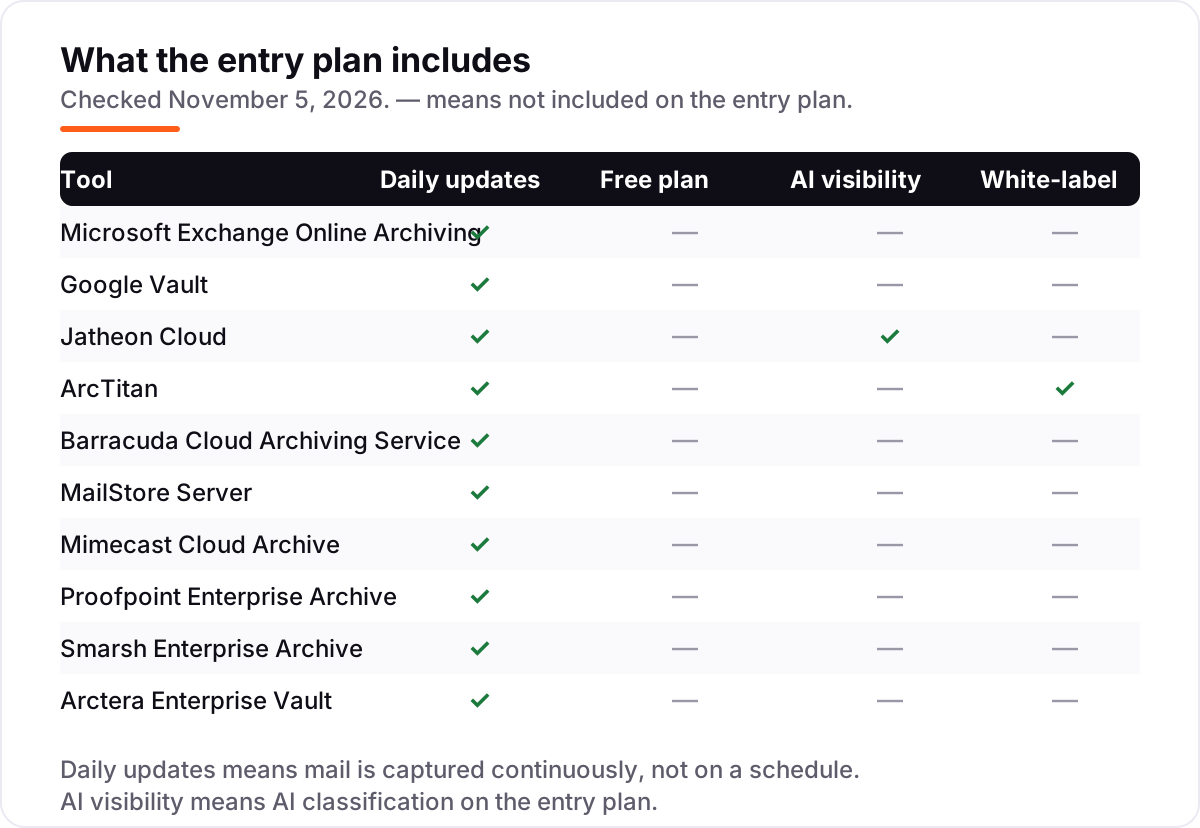
A third distinction worth knowing is journaling versus scheduled import. Journaling captures every message as it flows through the mail server, so nothing can be deleted before it is archived. Scheduled import pulls mail on a timetable, which leaves a window where a message can vanish. All ten tools here capture continuously, which is why the comparison matrix shows daily updates across the board — but check the method on any tool you add to this list later, because a nightly import is not the same promise.
Quick comparison: tool type by need
| Buyer | Best pick | Why |
|---|---|---|
| Microsoft 365 business | Microsoft Exchange Online Archiving | $3/user/month, archiving inside Exchange, no new console |
| Google Workspace business | Google Vault | Retention, holds and eDiscovery with Business Plus at $22/user/month |
| Small team, lowest monthly price | Jatheon Cloud | $2.50/user/month, best G2 rating here, no inactive-mailbox fees |
| MSP or unlimited storage | ArcTitan | $2.80/user/month, unlimited storage, white-label for MSPs |
| One-time budget, own server | MailStore Server | $259 once for 5 users, no monthly bill |
| Regulated financial firm | Smarsh Enterprise Archive | Custom quote, 100+ channels, WORM storage for SEC 17a-4 |
Mistakes to avoid
- Buying on storage alone. Unlimited storage means little if the retention policy cannot hold a mailbox through a dispute. Check holds, WORM storage and audit trails before you check gigabytes.
- Treating an archive as a backup. Vault and the tools here preserve records for compliance; they do not restore a deleted file on demand. Buy backup separately if recovery speed matters.
- Forgetting the leavers. A business with regular turnover keeps paying for departed employees' mail on most platforms. Jatheon is the exception here; Google charges $2–$7 a month per archived user.
- Ignoring exit costs. Enterprise archives can charge for extraction, and a cheap entry price can turn expensive at renewal or exit. Get export pricing in writing before you sign.
- Signing a quote-based deal without a scope. Custom-quote archives bill by users, channels, storage and services separately. Fix the channel list, retention period and export terms in the order form, or the first invoice will surprise you.
How we chose
We checked each vendor's own pricing page on November 5, 2026 and recorded the starting price exactly as shown, including the annual-billing figure where the page lists one, and we ranked the tools by fit for the most common buyer — a business that needs compliant retention without a second IT project — not by brand size. Two prices are not vendor-published and are disclosed as such: Jatheon's $2.50/user/month comes from SourceForge and FinancesOnline listings, and Barracuda's $4/user/month comes from Capterra and reseller listings, because neither vendor publishes a price of its own. Mimecast, Proofpoint, Smarsh and Arctera Enterprise Vault publish no starting price at all and are listed as custom quote. Ratings come from G2 pages opened on November 5, 2026. Three ratings are omitted with reason: Smarsh, because G2's Smarsh product pages now redirect to a category listing and the last crawl showing 4.1/5 from 28 reviews is 71 days old; Microsoft Exchange Online Archiving, because G2 has no listing for it; and Mimecast Cloud Archive, because G2's 4.4/5 Mimecast rating belongs to its email-security product, not the archive. No vendor paid for a place in this list, and none of the links here are affiliate links.
What to do next
Start with the archive that matches the mail you already run — Exchange Online Archiving for Microsoft 365, Vault for Google Workspace — and shortlist one standalone cloud archive for comparison. Run a trial with real mailboxes, test a legal hold and an export, and confirm the inactive-mailbox and exit terms before you sign. If the shortlist is settled but new customers are not finding you, our monthly SEO service handles the visibility side — or compare providers in our guide to SEO companies for small business. Once your tools are in place, find out what's holding your rankings back.
Your stack only works if people find you
SerpAstra fixes what keeps your site off page one and makes it easy for AI assistants to recommend.
Get a free audit→Sources we checked (17)
- Microsoft Exchange Online Archiving — microsoft.com (checked November 5, 2026)
- Google Workspace pricing — workspace.google.com/pricing (checked November 5, 2026)
- Google Vault help — support.google.com/vault (checked November 5, 2026)
- Jatheon pricing — SourceForge product listing (checked November 5, 2026)
- ArcTitan pricing — TitanHQ comparison page (checked November 5, 2026)
- Barracuda Cloud Archiving pricing — Capterra listing (checked November 5, 2026)
- MailStore Server pricing — mailstore.com (checked November 5, 2026)
- Mimecast Cloud Archive — mimecast.com (checked November 5, 2026)
- Proofpoint Enterprise Archive — proofpoint.com (checked November 5, 2026)
- Smarsh Enterprise Archive — smarsh.com (checked November 5, 2026)
- Arctera Enterprise Vault — arctera.io (checked November 5, 2026)
- Google Vault reviews — G2 (checked November 5, 2026)
- ArcTitan reviews — G2 (checked November 5, 2026)
- Jatheon reviews — G2 (checked November 5, 2026)
- Barracuda Message Archiver reviews — G2 (checked November 5, 2026)
- MailStore Server reviews — G2 (checked November 5, 2026)
- Arctera Enterprise Vault vs Proofpoint Enterprise Archive — G2 comparison (checked November 5, 2026)
Shamim
Founder of SerpAstra
A full-stack SEO and digital marketer who spends most days on Local SEO for dental practices, AI search visibility and lead generation.
Frequently asked questions
What is the best email archiving software?
It depends on the mail platform you already run. Microsoft Exchange Online Archiving at $3/user/month is the best fit for Microsoft 365 businesses, and Google Vault with Business Plus at $22/user/month is the best fit for Google Workspace teams. For a standalone archive, Jatheon Cloud leads with a 4.7/5 G2 rating from $2.50/user/month.
How much does email archiving software cost?
Published prices run from $2.50 to $22 per user a month, with MailStore Server as a $259 one-time licence for 5 users instead of a subscription. Four of the ten tools here — Mimecast, Proofpoint, Smarsh and Arctera Enterprise Vault — publish no price and are sold by custom quote, so enterprise budgets need a sales conversation.
Is email archiving the same as email backup?
No. Archiving keeps the original record under retention rules so it stays searchable and legally defensible for years. Backup keeps copies so you can recover from loss or failure. Google states plainly that Vault is not a backup tool: it cannot restore a deleted file on demand, and it only preserves data once a retention rule is set.
Do I need email archiving for compliance?
It depends on your regulator. Financial firms under SEC 17a-4 and FINRA must keep records in immutable WORM storage with supervision, which is why they buy Smarsh or Proofpoint. Healthcare and legal teams face similar duties under HIPAA and litigation rules. An unregulated business still benefits when a dispute or audit demands a message from years ago.
Can I archive email from both Microsoft 365 and Gmail?
Yes, with a standalone archive. Jatheon, ArcTitan, Barracuda, Mimecast and Proofpoint all capture mail from multiple platforms into one repository, so a business running both Microsoft 365 and Gmail keeps a single searchable record. The native archives do not cross over: Exchange Online Archiving covers Microsoft mail only, and Google Vault covers Google Workspace only.
What happens to archived mail when an employee leaves?
A legal hold or retention rule keeps the mail available even after the account is deleted, which is the whole point of archiving. The cost differs: Jatheon charges nothing for inactive mailboxes, while Google requires an Archived User licence at $2–$7 per user a month. Check the leaver policy before you buy, because a business with regular turnover pays for phantom mailboxes on most platforms.
Can I export mail out of an archive?
Yes, in most cases. The cloud tools here export to PST, EML or PDF, and Proofpoint and Smarsh add EDRM XML for legal review. The catch is cost and friction: enterprise contracts can charge extraction fees, and Smarsh reviewers specifically flag export fees as a reason leaving is hard. Confirm export pricing in writing before signing a multi-year archive contract.
Free SEO and AI visibility audit
Find out what is holding your rankings back
Send us your site. Within 2 business days you get a written audit, an AI visibility check and a short fix list ranked by impact. Free, with no contract attached.
Request my free audit→Related guides
 Digital Marketing & Ads11 Best Email Marketing Software for Small Business in 2026, ComparedThe 11 best email marketing software for small business, compared on real 2026 prices, free plans and automation — Brevo starts at $9/month.Read guide →
 Digital Marketing & Ads10 Best Email Drip Campaign Software in 2026, Compared10 best email drip campaign software tools compared on price, automation depth and free plans. Real starting prices checked November 4, 2026.Read guide →
 Digital Marketing & AdsBest Legal Marketing Software for 2026: 7 Options Compared by Use CaseCompare the 7 best legal marketing software options for 2026 on price, intake, automation and reviews, with prices checked November 4, 2026.Read guide →