
Best Email Blasting Software for 2026: 10 Options Compared by Use Case
Compare the 10 best email blasting software options for 2026 on price, free plans, send limits and deliverability, with every price checked November 5, 2026.
 Shamim Mia, Founder, SerpAstraLast verified November 5, 202614 min read
We compare pricing pages, documentation and public reviews. We never accept payment for rankings.

Key takeaways
- Brevo, Sender and Moosend all start at $9/month, but they charge differently: Brevo bills by emails sent, Sender and Moosend bill by contacts stored.
- Sender has the biggest free plan here (2,500 subscribers, 15,000 emails a month); Kit's free plan reaches 10,000 subscribers.
- The cap that decides your bill is usually the send limit: most tools cap monthly sends at 10 times your contact count.
- Never blast a purchased list: every tool here requires opt-in subscribers, and cold outreach to bought lists gets accounts closed.
On this page
Quick comparison
| Tool | Best for | Starting price | Free plan |
|---|---|---|---|
| Brevo | Senders with a large list who email a few times a month and want to pay by volume sent, not contacts stored | $9/mo | Yes (free plan) |
| Sender | Small businesses that want the biggest free plan in this list and real automation before paying anything | $9/mo | Yes (free plan) |
| Moosend | Budget senders who want unlimited sends and full automation on the cheapest paid plan | $9/mo | No (30-day trial) |
| MailerLite | Beginners and small teams that want the easiest editor and a free plan that still sends | $12/mo | Yes (free plan) |
| Constant Contact | Local businesses and nonprofits that want phone support and event tools with their blasts | $12/mo | No (30-day trial) |
| Mailchimp | Senders who want the biggest template library and the most integrations, and email often | $13/mo | Yes (free plan) |
| AWeber | Small businesses that want strong deliverability, ecommerce selling in email, and 24/7 support | $15/mo | No (14-day trial) |
| GetResponse | Senders who want unlimited sends plus webinars, landing pages and a website builder in one bill | $19/mo | Yes (free plan) |
| ActiveCampaign | Teams that want the deepest automation and segmentation, and will pay for it | $19/mo | No (14-day trial) |
| Kit | Creators and newsletter writers who want unlimited sends and tag-based segmentation | $39/mo | Yes (free plan) |
Make one of these tools?
We re-check this list every quarter. Send a correction, request a review, or ask about a clearly labeled sponsored spot.
Request a listingThe best email blasting software

Brevo
Best for: Senders with a large list who email a few times a month and want to pay by volume sent, not contacts stored
Brevo prices by emails sent, not contacts stored, which is the whole reason it leads this list. Starter costs $9 a month for 5,000 emails, and a sender with a big list who emails twice a month pays far less here than on a per-contact tool. The free plan sends 300 emails a day, and SMS, WhatsApp, transactional email and a basic CRM share the same account, so one login covers most small-business messaging.
The catch is the contact cap hiding inside the volume tiers: the $9 tier stores only 500 contacts, so a 5,000-person list needs the 20,000-email tier at $32 a month. Removing the Brevo logo costs another $12 a month on Starter. Buy Brevo when your list is large and your sending is occasional; buy a per-contact tool when you email a small list every day.
What we like
- Volume pricing suits big lists: $9/month covers 5,000 emails, and the bill follows sends, not contacts
- Free plan sends 300 emails a day with no time limit
- SMS, WhatsApp, transactional email and a basic CRM sit in the same account
- AI content tools are included on Starter, not held for a higher tier
Watch out for
- The $9 tier stores only 500 contacts, so a bigger list needs a pricier volume tier
- Removing the Brevo logo costs $12/month extra on Starter
- Reporting is shallower than the pricier automation-first tools here

Sender
Best for: Small businesses that want the biggest free plan in this list and real automation before paying anything
Sender wins on the free plan: 2,500 subscribers and 15,000 emails a month at $0, with automation workflows and segmentation included rather than locked behind a paywall. That is five times the free subscribers MailerLite offers and ten times Mailchimp's. Standard costs $9 a month for 500 subscribers, includes three user seats, and removes Sender branding from every email.
The trade-offs are a smaller template library and a shorter integration list than the big names, so teams that live in a particular CRM should check the connector first. The $6.30 annual figure is a first-year discount for new customers and renews at $9 a month. Pick Sender when the budget is tight and the free plan can carry the first year; pick Brevo when send volume, not list size, is the bigger number.
What we like
- The biggest free plan here: 2,500 subscribers and 15,000 emails a month at $0
- Automation workflows and segmentation run on the free plan, not just paid tiers
- Standard at $9/month includes 3 user seats and removes Sender branding
- Reviewers praise the live chat support for fast, human answers
Watch out for
- Template selection is smaller and less modern than Mailchimp or MailerLite
- The $6.30 annual figure is a first-year discount; it renews at $9/month
- Fewer third-party integrations than the big-name platforms here

Moosend
Best for: Budget senders who want unlimited sends and full automation on the cheapest paid plan
Moosend's promise is simple: unlimited sends on Pro, so a sender who blasts daily never watches a send counter. Pro costs $9 a month for 500 contacts, or $7 a month billed annually, and includes automation workflows, landing pages, forms, A/B testing and an AI writer from the start. The 30-day trial needs no credit card and opens almost every Pro feature.
There is no free plan, so the trial is the only way to test it for free, and support runs 24/5 rather than weekends. The template library is smaller than Mailchimp's or MailerLite's, and the price climbs with contacts: Pro is $48 a month at 5,000 contacts. Choose Moosend when you send often and want one flat price for unlimited blasts; choose Sender when a free plan matters more.
What we like
- Unlimited sends on Pro, so frequent blasts never trigger overage fees
- Pro at $9/month includes automation workflows, landing pages and an AI writer
- 30-day trial needs no credit card and opens almost every Pro feature
- Pro includes 5 team seats, more than most entry plans here
Watch out for
- No free plan — only a 30-day trial, after which you must pay
- Template library is smaller than Mailchimp or MailerLite
- Support runs 24/5, not weekends

MailerLite
Best for: Beginners and small teams that want the easiest editor and a free plan that still sends
MailerLite is the easiest tool here to learn: the drag-and-drop editor is clean, the setup takes minutes, and only active subscribers count toward your tier, so unsubscribed and bounced contacts cost nothing. Comfort costs $12 a month for 500 subscribers and 5,000 emails, and includes 50 automations, 10 landing pages, an AI writing assistant and three seats. The free plan covers 250 subscribers.
The limits to watch are the send cap — Comfort allows ten times your subscriber tier each month — and the strict account approval new senders sometimes face. Unlimited sends and the deeper automation wait for Power at $25 a month. Pick MailerLite when ease of use matters most and the list is small; pick Brevo when the list is large and sends are the metric that counts.
What we like
- The easiest editor in this list, with a clean drag-and-drop builder
- Only active subscribers count toward your tier — unsubscribed and bounced contacts are free
- Comfort at $12/month includes 50 automations, 10 landing pages and an AI writing assistant
- Free plan covers 250 subscribers and 2,500 emails a month with automations included
Watch out for
- Comfort caps sends at 10 times your subscriber tier each month
- New-sender account approval can be strict and slow
- Unlimited sends and the deeper automation wait for Power at $25/month

Constant Contact
Best for: Local businesses and nonprofits that want phone support and event tools with their blasts
Constant Contact is the pick for owners who want a person to talk to: phone support comes with every plan, including Lite at $12 a month for 500 contacts. Event registration, social posting and surveys are built in, which suits local businesses and nonprofits that run events alongside email. Nonprofits that prepay for a year save up to 30%, and the 30-day trial needs no credit card.
Lite is the tightest plan here on automation: one automation template, one custom segment, and sends capped at ten times your contact count. The bill also climbs steeply with list size — Lite is $50 a month at 2,500 contacts. Choose Constant Contact when support and events matter more than automation depth; choose MailerLite or Sender when the budget is the deciding factor.
What we like
- Phone support on every plan, including the $12 Lite tier
- Event registration, social posting and surveys built in, not bolted on
- Nonprofits save up to 30% when they prepay for a year
- Simple editor and templates that a non-marketer can run without training
Watch out for
- Lite caps sends at 10 times your contact count each month
- The bill climbs steeply with list size: Lite is $50/month at 2,500 contacts
- Only one automation template and one custom segment on Lite

Mailchimp
Best for: Senders who want the biggest template library and the most integrations, and email often
Mailchimp is still the best-known name in email, and the reason is the library: more templates and more integrations than anything else here, plus landing pages and signup forms on every plan. Essentials costs $13 a month for 500 contacts and 5,000 sends, with simple automation flows and 24/7 email and chat support included. The free plan covers 250 contacts and 500 sends a month.
The billing model is the warning: the price rises with every contact band, so Essentials is $75 a month at 5,000 contacts, and unsubscribed contacts count toward the tier until you archive them. Pick Mailchimp when templates and integrations matter most and the list stays small; pick Brevo or Sender when the list is large and the bill needs to stay flat.
What we like
- The biggest template library and integration list in this roundup
- 24/7 email and chat support starts on Essentials, not a higher tier
- Send-time optimization and simple automation flows included from Essentials
- Landing pages and signup forms on every plan, including free
Watch out for
- The bill rises steeply with contacts: Essentials is $75/month at 5,000 contacts
- Unsubscribed contacts count toward your billing tier until you archive them
- Free plan was cut to 250 contacts and 500 sends in February 2026

AWeber
Best for: Small businesses that want strong deliverability, ecommerce selling in email, and 24/7 support
AWeber has sold email marketing since the late 1990s, and its pitch is deliverability plus selling: Lite costs $15 a month for 500 subscribers and 5,000 sends, and lets you sell products from landing pages through Stripe. An AI subject line assistant, split testing and RSS-to-email are included, and support runs 24/7 by chat, email and phone on every paid plan.
Lite is tightly capped: one email list, three automations, three landing pages and one saved segment, and sales through Lite carry a 1.0% transaction fee on top of Stripe's charges. Plus costs $30 a month at the same list size, so growing senders pay up fast. Choose AWeber when deliverability and in-email selling matter; choose GetResponse when you want unlimited sends at a similar price.
What we like
- Long track record on deliverability, with a 14-day trial to test it on your own list
- Sell products directly from landing pages with Stripe, on Lite as well as Plus
- AI subject line assistant and split testing included on Lite
- 24/7 support by chat, email and phone on every paid plan
Watch out for
- Lite is capped at 1 email list, 3 automations and 3 landing pages
- A 1.0% transaction fee applies to sales made through Lite landing pages
- Plus costs double Lite at the same list size, so growing senders pay up fast

GetResponse
Best for: Senders who want unlimited sends plus webinars, landing pages and a website builder in one bill
GetResponse is the all-in-one option: Starter costs $19 a month for 1,000 contacts with unlimited monthly sends, so the send counter never matters. The free plan covers 500 contacts and 2,500 emails a month indefinitely, and new accounts get a 14-day trial of the premium features. AI content generators are included on Starter, and Creator adds webinars, a website builder and course tools.
Starter allows only one custom automation workflow, and the same contact on two lists counts twice toward the contact limit, which can push the bill up unexpectedly. Annual plans are non-refundable, so test on monthly billing first. Pick GetResponse when unlimited sends and webinars share one bill; pick ActiveCampaign when automation depth matters more than send volume.
What we like
- Unlimited monthly sends on every paid plan — no send cap to watch
- Free plan covers 500 contacts and 2,500 emails a month indefinitely
- AI content generators included on Starter, with a 14-day premium trial to test them
- Creator adds webinars, a website builder and course tools in the same subscription
Watch out for
- Starter allows only one custom automation workflow
- The same contact on two lists counts twice toward your contact limit
- Annual plans are non-refundable, so test on monthly billing first

ActiveCampaign
Best for: Teams that want the deepest automation and segmentation, and will pay for it
ActiveCampaign is the automation pick: the workflow builder supports branching, goals and site tracking that the cheaper tools here cannot match, and a marketing CRM is bundled in, so blasts and deals share one contact record. Starter costs $19 a month billed monthly, or $15 a month billed annually, for 1,000 contacts and 10,000 sends. It holds the largest G2 review base in this list.
There is no free plan, only a 14-day trial capped at 100 emails, and Starter is deliberately limited: five actions per automation, no landing pages and no generative AI. The bill climbs fast with contacts — Starter is $49 a month at 2,500. Choose ActiveCampaign when automation is the job; choose GetResponse or Moosend when the priority is sending a lot of email cheaply.
What we like
- The deepest automation builder here, with branching, goals and site tracking
- Segmentation and personalization that the cheaper tools cannot match
- A marketing CRM is bundled in, so blasts and deals share one contact record
- Rated 4.4/5 on G2 across more than 14,800 reviews, the largest base here
Watch out for
- No free plan — only a 14-day trial, capped at 100 emails
- Starter caps each automation at 5 actions, with no landing pages and no generative AI
- The bill climbs fast with contacts: Starter is $49/month at 2,500 contacts

Kit
Best for: Creators and newsletter writers who want unlimited sends and tag-based segmentation
Kit is built for creators: the free Newsletter plan covers up to 10,000 subscribers with unlimited broadcasts, landing pages and forms, which no other free plan here matches. Creator costs $39 a month billed monthly, or $33 billed annually, for 1,000 subscribers, and adds unlimited visual automations, sequences and integrations. Tag-based segmentation fits a creator's audience better than list-based tools.
Creator is the priciest entry in this list, and the September 2025 reprice more than doubled it from roughly $15 a month. Kit also takes 3.5% plus $0.30 on every sale made through Kit Commerce. Pick Kit when you are a creator growing a newsletter audience; pick MailerLite or Sender when the budget is small and the audience is not a creator business.
What we like
- Free Newsletter plan covers up to 10,000 subscribers with unlimited broadcasts
- No sending limits on any plan, free or paid
- Tag-based segmentation fits creators better than list-based tools
- Creator Network recommendations and the Sponsor Network help a newsletter grow
Watch out for
- Creator at $39/month is the priciest entry in this list
- The Creator entry price more than doubled in the September 2025 reprice
- Kit takes 3.5% plus $0.30 on every sale made through Kit Commerce
Email blasting software is the tool you reach for when one message has to land in thousands of inboxes at once: a product launch, a sale, a newsletter, a reminder. The best email blasting software makes that send cheap, fast and legal — it handles the list, the template, the send schedule and the delivery, and it keeps you on the right side of spam law by mailing only people who asked to hear from you. We compared the ten tools below on the numbers that decide the bill: the starting price, the free plan, the monthly send limit and what happens when your list grows. Every price was verified against the vendor's own pricing page, checked November 5, 2026.
How to choose the best email blasting software
- Count your sends, not just your contacts. Brevo prices by email volume and Moosend allows unlimited sends, while Mailchimp, Constant Contact and MailerLite price by list size and cap sends at a multiple of it.
- Check the free plan's real ceiling. Sender covers 2,500 subscribers free, Kit covers 10,000, and Mailchimp's free plan stops at 250 contacts and 500 sends a month.
- Watch the cap that bites first. A 10x send cap means a 500-contact list sends 5,000 emails a month — one weekly blast to the whole list, and nothing more.
- Confirm the trial length. AWeber, Mailchimp and ActiveCampaign give 14 days; Constant Contact and Moosend give 30 days.
- Check deliverability basics. Every tool here needs a verified sending domain and an opt-in list; none of them will send to a purchased list.
Email is one system in your stack, not the whole stack. If the business also needs to be found online, our guide to B2B email marketing software covers the visibility side of the same funnel. And before you send a blast, tag every link so you can see which one earned the click: the free UTM builder tool builds the tracking links in seconds, and the click data tells you which subject line and which call to action actually worked.
Whatever you shortlist, run one real blast before you pay. The free plans and trials in this list are long enough to send a genuine campaign — your list, your template, your subject line — and that one send tells you more than any review can. Check two things in the test: that the emails land in the inbox rather than spam, and that the open and click reports update the same day. Every tool here refreshes its campaign stats daily, so there is no reason to buy before you have seen a real report.
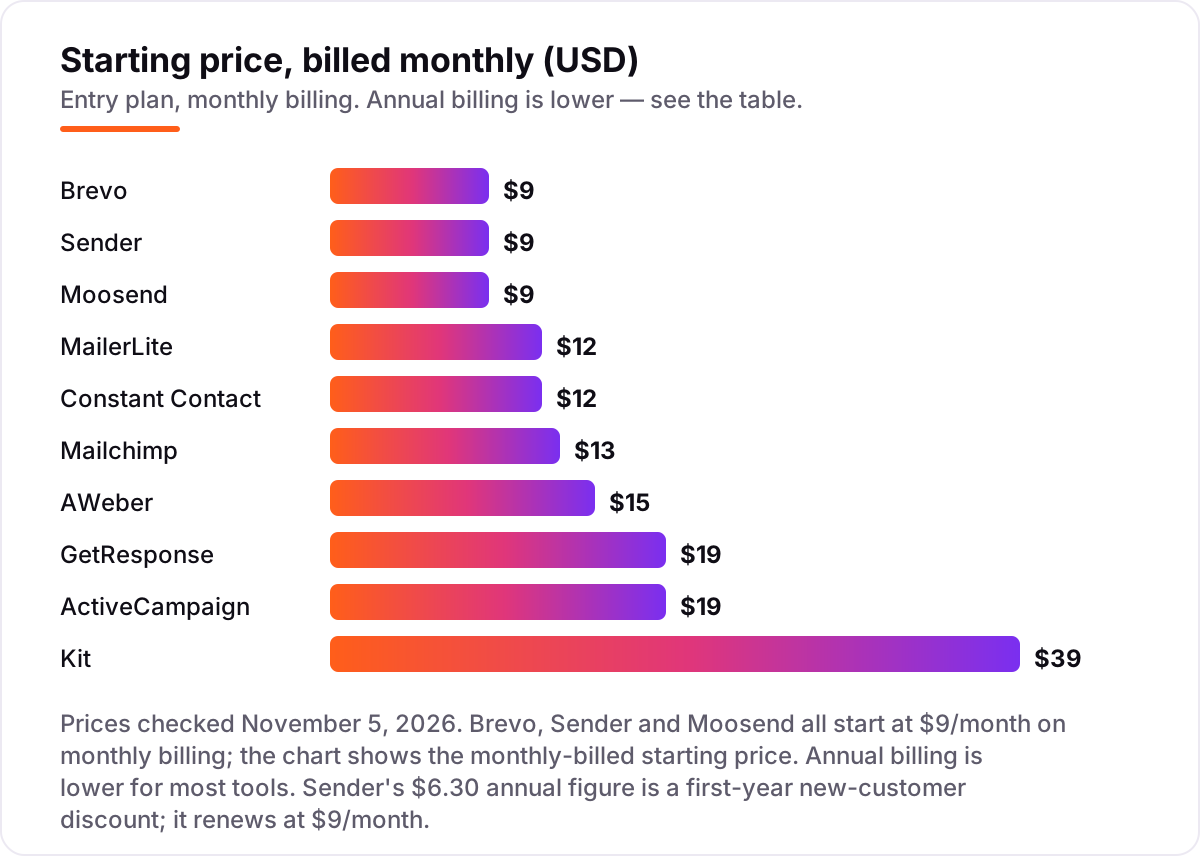
Email blasting software pricing: what you will actually pay
Take a 5,000-contact list emailed four times a month — 20,000 sends. On list prices, the subscription costs $32 a month on Brevo Starter (priced by volume), $39 on Sender Standard, $48 on Moosend Pro, $49 on MailerLite Comfort, $54 on GetResponse Starter, $60 on AWeber Lite, $75 on Mailchimp Essentials and $89 on Kit Creator. Two of those numbers need adjusting before they are real: Moosend Pro drops to $38 a month billed annually, and GetResponse Starter drops 18% on annual billing.
Over a year, that is $384 on Brevo, $468 on Sender, $456 on Moosend billed annually, $588 on MailerLite, $648 on GetResponse, $720 on AWeber, $900 on Mailchimp and $1,068 on Kit. The same 5,000 people and the same four blasts a month cost $384 a year at the cheap end and $1,068 at the dear end — a $684 gap that comes entirely from the pricing model, not from features. Two tools are missing from that table: Constant Contact Lite is $50 a month at 2,500 contacts and climbs from there, and ActiveCampaign Starter is $49 a month at 2,500 contacts — price your own band on the vendor's calculator before you commit to either.
Three costs sit outside every number above. First, the introductory discounts — Sender's $6.30 annual figure is a first-year offer that renews at $9 a month — end, so budget on the list price. Second, SMS: Brevo, Constant Contact and Sender all charge for text messages separately, usually through prepaid credits. Third, the sending domain: a dedicated IP, which the high-volume senders here eventually need, is a paid add-on on most tools. If the list is a B2B audience rather than consumers, the buying criteria shift too — see our guide to the best B2B email marketing software.
Annual billing cuts the bill on most tools here: MailerLite Comfort drops from $144 to about $130 a year, AWeber Lite from $180 to $150, GetResponse Starter from $228 to about $187, and ActiveCampaign Starter from $228 to $180. Brevo's yearly billing saves 10%, and Moosend's saves 20%. Mailchimp publishes no annual discount on its marketing plans, so the monthly figure is the whole story. One more cost to check before you commit: a second brand is a second subscription on every tool in this list, so price each list separately.
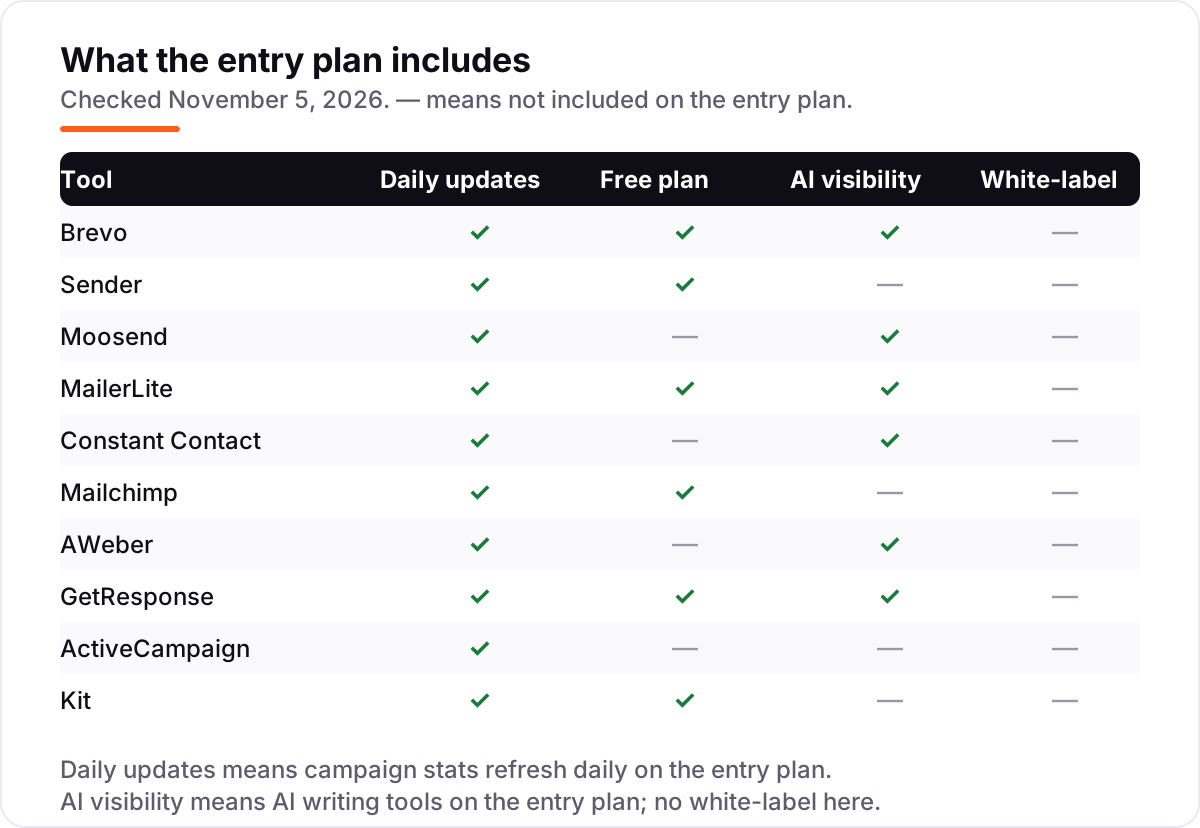
Know the difference: email blasting vs marketing automation
The confusion in this category is between one send and a sequence. Email blasting sends one message to a whole list at once — a newsletter, a sale announcement, a product launch. Marketing automation sends triggered messages to individuals — a welcome series when someone signs up, an abandoned-cart email when they leave a checkout, a birthday offer once a year. All ten tools in this list can blast; only some of them automate well. ActiveCampaign is the strongest automator here, GetResponse and Brevo are solid, and Constant Contact Lite is the weakest, with a single automation template.
There is a second, quieter confusion: blasting is not transactional email. A blast is marketing mail to a list; transactional email is the one-to-one messages a system sends — order confirmations, password resets, receipts. Brevo is the only tool here that sells both in the same account at the entry price, which is why developers and store owners often pick it. If your "blasts" are really receipts and confirmations, you need a transactional service, not a tool from this list.
A third distinction worth knowing is the send cap versus the contact cap. Some tools cap how many people you store (Mailchimp, MailerLite, Constant Contact), some cap how many emails you send (Brevo), and some cap neither on the entry plan (Moosend, GetResponse, Kit). The cap that bites first is your real limit: a 10x send cap on a 500-contact list means 5,000 emails a month, which is one blast a week and nothing left for a follow-up.
Quick comparison: tool type by need
| Buyer | Best pick | Why |
|---|---|---|
| Tightest budget, biggest free plan | Sender | Free to 2,500 subscribers, Standard is $9/month |
| Large list, occasional sends | Brevo | Volume pricing from $9/month for 5,000 emails |
| Daily sender, unlimited sends | Moosend | Pro is $9/month with no send cap |
| Easiest to learn | MailerLite | Comfort is $12/month with the friendliest editor |
| Wants phone support | Constant Contact | Lite is $12/month with phone help included |
| Deepest automation | ActiveCampaign | Starter is $19/month billed monthly |
| Creator newsletter | Kit | Free to 10,000 subscribers, Creator is $39/month |
Mistakes to avoid
- Budgeting on the headline price without checking the tier. Brevo's $9 covers 500 contacts and Mailchimp's $13 covers 500 contacts — a 5,000-contact list costs $32 and $75 a month on those same plans.
- Blasting a purchased or scraped list. Every tool here bans bought lists in its terms, and a spam complaint rate over roughly 0.1% can get the account suspended. Build the list with opt-in forms instead.
- Ignoring the send cap. A 10x cap sounds generous until you send a weekly blast plus a follow-up: on a 500-contact list that is 5,000 emails, and the month is already spent.
- Budgeting on a first-year promo. Sender's $6.30 annual figure renews at $9 a month, and GetResponse annual plans are non-refundable, so test on monthly billing before you commit to a year.
- Skipping the sending-domain setup. Authenticate the domain with SPF, DKIM and DMARC before the first blast, and warm a new domain up with small sends — a cold domain blasting 20,000 emails on day one lands in spam.
How we chose
We verified each price against the vendor's own pricing page, using fresh crawls of those pages dated November 2–5, 2026, and recorded the starting price exactly as shown, including the annual-billing figure where the page lists one, and we ranked the tools by fit for the most common buyer — a small business sending regular blasts to an opt-in list — not by brand size. Ratings come from G2 review pages crawled in the last few days, except Brevo's review count, which comes from our program's verified record because the G2 page would not load during this check. Brevo's pricing page is a calculator that shows no prices in its text, so its $9 entry price is corroborated by Brevo's own published pricing reference, checked November 4, 2026. Constant Contact's own blog and pricing pages describe a 30-day trial; an older 60-day figure still circulates in third-party roundups. No vendor paid for a place in this list, and none of the links here are affiliate links.
What to do next
Start with the free plan or trial of your top pick and send one real blast to your own list. Check that the emails land in the inbox, that the open and click reports update the same day, and that the bill for your list size matches the number on the pricing page before you commit to a year. If the emails are sorted but new customers are not finding you, our monthly SEO service handles the visibility side — or compare providers in our guide to SEO companies for small business. Once your tools are in place, find out what's holding your rankings back.
Your stack only works if people find you
SerpAstra fixes what keeps your site off page one and makes it easy for AI assistants to recommend.
Get a free audit→Sources we checked (20)
- Brevo pricing — brevo.com/pricing (checked November 5, 2026)
- Sender pricing — sender.net/pricing (checked November 5, 2026)
- Moosend pricing — moosend.com/pricing (checked November 5, 2026)
- MailerLite pricing — mailerlite.com/pricing (checked November 5, 2026)
- Constant Contact pricing — constantcontact.com/pricing (checked November 5, 2026)
- Mailchimp pricing — mailchimp.com/pricing/marketing (checked November 5, 2026)
- AWeber pricing — aweber.com/pricing.htm (checked November 5, 2026)
- GetResponse pricing — getresponse.com/pricing (checked November 5, 2026)
- ActiveCampaign pricing — activecampaign.com/pricing (checked November 5, 2026)
- Kit pricing — kit.com/pricing (checked November 5, 2026)
- Brevo on G2 — g2.com/products/sendinblue/reviews (checked November 5, 2026)
- Sender on G2 — g2.com/products/sender-net/reviews (checked November 5, 2026)
- Moosend on G2 — g2.com/products/moosend/reviews (checked November 5, 2026)
- MailerLite on G2 — g2.com/products/mailerlite/reviews (checked November 5, 2026)
- Constant Contact on G2 — g2.com/products/constant-contact/reviews (checked November 5, 2026)
- Mailchimp on G2 — g2.com/products/intuit-mailchimp-email-marketing/reviews (checked November 5, 2026)
- AWeber on G2 — g2.com/products/aweber/reviews (checked November 5, 2026)
- GetResponse on G2 — g2.com/products/getresponse/reviews (checked November 5, 2026)
- ActiveCampaign on G2 — g2.com/products/activecampaign/reviews (checked November 5, 2026)
- Kit on G2 — g2.com/products/convertkit-kit/reviews (checked November 5, 2026)
Shamim
Founder of SerpAstra
A full-stack SEO and digital marketer who spends most days on Local SEO for dental practices, AI search visibility and lead generation.
Frequently asked questions
What is the best email blasting software?
Brevo is the best fit for most senders: volume pricing from $9 a month, a free plan, and SMS and transactional email in the same account. Sender is the better pick when the budget is $0, with 2,500 free subscribers. Moosend wins for daily senders because Pro includes unlimited sends.
How much does email blasting software cost?
Entry prices run from $0 to $39 a month. Brevo, Sender and Moosend all start at $9 a month, MailerLite and Constant Contact at $12, Mailchimp at $13, AWeber at $15, GetResponse and ActiveCampaign at $19, and Kit at $39. A 5,000-contact list emailed weekly costs $32 to $89 a month, depending on the tool.
Is there really free email blasting software?
Yes, with limits. Sender is free for 2,500 subscribers and 15,000 emails a month, Kit is free to 10,000 subscribers, and GetResponse is free for 500 contacts. Brevo, MailerLite and Mailchimp also have free plans, but with smaller limits. Moosend, Constant Contact, AWeber and ActiveCampaign offer trials only.
What is the difference between email blasting and email marketing automation?
Blasting sends one message to a whole list at once, which is what this list covers. Automation sends triggered messages to individuals — a welcome series, an abandoned-cart email, a birthday offer — based on behavior. Most tools here do both, but ActiveCampaign and GetResponse are the strongest on automation.
How many emails can I send each month on the cheapest plans?
It depends on the pricing model. Brevo Starter covers 5,000 emails a month, Sender Standard covers 6,000, and Moosend and GetResponse have no send cap at all. Mailchimp, MailerLite, Constant Contact, AWeber and ActiveCampaign cap sends at 10 times your contact count on their entry plans.
Can I use these tools to send cold emails to a purchased list?
No. Every tool in this list requires an opt-in list and bans purchased, rented or scraped contacts in its terms. Sending cold blasts from these platforms risks an immediate account suspension and damages your sending reputation. For cold outreach, use a dedicated cold-email tool with its own sending domains instead.
Free SEO and AI visibility audit
Find out what is holding your rankings back
Send us your site. Within 2 business days you get a written audit, an AI visibility check and a short fix list ranked by impact. Free, with no contract attached.
Request my free audit→Related guides
 Digital Marketing & Ads7 Best B2B Email Marketing Software in 2026, ComparedCompare the 7 best b2b email marketing software tools on starting price, automation depth and free plans, with every price checked November 4, 2026.Read guide →
 Digital Marketing & Ads8 Best Email Marketing Platforms for 2026 (Pros, Cons and Pricing)8 best email marketing platforms compared on real starting prices, free plans and automation. Brevo $9/month, Mailchimp $13. Checked Nov 4, 2026.Read guide →
 Digital Marketing & Ads10 Best Email Drip Campaign Software in 2026, Compared10 best email drip campaign software tools compared on price, automation depth and free plans. Real starting prices checked November 4, 2026.Read guide →