
Best Email Design Software for 2026: 12 Options Compared by Use Case
Compare the 12 best email design software options for marketers on price, free plans and editor type, with every price checked November 6, 2026.
 Shamim Mia, Founder, SerpAstraLast verified November 6, 202614 min read
We compare pricing pages, documentation and public reviews. We never accept payment for rankings.

Key takeaways
- Stripo is the best dedicated email designer at $20/month, Beefree the easiest editor at $30/month, and MailerLite the best value all-rounder at $12/month for design and sending in one account.
- Brevo is the cheapest way to design and send at $9/month, while the dedicated builders charge $15–$30/month and need a separate sending platform.
- The single most important buying factor is where the email gets sent: a dedicated builder only pays off if it exports cleanly to the platform you already use.
- Litmus publishes no starting price and now sells through its sales team, so budget it as a custom quote and test it before committing.
On this page
Quick comparison
| Tool | Best for | Starting price | Free plan |
|---|---|---|---|
| Stripo | Small teams that design their own templates in a visual editor and export them to any email platform | $20/mo | Yes (free plan) |
| Beefree | Marketers who want the easiest drag-and-drop editor with a large template library and no code | $30/mo | Yes (free plan) |
| MailerLite | Small businesses that want to design and send newsletters from one cheap account | $12/mo | Yes (free plan) |
| Brevo | Senders with a big list but modest volume who want the lowest entry price | $9/mo | Yes (free plan) |
| Mailchimp | Small businesses that want the biggest template and integration ecosystem for their emails | $13/mo | Yes (free plan) |
| Klaviyo | Online stores that want product data to shape every email design | $20/mo | Yes (free plan) |
| Campaign Monitor | Design-led brands and agencies that want beautiful emails and unlimited users on every plan | $13/mo | No (trial only) |
| Topol | Solo designers and small teams who want a cheap standalone editor with clean HTML export | $15/mo | Yes (free plan) |
| Parcel | Developers who design emails in code and want previews, checks and spam scoring in one place | $29/mo | Yes (free plan) |
| Chamaileon | Enterprise teams that need one governed email design system with approvals and brand control | $400/mo | No (custom quote) |
| Unlayer | SaaS products that need an email editor embedded inside their own app | $250/mo | Yes (free plan) |
| Litmus | Teams that QA every email across clients and devices before it goes out | Custom | No (trial only) |
Make one of these tools?
We re-check this list every quarter. Send a correction, request a review, or ask about a clearly labeled sponsored spot.
Request a listingThe best email design software

Stripo
Best for: Small teams that design their own templates in a visual editor and export them to any email platform
Stripo is a design-only tool, and that focus shows: the editor is built for one job — making HTML emails that look right everywhere — and it exports the template to more than 90 email platforms, so you design once and send from whichever platform you already use. Basic costs $20 a month and covers 50 exports, 50 test emails a day and 50 stored emails, with premium templates and preview links included.
The catch is the export meter. Four exports a month on the free plan is enough to test the editor, but a team sending weekly campaigns will hit 50 exports quickly and need Medium at $45 a month. There is no sending built in, so budget a platform like MailerLite or Brevo on top. Buy Stripo when design quality matters most and you already have a sender.
What we like
- A dedicated design tool that exports to more than 90 email platforms, so you are never locked to one sender
- Free plan with no time limit, and Basic at $20/month covers 50 exports, premium templates and preview links
- Built-in spam, accessibility and client checks plus AI help with subject lines, copy and alt text
- Modular design with saved blocks and real-time co-editing on team plans
Watch out for
- Exports are the meter that matters: Basic stops at 50 a month, so a busy team needs Medium at $45/month
- No sending, lists or analytics of its own — it only designs, so you still need an email platform
- White-label and the plugin version are separate, higher-priced products

Beefree
Best for: Marketers who want the easiest drag-and-drop editor with a large template library and no code
Beefree is the easiest editor in this list to hand to a non-designer: the drag-and-drop builder is clean, the template library runs past 2,000 designs, and you can build emails, landing pages and popups in the same account, then export to the major email platforms. Professional costs $30 a month, or $25 a month billed annually, and removes the design and export caps, adding folders, user roles and HTML import.
The free Starter plan is a genuine trial, not a working plan: 10 designs and 6 exports a month will not cover a weekly newsletter, so most buyers pay from the first month. Brand controls and real-time co-editing wait for Business at $160 a month. Pick Beefree when ease and templates matter more than the lowest price; pick Stripo when export limits, not ease, decide the buy.
What we like
- The gentlest learning curve here: a clean drag-and-drop editor with more than 2,000 templates
- Designs emails, landing pages and popups in one place and exports to the major email platforms
- Unlimited designs and exports from Professional, with folders, roles and HTML import
- Strong brand controls on higher plans keep every template on-brand across a team
Watch out for
- The free Starter plan caps at 10 designs and 6 exports a month, so regular senders pay from day one
- Advanced brand controls and real-time co-editing wait for Business at $160/month
- Beefree was renamed RGE Studio in 2026, so some pages and logins now carry the new name

MailerLite
Best for: Small businesses that want to design and send newsletters from one cheap account
MailerLite is the best value all-rounder in this list because it covers the whole job for $12 a month: Comfort gives you a clean drag-and-drop editor with AI writing help, landing pages, a website builder and automations, and you send from the same account instead of exporting to another platform. The free plan covers 250 subscribers and 2,500 emails a month, which is enough to run a small newsletter before paying anything.
The limits to watch are the caps. Comfort stops at 50 automations and sends at most 10 times your subscriber count a month, and the template library is smaller than Mailchimp. The price also rises with your list: Comfort is $33 a month at 2,500 subscribers. Choose MailerLite when one cheap account should do everything; choose a dedicated builder when the design itself is the product.
What we like
- The cheapest design-and-send option here: Comfort from $12/month with three editors including HTML
- Clean drag-and-drop editor with AI writing help, landing pages and a website builder included
- Free plan covers 250 subscribers and 2,500 emails a month with 2 user seats
- Pricing rises with subscribers, not features, so the cost stays predictable as you grow
Watch out for
- The free plan now stops at 250 subscribers and 2,500 emails a month, down from 500 subscribers in June 2026
- Comfort caps automations at 50 and sending at 10 times your subscriber count
- Template choice is smaller than Mailchimp, and advanced automation needs Power at $25/month

Brevo
Best for: Senders with a big list but modest volume who want the lowest entry price
Brevo is the cheapest way into this list because it prices by emails sent, not contacts stored: Starter costs $9 a month for 5,000 emails, and the free plan sends 300 emails a day while storing up to 100,000 contacts. That makes it the best fit for a business with a large list that only emails once or twice a month. The drag-and-drop editor covers the basics, and Starter already includes AI content tools.
The catch is the contact cap hiding inside each volume tier: the $9 tier stores only 500 contacts, so a 2,000-contact list needs the 10,000-email tier at $17 a month. Removing the Brevo logo costs another $12 a month on Starter. Pick Brevo when your list is big and your sending is light; pick MailerLite when the editor itself matters more than the price.
What we like
- The lowest starting price here: Starter from $9/month for 5,000 emails
- Prices by emails sent, not contacts stored, so a large list with light sending stays cheap
- Free plan sends 300 emails a day and stores up to 100,000 contacts
- AI content tools on Starter, with automation and A/B testing from Standard at $18/month
Watch out for
- The 5,000-email Starter tier stores only 500 contacts, so a bigger list pushes the price up
- Removing the Brevo logo costs $12/month extra on Starter; it is included only from Standard
- The template editor is simpler than the dedicated builders, with fewer design controls

Mailchimp
Best for: Small businesses that want the biggest template and integration ecosystem for their emails
Mailchimp is the default recommendation for a reason: the templates look good out of the box, the drag-and-drop builder is polished, and it connects to almost everything a small business already uses, from Shopify to the usual form tools. Essentials costs $13 a month for 500 contacts and adds A/B testing, scheduling and more templates, while Creative Assistant suggests on-brand layouts built from your own assets and colours.
The billing trap is contact counting. Essentials is $45 a month at 2,500 contacts and $75 at 5,000, and unsubscribed contacts still count toward your tier until you archive or delete them. The free plan is small too: 250 contacts and 500 sends a month. Buy Mailchimp for the ecosystem and the templates; buy Brevo or MailerLite when the price per contact is the deciding factor.
What we like
- The largest template library and integration ecosystem of any design-and-send tool here
- Polished drag-and-drop builder with pre-built layouts, scheduling and A/B testing from Essentials
- Creative Assistant suggests on-brand layouts from your own assets and colours
- Connects to nearly every store, CRM and form tool a small business already uses
Watch out for
- Price climbs with every contact band: Essentials is $45/month at 2,500 contacts and $75 at 5,000
- Unsubscribed and archived contacts still count toward your tier until you remove them
- The free plan covers only 250 contacts and 500 sends a month, and email support ends after 30 days

Klaviyo
Best for: Online stores that want product data to shape every email design
Klaviyo is the pick for online stores because the design starts from your store data: products, orders and browse history flow into the editor, so a welcome email can show the products a customer looked at. The Email plan costs $20 a month for 500 active profiles, with dynamic product blocks and predictive segments included, and the free plan covers 250 profiles and 500 sends a month.
The cost to watch is the profile count. Klaviyo bills on active profiles, including people you have not emailed recently, so a list padded with old contacts costs real money — the Email plan is $60 a month at 2,500 profiles. There is no annual discount on self-serve plans, and SMS is a separate add-on. Choose Klaviyo when you sell online; choose Mailchimp when the store is not the centre of the business.
What we like
- Deep Shopify and WooCommerce integration puts products, orders and browse history into the editor
- Strong drag-and-drop builder with dynamic product blocks and predictive segments
- Free plan covers 250 profiles and 500 sends a month, including $5 of mobile credit
- AI subject-line help and send-time suggestions on the paid Email plan
Watch out for
- Price is tied to active profiles, so a list with old or unengaged contacts costs money every month
- No annual discount on self-serve plans, and SMS is a separate add-on priced per message
- The editor and setup take longer to learn than MailerLite or Brevo

Campaign Monitor
Best for: Design-led brands and agencies that want beautiful emails and unlimited users on every plan
Campaign Monitor is for brands where the email is the brand: the drag-and-drop builder produces genuinely polished emails, AI Writer is included on Lite, and every plan allows unlimited users, which suits agencies that put several people on one account. Lite costs $13 a month for 500 contacts, or $11.70 a month billed annually, and covers custom templates, drip campaigns and unlimited signup forms.
The limit to check before buying is the send cap: Lite allows only 5 times your contacts a month, so 500 contacts means 2,500 sends — a weekly newsletter to the full list uses it up. There is no free plan, only a trial and a 5-subscriber sandbox. Pick Campaign Monitor when design quality and unlimited seats matter; pick MailerLite when a free plan and a higher send cap matter more.
What we like
- A design-first builder that produces genuinely polished emails, with AI Writer on Lite
- Unlimited users on every plan, which suits agencies managing several clients
- Strong segmentation and engagement analytics, with journeys on Essentials
- Long track record: a veteran platform now part of the Marigold group
Watch out for
- Lite caps sending at 5 times your contacts a month, so a weekly newsletter to 500 contacts hits the ceiling
- No free plan, only a trial and a 5-subscriber sandbox for testing the editor
- Prices rise steeply with list size: Lite is $39/month at 2,500 contacts and Premier starts at $171/month

Topol
Best for: Solo designers and small teams who want a cheap standalone editor with clean HTML export
Topol is the budget dedicated editor in this list: PRO costs $15 a month billed monthly, or $10 a month billed annually, and gives you a simple drag-and-drop editor that renders through MJML, the open-source framework that keeps emails looking right in Gmail, Outlook and other clients. There are no usage fees, export charges or API call caps, and the HTML export is clean enough to drop into any sending platform.
The trade-off is scope. The template library is smaller than Stripo or Beefree, there is no sending built in, and white-labeling belongs to the Plugin version from $70 a month rather than PRO. Collaboration features are thinner too. Choose Topol when you want the cheapest honest editor for your own templates; choose Stripo when you need more templates and export headroom.
What we like
- The cheapest dedicated editor here: PRO from $15/month billed monthly, $10/month billed annually
- MJML-based rendering keeps emails looking right in Gmail, Outlook and other clients
- Clean HTML export with no usage fees, export charges or API call caps
- Simple editor that a non-designer can learn in an afternoon
Watch out for
- The template library is smaller than Stripo or Beefree, and there is no sending built in
- White-labeling comes with the Plugin version from $70/month, not with PRO
- Fewer collaboration features than the team-focused builders at the same price

Parcel
Best for: Developers who design emails in code and want previews, checks and spam scoring in one place
Parcel is the only tool here built for people who write email code: it is a dedicated HTML editor with email-aware autocomplete, reusable components, CSS inlining and clean export to any platform. The paid plan costs $29 a month per user and puts more than 80 inbox previews, accessibility checks and spam scoring in the same window, so you catch broken layouts and risky content before sending.
It is not a tool for non-developers — there is no drag-and-drop builder and no visual template library, and there is no sending or list management either. Inbox preview packs cost extra, from $49 per 500 previews. Pick Parcel when your team codes emails and wants previews built into the editor; pick Stripo or Topol when the team designs visually.
What we like
- A code editor built only for email, with email-aware autocomplete and reusable components
- More than 80 inbox previews plus accessibility checks and spam scoring in the same window
- CSS inlining and clean HTML export that works with any email platform
- Owned by Customer.io but still works with any ESP, so there is no lock-in
Watch out for
- Code-first by design, so non-developers will find the drag-and-drop tools far easier
- The free plan is limited, and inbox preview packs cost from $49 per 500 previews on top
- No sending, lists or visual template library — it is an editor, not a platform

Chamaileon
Best for: Enterprise teams that need one governed email design system with approvals and brand control
Chamaileon is not really a builder you buy; it is an email design system you adopt. Brand modules are locked so marketers can build campaigns without breaking the design, every plan includes unlimited seats with roles and approval workflows, and onboarding, training and 24/7 support are part of the price. Annual plans start from $4,000 a year, and larger accounts are quoted individually.
That price and that process rule out small teams: there is no free plan, no self-serve signup, and every account starts with a demo and a quote. Chamaileon's own comparison page quotes custom plans from around $320 a month, so treat $400 a month as the published starting point and confirm your quote. Buy it when brand governance is the job; buy Stripo or Beefree when one designer just needs a good editor.
What we like
- A true email design system: locked brand modules that marketers cannot break by accident
- Unlimited seats with roles and approval workflows included at every level
- AI text summarization and multilingual template support for global teams
- Onboarding, training and 24/7 support included in the price, not sold as add-ons
Watch out for
- The most expensive entry here: annual plans start from $4,000/year, with custom quotes above that
- No free plan and no self-serve signup — every account starts with a demo and a quote
- Overkill for a solo sender: the governance features only pay off at team scale

Unlayer
Best for: SaaS products that need an email editor embedded inside their own app
Unlayer is a different kind of pick: it is an embeddable editor that SaaS products put inside their own app, so their users can design emails without leaving the product. Launch costs $250 a month and covers 5,000 exports and 1 TB of bandwidth a month across the email, page, popup and document builders, with AI subject lines and content suggestions included.
Do not buy Unlayer as a standalone designer. The Studio plans for freelancers and teams were retired on June 30, 2026, so the only way in now is the free plan for evaluation or the $250-a-month Launch plan, and white-labeling waits for Scale at $750 a month. Pick Unlayer when you are building a product; pick Stripo Plugin or Topol Plugin when you want a cheaper embed.
What we like
- An embeddable editor for email, pages, popups and documents, built for SaaS products
- Clean drag-and-drop experience with AI subject lines and content suggestions
- Free plan for evaluation with no credit card required
- Documented API and SDKs that a developer can integrate in days, not months
Watch out for
- No standalone plan for freelancers or small teams since Studio was retired on June 30, 2026
- Launch at $250/month is the cheapest paid tier, with usage fees possible on top
- White-labeling needs Scale at $750/month, so small products pay for the embed alone

Litmus
Best for: Teams that QA every email across clients and devices before it goes out
Litmus is the quality-assurance pick, not a design tool in the usual sense: you build the email elsewhere, then Litmus previews it across more than 100 clients and devices, runs automated checks for links, images, accessibility and spam-filter risk, and lets the team comment and approve it through Litmus Proof before anything is sent.
There is no published price to compare. Litmus now sells through its sales team as part of Validity Engage, and the last widely reported Core price was $500 a month — a figure we do not treat as a live quote. Deliverability testing costs extra as an add-on. Use Litmus when broken emails cost you revenue; skip it when a free preview in your own editor is enough.
What we like
- Previews across more than 100 email clients and devices catch broken layouts before sending
- Automated QA checks for links, images, accessibility and spam-filter risk
- Litmus Proof adds comments and approval workflows for the whole team
- Post-send analytics show opens, clicks and engagement by client and device
Watch out for
- No published starting price: Litmus now sells through its sales team as part of Validity Engage
- The last widely reported Core price was $500/month, which prices out small teams
- Deliverability testing is a separately priced add-on, not bundled with Core
The best email design software depends on what you design for: a dedicated builder like Stripo or Beefree makes the prettiest templates, while an all-in-one platform like MailerLite or Brevo lets you design and send from the same account. We ranked the 12 tools below by fit for the most common buyer — a marketer or small business that wants good-looking emails without hiring a developer — and every price was checked on the vendor's own pricing page on November 6, 2026.
How to choose the best email design software
- Decide whether you need a designer or a sender. Stripo, Beefree, Topol and Parcel only design; MailerLite, Brevo, Mailchimp, Klaviyo and Campaign Monitor also send. A designer plus a sender means two bills, so an all-in-one usually wins for a small list.
- Count your exports, not your templates. Stripo Basic stops at 50 exports a month and Beefree Starter at 6, so a weekly sender outgrows the cheap tier fast. The export cap is your real starting price.
- Check the export destination. A template is only useful if it lands cleanly in your sending platform. Stripo exports to more than 90 platforms; test one real template in yours before paying for a year.
- Test the free plan with a real campaign. Build the actual newsletter, send it to your own Gmail and Outlook inboxes, and check it on a phone. The free plans here are long enough for one genuine test.
- Check who else edits. Unlimited users come free with Campaign Monitor, while Stripo Basic covers 2 members and Beefree Professional covers 2. A team of three pays for the next tier on the capped tools.
Good design only pays off if people see it. If the emails look right but nobody opens them, the problem is usually visibility, not the template — our guide to email marketing platforms covers the sending side, and before you publish the landing pages your emails link to, run your titles through the free SERP snippet preview tool to see exactly how they will look in Google.
Whatever you shortlist, try it with a real campaign before you pay. The free plans and trials in this list are long enough to design one genuine newsletter — your logo, your copy, your list — and that campaign tells you more than any review can. Check two things in the test: that the template renders correctly in Gmail and Outlook, and that the export or send flow does not add extra steps your team will skip.
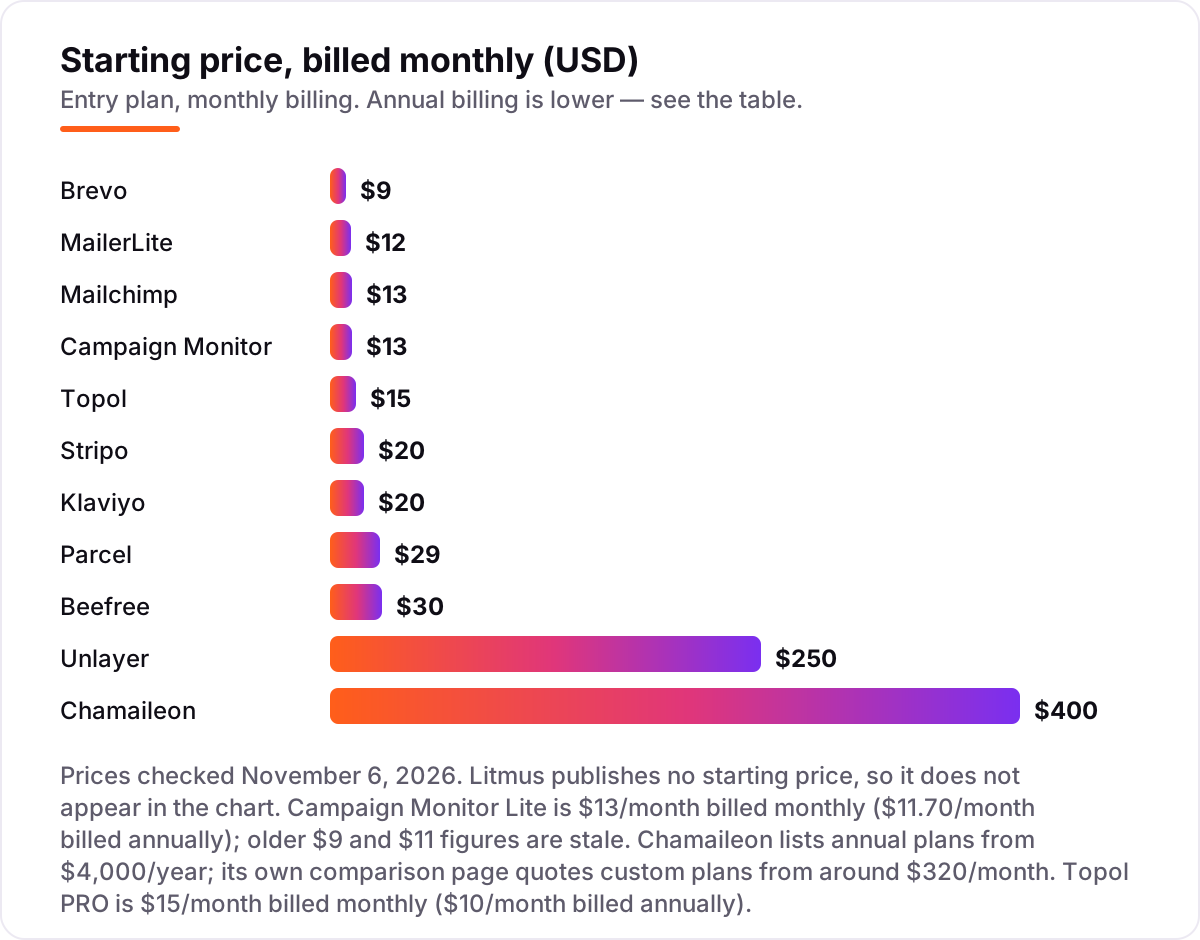
Email design software pricing: what you will actually pay
Take a small business with 2,000 subscribers that sends one newsletter a week — about 8,000 emails a month — and designs four emails a month. On the all-in-one platforms, the monthly list price is $17 on Brevo Starter (the 10,000-email tier, since the $9 tier stores only 500 contacts), $33 on MailerLite Comfort, $39 on Campaign Monitor Lite, $45 on Mailchimp Essentials and $60 on Klaviyo. On the dedicated builders, the design bill is $20 on Stripo Basic or $30 on Beefree Professional, but the sending platform is a second bill on top.
Over a year, that is $204 on Brevo, $240 on Stripo Basic plus whatever the sender costs, $360 on Beefree Professional plus the sender, $396 on MailerLite, $468 on Campaign Monitor, $540 on Mailchimp and $720 on Klaviyo — before any annual discount. The same 2,000 subscribers and the same four emails a month cost $204 a year at the cheap end and $720 at the dear end on the all-in-one tools, a $516 gap that comes entirely from how each tool counts your list.
Two costs sit outside every number above. First, the caps that force an upgrade: Brevo's contact cap, Campaign Monitor's 5-times-contacts send cap and Mailchimp's contact bands all move you to a higher tier as the list grows, so price the list you will have in a year, not the list you have today. Second, the add-ons: removing the Brevo logo costs $12 a month on Starter, and Litmus-style preview packs cost from $49 per 500 previews on Parcel. If you send from a platform rather than a builder, compare the full stack in our guide to email automation tools.
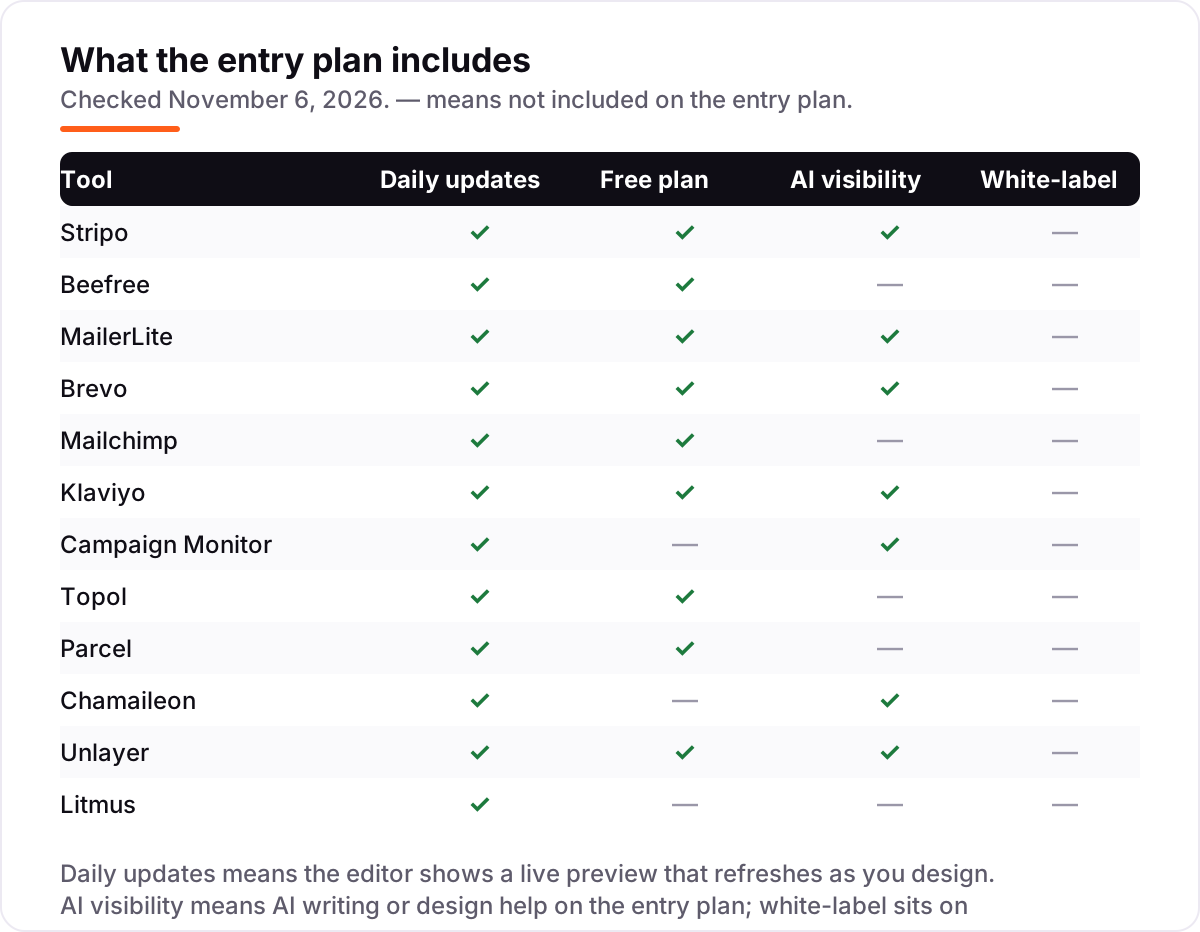
Know the difference: dedicated builders vs design-and-send platforms
The confusion in this category is between a tool that only designs and a platform that designs and sends. A dedicated builder — Stripo, Beefree, Topol, Parcel — makes the template and hands you the HTML. It does not hold your list, send the campaign or report opens and clicks. A design-and-send platform — MailerLite, Brevo, Mailchimp, Klaviyo, Campaign Monitor — does all of that in one account, so the design never leaves the place that sends it.
There is a third kind of tool that buyers mix up with both: testing tools like Litmus, which do not design or send at all. Litmus previews a finished email across more than 100 clients and devices and checks links, images, accessibility and spam risk before sending. It sits after the builder and before the send, and it is the only tool in this list that exists purely to catch mistakes.
The practical rule is simple. If you already have a sending platform you like, buy a dedicated builder and export into it. If you have no sender yet, buy a design-and-send platform and skip the second bill. And if broken emails already cost you sales, add a testing tool on top — but only after the design and the sending are settled, not before.
Quick comparison: tool type by need
| Buyer | Best pick | Why |
|---|---|---|
| Solo marketer on a budget | Brevo | Design and send from $9/month, priced by emails sent, not contacts stored |
| Best dedicated designer | Stripo | Focused visual editor that exports anywhere, from $20/month |
| Easiest editor | Beefree | More than 2,000 templates and the gentlest learning curve, from $30/month |
| Small business, design and send | MailerLite | One cheap account for design, sending and automation, from $12/month |
| Online store | Klaviyo | Store data drives the design, from $20/month for 500 profiles |
| Enterprise design system | Chamaileon | Governed, on-brand templates with approvals, from $400/month |
Mistakes to avoid
- Buying on the headline price and ignoring the meter. Stripo charges by exports, Brevo by emails sent and Mailchimp by contacts stored. The meter that runs out first is your real price, so price the usage you will have in a year.
- Designing in a tool that cannot export to your sender. A beautiful template you cannot get out of the builder is worthless. Export one real template into your sending platform before you pay for a year.
- Paying for a dedicated builder when you have no sender. Stripo, Beefree, Topol and Parcel do not send email. If you buy one without a sending platform, you have bought half a workflow.
- Trusting the preview in the editor. Every builder shows a clean preview; the real test is Gmail and Outlook on desktop and phone. Send a test to both before every campaign, and use a testing tool when the stakes are high.
- Ignoring the free-plan caps. Free plans here cap exports, designs, subscribers or sends. A plan that fits this month can stop working the month your list grows past 250 subscribers or your fourth export.
How we chose
We checked each vendor's own pricing page on November 6, 2026 and recorded the starting price exactly as shown, including the annual-billing figure where the page lists one, and we ranked the tools by fit for the most common buyer — a marketer or small business that wants good-looking emails without hiring a developer — not by brand size. Three prices need a note: Litmus publishes no starting price, so we list it as a custom quote and do not repeat the last widely reported $500-a-month Core figure as a live price; Campaign Monitor's Lite price comes from its calculator page, where October 2026 reads put it at $13 a month billed monthly and $11.70 billed annually, with older $9 and $11 figures now stale; and Chamaileon lists annual plans from $4,000 a year while its own comparison page quotes custom plans from around $320 a month. Ratings are shown for eight tools from G2 pages, using recent search-index copies of the exact G2 pages. Four tools carry no rating: Topol, Chamaileon and Litmus because the freshest G2 copies we could verify were 9, 11 and 160-plus days old, and Parcel because we found no G2 listing for the email code editor — we would rather show no rating than a stale or mismatched one. No vendor paid for a place in this list, and none of the links here are affiliate links.
What to do next
Start with the free plan or trial of your top pick and design one real newsletter in it — your logo, your copy, your list — then send a test to Gmail and Outlook and check it on a phone before you commit to a year. If the emails look right but new customers are not finding you, our monthly SEO service handles the visibility side — or compare the sending side in our guide to email marketing software for small business. Once your tools are in place, find out what's holding your rankings back.
Your stack only works if people find you
SerpAstra fixes what keeps your site off page one and makes it easy for AI assistants to recommend.
Get a free audit→Sources we checked (20)
- Stripo pricing — stripo.email/pricing (checked November 6, 2026)
- Beefree pricing — beefree.io/pricing (checked November 6, 2026)
- MailerLite pricing — mailerlite.com/pricing (checked November 6, 2026)
- Brevo pricing — brevo.com/pricing (checked November 6, 2026)
- Mailchimp pricing — mailchimp.com/pricing/marketing (checked November 6, 2026)
- Klaviyo pricing — klaviyo.com/pricing (checked November 6, 2026)
- Campaign Monitor pricing — campaignmonitor.com/pricing (checked November 6, 2026)
- Topol pricing — topol.io/pricing (checked November 6, 2026)
- Parcel pricing — parcel.io/pricing (checked November 6, 2026)
- Chamaileon pricing — chamaileon.io/pricing (checked November 6, 2026)
- Unlayer pricing — unlayer.com/pricing (checked November 6, 2026)
- Litmus pricing — litmus.com/pricing (checked November 6, 2026)
- Stripo on G2 — g2.com/products/stripo-email/reviews (checked November 6, 2026)
- Beefree (RGE Studio) on G2 — g2.com/products/beefree-beefree/reviews (checked November 6, 2026)
- MailerLite on G2 — g2.com/products/mailerlite/reviews (checked November 6, 2026)
- Brevo on G2 — g2.com/products/brevo-brevo/reviews (checked November 6, 2026)
- Mailchimp on G2 — g2.com/products/intuit-mailchimp-email-marketing/reviews (checked November 6, 2026)
- Klaviyo on G2 — g2.com/products/klaviyo/reviews (checked November 6, 2026)
- Campaign Monitor on G2 — g2.com/products/campaign-monitor-by-marigold/reviews (checked November 6, 2026)
- Unlayer on G2 — g2.com/products/unlayer/reviews (checked November 6, 2026)
Shamim
Founder of SerpAstra
A full-stack SEO and digital marketer who spends most days on Local SEO for dental practices, AI search visibility and lead generation.
Frequently asked questions
What is the best email design software?
Stripo is the best dedicated email designer at $20/month, because it focuses on design and exports to more than 90 platforms. MailerLite is the best all-rounder at $12/month when you also want to send from the same account. Beefree is the easiest editor at $30/month for teams that value templates and a gentle learning curve.
How much does email design software cost?
Design-and-send tools start at $9–$20 a month: Brevo $9, MailerLite $12, Mailchimp and Campaign Monitor $13, Klaviyo $20. Dedicated builders start at $15–$30 a month: Topol $15, Stripo $20, Beefree $30. Enterprise design systems start far higher, and Litmus is a custom quote.
Is there free email design software?
Yes. Stripo, Beefree, MailerLite, Brevo, Klaviyo, Topol, Parcel and Unlayer all have free plans, though most cap exports, designs or subscribers. Campaign Monitor has no free plan, only a trial and a 5-subscriber sandbox, and Chamaileon and Litmus are quote-only with no free tier.
What is the difference between an email builder and an email marketing platform?
An email builder only designs templates: Stripo, Beefree, Topol and Parcel make the HTML, and you send it from another platform. An email marketing platform designs and sends: MailerLite, Brevo, Mailchimp, Klaviyo and Campaign Monitor hold your list, send the campaign and report the results.
Can I design in one tool and send from another?
Yes, if the builder exports clean HTML. Stripo exports to more than 90 platforms, Beefree and Topol export to the major ones, and Parcel exports code that works anywhere. Export a test template first and check it renders correctly in your sending platform before you pay for a year.
Do I need Litmus or another testing tool?
Most small senders do not. Your platform's own preview plus a test send to Gmail and Outlook catches the common problems. Litmus earns its price when broken emails cost you revenue: it previews across more than 100 clients and devices and checks links, images, accessibility and spam risk before sending.
Can I switch email design tools later?
Yes, and it is easier than switching sending platforms. Export your templates as HTML from the old tool and import them into the new one, then test each template in the clients your audience uses most. Keep the old account open until every template is rebuilt, because exports do not always carry every setting across.
Free SEO and AI visibility audit
Find out what is holding your rankings back
Send us your site. Within 2 business days you get a written audit, an AI visibility check and a short fix list ranked by impact. Free, with no contract attached.
Request my free audit→Related guides
 Digital Marketing & Ads8 Best Email Marketing Platforms for 2026 (Pros, Cons and Pricing)8 best email marketing platforms compared on real starting prices, free plans and automation. Brevo $9/month, Mailchimp $13. Checked Nov 4, 2026.Read guide →
 Digital Marketing & Ads10 Best Email Automation Tools in 2026 (Free and Paid, Compared)Compare the 10 best email automation tools on price, free plans and automation depth, with every starting price checked on November 5, 2026.Read guide →
 Digital Marketing & Ads11 Best Email Marketing Software for Small Business in 2026, ComparedThe 11 best email marketing software for small business, compared on real 2026 prices, free plans and automation — Brevo starts at $9/month.Read guide →