
Best Email Security Software for 2026: 11 Options Compared by Use Case
Compare the 11 best email security software options for 2026 on price, phishing defense and BEC protection, with every price checked November 6, 2026.
 Shamim Mia, Founder, SerpAstraLast verified November 6, 202614 min read
We compare pricing pages, documentation and public reviews. We never accept payment for rankings.
Key takeaways
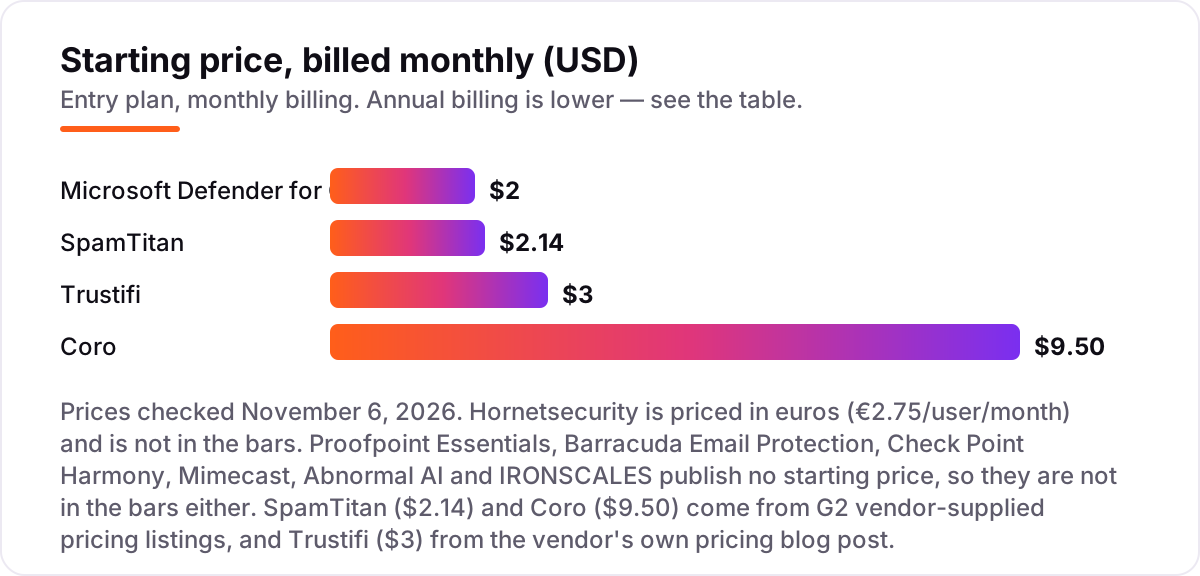
- Microsoft Defender for Office 365 Plan 1 is the cheapest real upgrade at $2 per user per month; SpamTitan follows at $2.14 and Trustifi lists a $3 flat rate.
- Six of the 11 tools publish no starting price at all — Proofpoint Essentials, Barracuda, Check Point Harmony, Mimecast, Abnormal AI and IRONSCALES are all quote-only, so shortlist three and compare trials.
- The single most important buying factor is deployment: a gateway reroutes your mail, while an API tool plugs into Microsoft 365 or Google Workspace without touching mail flow.
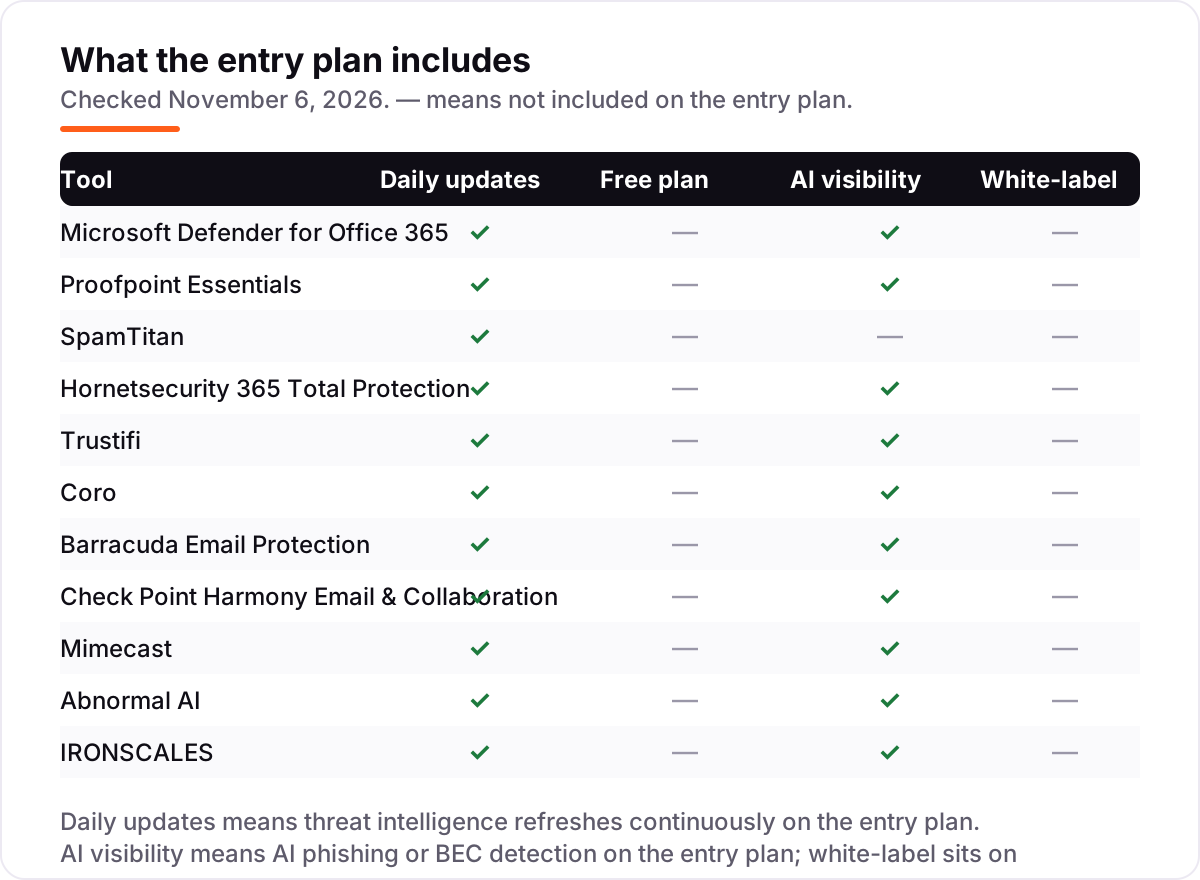
- Phishing simulation and user training matter as much as filtering — Coro and IRONSCALES bundle them, while the pure gateways do not.
On this page
Quick comparison
| Tool | Best for | Starting price | Free plan |
|---|---|---|---|
| Microsoft Defender for Office 365 | Microsoft 365 teams that want phishing and malware defense added to the mailboxes they already pay for | $2/user/mo | No (trial available) |
| Proofpoint Essentials | Small businesses that want enterprise-grade phishing and BEC defense without running it themselves | Custom quote | No (trial available) |
| SpamTitan | Budget-conscious small businesses that want a traditional gateway with strong attachment sandboxing | $2.14/user/mo | No (14-day trial) |
| Hornetsecurity 365 Total Protection | Microsoft 365 teams that want email security, backup and compliance in one package | €2.75/user/mo | No (30-day trial) |
| Trustifi | Small teams that need encryption and DLP cheaply, with one-click secure sending | $3/mo (flat rate) | No (trial available) |
| Coro | Non-technical small teams that want email, endpoint and cloud-app security on one bill | $9.50/user/mo | No (trial available) |
| Barracuda Email Protection | Mid-sized teams that want phishing defense plus encryption, DLP and mailbox backup from one vendor | Custom quote | No (30-day trial) |
| Check Point Harmony Email & Collaboration | Cloud-first teams that want API protection across email, Teams, SharePoint and OneDrive | Custom quote | No (trial available) |
| Mimecast | Enterprises where email downtime is a business outage and archiving is a compliance duty | Custom quote | No (demo only) |
| Abnormal AI | Larger teams fighting BEC and account takeover, where behavior matters more than signatures | Custom quote | No (demo only) |
| IRONSCALES | Teams that want phishing simulation and automated remediation alongside filtering | Custom quote | No (trial available) |
Make one of these tools?
We re-check this list every quarter. Send a correction, request a review, or ask about a clearly labeled sponsored spot.
Request a listingThe best email security software

Microsoft Defender for Office 365
Best for: Microsoft 365 teams that want phishing and malware defense added to the mailboxes they already pay for
Microsoft Defender for Office 365 is the cheapest real upgrade in this list because most buyers already own the mailboxes it protects. Plan 1 costs $2 per user per month when billed annually and adds Safe Links, Safe Attachments and anti-phishing policies on top of the Exchange Online Protection every Microsoft 365 subscription already includes. It is also bundled into Business Premium and E3, so many teams only need to turn it on.
Plan 2 costs $5 per user per month and adds automated investigation and response, Threat Explorer and attack simulation training. The catch is scope: it only protects Microsoft 365 mail, SharePoint, OneDrive and Teams, so a Google Workspace shop gets nothing from it, and the admin console takes real effort to tune. Buy it when your mail lives in Microsoft 365; look elsewhere when it does not.
What we like
- Cheapest real upgrade here at $2/user/month, and already bundled into Business Premium, E3 and E5
- Safe Links and Safe Attachments check URLs and files at click time, not just at delivery
- Zero-hour auto purge pulls malicious mail out of inboxes after it lands
- No MX record changes and no new vendor to manage for Microsoft 365 teams
Watch out for
- Only protects Microsoft 365 mail, SharePoint, OneDrive and Teams, so Google Workspace shops get nothing
- Plan 1 lacks automated investigation and attack simulation training, which need Plan 2 at $5/user/month
- The admin console is dense, and tuning policies takes more effort than a dedicated gateway

Proofpoint Essentials
Best for: Small businesses that want enterprise-grade phishing and BEC defense without running it themselves
Proofpoint Essentials exists for the same reason Proofpoint sells to large enterprises: phishing is a volume business, and the same threat intelligence protects a 40-person law firm as well as it protects a bank. Essentials packages URL Defense, attachment sandboxing and BEC controls into an admin console that does not require a security engineer to operate, and email continuity keeps staff working through a mail outage.
The friction is pricing. There is no public per-user price: Essentials is sold through partners and resellers, so the quote is the price, and reseller lists put the Business plan near $4 per user per month. Ask your reseller for the exact tier, confirm the long-term place of Essentials next to 365 Total Protection, and trial it before signing an annual contract.
What we like
- URL Defense checks links at click time, catching pages that turn malicious after delivery
- Attachment sandboxing and BEC controls come from the same threat intel that protects large enterprises
- Email continuity keeps staff sending and receiving during a mail outage
- Simple admin console that does not need a security engineer to run
Watch out for
- No published per-user price, so the final figure comes from a reseller quote, not a price page
- Proofpoint is steering small-business buyers toward 365 Total Protection, so confirm where Essentials fits long term
- Link rewriting and interstitial warning pages can annoy users

SpamTitan
Best for: Budget-conscious small businesses that want a traditional gateway with strong attachment sandboxing
SpamTitan is a traditional secure email gateway: mail routes through its filters first, which strip spam, phishing and malware before anything reaches the inbox. For a small business that just wants cleaner inboxes without an enterprise bill, that formula still works, and the attachment sandboxing is Bitdefender-powered, with dedicated CEO impersonation protection aimed at the exact attack that empties small business bank accounts.
Setup is genuinely fast, and it can run in the cloud or on your own hardware if data must stay local. What you give up is depth in the admin console: reporting and forensic detail lag behind Proofpoint and Mimecast, so if an auditor wants per-message verdict histories, verify that before buying. Count your alias addresses too, since they can count as separate users in licensing.
What we like
- One of the cheapest gateways here, with a published starting price instead of a quote
- Bitdefender-powered attachment sandboxing plus dedicated CEO impersonation protection
- Runs in the cloud or on your own hardware if data must stay local
- Fast cloud setup with no long onboarding project
Watch out for
- Reporting and forensic detail lag behind Proofpoint and Mimecast
- Alias addresses can count as separate users in licensing, so check how your addresses map to seats
- The $2.14 figure comes from a G2 vendor-supplied listing, not the vendor's own pricing page

Hornetsecurity 365 Total Protection
Best for: Microsoft 365 teams that want email security, backup and compliance in one package
Hornetsecurity 365 Total Protection is the only bundle in this list: email security, backup and compliance in one package for Microsoft 365. The Business plan starts at €2.75 per user per month and covers spam and malware protection, ATP, encryption, archiving and email continuity, while the Enterprise tiers add backup and awareness training up to €7.70 per user per month.
The bundle logic is the appeal. A team worried about both incoming attacks and outgoing data leaks can cover both without a second vendor, and the backup piece matters: losing a mailbox to ransomware with no backup is a different disaster from a missed phish. The limits are platform and currency: Microsoft 365 only, priced in euros, with an interface reviewers call complex.
What we like
- Security, backup and compliance in one package, so one vendor covers both attack and recovery
- Business plan starts at €2.75/user/month, the cheapest published bundle price here
- Multi-layered malware protection with sandboxing, encryption and DLP in higher tiers
- Built for Microsoft 365, so setup follows the tenant instead of rerouting mail through a gateway
Watch out for
- Microsoft 365 only, with no support for Google Workspace or other mail platforms
- Reviewers call the interface complex and hard to navigate in places
- Priced in euros, so US buyers pay a converted amount that moves with the exchange rate

Trustifi
Best for: Small teams that need encryption and DLP cheaply, with one-click secure sending
Trustifi takes an encryption-first angle. End-to-end encryption, one-click secure sending and DLP keep sensitive messages locked down, and the advanced security package lists at a flat $3 a month, with email archiving available for another $1 per user per month. It plugs into Outlook, Gmail and Microsoft 365, so there is no mail rerouting to arrange.
The trade-off is proof. At 23 G2 reviews it has the smallest review base in this list, so the 4.8 rating is less tested than the big names, and directory listings disagree with the vendor on price: Capterra shows a $6 flat rate where the vendor's own blog lists $3. Confirm the figure at quote time, and trial the encryption flow with the people who will actually send secure mail.
What we like
- Encryption-first design with end-to-end encryption and one-click secure sending
- Flat $3/month rate for the advanced security package, with volume discounts available
- DLP and secure file sharing included instead of sold as add-ons
- Plugs into Outlook, Gmail and Microsoft 365 without rerouting mail
Watch out for
- Smallest review base here at 23 G2 reviews, so the rating is less tested than the big names
- Directory listings show a $6 flat rate, against the vendor's own $3 figure, so confirm at quote time
- Email archiving costs an extra $1/user/month on top of the security package

Coro
Best for: Non-technical small teams that want email, endpoint and cloud-app security on one bill
Coro is not really an email security product. It is a whole security department sold as software, and email protection is one module inside it. That positioning is exactly why small businesses buy it: instead of a gateway vendor, an endpoint vendor and a backup vendor, you get one console, one agent and one invoice, with the Essentials Suite starting at $9.50 per user per month.
The email module handles phishing and malware detection for Microsoft 365 and Google Workspace, with automatic remediation that pulls malicious messages out of inboxes and phishing simulation that addresses the human side no filter fully solves. The honest trade-off is control: if you want deeply configurable mail-flow rules, a dedicated gateway still gives you more knobs than Coro does.
What we like
- One bill covers email, endpoint and cloud apps, with one console and one agent
- Automatic remediation pulls malicious messages out of inboxes without admin clicks
- Phishing simulation and security awareness training are bundled, not extra
- Highest-rated setup experience here, built for lean IT teams with no security staff
Watch out for
- The vendor's own pricing page now lists packages by quote only, so $9.50 comes from a G2 vendor-supplied listing
- Less granular mail-flow control than a dedicated gateway, and email cannot be bought alone cheaply
- The Complete Suite and managed options are priced on request, not published

Barracuda Email Protection
Best for: Mid-sized teams that want phishing defense plus encryption, DLP and mailbox backup from one vendor
Barracuda has been filtering email since before cloud email existed, and Email Protection is the modern packaging of that experience. The platform layers AI-based phishing detection, impersonation defense and account takeover monitoring on top of traditional spam and malware filtering, and the three tiers — Advance, Premium and Premium Plus — let a team buy the depth it needs.
What separates Barracuda from single-purpose gateways is the bundle. Email encryption, data loss prevention and cloud-to-cloud backup sit in the same family, so a team worried about both incoming attacks and outgoing data leaks can cover both without a second vendor. Only a quote tells you where your requirements land, so negotiate the tier on the features you will actually use.
What we like
- AI-based phishing and impersonation defense layered over traditional spam and malware filtering
- Email encryption and DLP sit in the same family as the filtering, not a second product
- Cloud-to-cloud backup covers the mailbox itself, not just the messages coming in
- Three tiers let a team buy the depth it needs instead of one fixed bundle
Watch out for
- No published per-user price, so the tier you land in only emerges from a quote
- Account takeover monitoring needs a higher tier, not the entry plan
- Legitimate mail is occasionally flagged, so someone has to watch the quarantine

Check Point Harmony Email & Collaboration
Best for: Cloud-first teams that want API protection across email, Teams, SharePoint and OneDrive
Check Point took a different architectural bet from the gateway vendors. Harmony Email & Collaboration connects to Microsoft 365 or Google Workspace through APIs, scans messages after delivery, and pulls threats from inboxes automatically. You never touch MX records or reroute mail, which means deployment is closer to an afternoon than a project.
That same API approach extends the coverage beyond email. Malicious files and links in Teams chats, SharePoint libraries and OneDrive folders get the same treatment, which closes a gap that gateway-only tools leave open. Licensing is where buyers get confused: Check Point sells through its Infinity platform with multiple packages, so start with the trial in monitor-only mode and see what it would catch before you commit.
What we like
- API connection means no MX record changes and no mail rerouting, so deployment takes an afternoon
- Scans Teams chats, SharePoint libraries and OneDrive files, not just email
- ThreatCloud intelligence updates detection continuously instead of waiting for signature updates
- Post-delivery remediation pulls threats from inboxes automatically
Watch out for
- Infinity platform licensing is complex, and DLP and collaboration features sit in higher tiers
- No on-premises deployment option and limited integrations beyond Microsoft 365 and Google Workspace
- Can feel steep for smaller teams once the full platform is priced out

Mimecast
Best for: Enterprises where email downtime is a business outage and archiving is a compliance duty
Mimecast is the choice when email is genuinely business critical. If your mail server goes down, Mimecast keeps users sending and receiving through its own infrastructure, then replays everything back when service returns. That continuity story, combined with phishing and malware protection, is why it has stayed an enterprise favorite for years.
On the security side, Mimecast watches URLs at time of click and detonates attachments in a sandbox before delivery, while impersonation protection flags lookalike domains aimed at executives and finance staff. The catch is packaging: Mimecast sells in bundles with different feature sets, and smaller teams often find the onboarding project longer than expected, since policies and archive retention need designing upfront.
What we like
- Email continuity keeps staff sending and receiving when the mail server goes down
- Time-of-click URL checks and attachment sandboxing cover phishing and malware together
- Impersonation protection flags lookalike domains and display-name spoofing aimed at executives
- Policy-based encryption and archiving cover retention duties in the same platform
Watch out for
- Quote-only bundles with different feature sets, so the right tier needs a sales conversation
- Onboarding runs longer than the API tools, since policies, journaling and archive retention need design upfront
- Smaller teams often pay for continuity and archiving depth they never use

Abnormal AI
Best for: Larger teams fighting BEC and account takeover, where behavior matters more than signatures
Abnormal AI built its reputation on a simple observation: signature-based filters miss attacks they have never seen, but the behavior of a compromised account looks different from a legitimate one. Its platform learns how each user, vendor and executive normally communicates, then flags anomalies such as a supplier suddenly asking for a wire transfer.
Because it works through APIs rather than as a gateway, there is no mail rerouting and very little policy tuning, and threats that land in inboxes get remediated automatically. The price of that simplicity is opacity: pricing is quote-only with no published starting point, and occasional false positives still need an analyst to review. Buy it for BEC and account takeover, not as a general-purpose gateway.
What we like
- Behavioral AI learns how each user, vendor and executive normally writes, then flags anomalies
- API-based deployment with no mail rerouting and very little policy tuning
- Strongest BEC and account takeover focus in this list, built for attacks signatures miss
- Highest ease-of-setup scores among the enterprise tools here
Watch out for
- Quote-only enterprise pricing, with no published starting point to budget against
- Occasional false positives still need an analyst to review and release
- No gateway controls, so teams that want mail-flow rules need a second tool

IRONSCALES
Best for: Teams that want phishing simulation and automated remediation alongside filtering
IRONSCALES pairs filtering with the human side of phishing. Alongside AI detection it runs phishing simulation and awareness training, and its one-click report button turns every employee into a sensor: when one person reports a phish, automated remediation removes the same message from every inbox at once, instead of leaving each copy for an admin to chase.
Setup is API-based, so it plugs into Microsoft 365 and Google Workspace without mail-flow changes, and reviewers praise the ease of use and the support team. The gaps to check are DLP and encryption, which are not native here, and price: everything is quote-only, so the bill only emerges from a sales conversation. Trial it with a real phishing simulation before you sign.
What we like
- Phishing simulation and awareness training come with the filtering, not as a separate product
- One-click report button turns every employee into a sensor for the security team
- Automated remediation removes confirmed threats from every inbox at once
- API-based setup that plugs into Microsoft 365 and Google Workspace quickly
Watch out for
- Quote-only pricing, so the bill only emerges from a sales conversation
- No native DLP or encryption features, which the main alternatives include
- Advanced automation and training features push the price up from the entry tier
The best email security software stops the messages your built-in filters miss: the fake invoice from your CEO, the vendor asking for new bank details, the QR code that leads to a login page that steals passwords. We ranked the 11 tools below by fit for the most common buyer — a small or mid-sized team running Microsoft 365 — starting with the cheapest native upgrade and ending with the enterprise API tools, and every price was checked on November 6, 2026.
How to choose the best email security software
- Start with your mail platform. Microsoft Defender for Office 365 and Hornetsecurity only protect Microsoft 365, while Check Point Harmony, Abnormal AI and IRONSCALES cover Microsoft 365 and Google Workspace. A tool that does not run on your mail host is not a shortlist candidate.
- Pick gateway or API first. A gateway reroutes mail through the vendor before delivery; an API tool scans after delivery and pulls threats from inboxes. Gateways give more mail-flow control, API tools deploy in an afternoon and cover Teams, SharePoint and OneDrive too.
- Decide what BEC protection means to you. Every tool here blocks spam and malware. Business email compromise is the differentiator: look for impersonation defense, lookalike-domain checks and behavioral detection, not just a spam score.
- Trial in monitor mode. Run any shortlisted tool for a week without blocking, and count what it would have caught that your current filters missed. That number, not the sales deck, decides the purchase.
- Count the seats honestly. Alias addresses and shared mailboxes can count as licensed users on some tools, so map your real address list to the seat count before you compare per-user prices.
- Ask what the quote includes. Continuity, archiving, backup, DLP and training are separate tiers on several tools here. A quote that leaves them out is not comparable with one that includes them.
Email security is one system in your stack, not the whole stack. If the business also needs to be found online, our monthly SEO service handles the visibility side, and the free SERP snippet preview tool shows exactly how your pages will look in Google before you publish them.
Whatever you shortlist, trial it with real mail before you pay. The free trials in this list are long enough to run one genuine week — your invoices, your vendors, your executives — and that week tells you more than any review can. Check two things in the trial: that legitimate mail is not quarantined, and that your IT contact can release a blocked message without calling support. Every tool here offers a trial or a demo, so there is no reason to buy before the tool has seen your real inbox.
Email security software pricing: what you will actually pay
Take a 50-person team on Microsoft 365. On list prices, the subscription costs $100 a month on Microsoft Defender for Office 365 Plan 1, $107 on SpamTitan, $250 on Defender Plan 2 and $475 on Coro Essentials. Hornetsecurity Business costs €137.50 a month for the same 50 seats. Trustifi lists a $3 flat rate for its advanced security package, so confirm whether that rate is per user or per organization before you model it.
Over a year, that is $1,200 on Defender Plan 1, $1,284 on SpamTitan, $3,000 on Defender Plan 2, €1,650 on Hornetsecurity Business and $5,700 on Coro Essentials. The same 50 people cost $1,200 a year at the cheap end and $5,700 at the dear end — but the comparison is not like-for-like, since Coro also covers endpoints and cloud apps while Defender covers email only. The six quote-only tools have no number in this math at all: Proofpoint Essentials, Barracuda, Check Point Harmony, Mimecast, Abnormal AI and IRONSCALES only price by quote, so get three written quotes and compare them on the same tier.
Two costs sit outside every number above. First, the seat count: alias addresses and shared mailboxes can count as licensed users, so a 50-person team with 20 aliases may pay for 70 seats. Second, the add-ons: archiving, backup, DLP and training sit in higher tiers on several tools, and email archiving alone adds $1 per user per month on Trustifi. If deliverability is part of the problem rather than just inbound threats, see our guide to the best email deliverability services.
Know the difference: a gateway vs an API layer
The confusion in this category is between two architectures that do the same job in different places. A gateway sits in front of your mail: you point your MX records at the vendor, mail routes through its filters, and clean mail is passed on to your inbox. SpamTitan, Proofpoint Essentials, Mimecast and Barracuda work this way. An API layer sits behind your mail: it connects to Microsoft 365 or Google Workspace, scans messages after delivery, and pulls threats out of inboxes. Check Point Harmony, Abnormal AI and IRONSCALES work this way, and Microsoft Defender is built into the platform itself.
Neither architecture is better in general. Gateways give you mail-flow rules, pre-delivery blocking and a quarantine you control, but they add a hop to every message and a cutover to manage. API tools deploy in an afternoon with no MX change, and they also see Teams chats, SharePoint libraries and OneDrive files that a gateway never touches — but they let the message land first and clean up after it. The right question is not which architecture is better, but which one your team can actually operate: a gateway nobody tunes is worse than an API tool that runs itself.
There is a second, quieter confusion: the built-in filter is not the same as a security product. Exchange Online Protection and Gmail's filters catch obvious spam, but business email compromise, QR code phishing and vendor impersonation routinely sail past them. That gap is what every tool in this list is sold to close.
Quick comparison: tool type by need
| Buyer | Best pick | Why |
|---|---|---|
| Small team on Microsoft 365, tight budget | Microsoft Defender for Office 365 | $2/user/month, native, no new vendor to manage |
| Small business wanting enterprise-grade filtering | Proofpoint Essentials | BEC and URL defense from the enterprise threat intel, partner-sold |
| Budget gateway on any mail host | SpamTitan | $2.14/user/month, Bitdefender sandbox, cloud or on-premises |
| Microsoft 365 team wanting security plus backup | Hornetsecurity 365 Total Protection | €2.75/user/month, backup and compliance in the same package |
| Small team needing encryption and DLP cheaply | Trustifi | $3/month flat rate, encryption-first with one-click secure sending |
| Non-technical team wanting one security bill | Coro | $9.50/user/month covers email, endpoint and cloud apps together |
| Regulated firm needing archiving and continuity | Mimecast | Continuity plus archiving in one enterprise platform |
Mistakes to avoid
- Buying on the quote without a trial in monitor mode. Quote-only tools are usually annual contracts. A week in monitor mode shows what the tool would have caught, and that number is the only honest basis for the price.
- Forgetting the aliases. A 50-person team with 20 alias addresses can pay for 70 seats on tools that license by address. Map your real address list before you compare per-user prices.
- Assuming the entry tier includes BEC defense. Account takeover monitoring needs a higher tier on Barracuda, and BEC detection is a Plus variant on Proofpoint Essentials. Read the tier, not the brand.
- Treating the filter as the whole defense. Pure gateways do not train your staff. If nobody teaches employees to spot a fake invoice, the filter is the only line of defense — Coro and IRONSCALES bundle simulation and training for exactly this reason.
- Comparing a quote with a list price. A $9.50 list price and a quote-only enterprise bundle are not the same kind of number. Get three written quotes on the same tier, with the same add-ons, before you call anything expensive.
How we chose
We checked each vendor's own pricing page on November 6, 2026 and recorded the starting price exactly as shown. Six tools publish no starting price — Proofpoint Essentials, Barracuda Email Protection, Check Point Harmony, Mimecast, Abnormal AI and IRONSCALES — so they are listed as custom quote. Coro's own pricing page now lists its packages by quote only, so its $9.50 figure comes from G2's vendor-supplied pricing listing, as does SpamTitan's $2.14; Trustifi's $3 comes from the vendor's own pricing blog post, while directory listings show $6, so we used the vendor's figure and say so here. Hornetsecurity's €2.75 comes from G2's vendor-supplied listing. Ratings are G2 scores from pages crawled in the last few days and recorded November 6, 2026. We ranked the tools by fit for the most common buyer — a small or mid-sized team on Microsoft 365 — not by brand size. No vendor paid for a place in this list, and none of the links here are affiliate links.
What to do next
Start with the free trial of your top pick and run one real week of mail through it in monitor mode. Check that legitimate mail is not quarantined and that a blocked message can be released without calling support before you commit to a year. If the inbox is sorted but new customers are not finding you, our monthly SEO service handles the visibility side — or compare outreach options in our guide to the best email automation tools. Once your tools are in place, find out what's holding your rankings back.
Your stack only works if people find you
SerpAstra fixes what keeps your site off page one and makes it easy for AI assistants to recommend.
Get a free audit→Sources we checked (22)
- Microsoft Defender for Office 365 pricing — microsoft.com (checked November 6, 2026)
- Proofpoint Essentials — proofpoint.com (checked November 6, 2026)
- SpamTitan pricing — spamtitan.com/pricing (checked November 6, 2026)
- Hornetsecurity 365 Total Protection — hornetsecurity.com (checked November 6, 2026)
- Trustifi pricing — trustifi.com blog (checked November 6, 2026)
- Coro pricing — coro.net/pricing (checked November 6, 2026)
- Barracuda Email Protection — barracuda.com (checked November 6, 2026)
- Check Point Harmony Email & Collaboration — checkpoint.com (checked November 6, 2026)
- Mimecast — mimecast.com (checked November 6, 2026)
- Abnormal AI — abnormal.ai (checked November 6, 2026)
- IRONSCALES — ironscales.com (checked November 6, 2026)
- Microsoft Defender for Office 365 reviews — G2 (checked November 6, 2026)
- Proofpoint Essentials reviews — G2 (checked November 6, 2026)
- SpamTitan reviews — G2 (checked November 6, 2026)
- Hornetsecurity 365 Total Protection reviews — G2 (checked November 6, 2026)
- Trustifi reviews — G2 (checked November 6, 2026)
- Coro reviews — G2 (checked November 6, 2026)
- Barracuda Email Protection reviews — G2 (checked November 6, 2026)
- Check Point Harmony Email & Collaboration reviews — G2 (checked November 6, 2026)
- Mimecast reviews — G2 (checked November 6, 2026)
- Abnormal AI reviews — G2 (checked November 6, 2026)
- IRONSCALES reviews — G2 (checked November 6, 2026)
Shamim
Founder of SerpAstra
A full-stack SEO and digital marketer who spends most days on Local SEO for dental practices, AI search visibility and lead generation.
Frequently asked questions
What is the best email security software?
For most Microsoft 365 teams, Microsoft Defender for Office 365 Plan 1 at $2 per user per month is the best starting point, since it is native and cheap. Proofpoint Essentials is the better pick when you want enterprise-grade BEC defense without running it yourself, and Coro suits non-technical teams that want email plus endpoint security on one bill.
How much does email security software cost?
Published starting prices run from $2 to $9.50 per user per month: Defender Plan 1 at $2, SpamTitan at $2.14, Trustifi at a $3 flat rate, Hornetsecurity at €2.75 and Coro at $9.50. Six of the 11 tools publish no price at all and sell by quote, so budget those only after a trial and a written quote.
Is there a free email security tool?
No tool in this list has a free plan, and only the built-in filters that come with Microsoft 365 and Google Workspace are free. Most tools here offer a free trial instead, typically 14 to 30 days. Use the trial in monitor-only mode first: it shows what the tool would have caught before you pay anything.
What is the difference between a gateway and API email security?
A gateway reroutes your mail through the vendor's filters before delivery, which needs an MX record change and a short cutover. An API tool connects to Microsoft 365 or Google Workspace, scans messages after delivery and pulls threats from inboxes. Gateways give more mail-flow control; API tools deploy faster and also cover Teams, SharePoint and OneDrive.
Do I still need Microsoft Defender if I buy another email security tool?
Usually yes. Many teams run Defender as the base layer and add a third-party tool on top for BEC, sandboxing or training, since the tools catch different attacks. Check for overlap before paying twice: Defender Plan 1 already covers Safe Links and Safe Attachments, so a second tool should add something Defender does not, such as behavioral BEC detection.
Can I switch email security tools later?
Yes, and switching is easier than switching most software. A gateway switch means pointing MX records at the new vendor and letting the old quarantine drain, while an API tool switch means revoking one app connection and granting another. Run both tools in monitor mode for a week so the new one proves itself before the old one is removed.
Free SEO and AI visibility audit
Find out what is holding your rankings back
Send us your site. Within 2 business days you get a written audit, an AI visibility check and a short fix list ranked by impact. Free, with no contract attached.
Request my free audit→Related guides
 Digital Marketing & Ads7 Best Email Deliverability Services in 2026Compare the 7 best email deliverability services on real prices, inbox testing, warmup and monitoring, with every price checked November 5, 2026.Read guide →
 Digital Marketing & Ads10 Best Email Automation Tools in 2026 (Free and Paid, Compared)Compare the 10 best email automation tools on price, free plans and automation depth, with every starting price checked on November 5, 2026.Read guide →
 Digital Marketing & Ads11 Best Email Marketing Software for Small Business in 2026, ComparedThe 11 best email marketing software for small business, compared on real 2026 prices, free plans and automation — Brevo starts at $9/month.Read guide →