
8 Best Email Signature Management Software in 2026, Compared
Compare the 8 best email signature management software tools on price, free plans, banner campaigns and compliance, with every price checked November 6, 2026.
 Shamim Mia, Founder, SerpAstraLast verified November 6, 202613 min read
We compare pricing pages, documentation and public reviews. We never accept payment for rankings.

Key takeaways
- Exclaimer is the best fit for most teams at $0.90/user/month (Starter, billed annually, 10-user minimum); CodeTwo follows at $1.22/user/month for Microsoft-only shops, and WiseStamp at $19/month base plus $1 per employee.
- Minimums decide the real bill more than the per-user rate: Opensense has a $500/month floor, Letsignit a $60/month floor, and Exclaimer a 10-user minimum — a 25-person team pays $22.50 a month on Exclaimer Starter and $500 on Opensense.
- The single most important buying factor is platform fit: CodeTwo and Letsignit are Microsoft-only, so Google Workspace teams should shortlist Exclaimer, WiseStamp or Newoldstamp instead.
- Banner campaigns are gated on most entry plans — only Newoldstamp and Letsignit include them at the starting price, while Exclaimer needs Standard and WiseStamp needs Grow.
On this page
Quick comparison
| Tool | Best for | Starting price | Free plan |
|---|---|---|---|
| Exclaimer | Microsoft 365 and Google Workspace teams from 10 users up that need enforced disclaimers and central control | $0.90/user/mo | No (14-day trial) |
| CodeTwo Email Signatures 365 | Microsoft 365 organizations from 10 users that want one plan with every feature included | $1.22/user/mo | No (14-day trial) |
| WiseStamp | Google Workspace and Microsoft 365 SMBs from 10 to 1,000 employees that want per-user costs to fall as they grow | $19/mo base + $1/employee | No (14-day trial) |
| Newoldstamp | Marketing-led SMBs on Google Workspace or Microsoft 365 that want banner campaigns from day one | $1.80/signature/mo | No (7-day trial) |
| MySignature | Freelancers and small teams of 1 to 50 that want the simplest setup and a free plan | $2.40/user/mo | Yes (free plan) |
| Letsignit | Microsoft 365 and Exchange organizations from around 40 users that want campaigns included in the entry plan | $1.50/user/mo | No (free trial) |
| Rocketseed | Microsoft 365 and Google Workspace companies of 50 or more that want design and setup done for them | $1.25/user/mo | No (14-day trial) |
| Opensense | Organizations of 50 to 10,000+ employees doing account-based signature marketing | $1/user/mo | No (trial) |
Make one of these tools?
We re-check this list every quarter. Send a correction, request a review, or ask about a clearly labeled sponsored spot.
Request a listingThe best email signature management software

Exclaimer
Best for: Microsoft 365 and Google Workspace teams from 10 users up that need enforced disclaimers and central control
Exclaimer leads this list because it covers the compliance job best at the lowest entry price. Starter costs $0.90 per user per month on annual billing, with a 10-user minimum, so the smallest monthly bill is $9. One console manages Microsoft 365, Google Workspace and Exchange, signatures are applied on the server so they appear on every device including mobile, and legal disclaimers are enforced centrally.
The trade-off sits in the tiers. Starter permits a single signature template and one promotional banner, so departments that want their own designs, or marketers who want campaign banners, must step up to Standard at $1.45 or Pro at $1.75. Buy Exclaimer when disclaimers and brand consistency cannot be left to chance; buy CodeTwo or WiseStamp when price matters more than the compliance badge.
What we like
- Server-side deployment covers Microsoft 365, Google Workspace and Exchange, including mobile
- Directory sync with legal disclaimers enforced centrally on every email
- Cheapest entry in this list at $0.90/user/month billed annually
- SOC 2 Type II, ISO 27001/27018, HIPAA and GDPR compliance
Watch out for
- Starter allows only one signature template and one promotional banner — campaigns need Standard at $1.45/user/month
- The headline rate is annual billing; the page does not publish a monthly-billing rate
- A 10-user minimum means a 5-person team still pays for 10 seats

CodeTwo Email Signatures 365
Best for: Microsoft 365 organizations from 10 users that want one plan with every feature included
CodeTwo sells one plan with every feature, which makes it the simplest buy for a Microsoft 365 shop: $1.22 per user per month for 10 users on yearly billing, sliding to $0.73 at 500 users, and $1.36 a month if you pay monthly. Rule-based signatures, legal disclaimers, autoresponder messages and one-click satisfaction surveys are all included, and signatures apply server-side or through the Outlook add-in.
The boundary is absolute: CodeTwo works with Microsoft 365 and Exchange only, so Google Workspace teams cannot use it at all. The per-user rate also changes with seat count, so check the pricing table for your exact headcount rather than multiplying a flat rate. Pick CodeTwo when the whole company lives in Microsoft 365 and you never want to think about tiers.
What we like
- One plan with every feature included — no tier-guessing or upsells
- Volume pricing falls to $0.73/user/month at 500 users on yearly billing
- Rule-based signatures apply server-side, so disclaimers work from any device
- 24/7 support included with a 24-hour response guarantee
Watch out for
- Microsoft 365 and Exchange only — Google Workspace organizations cannot use it at all
- The per-user rate changes with seat count, so check the pricing table for your exact headcount
- The signature editor can feel clunky when managing many designs, per G2 reviews

WiseStamp
Best for: Google Workspace and Microsoft 365 SMBs from 10 to 1,000 employees that want per-user costs to fall as they grow
WiseStamp's pricing rewards growth. Basic costs $19 a month base plus $1 per employee billed annually, which runs $44 a month for 25 employees but only $119 for 100. The AI Signature Designer builds the design, directory sync keeps employee details current, and signatures install company-wide automatically from Google Workspace or Microsoft Entra.
The trade-off is the base fee: under about 20 seats you pay more per user than the $1 headline suggests, and Basic has no campaigns or analytics, so marketing teams need Grow at $49 base plus $1 per employee. Choose WiseStamp when headcount is growing and you want signature marketing without enterprise pricing.
What we like
- Base-fee-plus-$1-per-employee model gets cheap per user as headcount grows
- AI Signature Designer with auto-sync from Google Workspace or Microsoft Entra
- Grow adds targeted banner campaigns, click analytics and signature rules
Watch out for
- The base fee means a 10-person team pays about $2.90 per user, not $1
- Basic has no campaigns or analytics, so marketing needs Grow at $49/month base
- The individual Pro+ plan ($9/month) is a separate product from the team plans

Newoldstamp
Best for: Marketing-led SMBs on Google Workspace or Microsoft 365 that want banner campaigns from day one
Newoldstamp puts marketing first at a low entry price. At $1.80 per signature per month billed annually, 25 signatures run $45 a month and 100 run $180. Banner campaigns with scheduling and segmentation are core features rather than upsells, with department-level templates, signature analytics and 24/7 live chat support.
The per-signature model cuts both ways: smooth at small scale, expensive past 100 seats next to Exclaimer Starter or CodeTwo. There is no CSV bulk import for user photos, so large rollouts need manual entry, and the trial lasts only 7 days. Pick Newoldstamp when banners are the point and the team is under 50 seats.
What we like
- Banner campaigns with scheduling and segmentation are core features, not upsells
- Per-signature slider pricing from 5 to 200+ signatures
- CRM integrations (HubSpot, Salesforce) without an enterprise tier
Watch out for
- Per-signature billing gets pricey at scale — 100 signatures is $180/month
- No CSV bulk import for user photos, so large rollouts need manual entry
- The free trial lasts only 7 days

MySignature
Best for: Freelancers and small teams of 1 to 50 that want the simplest setup and a free plan
MySignature is the simplest pick in this list and the only one with a free plan: one signature with MySignature branding costs $0, and the Teams Standard plan for companies over five people starts at $2.40 per user per month billed yearly, sliding to $1 at 100 seats. Central management, directory integration, banner campaigns and signature analytics come with Teams.
The ceiling is real: Teams plans do not include click analytics, which stay on the individual Professional plans at $6 to $7 per user per month, and the enterprise admin features are thinner than Exclaimer or CodeTwo. Choose MySignature when the team is small, the budget is tight and nobody needs deep governance.
What we like
- The only free plan in this list, and the lowest-friction setup here
- Teams rate slides from $2.40/user/month at 5 seats to $1 at 100 seats
- Wide template library with Gmail, Outlook and Apple Mail compatibility
- Email tracking and digital business cards included on paid plans
Watch out for
- Teams plans do not include click analytics — those stay on the individual Professional plans
- Enterprise admin features (directory sync depth, governance) are thinner than Exclaimer or CodeTwo
- Individual plans cost $6–$7/user/month, more than the Teams rate

Letsignit
Best for: Microsoft 365 and Exchange organizations from around 40 users that want campaigns included in the entry plan
Letsignit is the Microsoft-native value pick. Pro costs $1.50 per user per month and includes banner campaigns assignable by department, which competitors gate in higher tiers. Entra ID directory sync, signatures from all devices and 24/5 support come from a Microsoft Gold Partner, and the platform is ISO 27001 and 27018 certified and hosted on Azure.
The honest catch is the boundary and the floor: Google Workspace buyers should look elsewhere, and the $60-per-month minimum on annual commitment means 25 users pay $60 rather than $37.50. Enterprise pricing is a custom quote. Pick Letsignit when the company runs on Microsoft 365 and wants campaigns without paying Exclaimer Standard prices.
What we like
- Purpose-built for Microsoft 365 with Entra ID sync and a native Outlook add-in
- Pro includes targeted banner campaigns, unusual at this price
- ISO 27001 and 27018 certified, hosted on Azure
Watch out for
- Microsoft-centric, so Google Workspace shops get less from it
- The $60/month minimum doubles the effective rate for a 10-person team
- Enterprise pricing is a custom quote only

Rocketseed
Best for: Microsoft 365 and Google Workspace companies of 50 or more that want design and setup done for them
Rocketseed is closer to a managed service than a self-serve tool. One price covers everything — centralized signatures, banner campaigns with flexible placement and rotation, real-time analytics and dynamic legal disclaimers — at about $1.25 per user per month on annual billing, or $705 a year for 50 employees. Rocketseed does the initial signature and banner design for you.
The first-year math includes a mandatory one-time setup fee covering implementation, design, activation and training, and teams under 50 employees are not self-serve. Pick Rocketseed when a mid-size company wants signature marketing with real reporting and zero admin effort, and is happy to pay for the white-glove setup.
What we like
- One simple price with all features included instead of tiered gates
- Strong marketing analytics with real-time click alerts and Salesforce integration
- White-glove setup with initial design and training included
Watch out for
- A one-time setup fee inflates the first-year cost
- Pricing and trial are geared to 50-plus employees, so small teams go through sales
- Some G2 reviewers describe the interface as dated

Opensense
Best for: Organizations of 50 to 10,000+ employees doing account-based signature marketing
Opensense pairs a $1-per-user headline with enterprise pricing underneath. Signature costs $1 per user per month, Pipeline $3 and Complete $5, but every plan carries a $500-per-month platform minimum plus a service plan fee. At 100 users on Signature you pay $500, not $100. The product earns it for the right buyer: account-based banner targeting, click analytics and native ties to Salesforce, HubSpot, Marketo and Eloqua.
Setup typically needs more IT involvement than lighter tools, and the advanced analytics and campaign management sit in the $3 to $5 tiers. For the 25-person company it is the most expensive option here by far. Choose Opensense when marketing wants employee email as a pipeline channel, not just a branding fix.
What we like
- Deepest marketing integration: Salesforce, HubSpot, Marketo, Eloqua and ABM targeting on Pipeline and up
- Server-side deployment via transport rule, so signatures match on mobile, OWA and desktop
- SOC 2 Type II with 24/7 US-based support
Watch out for
- The $500/month minimum means a 25-person company pays $500, not $25
- Advanced analytics and campaign management sit in the $3–$5 tiers
- Setup typically needs more IT involvement than lighter tools
The best email signature management software turns every email your team sends into a consistent, branded touchpoint — and keeps legal disclaimers on all of them. We ranked the eight tools below by fit for the most common buyer, a team of roughly 10 to 100 people that needs one console for signatures and banners, and every price was checked on the vendor's own pricing page on November 6, 2026.
How to choose the best email signature management software
- Start with your mail platform. CodeTwo and Letsignit are built for Microsoft 365 and Exchange only. If the company runs on Google Workspace, the shortlist is Exclaimer, WiseStamp, Newoldstamp, MySignature, Rocketseed or Opensense.
- Read the minimum before the per-user rate. Exclaimer needs 10 users, Letsignit a $60 monthly minimum and Opensense a $500 monthly minimum. A low per-user price means little when the floor is higher than your whole bill.
- Decide whether banners are a day-one need. Newoldstamp and Letsignit include banner campaigns on their entry plans. Exclaimer needs Standard and WiseStamp needs Grow, so the real starting price for marketing is higher than the headline.
- Check how signatures reach the inbox. Server-side deployment adds the signature as mail passes through the server, so it appears on mobile and webmail too. Client-side tools install in the mail app and can leave mobile signatures inconsistent.
- Count the templates you will actually need. Exclaimer Starter allows one signature template for the whole company. Teams with several departments or brands need Standard, Pro or a tool with unlimited templates on the entry plan.
A signature tool is one piece of the email stack, not the whole stack. If the team also sends marketing email, our guide to email marketing software for small business covers that side, and the free SERP snippet preview tool checks how your pages will look in Google before you publish them.
Whatever you shortlist, trial it with real mailboxes before you pay. The trials in this list run 7 to 14 days, which is enough to send test mail from desktop, mobile and webmail and check that the signature renders the same everywhere. Check two things in the trial: that a directory change (a new hire, a changed phone number) flows into signatures without manual edits, and that your legal disclaimer appears on replies and forwards as well as new mail.
Email signature management software pricing: what you will actually pay
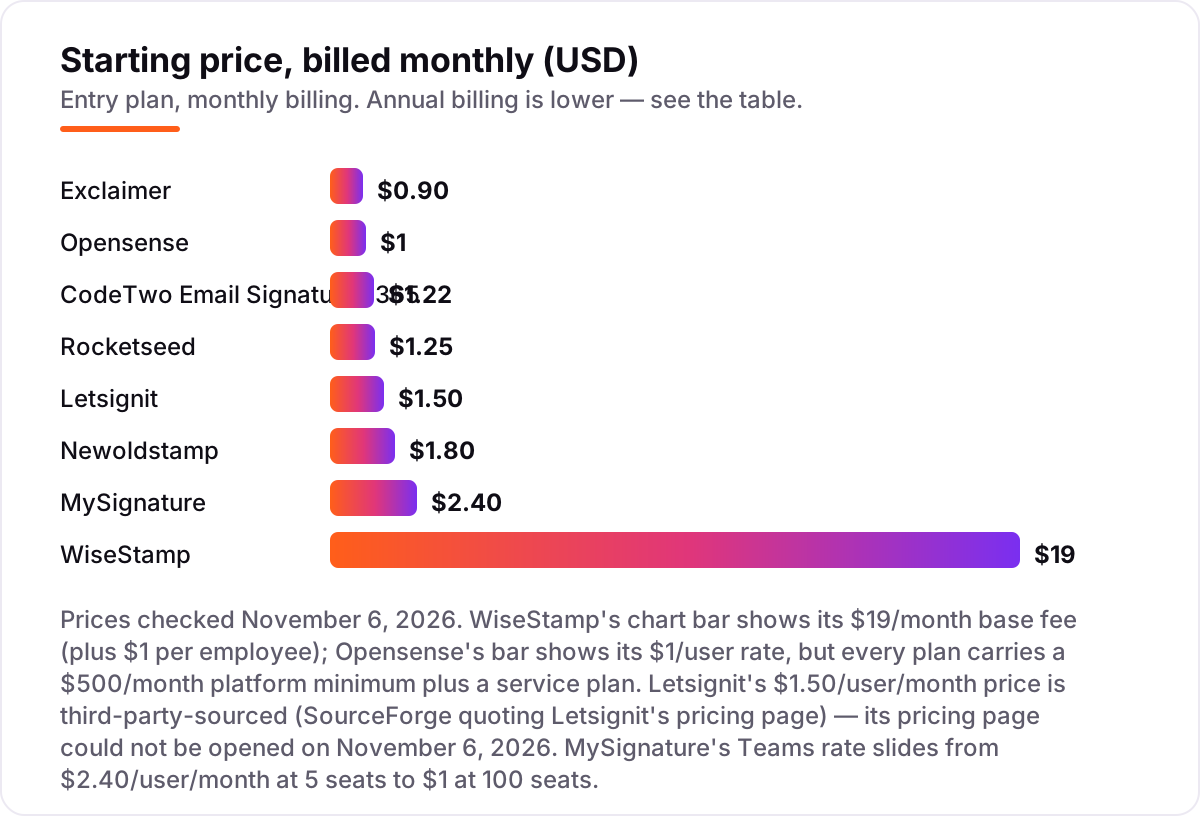
Take a 25-person team on annual billing. On list prices, the subscription costs $22.50 a month on Exclaimer Starter, $30.50 on CodeTwo, $44 on WiseStamp Basic, $45 on Newoldstamp and $60 on Letsignit Pro — but that last number needs adjusting before it is real. Letsignit's $60 is its monthly minimum, not 25 users times $1.50: the per-user math would give $37.50, and the floor lifts it to $60. MySignature does not publish a flat 25-seat rate, since its Teams Standard rate slides from $2.40 per user per month at 5 seats to $1 at 100 seats, so a 25-person team pays somewhere between $25 and $60 a month.
Over a year, that is $270 on Exclaimer Starter, $366 on CodeTwo, $528 on WiseStamp Basic, $540 on Newoldstamp and $720 on Letsignit. The same 25 people and the same signatures cost $270 a year at the cheap end and $720 at the dear end among the per-user tools — a $450 gap that comes entirely from minimums and billing choices, not from features. If the team also wants banner campaigns, the numbers move: WiseStamp Grow runs $74 a month, or $888 a year, and Exclaimer Standard runs $36.25 a month, or $435 a year.
Two tools do not fit the 25-person math at all. Rocketseed is built for 50 or more employees, where it costs $705 a year for 50 — about $58.75 a month — plus a one-time setup fee that covers implementation, design, activation and training. Opensense has a $500 monthly platform minimum, so a 25-person team pays $6,000 a year for the Signature plan, twenty-two times the Exclaimer bill. If email is also a sales channel rather than just a branding surface, compare the automation side in our guide to email automation tools before deciding how much of the budget belongs here.
One more cost to check before you commit: a second mail domain is usually a second setup, and several tools price per mailbox rather than per person. Shared mailboxes count as seats on CodeTwo and on Exclaimer, so count info@, support@ and sales@ in the headcount before you buy. Annual billing is the norm for the headline rates here — every per-user price in this list is the annual-billing figure, and paying monthly costs more where a monthly rate is published at all.
Know the difference: signature management vs a signature generator
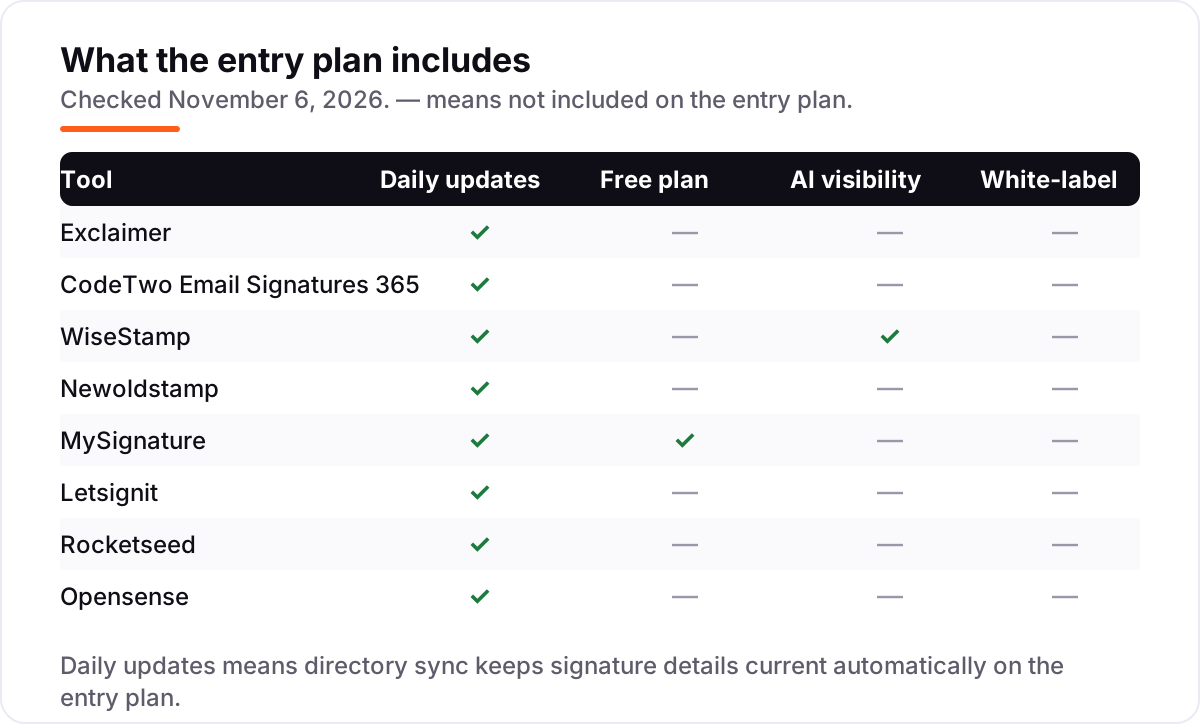
The confusion in this category is between a platform and a snippet. A signature generator builds one HTML signature for one person, who then pastes it into their mail client. It costs little or nothing, and it works fine for a freelancer. A signature management platform holds every signature centrally, pushes updates to every mailbox at once, syncs names and job titles from the company directory, and enforces disclaimers on every message. All eight tools in this list are management platforms, including the ones with free plans.
There is a second, quieter confusion: per-user pricing and per-signature pricing are not the same thing. Most tools charge per user, so one person with one mailbox costs one seat. Newoldstamp charges per signature, so a person with a main signature and a reply signature, or several mailboxes, costs more than one unit. Count signatures, not people, when you price Newoldstamp.
A third distinction worth knowing is server-side versus client-side deployment. Server-side tools add the signature as the email passes through the mail server, so it appears on every device and every mail app, including phones. Client-side tools install the signature inside Outlook or Gmail, which means a phone that never opens the add-in sends mail without it. If the team reads mail on mobile, server-side deployment is the feature to insist on.
Quick comparison: tool type by need
| Buyer | Best pick | Why |
|---|---|---|
| Small team that wants the cheapest compliant option | Exclaimer | $0.90/user/month billed annually, enforced disclaimers, 10-user minimum |
| Microsoft-only organization | CodeTwo | One plan with every feature, $1.22/user/month at 10 users |
| Growing team that wants per-user costs to fall | WiseStamp | $19/month base plus $1/employee, about $1.19 per user at 100 seats |
| Marketing-led SMB that wants banners now | Newoldstamp | Banner campaigns included from the start, $1.80/signature/month |
| Freelancer or tiny team that wants a free plan | MySignature | Free plan for individuals; Teams from $2.40/user/month |
| Enterprise doing account-based marketing | Opensense | ABM targeting and CRM integration, $1/user/month with a $500/month minimum |
Mistakes to avoid
- Budgeting on the per-user rate and ignoring the minimum. Opensense at $1 a user is not a $25-a-month tool for a 25-person team — the $500 floor makes it $500. Price the floor, not the headline.
- Buying the entry tier, then finding banners cost extra. Exclaimer Starter and WiseStamp Basic both hold campaigns for a higher plan. If banners are the reason you are buying, price the tier that includes them.
- Picking a Microsoft-only tool for a Google Workspace team. CodeTwo and Letsignit do not serve Google Workspace. Confirm platform support before the trial, not after it.
- Forgetting the setup fee. Rocketseed charges a one-time setup fee on top of the subscription, covering design and training. It is good value if you want the work done for you, but it belongs in the first-year budget.
- Letting employees paste their own signatures. The whole point of a management platform is central control. If staff keep their own old signatures, the disclaimers and branding you paid for never reach the inbox.
How we chose
We checked each vendor's own pricing page on November 6, 2026 and recorded the starting price exactly as shown, including the annual-billing figure where the page lists one, and we ranked the tools by fit for the most common buyer — a team of roughly 10 to 100 people that needs one console for branded signatures and banners — not by brand size. One exception: Letsignit's pricing page could not be opened on November 6, 2026, so its $1.50 per user per month Pro price is third-party-sourced from SourceForge's product page, which quotes Letsignit's own pricing text, and we say so here rather than presenting it as vendor-verified. Ratings come from each tool's G2 review page, checked November 6, 2026. No vendor paid for a place in this list, and none of the links here are affiliate links.
What to do next
Start with the free trial of your top pick and run one real week of mail through it: send from desktop, mobile and webmail, change one directory detail, and watch it flow into every signature. Check that the disclaimer appears on replies and forwards, and that the signature still renders cleanly in Outlook and Gmail. If the signatures are sorted but new customers are not finding you, our monthly SEO service handles the visibility side — or compare providers in our guide to email marketing software for small business. Once your tools are in place, find out what's holding your rankings back.
Your stack only works if people find you
SerpAstra fixes what keeps your site off page one and makes it easy for AI assistants to recommend.
Get a free audit→Sources we checked (16)
- Exclaimer pricing — exclaimer.com/pricing (checked November 6, 2026)
- CodeTwo pricing — codetwo.com/email-signatures/pricing (checked November 6, 2026)
- WiseStamp pricing — wisestamp.com/pricing (checked November 6, 2026)
- Newoldstamp pricing — newoldstamp.com/pricing (checked November 6, 2026)
- MySignature pricing — mysignature.io/pricing (checked November 6, 2026)
- Letsignit pricing — SourceForge product page quoting Letsignit's pricing page (checked November 6, 2026)
- Rocketseed pricing — rocketseed.com/email-signature-generator/pricing (checked November 6, 2026)
- Opensense pricing — opensense.com/pricing (checked November 6, 2026)
- Exclaimer reviews — g2.com/products/exclaimer/reviews (checked November 6, 2026)
- CodeTwo reviews — g2.com/products/codetwo-email-signatures-365/reviews (checked November 6, 2026)
- WiseStamp reviews — g2.com/products/wisestamp/reviews (checked November 6, 2026)
- Newoldstamp reviews — g2.com/products/newoldstamp/reviews (checked November 6, 2026)
- MySignature reviews — g2.com/products/mysignature/reviews (checked November 6, 2026)
- Letsignit reviews — g2.com/products/letsignit/reviews (checked November 6, 2026)
- Rocketseed reviews — g2.com/products/rocketseed/reviews (checked November 6, 2026)
- Opensense reviews — g2.com/products/opensense-email-signatures/reviews (checked November 6, 2026)
Shamim
Founder of SerpAstra
A full-stack SEO and digital marketer who spends most days on Local SEO for dental practices, AI search visibility and lead generation.
Frequently asked questions
What is the best email signature management software?
Exclaimer is the best fit for most teams: the widest platform coverage, enforced disclaimers and the lowest entry price at $0.90 per user per month billed annually. CodeTwo is the better pick for a Microsoft-only organization at $1.22 per user per month, and WiseStamp wins when headcount is growing fast. MySignature is the best free starting point.
How much does email signature management software cost?
Entry prices run from $0.90 to $2.40 per user per month on annual billing, except WiseStamp, which charges a $19 monthly base fee plus $1 per employee. Minimums change the real bill: Exclaimer needs 10 users, Letsignit $60 a month, and Opensense $500 a month. A 25-person team pays $22.50 a month on Exclaimer Starter and $500 on Opensense.
Is there free email signature management software?
Only one tool here has a free plan: MySignature, with one signature that carries MySignature branding. Free signature generators exist, but they only produce a snippet for one person to paste, with no central control, no directory sync and no way to update everyone's signature at once. For a team, the free plan is a trial, not a solution.
What is the difference between Exclaimer and CodeTwo?
Platform coverage and pricing shape. Exclaimer works with Microsoft 365, Google Workspace and Exchange, and sells three tiers from $0.90 to $1.75 per user per month. CodeTwo works with Microsoft 365 and Exchange only, sells a single plan with every feature, and its rate slides from $1.22 at 10 users to $0.73 at 500. Google Workspace teams must pick Exclaimer.
Does email signature software work with Google Workspace?
Most of these tools do: Exclaimer, WiseStamp, Newoldstamp, MySignature, Rocketseed and Opensense all support Google Workspace. The exceptions are CodeTwo and Letsignit, which are built for Microsoft 365 and Exchange. If your company runs on Google Workspace, shortlist Exclaimer or WiseStamp first and confirm directory sync during the trial.
Do managed email signatures work on mobile?
Yes, when the tool deploys signatures server-side — the signature is added as the email passes through the server, so it appears on phones, tablets and webmail exactly as on desktop. Exclaimer, CodeTwo, Opensense and Rocketseed all deploy this way. Tools that install signatures in the mail client instead may leave mobile signatures inconsistent, so check deployment during the trial.
How do banner campaigns in email signatures work?
An admin designs a banner once in the central console, picks which senders or departments show it, and sets start and end dates. The banner is then added to every outgoing email automatically, and clicks are tracked. Newoldstamp and Letsignit include campaigns on their entry plans; Exclaimer needs Standard and WiseStamp needs Grow for the same feature.
Free SEO and AI visibility audit
Find out what is holding your rankings back
Send us your site. Within 2 business days you get a written audit, an AI visibility check and a short fix list ranked by impact. Free, with no contract attached.
Request my free audit→Related guides
 Digital Marketing & Ads11 Best Email Marketing Software for Small Business in 2026, ComparedThe 11 best email marketing software for small business, compared on real 2026 prices, free plans and automation — Brevo starts at $9/month.Read guide →
 Digital Marketing & Ads10 Best Email Automation Tools in 2026 (Free and Paid, Compared)Compare the 10 best email automation tools on price, free plans and automation depth, with every starting price checked on November 5, 2026.Read guide →
 Digital Marketing & Ads12 Best CRM Email Marketing Software in 2026, Compared12 best crm email marketing software tools compared on price, CRM depth and automation, with real starting prices checked on November 4, 2026.Read guide →