
8 Best Email Testing Tools in 2026 (Free and Paid, Compared)
Compare the 8 best email testing tools on price, free plans, rendering previews and automation, with every price checked on November 6, 2026.
 Shamim Mia, Founder, SerpAstraLast verified November 6, 202612 min read
We compare pricing pages, documentation and public reviews. We never accept payment for rankings.

Key takeaways
- Mailtrap is the best all-round pick at $17/month for its Email Sandbox; Mailgun Inspect leads rendering QA at $99/month, and Mailpit is the best free local option at $0.
- Litmus publishes no starting price — expect a sales quote — and Email on Acid now sells as Mailgun Inspect, so buy the new name, not the old one.
- The limit that decides your real cost is the testing cap: previews per month, test emails per month or spam-test credits, not the headline price.
- Most teams need two tools: a sandbox for development and a preview or placement tester before campaigns go out.
On this page
Quick comparison
| Tool | Best for | Starting price | Free plan |
|---|---|---|---|
| Mailtrap | Development and QA teams that want a sandbox, previews and spam checks in one hosted platform | $17/mo | Yes (free plan) |
| Mailgun Inspect | Marketing and email teams that need rendering previews and pre-send QA before campaigns go out | $99/mo | No (1 month free) |
| Litmus | Marketing teams whose campaigns must render perfectly across every client and device | Custom quote | No (free trial) |
| Mailpit | Developers who want a free, local SMTP sandbox with no account, no quota and no cloud | Free | Yes (free) |
| GlockApps | Email marketers who need to know whether campaigns land in the inbox, spam or Promotions | $85/mo | Yes (free plan) |
| Mailosaur | QA teams automating email flows — signups, password resets and one-time codes — inside CI | $25/mo | No (14-day trial) |
| Testmail.app | Small teams automating end-to-end tests that need many disposable inboxes cheaply | $12/mo | Yes (free plan) |
| MailHog | Ruby and Rails developers who want the simplest possible local SMTP catcher | Free | Yes (free) |
Make one of these tools?
We re-check this list every quarter. Send a correction, request a review, or ask about a clearly labeled sponsored spot.
Request a listingThe best email testing tools

Mailtrap
Best for: Development and QA teams that want a sandbox, previews and spam checks in one hosted platform
Mailtrap is the most complete email testing platform in this list because it covers the whole workflow in one place: a fake SMTP server that captures test mail before it reaches real inboxes, HTML previews, spam score analysis and header inspection. The Email Sandbox free plan covers 50 test emails a month, and Basic costs $17 a month for 500 test emails, three users and 50 emails per sandbox.
The catch is that testing and sending are sold separately, so a team that also needs production delivery pays for the Email API product on top of the Sandbox. Device previews are a paid add-on rather than part of the entry plan. Choose Mailtrap when developers and QA share one testing workflow and you want the sandbox, previews and spam checks in a single login.
What we like
- Fake SMTP sandbox captures test mail without risking real inboxes
- HTML previews plus spam score and header inspection in one place
- Free plan covers 50 test emails a month with no card required
- API access lets test suites pull messages and run assertions
Watch out for
- Testing and sending are billed separately — production delivery costs extra
- Device previews across 100+ clients are a paid add-on, not in Basic
- Free plan caps at 50 test emails and 10 emails per sandbox

Mailgun Inspect
Best for: Marketing and email teams that need rendering previews and pre-send QA before campaigns go out
Mailgun Inspect is the new name for Email on Acid, and it does one job well: it renders your email across more than 100 clients and devices, then checks the links, images, HTML and accessibility before you send. Basic costs $99 a month for 1,000 previews with unlimited users, and the first month is free, so a team can judge the preview quality before paying.
The preview allowance is the limit to watch, because each client counts as one preview — a single test across 50 clients uses 50 of your 1,000. Accessibility, HTML analysis and spam-content checks wait for Premium at $199 a month. Pick Mailgun Inspect when campaign design is the risk and your team needs a pre-send QA gate, not a developer sandbox.
What we like
- Previews across 100+ clients and devices catch rendering breaks before sending
- Unlimited users on every plan, so the whole team can review
- API access lets developers add rendering tests to builds
- First month free, so teams can test the preview quality before paying
Watch out for
- No permanent free plan — the free month ends and billing starts at $99
- Accessibility, HTML and spam-content checks wait for Premium at $199/month
- Each preview counts per client, so one test across 50 clients uses 50 previews

Litmus
Best for: Marketing teams whose campaigns must render perfectly across every client and device
Litmus is the rendering standard that marketing teams compare everything else against: previews across more than 100 clients and devices, spam filter testing, analytics and approval workflows in one platform. Its builder and personalization features extend it beyond testing into full email production, which is why large marketing teams standardize on it.
The problem for buyers is the price. Litmus publishes no starting price — its pricing page now leads to a sales form, since the product sits inside Validity Engage — and the last widely reported Core price was $500 a month. Buy Litmus when rendering quality is a business risk and the budget is set by a sales conversation, not a price list.
What we like
- The widest rendering matrix here — previews across 100+ clients and devices
- Litmus Proof adds comments and approval workflows for team review
- Spam filter testing and analytics sit in the same platform
- Builder and personalization extend it beyond testing into production
Watch out for
- No published starting price — every quote comes from sales, so budgeting takes a call
- The last widely reported Core price was $500 a month, far above the other preview tools
- Overkill for developers who only need to catch test emails in staging

Mailpit
Best for: Developers who want a free, local SMTP sandbox with no account, no quota and no cloud
Mailpit is the best free option for developers: a small, fast SMTP server that captures every outgoing message from your local environment and shows it in a clean web interface, with search, HTML rendering, headers and attachments. It is open source under the MIT licence, ships as a single Go binary or Docker container, and takes about two minutes to set up.
The trade-off is scope. Mailpit runs on your machine only, so there is no hosted service for staging servers, no rendering previews across real clients and no spam scoring. It also has no team features. Choose Mailpit when you develop locally and want a free, maintained sandbox — and pair it with a preview tool before campaigns go out.
What we like
- Completely free and open source under the MIT licence — no account, no quota, no card
- Modern web UI with search, HTML rendering, headers and attachments
- Runs as a single Go binary or Docker container in about two minutes
- MailHog-compatible API makes migration from MailHog painless
Watch out for
- Local only — there is no hosted service for staging servers or shared QA
- No rendering previews across real clients and no spam scoring
- No team features, so shared inboxes and permissions do not exist

GlockApps
Best for: Email marketers who need to know whether campaigns land in the inbox, spam or Promotions
GlockApps answers a different question from the rest of this list: not whether your email looks right, but whether it reaches the inbox. Its Inbox Insight sends your message to a seed list and reports inbox, spam or tab placement across Gmail, Outlook, Yahoo and more, with content analysis that scores the message against individual spam filters.
Essential costs $85 a month billed monthly, or $59 a month billed annually, for 360 spam test credits a month, and the free plan includes 2 credits a month. Credits expire monthly and do not roll over, and there are no rendering previews. Pick GlockApps when deliverability is the worry and you want proof of placement before a big send.
What we like
- Seed-list tests show inbox, spam or tab placement across Gmail, Outlook, Yahoo and more
- Content analysis scores the message against individual spam filters with fix recommendations
- DMARC analytics, blocklist and uptime monitoring come in the same bundle
- Free plan includes 2 test credits a month for trying the workflow
Watch out for
- The $59-a-month figure needs annual billing — month-to-month Essential is $85
- Test credits expire each month and do not roll over
- No rendering previews, so a second tool is needed to check how the email looks

Mailosaur
Best for: QA teams automating email flows — signups, password resets and one-time codes — inside CI
Mailosaur is built for automated testing: it gives your test suite real email addresses and inboxes, so a signup, password reset or one-time code can be sent, received and asserted on through an API. SDKs cover Playwright, Cypress, Selenium and more, and SMS testing is available for flows that need a phone step.
Personal costs $25 a month billed monthly, or $20 a month billed annually, for one user, one inbox and 15,000 inbound emails a month. There is no permanent free plan, only a 14-day trial, and SMS testing and email previews cost extra. Choose Mailosaur when email-dependent flows run inside CI and flaky inboxes keep breaking your builds.
What we like
- Real email addresses and inboxes that test suites can send to, search and assert on through the API
- SDKs for Playwright, Cypress, Selenium and more, with OTP and magic-link extraction
- SMS testing available for verification flows that need a phone step
- 14-day trial is long enough to wire it into a real pipeline
Watch out for
- Personal covers one user and one inbox — a team needs Core at $62.50 a month for five seats
- SMS testing and email previews cost extra as add-ons
- Message retention is limited, so old test emails disappear unless you export them

Testmail.app
Best for: Small teams automating end-to-end tests that need many disposable inboxes cheaply
Testmail.app is the cheapest way to automate email testing at volume. Wildcard addresses give you unlimited inboxes, so every test can use a fresh address with no setup, and the GraphQL and REST APIs plus webhooks fit straight into CI pipelines. The free plan covers 100 emails a month forever, with spam testing included.
Essential costs $12 a month billed monthly, or $9 a month billed annually, for 10,000 emails a month with unlimited users, addresses and mailboxes. There are no rendering previews, and public feedback is thin — only 3 G2 reviews at the time we checked. Pick it when your tests need many disposable inboxes and the budget is small.
What we like
- Unlimited inboxes through wildcard addresses — every test gets a fresh address with no setup
- Unlimited users on every plan, including the free one
- Free plan covers 100 emails a month forever, with spam testing included
- GraphQL and REST APIs plus webhooks fit CI pipelines
Watch out for
- Only 3 G2 reviews, so public feedback is thin compared with the bigger tools
- No rendering previews across email clients
- The $9-a-month figure needs annual billing — month-to-month Essential is $12

MailHog
Best for: Ruby and Rails developers who want the simplest possible local SMTP catcher
MailHog is the classic free local email catcher: a small SMTP server with a web interface that captures outgoing mail from a development environment, letting developers inspect messages without sending them. It runs easily in Docker, costs nothing, and has been the default local choice for Ruby and Rails teams for years.
The catch is maintenance. Development has slowed, and Mailpit is the actively maintained successor with the same idea and a better interface. MailHog has no hosted option, no API for automated assertions and no spam scoring. Use it if it is already wired into your project; start new projects on Mailpit instead.
What we like
- Completely free and open source with no account or setup beyond a binary
- The simplest setup here — point the app at it and captured mail appears in the web UI
- Runs easily in Docker for local development
- HTML and plain-text views show the message as recipients would see it
Watch out for
- Development has slowed and Mailpit is the actively maintained successor
- No hosted option, no API for automated assertions and no spam scoring
- A Ruby dependency in some install paths where Mailpit needs none
The best email testing tools catch broken emails before real people see them: they trap test messages in a sandbox, preview the design across clients, or check whether the message lands in the inbox instead of spam. We ranked the eight tools below by fit for the most common buyer — a team that sends both app email and marketing campaigns — and every price was checked on the vendor's own pricing page on November 6, 2026.
The eight tools below fall into three types, and the type matters more than the brand. Sandbox tools such as Mailtrap, Mailpit and MailHog trap the mail your app sends during development. Preview tools such as Mailgun Inspect and Litmus show how a finished campaign renders. Automation tools such as Mailosaur and Testmail.app, and placement tools such as GlockApps, answer questions the other two cannot. Pick the type first, then the tool — the wrong type is the most expensive mistake in this category.
How to choose the best email testing tools
- Name the testing job first. Sandbox tools catch app mail in development, preview tools check campaign design, and placement tools check the inbox. No single tool here does all three well.
- Count the cap that bites first. Previews per month, test emails per month or spam-test credits decide your real cost — a cheap plan with a small cap is the expensive one.
- Check the free plan honestly. A free sandbox covers development, but rendering previews and placement tests are paid on every tool here except the free local ones.
- Look for API access. If tests run in CI, the tool needs an API that can receive mail, search it and extract links or codes — Mailosaur and Testmail.app are built for that.
- Plan for two tools, not one. Most teams pair a sandbox for developers with a preview or placement tester for campaigns, so budget for the pair.
Email testing is one part of getting email right — the other part is whether your mail reaches people at all, which our guide to email deliverability services covers in detail. And before you publish the landing pages your emails link to, run their titles through the free SERP snippet preview tool — it shows exactly how the title and description will look in Google.
Whatever you shortlist, run a real campaign through it before you pay. Send a test to every client your audience actually uses, check the spam score, and confirm the links and images survive. A tool that only looks good on its own demo page is not a tool you should trust with your next send.
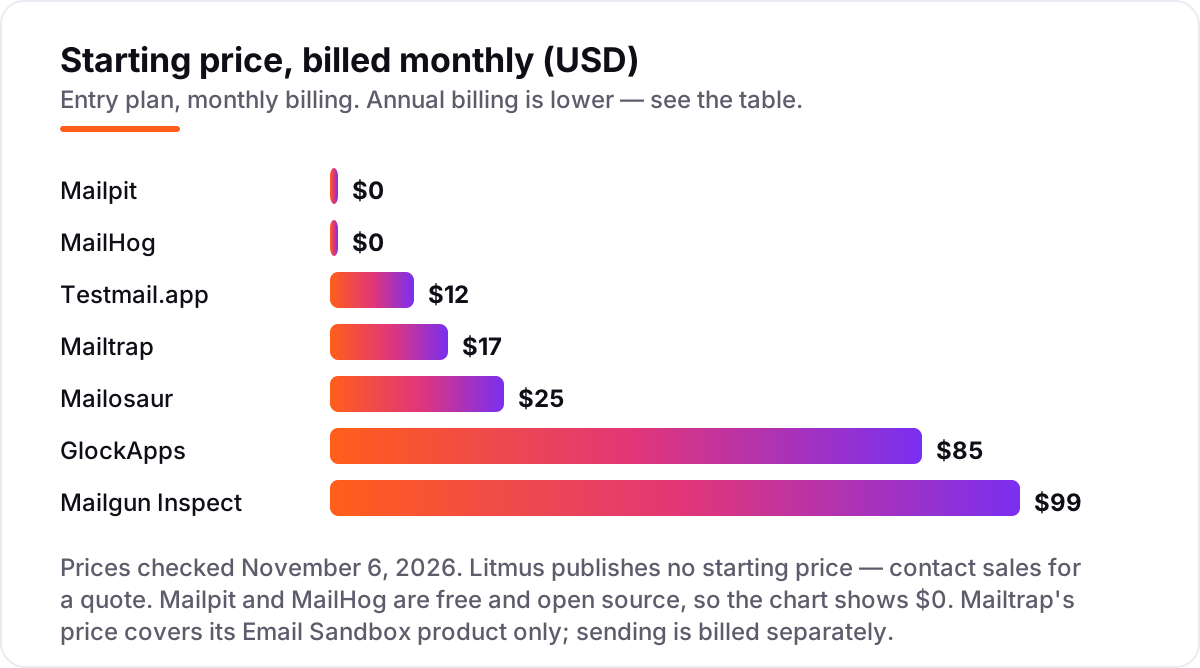
Email testing tools pricing: what you will actually pay
Take a five-person team that runs four campaigns a month and ships app email every week. The cheapest honest stack is Mailpit at $0 for local development plus Testmail.app Essential at $12 a month for automated tests — $144 a year. Add rendering QA and the stack becomes Mailtrap Basic at $17 plus Mailgun Inspect Basic at $99, or $116 a month and $1,392 a year.
Add placement proof and the bill grows again: GlockApps Essential at $85 a month billed monthly takes the full stack to $201 a month, or $2,412 a year. Switch the parts that offer it to annual billing — Mailtrap at $14, GlockApps at $59, Mailgun Inspect still $99 — and the same stack costs $172 a month, or $2,064 a year, a $348 saving for paying yearly.
The automation choice is a smaller gap. Mailosaur Personal at $25 a month billed monthly, or $20 billed annually, covers one user and one inbox; Testmail.app Essential at $12 a month, or $9 billed annually, covers unlimited users and inboxes. Over a year that is $300 against $144 on monthly billing, or $240 against $108 on annual billing — a $156 gap for the bigger brand and its SDKs. Litmus sits outside these numbers entirely: with no published price, budget a sales quote, and treat the widely reported $500-a-month Core figure as third-party reporting, not a vendor price.
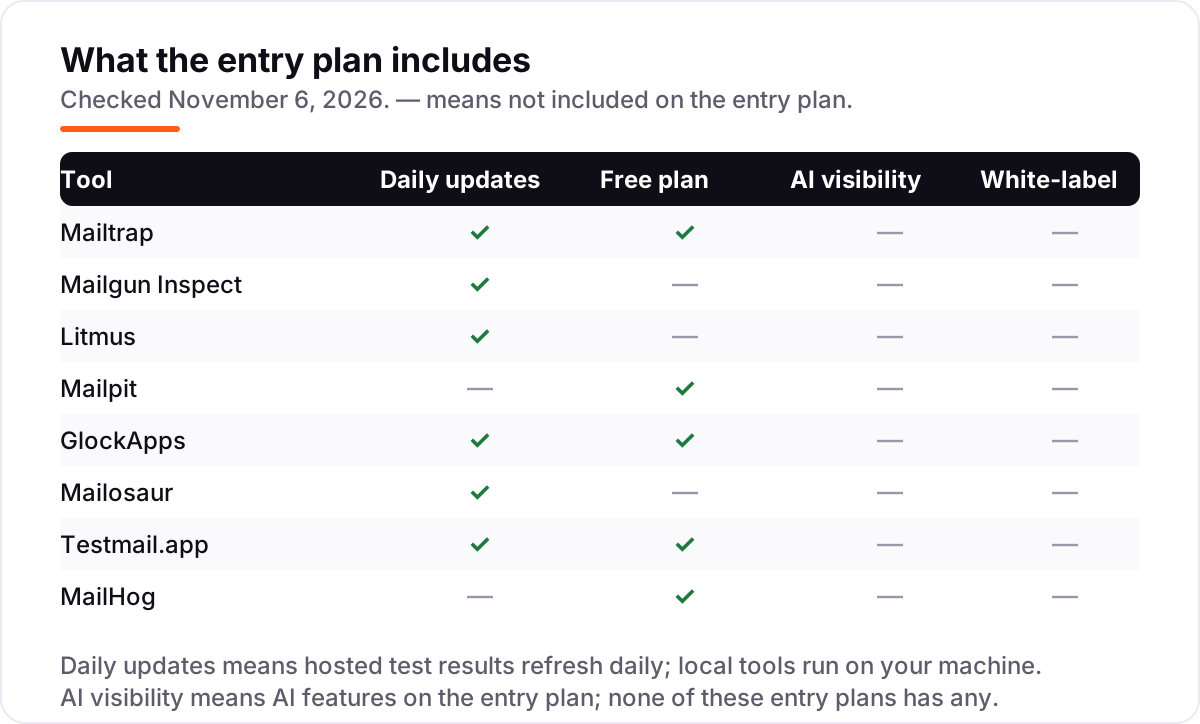
Know the difference: sandbox testing vs rendering previews vs inbox placement
The confusion in this category is that three different jobs share one name. Sandbox testing catches the email your app sends during development — a fake SMTP server traps it before it reaches a real inbox. Rendering previews show how a finished campaign looks across email clients and devices. Inbox placement testing sends the campaign to a seed list and reports whether it landed in the inbox, spam or a tab.
Each job needs a different tool, and buying the wrong type is the most common mistake. A sandbox will not tell you whether Outlook breaks your layout, a preview tool will not tell you whether Gmail sends you to spam, and a placement tool will not show you the design at all. Mailtrap is the closest thing to a bridge — sandbox plus previews plus spam scores — but even it sells device previews as an add-on and has no seed-list placement test.
The practical rule is simple: developers need a sandbox, marketers need previews, and anyone sending campaigns at volume needs placement proof. Budget for two of the three, and pick the pair that matches the emails you actually send.
Quick comparison: tool type by need
| Buyer | Best pick | Why |
|---|---|---|
| Most teams, all-round testing | Mailtrap | Sandbox, previews and spam checks in one platform, from $17/month |
| Marketing team checking campaign design | Mailgun Inspect | Previews across 100+ clients, Basic is $99/month |
| Large marketing team, rendering is critical | Litmus | The rendering standard, priced by sales quote |
| Developer testing locally for free | Mailpit | Free, open source, modern local sandbox at $0 |
| Checking inbox placement before a big send | GlockApps | Seed-list placement tests, Essential is $85/month |
| QA team automating email flows in CI | Mailosaur | Real test inboxes with an API, Personal is $25/month |
| Budget automation with many inboxes | Testmail.app | Unlimited inboxes and a free plan, Essential is $12/month |
| Ruby team with an existing setup | MailHog | Simple free local catcher at $0, though Mailpit is the maintained successor |
Mistakes to avoid
- Buying a preview tool for a sandbox job. Litmus and Mailgun Inspect check finished campaigns; they do not trap the mail your app sends in staging. Developers need a sandbox first.
- Budgeting on the annual price while paying monthly. GlockApps Essential is $59 a month billed annually but $85 month to month, and the same gap applies to Mailosaur and Testmail.app.
- Ignoring the preview cap. Mailgun Inspect counts every client as one preview, so a single test across 50 clients uses 50 of your 1,000 monthly previews.
- Treating a free plan as a production plan. Free tiers cap test emails, previews or credits — Mailtrap's free plan stops at 50 test emails a month and GlockApps' at 2 test credits.
- Paying for Litmus before asking what it costs. With no published price, the quote can be far above the $99 preview tools — get the number in writing before the team standardizes on it.
How we chose
We checked each vendor's own pricing page on November 6, 2026 and recorded the starting price exactly as shown. Two monthly-billing figures come from the vendor's own G2 listing rather than the pricing page, because the vendors' pages show only the annual-billing equivalent: Mailosaur Personal at $25 a month ($20 billed annually) and GlockApps Essential at $85 a month ($59 billed annually). Litmus publishes no starting price, so it is listed as a custom quote; the widely reported $500-a-month Core figure is third-party reporting, not a vendor price. Ratings come from G2 pages opened on November 6, 2026. Litmus has no rating here because its G2 listing now covers the merged Validity Engage suite rather than Litmus alone, and the Mailgun rating covers Mailgun as a whole, since Inspect has no separate G2 listing. Mailpit and MailHog have no G2 listing, so they carry no rating. No vendor paid for a place in this list, and none of the links here are affiliate links.
What to do next
Start with the free option that matches your job — Mailpit for local development, Mailtrap's free Sandbox plan for a hosted test, or Testmail.app's free plan for automation — and run one real campaign or test suite through it. Check that the previews, spam scores or placement reports match what you see in real inboxes before you commit to a year. If email brings in customers but search does not, our monthly SEO service handles the visibility side — or compare outreach options in our guide to cold email software. Once your tools are in place, find out what's holding your rankings back.
Your stack only works if people find you
SerpAstra fixes what keeps your site off page one and makes it easy for AI assistants to recommend.
Get a free audit→Sources we checked (13)
- Mailtrap pricing — mailtrap.io/pricing (checked November 6, 2026)
- Litmus pricing — litmus.com/pricing (checked November 6, 2026)
- Mailgun Inspect pricing — mailgun.com/pricing/inspect (checked November 6, 2026)
- Mailpit — mailpit.ax (checked November 6, 2026)
- GlockApps pricing — glockapps.com/pricing (checked November 6, 2026)
- Mailosaur pricing — mailosaur.com/pricing (checked November 6, 2026)
- Testmail.app pricing — testmail.app/pricing (checked November 6, 2026)
- MailHog — github.com/mailhog/MailHog (checked November 6, 2026)
- Mailtrap reviews — g2.com/products/mailtrap/reviews (checked November 6, 2026)
- Mailgun reviews — g2.com/products/mailgun/reviews (checked November 6, 2026)
- Mailosaur reviews — g2.com/products/mailosaur/reviews (checked November 6, 2026)
- GlockApps reviews — g2.com/products/glockapps/reviews (checked November 6, 2026)
- Testmail.app reviews — g2.com/products/testmail-app/reviews (checked November 6, 2026)
Shamim
Founder of SerpAstra
A full-stack SEO and digital marketer who spends most days on Local SEO for dental practices, AI search visibility and lead generation.
Frequently asked questions
What is the best email testing tool overall?
Mailtrap is the best all-round pick: its Email Sandbox captures test mail, checks spam scores and previews HTML in one platform, from $17 a month with a free plan. Litmus leads for rendering previews, Mailpit leads for free local testing, and GlockApps leads for inbox placement. Most teams end up using two tools, not one.
Is there a free email testing tool?
Yes. Mailpit and MailHog are free and open source for local testing, Mailtrap offers a free Sandbox plan with 50 test emails a month, and Testmail.app has a free plan with 100 emails a month. GlockApps also gives 2 free spam-test credits a month. The free options cover development and light testing; campaigns need a paid preview tool.
What is the difference between Mailtrap and Litmus?
Mailtrap is a developer sandbox: it captures test emails through a fake SMTP server, with previews and spam checks, from $17 a month. Litmus is a marketing preview platform: it renders campaigns across 100+ clients and devices with approval workflows, priced by sales quote. Many teams use both — Mailtrap in development, Litmus before campaigns go out.
Can I automate email testing in CI?
Yes. Mailosaur and Testmail.app provide real test inboxes with APIs for automated suites, and Mailtrap offers API access on paid plans. Mailpit and MailHog work in local CI pipelines as self-hosted capture servers. Pick Mailosaur or Testmail.app when tests must receive real mail and assert on links or one-time codes.
How much does email testing cost?
Free tools cover local testing at $0, and the cheapest paid plans run $12–$25 a month for automation tools. A rendering preview tool costs $99 a month on Mailgun Inspect, and Litmus is priced by sales quote — the last widely reported Core price was $500 a month. Most teams spend $17–$116 a month on a sandbox plus a preview tool.
What happened to Email on Acid?
Email on Acid is becoming Mailgun Inspect, Sinch's next-generation email QA suite. Subscription customers started moving across in June 2026, with annual customers migrating at the end of their term. The pricing is unchanged — Basic $99 a month, Premium $199 — and existing previews and test history do not carry over to the new platform.
Do I need email testing if I use a transactional provider?
Yes. Providers such as Mailgun Send or Postmark deliver mail, but they do not verify your templates, rendering or content. Test emails in staging with a sandbox tool, preview the design across clients, and check spam placement before campaigns reach real subscribers. Delivery and design are separate jobs.
Free SEO and AI visibility audit
Find out what is holding your rankings back
Send us your site. Within 2 business days you get a written audit, an AI visibility check and a short fix list ranked by impact. Free, with no contract attached.
Request my free audit→Related guides
 Digital Marketing & Ads7 Best Email Deliverability Services in 2026Compare the 7 best email deliverability services on real prices, inbox testing, warmup and monitoring, with every price checked November 5, 2026.Read guide →
 Digital Marketing & Ads10 Best Cold Email Software in 2026: Pricing, Features and Pros & ConsCompare the 10 best cold email software tools on price, free plans, warm-up and AI features, with every price checked November 5, 2026, before you buy.Read guide →
 Digital Marketing & Ads11 Best Email Marketing Software for Small Business in 2026, ComparedThe 11 best email marketing software for small business, compared on real 2026 prices, free plans and automation — Brevo starts at $9/month.Read guide →