
10 Best Employee Portal Software Reviews in 2026, Compared
Compare the 10 best employee portal software reviews side by side on price, free trials and AI features, with every price checked November 6, 2026.
 Shamim Mia, Founder, SerpAstraLast verified November 6, 202614 min read
We compare pricing pages, documentation and public reviews. We never accept payment for rankings.

Key takeaways
- Simpplr is the best fit for most mid-size and enterprise buyers, with deployment in four to eight weeks; Workvivo follows at 4.8/5 for adoption, and Jostle is the only portal here with published prices, from $2.77 per user a month.
- Seven of the ten vendors publish no price at all, so budget for an annual contract and ask every vendor for the per-user math before you compare quotes.
- The single most important buying factor is who the portal must reach: desk workers, frontline staff with no corporate email, or both — that split decides the shortlist, not the feature list.
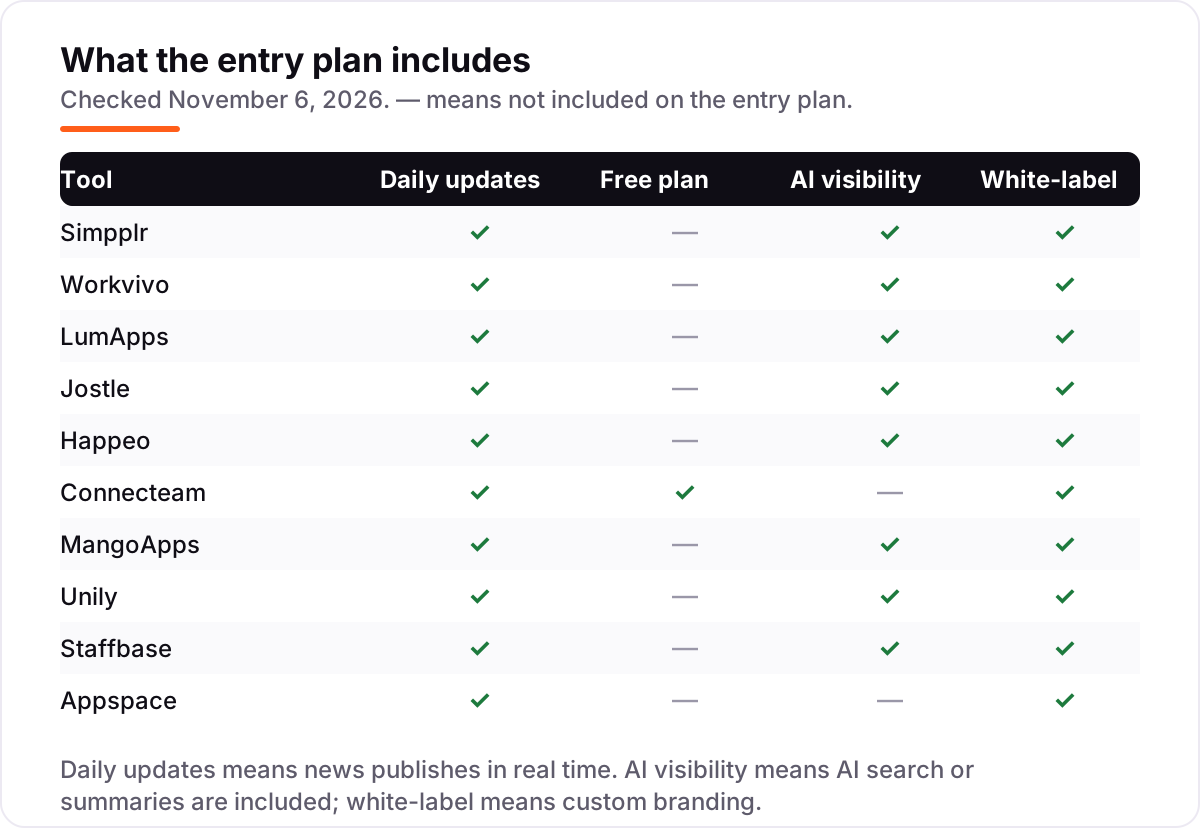
- Free plans are rare in this category — only Connecteam has one, for up to 10 users — so plan on a trial or a demo, not a free tier.
On this page
Quick comparison
| Tool | Best for | Starting price | Free plan |
|---|---|---|---|
| Simpplr | Mid-market to enterprise teams that want a modern intranet live in weeks, with AI search and measurable communications | Custom quote | No (demo) |
| Workvivo | Companies whose biggest problem is adoption — a social feed employees actually open | Custom quote | No (demo) |
| LumApps | Large companies on Microsoft 365 or Google Workspace that need one governed hub for HQ and the frontline | Custom quote | No (demo) |
| Jostle | Mid-size teams that want transparent per-user pricing and a portal live without consultants | $2.77/user/mo | No (30-day trial) |
| Happeo | Small to mid-size companies on Google Workspace that want channels, pages and people search in one place | Custom quote | No (trial on request) |
| Connecteam | Frontline teams of up to 30 people that need scheduling, chat and HR records in one mobile app | $29/mo per hub | Yes (free up to 10 users) |
| MangoApps | Frontline-heavy employers in retail, healthcare and field service that need shifts, training and comms together | $9/employee/mo | No (14-day trial) |
| Unily | Global enterprises operating across countries, languages and business units | Custom quote | No (demo) |
| Staffbase | Large distributed workforces with many deskless workers and no corporate email | Custom quote | No (trial available) |
| Appspace | Companies that also need digital signage, desk booking and visitor management in one buy | Custom quote | No (demo) |
Make one of these tools?
We re-check this list every quarter. Send a correction, request a review, or ask about a clearly labeled sponsored spot.
Request a listingThe best employee portal software

Simpplr
Best for: Mid-market to enterprise teams that want a modern intranet live in weeks, with AI search and measurable communications
Simpplr sells one product, Simpplr One, and it treats the intranet as a communications platform rather than a document store. News, announcements and pages are personalised by role, location and interests, analytics show which messages were read and which were ignored, and AI search answers employee questions across the content. The company reports more than two million active users and over 1,000 customers.
The reason it leads this list is speed: deployment typically runs four to eight weeks, among the fastest for an enterprise intranet, and the vendor reports 98% of reviewers rating it 4 or 5 stars. The catch is transparency — there are no public prices or named plans, so you negotiate in the dark. Shortlist Simpplr when you want a modern intranet live in weeks and have the budget for enterprise software.
What we like
- Deployment in four to eight weeks, among the fastest enterprise intranets in this list
- AI-powered enterprise search and assistance built into Simpplr One
- Analytics show which messages were read and which were ignored
- Named a Leader in the 2026 Gartner Magic Quadrant and the Forrester Wave for Intranet Platforms
Watch out for
- No public prices — every quote is negotiated, so you cannot compare costs without a sales conversation
- Enterprise focus means higher cost than a simple intranet for smaller teams
- Content is organised by audience and topic rather than folders, which frustrates admins who expect a file tree

Workvivo
Best for: Companies whose biggest problem is adoption — a social feed employees actually open
Workvivo is now a Zoom company, and it leans into that identity: one digital headquarters where updates, conversations, knowledge and recognition live in a feed employees actually open. The platform combines posts, chat and calls, livestreams, knowledge hubs, onboarding journeys and AI features such as natural-language answers and automatic catch-up summaries. It integrates with more than 60 HR tools plus Google Workspace, Microsoft 365 and Slack.
It carries the highest rating in this list, 4.8 out of 5 from 2,663 G2 reviews, and that score is the point: a portal nobody opens is a failed purchase, whatever it cost. The trade-off is that it publishes a plan structure but no prices, so quotes are built from licence count and scope. Choose Workvivo when adoption is your biggest worry and the social design is the fix.
What we like
- Familiar social feed that drives strong adoption and peer recognition
- More than 60 integrations with HR tools, Google Workspace, Microsoft 365 and Slack
- Named a Leader in the 2026 Gartner Magic Quadrant for Intranet Packaged Solutions
- AI features include natural-language answers and automatic catch-up summaries
Watch out for
- Quote-only pricing with no public per-user rates, so the real number needs a sales conversation
- Smaller companies may pay for more platform than they need
- Some reviewers report notification overload and mobile app performance issues

LumApps
Best for: Large companies on Microsoft 365 or Google Workspace that need one governed hub for HQ and the frontline
LumApps positions itself as an AI employee hub rather than a plain intranet. It pulls communication, no-code workflows, microlearning and integrations into one place, connecting to Microsoft, Google, ServiceNow and Workday with more than 50 no-code connectors. Buyers get intranet pages, targeted campaigns, knowledge search, onboarding journeys and mobile access in one annual subscription, and more than seven million employees use it.
The analyst record is the strongest here: LumApps was named a Leader in both the 2026 Gartner Magic Quadrant for Intranet Packaged Solutions and the Forrester Wave for Intranet Platforms in Q2 2026. The honest catch is cost and commitment — pricing is quote-based, and typical rollouts stretch three to six months. Buy it when your company already runs on Microsoft 365 or Google Workspace and needs one governed hub.
What we like
- Deep Microsoft 365 and Google Workspace integration, with more than 50 no-code connectors
- AI-assisted search and content workflows across the whole hub
- More than seven million employees use the platform
- Leader in the 2026 Gartner Magic Quadrant and the Forrester Wave for Intranet Platforms
Watch out for
- Quote-only pricing with annual contracts — no public price to compare against
- Typical rollouts run three to six months, with real content migration work
- Small and mid-size teams pay enterprise rates for a platform built at enterprise scale

Jostle
Best for: Mid-size teams that want transparent per-user pricing and a portal live without consultants
Jostle calls itself better than an intranet, and its differentiator is honesty about price. Plans scale by user count: Bronze costs $2.77 per user a month at 500 users, $5.00 at 25 to 50, and $7.50 at 10 people, all prepaid annually, while Silver and Gold add the library and optional modules. Every plan includes mobile apps, SSO and provisioning, governance controls, Google Workspace and Microsoft 365 integrations, AI features and free onboarding.
The platform covers the basics well: targeted news with read-tracking, a knowledge library, a directory with org charts, shout-outs and recognition, discussions and weekly digest emails. The catch is scale and depth — companies that need deep customisation or complex multilingual publishing will hit its edges. For most companies under a few thousand employees, it is the least painful way to get a working portal.
What we like
- Published per-user prices starting at $2.77 a month on Bronze at 500 users
- Free implementation and onboarding on every plan
- SSO, mobile apps, custom branding and integrations included at all tiers
- Per-user price falls as headcount grows, so growth lowers the rate
Watch out for
- Per-user price rises sharply for small teams — $7.50 a month at 10 people against $2.77 at 500
- Less suited to global enterprises with heavy customisation needs
- Advanced modules such as Teams org charts are add-ons above the base tiers

Happeo
Best for: Small to mid-size companies on Google Workspace that want channels, pages and people search in one place
Happeo is a modern intranet that gives companies one official place for company information, built around the way Google teams already work. Long-term information lives in Pages, fast-moving updates live in Channels, and people search, announcements and groups sit on top. It integrates with Google Workspace and Slack, and higher tiers extend search into connected tools, with permissions and lifecycle controls as content grows.
Pricing is quoted per organisation across three plans — Starter, Growth and Enterprise — with a trial available through the site, so you will need a sales conversation for an exact figure. The Starter tier has no minimum user requirement, which helps smaller Google Workspace teams. Pick Happeo when your company lives in Google Workspace and wants an intranet that feels like part of it.
What we like
- Deep Google Workspace integration — pages, search and people built around Google tools
- Channels separate fast-moving updates from long-term information in Pages
- Unified search reaches into connected tools on higher tiers
- Starter tier has no minimum user requirement, which helps smaller Google Workspace teams
Watch out for
- Quote-only pricing across Starter, Growth and Enterprise — no public figure to compare
- Higher tiers carry minimum user requirements, so very small teams cannot buy them
- Some reviewers flag the mobile app as needing improvement

Connecteam
Best for: Frontline teams of up to 30 people that need scheduling, chat and HR records in one mobile app
Connecteam is a mobile workforce app for teams that work on job sites, shop floors and routes rather than at desks. It sells three hubs — Operations, Communications, and HR and Skills — at $29, $49 and $99 a month per hub for the first 30 users billed annually, with a per-user charge beyond that. One hub covers scheduling and GPS clock-ins, chat, or HR records; all three together cost $87 a month before extra users.
The free Small Business plan covers up to 10 users across all hubs, giving very small businesses a real on-ramp, and paid plans carry a 14-day trial. The pricing catch is the hub model: a 30-person team runs scheduling on the Operations hub for $29 a month, but a team needing all three hubs pays three times. Buy Connecteam when one hub covers it.
What we like
- One hub covers the first 30 users for a flat $29 a month billed annually
- Free Small Business plan for teams of up to 10 users, across all hubs
- Mobile-first design for deskless workers on job sites, shop floors and routes
- 14-day free trial on the paid plans
Watch out for
- The price is per hub — scheduling, chat and HR records together cost $87 a month, not $29
- Per-user fees start from the 31st user on every hub, so costs step up as the team grows
- Admin setup takes longer than the simple employee app suggests

MangoApps
Best for: Frontline-heavy employers in retail, healthcare and field service that need shifts, training and comms together
MangoApps has spent nearly two decades on the frontline workforce, and it shows. Employees without a desk, corporate email or laptop get a full employee app with schedules, tasks, training, safety checks, shift coverage and HR self-service, all under one login. The company reports more than two million users and 90%-plus adoption within 90 days, backed by an adoption guarantee.
Pricing is modular: the Communications and Intranet suite costs $9 per employee a month with a 200-employee minimum, while specialist teams can buy single suites priced per specialist seat from 10 seats. More than 200 integrations cover HRIS, payroll and ITSM systems, and AI agents are built into everyday workflows. Choose MangoApps when most of your workforce works shifts, drives routes or staffs stores and clinics.
What we like
- Built for deskless workers — no corporate email or laptop needed to use the full app
- More than 200 integrations cover HRIS, payroll and ITSM systems
- Adoption guarantee backed by named customer success managers
- SaaS, private cloud, customer VPC or on-premise deployment for regulated industries
Watch out for
- Per-employee suites carry a 200-employee minimum, so smaller teams buy specialist seats instead
- Modular quote-based pricing needs a sales conversation to price the full stack
- Some reviewers find the interface confusing for beginners

Unily
Best for: Global enterprises operating across countries, languages and business units
Unily markets itself as an AI-native employee experience platform. Two products carry that claim: Unily Glass, a conversational AI layer that answers questions and triggers actions across HR, IT and CRM systems, and Indi, an agent that helps admins design and publish branded intranet experiences. The platform serves companies with 1,000 to more than 100,000 employees, with customer stories that include CVS Health, British Airways and Wipro.
It excels at the hard parts of global scale: personalised content targeting, multi-channel publishing, governance workflows and analytics. Its bring-your-own-AI approach lets companies connect Microsoft 365 Copilot or other existing AI investments instead of buying another model. Shortlist Unily when you operate across countries, languages or business units and need one brand-consistent hub.
What we like
- Strong multilingual publishing and localisation for global teams
- Unily Glass conversational AI and the Indi page-building agent
- Proven at 100,000-plus employees, including CVS Health and British Airways
- Bring-your-own-AI approach connects Microsoft 365 Copilot and other existing AI investments
Watch out for
- Built for very large companies — pricing and scope overwhelm smaller teams
- Implementation needs dedicated internal owners to succeed
- Sales process is heavy, with no public price to anchor a budget

Staffbase
Best for: Large distributed workforces with many deskless workers and no corporate email
Staffbase is built for the hardest intranet audience: employees who have no company email, no desk and limited time. Frontline workers get a branded mobile app, can log in without a corporate email address, and receive targeted news, shifts information and policy updates on their own phones. The vendor was named a Leader in the 2026 Gartner Magic Quadrant for Intranet Packaged Solutions, and it offers separate frontline and enterprise pricing.
Pricing is quote only, and the sales process is demo led, so you cannot compare costs without a conversation. That is the whole trade-off: Staffbase fits large employers reaching frontline workers at scale, where compliance, works-council needs and multi-channel delivery matter more than a published price list. Pick it when most of your workforce never sits at a desk.
What we like
- Reaches workers with no corporate email through a branded mobile app
- Targeted news, shift information and policy updates on employees' own phones
- Strong on compliance and works-council needs for large European employers
- Named a Leader in the 2026 Gartner Magic Quadrant for Intranet Packaged Solutions
Watch out for
- Quote-only pricing with an enterprise sales process that is too heavy for small companies
- Frontline rate is separate from the intranet rate, so compare both before budgeting
- Smaller buyers pay enterprise prices for a platform built at enterprise scale

Appspace
Best for: Companies that also need digital signage, desk booking and visitor management in one buy
Appspace acquired Igloo Software in September 2025, adding more than 325 customers and deep intranet expertise to a platform that already covered digital signage, space reservation and visitor management. The value proposition is consolidation: one vendor for the intranet, the employee mobile app, meeting room screens, desk booking and visitor check-in, managed through a single admin interface.
It integrates with the apps and collaboration tools teams already use, and it was recognised in the Forrester Wave for Intranet Platforms in Q2 2026. The watch-out is focus: if you only need an intranet, a broad workplace platform can be more than you want to buy and administer, and because the Igloo integration is recent, ask for a clear roadmap before committing to a migration path.
What we like
- One vendor for the intranet, digital signage, space reservation and visitor management
- Recognised in the Forrester Wave for Intranet Platforms, Q2 2026
- Plugs into the collaboration tools teams already use
- Single admin interface for screens, rooms, desks and the employee app
Watch out for
- Broad platform — intranet-only buyers may overpay for signage, rooms and visitors
- The Igloo acquisition (September 2025) means the product roadmap is still converging
- Quote-only pricing with no public figure to compare against
The best employee portal software reviews agree on one thing: most portals fail on adoption, not features. A portal nobody opens is a failed purchase whatever it cost, so we ranked the ten tools below by fit for the most common buyer — a mid-size company buying its first portal or replacing a dead intranet — starting with the fastest enterprise deployments and ending with the broadest workplace platform, and every price was checked on the vendor's own site on November 6, 2026.
How to choose the best employee portal software reviews
- Count who must log in, not who has a desk. If half your workforce has no corporate email, only MangoApps, Staffbase and Connecteam reach them properly — the enterprise intranets assume a company identity.
- Check the mobile app first. Frontline staff live on phones, so test the app on a real device during the trial: offline reading, push notifications and login without email matter more than the desktop design.
- Ask for the per-user math on every quote. Seven vendors here publish no price, so make each one divide the annual contract by licensed headcount before you compare.
- Test search with your own content. AI search is the headline feature on most of these tools, but it only helps if it finds your policies and pages — load real documents in the trial, not the demo data.
- Check the rollout time, not just the price. Simpplr goes live in four to eight weeks, LumApps in three to six months, and that gap is real calendar time your team spends on migration.
- Confirm the integrations you already pay for. Microsoft 365, Google Workspace, your HR system and Slack or Teams should all connect without a paid add-on — ask which connectors cost extra.
A portal is one system in your stack, not the whole stack. If the business also needs to hire through it, our guide to recruitment marketing platforms covers the hiring side. And before you publish new pages for the services you sell, run your titles through the free SERP snippet preview tool — it shows exactly how the title and description will look in Google.
Whatever you shortlist, try it with real people before you pay. The trials and demos in this list are long enough to run one genuine pilot — a department, its real news, its real documents — and that pilot tells you more than any review can. Check two things in the pilot: that frontline staff can log in and find a policy in under a minute, and that managers can publish news without asking IT. Every tool here is built to be run by comms or HR, so there is no reason to buy before they have tried it.
Employee portal software pricing: what you will actually pay
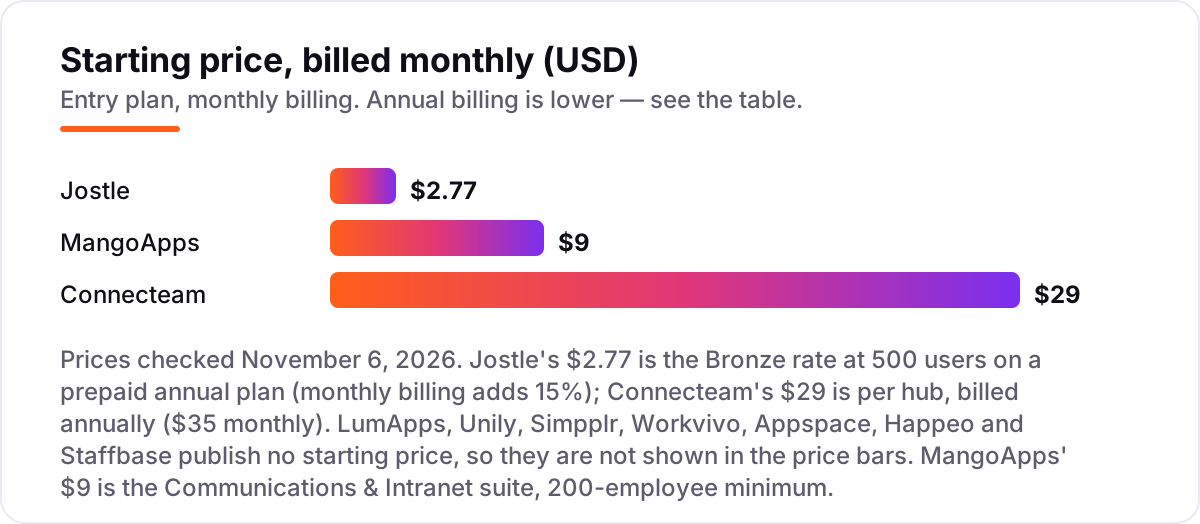
Take a 500-person company with a mix of desk and frontline staff. On published prices, Jostle Bronze costs $2.77 per user a month at 500 users, which is $1,385 a month or $16,620 a year on a prepaid annual plan. MangoApps Communications and Intranet costs $9 per employee a month, which is $4,500 a month or $54,000 a year at 500 employees, above its 200-employee minimum. Connecteam's Operations hub on Basic costs $29 a month for the first 30 users plus $0.80 per extra user, which is $405 a month or $4,860 a year; all three hubs on Basic cost $933 a month or $11,196 a year.
Two of those numbers need adjusting before they are real. Jostle's monthly billing adds 15%, so the same 500 users cost $1,593 a month if you refuse the annual prepay. Connecteam's $29 buys one hub, so a team that needs scheduling, chat and HR records pays $87 a month in base fees before the per-user charges, and every user past the 30th adds $1.80 a month across the three hubs.
The seven quote-only vendors cannot be priced this way at all. Their quotes depend on headcount, scope, support level and contract length, and the only honest comparison is the per-user math on each written quote: annual contract value divided by licensed headcount, with add-ons and implementation listed separately. Ask every vendor the same three questions — what is the per-user price at our headcount, what costs extra, and what does implementation cost — and compare the answers, not the headlines. If payroll is part of the same buying round, see our guide to the best payroll software for small business for the other half of the budget.
Annual billing cuts the bill on the three priced tools: Jostle's prepaid annual plan is the only way to get the $2.77 rate, Connecteam saves about 18% against monthly billing, and MangoApps bills annually at 15% off. One more cost to check before you commit: a second brand or subsidiary is usually a second contract on the enterprise tools, so price the second audience before you sign for the first.
Know the difference: employee portal vs intranet vs HR software
The confusion in this category is between three tools that share a login. An employee portal is the front door: one login for news, the directory, self-service and apps. An intranet is the content behind that door: pages, documents and knowledge. HR software is the system of record behind both: employee records, payroll and time off. Most tools in this list sell the portal and the intranet together, which is why the two words are used interchangeably — buy on who must log in and what they must do there, not on the label.
There is a second, quieter confusion: HR self-service is not HR software. A portal that lets employees update an address, book time off or read a payslip still needs an HR system underneath to store those records. All ten tools here connect to HR systems rather than replacing them, which is why the integration list matters more than the feature list. If a tool cannot sync with your HR system, every record gets typed twice.
A third distinction worth knowing is a portal for desk workers versus one for frontline workers. Desk portals assume a company email, a laptop and a Microsoft or Google login. Frontline portals assume a personal phone, no corporate email and minutes of attention between shifts. MangoApps, Staffbase and Connecteam are built for the second audience; the enterprise intranets are built for the first. Buying a desk portal for a frontline workforce is the most expensive mistake in this category, because the licence count looks right and the adoption never comes.
Quick comparison: tool type by need
| Buyer | Best pick | Why |
|---|---|---|
| Mid-size to enterprise, fast rollout | Simpplr | Live in 4–8 weeks, AI search, custom quote |
| Adoption is the biggest worry | Workvivo | Social feed, 4.8/5 from 2,663 reviews, custom quote |
| Large company on Microsoft 365 or Google | LumApps | Deep suite integration, custom quote |
| Transparent pricing matters most | Jostle | Published prices from $2.77/user/month |
| Google Workspace shop | Happeo | Channels and search built around Google, custom quote |
| Frontline team on a budget | Connecteam | One hub $29/month for 30 users, free up to 10 users |
Mistakes to avoid
- Comparing quotes without the per-user math. Seven vendors here publish no price, so a quote that looks cheap at 500 users can be dear at 2,000 — divide every annual contract by licensed headcount before you compare.
- Buying a desk portal for a frontline workforce. If staff have no corporate email, the enterprise intranets cannot reach them — shortlist MangoApps, Staffbase or Connecteam instead.
- Budgeting on the cheapest hub, then needing all three. Connecteam's $29 buys one hub, not the platform — price all the hubs you need on day one, not the one you start with.
- Skipping the pilot with real frontline staff. A demo with head office proves nothing about adoption — run one department's real news and documents through the trial first.
- Forgetting the second audience. A second brand, subsidiary or country is usually a second contract on the enterprise tools — price it before you sign, not after.
How we chose
We checked each vendor's own site on November 6, 2026 and recorded the starting price exactly as shown: Jostle's $2.77 is the Bronze rate at 500 users on its prepaid annual plan, Connecteam's $29 is the Basic rate per hub billed annually, and MangoApps' $9 is the Communications and Intranet suite rate. The other seven vendors publish no starting price, so they are listed as custom quote rather than estimated. Jostle's pricing page is an interactive calculator that renders no price as text, so its figure comes from Jostle's own blog post giving the Bronze rate at 500 users, cross-checked against the vendor-supplied G2 listing. Ratings come from G2 review pages crawled on November 6, 2026. We ranked the tools by fit for the most common buyer — a mid-size company buying its first portal or replacing a dead intranet — not by brand size. No vendor paid for a place in this list, and none of the links here are affiliate links.
What to do next
Start with a demo or trial of your top pick and run one real pilot — a department, its real news, its real documents — before you commit to a year. Check that frontline staff can log in and find a policy in under a minute, and that managers can publish news without asking IT. If the portal is sorted but new customers are not finding you, our monthly SEO service handles the visibility side — or compare providers in our guide to payroll software for small business. Once your tools are in place, find out what's holding your rankings back.
Your stack only works if people find you
SerpAstra fixes what keeps your site off page one and makes it easy for AI assistants to recommend.
Get a free audit→Sources we checked (20)
- Simpplr — simpplr.com (pricing on request; checked November 6, 2026)
- Workvivo — workvivo.com (pricing on request; checked November 6, 2026)
- LumApps — lumapps.com (pricing on request; checked November 6, 2026)
- Jostle pricing — jostle.me/pricing (checked November 6, 2026)
- Happeo — happeo.com (pricing on request; checked November 6, 2026)
- Connecteam pricing — connecteam.com/pricing (checked November 6, 2026)
- MangoApps pricing — mangoapps.com/pricing (checked November 6, 2026)
- Unily — unily.com (pricing on request; checked November 6, 2026)
- Staffbase — staffbase.com (pricing on request; checked November 6, 2026)
- Appspace — appspace.com (pricing on request; checked November 6, 2026)
- Simpplr reviews — g2.com/products/simpplr/reviews (checked November 6, 2026)
- Workvivo reviews — g2.com/products/workvivo/reviews (checked November 6, 2026)
- LumApps reviews — g2.com/products/lumapps/reviews (checked November 6, 2026)
- Jostle reviews — g2.com/products/jostle/reviews (checked November 6, 2026)
- Happeo reviews — g2.com/products/happeo/reviews (checked November 6, 2026)
- Connecteam reviews — g2.com/products/connecteam/reviews (checked November 6, 2026)
- MangoApps reviews — g2.com/products/mangoapps/reviews (checked November 6, 2026)
- Unily reviews — g2.com/products/unily/reviews (checked November 6, 2026)
- Staffbase reviews — g2.com/products/staffbase/reviews (checked November 6, 2026)
- Appspace reviews — g2.com/products/appspace/reviews (checked November 6, 2026)
Shamim
Founder of SerpAstra
A full-stack SEO and digital marketer who spends most days on Local SEO for dental practices, AI search visibility and lead generation.
Frequently asked questions
What is the best employee portal software?
Simpplr is the best fit for most mid-size and enterprise buyers, with deployment in four to eight weeks and AI search built in. Workvivo is the better pick when adoption is the worry, at 4.8/5 from 2,663 reviews. Jostle is the best choice when you need published prices, from $2.77 per user a month.
How much does employee portal software cost?
Only three tools here publish prices: Jostle from $2.77 per user a month, MangoApps from $9 per employee a month, and Connecteam from $29 a month per hub. The other seven vendors quote by headcount and scope, always on an annual contract, so ask each one for the per-user math before comparing.
Is there free employee portal software?
Only Connecteam has a genuinely free plan, covering up to 10 users across all hubs. Jostle and MangoApps offer 14- to 30-day free trials, Staffbase offers a free trial, and the rest are demo-led. No enterprise intranet in this list is free at any real headcount.
What is the difference between an employee portal and an intranet?
A portal is the front door: one login for news, the directory, self-service and apps. An intranet is the content behind that door: pages, documents and knowledge. Most tools here sell both together, so buy on who must log in and what they must do there, not on the label.
How long does it take to launch an employee portal?
Simpplr typically goes live in four to eight weeks, among the fastest enterprise deployments here. LumApps rollouts usually run three to six months with content migration. Jostle and Connecteam are the quickest for lean teams, since onboarding is included and no consultants are needed.
Do employees need a company email to use a portal?
Not with the frontline tools. MangoApps, Staffbase and Connecteam all let workers log in without a corporate email address, which is the whole point for deskless staff. The enterprise intranets assume a company identity, usually through Microsoft 365, Google Workspace or SSO.
Can I switch employee portal software later?
Yes, but plan the move like a migration, not a swap. Export pages, news history, the directory and permissions, then rebuild the information architecture in the new tool before go-live. Switching mid-year is fine for a portal, since it holds content rather than payroll or records.
Free SEO and AI visibility audit
Find out what is holding your rankings back
Send us your site. Within 2 business days you get a written audit, an AI visibility check and a short fix list ranked by impact. Free, with no contract attached.
Request my free audit→Related guides
 Accounting, Tax & Finance10 Best Payroll Software for Small Business in 2026, ComparedCompare the 10 best payroll software for small business on base price, tax filing and free trials, with every price checked November 4, 2026.Read guide →
 Digital Marketing & Ads9 Best Recruitment Marketing Platforms in 2026, ComparedCompare the 9 best recruitment marketing platforms on price, career sites, campaigns and CRM and trial options, with every price checked November 5, 2026.Read guide →
 Accounting, Tax & Finance10 Best Bookkeeping and Payroll Software for Small Business in 2026, ComparedThe 10 best bookkeeping and payroll software for small business, compared on real 2026 prices, per-employee payroll fees and free plans at your headcount.Read guide →