
10 Best Expense Management Software for Small Business in 2026, Compared
10 best expense management software for small business options compared on price, cards and receipt automation, with real prices checked November 2, 2026.
 Shamim Mia, Founder, SerpAstraLast verified November 2, 202613 min read
We compare pricing pages, documentation and public reviews. We never accept payment for rankings.

Key takeaways
- Ramp is the best pick for most small businesses: a full expense platform free at $0/user/month, with Brex free too and BILL Spend & Expense free at $0/user/month.
- The single most important buying factor is whether you will move spend onto a new corporate card: the free platforms only pay for themselves if you do.
- If you want to keep your own cards, Expensify Collect starts at $5/member/month and Zoho Expense Standard at $3/user/month billed annually.
- Every price below was checked on the vendor's own pricing page, or cross-checked against vendor-supplied pricing, on November 2, 2026. No ratings are shown because G2 pages were unreachable that day.
On this page
Quick comparison
| Tool | Best for | Starting price | Free plan |
|---|---|---|---|
| Ramp | US small businesses moving spend onto corporate cards who want the fullest free expense platform | $0/mo (Free) | Yes |
| Brex | Startups and growing companies that want free spend management plus banking in one place | $0/mo (Essentials) | Yes |
| BILL Spend & Expense | Small businesses already paying bills in BILL that want free cards, budgets and expense tracking | $0/mo | Yes |
| Expensify | Small teams that file lots of reimbursements and want to keep their existing corporate cards | $5/mo | Yes (individuals) |
| Zoho Expense | Budget-conscious teams, especially those already using Zoho Books or other Zoho apps | $3/mo (annual) | Yes (up to 3 users) |
| Navan | Small companies where travel booking and expense capture should live in one workflow | Free (5 users) | Yes (5 users free) |
| Sage Expense Management | Teams that want real-time expense control while keeping the corporate cards they already have | $11.99/mo (annual) | No (free trial) |
| Pleo | European small businesses that want company cards, receipts and reimbursements in pounds | £8/mo (Start) | No (free trial) |
| Spendesk | European finance teams consolidating cards, claims, invoices and budgets in one platform | Custom quote | No |
| SAP Concur | Larger companies with formal travel policies and many infrequent expense filers | $7/report | No |
Make one of these tools?
We re-check this list every quarter. Send a correction, request a review, or ask about a clearly labeled sponsored spot.
Request a listingThe best expense management software for small business

Ramp
Best for: US small businesses moving spend onto corporate cards who want the fullest free expense platform
Ramp is the best pick in this list for most small businesses because the free tier is unusually complete: unlimited cards, expenses by text or Slack, bill pay, travel booking and automatic receipt matching, all at $0/user/month. Ramp earns its revenue from card interchange rather than subscriptions, which is why the software itself costs nothing, and the Free plan already syncs with QuickBooks Online and Xero.
The catch is the card. Ramp only works this well if company spend moves onto Ramp cards, and the paid Plus plan at $15/user/month adds a platform fee that Ramp does not publish, so the upgrade cost is partly hidden. If a business is willing to switch cards, start here; if it must keep its own cards, Expensify or Sage Expense Management fit better.
What we like
- Free plan covers unlimited corporate cards, expenses by SMS or Slack, bill pay, travel booking and auto receipt matching at $0/user/month
- AI-driven expense reviews and auto-coded line items on Plus, with NetSuite and Sage Intacct integrations
- Reimbursements, approval workflows and QuickBooks Online and Xero sync included from the Free plan
Watch out for
- Plus adds an unpublished platform fee on top of $15/user/month, so the real Plus cost is not fully visible upfront
- Free plan excludes NetSuite and Sage Intacct integrations and multi-entity support, which need Plus or Enterprise
- US-focused: card eligibility and credit underwriting apply, and local-currency cards need Enterprise

Brex
Best for: Startups and growing companies that want free spend management plus banking in one place
Brex is the closest rival to Ramp, and it answers the same way: the Essentials plan is free at $0/user/month and covers cards, expenses, bill pay, travel booking and reimbursements, with AI-powered rules and real-time reporting included. Where Brex pulls ahead is global reach, with local-currency cards in more than 50 countries, and banking tools that sit next to the spend data.
The free plan caps at two entities, and the deeper ERP and HRIS integrations need Premium at $12/user/month. Brex also became a Capital One subsidiary in April 2026, and while products and pricing are unchanged for now, a buyer should expect the roadmap to shift over time. Pick Brex when the team spends across borders; pick Ramp for the deepest free automation in the US.
What we like
- Essentials includes corporate cards, expense management, bill pay, travel booking and reimbursements at $0/user/month
- AI-powered custom rules and real-time reporting on the free plan, with API access included
- Local-currency cards in 50+ countries and cards accepted in 210+ countries and territories
Watch out for
- Essentials is capped at two entities, so multi-entity companies need Premium at $12/user/month
- Advanced ERP and HRIS integrations and multi-entity support sit on Premium, not Essentials
- Now owned by Capital One after the April 2026 acquisition, so the roadmap may change over time

BILL Spend & Expense
Best for: Small businesses already paying bills in BILL that want free cards, budgets and expense tracking
BILL Spend & Expense, formerly Divvy, is the free option for teams that already run bills through BILL. The Spend & Expense plan itself is $0/user/month and includes corporate cards, budgets, expense tracking and AI receipt matching, with credit lines from $1,000 to $5 million on approval. It layers onto the paid AP and AR plans, so a finance team can run bills, payments and expenses in one place.
The free label needs one qualification: the AP and AR plans start at $49/user/month, and payment fees still apply on top, at $0.59 per ACH payment and $1.99 per mailed check. For a business that already pays for BILL, though, the expense side adds nothing to the software bill, which makes it the easiest free tier to adopt.
What we like
- Spend & Expense is $0/user/month with corporate cards, budgets, expense tracking and credit lines from $1,000 to $5M on approval
- AI-powered receipt matching and categorization with real-time spend visibility
- Layers onto BILL Accounts Payable and Receivable, so bills, payments and expenses share one platform
Watch out for
- Accounts Payable and Receivable are separate paid plans from $49/user/month, so the full platform is not free
- Per-transaction payment fees still apply, such as $0.59 per ACH payment and $1.99 per mailed check
- Credit lines are not guaranteed and depend on application approval

Expensify
Best for: Small teams that file lots of reimbursements and want to keep their existing corporate cards
Expensify is the classic expense reporter in this list, and it is still the simplest paid option for a team that files reimbursements and wants to keep its own cards. Collect costs $5/member/month with no annual commitment and covers unlimited receipt scans, approvals, reimbursements, bill pay and sync with QuickBooks and Xero. Employees snap a receipt, the app reads it, and managers approve in a chat-style interface.
The pricing catch sits one tier up. Control is $18/member/month billed annually, dropping toward $9 only when at least half of US spend runs on the Expensify Card, so the headline Control price is conditional. For most small teams Collect is enough, and at $5 a member it is the cheapest honest paid reporting price here.
What we like
- Collect covers unlimited SmartScans, approvals, reimbursements and QuickBooks and Xero sync for $5/member/month
- Works with the cards a team already carries, so no card switch is needed
- Charges per unique member, and next-day reimbursement is available for US teams
Watch out for
- No free business plan: the free tier is for individuals, so teams pay from the first member
- Control costs $18/member/month billed annually unless at least half of US spend runs on the Expensify Card
- Advanced approvals and deeper accounting integrations need Control, not Collect

Zoho Expense
Best for: Budget-conscious teams, especially those already using Zoho Books or other Zoho apps
Zoho Expense is the cheapest paid entry plan in this list: Standard costs $3/user/month billed annually, or $4 billed monthly, and the free plan covers up to 3 users with receipt auto-scan, mileage tracking and accounting integrations. It handles the core job well, with receipt scanning, approval workflows, policy checks, per-diem and mileage, plus corporate card feeds on Standard.
Two limits matter. Autoscans are capped at 20 per user a month on Standard, so a team that scans hundreds of receipts will need Premium, and bank feeds live in Zoho Books rather than in Expense, which adds cost for teams outside the Zoho ecosystem. For a small Zoho shop, though, it is the lowest-cost route to proper expense reporting.
What we like
- Standard is $3/user/month billed annually, the cheapest paid entry plan in this list
- Free plan covers up to 3 users with receipt auto-scan, mileage tracking and accounting integrations
- Mileage, per-diem and multi-level approvals included from the Standard plan
Watch out for
- Receipt autoscans are capped at 20 per user a month on Standard, so heavy scanners need Premium
- Bank feeds live in Zoho Books rather than in Expense itself, which adds cost for non-Zoho users
- Every user, including accountants, counts as a paid seat

Navan
Best for: Small companies where travel booking and expense capture should live in one workflow
Navan, formerly TripActions, is the natural pick when travel is a major spend category. It combines travel booking with expense capture, so a trip booked in Navan flows into expenses without re-entry, and travel policy controls apply at booking time rather than after the money is spent. Travel booking is free for eligible companies up to 300 employees, and expense management is free for the first 5 monthly expensing users.
Beyond those free users, expense costs $15/user/month, and only people who submit a transaction that month count, so the bill follows actual filers rather than headcount. For a team that travels weekly, Navan removes the worst part of expense reporting, which is reconstructing a trip after the fact. For a team that rarely travels, a cheaper reporting tool makes more sense.
What we like
- Travel booking is free for eligible companies up to 300 employees, funded by travel-supplier commissions
- Trips booked in Navan flow into expenses automatically, so the report largely writes itself
- Only people who submit a transaction in the month count as expensing users
Watch out for
- Expense costs $15/user/month after the first 5 users, so the bill grows with every regular submitter
- Companies over 300 employees move to custom Enterprise pricing
- Less useful for teams that rarely travel, where a reporting-only tool costs less

Sage Expense Management
Best for: Teams that want real-time expense control while keeping the corporate cards they already have
Sage Expense Management, formerly Fyle after Sage acquired it in 2025, is built for companies that want real-time expense control without changing corporate cards. Direct integrations with existing Visa, Mastercard and American Express cards deliver transactions instantly on swipe, so finance sees spend as it happens, and employees can text a receipt that the system codes and matches automatically.
Growth costs $11.99/active user/month billed annually, with a 5-user minimum, and the plan charges only for active users, so onboarding the whole company does not mean paying for everyone. The trade-off is the lack of a free plan and the one-time implementation fee on some two-way accounting integrations. Pick it when keeping the current cards matters more than getting software for free.
What we like
- Direct feeds from existing Visa, Mastercard and American Express cards show transactions the moment they are swiped
- Charges only for active users, so staff who file nothing in a month cost nothing
- Receipts can be submitted by text, email or app, with AI coding and matching to the right category
Watch out for
- Growth has a 5-user minimum billing, and Business needs 10 users, so very small teams pay for seats they may not use
- Two-way integrations with some accounting tools carry a one-time implementation fee
- No free plan, and the monthly-billed rate is higher than the annual rate shown first

Pleo
Best for: European small businesses that want company cards, receipts and reimbursements in pounds
Pleo is the cleanest European card-and-receipt platform for a small team, and it is priced in pounds: Start costs £8 a month for a single user, Build runs from £14/user/month and adds reimbursements, mileage and per-diem handling, and higher plans add cashback and multi-entity management. Cards, receipts and approvals live in one app, with two-way sync to Xero and QuickBooks.
The honest limitation is per-user pricing. Every extra cardholder adds to the monthly bill, and the free Starter tier Pleo once offered for up to three users is gone, so there is no free way in anymore. For a UK or European team that wants a tidy card platform and bills in pounds, it is still the most straightforward option here.
What we like
- Start covers company cards and real-time expense tracking from £8 a month for a single user
- Build adds reimbursements, mileage and per-diem handling from £14/user/month
- Two-way sync with Xero and QuickBooks, plus native NetSuite, Sage and DATEV integrations on higher plans
Watch out for
- Priced in pounds with per-user add-ons, so the bill scales with every extra cardholder
- The free Starter tier for up to 3 users was removed, so there is no free way to run Pleo now
- Cashback and multi-entity management sit on the higher Advanced and Beyond plans

Spendesk
Best for: European finance teams consolidating cards, claims, invoices and budgets in one platform
Spendesk is the quote-based European answer to this category: a fixed monthly platform fee plus transaction fees, with no per-user or per-card charges, so a 300-person company where only 15 people submit expenses is not penalized for unused seats. Cards, expense claims, invoices, budgets and approvals sit in one platform, and the built-in wallet pays reimbursements directly instead of waiting for payroll.
The trade-off is transparency. Spendesk publishes no price, so the cost cannot be budgeted without a sales conversation, and accounts payable, procurement, multi-entity and ERP integrations are add-ons rather than included. It fits a European finance team consolidating spend in one place; a small team that wants a number today should look at Pleo instead.
What we like
- Fixed monthly platform fee plus transaction fees, with no per-user or per-card charges
- Built-in wallet pays reimbursements directly, without waiting for the monthly payroll run
- Spendesk AI reads invoices and receipts, pre-fills bookkeeping fields and flags duplicates
Watch out for
- No published price, so a team cannot budget the cost without a sales conversation
- Accounts payable, procurement, multi-entity and ERP integrations are extra add-ons
- Card FX fees run to 2.99% in the EEA and UK, which adds up on cross-border spend

SAP Concur
Best for: Larger companies with formal travel policies and many infrequent expense filers
SAP Concur is the long-standing default for large companies, and it is the only major tool here priced per report rather than per user. Base starts at $7 per expense report and Plus at $11, both with unlimited users, while Premium, which bundles Concur Travel and Intelligence, is custom-priced. Per-report pricing suits a company where many employees travel rarely, because no monthly seat is paid for someone who files two reports a year.
For a small business, Concur is usually the wrong shape. A whole company filing monthly will pay more per report than a per-user tool costs per seat, and implementation runs long, with an interface that public reviews regularly call dated. It earns its place here as the benchmark for formal travel programs, not as the pick for a ten-person team.
What we like
- Per-report pricing suits companies where many employees file rarely, since unused seats cost nothing
- Base and Plus both cover unlimited users, with Plus adding ExpenseIt, reporting and a user support desk
- Deep policy controls, audit tools and integrations with most major card issuers and ERPs
Watch out for
- The bill grows with report volume, so a whole company filing monthly can cost more than per-user tools
- Premium, which adds Concur Travel and Intelligence, is custom-priced with no list price
- Public reviews regularly mention a dated interface, long implementation and heavy administration
The best expense management software for small business is the one that matches how the team already spends: card-first platforms like Ramp are free when spend moves onto their cards, while reporting tools like Expensify work with the cards a team already carries. This list ranks ten tools by fit for a typical small business, with every starting price checked on November 2, 2026.
Start with the free tiers
Three tools in this list cost nothing in software fees: Ramp, Brex and BILL Spend & Expense all run free core plans funded by card interchange, not subscriptions. That is a real business model, not a trial, and the free tiers cover cards, expenses, approvals and accounting sync. The catch is the card: the value only appears when company spend moves onto the vendor's own corporate card, which needs a credit application and a change in how the team pays.
If the team will not switch cards, the free options narrow fast. Zoho Expense has a free plan for up to 3 users, and Navan Expense is free for the first 5 monthly expensing users, but a team of ten that keeps its own cards should expect to pay. The cheapest honest paid prices are Zoho Expense Standard at $3/user/month billed annually and Expensify Collect at $5/member/month, and both work with existing cards.
How to choose the best expense management software for small business
- Answer the card question first. If the team will move spend onto a new corporate card, Ramp, Brex or BILL give a full platform free. If not, shortlist Expensify, Zoho Expense and Sage Expense Management, which work with existing cards.
- Count active filers, not headcount. Some tools charge per user, others per active user, and Concur charges per report. A 30-person company where only 8 people file expenses pays very different amounts on each model.
- Check the accounting sync on the plan you will buy. Ramp Free covers QuickBooks Online and Xero, but NetSuite needs Plus. Read the integration list for the entry plan, not the top tier.
- Price the payment fees, not just the subscription. BILL charges $0.59 per ACH payment and $1.99 per mailed check, and Ramp charges $0.65 per 1099 filing, so a business that pays many vendors by check will feel those fees.
- Test receipt capture with real receipts. SmartScan-style capture is the feature employees touch every day, so run the trial with the messiest receipts the team actually has, not clean ones.
- Check the free tier limits before rolling out. Brex Essentials caps at two entities, Zoho's free plan covers 3 users, and Navan's free expense tier covers 5 users, so a growing team can outgrow free faster than expected.
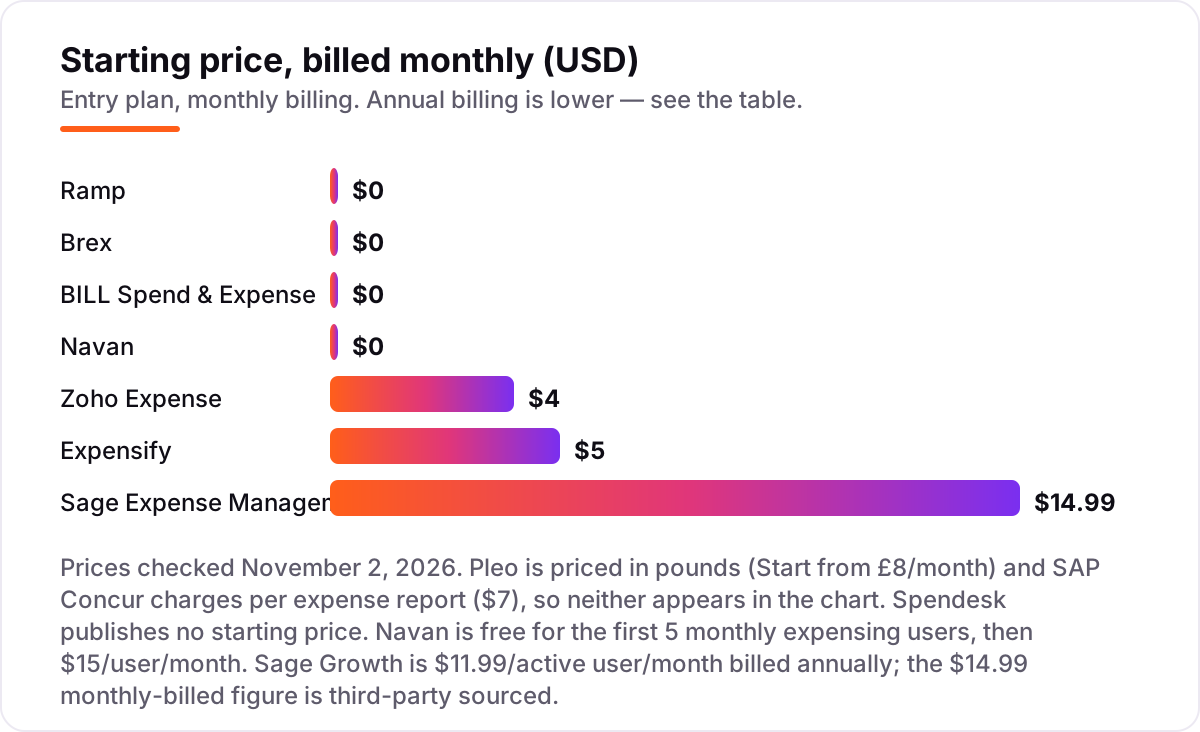
Expense management software for small business pricing: what you will actually pay
Take a 10-person business where 8 people file expenses each month. On Ramp Free, the software costs $0 a month, and on Ramp Plus the same team would pay 10 times $15, or $150 a month, plus the platform fee Ramp does not publish. On Expensify Collect the team pays 10 times $5, or $50 a month with no annual commitment, while Zoho Expense Standard costs 10 times $3, or $30 a month billed annually, and 10 times $4, or $40 a month billed monthly.
Navan Expense is free for the first 5 monthly expensing users, so a team with 8 filers pays for 3 users at $15, or $45 a month. Sage Expense Management Growth, billed annually, costs 10 active users times $11.99, or $119.90 a month, with a 5-user minimum that a smaller team should note. SAP Concur Base works differently: if those 8 filers submit one report each a month, the cost is 8 times $7, or $56 a month, and it rises with every extra report filed.
Then add the payment fees, which is where the free plans stop being free. A business paying 10 vendors by ACH through BILL owes 10 times $0.59, or $5.90 a month in transaction fees, and 10 mailed checks would cost $19.90. Ramp charges $0.65 per 1099 filing, so a business filing 20 of them at year-end pays $13. None of these fees is large on its own, but they belong in the budget next to the subscription, and a monthly SEO plan that keeps the business visible costs far more than any of them, so the expense tool should never be the line item that surprises the owner.
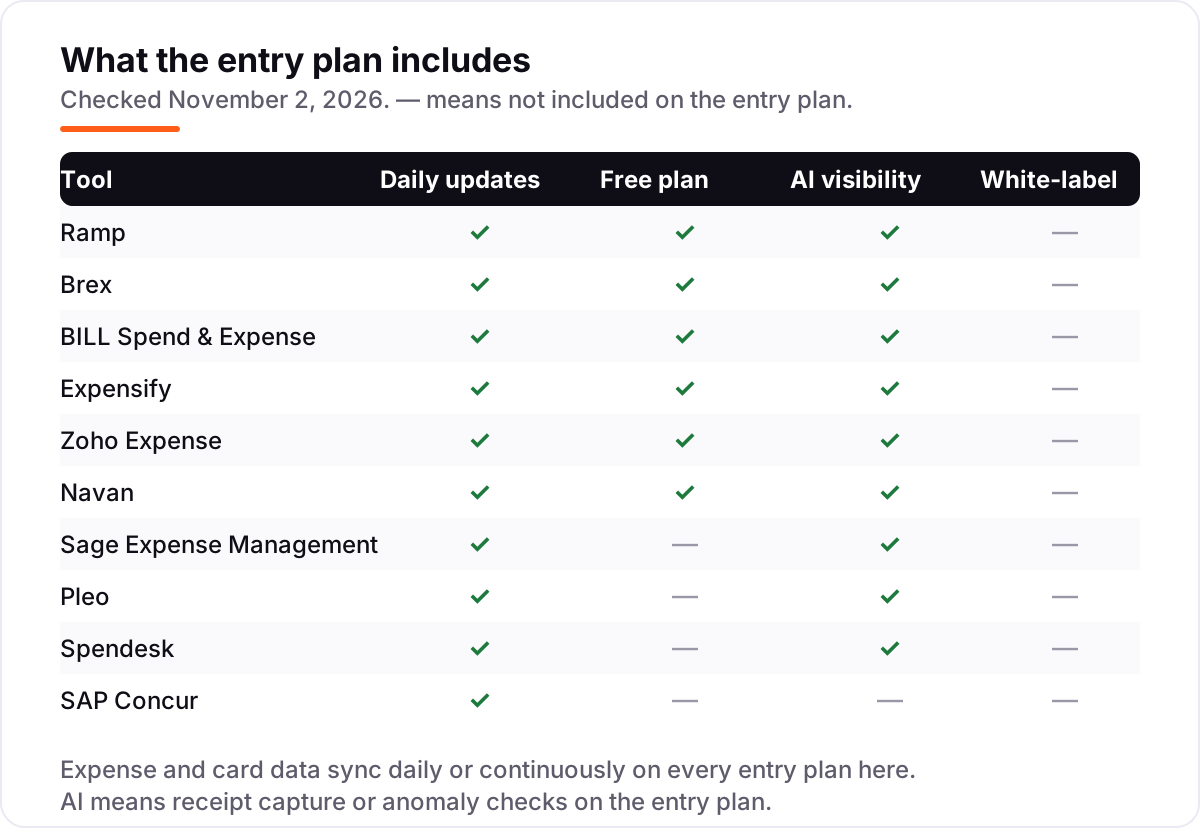
Know the difference: expense management vs expense tracking vs corporate cards
These three terms get used as if they mean the same thing, and they do not. Expense tracking records what was already spent: receipts are scanned, card feeds are imported, and the totals land in a report. It looks backward, and it is the job a spreadsheet plus a receipt app can mostly do. Expense management adds control before the money goes out: budgets per team, approval workflows, policy checks that flag out-of-policy spend, and cards with limits that stop a purchase before it happens.
Corporate cards are the payment rail underneath both. A corporate card on its own is just a way to pay; paired with an expense platform, it becomes the control point, because the card can be frozen, limited by category or vendor, and matched to a receipt automatically. That is why Ramp, Brex and BILL can give the software away: the card earns interchange on every transaction, so the software is the hook and the card is the revenue.
The practical test is simple. If the business only needs to record spending for the books, a tracking tool or the accounting software itself is enough. If the owner wants to approve spending before it happens and see it in real time, that is expense management, and it usually means adopting the vendor's card or paying for a reporting tool like Expensify. Before writing the policy that governs all of it, run the draft through the free readability checker so employees can actually follow it.
Quick comparison: tool type by need
| Buyer | Best pick | Why |
|---|---|---|
| Small business that will switch cards | Ramp | Free at $0/user/month with the fullest free plan here |
| Startup that wants cards plus banking | Brex | Essentials free, with global cards and API access |
| Team already paying bills in BILL | BILL Spend & Expense | Free cards and budgets that sit on top of BILL AP |
| Team keeping its own cards, on a budget | Expensify or Zoho Expense | Collect $5/member/month; Zoho Standard $3/user/month billed annually |
| Company where travel is the big spend | Navan | Travel free up to 300 employees; first 5 expensing users free |
| Team that must keep existing cards | Sage Expense Management | Real-time feeds from Visa, Mastercard and Amex from $11.99/active user/month billed annually |
How we chose
We checked each vendor's own pricing page on November 2, 2026 and recorded the starting price exactly as shown, including the annual-billing figure where the page lists one; Ramp, Brex, BILL, Navan and Sage Expense Management were read directly from their pricing pages that day. The Expensify, Zoho Expense, Pleo, Spendesk and SAP Concur pricing pages did not load during the check, so those figures were cross-checked against the vendors' published pricing as carried by G2's vendor-supplied pricing data and multiple 2026 comparisons, and the Sage $14.99 monthly-billed figure is third-party sourced because the vendor page lists the $11.99 billed-annually rate only. No ratings are shown in this list because the G2 review pages were unreachable on November 2, 2026, so no score is estimated or carried over from older checks. We ranked the tools by fit for the most common buyer, a small business with a handful of regular expense filers, not by brand size. No vendor paid for a place in this list, and none of the links here are affiliate links.
What to do next
Start with the card question: if the team will switch cards, take the free plan of Ramp, Brex or BILL and run real spending through it for a month. If the team keeps its own cards, trial Expensify Collect and Zoho Expense side by side with the same receipts and compare which one the team actually uses. If travel dominates spending, look at Navan before either, and if the business already runs on one of the best SEO companies for small business or a marketing automation for small business stack, keep the expense tool separate from the marketing stack and judge it on its own numbers. Once your tools are in place, find out what's holding your rankings back.
Your stack only works if people find you
SerpAstra fixes what keeps your site off page one and makes it easy for AI assistants to recommend.
Get a free audit→Sources we checked (10)
- Ramp pricing — ramp.com/pricing (checked November 2, 2026)
- Brex pricing — brex.com/pricing (checked November 2, 2026)
- BILL pricing — bill.com/product/pricing (checked November 2, 2026)
- Expensify pricing — expensify.com/pricing (checked November 2, 2026)
- Zoho Expense pricing — zoho.com/expense/pricing.html (checked November 2, 2026)
- Navan pricing — navan.com/pricing (checked November 2, 2026)
- Sage Expense Management pricing — fylehq.com/pricing (checked November 2, 2026)
- Pleo pricing — pleo.io/en/pricing (checked November 2, 2026)
- Spendesk pricing — spendesk.com/en/pricing (checked November 2, 2026)
- SAP Concur pricing — concur.com/en-us/pricing (checked November 2, 2026)
Shamim
Founder of SerpAstra
A full-stack SEO and digital marketer who spends most days on Local SEO for dental practices, AI search visibility and lead generation.
Frequently asked questions
What is the best expense management software for small business?
Ramp is the best pick for most small businesses: a full expense platform free at $0/user/month, funded by card interchange. Brex and BILL Spend & Expense are free too. If the team will not switch cards, Expensify Collect at $5/member/month is the simplest paid option.
How much does expense management software cost per user?
From $0 to about $15 per user a month. Ramp, Brex and BILL are free, Zoho Expense Standard is $3/user/month billed annually, Expensify Collect is $5/member/month, and Ramp Plus and Navan Expense are $15/user/month. Card fees and payment fees sit on top of some of these prices.
Is there really free expense management software?
Yes, with a condition. Ramp, Brex and BILL Spend & Expense run genuinely free core plans funded by card interchange, so the software costs nothing but the team must use their cards. Zoho Expense also has a free plan for up to 3 users, and Navan Expense is free for the first 5 monthly expensing users.
What is the difference between expense management and expense tracking?
Expense tracking records what was already spent, usually from receipts and card feeds. Expense management adds control before the money goes out: budgets, approval workflows, policy checks and corporate cards with spending limits. Tracking looks backward; management sets the rules in advance and enforces them as spending happens.
Do I need a corporate card to use expense management software?
Not always. Ramp, Brex and BILL require their own cards for the free plans to make sense, since card interchange funds the software. Expensify, Zoho Expense and Sage Expense Management work with the cards a team already carries, so they fit businesses that cannot or will not switch cards.
Can expense management software connect to QuickBooks or Xero?
Yes, all ten tools in this list sync with QuickBooks Online, Xero or both, though the depth varies. Ramp Free covers QuickBooks Online and Xero, while NetSuite and Sage Intacct need Ramp Plus. Check the integration list on the plan you will actually buy, not the top tier, before committing.
What should a small business check before paying for expense software?
Four things: whether the price is per user, per active user or per report; whether the free tier needs the vendor's own card; what counts as a user, since some tools charge for everyone and others only for active filers; and whether payment fees such as ACH or check charges apply. The worked example in this guide prices each of these.
Free SEO and AI visibility audit
Find out what is holding your rankings back
Send us your site. Within 2 business days you get a written audit, an AI visibility check and a short fix list ranked by impact. Free, with no contract attached.
Request my free audit→Related guides
 SEO & AI Search8 Best SEO Companies for Small Business in 20268 best SEO companies for small business compared on price, contracts and AI visibility, with prices checked on each agency's own site on November 1, 2026.Read guide →
 MarketingMarketing automation for small businesses: what to automate (and what not to)Marketing automation for small businesses, explained: what to automate first, what to keep human, and the tools that save hours without losing customers.Read guide →
 SEO & AI Search12 Best Marketing Platforms for Small Business SEO in 2026, ComparedThe 12 best marketing platforms for small business SEO, compared on real prices, SEO tools and AI visibility. Every price checked November 1, 2026.Read guide →