
9 Best Expense Software for Small Business in 2026, Compared
9 best expense software for small business compared on price, free plans, cards and AI receipt capture — with real prices checked November 2, 2026.
 Shamim Mia, Founder, SerpAstraLast verified November 2, 202612 min read
We compare pricing pages, documentation and public reviews. We never accept payment for rankings.

Key takeaways
- Ramp is the best overall pick for most small businesses: a genuinely free plan with unlimited cards, AI receipt matching and bill pay, with Plus at $15/user/month. Expensify ($5/member/month) is the best choice if you want to keep your own cards, and BILL Spend & Expense is free too.
- The single most important buying factor is whether you will switch cards: Ramp, BILL and Brex are free because they earn from card spend, while Expensify, Zoho Expense and Fyle charge a subscription so you can keep your current bank and cards.
- Free plans are real here — four of the nine tools start at $0 — but check what the free tier leaves out: NetSuite sync, multi-entity support and advanced approvals usually need a paid plan.
- Every price below was checked on the vendor's own pricing page on November 2, 2026. Fyle's $14.99 monthly-billed figure is third-party sourced; its own page lists only the $11.99 billed-annually rate.
On this page
Quick comparison
| Tool | Best for | Starting price | Free plan |
|---|---|---|---|
| Ramp | Small businesses ready to move spending onto Ramp cards who want the most automation for $0 in subscription fees | $0/mo (Free) | Yes (free plan) |
| Expensify | Small businesses that want to keep their existing bank and cards and pay a flat per-person fee | $5/mo (Collect) | No (30-day trial) |
| BILL Spend & Expense | QuickBooks and Xero users who want corporate cards, budgets and expense tracking at no subscription cost | $0/mo | Yes (free plan) |
| Brex | Funded startups and global teams that want free cards, banking and travel in one platform | $0/mo (Essentials) | Yes (free plan) |
| Zoho Expense | Budget-conscious small businesses, especially teams already using Zoho Books | $4/mo | Yes (up to 3 users) |
| Navan | Small businesses where travel booking and expense reporting belong in one workflow | $0 (first 5 users) | Yes (5 users free) |
| Fyle (Sage Expense Management) | Finance teams that want to keep their existing cards and pay only for employees who actually file expenses | $14.99/mo | No (trial available) |
| QuickBooks Online | Small businesses that want expense tracking inside the accounting software they already use | $38/mo | Yes (limited free plan) |
| FreshBooks | Freelancers and service businesses that bill clients and want expenses tracked next to invoices | $23/mo | No (30-day trial) |
Make one of these tools?
We re-check this list every quarter. Send a correction, request a review, or ask about a clearly labeled sponsored spot.
Request a listingThe best expense software for small business

Ramp
Best for: Small businesses ready to move spending onto Ramp cards who want the most automation for $0 in subscription fees
Ramp earns the top spot because its free plan is a complete expense system, not a teaser: unlimited cards, expenses submitted by text or Slack, automatic receipt collection and matching, bill pay, and travel booking, all for $0 per user. The catch is the card. Every feature runs on Ramp cards, so a business that wants to keep its existing bank and card program should look at Expensify or Zoho Expense instead.
The paid step up is Plus at $15 per user a month, which adds AI expense reviews, automatic card locking when receipts go missing, and NetSuite, Sage Intacct and Acumatica integrations, plus a platform fee based on team size that Ramp does not publish. That unpublished fee is the one thing to get in writing before you upgrade; on the free plan, there is nothing to negotiate.
What we like
- Free plan covers unlimited cards, expenses via SMS or Slack, auto-receipt matching, bill pay and travel booking
- Plus adds AI expense reviews, auto-locking cards for missing receipts and NetSuite, Sage Intacct and Acumatica integrations
- No card replacement fee, late fee or interest on the Ramp card, and no fees on wires or same-day ACH via Bill Pay
Watch out for
- Everything runs on Ramp cards — you cannot keep your existing bank and card program
- Plus adds a platform fee based on team size that Ramp does not publish, so the real Plus cost is not fully quotable up front
- Bill Pay fees apply per payment ($0.59 per standard ACH, $1.99 per check) unless paid from a Ramp Checking Account

Expensify
Best for: Small businesses that want to keep their existing bank and cards and pay a flat per-person fee
Expensify is the best choice for a business that refuses to switch cards. Collect costs a flat $5 per member a month with no annual commitment and works with Amex, Chase, Citi and most other corporate cards, covering unlimited SmartScans, approvals, bill pay, invoicing, global reimbursements and direct sync to QuickBooks and Xero. It is the only tool here that gives you the full expense workflow on somebody else's card at a flat per-person price.
The pricing gets more complicated one tier up. Control costs $18 per member a month on an annual plan, or $36 pay-per-use, dropping to as low as $9 with enough spending on the Expensify Card, and it is the tier that adds multi-level approvals, ERP integrations and advanced policy controls. Budget on the $5 figure and treat Control as a separate decision.
What we like
- Works with any corporate card — Amex, Chase, Citi and most others — with no card switch required
- Collect is a flat $5 per member a month with no annual commitment, covering SmartScan, approvals, bill pay and invoicing
- Direct sync to QuickBooks and Xero plus global reimbursements and travel booking on the entry plan
Watch out for
- Control costs $18 per member a month on an annual plan (as low as $9 with enough Expensify Card spend), and $36 pay-per-use
- Advanced controls, multi-level approvals and ERP integrations sit on Control, not the $5 Collect plan
- Annual Control subscriptions lock in a seat count for 12 months and cannot be reduced until renewal

BILL Spend & Expense
Best for: QuickBooks and Xero users who want corporate cards, budgets and expense tracking at no subscription cost
BILL Spend & Expense, formerly Divvy, is the free option for businesses that live in QuickBooks or Xero. The software costs $0 per user a month at any headcount, with corporate cards, budgets, virtual cards and AI-powered receipt matching and categorization included, and credit lines from $1,000 to $5 million subject to approval. Managers see spending as it happens instead of at month end.
The free tier is the whole expense product, but it is not the whole BILL platform. Accounts payable and receivable are separate paid plans starting at $49 per user a month, so a business that also wants bill automation will pay for that part. If all you need is cards, budgets and expense tracking, the $0 price is hard to argue with, though some reviewers say emailed receipts do not always match automatically.
What we like
- Spend & Expense is $0 per user per month with no subscription or per-user software fees at any headcount
- Real-time spend visibility with budgets, virtual cards and AI-powered receipt matching and categorization
- Formerly Divvy; pairs with BILL AP and AR on one platform and syncs with QuickBooks and Xero
Watch out for
- AP and AR are separate paid plans from $49/user/month, so the full BILL platform is not free
- Credit lines ($1,000 to $5 million) are subject to approval and are not guaranteed
- Some reviewers report receipts emailed in do not always match to the right transaction automatically

Brex
Best for: Funded startups and global teams that want free cards, banking and travel in one platform
Brex packs the most into a free plan. Essentials costs $0 per user a month and includes global cards accepted in 210-plus countries, AI-powered custom rules, bill pay, reimbursements, travel booking, real-time reporting and API access, plus a business account and treasury product. For a funded startup or a team that spends internationally, that is a serious finance stack with no subscription.
Two limits matter. Eligibility is strict: sole proprietors are excluded and approval is not guaranteed, so plenty of very small businesses cannot open an account at all. And the features that growing teams eventually want — multiple expense policies, dynamic approval chains, AI compliance auditing and multi-entity support — need Premium at $12 per user a month. International card spend can also carry an FX markup of up to 3%.
What we like
- Essentials is free and includes global cards, AI-powered custom rules, bill pay, reimbursements and travel booking
- Cards accepted in 210+ countries with local-currency cards in 50+ countries
- Accounting integrations with QuickBooks and Xero on the free plan, plus API access and real-time reporting
Watch out for
- Eligibility is strict — sole proprietors are excluded and approval is not guaranteed
- Multiple expense policies, dynamic approval chains and AI compliance auditing need Premium ($12/user/month)
- International card spend can carry an FX markup of up to 3%

Zoho Expense
Best for: Budget-conscious small businesses, especially teams already using Zoho Books
Zoho Expense is the cheapest paid plan in this list and the natural pick for teams already using Zoho Books. Standard costs $4 per user a month, or $3 billed annually, and adds corporate card management, real-time card feeds, multi-level approvals and cash advances. The free plan covers up to 3 users with AI receipt capture, mileage tracking and accounting integrations, so a micro-business may never pay.
The limits are scan caps and add-ons. Standard allows 200 receipt Autoscans per user a month, and 20 on the free plan, so a team that files hundreds of receipts will need Premium at $6 a month, or $5 billed annually, for 1,000 scans. ERP and HRMS integrations are a paid add-on on Standard, and reviewers say the settings take time to learn. For a Zoho household, the price is hard to beat.
What we like
- Cheapest paid plan here: Standard is $4 per user a month, or $3 billed annually
- Free plan for up to 3 users with AI receipt capture, mileage tracking and accounting integrations
- Bills only active users, and Zia AI adds receipt scanning, fraud detection and an AI insights dashboard
Watch out for
- Standard caps receipt Autoscans at 200 per user a month (20 on the free plan); Premium allows 1,000
- ERP and HRMS integrations are a paid add-on on Standard, not included
- Reviewers note the settings and approval setup take time to learn, and some workflows feel rigid

Navan
Best for: Small businesses where travel booking and expense reporting belong in one workflow
Navan solves the travel-expense problem at the source. Travel booking is free for companies with up to 300 employees, funded by travel provider commissions, and expenses are captured automatically when trips are booked, so the report largely writes itself. The first 5 monthly expensing users are free, and after that expense costs $15 per user a month, counted only for people who submit a transaction that month.
Policy enforcement happens at booking, not after the money is spent, which is the feature that saves finance teams the most chasing. The trade-off is that Navan is a travel platform first: businesses that rarely travel will pay $15 per user for an expense tool when Ramp or BILL costs nothing. Reviewers note the accounting sync can need manual cleanup. Buy Navan when travel is a real spend category.
What we like
- Travel booking is free for companies up to 300 employees, funded by travel provider commissions
- Expenses are captured automatically when trips are booked, so the report largely writes itself
- Policy is enforced at booking time, and the Ava AI assistant helps travelers rebook when plans change
Watch out for
- Expense costs $15 per user a month once past the 5 free expensing users, which adds up fast for larger teams
- Travel is free only for companies with 300 or fewer employees; larger companies move to custom Enterprise pricing
- Reviewers note ERP sync and export can need manual cleanup, and the accounting layer feels less mature than the booking side

Fyle (Sage Expense Management)
Best for: Finance teams that want to keep their existing cards and pay only for employees who actually file expenses
Fyle, now Sage Expense Management, is built for finance teams that want to keep their cards. Its Growth plan costs $11.99 per active user a month billed annually and bills only for people who create an expense or have a card transaction that month, so a team with 50 employees but 12 regular spenders pays for 12. Real-time card feeds, receipt capture by text, email or app, and AI auto-categorization come standard.
The catches are the minimums and no free plan. Growth bills a minimum of 5 users and Business a minimum of 10, and two-way accounting integrations carry a one-time implementation fee. There is no free plan, only a trial, and the $14.99 monthly-billed figure comes from a third-party directory, not Fyle's own page, which lists only the annual rate. For card-keeping teams, the active-user model still saves money.
What we like
- Bills only active users — people who create an expense or have a card transaction that month
- Real-time card feeds for Visa and Mastercard plus receipt capture by text, Gmail, Outlook or mobile app
- AI auto-categorization, Copilot spend insights and two-way sync with QuickBooks, Xero and Sage Intacct
Watch out for
- Growth has a 5-user minimum billing, and Business a 10-user minimum, so very small teams pay for seats they do not use
- No free plan — only a free trial — and two-way integrations carry a one-time implementation fee
- Reviewers note duplicate expenses can appear when a card charge posts days after the receipt, and some reports take time to build

QuickBooks Online
Best for: Small businesses that want expense tracking inside the accounting software they already use
QuickBooks Online is the accounting-first choice: expense tracking lives inside the books, so bank feeds categorize spending, receipts attach to transactions, and the numbers flow straight into invoicing, reporting and tax-ready records with no export step. Simple Start costs $38 a month for one user plus two accountants, and a free plan covers two invoices a month for the very smallest businesses.
The pricing structure is the thing to check before you commit. QuickBooks charges per company, not per user, so a second person forces Essentials at $85 a month, and Intuit has raised prices repeatedly, including again for renewals from August 1, 2026. Payroll and inventory need higher plans. Buy it when you want one system for books and expenses, not when you only need expense tracking.
What we like
- Bank feeds categorize expenses automatically and learn from your rules, with receipt capture on every plan
- Expenses flow straight into invoicing, reporting and tax-ready books with no export step
- The largest app ecosystem here, with 118 integrations listed on G2, plus accountant access on every plan
Watch out for
- Priced per company, not per user — Simple Start covers 1 user, so a second person forces Essentials at $85/month
- Intuit raises prices regularly; Essentials, Plus and Advanced all rose again for renewals from August 1, 2026
- Payroll, inventory and project profitability need higher plans or paid add-ons

FreshBooks
Best for: Freelancers and service businesses that bill clients and want expenses tracked next to invoices
FreshBooks is the invoicing-first choice for freelancers and service businesses. Lite costs $23 a month and pairs unlimited expenses and time tracking with invoicing, estimates, automated bank import and mobile mileage tracking, all in a login that takes less than a day to learn. For a consultant or designer who bills clients, expenses sit next to the invoices they belong to, which is the whole appeal.
The limits are client caps and seat fees. Lite covers only 5 billable clients and leaves out bank reconciliation, double-entry reports and accountant access, which arrive on Plus at $43 a month. Every plan includes just one user, with each extra team member at $11 a month, and there is no free plan, only a 30-day trial. The $4.60 headline on the pricing page is a limited-time offer, not the list price.
What we like
- Unlimited expenses and time tracking on every plan, with automated bank import and mobile mileage tracking
- Invoicing, estimates, late fees and payment collection sit in the same login as expenses
- Plus ($43/month) adds bank reconciliation, double-entry reports, receipt capture and accountant access
Watch out for
- Lite caps at 5 billable clients and leaves out bank reconciliation, double-entry reports and accountant access
- Every plan includes only 1 user; each extra team member costs $11 a month
- No free plan — only a 30-day trial — and the headline prices on the page are time-limited offers, not list prices
The best expense software for small business is the one your team actually uses, so this list is sorted by how small businesses really buy: free card-based platforms first, then low-cost subscriptions that let you keep your own bank. Every price below comes from the vendor's own pricing page, checked November 2, 2026, and the nine tools are ranked by fit for a typical small business, not by brand size.
How to choose the best expense software for small business
- Decide the card question first. Ramp, BILL Spend & Expense and Brex are free because they earn from their own cards. If you will not switch cards, your shortlist is Expensify, Zoho Expense and Fyle.
- Count who actually files expenses. Some tools bill every user; others, like Zoho Expense and Fyle, bill only active users. A 30-person team with 8 regular spenders pays very different amounts on each model.
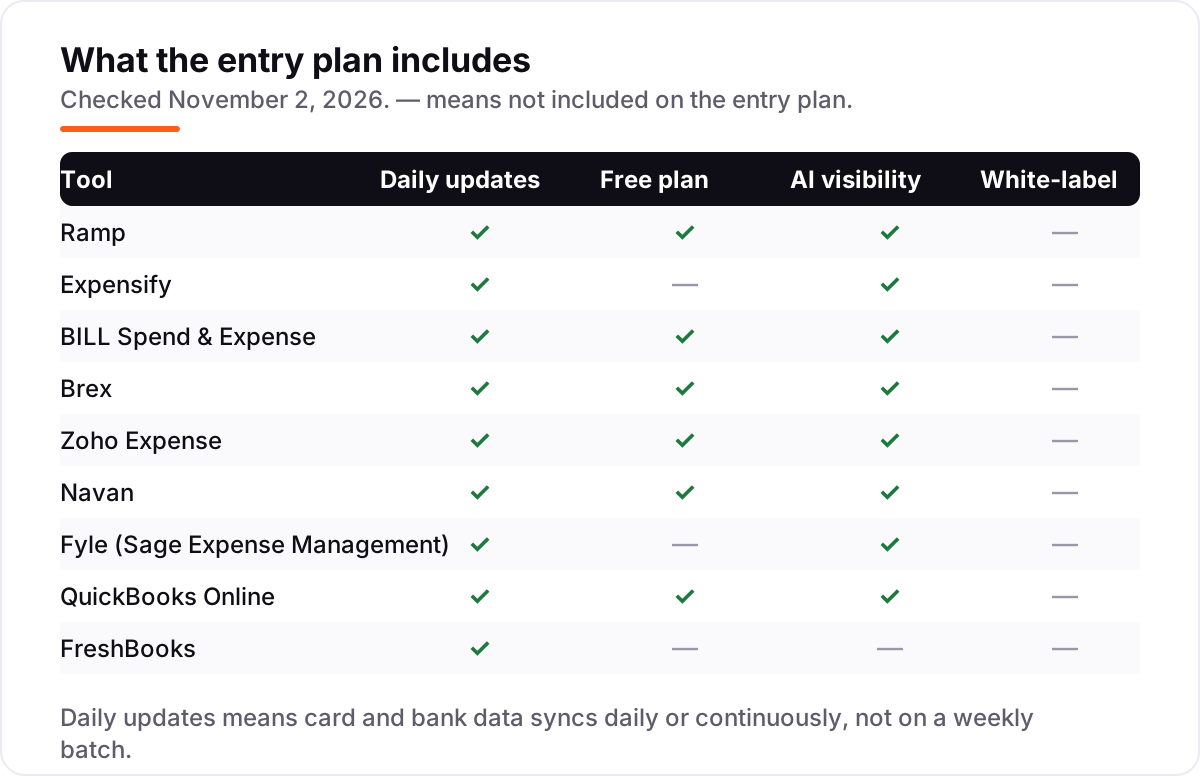
- Check the free tier's ceiling. NetSuite sync, multi-entity support, advanced approvals and white-label reports usually need a paid plan, so map the features you need against the free tier before you commit.
- Look at receipt capture limits. Zoho Expense caps Standard at 200 Autoscans per user a month, and Expensify's unlimited SmartScans are a real advantage for receipt-heavy teams.
- Confirm your accounting sync. Every tool here syncs with QuickBooks or Xero, but NetSuite, Sage Intacct and ERP integrations often sit on a higher plan.
- Test the mobile app with real receipts. The best expense software is the one employees use on the day they spend, so run a one-week trial with your actual receipts before you buy.
Before you publish an expenses policy page for staff, check how it will look in search with the free SERP snippet preview tool — a policy nobody can find is a policy nobody follows.
Expense software for small business pricing: what you will actually pay
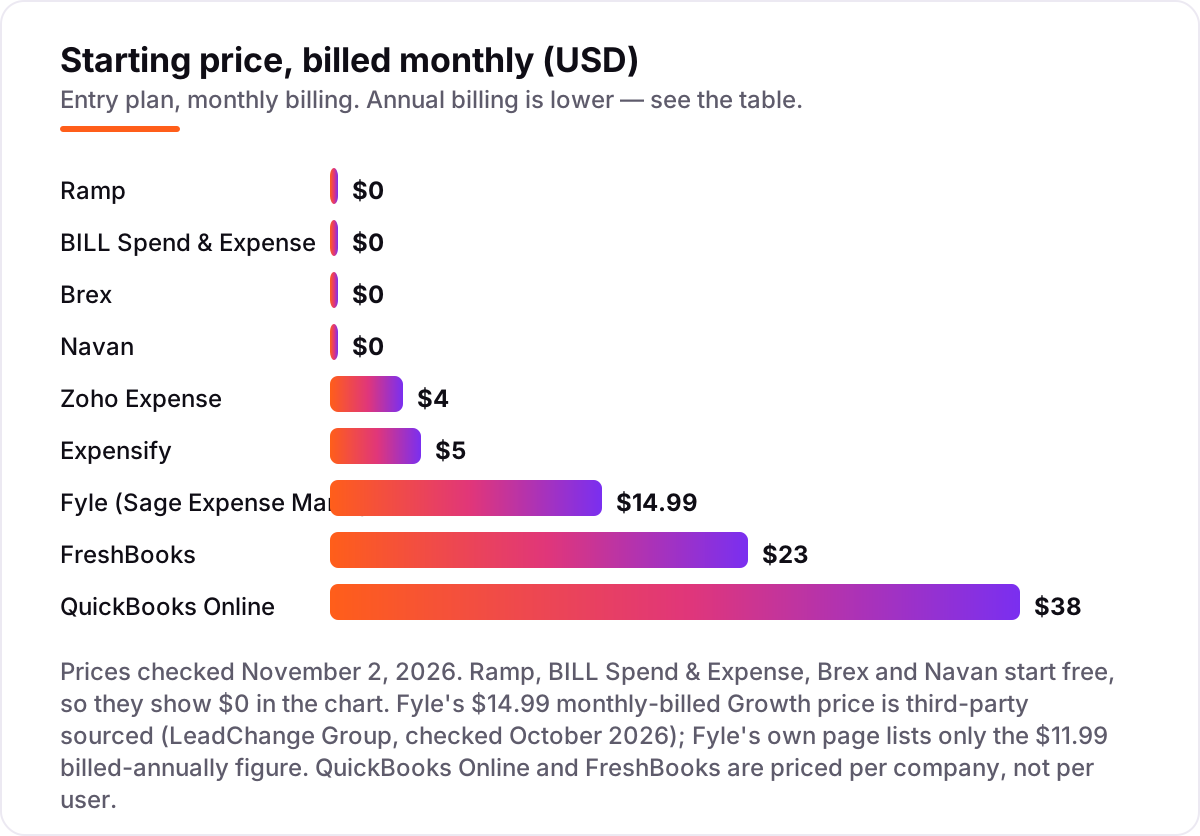
Take a 10-person team where everyone files expenses every month. On Expensify Collect the bill is 10 × $5 = $50 a month, with no annual commitment. On Zoho Expense Standard it is 10 × $3 = $30 a month billed annually, or $360 a year, because the annual rate is lower than the $4 monthly rate. On Fyle Growth it is 10 × $11.99 = $119.90 a month billed annually — but only if all 10 are active users that month, since Fyle bills only for people who create an expense or have a card transaction.
The card-based platforms change the math completely. Ramp Free, BILL Spend & Expense and Brex Essentials all cost $0 a month in subscription fees for the same 10 people, because the vendor earns from card spend instead of seats. The catch is the step up: Ramp Plus is 10 × $15 = $150 a month before an unpublished platform fee, and Brex Premium is 10 × $12 = $120 a month.
The accounting tools price differently again. QuickBooks Online Simple Start is $38 a month flat, but it covers only 1 user, so a 10-person team that needs everyone in the books lands on Advanced at $340 a month. FreshBooks Lite is $23 a month, but it includes only 1 user and 5 billable clients, with each extra team member at $11 a month — so 10 users would cost $23 + (9 × $11) = $122 a month before any client-cap upgrade. The lesson is the same in every case: multiply the headline price by your real headcount, then check the user cap, the client cap and the minimum billing.
Know the difference: simple expense trackers vs full expense management suites
A simple expense tracker records spending after it happens. It captures receipts, sorts them into categories, tracks mileage and produces a report your bookkeeper can file. QuickBooks Online and FreshBooks are trackers in this sense: the expense features sit inside accounting software, and the workflow is submit, approve, reimburse. For a freelancer or a business with a handful of monthly expenses, a tracker is enough, and it is usually the cheapest option because you are already paying for the accounting.
A full expense management suite controls spending before it happens. It issues corporate cards with limits, enforces policy at the point of purchase, routes approvals through multiple levels, flags out-of-policy spend automatically and syncs everything to the ledger in real time. Ramp, Expensify, BILL Spend & Expense, Brex, Zoho Expense, Navan and Fyle are suites. The difference shows up in the month-end close: with a tracker you reconcile what was spent, while with a suite you already know, because every transaction was categorized and approved as it happened.
The confusion costs money in both directions. Buy a tracker when you need a suite and you will spend hours chasing receipts and approving reports by email. Buy a suite when you need a tracker and you will pay for card programs, policy engines and approval chains that a five-person team never uses. If your team spends on company cards, travels, or files more than about 50 expenses a month, buy the suite. If expenses are occasional reimbursements on personal cards, the tracker inside your accounting software is the right spend. Our guide to accounting software for small businesses with inventory covers the accounting side of the same decision.
Quick comparison: tool type by need
| Buyer | Best pick | Why |
|---|---|---|
| Small business that wants $0 software | Ramp | Free plan with unlimited cards, AI receipt matching and bill pay |
| Team keeping its own bank and cards | Expensify | Collect at $5/member/month, works with any corporate card |
| QuickBooks or Xero user | BILL Spend & Expense | $0/user/month with budgets, virtual cards and real-time visibility |
| Startup spending globally | Brex | Free Essentials with cards in 210+ countries |
| Cheapest paid plan | Zoho Expense | Standard from $3/user/month billed annually, free for up to 3 users |
| Travel-heavy team | Navan | Free travel booking and 5 free expensing users |
| Finance team paying only for active users | Fyle (Sage Expense Management) | Growth from $11.99/active user/month billed annually |
| Books and expenses in one system | QuickBooks Online | Simple Start at $38/month with bank feeds and receipt capture |
| Freelancer billing clients | FreshBooks | Lite at $23/month with invoicing, expenses and time tracking |
How we chose
We checked each vendor's own pricing page on November 2, 2026 and recorded the starting price exactly as shown, including the annual-billing figure where the page lists one. One exception: Fyle's own page lists only the $11.99 billed-annually Growth rate, so the $14.99 monthly-billed figure comes from a third-party directory (LeadChange Group) and is labeled as such in the card. Ratings come from G2, checked the same day, except Ramp, where G2's page mixes in a different product's media and shows only 22 reviews, so we left its rating out rather than publish a number we could not trust. We ranked the tools by fit for the most common buyer — a small business owner who wants expenses handled with the least admin — not by brand size. No vendor paid for a place in this list, and none of the links here are affiliate links.
What to do next
Start with the two finalists from the table above and run both free plans or trials with your real receipts for one week. If the books are clean but new customers are not finding you, our monthly SEO service can take that on while you keep the expenses tidy. Once the trial week proves the workflow, move the whole team over in one go and cancel the old tool, rather than running two systems side by side. Once your tools are in place, find out what's holding your rankings back.
Your stack only works if people find you
SerpAstra fixes what keeps your site off page one and makes it easy for AI assistants to recommend.
Get a free audit→Sources we checked (18)
- Ramp pricing — ramp.com/pricing (checked November 2, 2026)
- Expensify pricing — expensify.com/pricing (checked November 2, 2026)
- Expensify pricing explained — help.expensify.com (checked November 2, 2026)
- Expensify on G2 — 4.5/5, 5,690 reviews (checked November 2, 2026)
- BILL pricing — bill.com/pricing (checked November 2, 2026)
- BILL Spend & Expense on G2 — 4.5/5, 2,244 reviews (checked November 2, 2026)
- Brex pricing — brex.com/pricing (checked November 2, 2026)
- Brex on G2 — 4.8/5, 1,653 reviews (checked November 2, 2026)
- Zoho Expense pricing — zoho.com/expense/pricing (checked November 2, 2026)
- Zoho Expense on G2 — 4.5/5, 1,594 reviews (checked November 2, 2026)
- Navan pricing — navan.com/pricing (checked November 2, 2026)
- Navan on G2 — 4.6/5, 9,664 reviews (checked November 2, 2026)
- Fyle (Sage Expense Management) pricing — fylehq.com/pricing (checked November 2, 2026)
- Fyle (Sage Expense Management) on G2 — 4.6/5, 1,823 reviews (checked November 2, 2026)
- QuickBooks Online pricing — quickbooks.intuit.com/pricing (checked November 2, 2026)
- QuickBooks Online on G2 — 4.0/5, 3,901 reviews (checked November 2, 2026)
- FreshBooks pricing — freshbooks.com/pricing (checked November 2, 2026)
- FreshBooks on G2 — 4.5/5, 981 reviews (checked November 2, 2026)
Shamim
Founder of SerpAstra
A full-stack SEO and digital marketer who spends most days on Local SEO for dental practices, AI search visibility and lead generation.
Frequently asked questions
What is the best expense software for small business?
Ramp is the best overall pick for most small businesses: a genuinely free plan with unlimited cards, AI receipt matching and bill pay, with Plus at $15/user/month. If you want to keep your own cards, Expensify at $5/member/month is the better fit. BILL Spend & Expense is also free and suits QuickBooks and Xero users.
How much does expense software cost for a small business?
From $0 to $38 a month at the entry level. Ramp, BILL Spend & Expense and Brex start free, Zoho Expense starts at $4/user/month, Expensify at $5/member/month, and QuickBooks Online at $38/month per company. A 10-person team pays $50/month on Expensify Collect or $30/month on Zoho Standard billed annually.
Is there free expense software for small business?
Yes, with real free plans, not just trials. Ramp, BILL Spend & Expense and Brex all start at $0 per user, Zoho Expense is free for up to 3 users, and Navan gives the first 5 expensing users free. The free tiers are funded by card spend, so check what they leave out before you commit.
What is the difference between an expense tracker and expense management software?
A tracker records spending — receipts, mileage and categories — usually inside accounting software like QuickBooks or FreshBooks. Expense management software adds the workflow around it: corporate cards, budgets, approval chains, policy checks and reimbursements. If you only need records, a tracker is enough; if you need control before money is spent, you need management.
Do I have to switch to a new corporate card?
Only with Ramp, BILL Spend & Expense and Brex, which are free because they earn from card spend. Expensify, Zoho Expense and Fyle charge a subscription precisely so you can keep your existing bank and cards. If switching cards is a deal-breaker, start your shortlist with those three and skip the card-based platforms.
Can expense software replace QuickBooks for a small business?
No, not on its own. Expense tools track and control spending, but they do not keep the general ledger, run payroll or prepare tax-ready books. QuickBooks Online does both, which is why it is in this list. Most small businesses pair a dedicated expense tool with their accounting software and sync the two.
How do I switch expense software without losing receipts?
Export first, then move. Download your expense history and receipt images from the old tool, reconcile the open reports, and only then cancel. Most tools in this list import from QuickBooks, Xero or a CSV, so bring the categories with you. Run the new tool alongside the old one for one month before you cut over.
Free SEO and AI visibility audit
Find out what is holding your rankings back
Send us your site. Within 2 business days you get a written audit, an AI visibility check and a short fix list ranked by impact. Free, with no contract attached.
Request my free audit→Related guides
 SEO & AI Search10 Best Accounting Software for Analytics in 2026, Compared10 best accounting software for analytics compared on price, reports and forecasting, with real starting prices checked November 2, 2026, sorted by buyer need.Read guide →
 SEO & AI Search10 Best Accounting Software for Small Business with Inventory in 2026, Compared10 best accounting software for small business with inventory, compared on price, stock depth and free plans. Prices checked November 2, 2026.Read guide →
 SEO & AI Search8 Best SEO Platforms for Finance in 2026 (Pros, Cons and Pricing)8 best SEO platform for finance options compared on price, YMYL content tools, branch tracking and AI visibility. All prices checked November 1, 2026.Read guide →