
9 Best Free Apps for Instagram Analytics in 2026
The 9 best free app for instagram analytics picks, compared on price, free-plan limits and ratings, with every price checked November 6, 2026.
 Shamim Mia, Founder, SerpAstraLast verified November 6, 202614 min read
We compare pricing pages, documentation and public reviews. We never accept payment for rankings.

Key takeaways
- Meta Business Suite is free and the obvious first stop; Later follows at $25 a month and Metricool at $25, while Buffer's Essentials starts at $6 per channel — all four have free plans.
- The single most important buying factor is what the free plan actually lets you measure: several free tiers cap history at 30 days or hide competitor and audience data behind the paywall.
- Agorapulse's classic free plan ended July 6, 2026 — the only free tier left is Archie, which creates posts with AI and does not do full analytics.
- Crowdfire shut down in May 2025, so any list still recommending it is out of date — check the vendor is still selling before you sign up.
On this page
Quick comparison
| Tool | Best for | Starting price | Free plan |
|---|---|---|---|
| Meta Business Suite | Creators and small businesses that run Instagram and Facebook and want first-party data at $0 | Free | Yes (free) |
| Later | Solo creators who plan their Instagram grid visually and want analytics without paying | $25/mo | Yes (free plan) |
| Metricool | Small businesses that want deep Instagram analytics and competitor tracking on a free plan | $25/mo | Yes (free plan) |
| Buffer | Solo creators who want the simplest free scheduler with honest Instagram analytics | $6/mo/channel | Yes (free plan) |
| Agorapulse | Small teams that live in the inbox and want strong reporting once they outgrow free tools | $99/mo/user | Yes (Archie only) |
| Planoly | Solo creators who plan their Instagram grid on their phone and sell from their bio | $16/mo | Yes (mobile only) |
| Pallyy | Freelancers and small teams that manage one brand across many networks on a tight budget | $15/mo | Yes (free plan) |
| Not Just Analytics | Instagram-only creators and managers who want plain-language advice on one profile | €7.50/mo | Yes (free version) |
| Analisa | Marketers who need to analyze any public Instagram or TikTok profile, including competitors | $69/mo | Yes (free plan) |
Make one of these tools?
We re-check this list every quarter. Send a correction, request a review, or ask about a clearly labeled sponsored spot.
Request a listingThe best free apps for Instagram analytics

Meta Business Suite
Best for: Creators and small businesses that run Instagram and Facebook and want first-party data at $0
Meta Business Suite is the only tool in this list that reads Instagram's own data, and it costs nothing. Insights covers reach, engagement, follower growth and audience demographics for the past 28 days, plus benchmarking against similar businesses that no third-party tool can reproduce. Scheduling, the unified inbox and ad management sit in the same dashboard.
The catch is scope. Business Suite is Meta-only, so a brand that also posts to TikTok or LinkedIn still needs a second tool, and there is no competitor analysis or white-label reporting. Since September 2026 Meta has also sold longer scheduling, links in organic posts and exportable insights in the paid Meta One Advanced plan at $49.99 a month. Start here anyway: the core analytics are free, and every other tool in this list is measured against them.
What we like
- Completely free on desktop and mobile, with no account or post caps
- First-party Instagram Insights: reach, engagement, follower growth and audience demographics
- Benchmarking against similar businesses, which third-party tools cannot match
- Scheduling, inbox and ads in the same dashboard, so nothing else is needed to start
Watch out for
- Meta only — it will never schedule to TikTok, LinkedIn, X or Pinterest
- No competitor analysis and no white-label reporting
- Exportable insights and longer scheduling now sit in the paid Meta One Advanced plan ($49.99/month)

Later
Best for: Solo creators who plan their Instagram grid visually and want analytics without paying
Later is built around the Instagram grid: drag posts into a visual calendar, preview the feed, and let the scheduler publish. The free plan covers one social set with 12 scheduled posts per profile a month, a Link in Bio page and introductory analytics — enough for a creator posting a few times a week. Starter costs $25 a month and adds 30 posts per profile, 5 AI credits and a year of analytics.
The limits are worth reading before you commit. The free plan cannot schedule Instagram Stories or carousels, and it has no platform analytics, so you fly partly blind until you pay. Growth at $50 a month adds a second social set, the social inbox and listening. Pick Later when the grid matters as much as the numbers; pick Metricool when the numbers matter more.
What we like
- Visual grid planner built for Instagram, with a Link in Bio page included
- Free plan covers 1 social set with 12 scheduled posts per profile a month
- Starter adds a year of analytics and 5 AI credits for $25 a month
- Rated 4.5 out of 5 on G2 from 389 reviews, the joint-highest score here
Watch out for
- Free plan has no platform analytics and cannot schedule Stories or carousels
- 12 posts per profile a month on the free plan is tight for daily posters
- Analytics history is only a year even on Growth, and AI credits cost extra

Metricool
Best for: Small businesses that want deep Instagram analytics and competitor tracking on a free plan
Metricool is the analytics-first option in this list: the free plan already includes competitor analysis on five profiles, best-time-to-post guidance and 30 days of history for one brand. Starter costs $25 a month billed monthly, or $20 billed annually, and unlocks unlimited posting, LinkedIn, 100 competitors and downloadable PDF and PowerPoint reports. Pricing is per brand, not per seat, so a small team shares one bill.
Two catches deserve attention. Free-plan charts carry a watermark, reports cannot be downloaded at all, and history stops at 30 days — the free tier is a trial of the analytics, not the full product. X is also a $10-a-month add-on per account on every plan, and the free plan cannot connect X or LinkedIn at all. Buy Metricool when competitor tracking and reporting are the job; buy Buffer when simple scheduling is enough.
What we like
- Free plan includes competitor analysis on 5 profiles and 5 AI credits a month
- Best-time-to-post and unlimited posting unlock on Starter at $25 a month
- Analytics and reporting are the strongest in this price range, per reviewers
- Rated 4.5 out of 5 on G2 from 98 reviews
Watch out for
- Free plan keeps only 30 days of analytics history and cannot download reports
- LinkedIn and X are excluded from the free plan entirely
- X costs $10 a month per account extra, even on paid plans

Buffer
Best for: Solo creators who want the simplest free scheduler with honest Instagram analytics
Buffer is the calmest tool in this list. Connect your channels, drop posts into a queue and let it publish — the interface has almost nothing to learn. The free plan covers three channels with 10 queued posts each, 30 days of insights, the AI Assistant and the community comment inbox. Essentials costs $6 per channel a month and removes the post cap while adding advanced analytics and hashtag management.
The per-channel model is both the strength and the trap: one Instagram account costs $6 a month, but six channels cost $36, and the price climbs with every network you add. There is no social listening and no DM inbox to match Agorapulse, and approvals wait for the Team plan at $12 per channel. Pick Buffer when you run a few channels and want the simplest free start here.
What we like
- Free plan covers 3 channels with 10 queued posts each and 30 days of insights
- Essentials is $6 per channel a month, the cheapest paid step in this list
- AI Assistant and the community comment inbox are included on the free plan
- Rated 4.3 out of 5 on G2 from 1,039 reviews, the largest review base here
Watch out for
- Per-channel pricing adds up fast: six channels on Essentials cost $36 a month
- No social listening and no DM inbox comparable to Agorapulse
- Approvals and team features wait for the Team plan at $12 per channel a month

Agorapulse
Best for: Small teams that live in the inbox and want strong reporting once they outgrow free tools
Agorapulse is the team tool in this list: a unified inbox that gathers Instagram comments, messages and mentions into one queue, plus the strongest reporting here short of an enterprise suite. Standard costs $99 per user a month billed monthly, or $79 billed annually, and includes 10 social profiles, unlimited scheduling and branded report exports. A 30-day trial needs no credit card.
Read the free-plan situation carefully. The classic free plan ended on July 6, 2026, and the only no-cost tier left is Archie, an AI tool that creates posts — it does not do full analytics or inbox work. Per-user pricing also bites: three people on Standard cost $297 a month billed monthly. Buy Agorapulse when the inbox and client reporting are the job; stay on a free tool while it is just you and one account.
What we like
- Unified inbox for comments, messages and mentions across networks
- Standard includes 10 social profiles, branded report exports and basic reports
- Rated 4.5 out of 5 on G2 from 978 reviews, with support praised most
- 30-day free trial needs no credit card
Watch out for
- Classic free plan ended July 6, 2026 — the free Archie tier only creates posts with AI
- Per-user pricing: a three-person team pays $297 a month on Standard billed monthly
- X publishing and advanced listening are paid add-ons with no published price

Planoly
Best for: Solo creators who plan their Instagram grid on their phone and sell from their bio
Planoly is the Instagram-first planner for creators who sell from their bio: a drag-and-drop grid preview, a media library, comment-to-DM automation and a link-in-bio storefront. The free Personal plan lives in the mobile app and covers one social set, 10 uploads a month and one month of Instagram analytics. Starter costs $16 a month billed monthly, or $14 billed annually, and removes the upload cap.
The free plan is the thinnest here — 10 uploads a month and a single month of analytics history will not run a business. Starter also covers one social set and one user, so a second brand means Growth at $28 a month. Reviewers rate the analytics thinner than Later or Metricool. Pick Planoly when the grid preview and storefront matter most; pick Later for the same idea with a stronger free plan.
What we like
- Drag-and-drop grid preview built specifically for Instagram and TikTok
- Free Personal plan in the mobile app with 1 month of Instagram analytics
- Starter at $16 a month adds unlimited uploads and a free Link in Bio
- Rated 4.3 out of 5 on G2 from 67 reviews
Watch out for
- Free plan is mobile-app-only, capped at 10 uploads a month with 1 month of analytics
- Starter covers 1 social set and 1 user — a second brand means Growth at $28 a month
- Reviewers say the analytics are thinner than Metricool or Later

Pallyy
Best for: Freelancers and small teams that manage one brand across many networks on a tight budget
Pallyy is the budget pick with the best score here: 4.7 out of 5 on Capterra from 81 reviews. The free plan covers one social set of up to 11 accounts, with 15 image posts a month and basic analytics; Starter costs $15 a month billed monthly, or $12 billed annually, for 20 posts. Pricing is per brand, so an eight-network brand pays one flat rate.
The free plan has a hard edge: images only, with no video, no carousels, no queue scheduling and no inbox, so a brand whose best content is Reels gets a calendar for stills. Pro at $25 a month removes those limits but still covers one user; a second teammate needs Agency at $99 a month. Pick Pallyy when you run one brand on many networks and post stills fewer than 15 times a month.
What we like
- Free plan holds up to 11 accounts in one social set — the most here
- Highest rating in this list: 4.7 out of 5 on Capterra from 81 reviews
- Starter is $15 a month with 20 posts for 1 social set
- Per-brand pricing means an eight-account brand still pays one flat rate
Watch out for
- Free plan publishes images only — no video, no carousels, no queue scheduling
- Pro covers 1 user only; a second teammate needs the Agency plan at $99 a month
- Smallest review base here, so the 4.7 rating carries less weight than Buffer's 4.3

Not Just Analytics
Best for: Instagram-only creators and managers who want plain-language advice on one profile
Not Just Analytics does one thing: Instagram analytics, explained in plain language. Enter a username and it reports engagement rate, average likes and comments, follower growth trends and hashtag performance, then tells you what to change — no scheduling, no inbox, no other networks. The free basic version covers public profile overviews with limited data, and the Light plan costs €7.50 a month billed annually.
The trade-offs are focus and currency. It is Instagram-only, so a multi-network brand still needs a scheduler, and it is priced in euros, so US buyers pay a converted amount plus VAT. The free version is also limited: full follower breakdowns and downloadable client reports need a paid plan. Pick it when you want a second opinion on one Instagram profile at the lowest paid price in this list.
What we like
- Built only for Instagram, with engagement rate, follower growth and hashtag research
- Plain-language tips explain what the numbers mean, not just the numbers
- Light plan is €7.50 a month billed annually — the cheapest paid analytics here
- Automatic branded PDF reports for clients from the Standard plan up
Watch out for
- Priced in euros, so US buyers pay a converted amount plus VAT
- Free version is limited — full follower breakdowns and reports need a paid plan
- No scheduling, no inbox and no multi-network support; analytics only

Analisa
Best for: Marketers who need to analyze any public Instagram or TikTok profile, including competitors
Analisa is the only tool here that analyzes any public Instagram or TikTok profile, not just your own — which makes it the competitor-research pick. The free Basic plan covers unlimited profile and hashtag analysis, including engagement rates, top captions and prominent hashtags. Premium costs $69 a month billed monthly and adds exports to PDF, Excel and PNG, historical data and content optimization tools.
It is also the most expensive and lowest-rated tool in this list: 3.8 out of 5 on G2 from 18 reviews, with reviewers noting slow reports and occasional downtime. There is no scheduling or publishing, so it pairs with a scheduler rather than replacing one. Pick Analisa when benchmarking competitors is the job; pick Not Just Analytics when you only need your own profile explained cheaply.
What we like
- Free Basic plan analyzes any public profile or hashtag with no time limit
- Follower demographics and authenticity checks on paid plans
- Covers Instagram and TikTok in one tool
- Profile comparison helps benchmark against competitors
Watch out for
- Paid plan starts at $69 a month, the highest entry price in this list
- Lowest rating here: 3.8 out of 5 on G2, with reviewers noting slow reports and downtime
- No scheduling or publishing — analysis only, so it pairs with another tool
The best free app for instagram analytics is usually the one already on your phone: Meta Business Suite reads Instagram's own data and costs nothing. But it is Meta-only, it shows no competitor data, and its free Insights stop at 28 days of history — so the right free app depends on what you need to measure. We ranked the nine tools below by fit for the most common buyer — a creator or small business checking one Instagram account — starting with the free options and ending with the specialist tools, and every price was checked on November 6, 2026.
A note on two names you may see in older lists: Crowdfire shut down in May 2025, so it cannot be bought at any price, and Agorapulse ended its classic free plan on July 6, 2026. Both facts change what "free" means in this category, and the nine tools below are all actively sold in 2026.
How to choose the best free app for instagram analytics
- Start with what the free plan measures. Meta Business Suite shows your own reach, engagement and audience for free; Metricool adds 5 competitors; Analisa analyzes any public profile. A free plan that only counts your own posts is a different product from one that benchmarks you.
- Check the history limit. Metricool's free plan keeps 30 days, Planoly's keeps 1 month, and Later's free plan has no platform analytics at all. If you want to compare this quarter with last quarter, you will pay.
- Count the cap that bites first. Later's free plan allows 12 posts per profile a month, Metricool's 20 posts, Pallyy's 15 image posts, Planoly's 10 uploads. The cap you hit first is your real starting price.
- Check whether the price is per channel, per user or per brand. Buffer charges $6 per channel, Agorapulse $99 per user, and Metricool and Pallyy charge per brand — the same one-person setup costs $6, $99 or $25 depending on the model.
- Confirm the tool is still sold. Crowdfire shut down in May 2025 and Agorapulse ended its classic free plan in July 2026, so a list written before those dates will mislead you.
Analytics is one system in your stack, not the whole stack. If the business also needs to be found on Google, our monthly SEO service handles the visibility side. And before you publish the posts your analytics tell you to write, run your titles through the free SERP snippet preview tool — it shows exactly how the title and description will look in Google.
Whatever you shortlist, try it with real data before you pay. The free plans in this list are long enough to run one genuine month — your account, your posts, your audience — and that month tells you more than any review can. Check two things in the trial: that the numbers match what Instagram itself reports in Business Suite, and that the history goes back far enough to show a trend. Every tool here has a free plan or a trial, so there is no reason to buy before you have compared them on your own account.
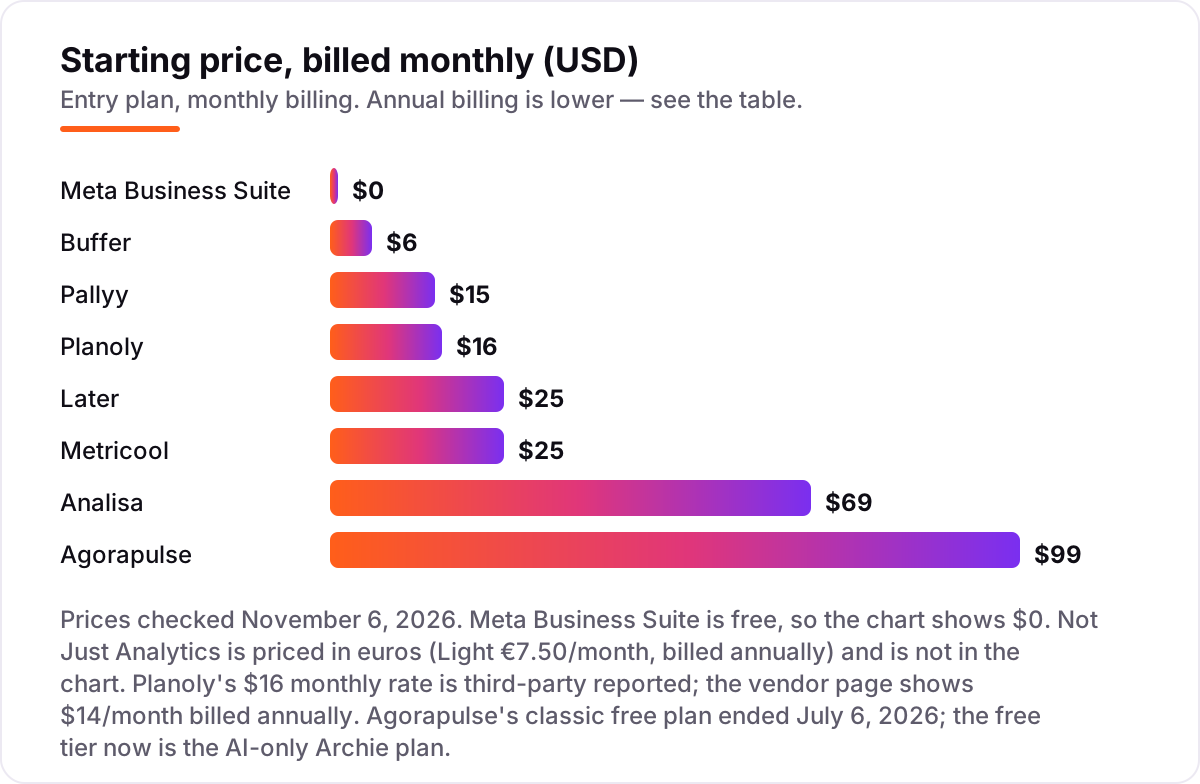
Instagram analytics pricing: what you will actually pay
Take a creator with one Instagram account posting 12 times a month. On list prices, the month costs $0 on Meta Business Suite, Later, Metricool, Pallyy and Analisa — every one of those free plans covers 12 posts or unlimited analysis. Buffer's free plan covers only 10 queued posts per channel, so the 12th post pushes you onto Essentials at $6 a month; Planoly's free plan covers only 10 uploads, so you need Starter at $16 a month. Not Just Analytics is free at this volume too, and its Light plan costs €7.50 a month billed annually if you want the full profile advice.
Over a year, that same creator pays $0 on five tools, $60 on Buffer Essentials billed annually, $168 on Planoly Starter billed annually, and €90 on Not Just Analytics Light. The outlier is Agorapulse: its free Archie tier creates posts with AI but does not do full analytics, so real analytics start at Standard — $99 a month billed monthly, or $948 a year billed annually. The gap between $0 and $948 for the same 12 posts is the difference between a free tier that measures and a paid plan that reports.
Three costs sit outside every number above. First, the per-unit model: a second Instagram account doubles Buffer's bill to $12 a month and doubles Agorapulse's only if you add a user, while Metricool and Pallyy charge per brand, so extra accounts in the same brand cost nothing extra. Second, the add-ons: X costs $10 a month per account on Metricool, and Agorapulse sells X publishing and listening separately with no published price. Third, the annual-billing discount: Later drops from $300 to $225 a year, Metricool Starter from $300 to $240, and Buffer from $72 to $60 per channel. If the content also needs to rank on Google, not just on Instagram, our AI search optimization service covers that side.
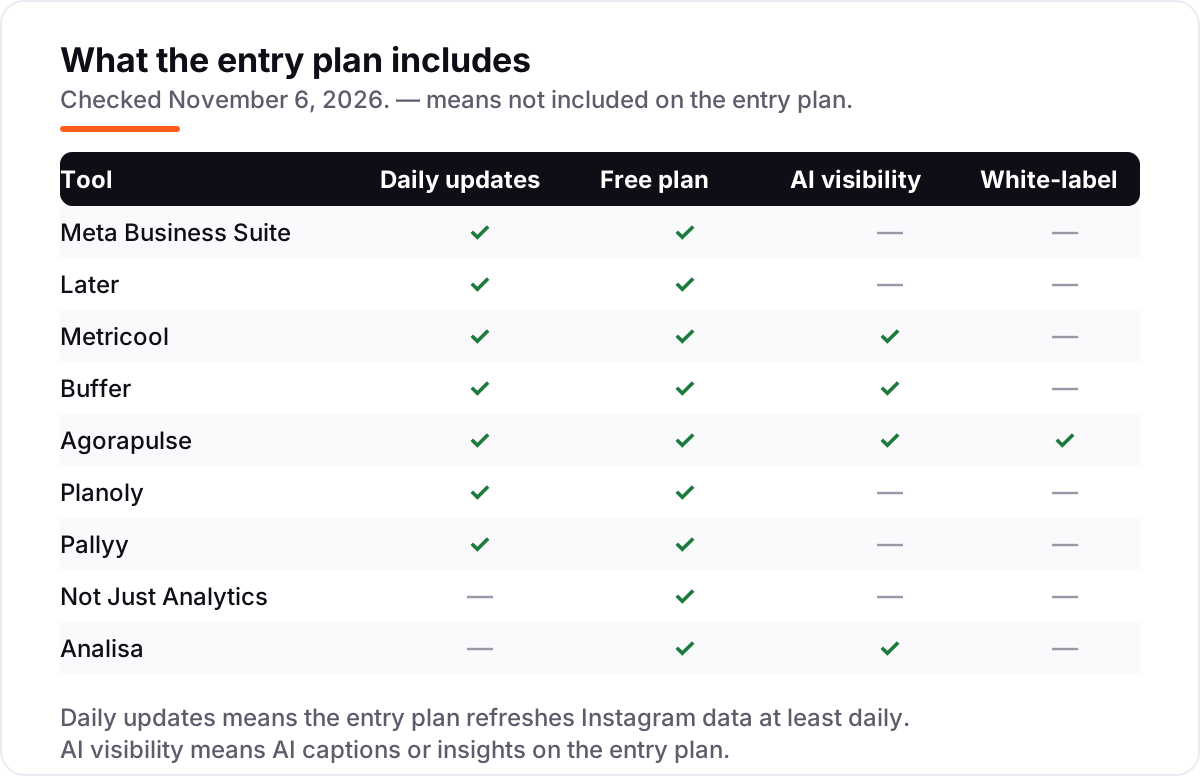
Know the difference: Instagram Insights vs third-party analytics apps
The confusion in this category is between first-party data and third-party data. Instagram Insights, inside Meta Business Suite, reads Instagram's own numbers for your accounts: reach, engagement, follower growth and audience demographics, plus benchmarking against similar businesses. No third-party tool can match that accuracy for your own account, because only Meta holds the underlying data — and it is free.
Third-party apps earn their place in two ways Insights cannot. First, they analyze profiles you do not own: Analisa and Not Just Analytics can report on any public profile, which is how you benchmark competitors. Second, they add scheduling, reporting and multi-network coverage that Insights does not have. The trade-off is that their competitor numbers are measured from public data, not from Meta's internal records, so treat them as directional rather than exact.
There is a second, quieter confusion: a free plan is not a free trial. A free plan — Meta Business Suite, Buffer, Metricool, Later, Pallyy — stays free with limits. A free trial — Agorapulse's 30 days, or the 14-day trials on Later, Buffer, Planoly and Pallyy — ends and starts billing. Agorapulse is the trap to watch: its classic free plan ended on July 6, 2026, so a trial that ends now leaves you with the AI-only Archie tier, not a free analytics plan.
Quick comparison: tool type by need
| Buyer | Best pick | Why |
|---|---|---|
| Just starting, $0 budget | Meta Business Suite | First-party Instagram data free, with no caps |
| Visual grid planning | Later | Free plan with grid preview, Starter is $25/month |
| Deepest free analytics | Metricool | Competitor tracking free, Starter is $25/month |
| Simplest scheduler | Buffer | Free for 3 channels, Essentials is $6/channel/month |
| Small team with an inbox | Agorapulse | Unified inbox and reporting, Standard is $99/user/month |
| Cheapest paid analytics | Not Just Analytics | Instagram-only advice, Light is €7.50/month billed annually |
Mistakes to avoid
- Trusting a list that still recommends Crowdfire. Crowdfire shut down in May 2025. Any list that still lists it as a free option has not been updated since, and its other prices are probably stale too.
- Confusing a free trial with a free plan. Agorapulse's 30-day trial ends and starts billing at $99 a user a month; the free tier left after July 2026 is Archie, which only creates posts with AI. Check what remains free after the trial ends.
- Buying on the free plan, then finding the history is capped. Metricool's free plan keeps 30 days and Planoly's keeps 1 month, so a year-over-year comparison needs a paid plan from day one.
- Ignoring the per-unit price. Buffer at $6 a channel and Agorapulse at $99 a user look cheap for one account and double or triple fast. Price the second account and the second teammate before you commit.
- Expecting competitor data from native Insights. Meta Business Suite benchmarks against similar businesses but never names them. If you need named competitor profiles, you need a third-party tool like Metricool or Analisa.
How we chose
We checked each vendor's own pricing page on November 6, 2026 and recorded the starting price exactly as shown, including the annual-billing figure where the page lists one, and we ranked the tools by fit for the most common buyer — a creator or small business checking one Instagram account — not by brand size. Two figures need a note: Planoly's $16 monthly rate comes from a third-party review of the vendor's page, which itself shows $14 a month billed annually, and Analisa's $59 annual-equivalent rate is third-party reported while its $69 monthly rate is the listed price. Not Just Analytics publishes only an annual rate, €7.50 a month billed annually, so no monthly-billed figure exists to quote. Ratings come from fresh crawls of the G2 and Capterra product pages; Meta Business Suite and Not Just Analytics have no G2 or Capterra listing, so no rating is shown for them rather than an estimated one. Crowdfire was left out because it shut down in May 2025. No vendor paid for a place in this list, and none of the links here are affiliate links.
What to do next
Start with Meta Business Suite and one free tool from this list — Metricool if you want competitor data, Buffer if you want the simplest scheduler — and run them side by side for one month on your real account. Compare the numbers against Instagram's own Insights, and check that the history goes back far enough to show a trend before you pay for anything. If the analytics are sorted but new customers are not finding you, our monthly SEO service handles the visibility side. Once your tools are in place, find out what's holding your rankings back.
Your stack only works if people find you
SerpAstra fixes what keeps your site off page one and makes it easy for AI assistants to recommend.
Get a free audit→Sources we checked (16)
- Meta Business Suite — business.facebook.com (checked November 6, 2026)
- Later pricing — later.com/pricing (checked November 6, 2026)
- Metricool pricing — metricool.com/pricing (checked November 6, 2026)
- Buffer pricing — buffer.com/pricing (checked November 6, 2026)
- Agorapulse pricing — agorapulse.com/pricing (checked November 6, 2026)
- Planoly plans — planoly.com (checked November 6, 2026)
- Pallyy pricing — pallyy.com/pricing (checked November 6, 2026)
- Not Just Analytics pricing — notjustanalytics.com (checked November 6, 2026)
- Analisa — analisa.io (checked November 6, 2026)
- Later Social reviews — G2 (checked November 6, 2026)
- Metricool reviews — G2 (checked November 6, 2026)
- Buffer reviews — G2 (checked November 6, 2026)
- Agorapulse reviews — G2 (checked November 6, 2026)
- Planoly reviews — G2 (checked November 6, 2026)
- Pallyy reviews — Capterra (checked November 6, 2026)
- Analisa.io reviews — G2 (checked November 6, 2026)
Shamim
Founder of SerpAstra
A full-stack SEO and digital marketer who spends most days on Local SEO for dental practices, AI search visibility and lead generation.
Frequently asked questions
What is the best free app for Instagram analytics?
Meta Business Suite is the best free app for most people: it is free, it reads Instagram's own data, and it covers reach, engagement, follower growth and audience demographics. If you also need competitor data or scheduling, Metricool's free plan is the best next step, with 5 competitor profiles and 20 posts a month.
Is Instagram Insights really free?
Yes. Instagram Insights lives inside Meta Business Suite, which Meta says is free on desktop and in the mobile app — you only pay if you run ads. The free Insights cover the past 28 days. Since September 2026, Meta has sold longer scheduling, links in organic posts and exportable insights in the paid Meta One Advanced plan at $49.99 a month.
Can a free Instagram analytics app show who unfollowed me?
No, not reliably. Instagram's API does not share unfollower lists, so apps that claim to show them are guessing from sampled data or asking for your login in ways that break Instagram's rules. Not Just Analytics and Analisa show follower growth trends and engagement instead, which is the honest version of the same question — whether your audience is growing or shrinking.
Which free Instagram analytics app is best for a small business?
Start with Meta Business Suite for your own numbers, then add Metricool's free plan for competitor tracking and scheduling — together they cover the job at $0. If you post more than 20 times a month or need reports you can download, Metricool Starter at $25 a month is the cheapest honest upgrade. Buffer's free plan is the better pick if you also run Facebook or TikTok.
Do free Instagram analytics apps show competitor data?
Only the third-party ones, and only for public profiles. Metricool's free plan tracks 5 competitors, and Analisa's free Basic plan analyzes any public profile or hashtag. Meta Business Suite shows benchmarking against similar businesses but never names them, and it only covers your own accounts. Any tool promising exact competitor follower lists is estimating, not measuring.
What should I check before paying for an Instagram analytics app?
Check four things: the free plan's history limit (30 days on Metricool, 1 month on Planoly), the cap that bites first (posts per month, profiles, or users), whether the price is per channel or per user, and whether the tool is still sold — Crowdfire shut down in May 2025 and Agorapulse ended its classic free plan in July 2026. Run the free plan or trial with real data first.
Free SEO and AI visibility audit
Find out what is holding your rankings back
Send us your site. Within 2 business days you get a written audit, an AI visibility check and a short fix list ranked by impact. Free, with no contract attached.
Request my free audit→Related guides
 Digital Marketing & Ads10 Best Instagram Marketing Tools in 2026 (Free and Paid, Compared)Compare the 10 best instagram marketing tools in 2026 on price, scheduling, analytics and free plans, with real prices checked on November 4, 2026.Read guide →
 Digital Marketing & Ads10 Best AI Tools for Social Media Content Creation in 2026, ComparedCompare the 10 best ai tools for social media content creation on price, free plans and AI features, with every price checked November 5, 2026.Read guide →
 Digital Marketing & Ads10 Best Social Media Advertising Software in 2026, ComparedCompare the 10 best social media advertising software options on price, free plans and ad tools, with every price checked on November 5, 2026.Read guide →