
11 Best Free CAD Software for Woodworking in 2026, Compared
Compare the 11 best free cad software for woodworking on price, free plans, CNC support and 2D drafting, with every price checked November 4, 2026.
 Shamim Mia, Founder, SerpAstraLast verified November 4, 202614 min read
We compare pricing pages, documentation and public reviews. We never accept payment for rankings.

Key takeaways
- FreeCAD is the best fit for most woodworkers at $0, with full parametric modeling and CNC toolpaths; SketchUp Free follows for fast furniture sketches, and Fusion 360 for shops that cut on a CNC router.
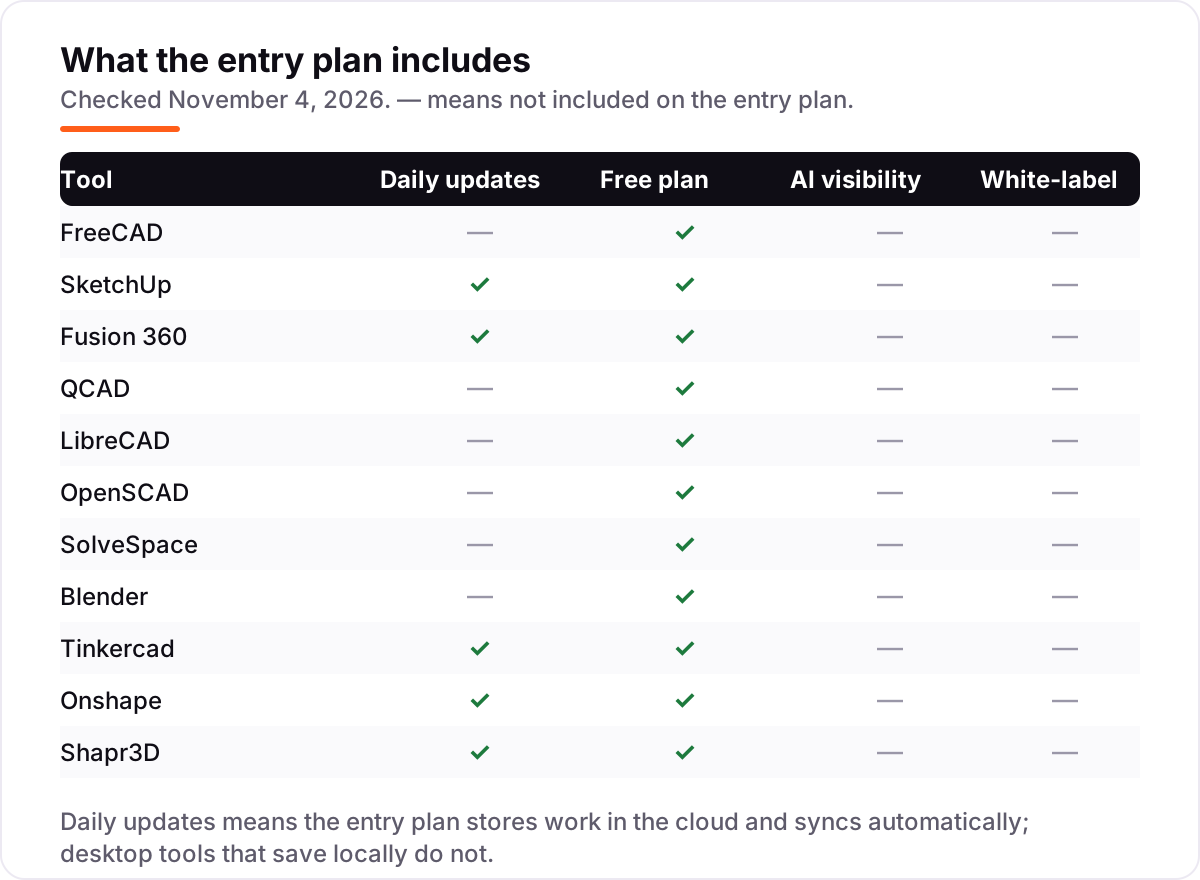
- Seven of the eleven tools are completely free with no paid plan at all — FreeCAD, LibreCAD, OpenSCAD, SolveSpace, Blender, Tinkercad and QCAD's Community Edition.
- The single most important buying factor is the license limit: SketchUp Free and Fusion personal use ban commercial work, and Onshape's free plan makes every document public.
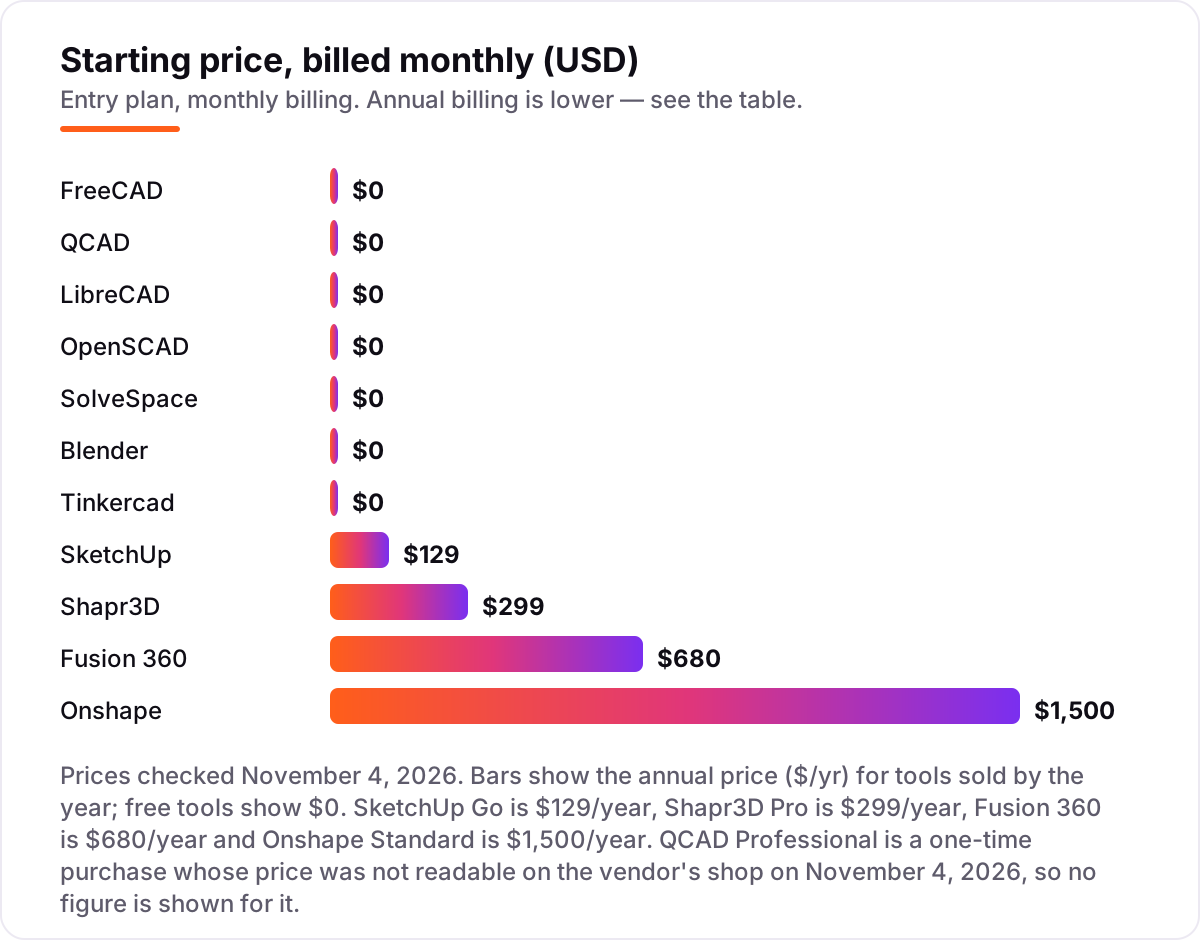
- Only four tools charge anything: SketchUp Go at $129 a year, Shapr3D Pro at $299 a year, Fusion 360 at $680 a year and Onshape Standard at $1,500 a year.
On this page
Quick comparison
| Tool | Best for | Starting price | Free plan |
|---|---|---|---|
| FreeCAD | Woodworkers who want a fully free parametric modeler with CAM for CNC, and no license limits on commercial work | Free | Yes (free) |
| SketchUp | Furniture makers who want the fastest way to sketch a piece in 3D and show it to a client | Free; Go $129/yr | Yes (free plan) |
| Fusion 360 | Small shops that design in 3D and cut on a CNC router, and can live with a free personal-use license | Free; $680/yr | Yes (personal use) |
| QCAD | Woodworkers who need precise 2D shop drawings and cut lists in DXF or DWG | Free | Yes (free) |
| LibreCAD | Anyone who needs free 2D drafting for workshop plans and does not need 3D at all | Free | Yes (free) |
| OpenSCAD | Makers who design repeatable parts — joints, jigs, brackets — by writing code instead of clicking | Free | Yes (free) |
| SolveSpace | Hobbyists who want a tiny, fast parametric modeler for simple mechanical parts and linkages | Free | Yes (free) |
| Blender | Woodworkers who sculpt organic, carved forms and want photorealistic renders of the finished piece | Free | Yes (free) |
| Tinkercad | Complete beginners and classrooms that need a first 3D model in a browser in under an hour | Free | Yes (free) |
| Onshape | Makers who want full parametric CAD in a browser with version history and no install | Free; Standard $1,500/yr | Yes (free plan) |
| Shapr3D | Woodworkers who sketch designs on an iPad with Apple Pencil, at the bench or on a job site | Free; Pro $299/yr | Yes (free plan) |
Make one of these tools?
We re-check this list every quarter. Send a correction, request a review, or ask about a clearly labeled sponsored spot.
Request a listingThe best free CAD software for woodworking

FreeCAD
Best for: Woodworkers who want a fully free parametric modeler with CAM for CNC, and no license limits on commercial work
FreeCAD is the strongest free option for a woodworker who wants parametric CAD without paying anything. You sketch a profile, pad it into a solid, and change any dimension later — the model updates. The PartDesign and Sketcher workbenches cover furniture parts, joints and jigs, and the CAM workbench turns a model into toolpaths for a CNC router, so one program carries a piece from sketch to cut.
The price is the whole point: there is no paid plan, no trial clock and no commercial-use ban, so a shop can run the business on it. The trade-off is the learning curve — the workbench system and the interface take longer to learn than SketchUp, and large models can run slowly. Choose FreeCAD when you want the most capable free tool and are willing to spend a few evenings learning it.
What we like
- Parametric PartDesign and Sketcher workbenches: change a dimension and the whole model updates
- CAM workbench turns a model into CNC router toolpaths, so one program covers sketch to cut
- No paid plan, no trial clock and no commercial-use ban — a shop can run the business on it
- Reads and writes STEP, IGES, STL, SVG, DXF, OBJ and IFC, so files move to other tools cleanly
Watch out for
- The workbench system and interface take longer to learn than SketchUp
- Large models can run slowly, and the interface draws regular complaints in reviews
- Community support only — there is no vendor help desk to call

SketchUp
Best for: Furniture makers who want the fastest way to sketch a piece in 3D and show it to a client
SketchUp is the fastest way to get a piece of furniture into 3D. Push/pull modeling turns a flat rectangle into a cabinet side in one drag, and the 3D Warehouse supplies millions of ready-made models — hinges, handles, whole kitchens — to drop into a design. It runs in the browser, so there is nothing to install and nothing to pay for personal projects.
The catch is the license. SketchUp Free is personal, non-commercial use only, and it cannot import or export DWG, DXF or OBJ files, so a paid job needs Go at $129 a year. There is also no desktop app and no LayOut for dimensioned drawings. Pick SketchUp when speed and showing the client matter more than precision drawings or CNC output.
What we like
- Push/pull modeling is the fastest way to sketch a cabinet or table in 3D
- 3D Warehouse holds millions of ready-made models, from hinges to whole kitchens
- Runs in the browser with nothing to install, and the free plan costs $0
- Go at $129/year adds commercial use, iPad modeling and unlimited cloud storage
Watch out for
- Free plan is personal, non-commercial use only — paid work needs Go at $129/year
- No DWG, DXF or OBJ import and export on the free plan, and no desktop app
- No LayOut, so dimensioned shop drawings wait for the $399/year Pro plan

Fusion 360
Best for: Small shops that design in 3D and cut on a CNC router, and can live with a free personal-use license
Fusion 360 is the one tool here that takes a piece from design to cutting without leaving the program. The parametric timeline records every sketch and feature, so a dimension change ripples through the model, and the built-in CAM produces toolpaths for a CNC router. Version history is automatic, and the cloud saves mean a crashed laptop never loses a design.
The free personal-use license is the catch: it covers home-based, non-commercial projects only, for individuals earning under $1,000 a year from their work, and some advanced features are held back. Selling your pieces means the paid plan at $680 a year. Choose Fusion 360 when you cut on a CNC router and want design and CAM in one place.
What we like
- Parametric timeline plus integrated CAM in one workspace — model, then cut, without exporting
- Version history and cloud collaboration are built in, so no file is ever lost to a crash
- Strongest CNC support here, including 3- and 4-axis toolpaths for routers
- Free personal-use license covers the full core toolset for hobbyists
Watch out for
- Personal use is non-commercial only, for individuals earning under $1,000 a year from their work
- Paid plan is $680 a year, or $85 a month — the steepest jump in this list
- Cloud-based files need a reliable internet connection to save and open work

QCAD
Best for: Woodworkers who need precise 2D shop drawings and cut lists in DXF or DWG
QCAD is a focused 2D drafting tool, and for shop drawings that focus pays off. Layers, blocks, dimensioning and snap tools produce clean, precise plans, and a library of more than 5,000 ready-made parts drops hinges, fasteners and fittings straight into a drawing. It reads and writes DXF and DWG, so plans move to a laser cutter or a CNC shop without conversion trouble.
The Community Edition is free and open source, with no time limit. Full DWG read/write waits for the Professional edition, a one-time purchase, and there is no 3D modeling at all — a cabinet must be drawn view by view. Pick QCAD when your output is paper plans and cut lists, and 3D would only slow you down.
What we like
- Clean, precise 2D drafting with layers, blocks, dimensioning and snap tools
- Library of more than 5,000 ready-made CAD parts to drop into a drawing
- Runs on Windows, macOS and Linux and reads and writes DXF and DWG
- Community Edition is free and open source, with no time limit
Watch out for
- 2D only — there is no 3D modeling, so furniture must be drawn view by view
- Full DWG read/write waits for the Professional edition, a one-time purchase
- Smaller community than LibreCAD, so fewer tutorials and forum answers

LibreCAD
Best for: Anyone who needs free 2D drafting for workshop plans and does not need 3D at all
LibreCAD is the lightest tool in this list: a free, open-source 2D drafting program that installs in minutes and runs happily on an old workshop computer. The commands and interface will feel familiar to anyone who has used AutoCAD, with layers, dimensioning and snap tools for precise plans. Drawings export to PDF and SVG, so a plan prints cleanly or goes to a client by email.
It is strictly 2D, so there is no 3D model, no rendering and no CAM — this is a drawing board, not a workshop. Development is community-driven and moves slowly, and DWG support depends on external libraries that do not open every file version. Choose LibreCAD when you need free 2D plans and nothing else.
What we like
- Completely free 2D drafting with no caps, trials or paid tiers
- Lightweight and fast — it runs well on old workshop computers
- AutoCAD-like commands and interface, so anyone who knows AutoCAD settles in quickly
- Exports drawings to PDF and SVG for printing or sharing with clients
Watch out for
- Strictly 2D — no 3D modeling, rendering or CAM at any price
- Community-driven development moves slowly, and some versions are unstable
- DWG support depends on external libraries and may not open every file version

OpenSCAD
Best for: Makers who design repeatable parts — joints, jigs, brackets — by writing code instead of clicking
OpenSCAD replaces clicking with code: you describe a part in a script, and the program builds the solid. That sounds strange until you need twenty identical brackets in different sizes, or a mortise that must fit any board thickness — change one number and every copy updates. Designs are plain text, so they version-control cleanly in Git, and the STL export is ready for a 3D printer or laser cutter.
There is no interactive modeling, so anyone who thinks in pictures rather than code will struggle, and rendering large designs is slow because the engine runs on a single CPU core. There are also no assemblies, so a multi-part piece must be combined by hand. Pick OpenSCAD when your work is repeatable parts and you are comfortable writing a few lines of code.
What we like
- Parametric by design: change one number and every copy of a part updates
- Perfect for repeatable joinery — one script makes a mortise in any size
- Designs are plain text, so they version-control cleanly in Git
- Exports clean STL files ready for a 3D printer or laser cutter
Watch out for
- No interactive modeling: every shape is written as code, which puts off non-programmers
- Rendering large designs is slow, since the engine runs on a single CPU core
- No assemblies, so a multi-part piece must be built and combined by hand

SolveSpace
Best for: Hobbyists who want a tiny, fast parametric modeler for simple mechanical parts and linkages
SolveSpace is a small, fast parametric modeler built around a strong constraint solver: sketch a shape, pin it down with dimensions and constraints, and the part holds its shape when you change a value. It covers 2D and 3D modeling with assemblies in one tiny program, and it exports DXF, STL and STEP, so a part moves to a printer, a laser or a CNC machine without fuss.
The program is free and open source, and it opens in seconds on any machine. The trade-offs are a plain, dated interface with no rendering to speak of, and a small community, so tutorials and forum answers are thin compared with FreeCAD. There is also no G2 review page, so no independent score exists. Choose SolveSpace when you want a light parametric tool and are happy working without hand-holding.
What we like
- Constraint solver is genuinely strong: sketch, constrain, and the part holds its shape
- Tiny, fast download that opens in seconds on any machine
- Parametric 2D and 3D modeling with assemblies in one small program
- Exports DXF, STL and STEP, so parts move to a printer, laser or CNC easily
Watch out for
- Small community, so help and tutorials are thin compared with FreeCAD
- Plain, dated interface with no rendering or visualization to speak of
- No G2 review page exists, so there is no independent review score to show

Blender
Best for: Woodworkers who sculpt organic, carved forms and want photorealistic renders of the finished piece
Blender is the wrong tool for dimensioned plans and the right tool for carved work. Its sculpting tools shape organic forms — a carved chair back, a relief panel, a turned leg — better than any free CAD program, and the Cycles renderer produces photorealistic images to show a client before any wood is cut. It is free and open source, with no license to track and no commercial-use ban.
It is not a precision CAD tool: there are no parametric constraints, so a tenon that must be exactly 12 mm is fiddly to guarantee. The learning curve is steep, the interface overwhelms most first-time users, and heavy scenes can slow down on modest hardware. Pick Blender when the piece is sculpted or the render matters more than the drawing.
What we like
- Best sculpting tools of any free program — ideal for carved chairs, reliefs and organic shapes
- Cycles renderer produces photorealistic images to show a client before cutting wood
- Huge community, with a tutorial for almost anything you want to make
- Free for any use, including commercial work, with no license to track
Watch out for
- Not a precision CAD tool: dimensions and constraints are not its job
- Steep learning curve — the interface overwhelms most first-time users
- Heavy scenes can slow down or crash on modest hardware
Tinkercad
Best for: Complete beginners and classrooms that need a first 3D model in a browser in under an hour
Tinkercad is the easiest first step into 3D design: a free Autodesk web app where you drag shapes onto a workplane, resize them, and combine them into a part. There is nothing to install, the built-in tutorials walk a beginner through the first model in under an hour, and classroom tools make it the safe pick for teaching. It exports STL, OBJ and SVG for 3D printing and laser cutting.
The simplicity is also the ceiling. There are no parametric constraints, so a part cannot be resized by typing a dimension, and precision work is out of reach. It is cloud-only, so a bad connection stops the work, and SVG import is unreliable. Choose Tinkercad for a first project, a school class, or a quick prototype — then move to FreeCAD or SketchUp when the work gets serious.
What we like
- Easiest start in this list: drag, drop and combine shapes, no install, no manual
- Runs in the browser, so it works on a school Chromebook or a workshop laptop
- Built-in tutorials and classroom tools make it the safe pick for teaching
- Exports STL, OBJ and SVG for 3D printing and laser cutting
Watch out for
- Too simple for precise work: no parametric constraints and no dimension-driven parts
- Cloud-only, so a bad connection stops the work
- Limited import options, and SVG import is unreliable

Onshape
Best for: Makers who want full parametric CAD in a browser with version history and no install
Onshape puts full parametric CAD in a browser: nothing to install, nothing to save, and it runs on a cheap laptop. The version control is the standout — every change is recorded, branches let you try a design variation without risking the original, and real-time collaboration means a client or partner can watch and comment while you model. The free plan includes the full modeling toolkit, assemblies and drawings.
The free plan has one hard rule: every document is public, and use is non-commercial only, so client work and private designs are out. The paid step is also the steepest here, with Standard at $1,500 a year. There is no offline mode for the workshop. Pick Onshape when you model on the move, value version history, and can live with public documents.
What we like
- Full parametric CAD in a browser — nothing to install, and it runs on a cheap laptop
- Built-in version control with branching, so every design change is reversible
- Real-time collaboration: share a link and a client or partner edits with you
- Free plan includes the full modeling toolkit, assemblies and drawings
Watch out for
- Free plan is non-commercial only, and every document is public
- Standard costs $1,500 a year — the dearest paid step in this list
- Cloud-only, so there is no offline mode for the workshop

Shapr3D
Best for: Woodworkers who sketch designs on an iPad with Apple Pencil, at the bench or on a job site
Shapr3D is CAD for the workshop floor: a pencil-first modeler that runs on iPad, Mac, Windows and Vision Pro, with Apple Pencil sketching that feels closer to drawing on paper than any mouse-driven tool. It combines parametric history with direct modeling, produces technical drawings on the Pro plan, and exports STEP, IGES and DWG when you pay. Students and educators get it free.
The free Basic plan is deliberately narrow: two active projects and low-resolution STL and 3MF exports only, so a finished piece cannot leave the app in production quality. Pro costs $299 a year, which is a lot for a hobbyist who designs a few parts a month, and there is no built-in cutting list. Choose Shapr3D when you design at the bench, on a job site, or anywhere a keyboard is in the way.
What we like
- Pencil-first modeling on iPad is the most natural way to sketch a piece away from a desk
- Parametric history and direct modeling in one tool, with technical drawings on Pro
- Exports STEP, IGES, DWG and high-resolution meshes on the Pro plan
- Free for students and educators, with a 14-day money-back guarantee on paid plans
Watch out for
- Basic plan caps at 2 projects and exports only low-resolution STL and 3MF files
- Pro costs $299 a year — a lot for a hobbyist who designs a few parts a month
- No built-in way to produce a cutting list for your components
The best free cad software for woodworking covers two different jobs: drawing a piece so you can build it, and cutting it on a machine. This list ranks eleven free tools by fit for the most common buyer — a hobbyist or small-shop woodworker who designs furniture, cabinets and jigs without paying for a CAD seat — and every price was checked on the vendor's own pricing page on November 4, 2026.
How to choose the best free cad software for woodworking
- Decide whether you need 2D or 3D. Shop drawings and cut lists need 2D drafting (LibreCAD, QCAD); furniture design and CNC work need a 3D model (FreeCAD, SketchUp, Fusion 360).
- Read the license before you sell anything. FreeCAD, Blender and the other open-source tools allow commercial work at $0, while SketchUp Free, Fusion personal use and Onshape's free plan ban it.
- Check the export formats. A model you cannot export is a model you cannot cut: look for DXF or DWG for 2D work and STEP or STL for 3D work and CNC.
- Match the tool to the machine. A CNC router needs CAM (FreeCAD, Fusion 360); a laser cutter needs clean 2D files (QCAD, LibreCAD, OpenSCAD); a 3D printer needs STL (almost everything here).
- Be honest about the learning curve. Tinkercad and SketchUp take hours; FreeCAD and OpenSCAD take weeks. A tool you never learn is the most expensive one in this list.
The order in this list follows fit for a woodworker, not brand size: FreeCAD first because it does the most for $0, then the tools that trade capability for speed or simplicity. If you already use one of these tools for 3D printing, the jump to woodworking is small — our guide to beginner CAD software for 3D printing covers the same tools from the printing side. And if you sell your pieces online, run the product page titles through the free SERP snippet preview tool before you publish — a clear title is what gets the click.
Whatever you shortlist, build one real piece in it before you commit. A small side table is the honest test: it needs a 3D model, a dimensioned drawing, a cut list and an export to the machine you actually own. The free plans and trials in this list are long enough for that test, and the test tells you more than any review can. Check two things while you build it: that the export format your machine needs actually works, and that the license lets you sell the finished piece.
Free CAD software for woodworking pricing: what you will actually pay
Take a one-person furniture shop that designs and sells its own pieces. On the free plans, the software bill is $0 on FreeCAD, LibreCAD, QCAD, OpenSCAD, SolveSpace, Blender and Tinkercad — seven tools with no paid plan to upgrade into. The other four cost money only when the free tier's limits bite: SketchUp Go is $129 a year for commercial use, Shapr3D Pro is $299 a year for production exports, Fusion 360 is $680 a year for commercial use, and Onshape Standard is $1,500 a year for private documents.
Over three years, that is $0 on FreeCAD, $387 on SketchUp Go, $897 on Shapr3D Pro, $2,040 on Fusion 360 and $4,500 on Onshape Standard. The gap between $0 and $4,500 buys the same chair — the difference is license terms, cloud storage and CAM, not the shape of the wood. A shop that stays on FreeCAD and buys nothing pays $0 in three years; a shop that needs Onshape's private documents pays $4,500 for the same period.
Two traps sit behind those numbers. First, the free tiers that ban commercial work: SketchUp Free, Fusion personal use and Onshape's free plan all cost $0, but selling a piece designed on them breaks the license, so the real starting price for a selling shop is the paid plan. Second, the export limits: Shapr3D Basic exports only low-resolution STL and 3MF files, so a shop that needs STEP or DWG files pays $299 a year whether it wants to or not. Budget on the price of the tier you actually need, not the $0 headline.
Know the difference: free forever, free tier and free trial
The confusion in this category is the word "free", which means three different things here. Free forever means open-source software with no paid plan at all: FreeCAD, LibreCAD, OpenSCAD, SolveSpace, Blender and Tinkercad, plus QCAD's Community Edition. Download it, use it for any work including commercial jobs, and the price stays $0 — there is nothing to upgrade into and no trial clock running.
A free tier is different: the software is free only inside limits set by the vendor. SketchUp Free, Fusion personal use, Onshape's free plan and Shapr3D Basic are all free tiers, and each one has a limit that matters — SketchUp Free and Fusion personal use ban commercial work, Onshape's free plan makes every document public, and Shapr3D Basic caps you at two projects with low-resolution exports. A free tier is a real product, not a demo, but the limit decides when you start paying.
A free trial is a third thing: full access for a set number of days, then you pay or stop. SketchUp Pro offers 7 days, Fusion 360 offers 30 days, and Shapr3D Pro offers 14 days. A trial is useful for testing the paid plan, but it is not a way to run a shop for free. When a tool says "free", check which of the three it means before you build a business on it.
Quick comparison: tool type by need
| Buyer | Best pick | Why |
|---|---|---|
| Hobbyist or small shop, any budget | FreeCAD | Full parametric CAD plus CAM at $0, with no commercial-use ban |
| Furniture maker who sketches fast | SketchUp | Push/pull modeling and the 3D Warehouse, free on the web for personal use |
| Shop with a CNC router | Fusion 360 | Design and CAM in one workspace, free for personal use |
| Precise 2D shop drawings | QCAD | Clean drafting with a 5,000-part library, free Community Edition |
| Absolute beginner | Tinkercad | Drag-and-drop 3D in a browser, free, with tutorials built in |
| Designing on an iPad | Shapr3D | Pencil-first CAD for the bench or job site, free Basic plan |
Mistakes to avoid
- Designing a product to sell on a non-commercial license. SketchUp Free, Fusion personal use and Onshape's free plan all ban commercial work. If you sell what you design, the free tier is not free for you — budget for Go at $129 a year or a $0 tool that allows commercial use.
- Buying on the $0 headline, then finding the export costs money. Shapr3D Basic exports only low-resolution STL and 3MF files; STEP, IGES and DWG need Pro at $299 a year. Check the export list before you commit to a tool.
- Picking a 2D tool for a 3D job. LibreCAD and QCAD draw excellent plans, but they cannot model a chair. If the work needs a 3D model or a CNC toolpath, start with a 3D tool.
- Ignoring the learning curve. FreeCAD and OpenSCAD are the most capable free tools here and also the hardest to learn. A tool that sits unused because the interface beat you is worth less than a simpler tool you actually use.
- Forgetting the file format your machine needs. A laser cutter wants DXF, a 3D printer wants STL, a CNC router wants STEP or a CAM toolpath. Confirm the export works on the free plan before you design a whole project in the wrong program.
How we chose
We checked each vendor's own pricing page on November 4, 2026 and recorded the starting price exactly as shown, and we ranked the tools by fit for the most common buyer — a hobbyist or small-shop woodworker — not by brand size. Because this post is mostly free and open-source tools, the price chart shows annual prices ($/yr) rather than monthly equivalents: the four paid plans are all sold by the year. Ratings come from G2 pages opened on November 4, 2026, except SolveSpace, which has no G2 page, so no rating is shown for it. One price is not shown: QCAD Professional is a one-time purchase, but its price was not readable on the vendor's shop on November 4, 2026, and directory listings disagreed with each other, so we show no figure for it rather than a guessed one. No vendor paid for a place in this list, and none of the links here are affiliate links.
What to do next
Start with the free plan of your top pick and build one real piece in it — a side table is the honest test. Check that the export format your machine needs works, and that the license lets you sell the finished piece. If the first tool fights you, switch: every tool here is free to try, and the right one is the one you actually finish a project in. If the designs are sorted but new customers are not finding you, our monthly SEO service handles the visibility side. Once your tools are in place, find out what's holding your rankings back.
Your stack only works if people find you
SerpAstra fixes what keeps your site off page one and makes it easy for AI assistants to recommend.
Get a free audit→Sources we checked (23)
- FreeCAD — freecad.org (checked November 4, 2026)
- SketchUp plans and pricing — sketchup.com/plans-and-pricing (checked November 4, 2026)
- SketchUp Go — sketchup.trimble.com/en/products/sketchup-go/buy (checked November 4, 2026)
- Autodesk Fusion subscription types — autodesk.com/products/fusion-360/blog/fusion-subscription-types/ (checked November 4, 2026)
- Autodesk Fusion for personal use — autodesk.com/ca-en/products/fusion-360/personal (checked November 4, 2026)
- QCAD — qcad.org/en/ (checked November 4, 2026)
- LibreCAD — librecad.org (checked November 4, 2026)
- OpenSCAD — openscad.org (checked November 4, 2026)
- SolveSpace — solvespace.com (checked November 4, 2026)
- Blender — blender.org (checked November 4, 2026)
- Tinkercad — tinkercad.com (checked November 4, 2026)
- Onshape plans and pricing — onshape.com/en/pricing (checked November 4, 2026)
- Shapr3D pricing — shapr3d.com/pricing (checked November 4, 2026)
- FreeCAD reviews — g2.com/products/freecad/reviews (checked November 4, 2026)
- SketchUp reviews — g2.com/products/sketchup/reviews (checked November 4, 2026)
- Autodesk Fusion reviews — g2.com/products/fusion-360/reviews (checked November 4, 2026)
- QCAD reviews — g2.com/products/qcad/reviews (checked November 4, 2026)
- LibreCAD reviews — g2.com/products/librecad/reviews (checked November 4, 2026)
- OpenSCAD reviews — g2.com/products/openscad/reviews (checked November 4, 2026)
- Blender reviews — g2.com/products/blender/reviews (checked November 4, 2026)
- Tinkercad reviews — g2.com/products/tinkercad/reviews (checked November 4, 2026)
- Onshape reviews — g2.com/products/onshape/reviews (checked November 4, 2026)
- Shapr3D reviews — g2.com/products/shapr3d/reviews (checked November 4, 2026)
Shamim
Founder of SerpAstra
A full-stack SEO and digital marketer who spends most days on Local SEO for dental practices, AI search visibility and lead generation.
Frequently asked questions
What is the best free CAD software for woodworking?
FreeCAD is the best fit for most woodworkers: full parametric modeling, a CAM workbench for CNC routers, and no license limits, all at $0. SketchUp Free is the faster pick for sketching furniture in 3D, and Fusion 360 is the better pick for shops that cut on a CNC router. Start with FreeCAD unless you need speed or CAM above all else.
Is there really free CAD software for woodworking?
Yes. Seven of the eleven tools here are completely free with no paid plan: FreeCAD, LibreCAD, OpenSCAD, SolveSpace, Blender and Tinkercad, plus QCAD's Community Edition. SketchUp, Fusion 360, Onshape and Shapr3D are free tiers with limits instead — check the license before you sell anything you design.
Can I use free CAD software for commercial woodworking?
It depends on the license. FreeCAD, LibreCAD, OpenSCAD, SolveSpace, Blender, Tinkercad and QCAD Community Edition allow commercial work at $0. SketchUp Free, Fusion personal use and Onshape's free plan ban commercial work, so a shop that sells its pieces needs a paid plan — from $129 a year for SketchUp Go.
What is the difference between 2D and 3D CAD for woodworking?
2D CAD draws flat plans — elevations, cut lists and shop drawings — and tools like LibreCAD and QCAD do it well and free. 3D CAD builds a solid model you can rotate, measure and render, which suits furniture design and CNC work. Most woodworkers need both: a 3D model to design, and 2D drawings to build from.
Do I need CAM for CNC woodworking?
Yes, if you cut with a CNC router. CAD draws the part; CAM turns it into toolpaths the machine follows. FreeCAD and Fusion 360 include CAM, so one program covers both jobs. SketchUp, Onshape and the 2D tools do not, so you would export the model to a separate CAM program before cutting.
Which free CAD software is easiest to learn?
Tinkercad is the easiest: drag-and-drop shapes in a browser, with tutorials that get a first model built in under an hour. SketchUp Free is next — push/pull modeling feels natural within a day. FreeCAD and OpenSCAD take the longest, but they repay the effort with parametric models that update when a dimension changes.
Can I design furniture in SketchUp Free?
Yes, for personal projects. SketchUp Free runs in the browser and handles furniture design well, with push/pull modeling and the 3D Warehouse for ready-made parts. The limits are commercial use, which the free plan bans, and exports: no DWG, DXF or OBJ files. Paid work needs Go at $129 a year.
Free SEO and AI visibility audit
Find out what is holding your rankings back
Send us your site. Within 2 business days you get a written audit, an AI visibility check and a short fix list ranked by impact. Free, with no contract attached.
Request my free audit→Related guides
 Design, Video & Creative8 Best Beginner CAD Software for 3D Printing in 2026, ComparedCompare the 8 best beginner cad software for 3d printing on price, free plans and learning curve, with every price checked November 4, 2026.Read guide →
 AI, Data & Analytics12 Best AI Tools for Video Content Creation in 2026, Compared12 best AI tools for video content creation compared with real prices, free plans and G2 ratings, so you can pick the right video maker without overpaying.Read guide →
 ContentVideo SEO: how to rank videos on Google and YouTubeVideo SEO explained: how to rank videos on Google and YouTube with titles, thumbnails, chapters, transcripts and the signals each platform actually rewards.Read guide →