
8 Best HR Software for Small Business in 2026, Compared
Compare the 8 best hr software for small business options on price, free plans, payroll and hiring, with every price checked November 6, 2026.
 Shamim Mia, Founder, SerpAstraLast verified November 6, 202614 min read
We compare pricing pages, documentation and public reviews. We never accept payment for rankings.

Key takeaways
- Gusto is the best fit for most small businesses at $49 a month plus $6 per person; BambooHR follows at $10 per employee a month for dedicated HR, and Zoho People at $1.25 per user a month billed annually for the tightest budget.
- Homebase and Zoho People both offer genuinely free plans — Homebase for one location and up to 10 hourly employees, Zoho People for up to 5 users.
- The single most important buying factor is what the headline price leaves out: per-person fees, payroll add-ons and flat minimums decide what you actually pay, not the starting rate.
- Payroll is an add-on or a higher tier on most HR-first tools, so budget for it separately — payroll runs about $6–$8 per person a month on top of the HR subscription.
On this page
Quick comparison
| Tool | Best for | Starting price | Free plan |
|---|---|---|---|
| Gusto | Small US teams that want payroll, benefits and basic HR in one place with published prices | $49/mo + $6/person | No |
| BambooHR | Growing teams moving off spreadsheets that want a dedicated HR system with published prices | $10/employee/mo | No (7-day trial) |
| Rippling | Growing companies that want HR, payroll, IT and finance on one employee record | From $8/user/mo | No (demo only) |
| Zoho People | Small teams that want the cheapest real HR system, especially teams already using Zoho tools | $1.25/user/mo | Yes (free plan) |
| OnPay | Owners who want one simple flat payroll price with multi-state filing included | $49/mo + $6/worker | No (1st month free) |
| TriNet Zenefits | Small teams that want core HR plus access to HR experts, with payroll available as an add-on | $10/employee/mo | No (demo only) |
| SurePayroll | Very small US teams that want the lowest base fee for full-service payroll | $29/mo + $7/employee | No (1-month trial) |
| Homebase | Restaurants, shops and salons with hourly staff who need scheduling and time tracking free | Free; Essentials $30/mo | Yes (free) |
Make one of these tools?
We re-check this list every quarter. Send a correction, request a review, or ask about a clearly labeled sponsored spot.
Request a listingThe best hr software for small business

Gusto
Best for: Small US teams that want payroll, benefits and basic HR in one place with published prices
Gusto is the payroll-first pick in this list. Simple costs $49 a month plus $6 per person and covers full-service payroll in one state: unlimited runs, automatic tax filing and payments, direct deposit, and W-2s and 1099s. Employee self-service, basic PTO policies and benefits access come with it, so a small team gets payroll and the HR basics in a single subscription.
The limits are geography and depth. A second state pushes you to Plus at $80 a month plus $12 per person, and time tracking, performance reviews and recruiting all wait for Plus or Premium. Benefits premiums and workers' comp sit outside the subscription. Buy Gusto when payroll is the job and HR rides along; buy BambooHR when records and hiring are the job and payroll is secondary.
What we like
- Published prices on every plan, so a 10-person team can budget exactly $109 a month on Simple
- Unlimited payroll runs with automatic tax filing, direct deposit and W-2s and 1099s included
- Employee self-service, basic PTO tracking and benefits access from the entry plan
- More than 150 integrations cover accounting, time tracking and benefits tools
Watch out for
- Simple covers payroll in one state only — a second state means Plus at $80 a month plus $12 per person
- Time tracking, performance reviews and recruiting sit on Plus or Premium, not Simple
- Benefits premiums, workers' comp and state tax registration are billed on top

BambooHR
Best for: Growing teams moving off spreadsheets that want a dedicated HR system with published prices
BambooHR is the dedicated HR system in this list, and the one most small businesses reach for when spreadsheets stop working. Core covers employee records, custom reports, approval workflows, hiring and onboarding, time off, benefits tracking and eNPS surveys, with an AI assistant that answers HR data questions. Pro costs $17 per employee a month and adds performance management; Elite costs $25 and adds compensation planning.
The catch is the small-team math. Above 25 employees Core is $10 per employee a month, but teams of 25 or fewer pay a flat $250 a month — so a 10-person team pays $25 per employee, not $10. Payroll, benefits administration and time tracking are paid add-ons on every plan. Choose BambooHR when HR records are the core job; choose Gusto when payroll comes first.
What we like
- Core includes an AI assistant that answers HR data questions, plus hiring, onboarding and time off
- Employee records, custom reports, approval workflows and eNPS surveys on the entry plan
- Published pricing — Core $10, Pro $17 and Elite $25 per employee a month above 25 employees
- More than 150 integrations and a mobile app employees actually use
Watch out for
- Teams of 25 or fewer pay a flat $250 a month — a 10-person team pays $25 per employee, not $10
- Payroll, benefits administration and time tracking are paid add-ons, not included in Core
- The 7-day trial is short for a system that holds every employee record

Rippling
Best for: Growing companies that want HR, payroll, IT and finance on one employee record
Rippling is the all-in-one platform in this list: HR, payroll, IT and finance all run off a single employee record. Onboarding a hire can create their payroll record, enroll them in benefits, provision their laptop and grant app access in one flow, and the workflow automator turns approvals and offboarding into rules instead of checklists. The platform starts at $8 per user a month plus a monthly base fee.
The $8 figure is only the entry fee. Payroll, benefits, IT and spend are separate modules, each quoted, so a working setup for a small team usually lands well above the headline rate. There is no free plan and no free trial — only a guided demo. Pick Rippling when one record for everything is worth a custom quote; pick Gusto or BambooHR when a published price matters more.
What we like
- One employee record drives HR, payroll, IT provisioning and spend, so nothing is re-entered
- Workflow automator turns onboarding, offboarding and approvals into rules instead of checklists
- More than 600 integrations and automated device and app provisioning for new hires
- Highest-rated tool in this list at 4.8 out of 5 on G2 across more than 13,000 reviews
Watch out for
- The $8 figure buys only the platform — payroll, benefits, IT and spend are quoted on top
- No free plan and no free trial; evaluation means a guided sales demo
- The monthly base fee is not published on the pricing page, so the first quote is a surprise

Zoho People
Best for: Small teams that want the cheapest real HR system, especially teams already using Zoho tools
Zoho People is the budget pick in this list because the numbers are so low: the free plan covers up to 3 users, and Essential HR costs $3 per user a month billed annually, or $4 billed monthly. It covers the employee database, leave tracking, document management with e-signatures, candidate onboarding and HR audits, with the Zia bot answering routine HR questions. Workforce is $5 and Enterprise is $8 per user a month.
The trade-off is scope. People never runs payroll — that is a separate Zoho product — and the free plan stops at 3 users, so most teams pay from day one. Setup and permissions take longer to learn than BambooHR. Choose Zoho People when the budget is tight and the team already lives in Zoho; choose Gusto when payroll must be in the same subscription.
What we like
- Cheapest paid HR here: Essential HR is $3 per user a month billed annually ($4 billed monthly)
- A real free plan for up to 3 users with employee records, leave tracking and document management
- Zia bot answers HR questions, and the entry plan includes e-signatures and HR audits
- Deep Zoho ecosystem: CRM, Books, Payroll, Recruit and Expense connect without third-party tools
Watch out for
- Payroll is a separate Zoho product — People on its own never runs pay
- The free plan covers only 3 users, so a 4-person team starts paying immediately
- Advanced setup and permissions take time to learn, reviewers say

OnPay
Best for: Owners who want one simple flat payroll price with multi-state filing included
OnPay removes the decision fatigue that plagues payroll shopping. There is one plan and one price: $49 a month plus $6 per worker, and that covers unlimited pay runs, federal, state and local tax filings, W-2s and 1099s, multistate payroll, garnishments and multiple pay rates. A 10-person team pays $109 a month — identical to Gusto Simple at that headcount — and the first month is free, including onboarding and migration.
The trade is scope. Everything is US-centric, so it is the wrong tool the moment you hire abroad, and HR tools and time tracking are paid add-ons rather than built in. The integration list is short, with fewer than 10 marketplace listings. Pick OnPay when you want one price and no tier ladder; pick Gusto when benefits and HR depth matter more.
What we like
- One plan, one price: $49 a month plus $6 per worker covers unlimited runs and tax filing in all 50 states
- W-2 employees and 1099 contractors run in the same pay run at no extra charge
- First month free, including onboarding and migration from the current provider
- Rated 4.8 out of 5 on G2, with reviewers praising the support most
Watch out for
- HR tools and time tracking are paid add-ons ($15 a month plus $2 or $4 per worker each)
- No international payroll — US-only, so hiring abroad means a second system
- Fewer than 10 marketplace integrations, far short of Gusto or Rippling
TriNet Zenefits
Best for: Small teams that want core HR plus access to HR experts, with payroll available as an add-on
TriNet Zenefits — the TriNet HR Platform, formerly Zenefits — pairs HR software with access to HR experts, which is its main selling point over a pure tool. Essentials costs $10 per employee a month on annual billing and covers onboarding, benefits administration, time tracking and compliance tools. Growth is $20 and Zen is $33 per employee a month, and Zen is the tier where payroll is included.
The catch is the payroll add-on. Essentials and Growth charge $6 more per employee a month for payroll, so HR plus payroll on Essentials is really $16 per employee a month, and a 5-employee minimum means a 3-person team pays for 5. TriNet also routes some buyers to a custom quote now, so confirm the published rate in writing. Choose it when expert HR guidance matters; choose BambooHR for software alone.
What we like
- Published tiered pricing: Essentials $10, Growth $20 and Zen $33 per employee a month on annual billing
- Benefits administration, onboarding, time tracking and compliance tools in one platform
- Access to HR experts and guidance, not just software — the main reason teams pick it over a pure tool
- Zen includes payroll, performance management and compensation tools in a single price
Watch out for
- Payroll costs $6 more per employee a month on Essentials and Growth — it is only included on Zen
- A 5-employee minimum applies, so a 3-person team pays for 5
- TriNet now routes some buyers to a custom quote instead of the published tiers — confirm the rate in writing

SurePayroll
Best for: Very small US teams that want the lowest base fee for full-service payroll
SurePayroll is the specialist for very small teams that cross state lines. Full Service costs $29 a month plus $7 per employee and includes federal and state filing and deposits, unlimited runs and free 2-day direct deposit, backed by a tax penalty guarantee. No Tax Filing is $20 a month plus $4 per employee for teams that file taxes themselves. A 10-person team pays $99 a month on Full Service.
The extras narrow the gap with rivals. Multi-state payroll costs a flat $9.99 a month after the first state, year-end forms cost $50 plus $5 per form, and the pricing page shows a second base fee of $39 without labelling which applies — ask in writing before signing up. There are no HR tools beyond payroll. Pick SurePayroll when payroll is the whole job and the team is small.
What we like
- Lowest base fee for full-service payroll here: $29 a month plus $7 per employee
- Files and deposits federal, state and local payroll taxes, with a tax penalty guarantee
- Unlimited payroll runs and free 2-day direct deposit on the entry plan
- Backed by Paychex, which has owned SurePayroll since 2011
Watch out for
- Multi-state payroll costs $9.99 a month extra, and year-end forms cost $50 plus $5 per form
- No HR tools beyond payroll — records, onboarding and benefits need another system
- The pricing page shows two different base fees ($29 and $39) without labelling which applies

Homebase
Best for: Restaurants, shops and salons with hourly staff who need scheduling and time tracking free
Homebase is built for hourly workers, and its free Basic plan is the best free starting point in this list: one location, up to 10 employees, basic scheduling, time tracking and POS integration at $0. Essentials costs $30 a month per location billed monthly, or $24 billed annually, and adds advanced scheduling, advanced time tracking and team messaging. Plus is $70 and All-in-One is $120 per location a month.
The limits are team type and depth. Homebase is limited for salaried or knowledge-worker teams, hiring tools and PTO controls wait for Plus, and payroll is always an add-on at about $39 a month plus $6 per employee. A second location doubles the bill. Pick Homebase when the team clocks in and out; pick BambooHR or Zoho People when the team sits at desks.
What we like
- The only free plan here built for hourly teams: scheduling, time tracking and POS integration at $0
- Per-location pricing means the bill stays flat as you hire past 10 people
- Team messaging and a mobile app employees actually check are included from Essentials
- Rated 4.6 out of 5 on G2 across more than 600 reviews, with scheduling praised most
Watch out for
- Hiring tools wait for Plus at $70 a month per location, and PTO controls too
- Payroll is always an add-on, never included — about $39 a month plus $6 per employee
- Per-location pricing: a second site doubles the bill even with the same staff count
The best hr software for small business buyers is not one product but a choice between three kinds of tool: payroll-first systems, dedicated HR platforms, and free scheduling tools for hourly teams. We ranked the eight tools below by fit for the most common buyer — a US owner with 5 to 25 employees — starting with the payroll-first options and ending with the free pick for hourly staff, and every price was checked on November 6, 2026.
How to choose the best hr software for small business
- Decide whether payroll is in the same subscription. Gusto, OnPay and SurePayroll run pay natively; BambooHR, Zoho People and Homebase need a separate payroll product or add-on. If pay lives elsewhere, add $6–$8 per person a month to the HR price.
- Count heads the way the vendor counts them. BambooHR charges a flat $250 a month for 25 or fewer employees, TriNet Zenefits bills a 5-employee minimum, and Homebase charges per location, not per person. The per-employee rate is only the real price when the vendor bills per employee.
- Check what the free plan actually covers. Homebase Basic is free for scheduling and time tracking, Zoho People is free for 5 users, and everything else here is a trial or a demo. A free plan that stops at 3 users is not a free plan for a 10-person team.
- Match the tool to the team type. Hourly, shift-based teams need scheduling and a time clock first — that is Homebase. Desk-based teams need records, hiring and time off first — that is BambooHR or Zoho People.
- Test the trial with real employee data. Run one genuine pay cycle or one onboarding through the trial: import the team, set the PTO rules, and check that your accountant or payroll contact can get in before you pay.
HR is one system in your stack, not the whole stack. If the business also needs to be found online, our guide to payroll software for small business covers the pay side in more depth, and our monthly SEO service handles the visibility side. And before you publish new pages for the services you sell, run your titles through the free SERP snippet preview tool — it shows exactly how the title and description will look in Google.
Whatever you shortlist, try it with real data before you pay. The free plans and trials in this list are long enough to run one genuine month — your team, your schedules, your pay cycle — and that month tells you more than any review can. Check two things in the trial: that the payroll or time data reconciles without daily fixing, and that the reports match what your accountant expects. Every tool here lets you export your employee data, so there is no reason to buy before you have tested the exit as well as the entrance.
HR software for small business pricing: what you will actually pay
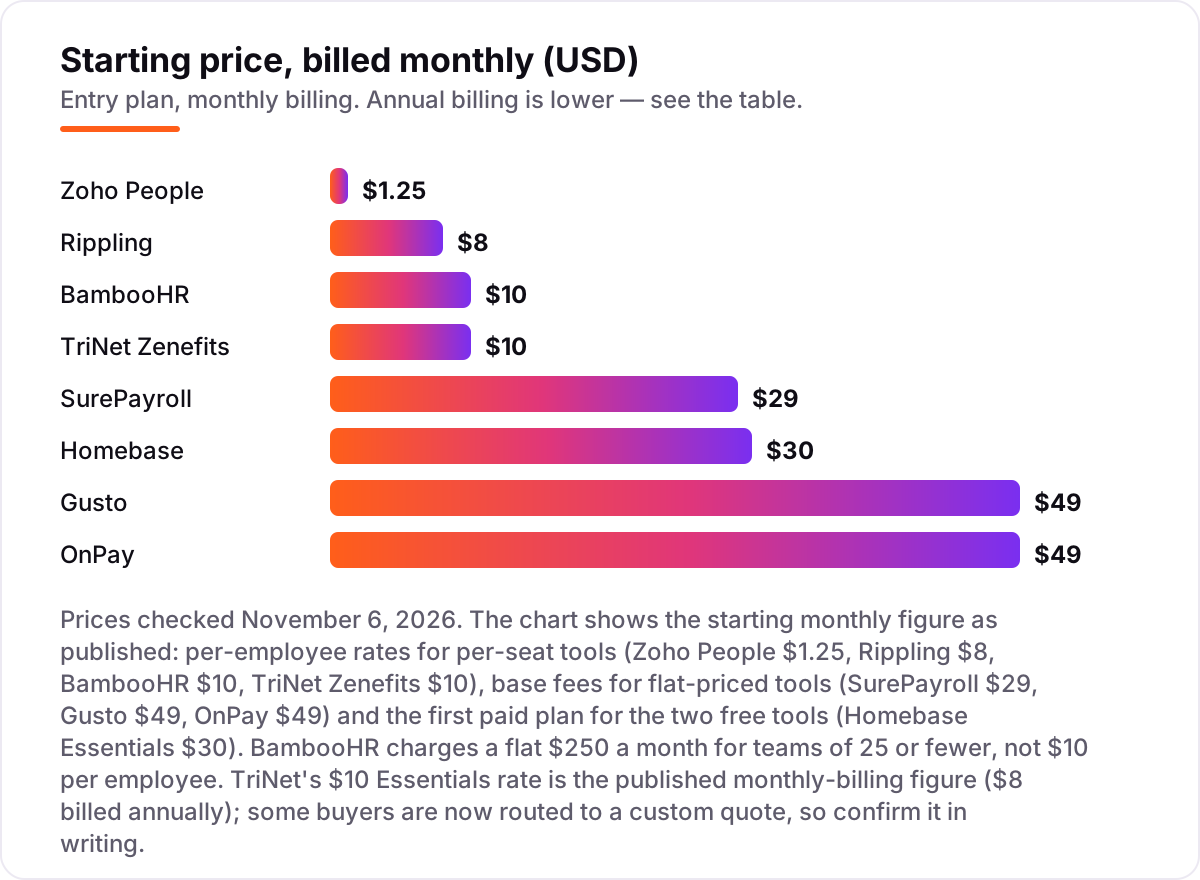
Take a 10-person team at one location. On list prices, the monthly subscription costs $0 on Homebase Basic, $12.50 on Zoho People Essential HR billed annually, $99 on SurePayroll Full Service, $100 on TriNet Zenefits Essentials, $109 on Gusto Simple or OnPay, $120 on the Rippling platform before any module, and $250 on BambooHR Core at the flat small-team rate.
Three of those numbers need adjusting before they are real. First, Rippling's $120 is the platform only: US payroll adds about $8 per employee a month on annual billing, bringing HR plus payroll to about $200 a month, and the monthly base fee is not published, so the quote is the only exact figure. Second, TriNet Zenefits Essentials at $100 a month does not include payroll — add $6 per employee and the real figure is $160 a month. Third, Homebase Basic is free, but hiring tools wait for Plus at $70 a month per location and payroll is an add-on at about $39 a month plus $6 per employee.
Over a year, that is $0 on Homebase Basic, $360 on Zoho People, $1,188 on SurePayroll, $1,308 on Gusto Simple or OnPay, $1,920 on TriNet Zenefits with payroll, $2,400 on Rippling with payroll before the base fee, and $3,000 on BambooHR Core. The same 10 people cost $0 at the free end and $3,000 at the dear end — a gap that comes entirely from what each headline price leaves out, not from features. If you run a wider hiring operation, the recruiting side differs too — see our guide to recruitment marketing platforms.
Annual billing cuts the bill on the tools that publish one: Zoho People drops from $1.50 to $1.25 per user a month, Homebase Essentials from $30 to $24 per location a month, and TriNet Zenefits quotes its $10 Essentials rate on monthly billing ($8 billed annually). Gusto, OnPay and SurePayroll publish no annual discount, so the monthly figure is the whole story. One more cost to check before you commit: a second location is a second subscription on Homebase, and a second state is a higher tier on Gusto — so price the second site or the second state before you commit to a tool for the first.
Know the difference: HR software vs payroll software
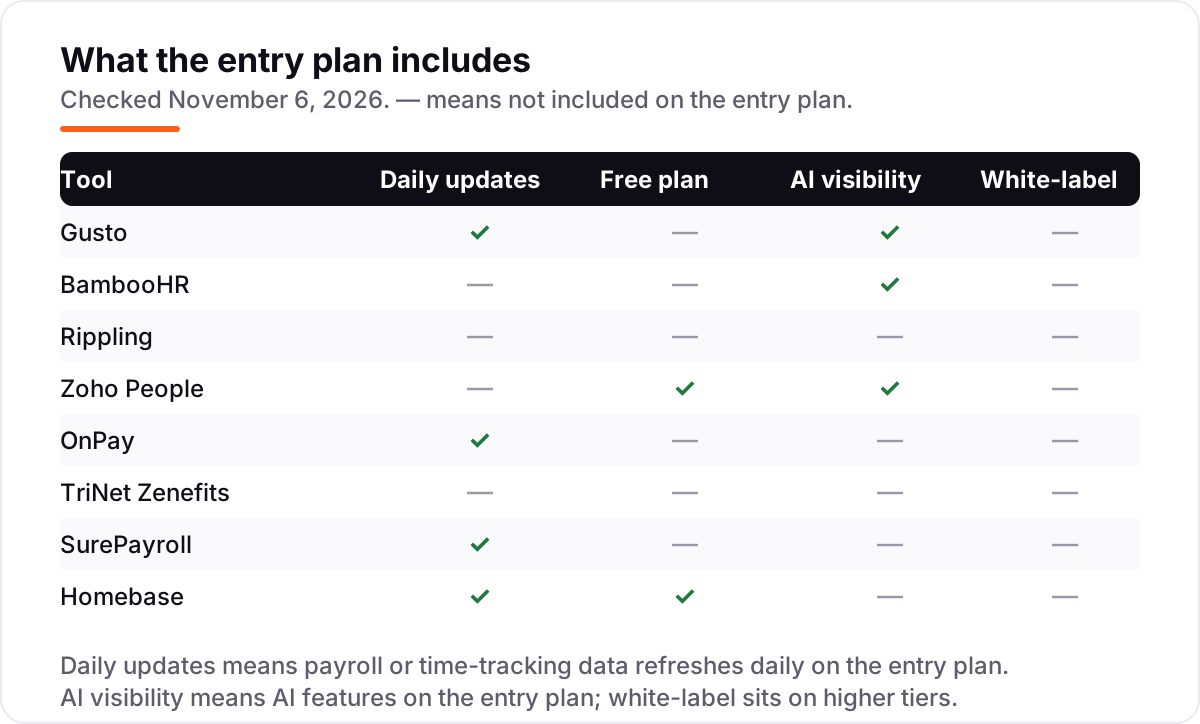
The confusion in this category is between a system of record and a system of pay. HR software manages the employee lifecycle — records, hiring, onboarding, time off, performance and benefits. Payroll software calculates pay, withholds tax and files returns. Some tools do both, like Gusto, while others do one job only: BambooHR is HR without payroll, and SurePayroll is payroll without HR.
There is a second, quieter confusion: a free plan is not the same as a free tool. Homebase Basic is free for scheduling and time tracking, but payroll is a paid add-on and hiring waits for Plus. Zoho People is free for 5 users, but a 6-person team pays. A trial is not a free plan either — BambooHR's 7-day trial and SurePayroll's 1-month trial end, and the bill starts whether you have finished evaluating or not.
A third distinction worth knowing is per-employee pricing versus per-location and flat pricing. BambooHR's $10 per employee a month only applies above 25 employees; below that it is a flat $250 a month. Homebase charges per location, so the bill stays flat as you hire but doubles when you open a second site. TriNet Zenefits bills a 5-employee minimum, so a 3-person team pays for 5. The unit the vendor bills on is the number that decides your real cost.
Quick comparison: tool type by need
| Buyer | Best pick | Why |
|---|---|---|
| Most small businesses | Gusto | Payroll, benefits and basic HR in one place, from $49/month plus $6 per person |
| Team moving off spreadsheets | BambooHR | Dedicated HR records, hiring and time off, Core from $10/employee/month |
| Company that wants one record for everything | Rippling | HR, payroll, IT and finance on one record, from $8/user/month plus a base fee |
| Tightest budget | Zoho People | Free for up to 5 users, then $1.25/user/month billed annually |
| Owner who wants one flat price | OnPay | One plan at $49/month plus $6 per worker, multi-state filing included |
| Team that wants HR experts on call | TriNet Zenefits | Core HR plus human guidance, Essentials from $10/employee/month |
| Smallest payroll base fee | SurePayroll | Full-service payroll from $29/month plus $7 per employee |
| Hourly, shift-based team | Homebase | Scheduling and time tracking free for one location and up to 10 employees |
Mistakes to avoid
- Budgeting on the per-person rate alone. A $10 per employee tool is $250 a month on BambooHR for a 10-person team, and a $49 base fee plus $6 per person is $109 a month on Gusto. Multiply the rate by your headcount and add the base fee before comparing.
- Buying HR and forgetting payroll. BambooHR, Zoho People and Homebase do not run pay on the entry plan. Price the payroll add-on or the separate payroll product first, or the HR subscription is only half the bill.
- Ignoring the minimum that bites first. TriNet Zenefits bills 5 employees minimum, BambooHR bills a $250 flat minimum, and Zoho People's free plan stops at 5 users. The minimum, not the rate, is your real starting price.
- Paying for the top tier before you have the headcount. Performance management, compensation planning and IT provisioning are built for teams of 25 or more. Buy the entry plan, and upgrade the month the team actually needs the feature — not before.
- Forgetting the second location or second state. Homebase charges per location and Gusto Simple covers one state. Price the second site or the second state before you commit to a tool for the first.
How we chose
We verified every price against the vendor's own pricing page, using fresh search-index copies of those pages and independent October and November 2026 reads of the same pages, and re-checked the figures on November 6, 2026. We ranked the tools by fit for the most common buyer — a US small business owner with 5 to 25 employees — not by brand size. Seven of the eight tools carry a G2 rating checked November 6, 2026; TriNet Zenefits carries none, because the fresh G2 copies we could open showed no current score for its listing. Three figures need a warning: TriNet now routes some buyers to a custom quote instead of its published $10 Essentials tier, SurePayroll's pricing page shows a second, unexplained base fee of $39 alongside $29, and Rippling does not publish its monthly base fee at all. No vendor paid for a place in this list, and none of the links here are affiliate links.
What to do next
Start with the free plan or trial of your top pick and run one real pay cycle through it. Check that the payroll or time data reconciles, the reports match what your accountant expects, and the export works before you commit to a year. If the HR side is sorted but new customers are not finding you, our monthly SEO service handles the visibility side — or compare the pay side in our guide to payroll software for small business. Once your tools are in place, find out what's holding your rankings back.
Your stack only works if people find you
SerpAstra fixes what keeps your site off page one and makes it easy for AI assistants to recommend.
Get a free audit→Sources we checked (15)
- Gusto pricing — gusto.com/product/pricing (checked November 6, 2026)
- BambooHR pricing — bamboohr.com/pricing (checked November 6, 2026)
- Rippling pricing — rippling.com/pricing (checked November 6, 2026)
- Zoho People pricing — zoho.com/people/zohopeople-pricing.html (checked November 6, 2026)
- OnPay pricing — onpay.com/payroll/software/costs-pricing (checked November 6, 2026)
- TriNet Zenefits pricing — zenefits.com/pricing (checked November 6, 2026)
- SurePayroll pricing — surepayroll.com/pricing (checked November 6, 2026)
- Homebase pricing — joinhomebase.com/pricing (checked November 6, 2026)
- Gusto reviews — g2.com/products/gusto/reviews (checked November 6, 2026)
- BambooHR reviews — g2.com/products/bamboohr/reviews (checked November 6, 2026)
- Rippling reviews — g2.com/products/rippling/reviews (checked November 6, 2026)
- Zoho People reviews — g2.com/products/zoho-people/reviews (checked November 6, 2026)
- OnPay reviews — g2.com/products/onpay/reviews (checked November 6, 2026)
- SurePayroll reviews — g2.com/products/surepayroll/reviews (checked November 6, 2026)
- Homebase reviews — g2.com/products/homebase/reviews (checked November 6, 2026)
Shamim
Founder of SerpAstra
A full-stack SEO and digital marketer who spends most days on Local SEO for dental practices, AI search visibility and lead generation.
Frequently asked questions
What is the best HR software for small business?
Gusto is the best fit for most small businesses: full-service payroll, benefits and basic HR from $49 a month plus $6 per person, with published prices. BambooHR is the better pick when HR records and hiring are the core job, and Zoho People is the cheapest paid option at $1.25 per user a month billed annually.
How much does HR software for a small business cost?
Entry prices run from $0 to $49 a month in base fees, plus $3–$10 per employee a month on per-seat tools. A 10-person team pays $0 on Homebase Basic, $30 a month on Zoho People, $99 on SurePayroll, $109 on Gusto or OnPay, and $250 on BambooHR, before payroll add-ons.
Is there really free HR software for small businesses?
Yes, with limits. Homebase Basic is free for one location and up to 10 employees, with scheduling and time tracking included. Zoho People is free for up to 5 users. Both are real products, not trials, but payroll costs extra on either one.
What is the difference between HR software and payroll software?
HR software manages the employee lifecycle — records, hiring, onboarding, time off, performance and benefits. Payroll software calculates pay, withholds tax and files returns. Some tools do both, like Gusto, while others do one job only, like BambooHR for HR or SurePayroll for pay.
Do I need payroll with my HR software?
Only if the tool does not run pay itself. BambooHR, Zoho People and Homebase need a separate payroll product or add-on, while Gusto, OnPay and SurePayroll run payroll natively. Budget $6–$8 per person a month for payroll on top of an HR-only subscription.
Can I switch HR software later?
Yes, but plan the move for a quiet month. Export employee records, pay history, time-off balances and documents from the old tool, then import them into the new one and run one parallel payroll before going live. Switching mid-pay-cycle means running two systems through payday.
Does HR software include benefits administration?
Usually, on the middle tiers. Gusto includes benefits access from Simple, TriNet Zenefits covers benefits from Essentials, and BambooHR tracks benefits on Core. The cheapest plans sometimes track benefits only, while enrollment and carrier connections sit on a higher tier or an add-on.
Free SEO and AI visibility audit
Find out what is holding your rankings back
Send us your site. Within 2 business days you get a written audit, an AI visibility check and a short fix list ranked by impact. Free, with no contract attached.
Request my free audit→Related guides
 Accounting, Tax & Finance10 Best Payroll Software for Small Business in 2026, ComparedCompare the 10 best payroll software for small business on base price, tax filing and free trials, with every price checked November 4, 2026.Read guide →
 Accounting, Tax & Finance10 Best Bookkeeping and Payroll Software for Small Business in 2026, ComparedThe 10 best bookkeeping and payroll software for small business, compared on real 2026 prices, per-employee payroll fees and free plans at your headcount.Read guide →
 Digital Marketing & Ads9 Best Recruitment Marketing Platforms in 2026, ComparedCompare the 9 best recruitment marketing platforms on price, career sites, campaigns and CRM and trial options, with every price checked November 5, 2026.Read guide →