
Best HVAC Software for 2026: 12 Options Compared by Use Case
Compare the 12 best hvac software picks for HVAC contractors on price, dispatch, free plans and QuickBooks sync, with every price checked November 8, 2026.
 Shamim Mia, Founder, SerpAstraLast verified November 8, 202614 min read
We compare pricing pages, documentation and public reviews. We never accept payment for rankings.

Key takeaways
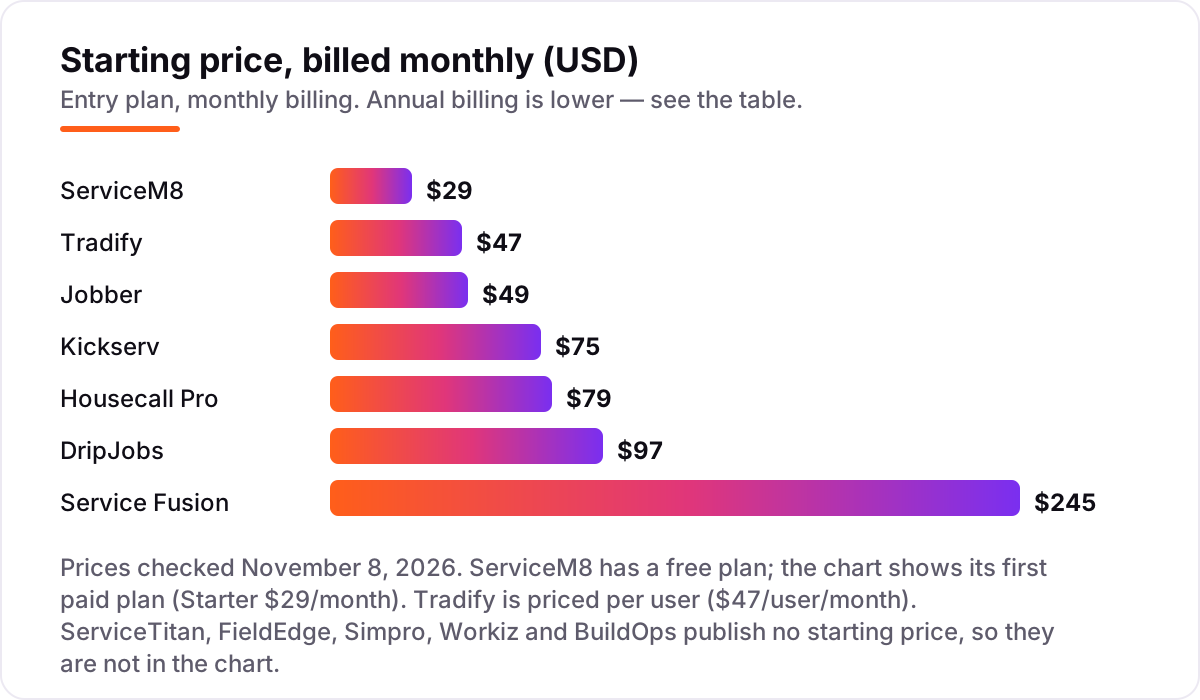
- Housecall Pro is the best fit for most HVAC shops at $79/month; Jobber follows at $49/month for a solo operator, and ServiceM8 starts free with a $29/month Starter plan.
- The single most important buying factor is how the price scales with your crew: per-user plans like Tradify at $47 per user triple in cost as you hire, while flat plans like Kickserv at $75 for 5 users and Service Fusion at $245 a month stay put.
- Five of the 12 tools publish no starting price at all: ServiceTitan, FieldEdge, Simpro, Workiz and BuildOps are quote-only, so budget for a sales call and an implementation fee on top of the subscription.
- QuickBooks sync is not on every entry plan: Housecall Pro gates it to Essentials and Jobber gates it to Connect, so check the tier before you buy for the books.
On this page
Quick comparison
| Tool | Best for | Starting price | Free plan |
|---|---|---|---|
| Housecall Pro | HVAC shops that want the most complete all-in-one platform, from booking to payments, with room to grow | $79/mo | No (14-day trial) |
| Jobber | Solo operators and small HVAC crews that want the easiest setup and the lowest published starting price | $49/mo | No (14-day trial) |
| ServiceM8 | Sole traders and tiny HVAC crews that want a real free plan and to pay by job volume, not by headcount | Free; Starter $29/mo | Yes (free) |
| Kickserv | Small HVAC teams of up to 5 that want a flat price covering the whole crew | $75/mo | No (30-day trial) |
| Tradify | HVAC firms that quote first and want fast quoting with Xero or QuickBooks sync on every plan | $47/user/mo | No (14-day trial) |
| Service Fusion | Growing HVAC crews of 8 or more that want one flat price no matter how many techs they hire | $245/mo | No (demo) |
| DripJobs | HVAC firms that lose jobs to slow follow-up and want automated drip campaigns and package pricing | $97/mo | No (no trial) |
| ServiceTitan | Established HVAC firms with 5 or more techs that want the deepest reporting and marketing tracking | Custom quote | No (demo) |
| FieldEdge | Mid-sized HVAC, plumbing and electrical shops that run on QuickBooks and want flat-rate pricing | Custom quote | No (demo) |
| Simpro | HVAC and trade firms that run service, projects and maintenance from one system with strong quoting | Custom quote | No (demo) |
| Workiz | Residential HVAC teams that want built-in calling, texting and AI answering with their dispatch | Custom quote | No (7-day trial) |
| BuildOps | Commercial HVAC and mechanical contractors running service work and construction-style projects together | Custom quote | No (demo) |
Make one of these tools?
We re-check this list every quarter. Send a correction, request a review, or ask about a clearly labeled sponsored spot.
Request a listingThe best hvac software

Housecall Pro
Best for: HVAC shops that want the most complete all-in-one platform, from booking to payments, with room to grow
Housecall Pro is the broadest platform in this list: online booking, scheduling, dispatch, estimates, invoicing, payments and consumer financing sit in one login, and the price book and job costing arrive on the entry Basic plan. Basic costs $79 a month for one user, or $59 a month billed annually, while Essentials costs $189 a month for five users and adds routes, flat-rate pricing, GPS tracking and QuickBooks sync.
The catch is that the price you see depends on the quiz. The pricing page shows different figures after you answer questions about your trade and team size, and add-ons for CSR AI, payroll, GPS and marketing sit outside every plan. Buy Housecall Pro when you want one system for the whole job; buy Jobber when you want a lower entry price and a simpler setup.
What we like
- Online booking, scheduling, dispatch, estimates, invoicing and payments in one login
- Price book and job costing included on the entry Basic plan
- Review management built in, so completed jobs turn into Google reviews
- Rated 4.3 out of 5 on G2 from 205 reviews, the most-reviewed all-rounder here
Watch out for
- QuickBooks sync waits for Essentials at $189/month, not Basic
- Add-ons for CSR AI, payroll, GPS and marketing sit outside the plan price
- The pricing page shows different prices after its trade and team-size quiz, so confirm your own quote

Jobber
Best for: Solo operators and small HVAC crews that want the easiest setup and the lowest published starting price
Jobber is the easiest tool here to set up, and its 4.6 out of 5 G2 rating from 509 reviews is the highest in this list. Core costs $49 a month for one user, or $29 a month billed annually, and covers quoting, invoicing, scheduling, online booking, a client hub and reporting. The plan steps up by team size, with extra users at $29 a month each, so the bill grows in small, predictable steps.
The limits to watch are the gates on Core: QuickBooks sync, automated reminders and routing wait for Connect, and two-way texting and job costing wait for Grow. A five-person crew pays $199 a month for Connect billed monthly, or $149 a month billed annually. Choose Jobber for the smoothest start; choose Housecall Pro for a price book and job costing on the entry plan.
What we like
- The highest G2 rating here at 4.6 out of 5 from 509 reviews
- Cleanest setup in this list, with quoting, invoicing, scheduling and CRM from day one
- Client hub and online booking included on the entry Core plan
- Extra users cost $29/month each, so the bill grows in small steps
Watch out for
- Core covers 1 user only, so a crew of 5 needs Connect at $199/month
- QuickBooks sync and automated reminders wait for Connect, not Core
- Two-way texting and job costing wait for Grow at $199/month for 1 user

ServiceM8
Best for: Sole traders and tiny HVAC crews that want a real free plan and to pay by job volume, not by headcount
ServiceM8 is the only tool here with a free plan that is a real working system: one user and 30 jobs a month at $0, with scheduling, quoting, invoicing, payments and AI smart helpers included. Starter costs $29 a month for 50 jobs, Growing costs $79 for 150 jobs, and every paid plan includes unlimited users, so hiring a tech never raises the subscription.
The trade-off is the job cap and the review record. A shop running more than 150 jobs a month needs Premium at $149, and ServiceM8 holds the lowest G2 score here at 3.8 out of 5 from 16 reviews, with users citing bugs and slow performance. Start on ServiceM8 when the budget is $0 and the job count is low; move to Jobber or Kickserv when the crew grows past a handful of techs.
What we like
- The only free plan here with no revenue cap, and paid plans include unlimited users
- Priced by jobs a month, so hiring a tech does not raise the subscription
- AI smart helpers included, with 10 uses a day on the free plan
- Strong iPhone and iPad app for techs working in the field
Watch out for
- Free plan covers 1 user and 30 jobs a month, so a busy shop outgrows it fast
- Lowest G2 score here at 3.8 out of 5, with reviewers citing bugs and slow performance
- Job costing and markup billing wait for Premium at $149/month

Kickserv
Best for: Small HVAC teams of up to 5 that want a flat price covering the whole crew
Kickserv is the cheapest way to cover a small crew: Start costs $75 a month for five users, or $60 a month billed annually, and includes the CRM, a customer center, automated reminders, more than 20 business reports and time and expense tracking. Run costs $149 a month for ten users and adds dispatch mapping, GPS check-ins and custom reports, while Scale costs $249 for twenty users.
The gaps are narrow but real. There is no single-user plan, so a solo operator pays for five seats, and two-way texting is not included on any plan. QuickBooks Desktop integration costs $50 a month extra on Run. Pick Kickserv when five people share the work and the budget matters most; pick Jobber when you need two-way texting and a lower solo price.
What we like
- Start covers 5 users for $75/month, the cheapest per-seat deal here
- More than 20 business reports and time and expense tracking on the entry plan
- QuickBooks Online integration included from Start
- A 5% Kickserv Kickback discount applies when monthly card volume passes $1,000
Watch out for
- No single-user plan, so a solo operator pays for 5 seats
- Two-way texting is not included on any plan
- QuickBooks Desktop integration costs $50/month extra on Run

Tradify
Best for: HVAC firms that quote first and want fast quoting with Xero or QuickBooks sync on every plan
Tradify is built for firms that quote first: Lite costs $47 per user a month and covers job management, scheduling with Google Calendar sync, quotes and invoices with markups, card payments and sync to Xero and QuickBooks Online on every plan. Pro costs $51 per user and adds timesheets, job costing, recurring jobs and subcontractor scheduling, while Plus costs $61 and adds AI SmartTools and purchase orders.
The per-user model is the whole decision. One user pays $47 a month, but five people on Pro pay $255 a month, which is more than Jobber Connect or Housecall Pro Essentials for the same crew. Choose Tradify when quoting speed and accounting sync matter most and the team is small; choose a flat plan when headcount is the thing that keeps growing.
What we like
- Quotes with markups, scheduling, invoicing and card payments on every plan
- Xero and QuickBooks Online sync included on Lite, not gated to a higher tier
- Google Calendar sync keeps the schedule visible outside the app
- Subcontractor scheduling included on Pro for firms that hand work out
Watch out for
- Every user is a paid seat, so a 5-person crew pays $235/month on Lite
- Timesheets, job costing and recurring jobs wait for Pro at $51/user/month
- AI SmartTools, purchase orders and reporting wait for Plus at $61/user/month

Service Fusion
Best for: Growing HVAC crews of 8 or more that want one flat price no matter how many techs they hire
Service Fusion charges one flat price for the whole company: Starter costs $245 a month billed monthly, or $208 a month billed annually, with unlimited users, scheduling, dispatching, estimates, invoicing, payments and QuickBooks sync. Plus costs $382 a month and Pro costs $627, both still with unlimited users, and every plan is month-to-month with no contract.
The flat price only wins at scale. A solo operator pays $245 a month for what Jobber sells for $49, and job costing, inventory and GPS fleet tracking are paid add-ons rather than included features. There is no free trial, only a sales-led demo. Buy Service Fusion when the crew is eight or more and per-user billing has become the problem; buy Jobber or Kickserv while the team is small.
What we like
- Unlimited users on every plan, so the bill never moves when you hire
- Scheduling, dispatching, estimates, invoicing and QuickBooks sync on Starter
- Month-to-month billing with no contract, and 15% off for annual billing
- Flat pricing beats per-user tools once the crew passes about 8 people
Watch out for
- Starter at $245/month is dear for a solo operator or a 2-person shop
- Job costing, inventory and GPS fleet tracking are paid add-ons, not included
- No free trial, only a sales-led demo

DripJobs
Best for: HVAC firms that lose jobs to slow follow-up and want automated drip campaigns and package pricing
DripJobs is a CRM first and a dispatcher second: Pro costs $97 a month for one admin user and includes an automated pipeline, more than 40 pre-built drip campaigns, Good, Better, Best package pricing, proposals with e-signatures, invoicing, payments and a customer portal. Advanced costs $147 a month, and the price is flat rather than per user, with no annual-billing maze.
The catch is what the $97 does not cover. Extra users, Jobi AI, two-way texting and job costing are paid add-ons, and there is no free trial to test the campaigns before paying. With only four G2 reviews, there is also little independent evidence to lean on. Pick DripJobs when lost follow-up is the leak in the business; pick a full field service tool when dispatch is the job.
What we like
- More than 40 pre-built multi-step drip campaigns that follow up automatically
- Good, Better, Best package pricing built into every plan
- Proposals with e-signatures, invoicing, payments and a customer portal included
- Flat monthly price with no annual-billing maze and no per-user charge on Pro
Watch out for
- Pro covers 1 admin user, and extra users and Jobi AI are paid add-ons
- Two-way texting and job costing are add-ons, not included in the $97/month
- Only 4 G2 reviews, so there is little independent reviewer evidence

ServiceTitan
Best for: Established HVAC firms with 5 or more techs that want the deepest reporting and marketing tracking
ServiceTitan is the deepest platform in this list, built for established firms with five or more techs: intelligent dispatch, pricebooks, memberships, commission tracking, marketing ROI and reporting that ties the whole operation together. Its pricing page lists Starter, Essentials and The Works, but every package shows a Request Pricing button instead of a number, and pricing runs per technician.
The depth comes with a commitment. Implementation fees run into thousands of dollars, contracts typically run 12 to 36 months, and G2 rates its ease of setup the lowest here. Smaller shops often find it more than they need. Buy ServiceTitan when the firm is big enough to staff the system; buy Housecall Pro or Jobber while the team is still small.
What we like
- Deepest dispatch, reporting and marketing ROI tracking in this list
- Pricebooks, memberships and commission tracking built for larger shops
- Rated 4.5 out of 5 on G2 from 371 reviews
- Seamless accounting integrations for firms running a real back office
Watch out for
- No published price, so you need a demo and a sales quote before you can compare it
- Implementation fees and annual contracts add to the first-year cost
- Steepest setup in this list, with the lowest G2 ease-of-setup score here

FieldEdge
Best for: Mid-sized HVAC, plumbing and electrical shops that run on QuickBooks and want flat-rate pricing
FieldEdge is a long-standing choice for HVAC, plumbing and electrical shops, and its two-way QuickBooks sync is the feature reviewers praise most. It sells three tiers, Select, Premier and Elite, with a flat-rate price book, service agreement tracking and dispatch built in, but it publishes no prices, so the cost only appears after a sales conversation.
The onboarding is the other cost to budget for: a five-week implementation and a setup fee reported at $500 to $2,000, and the subscription clock starts at setup. There is no native GPS tracking or review management, so those need separate tools. Choose FieldEdge when the books live in QuickBooks and flat-rate pricing is the priority; choose Housecall Pro when you want published prices and a faster start.
What we like
- Two-way QuickBooks sync that reviewers consistently praise
- Flat-rate price book built for HVAC service work
- Service agreement tracking that handles the accounting correctly
- Rated 4.0 out of 5 on G2 from 87 reviews, with ease of use its top-cited strength
Watch out for
- No published price, so the cost only appears after a sales conversation
- Five-week paid onboarding and a setup fee of $500 to $2,000, as reported by reviewers
- No native GPS tracking or review management, so those need separate tools

Simpro
Best for: HVAC and trade firms that run service, projects and maintenance from one system with strong quoting
Simpro covers the full job lifecycle in one system: quoting, scheduling, job management, inventory, fleet tracking and asset maintenance, with estimates that auto-populate from preset labor rates and vendor catalogs. It suits HVAC firms that run service calls and longer projects side by side, and it holds a 4.1 out of 5 G2 rating from 407 reviews.
The price is the hurdle. Simpro publishes no rate card, so you need a discovery call and an implementation project before you know the cost, and customization is complex enough that firms often pay for help from support. Quote templates are also reported as clunky. Pick Simpro when projects and maintenance matter as much as service calls; pick FieldEdge when the work is mostly residential service.
What we like
- Quotes, scheduling, inventory and project work in one platform
- Estimates auto-populate from preset labor rates and vendor catalogs
- GPS fleet tracking with geofencing and IoT asset monitoring included
- Rated 4.1 out of 5 on G2 from 407 reviews, the second-largest review base here
Watch out for
- No published price, so you need a discovery call and an implementation project
- Customization is complex and often needs paid help from support
- Quote form templates are reported as clunky by reviewers

Workiz
Best for: Residential HVAC teams that want built-in calling, texting and AI answering with their dispatch
Workiz pairs dispatch with communications: scheduling, estimates, invoices, payments and QuickBooks sync sit alongside a built-in phone system with call tracking, recording and two-way texting. Each paid tier covers the first five users, and Pro adds Genius AI scheduling and lead tools. It holds a 4.5 out of 5 G2 rating from 247 reviews, with customer support the most-praised strength.
The pricing changed in 2026: all three plans now show Request pricing, and the free Lite plan from 2025 is gone, leaving only a seven-day trial. The phone system and AI answering are paid add-ons on every plan. Choose Workiz when missed calls are the leak; choose Jobber or Housecall Pro when you want a price you can read before the demo.
What we like
- Built-in phone system with call tracking, recording and two-way texting
- Genius AI scheduling and lead tools on the Pro plan
- Each paid tier covers the first 5 users before extra-user charges
- Rated 4.5 out of 5 on G2 from 247 reviews, with customer support the top-cited strength
Watch out for
- Base prices were removed from the pricing page in 2026, so every plan needs a quote
- The free Lite plan from 2025 is gone, and there is no lasting free tier
- Phone system and AI answering are paid add-ons on every plan

BuildOps
Best for: Commercial HVAC and mechanical contractors running service work and construction-style projects together
BuildOps is built for commercial HVAC and mechanical contractors from the start, not adapted from residential software: service work and construction-style projects run in the same system, with multiple quote versions, internal approvals, change order management and commercial financial controls. It holds a 4.1 out of 5 G2 rating from 178 reviews.
The cost is a quote and a project. BuildOps publishes no rate card, and G2 reports a time to implement of three to four months, with a learning curve for techs that reviewers mention often. It is the wrong shape for a residential shop. Pick BuildOps when commercial projects are the business; pick ServiceTitan or Simpro when the mix is mostly residential service.
What we like
- Built for commercial specialty contractors, not adapted from residential software
- Multiple quote versions with internal approvals for complex commercial bids
- Change order management tied to quotes and project budgets
- Rated 4.1 out of 5 on G2 from 178 reviews, with ease of use and support praised
Watch out for
- No published price, so the quote is the only number that binds
- Implementation takes months, with a 3 to 4 month time to implement reported on G2
- Learning curve for techs is a repeated complaint in reviews
The best hvac software for an HVAC contractor is not the one with the longest feature list; it is the one whose pricing matches how the crew actually grows. We ranked the 12 tools below by fit for the most common buyer, a US HVAC shop with one to fifteen techs, starting with the published-price options and ending with the quote-only platforms, and every price was checked on the vendor's own pricing page on November 8, 2026.
How to choose the best hvac software
- Count your techs first. Tradify charges $47 per user a month, so five people cost $235, while Kickserv covers five users for $75 a month and Service Fusion charges $245 a month no matter how many techs you hire.
- Count your jobs. ServiceM8 prices by jobs a month, not by users: 30 jobs are free, 50 jobs cost $29 a month and 150 jobs cost $79, so a busy summer month can push you into the next tier.
- Check the QuickBooks tier. Housecall Pro gates its QuickBooks sync to Essentials and Jobber gates it to Connect, so the entry plan is not enough if the books are the reason you are buying.
- Decide whether you need project work. Residential service calls suit Housecall Pro and Jobber; multi-day installs and commercial work suit Simpro and BuildOps, which track projects, inventory and change orders.
- Think about who answers the phone. Workiz builds calling and texting into dispatch, and DripJobs automates follow-up after the estimate, so pick for the leak you actually have.
Software runs the jobs, but it does not fill the diary. If the phones are quiet, our local SEO service helps HVAC firms show up on Google Maps and in AI answers when someone nearby searches for a repair. And before you spend on software, check how customers find you today: the free Google review link generator makes a short link you can text after every completed job, so reviews keep coming while you compare tools.
Whatever you shortlist, try it with real jobs before you pay. The trials in this list run from 7 days on Workiz to 30 days on Kickserv, and that is long enough to run one genuine week: your schedule, your price book, your techs in the field. Check two things in the trial: that dispatching a job from the office to a phone takes seconds, and that the invoice it produces matches what your accountant expects. If you run a plumbing crew as well as HVAC, our guide to the best apps for plumbers covers the same tools from that trade's angle.
HVAC software pricing: what you will actually pay
Take a five-person HVAC crew running about 120 jobs a month. On monthly billing, the subscription costs $75 on Kickserv Start, $79 on ServiceM8 Growing, $97 on DripJobs Pro, $189 on Housecall Pro Essentials, $199 on Jobber Connect, $245 on Service Fusion Starter and $255 on Tradify Pro. Two of those numbers need adjusting before they are real: DripJobs Pro covers one admin user, so extra users are paid add-ons with unpublished prices, and ServiceM8 Growing covers 150 jobs, so a busier month pushes the crew into Premium at $149.
Over a year on annual billing, that is $720 on Kickserv, $948 on ServiceM8, $1,164 on DripJobs, $1,788 on Housecall Pro Essentials, $1,788 on Jobber Connect, $2,496 on Service Fusion and $3,060 on Tradify Pro. The same five people and the same 120 jobs cost $720 a year at the cheap end and $3,060 at the dear end, a $2,340 gap that comes entirely from per-user pricing, not from features. If the crew grows to ten, the gap widens: Kickserv Run is $149 a month and Service Fusion stays at $245, while Tradify Pro climbs to $510 a month.
Three costs sit outside every number above. First, the quote-only five, ServiceTitan, FieldEdge, Simpro, Workiz and BuildOps, publish no starting price, so there is no number to compare until you take a demo and a sales call, and implementation fees run from a reported $500 to $2,000 on FieldEdge into thousands of dollars on ServiceTitan. Second, card processing on the invoices you send, typically around 2.9% plus 30 cents a transaction. Third, the add-ons: phone systems, GPS tracking, AI answering and job costing are sold separately on several tools here. If estimating is the part of the job you want priced first, see our guide to the best estimating software for contractors.
Know the difference: field service software vs a sales CRM
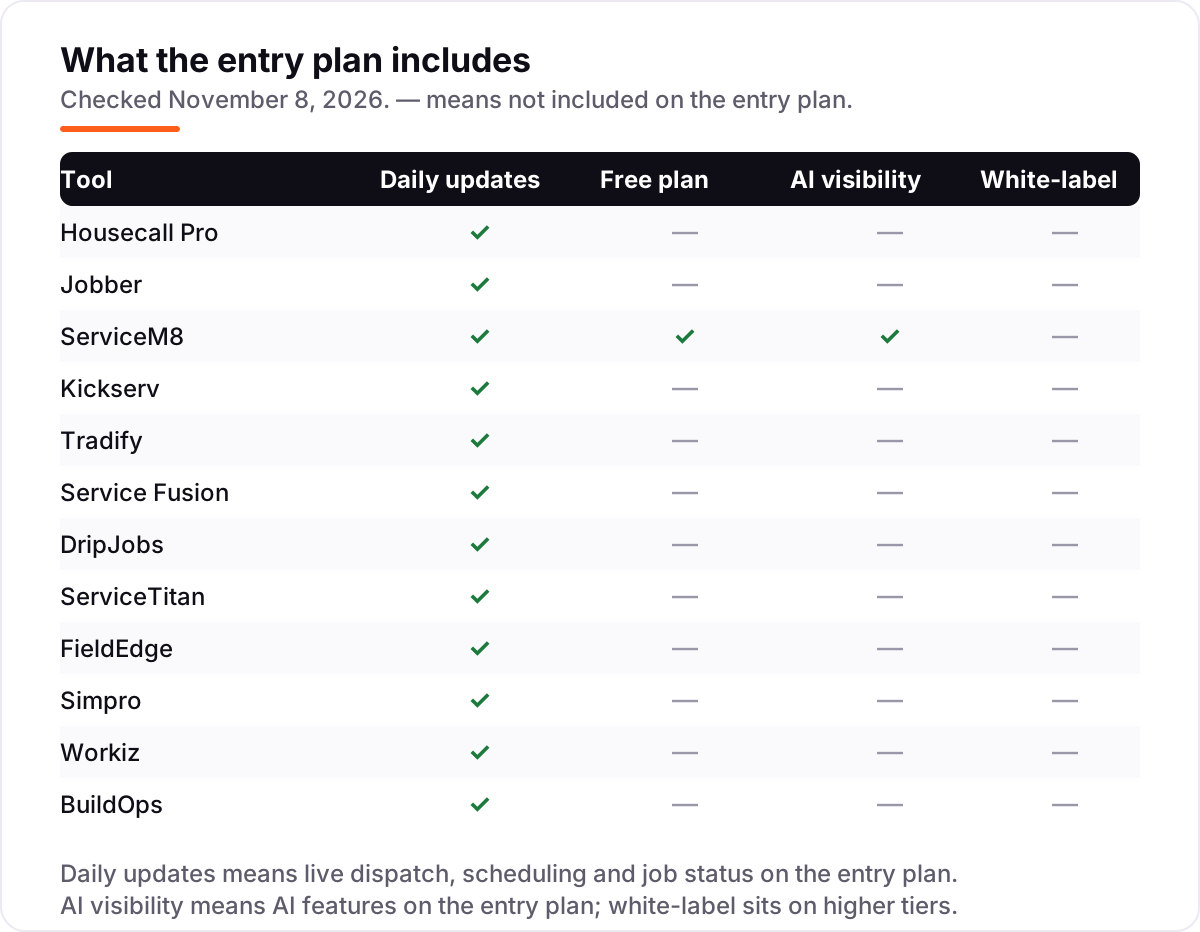
The confusion in this category is between software that runs the job and software that wins the job. Field service software, which is most of this list, schedules, dispatches, tracks the tech in the field, invoices the customer and syncs the books. A sales CRM like DripJobs does a different job: it chases the lead, sends the drip messages, builds the Good, Better, Best estimate and gets the signature. DripJobs does dispatch too, but its strength is the follow-up, not the truck roll.
There is a second confusion: none of these tools is accounting software. They send invoices and take payments, but the ledger lives in QuickBooks or Xero, and the sync between the two is what keeps the books straight. That is why the tier matters so much: a tool that only syncs on its second or third plan is not really connected on the plan you are buying.
A third distinction worth knowing is flat pricing versus per-user pricing. A flat plan like Service Fusion or Kickserv costs the same whether you hire or not, which suits a growing crew. A per-user plan like Tradify costs more with every hire, which suits a stable team that quotes a lot. The cheapest headline price is rarely the cheapest bill once your crew is five people, so price the tool for the team you will have next summer, not the team you have today.
Quick comparison: tool type by need
| Buyer | Best pick | Why |
|---|---|---|
| Solo operator on a budget | ServiceM8 | Free plan for 30 jobs a month, Starter is $29/month for 50 jobs |
| Most HVAC shops | Housecall Pro | The all-in-one choice, from $79/month, with a price book on the entry plan |
| Small crew that hates per-user pricing | Kickserv | Five users for $75/month, flat, with QuickBooks Online included |
| Firm that lives on quotes | Tradify | Fast quoting with accounting sync on every plan, $47/user/month |
| Growing crew of 8 or more | Service Fusion | Flat $245/month with unlimited users, no matter how many techs you hire |
| Commercial projects | BuildOps | Service plus construction projects in one system, priced by quote |
Mistakes to avoid
- Budgeting on the promo price. Housecall Pro offers Basic and Essentials at $26 for the first month, and Jobber runs first-month discounts too. The list price is what you pay after the promo, so compare tools on that number.
- Buying on the entry price, then finding QuickBooks costs extra. Housecall Pro gates its QuickBooks sync to Essentials and Jobber gates it to Connect. If the books are the reason you are buying, price the tier that includes the sync.
- Ignoring the cap that bites first. A tool can be cheap and still be the wrong buy: ServiceM8 Free stops at 30 jobs a month, Jobber Core stops at one user, and Kickserv Start stops at five users.
- Paying for the enterprise platform too early. ServiceTitan and BuildOps need implementation projects, annual contracts and months of setup. A five-person shop pays that cost without getting the value, so grow into them.
- Forgetting card processing and add-ons. The subscription is not the whole bill: card fees run about 2.9% plus 30 cents a transaction, and phone systems, GPS tracking and AI answering are paid add-ons on several tools here.
How we chose
We checked each vendor's own pricing page on November 8, 2026, using fresh search-index reads of the vendors' pages dated October and November 2026, and recorded the starting price exactly as shown, including the annual-billing figure where the page lists one. Five tools publish no starting price, so they are listed as Custom quote and we assert no reported per-user figure for them, and we ranked the tools by fit for the most common buyer, a US HVAC shop with one to fifteen techs, not by brand size. Ratings come from G2 pages crawled within the last few days; Tradify and DripJobs carry no rating because G2 holds only 3 and 4 reviews for them, and we would rather show no rating than a thin one. No vendor paid for a place in this list, and none of the links here are affiliate links.
What to do next
Start with the free plan or trial of your top pick and run one real week of jobs through it. Check that dispatching from the office to a tech's phone takes seconds, that the invoice matches what your accountant expects, and that the price you were quoted matches the price on the pricing page before you commit to a year. If the jobs are sorted but new customers are not finding you, our local SEO service handles the visibility side, or compare providers in our guide to SEO companies for small business. Once your tools are in place, find out what's holding your rankings back.
Your stack only works if people find you
SerpAstra fixes what keeps your site off page one and makes it easy for AI assistants to recommend.
Get a free audit→Sources we checked (22)
- Housecall Pro pricing — housecallpro.com/pricing (checked November 8, 2026)
- Jobber pricing — getjobber.com/pricing (checked November 8, 2026)
- ServiceM8 pricing — servicem8.com/pricing (checked November 8, 2026)
- Kickserv pricing — kickserv.com/pricing (checked November 8, 2026)
- Tradify pricing — tradifyhq.com/pricing (checked November 8, 2026)
- Service Fusion pricing — servicefusion.com/pricing (checked November 8, 2026)
- DripJobs pricing — dripjobs.com/pricing (checked November 8, 2026)
- ServiceTitan pricing — servicetitan.com/pricing (checked November 8, 2026)
- FieldEdge — fieldedge.com (checked November 8, 2026)
- Simpro — simprogroup.com (checked November 8, 2026)
- Workiz pricing — workiz.com/pricing-plans (checked November 8, 2026)
- BuildOps — buildops.com (checked November 8, 2026)
- Housecall Pro on G2 — g2.com (checked November 8, 2026)
- Jobber on G2 — g2.com (checked November 8, 2026)
- ServiceM8 on G2 — g2.com (checked November 8, 2026)
- Kickserv on G2 — g2.com (checked November 8, 2026)
- Service Fusion on G2 — g2.com (checked November 8, 2026)
- ServiceTitan on G2 — g2.com (checked November 8, 2026)
- FieldEdge on G2 — g2.com (checked November 8, 2026)
- Simpro on G2 — g2.com (checked November 8, 2026)
- Workiz on G2 — g2.com (checked November 8, 2026)
- BuildOps on G2 — g2.com (checked November 8, 2026)
Shamim
Founder of SerpAstra
A full-stack SEO and digital marketer who spends most days on Local SEO for dental practices, AI search visibility and lead generation.
Frequently asked questions
What is the best HVAC software?
Housecall Pro is the best fit for most HVAC shops: booking, dispatch, estimates, invoicing and payments in one login from $79 a month, with a 4.3 out of 5 G2 rating from 205 reviews. Jobber is the better pick for a solo operator at $49 a month, and ServiceM8 is the best free option with a real free plan.
How much does HVAC software cost per month?
Published starting prices run from $0 to $245 a month: ServiceM8 is free, Jobber starts at $49, Kickserv at $75 for five users, Housecall Pro at $79 and Service Fusion at $245. Five of the 12 tools publish no price at all and need a quote. A five-person crew typically pays $75 to $255 a month on the published plans, before card processing and add-ons.
Is there free HVAC software for small businesses?
ServiceM8 is the only tool here with a genuinely free plan: one user and 30 jobs a month at $0, with scheduling, quoting and invoicing included. Every other tool offers a free trial instead, from 7 days on Workiz to 30 days on Kickserv, and Workiz no longer offers a free plan at all.
ServiceTitan vs Housecall Pro: which is better for HVAC?
Housecall Pro fits most HVAC shops: published prices from $79 a month, a faster setup and the full job workflow in one login. ServiceTitan fits established firms with five or more techs that need deeper reporting, pricebooks and marketing tracking, and can absorb a custom quote, implementation fees and a 12 to 36 month contract.
Does HVAC software sync with QuickBooks?
Most of these tools sync with QuickBooks, but the tier matters. Housecall Pro gates the sync to Essentials at $189 a month, and Jobber gates it to Connect. Tradify, Kickserv, Service Fusion and FieldEdge include it on the entry plan. Check the tier before you buy, and confirm whether the sync is one-way or two-way.
Can I switch HVAC software later?
Yes, but plan the move for a quiet week, not mid-season. Export your customer list, open jobs, price book and job history from the old tool, import them into the new one, and run both systems for a week before you cancel. A quote-only platform will scope the migration as part of its implementation, so ask what it includes before you sign.
What is the difference between HVAC software and a CRM?
HVAC software runs the job: scheduling, dispatch, estimates, invoicing and the tech's mobile app. A CRM like DripJobs runs the sale: leads, automated follow-up, package pricing and proposals. Many shops need both, but if you buy only one, buy the field service tool first, because a missed dispatch costs more than a missed follow-up.
Free SEO and AI visibility audit
Find out what is holding your rankings back
Send us your site. Within 2 business days you get a written audit, an AI visibility check and a short fix list ranked by impact. Free, with no contract attached.
Request my free audit→Related guides
 Local Business & Vertical Software9 Best Apps for Plumbers in 2026: Free and Paid Apps RankedCompare the 9 best apps for plumbers on price, scheduling, dispatch and payments, with every price checked November 7, 2026 and quotes explained.Read guide →
 Local Business & Vertical Software8 Best Estimating Software for Contractors in 2026, ComparedCompare the 8 best estimating software for contractors on price, takeoff, cost databases and free trials, with every price checked November 7, 2026.Read guide →
 Accounting, Tax & Finance11 Best Invoicing Software for Small Business in 2026, Compared11 best invoicing software for small business compared on price, free plans and payment fees. Prices checked on vendor pricing pages, November 2, 2026.Read guide →