
10 Best Inventory Management Software Small Business in 2026, Compared
10 best inventory management software small business picks compared with real 2026 prices, free plans and order limits, so you can choose by volume.
 Shamim Mia, Founder, SerpAstraLast verified November 10, 202613 min read
We compare pricing pages, documentation and public reviews. We never accept payment for rankings.
Key takeaways
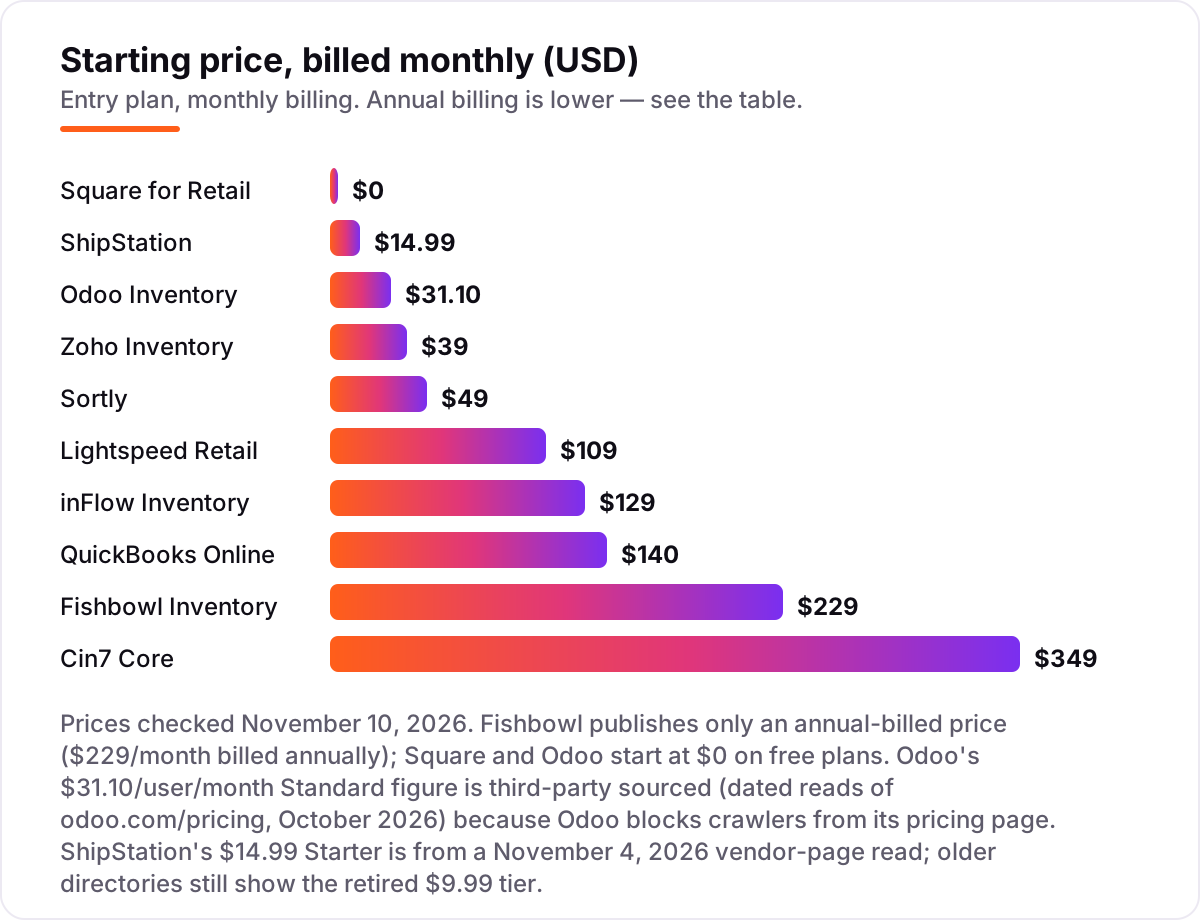
- Zoho Inventory is the best value for most small businesses: a free plan for 50 orders a month, and Standard from $29/month billed annually. Sortly is the simplest at $49/month, and Square for Retail starts at $0.
- The single most important buying factor is the meter: order caps, item caps, users and locations decide the real price, not the headline monthly figure.
- Free plans exist — Zoho, Sortly, Square and Odoo all start at $0 — but every free tier is capped, so count your items and monthly orders before choosing.
- Every price below was checked on November 10, 2026, against the vendor's own pricing page or a fresh copy of it. Odoo's figure is third-party sourced because Odoo blocks crawlers from its pricing page.
On this page
Quick comparison
| Tool | Best for | Starting price | Free plan |
|---|---|---|---|
| Zoho Inventory | Small online and multichannel sellers who want a genuinely free plan and per-organization pricing | $29/mo (annual) | Yes (50 orders) |
| Sortly | Small teams that count stock by hand with phones and want the simplest possible tracker | $49/mo | Yes (100 items) |
| Square for Retail | Single-location shops that want to start at $0 and take card payments in the same system | $0 (free plan) | Yes (free plan) |
| Odoo Inventory | Small businesses that want a full ERP — inventory, sales, purchasing and accounting in one database | $31.10/user/mo | Yes (1 app free) |
| inFlow Inventory | Small wholesalers and B2B sellers who need order management, B2B portals and multi-location stock | $99/mo (annual) | No (14-day trial) |
| Fishbowl Inventory | Small manufacturers and QuickBooks shops that need deep stock control and barcode workflows | $229/mo (annual) | No |
| Cin7 Core | Growing multichannel sellers on Shopify and Amazon who need one accurate stock number everywhere | $349/mo | No |
| Lightspeed Retail | Multi-location retailers and specialty shops with complex stock, variants and transfers | $89/mo (annual) | No (trial) |
| QuickBooks Online | Product businesses already running their books on QuickBooks who want stock in the same system | $140/mo | Yes (free plan) |
| ShipStation | Online sellers shipping 50+ orders a month who want labels, tracking and stock sync in one place | $14.99/mo | No (30-day trial) |
Make one of these tools?
We re-check this list every quarter. Send a correction, request a review, or ask about a clearly labeled sponsored spot.
Request a listingThe best inventory management software

Zoho Inventory
Best for: Small online and multichannel sellers who want a genuinely free plan and per-organization pricing
Zoho Inventory is the value pick in this list because the free plan is a real plan, not a trial: 50 orders a month, item tracking, barcoding and vendor management for $0, and the paid plans charge per organization rather than per user. Standard costs $29 a month billed annually and covers 500 orders, 3 users and 2 locations, with composite items, dropshipping and backordering included.
The catch is the meter. Every plan caps monthly orders, so a busy month can push you into the next tier whether or not you need its features, and serial and batch tracking wait until Premium at $79 a month. If your order volume is steady and under 500 a month, start here; if you sell by batch or serial number, budget for Premium from the start.
What we like
- Free plan covers 50 orders a month with item tracking, barcoding and vendor management
- Per-organization pricing, not per-user: adding team members costs nothing extra on any plan
- Standard at $29/month billed annually covers 500 orders, 3 users and 2 locations with composite items and dropshipping
Watch out for
- Order caps force an upgrade at every growth step: 500 orders a month on Standard, 3,000 on Premium
- Serial and batch tracking, barcode generation and stock counting sit on Premium ($79/month) or above
- No free trial of the paid plans beyond the 14-day trial; the free plan is the only way to test long-term

Sortly
Best for: Small teams that count stock by hand with phones and want the simplest possible tracker
Sortly is the simplest tool in this list, and that is the point. You photograph items, scan barcodes with a phone, and the stock list builds itself — no warehouse system to learn, no spreadsheet to maintain. Advanced costs $49 a month and covers 500 items and 2 users with unlimited QR code labels, inventory import, low-stock alerts and stock counts.
The limits are the story. The free plan stops at 100 items, and the $24 a month annual figure is a first-year promotion; from year two, yearly plans renew at roughly 20% off the monthly rate, so budget $39 a month, not $24. Sortly is the right pick for a team that counts stock by hand; it is the wrong pick if you need purchase orders, accounting or multichannel order management.
What we like
- Fastest to start: photograph items, scan barcodes with a phone and the stock list builds itself
- Advanced at $49/month covers 500 items and 2 users with unlimited QR code labels and inventory import
- Low-stock alerts, stock counts and activity history keep a small team in sync without training
Watch out for
- The free plan stops at 100 items and 1 user, so almost any real stock list needs a paid plan
- The $24/month annual figure is a first-year promotion for new customers; yearly plans renew at 20% off the monthly rate from year two
- No accounting or order management depth: purchase orders start on Ultra ($149/month) and QuickBooks Online only on Premium

Square for Retail
Best for: Single-location shops that want to start at $0 and take card payments in the same system
Square for Retail is the cheapest way to start, because the starting price is zero. The free plan covers sales, basic stock tracking, low-stock alerts and an online store, and a small shop can run on it for a long time before needing anything else. Plus at $49 a month per location adds purchase orders, vendor management, cost-of-goods reports and barcode label printing, plus a slightly lower card rate.
The lock-in is the processing. You cannot bring your own payment processor to Square, so the 2.6% plus 15 cents per in-person card payment on the free plan is non-negotiable, and it falls only a tenth of a point on Plus. Buy Square when the till and the stockroom are the same job; buy a dedicated inventory system when stock control, not payments, is the bottleneck.
What we like
- Free plan covers sales, basic inventory, low-stock alerts and an online store at $0 before card fees
- Plus at $49/month per location adds purchase orders, vendor management, cost-of-goods reports and barcode label printing
- Month-to-month billing with no cancellation fees, and card rates fall slightly on Plus and Premium
Watch out for
- Real inventory management — purchase orders, vendors, cost reporting — starts on Plus ($49/month per location), not the free plan
- Payment processing is locked to Square, so the per-transaction fee is non-negotiable
- Transfer orders between stores need Premium ($149/month per location)

Odoo Inventory
Best for: Small businesses that want a full ERP — inventory, sales, purchasing and accounting in one database
Odoo Inventory is the only free full warehouse system in this list — with one condition. The One App Free plan gives you the complete Inventory app for unlimited users at $0: multi-location stock, lots and serial numbers, barcode receipts and picking, reordering rules and landed costs. It stays free only while Inventory is your only Odoo app; install Sales or Accounting and every user becomes a paid Standard seat.
Standard costs $31.10 per user a month for the first 12 months, then $38.90, and it includes every Odoo app, so the stock figure in the warehouse is the same figure in the accounts. That is the honest trade: unmatched free depth, but a per-user price that grows with headcount and a setup that takes real work.
What we like
- One App Free gives the full Inventory app — multi-location stock, lots and serials, barcode picking — for unlimited users at $0
- Standard includes every Odoo app, so sales, purchasing and accounting share one stock figure with no sync step
- Reordering rules, landed costs and FEFO picking cover warehouse workflows the simpler trackers cannot
Watch out for
- The $31.10/user/month figure is a 12-month introductory rate; the list price is $38.90/user/month
- Every internal user is charged once a second app is installed, so costs scale with headcount, not stock
- Setup and customization take real work; reviewers note a steep learning curve on advanced settings

inFlow Inventory
Best for: Small wholesalers and B2B sellers who need order management, B2B portals and multi-location stock
inFlow Inventory is built for wholesalers, and it shows in the plan structure: unlimited products, sales and purchase orders on every plan, with the meter set by team members and locations instead. Lite costs $99 a month billed annually for 2 team members and 1 location, and the B2B Showroom add-on gives each customer a portal with their own products and prices.
The step-ups are steep. A third team member or a second location means Core at $299 a month, serial and lot tracking are $39 a month each below the top tier, and Core and above require a $499 one-time onboarding package. Choose inFlow when you sell to other businesses and need order management with your stock; choose Zoho when you sell direct to consumers and want the lower floor.
What we like
- Unlimited products, sales and purchase orders on every plan, with 2 team members and 1 location on Lite
- B2B Showroom add-on ($39/month) gives customers their own portal with per-customer products and prices
- G2 reviewers cite ease of use most, and in-house support is included on every plan
Watch out for
- Lite at $99/month billed annually covers only 2 team members and 1 location; a third person or second site means Core ($299/month)
- Serial and lot tracking are $39/month add-ons each below the top tier, and Core and above require a $499 one-time onboarding package
- Manufacturing (bills of materials, work orders) is a separate product line starting at $169/month billed annually

Fishbowl Inventory
Best for: Small manufacturers and QuickBooks shops that need deep stock control and barcode workflows
Fishbowl Inventory is the warehouse workhorse in this list. Essentials costs $229 a month billed annually and covers real-time inventory, SKU tracking, reorder points and mobile barcode scanning for 2 users, with two-way QuickBooks Online sync included so the stock figure and the books never drift apart. Growth at $429 a month adds pick, receive and ship workflows and automated reordering.
Read the plan names carefully: the Inventory plans do not include manufacturing. Bills of materials, work orders and MRP need Fishbowl Advanced Manufacturing from $675 a month, and every purchase requires an implementation package quoted separately. Buy Fishbowl for deep stock control in a QuickBooks shop; do not buy the $229 plan expecting a factory system.
What we like
- Essentials covers real-time inventory, SKU tracking, reorder points and mobile barcode scanning for 2 users
- Two-way QuickBooks Online sync is included, so stock and the books stay in step without a third tool
- Growth ($429/month) adds pick, receive and ship workflows, automated reordering and multichannel selling
Watch out for
- Essentials at $229/month billed annually covers only 2 users, and the Inventory plans do not include manufacturing at all
- Manufacturing (bills of materials, work orders, MRP) needs Fishbowl Advanced Manufacturing from $675/month
- Every purchase requires an implementation package, quoted separately and not included in the subscription price

Cin7 Core
Best for: Growing multichannel sellers on Shopify and Amazon who need one accurate stock number everywhere
Cin7 Core is the multichannel pick: one stock number across Shopify, Amazon and your warehouse, with a published price list instead of a sales call. Standard costs $349 a month for 5 users, 2 integrations and 6,000 sale orders a year, and every plan includes unlimited inventory locations with native Shopify and Amazon sync. Pro at $599 a month adds material requirements planning for sellers who assemble what they sell.
The meter is order volume, not users alone, so a high-volume, low-ticket seller can outgrow Standard faster than the price suggests. Forecasting, the B2B portal and POS are paid add-ons on top. Choose Cin7 when you sell on two or more channels and stock accuracy across them is the daily problem.
What we like
- One published price list for a serious system: Standard $349, Pro $599 and Advanced $1,199 a month
- Unlimited inventory locations on every plan, with native Shopify and Amazon stock sync
- Pro adds material requirements planning for sellers who assemble or make what they sell
Watch out for
- Standard at $349/month covers only 5 users, 2 integrations and 6,000 sale orders a year; volume above that costs more
- ForesightAI forecasting, the B2B portal and POS are paid add-ons, not part of the base plans
- Cin7 Omni, the enterprise product, is quote-only, so larger sellers lose the published-price certainty

Lightspeed Retail
Best for: Multi-location retailers and specialty shops with complex stock, variants and transfers
Lightspeed Retail is the inventory-first POS in this list, built for shops where stock complexity is the job: multi-variant products in sizes and colours, bundles with margin tracking, stock transfers between locations and 10,000-item CSV imports. Basic costs $89 a month billed annually and covers POS, payments, core inventory, purchase orders and a basic online store for one register.
The price climbs with the shop. Extra registers are $59 a month each, card processing runs through Lightspeed Payments at 2.6% plus 10 cents on every plan, and forecasting, custom reporting and API access wait until Plus at $289 a month. Choose Lightspeed when the shop floor and the stockroom are one operation; choose Square when a single till is enough.
What we like
- Basic covers POS, payments, core inventory, purchase orders and a basic online store from $89/month billed annually
- Core ($149/month) adds loyalty, advanced reporting, accounting integrations and a mobile scanner app
- Handles multi-variant products, bundles, stock transfers and up to 10,000-item CSV imports
Watch out for
- Basic at $89/month billed annually covers 1 register and 1 location; extra registers are $59/month each
- Card processing runs through Lightspeed Payments at 2.6% + 10c on every plan, with no cheaper processor option on the page
- The features serious stockrooms need — forecasting, custom reporting, API access — sit on Plus ($289/month)

QuickBooks Online
Best for: Product businesses already running their books on QuickBooks who want stock in the same system
QuickBooks Online is the books-first pick, and its inventory only starts on Plus. That plan costs $140 a month and tracks quantities and cost of goods sold with FIFO valuation, plus purchase orders, sales orders, budgets and project profitability for 5 users. Enhanced inventory adds item receipts, moving-average cost and sales-order to purchase-order linking, so stock movements post straight to the ledger.
The honest math is that $38 a month buys no inventory at all: Simple Start and Essentials do not track stock, and the $40-a-month enhanced inventory add-on does not change that. If your books already live in QuickBooks, Plus is the cheapest way to add stock control; if they do not, a dedicated system costs less than adopting QuickBooks for inventory alone.
What we like
- Plus tracks quantities and cost of goods sold with FIFO valuation, purchase orders and sales orders in the books
- Enhanced inventory on Plus adds item receipts, moving-average cost and sales-order to purchase-order linking
- Five users and two accountant seats are included, so the bookkeeper and the team share one login
Watch out for
- Inventory tracking starts on Plus at $140/month — Simple Start ($38) and Essentials ($85) do not include it
- Plus rose from $115 to $140 a month for renewals on or after August 1, 2026, and reviewers cite frequent price increases
- Plus stops at 5 users and 40 combined classes and locations; a sixth user means Advanced at $340/month

ShipStation
Best for: Online sellers shipping 50+ orders a month who want labels, tracking and stock sync in one place
ShipStation is the shipping-first pick in this list, and it earns its place for sellers whose stock problem is really a fulfilment problem. Starter costs $14.99 a month for 50 shipments, with 300-plus integrations across carts and marketplaces, automation rules, branded labels and discounted carrier rates. As orders ship, stock levels sync back to every connected channel, so listings do not oversell.
Two things to check before you buy. The price is banded by shipment volume, so Starter costs $79.99 a month at 1,000 shipments, and the inventory tools are lighter than the dedicated systems here — no bills of materials, no warehouse management. Choose ShipStation when labels and tracking are the daily work; choose inFlow or Cin7 when stock control itself is.
What we like
- Starter at $14.99/month covers 50 shipments with 300+ integrations across carts and marketplaces
- Automation rules, branded labels and discounted carrier rates cut the time each order takes to leave the shelf
- Stock levels sync back to every connected channel as orders ship, so listings do not oversell
Watch out for
- ShipStation is shipping-first: its inventory tools are lighter than the dedicated systems in this list
- The price rises with shipment volume — Starter is $79.99 a month at 1,000 shipments, not $14.99
- Older directories still show the retired $9.99 Starter tier and the old Bronze/Silver ladder; the current plans are Starter, Standard and Premium
This list covers the best inventory management software small business owners can buy in 2026, sorted by fit for the most common buyer: a small business that has outgrown a spreadsheet and needs one accurate stock number. The same question is often asked as "best inventory management software for small business" — it means the same thing, and the tools below are ranked for that buyer, not by brand size.
How to choose the best inventory management software small business owners actually need
- Count what the plan meters first. Zoho meters orders, Sortly meters items, inFlow meters team members and locations, Cin7 meters sale orders a year. The meter decides your real price.
- Match the tool to where you sell. A single shop needs a POS with stock control (Square, Lightspeed); a multichannel seller needs sync across Shopify and Amazon (Cin7, inFlow).
- Check what the free plan actually caps. Free tiers here stop at 50 orders, 100 items, or one app — fine for testing, rarely enough for trading.
- Look for the add-ons and the onboarding. Serial tracking, lot tracking and implementation are often priced separately, and they change the total by hundreds a month.
- Try the real stock list before you pay. Every tool here has a free plan or a free trial. Load your actual SKUs and orders for a week and see where the caps bite.
Inventory management software pricing: what you will actually pay
Take a typical small business: one location, 3 staff, 500 orders a month and 2,000 SKUs. On Zoho Inventory, Standard at $29 a month billed annually costs $348 a year and covers exactly 500 orders — but a busy month over 500 forces Premium at $79 a month. On inFlow, Lite at $99 a month billed annually costs $1,188 a year, but it covers only 2 team members and 1 location, so a third staff member pushes you to Core at $299 a month. On Fishbowl, Essentials at $229 a month billed annually costs $2,748 a year for 2 users, plus a separately quoted implementation package.
The same business on Sortly needs Ultra, not Advanced: Advanced caps at 500 items, so 2,000 SKUs mean $149 a month, or $74 a month in year one on annual billing. On Odoo, 3 users on Standard at the $31.10 introductory rate cost $93.30 a month in year one, then $116.70 at the $38.90 list price. The lesson is the same in every row: price the plan your caps force you into, not the cheapest plan on the page.
Quick comparison: tool type by need
| Buyer | Best pick | Why |
|---|---|---|
| Smallest budget, wants a free plan | Zoho Inventory | Free for 50 orders a month; paid from $29/month billed annually |
| Counts stock by hand with phones | Sortly | $49/month, photo and barcode scanning, no training needed |
| Single shop with a till | Square for Retail | Free plan at $0; Plus adds purchase orders at $49/month per location |
| Wants a full ERP, not just stock | Odoo Inventory | Full Inventory app free for one app; Standard $31.10/user/month in year one |
| Wholesaler selling to other businesses | inFlow Inventory | Unlimited products and B2B portals from $99/month billed annually |
| Multichannel seller on Shopify and Amazon | Cin7 Core | One stock number everywhere from $349/month, unlimited locations |
Inventory software vs spreadsheets: know the difference
The biggest confusion in this category is the idea that a spreadsheet is a cheaper version of the same thing. It is not. A spreadsheet is a list you update by hand, and it is wrong the moment someone forgets an update, sells an item twice, or edits it while someone else is editing it too. Inventory software updates stock itself: a sale, a purchase order or a return posts and the number moves, and the system warns you before you oversell or run out.
The second difference is channels. A spreadsheet holds one number; inventory software holds one number per channel and keeps them in step, so a sale on Amazon lowers the stock Shopify shows. The third difference is cost visibility: the tools in this list track what each unit cost, so you know the margin on every sale instead of guessing it at month end. If your stock list fits on one screen and you sell from one place, a spreadsheet still works. The day you sell from two places, or two people touch the list, it stops working — and that is the day to buy one of the tools above.
How we chose
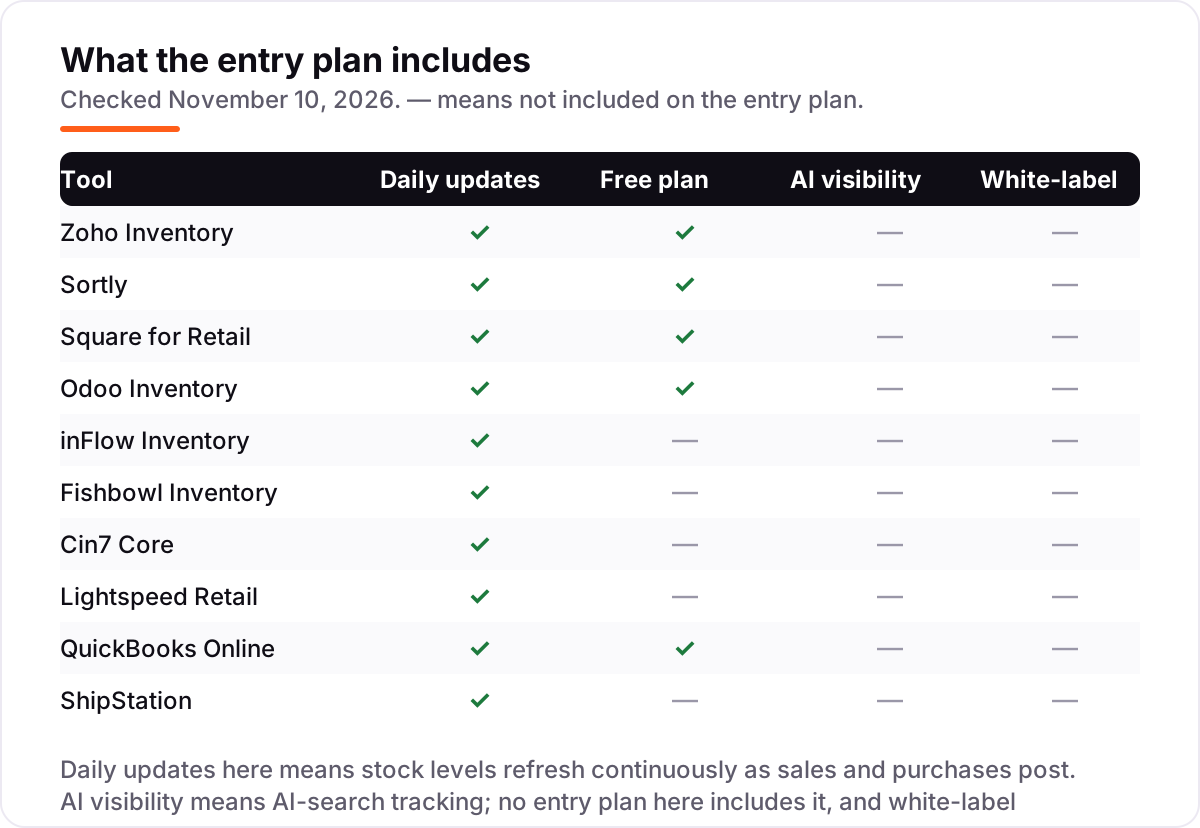
We checked each vendor's own pricing page on November 10, 2026 and recorded the starting price exactly as shown, including the annual-billing figure where the page lists one. Zoho Inventory's page was read directly, and inFlow Inventory's page confirmed its $129 to $879 monthly range the same day; the other prices were verified against fresh November 2026 copies of the vendors' own pricing pages and independent October and November reads. Two figures are third-party sourced and marked as such: Odoo's $31.10 Standard rate, because Odoo blocks crawlers from its pricing page, and ShipStation's $14.99 Starter, from a November 4, 2026 vendor-page read, because older directories still show the retired $9.99 tier. Ratings come from G2, with review counts shown. We ranked the tools by fit for the most common buyer — a small business that has outgrown a spreadsheet — not by brand size. No vendor paid for a place in this list, and none of the links here are affiliate links.
What to do next
Start with the meter: count your monthly orders, your SKUs, your staff and your locations, then find the cheapest plan whose caps you do not hit. Then take the free plan or trial of your top pick and load your real stock list for a week. If the numbers stay accurate across every channel and the reports make sense without a manual recount, you have your tool. Before you list new products, run your titles through the free SERP snippet preview tool — and if your store also needs more traffic, our SEO audit shows where the gaps are. Once your tools are in place, find out what's holding your rankings back.
Your stack only works if people find you
SerpAstra fixes what keeps your site off page one and makes it easy for AI assistants to recommend.
Get a free audit→Sources we checked (20)
- Zoho Inventory pricing — zoho.com/us/inventory/pricing (checked November 10, 2026)
- Zoho Inventory on G2 — 4.4/5, 91 reviews (checked November 10, 2026)
- Sortly pricing — sortly.com/pricing (checked November 10, 2026)
- Sortly on G2 — 4.3/5, 27 reviews (checked November 10, 2026)
- Square pricing — squareup.com/us/en/pricing (checked November 10, 2026)
- Square Point of Sale on G2 — 4.6/5, 1,211 reviews (checked November 10, 2026)
- Odoo pricing — odoo.com/pricing (third-party reads, October 2026)
- Odoo Inventory on G2 — 4.4/5, 65 reviews (checked November 10, 2026)
- inFlow Inventory pricing — inflowinventory.com/software-pricing (checked November 10, 2026)
- inFlow Inventory on G2 — 4.4/5, 58 reviews (checked November 10, 2026)
- Fishbowl Inventory pricing — fishbowlinventory.com/pricing (checked November 10, 2026)
- Fishbowl Inventory on G2 — 4.0/5, 274 reviews (checked November 10, 2026)
- Cin7 Core pricing — cin7.com/pricing (checked November 10, 2026)
- Cin7 Core on G2 — 4.2/5, 345 reviews (checked November 10, 2026)
- Lightspeed Retail pricing — lightspeedhq.com/pricing (checked November 10, 2026)
- Lightspeed Retail on G2 — 4.0/5, 294 reviews (checked November 10, 2026)
- QuickBooks Online pricing — quickbooks.intuit.com/pricing (checked November 10, 2026)
- QuickBooks Online on G2 — 4.0/5, 3,870 reviews (checked November 10, 2026)
- ShipStation pricing — shipstation.com/pricing (checked November 10, 2026)
- ShipStation on G2 — 4.3/5, 588 reviews (checked November 10, 2026)
Shamim
Founder of SerpAstra
A full-stack SEO and digital marketer who spends most days on Local SEO for dental practices, AI search visibility and lead generation.
Frequently asked questions
What is the best inventory management software for a small business?
Zoho Inventory is the best inventory management software for small business owners on a budget: a free plan for 50 orders a month and Standard from $29/month billed annually. If you count stock by hand, Sortly at $49/month is simpler. Shops that take card payments in store should look at Square for Retail, which starts at $0.
How much does inventory management software cost for a small business?
From $0 to $349 a month at the entry level. Zoho Standard is $29/month billed annually, Sortly is $49, Square Plus is $49 per location, and inFlow Lite is $99 billed annually. Fishbowl starts at $229/month and Cin7 Core at $349. The real cost depends on your meter — orders, items, users and locations — not the headline price.
Is there free inventory management software for a small business?
Yes, with caps. Zoho Inventory is free for 50 orders a month, Sortly is free for 100 items, Square for Retail is free with basic stock tracking, and Odoo Inventory is free forever if it is your only Odoo app. Each free tier is genuinely usable for a very small stock list, and each one forces an upgrade as soon as you grow past its cap.
What is the difference between inventory software and a spreadsheet?
A spreadsheet is a static list you update by hand; inventory software updates stock itself as orders, purchases and returns post, and it warns you before you oversell or run out. It also keeps one stock number across every sales channel, which a spreadsheet cannot do without constant manual copying. The spreadsheet breaks the first time two people edit it at once.
Do I need inventory software if I already use QuickBooks?
QuickBooks Online tracks inventory, but only from the Plus plan at $140/month — Simple Start and Essentials do not include it. If your stock is simple and your books already live in QuickBooks, Plus is the cheapest route. If you sell on multiple channels, need barcode picking or run a warehouse, a dedicated system like Zoho, inFlow or Cin7 will fit better.
Can inventory software sync stock across Shopify and Amazon?
Yes, on the multichannel tools in this list. Cin7 Core syncs stock natively with Shopify and Amazon, inFlow covers unlimited integrations on every plan, and ShipStation syncs stock back to every connected channel as orders ship. Zoho and Odoo also integrate with both channels. Check the integration list for your exact channels before you pay, because depth varies.
What should I check before paying for inventory software?
Five things: what the plan meters (orders, items, users or locations), what the free plan actually caps, whether barcode scanning and purchase orders are included or add-ons, whether the price is monthly or annual billing, and whether onboarding or implementation is a separate charge. Fishbowl and inFlow both add onboarding costs that the subscription price does not show.
Free SEO and AI visibility audit
Find out what is holding your rankings back
Send us your site. Within 2 business days you get a written audit, an AI visibility check and a short fix list ranked by impact. Free, with no contract attached.
Request my free audit→Related guides
 SEO & AI Search10 Best Accounting Software for Small Business with Inventory in 2026, Compared10 best accounting software for small business with inventory, compared on price, stock depth and free plans. Prices checked November 2, 2026.Read guide →
 Local Business & Vertical Software12 Best Construction Inventory Software Reviews in 2026, ComparedCompare the 12 best construction inventory software reviews on price, free plans, barcode tracking and QuickBooks sync, with prices checked November 7, 2026.Read guide →
 SEO & AI Search7 Best Ecommerce Platforms for SEO in 2026 (Pros, Cons and Pricing)The 7 best ecommerce platform for SEO picks compared on price, SEO controls and ease of use, with real 2026 prices checked on each vendor's pricing page.Read guide →