
9 Best Landscape Design Software in 2026, Compared
Compare the 9 best landscape design software options on price, free plans, 3D rendering and plant libraries, with every price checked November 8, 2026.
 Shamim Mia, Founder, SerpAstraLast verified November 8, 202614 min read
We compare pricing pages, documentation and public reviews. We never accept payment for rankings.
Key takeaways
- PRO Landscape at $90/month is the best fit for design-build contractors, Realtime Landscaping Pro at $279 one-time is the best value with no subscription, and SketchUp Go at $129/year is the best pick for custom structures.
- The single most important buying factor is the deliverable that wins the job: photo-based designs close homeowners, CAD plans get built, and 3D presentations sell the bigger project.
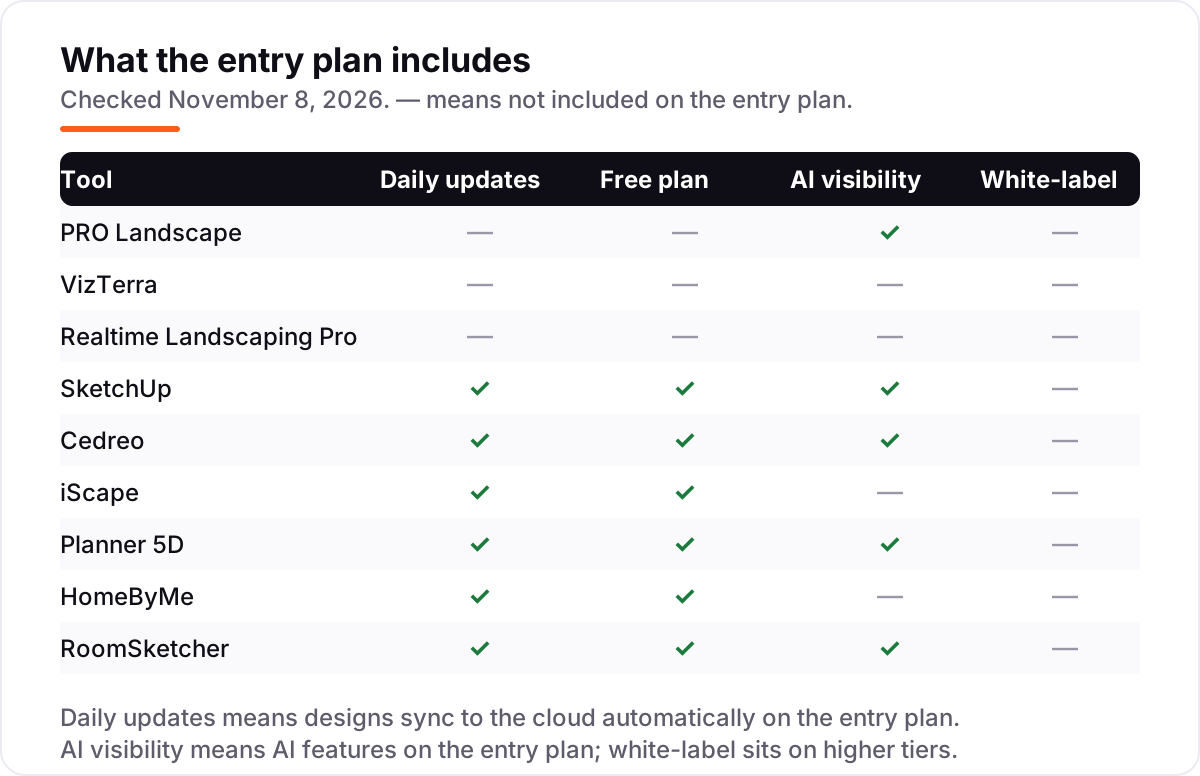
- Six tools have genuinely free plans — SketchUp, Cedreo, iScape, Planner 5D, HomeByMe and RoomSketcher — while PRO Landscape, VizTerra and Realtime Landscaping offer trials only.
- Only Realtime Landscaping sells a one-time licence; every other tool here is a subscription, so the design files stop working when you stop paying.
On this page
Quick comparison
| Tool | Best for | Starting price | Free plan |
|---|---|---|---|
| PRO Landscape | Design-build contractors who want photo imaging, landscape CAD, 3D and estimates in one Windows suite | $90/mo | No (free trial) |
| VizTerra | Landscape and hardscape designers who sell with interactive 3D presentations | $97/mo | No (30-day trial) |
| Realtime Landscaping Pro | Homeowners and small firms who want detailed 3D yard design without a subscription | $279 one-time | No (free trial) |
| SketchUp | Designers who need a general 3D modeler for custom structures, decks and pergolas | $129/yr | Yes (free) |
| Cedreo | Residential builders and remodelers who need 2D plans, 3D renders and proposals fast | $129/mo | Yes (free plan) |
| iScape | Landscapers who design on site from a photo of the client's actual yard | $29.99/mo | Yes (free plan) |
| Planner 5D | Homeowners and designers who want quick 2D and 3D layouts with renders on any device | $19.99/mo | Yes (free plan) |
| HomeByMe | Homeowners who want a simple browser planner for a house and garden in 3D | $29/mo | Yes (free plan) |
| RoomSketcher | Anyone who needs a measured 2D/3D plan that prints to scale | $24/mo | Yes (free plan) |
Make one of these tools?
We re-check this list every quarter. Send a correction, request a review, or ask about a clearly labeled sponsored spot.
Request a listingThe best landscape design software

PRO Landscape
Best for: Design-build contractors who want photo imaging, landscape CAD, 3D and estimates in one Windows suite
PRO Landscape is the working designer's suite: Photo Imaging, a landscape CAD planner, 3D rendering and proposals live in one Windows program, so a design goes from a client photo to a priced proposal without changing tools. The photo step is the selling point — drop plants, pavers and lighting onto a photo of the client's yard and they see the finished job, not a sketch.
The CAD side then turns that picture into a scaled plan with irrigation symbols and take-offs, and the estimate builder prices it from your own rates. The catch is the platform: Windows only, with no free plan, and the $90 monthly price comes from vendor-provided G2 pricing rather than a page on prolandscape.com. Buy it when photo selling and CAD output both matter.
What we like
- Photo Imaging turns a client photo into a design in minutes, which closes sales on the spot
- Landscape CAD with irrigation symbols and take-offs, plus estimates built from your own prices
- AI Suite adds an AI outdoor-living designer, image enhancement and an AI eraser
- Companion app for iPad and Android lets you design and bid on site with the client
Watch out for
- Windows only — Mac users need Parallels or another tool
- No free plan, only a free trial, so you pay before the first client project
- The $90 monthly rate is vendor-provided via G2; prolandscape.com publishes no pricing page

VizTerra
Best for: Landscape and hardscape designers who sell with interactive 3D presentations
VizTerra is built around one idea: the presentation sells the project. You draw in 2D, the design becomes a 3D scene, and the client explores it as an interactive walkthrough instead of squinting at a flat plan. The 3D library covers the whole outdoor-living job — landscapes, hardscapes, outdoor kitchens, decks and pergolas — so the presentation looks finished, not placeholder.
The price is $97 per user per month, or $84 on the Annual Membership, plus a one-time $95 setup fee, which makes the first year $1,092 on annual billing. There is no free plan, only a 30-day trial with full access. Pick VizTerra when the client presentation is the product you are selling.
What we like
- Draw in 2D and turn the plan into an interactive 3D presentation clients can explore
- Large 3D library covers landscapes, hardscapes, outdoor kitchens, decks and pergolas
- Built for selling: the presentation itself is the sales tool, not an export afterthought
- Annual Membership drops the rate to $84 per user per month ($997 a year)
Watch out for
- Windows desktop only, so Mac-based designers need another option
- A $95 one-time setup fee sits on top of the subscription
- No free plan — the 30-day trial is the only way to try it before paying

Realtime Landscaping Pro
Best for: Homeowners and small firms who want detailed 3D yard design without a subscription
Realtime Landscaping Pro is the only tool here you buy once: $279 and it is yours, with no monthly bill and no renewal to forget. For that you get serious capability — a plant library of more than 6,000 entries, growth previews that show the yard up to 20 years ahead, terrain sculpting, lighting simulation and 3D walkthroughs. Photo-based design builds the plan on a picture of the real yard.
The trade-offs are platform and polish. It runs on Windows 10 and 11 only, the trial watermarks output, and very large projects can lag on older machines. Over three years it costs $279 against more than $3,000 for the subscription tools at the top of this list. Buy it when you want to own the software outright.
What we like
- One $279 payment and you own it — no subscription, no monthly bill, no renewal
- Plant library of more than 6,000 entries with growth previews up to 20 years ahead
- Terrain sculpting, outdoor lighting simulation and 3D walkthroughs included
- Photo-based design lets you build the plan on a photo of the actual yard
Watch out for
- Windows 10 and 11 only — no Mac version and no mobile app
- The free trial watermarks output and trims the plant and object library
- Large, complex projects can lag on older hardware

SketchUp
Best for: Designers who need a general 3D modeler for custom structures, decks and pergolas
SketchUp is not landscape software — it is a general 3D modeler that landscape designers reach for when the job includes something custom: a deck, a pergola, a retaining wall, a built-in kitchen. The push-pull modeling is the fastest way to build those structures in 3D, and the 3D Warehouse supplies millions of ready-made models, from plants to patio furniture.
Go costs $129 a year and runs on web and iPad, with AI Render credits included; Pro at $399 a year adds the desktop app and LayOut for documentation. There is no plant database and no irrigation tools, so it pairs with a landscape tool rather than replacing one. Buy it for the structures around the planting.
What we like
- The fastest way to model custom structures — decks, pergolas, retaining walls — in 3D
- Huge 3D Warehouse of ready-made models speeds up every project
- Go includes AI Render credits and works on web and iPad, not just desktop
- Free web version covers personal projects, so you can learn it before paying
Watch out for
- Go has no desktop app and no LayOut, so documentation needs Pro at $399 a year
- Photorealistic rendering is not built in — it needs an extension or Studio
- The monthly rate ($19.99) costs $239.88 over a year, nearly double the $129 annual price

Cedreo
Best for: Residential builders and remodelers who need 2D plans, 3D renders and proposals fast
Cedreo is a browser-based home design tool that residential builders use to produce a full plan set — 2D and 3D floor plans, sections, elevations, roofs and site plans — with realistic renders in about two hours, according to the vendor. Nothing installs, so it runs on any computer, and Pro covers unlimited projects with 40 renderings a month plus 10 AI renderings.
The price needs a warning: Cedreo shows different prices by visitor location, so the $129 monthly and $79 annual Pro rates are the US list prices and your screen may differ. The free plan allows one project and no renderings. Buy Cedreo when speed to a finished proposal matters more than CAD depth.
What we like
- Browser-based, so it runs on any computer with nothing to install
- A full plan set with realistic renders in about two hours, per the vendor
- Pro includes 40 renderings a month plus 10 AI renderings and unlimited projects
- Personal plan at $139 per project suits a single one-off job
Watch out for
- Published prices vary by visitor location, so the figure on your screen may differ
- The free plan allows one project and no renderings, so it is a demo, not a working tier
- Rendering tops out at full HD, and deep customization is weaker than in CAD tools

iScape
Best for: Landscapers who design on site from a photo of the client's actual yard
iScape is the tool for the driveway conversation: open the app on your phone, take a photo of the client's yard, and place plants, pavers and features onto the real scene with augmented reality. The client watches the design appear on their own property, which is a stronger sell than any plan printed back at the office. The proposal tool then turns the design into a priced PDF quote.
Pro costs $29.99 a month or $299.99 a year and unlocks the full database with unlimited designs; the free plan is a limited database with 2 designs. The hard limit is platform: 2D and 3D design are iOS only. Pick iScape when you design on site, on an iPhone, and want the quote out the same day.
What we like
- Augmented-reality design on a photo of the real yard, on the phone, at the property
- Built-in proposal tool turns the design into a priced PDF quote in minutes
- Free plan lets you try it with 2 designs before paying anything
- Pro unlocks the full plant, hardscape and product database with unlimited designs
Watch out for
- 2D and 3D design are iOS only, so Android users get a narrower app
- The free plan is a limited database — the full plant library needs Pro
- At $29.99 a month it is pricey for homeowners with a single yard to design

Planner 5D
Best for: Homeowners and designers who want quick 2D and 3D layouts with renders on any device
Planner 5D is a home designer first, but it earns its place here because it is the easiest way to lay out a house and garden together: draw the floor plan, place the patio and beds in 3D, and render the result from the browser or phone. AI floor-plan recognition turns a sketch or photo into a plan in minutes, and designs sync across devices.
Premium costs $19.99 a month or $59.99 a year — the cheapest annual paid tier in this list — and the free Basic plan covers unlimited projects with half the catalog. The limits are landscape depth and exports: no planting plans, and CAD export needs Professional at $49.99 a month. Use it for whole-property layouts, not planting design.
What we like
- Runs in the browser and on mobile, so designs start anywhere and sync everywhere
- AI floor-plan recognition turns a sketch or photo into a plan in minutes
- Premium at $59.99 a year is one of the cheapest paid tiers in this list
- Professional adds CAD export, 360-degree walkthroughs and unlimited 4K renders
Watch out for
- Landscape-specific tools are thin — it is a home designer first, a garden tool second
- Unlimited 4K renders and CAD export wait for Professional at $49.99 a month
- The free plan covers only half the furniture catalog and adds watermarks to exports

HomeByMe
Best for: Homeowners who want a simple browser planner for a house and garden in 3D
HomeByMe is the simplest tool in this list: a drag-and-drop browser planner that turns a floor plan into a furnished 3D home and garden with almost no learning curve. The free Starter plan covers 2D, 3D and walkthroughs for 3 projects with 3 realistic renderings, which is enough to design one house and yard properly before paying anything.
Premium costs $29 a month and removes the caps — unlimited projects, unlimited HD images and 360-degree photos — but there is no published annual price, so no yearly discount. The garden tools stay basic: beds, lawns and paths, not planting schedules or irrigation. Pick it for a simple whole-property view, not a planting plan.
What we like
- Free Starter plan covers 2D, 3D and walkthroughs, so a first project costs nothing
- Simple drag-and-drop planner that needs no training to produce a decent 3D view
- Premium adds unlimited projects, unlimited HD images and 360-degree photos
- Runs entirely in the browser on any computer
Watch out for
- Landscape design is basic — beds, lawns and paths, not planting plans or irrigation
- The free Starter plan covers only 3 projects and 3 realistic renderings
- No published annual price, so there is no yearly discount to take

RoomSketcher
Best for: Anyone who needs a measured 2D/3D plan that prints to scale
RoomSketcher is the odd one out here, and deliberately so: it is a floor-plan tool, not a landscape designer, but it is the best way to produce a measured plan when a client needs a drawing, not a render. Draw the property to scale in the browser, and the tool produces 2D plans, 3D views, Live 3D walkthroughs and 3D photos from that measured model — and the plans print to scale.
Pro costs $24 a month, or $144 a year, and adds measurements, branding, Live 3D and 5 credits a month; the free plan starts with 2 credits and watermarked snapshots. The catch is the credit metering: 3D output costs credits, so heavy months cost more. Buy it when the deliverable is a measured plan a crew can build from.
What we like
- Measured 2D and 3D floor plans that print to scale, with measurements and total area
- Live 3D walkthroughs and 360 views let clients explore the finished property
- Runs in the browser and as desktop and tablet apps, with iPhone LiDAR capture
- Free plan with 2 starter credits lets you try a real project before paying
Watch out for
- Credits meter 3D output, so costs vary with how many renders and plans you order
- No plant library or landscape-specific tools — it is a floor-plan tool first
- VIP at $49 a year is cheaper but lacks measurements and branding, so measured work needs Pro
The best landscape design software turns a yard you can only imagine into a plan a client can approve and a crew can build from. We ranked the nine tools below by fit for the most common buyer — a landscape designer or design-build contractor who sells the design before building it — starting with the pro suites and ending with the budget 2D option, and every price was checked on the vendor's own pricing page on November 8, 2026.
How to choose the best landscape design software
- Start with the deliverable. If you sell to homeowners, you need photo-based designs or 3D presentations they can picture. If a crew builds from your work, you need scaled CAD plans with a plant list. Pick the tool that produces the output your buyer signs.
- Count the real cost, not the headline. A $29.99 monthly plan costs $359.88 over a year, and a $279 one-time licence costs $279 over three years. Compare first-year totals, not monthly figures.
- Check the platform before the features. PRO Landscape, VizTerra and Realtime Landscaping Pro run on Windows only. If your office is Mac-based, the browser tools — SketchUp, Cedreo, Planner 5D, HomeByMe and RoomSketcher — are the shortlist.
- Test the plant library, not the demo. A library of 6,000 plants matters only if it covers your climate zone and the species you actually plant. Run one real project through the trial and check the species list first.
- Decide whether the design is the sale. When the design itself wins the job, pay for the presentation tools. When the design is a formality before the build, the cheapest tool that draws a clean plan wins.
Good design software is only half the job for a landscaping business — the other half is being found by homeowners searching nearby. Our local SEO service covers that side, and the free local business schema generator adds the structured data that helps a landscaping business show up in local results. Before you publish new service pages, run your titles through the free SERP snippet preview tool too.
Whatever you shortlist, try it on a real property before you pay. The free plans and trials in this list are long enough to design one genuine yard — your plants, your materials, your client — and that project tells you more than any review can. Check two things in the trial: that the plant library covers your climate zone, and that the export your client sees looks like the finished yard, not a sketch.
Landscape design software pricing: what you will actually pay
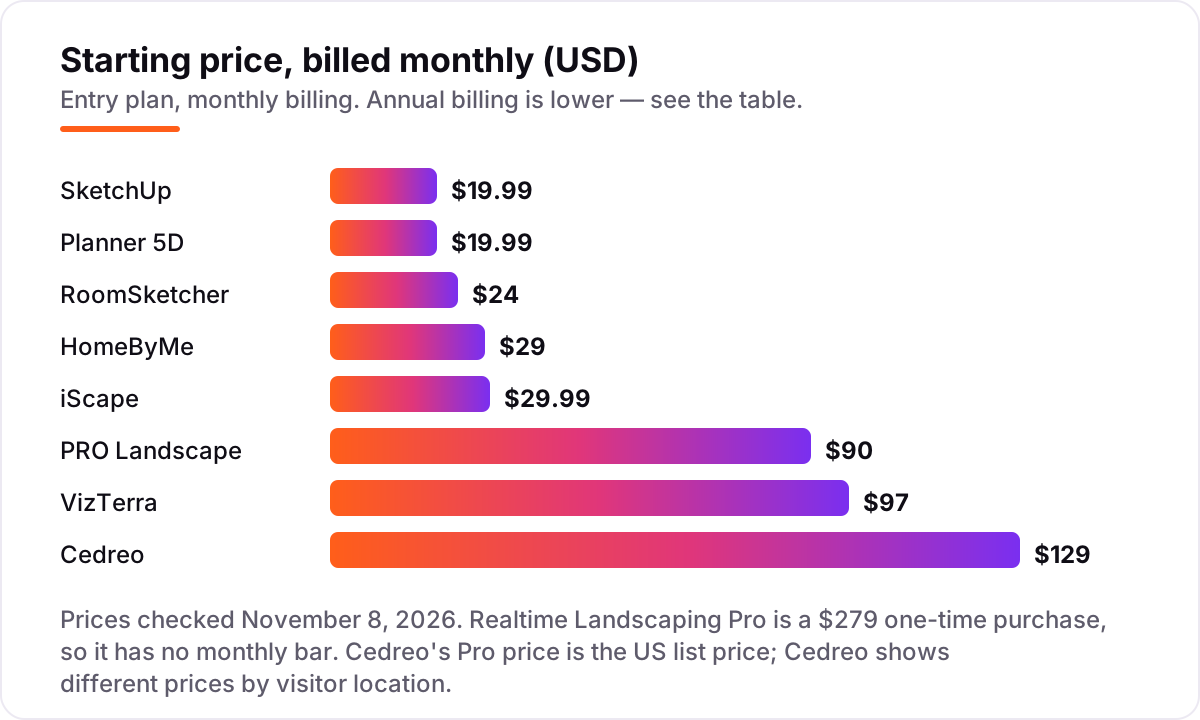
Take a solo designer doing four client projects a month, paying monthly for the first year. The subscription costs $239.88 on SketchUp Go or Planner 5D Premium, $288 on RoomSketcher Pro, $348 on HomeByMe Premium, $359.88 on iScape Pro, $1,080 on PRO Landscape, $1,164 on VizTerra, and $1,548 on Cedreo Pro. Realtime Landscaping Pro costs $279 once, and nothing in year two or three.
Annual billing changes the picture. SketchUp Go drops from $239.88 to $129 a year, Planner 5D Premium from $239.88 to $59.99, RoomSketcher Pro from $288 to $144, iScape Pro from $359.88 to $299.99, PRO Landscape from $1,080 to $900, Cedreo Pro from $1,548 to $948, and VizTerra from $1,164 to $997 — plus a $95 setup fee, so $1,092 in the first year. The same designer and the same four projects a month cost $59.99 a year at the cheap end and $1,548 at the dear end, before any add-ons.
Three costs sit outside every number above. First, the setup fees: VizTerra charges $95 once, and the desktop tools may need a Windows machine if your office runs Macs. Second, the render and export caps: Cedreo Pro includes 40 renderings a month, Planner 5D Professional is the tier with unlimited 4K renders, and HomeByMe's free plan stops at 3 realistic renderings. Third, the upgrade that the entry plan forces: SketchUp Go has no desktop app, so documentation means Pro at $399 a year, and PRO Landscape's Home app for consumers is a separate product. If you also want AI-generated concepts, our guide to the best AI landscape design software covers the tools that draft a design from a photo on their own.
Know the difference: photo-based design vs CAD plans
The confusion in this category is between two different outputs that happen to share a name. Photo-based design places plants, pavers and lighting onto a photograph of the client's actual yard — PRO Landscape's Photo Imaging and iScape's AR view work this way — and its job is to sell. The client sees their own house with the finished garden on it, and approves faster than they would from a drawing. CAD plans are the opposite: scaled, measurable drawings with plant lists, irrigation symbols and take-offs that a crew can build from without guessing.
Neither output replaces the other. A photo design with no scale cannot be priced or built accurately, and a CAD plan with no visual cannot convince a homeowner who cannot read drawings. The pro tools in this list do both — PRO Landscape and VizTerra pair presentation with plans, and Realtime Landscaping Pro pairs photo-based design with terrain and walkthroughs — while the budget tools usually do one: RoomSketcher draws measured 2D plans, Planner 5D and HomeByMe render the property in 3D but produce no planting schedule.
A third distinction worth knowing is the plant library versus the plant list. A library is what you design with — thousands of species with mature sizes and growth previews. A list is what you hand the nursery: species, quantities and sizes for one project. Realtime Landscaping Pro and PRO Landscape produce both from the same design; the browser tools mostly produce the picture, and the list becomes a manual job. If your crews order from your plans, check the list export in the trial before you buy.
Quick comparison: tool type by need
| Buyer | Best pick | Why |
|---|---|---|
| Design-build contractor | PRO Landscape | Photo imaging, CAD and estimates in one suite, from $90/month |
| Designer who sells with 3D | VizTerra | Interactive 3D presentations, from $97/user/month |
| Best value, no subscription | Realtime Landscaping Pro | Full 3D yard design for a single $279 payment |
| Custom structures and decks | SketchUp | Fast 3D modeling with a huge model library, Go is $129/year |
| Fast proposals for builders | Cedreo | Plans and renders in about two hours, Pro is $129/month |
| Designing on site, on iPhone | iScape | AR design on the client's yard photo, Pro is $29.99/month |
| Cheapest paid plan with renders | Planner 5D | Premium is $19.99/month, or $59.99 a year |
| Simplest browser planner | HomeByMe | Free Starter plan, Premium is $29/month |
| Measured plans that print to scale | RoomSketcher | Measured 2D/3D plans with Live 3D, Pro is $24/month |
Mistakes to avoid
- Budgeting on the monthly figure. The monthly rate is not the yearly cost: SketchUp Go at $19.99 a month is $239.88 a year against $129 billed annually, and iScape Pro at $29.99 is $359.88 against $299.99. Compare first-year totals.
- Buying a Windows-only tool for a Mac office. PRO Landscape, VizTerra and Realtime Landscaping Pro do not run on macOS. Check the platform before the feature list, or budget for Parallels or a Windows machine.
- Paying for renders you will not use. Cedreo Pro includes 40 renderings a month and Planner 5D Professional offers unlimited 4K renders — both wasted if you present twice a month. Match the render allowance to your real project count.
- Trusting the plant library without checking your zone. A library of 6,000 plants is useless if it lacks the species you plant in your climate. Run one real project through the trial and check the species first.
- Forgetting the subscription never ends. Only Realtime Landscaping Pro sells a one-time licence. Every other tool here stops working when the subscription stops, so a tool you use four times a year still costs twelve months.
How we chose
We checked each vendor's own pricing page on November 8, 2026 and recorded the starting price exactly as shown, including the annual-billing figure where the page lists one, and we ranked the tools by fit for the most common buyer — a landscape designer or design-build contractor who sells the design before building it — not by brand size. Two prices carry a disclosure: PRO Landscape publishes no pricing page, so its $90 monthly and $900 annual rates are the vendor-provided figures from its G2 listing, and HomeByMe's $29 Premium rate is likewise vendor-supplied via G2. Cedreo shows different prices by visitor location, so we used the US list price. Realtime Landscaping's G2 rating was omitted because the listing holds only 6 reviews and was last crawled 65 days ago, and VizTerra, iScape and HomeByMe have no G2 rating we could verify — we would rather show no rating than a stale or estimated one. No vendor paid for a place in this list, and none of the links here are affiliate links.
What to do next
Start with the free plan or trial of your top pick and design one real yard through it — your plants, your materials, your client — before you pay for a year. Check that the plant library covers your climate zone, that the export your client sees looks like the finished yard, and that the file your crew gets is something they can build from. If the designs are sorted but new clients are not finding you, our local SEO service handles the visibility side — or compare providers in our guide to SEO companies for small business. Once your tools are in place, find out what's holding your rankings back.
Your stack only works if people find you
SerpAstra fixes what keeps your site off page one and makes it easy for AI assistants to recommend.
Get a free audit→Sources we checked (13)
- PRO Landscape pricing — g2.com/products/pro-landscape (vendor-provided pricing, checked November 8, 2026)
- VizTerra pricing — structurestudios.com/blog/vizterra-vs-pro-landscape (vendor comparison, checked November 8, 2026)
- Realtime Landscaping pricing — ideaspectrum.com (checked November 8, 2026)
- SketchUp pricing — sketchup.com/plans-and-pricing (checked November 8, 2026)
- SketchUp reviews — g2.com/products/sketchup/reviews (checked November 8, 2026)
- Cedreo pricing — cedreo.com/pricing (checked November 8, 2026)
- Cedreo reviews — g2.com/products/cedreo/reviews (checked November 8, 2026)
- iScape pricing — iscapeit.com/faqs (vendor FAQ, checked November 8, 2026)
- Planner 5D pricing — planner5d.com/pricing (checked November 8, 2026)
- Planner 5D reviews — g2.com/products/planner-5d/reviews (checked November 8, 2026)
- HomeByMe pricing — g2.com/products/homebyme/pricing (vendor-supplied pricing, checked November 8, 2026)
- RoomSketcher pricing — roomsketcher.com (checked November 8, 2026)
- RoomSketcher reviews — g2.com/compare/planner-5d-vs-roomsketcher (checked November 8, 2026)
Shamim
Founder of SerpAstra
A full-stack SEO and digital marketer who spends most days on Local SEO for dental practices, AI search visibility and lead generation.
Frequently asked questions
What is the best landscape design software?
PRO Landscape is the best fit for most design-build contractors, with photo imaging, CAD and estimates in one suite from $90/month. Realtime Landscaping Pro at $279 one-time is the best value, and SketchUp Go at $129/year is the best pick for custom structures like decks and pergolas.
How much does landscape design software cost?
Entry prices run from $19.99 a month for Planner 5D Premium and SketchUp Go to $129 a month for Cedreo Pro, plus one $279 one-time option in Realtime Landscaping Pro. A solo designer typically pays $60–$1,550 in the first year, depending on the tool and whether they pay monthly or annually.
Is there really free landscape design software?
Yes, with limits. SketchUp Free, Cedreo, iScape, Planner 5D, HomeByMe and RoomSketcher all have free plans, but each caps something — projects, renderings, credits, the plant catalog or the furniture catalog. PRO Landscape, VizTerra and Realtime Landscaping offer free trials instead of free plans.
What is the difference between photo-based design and CAD landscape design?
Photo-based design places plants and materials onto a photo of the real yard, which sells the job to a homeowner fast. CAD design produces scaled, measurable plans a crew can build from. The pro tools in this list do both; the budget tools usually do one.
Can I use landscape design software on a Mac?
It depends on the tool. PRO Landscape, VizTerra and Realtime Landscaping Pro are Windows only, so Mac users need Parallels or a different tool. SketchUp, Cedreo, Planner 5D, HomeByMe and RoomSketcher run in the browser and work on a Mac.
Do I need 3D rendering, or is 2D enough?
2D is enough when the deliverable is a plan a crew builds from — a scaled drawing with a plant list does that job. 3D rendering earns its price when you must sell the design first, because clients approve faster when they see the finished yard.
Can I switch landscape design software later?
Yes, but exports are the catch. Most tools export images and PDFs easily, while editable plans rarely transfer between programs. Expect to redraw active projects in the new tool, so switch between jobs instead, not in the middle of one.
Free SEO and AI visibility audit
Find out what is holding your rankings back
Send us your site. Within 2 business days you get a written audit, an AI visibility check and a short fix list ranked by impact. Free, with no contract attached.
Request my free audit→Related guides
 Local Business & Vertical Software12 Best AI Landscape Design Software in 2026, ComparedCompare the 12 best ai landscape design software tools on price, free plans, AR previews and AI restyles, with every price checked November 7, 2026.Read guide →
 Local Business & Vertical Software9 Best Free 3D Landscape Design Software in 2026, ComparedCompare the 9 best free 3d landscape design software options on price, free plans and 3D views, with every price checked on November 7, 2026.Read guide →
 Local Business & Vertical Software10 Best Deck Design Software for Contractors in 2026, ComparedCompare the 10 best deck design software for contractors on price, 3D quality, materials lists and permit output, with every price checked November 7, 2026.Read guide →