
10 Best Landscaping Payroll Apps in 2026: Free and Paid Apps Ranked
Compare the 10 best landscaping payroll apps in 2026 on price, hourly pay, tax filing and crew features, with every price checked November 8, 2026.
 Shamim Mia, Founder, SerpAstraLast verified November 8, 202613 min read
We compare pricing pages, documentation and public reviews. We never accept payment for rankings.

Key takeaways
- Gusto is the best fit for most landscaping crews at $49/month + $6/person; OnPay matches the price with multi-state payroll included, and Patriot Payroll is the cheapest entry at $17/month + $4/worker.
- Every price here is a base fee plus a per-person charge — an 8-person crew pays $49 a month on Patriot and $106 on QuickBooks, a $684-a-year gap before add-ons.
- Time-tracking apps are not payroll apps: ClockShark and Workyard track hours, but only the tools in this list file taxes and pay people.
- ADP RUN and Paychex Flex publish no prices at all, so budget them only after a written quote that lists every fee.
On this page
Quick comparison
| Tool | Best for | Starting price | Free plan |
|---|---|---|---|
| Gusto | Landscaping crews that want the easiest full-service payroll, with benefits and HR in the same login | $49/mo | No |
| OnPay | Small landscaping companies that want one flat full-service plan with multi-state payroll included | $49/mo | No |
| SurePayroll | Small landscaping crews that want the cheapest full-service payroll with taxes filed for them | $29/mo | No |
| Patriot Payroll | Owner-operated landscaping businesses that want the cheapest payroll and US phone support | $17/mo | No |
| Square Payroll | Landscaping companies that already take payments and schedule with Square | $35/mo | No |
| QuickBooks Payroll | Landscaping companies that already run QuickBooks Online for their books | $50/mo | No |
| Homebase | Hourly landscaping crews that want scheduling, time tracking and payroll in one app | $49/mo | Yes (Basic free) |
| Rippling | Growing landscaping firms that want payroll, HR and IT on one employee record | $8/user/mo | No |
| ADP Run | Larger landscaping companies that want a big-name provider with deep HR and compliance support | Custom quote | No |
| Paychex Flex | Landscaping companies that want a dedicated payroll specialist and 24/7 support | Custom quote | No |
Make one of these tools?
We re-check this list every quarter. Send a correction, request a review, or ask about a clearly labeled sponsored spot.
Request a listingThe best landscaping payroll apps

Gusto
Best for: Landscaping crews that want the easiest full-service payroll, with benefits and HR in the same login
Gusto is the easiest payroll app in this list to run, and that matters when the payroll runner also estimates jobs and drives the truck. Simple costs $49 a month plus $6 per person, covers unlimited pay runs, and files and pays federal, state and local taxes for you. New hires onboard from a phone, and benefits, 401(k) and workers' comp administration all live in the same login.
The limit to watch is geography. Simple runs payroll in one state, so a crew that works across a state line needs Plus at $80 a month plus $12 per person. Time tracking is also an add-on on Simple, at $6 per person a month. Pick Gusto when you want payroll to take the least of your week; pick OnPay when your crews cross state lines on the entry plan.
What we like
- The easiest payroll setup here: most crews run their first payroll the same day they sign up
- Unlimited pay runs with automatic tax filings and payments in every state you operate
- Benefits, 401(k) and workers' comp admin live in the same login as payroll
- Employee self-onboarding and a mobile app cut the paperwork for field hires
Watch out for
- Simple covers one state only — multi-state crews need Plus at $80/month + $12/person
- Per-person fees add up fast on big seasonal crews, since every active employee is billed
- Time tracking costs extra on Simple, at $6 per person a month

OnPay
Best for: Small landscaping companies that want one flat full-service plan with multi-state payroll included
OnPay keeps the buying decision simple: one plan, $49 a month plus $6 per worker, with every feature included. That single plan covers unlimited pay runs, all federal, state and local tax filings and payments, multi-state payroll, and year-end W-2 and 1099 forms. For a landscaping company whose crews cross a county or state line, the multi-state coverage on the entry plan is the difference that matters.
The trade-off is scope. OnPay has no built-in time tracking, so crew hours come from your scheduling app or a time clock, and its HR and benefits features are thinner than Gusto's. The integration list is short — QuickBooks Online, Xero and a handful of others — so niche landscape tools may need a manual export. Pick OnPay when you want one predictable price and payroll that just works.
What we like
- One plan, one price: every feature is included, so there is no tier to outgrow
- Multi-state payroll is included on the entry plan, unlike Gusto Simple
- US-based support with a reputation for answering the phone and helping with setup
- Integrates with QuickBooks Online and Xero, so payroll journals post to the books
Watch out for
- No built-in time tracking — hours come from your scheduling app or a separate time clock
- Fewer HR and benefits features than Gusto or Rippling at the same price
- Only a handful of integrations, so niche landscape software may need a manual export

SurePayroll
Best for: Small landscaping crews that want the cheapest full-service payroll with taxes filed for them
SurePayroll is the cheapest way to get someone else to file your payroll taxes. Full Service costs $29 a month plus $7 per employee, covers unlimited pay runs, and files and deposits federal and state payroll taxes for you. Direct deposit is free with a two-day turnaround, onboarding help from a real person is free, and new customers get alternating months free during their first year.
Watch the extras. Multi-state payroll adds $9.99 a month, year-end W-2 and 1099 forms are billed separately at $50 plus $5 per form, and there is no built-in time tracking, so crew hours come from another app. Support wait times are the most common complaint in recent reviews. Pick SurePayroll when price is the deciding factor and you run payroll in one state.
What we like
- The lowest full-service price here: $29 a month plus $7 per employee, taxes filed for you
- Unlimited payroll runs and free 2-day direct deposit on the entry plan
- Alternating months are free during the first 12 months for new customers
- Free onboarding with a real person walking you through setup
Watch out for
- Multi-state payroll costs $9.99 a month extra, and year-end forms carry separate fees
- No built-in time tracking — hours must come from another app
- Support wait times are a common complaint in recent reviews

Patriot Payroll
Best for: Owner-operated landscaping businesses that want the cheapest payroll and US phone support
Patriot Payroll is the cheapest entry point in this list: Basic Payroll costs $17 a month plus $4 per worker, with unlimited payroll runs, free direct deposit and a free employee portal. Setup is free, and the US-based support team has a reputation for actually answering the phone — a real difference when payday is Friday and something is wrong.
The catch is what Basic does not do. It does not file your payroll taxes for you, so either you file them or you step up to the full-service plan, which costs more. There is no built-in time tracking, and multi-state tax filing is not on Basic either. Pick Patriot when the crew is small, the budget is tight, and you are comfortable handling tax filings yourself.
What we like
- The lowest starting price here: $17 a month plus $4 per worker
- US-based support with a reputation for answering the phone quickly
- Unlimited payroll runs with free direct deposit and a free employee portal
- Free setup, and accounting from the same company if you want one login
Watch out for
- Basic Payroll does not file taxes for you — full-service filing costs extra on a higher plan
- No built-in time tracking or scheduling for field crews
- Fewer integrations than the bigger suites, and no multi-state tax filing on Basic

Square Payroll
Best for: Landscaping companies that already take payments and schedule with Square
Square Payroll makes sense for one buyer: a landscaping company already running Square for payments and scheduling. It costs $35 a month plus $6 per person, covers unlimited pay runs, and files and pays federal and state taxes automatically. Crew hours flow from Square time cards straight into payroll, and team members clock in and check pay stubs from the Square app.
Outside the Square ecosystem it fits poorly. Salaried staff are converted to an hourly rate when you enter their hours, which makes salaried pay awkward, and reporting is basic — pre-set reports exported as CSV files with no preview. Pick Square Payroll when your crews already clock in on Square; otherwise Gusto or OnPay will fit better.
What we like
- Hours flow straight from Square time cards into payroll — no re-entry for hourly crews
- Automatic federal and state tax payments and filings, with multi-state included
- Team members clock in from the Square app and see pay stubs on their phones
- Contractor payments are included, so 1099 subs ride on the same system
Watch out for
- Built around the Square ecosystem — it fits poorly if you do not use Square already
- Salaried pay is awkward: salaried staff are converted to an hourly rate for entry
- Reporting is basic: pre-set reports with no preview, exported as CSV files

QuickBooks Payroll
Best for: Landscaping companies that already run QuickBooks Online for their books
QuickBooks Payroll — now sold as QuickBooks Workforce — exists for one reason: your payroll should reconcile with your accounting without manual journal entries. Core starts at $50 a month plus $7 per employee, with next-day direct deposit, automatic payroll runs, and federal and state tax filings. Payroll AI collects time and attendance from employees and flags inconsistencies before payday.
The catch is the ecosystem lock-in. It works best alongside a paid QuickBooks Online plan, so you pay for two subscriptions, and Core includes only one state filing — extra states cost $12 a month each. Prices have risen repeatedly, and the rebrand to Workforce has muddied the pricing page. Pick it when your books already live in QuickBooks; otherwise compare Gusto first.
What we like
- Payroll posts straight to QuickBooks Online — no journal entries to re-key
- Payroll AI collects time and attendance and flags inconsistencies for you
- Next-day direct deposit and automatic tax filings on the Core plan
- Contractor-only payments from $15 a month for up to 20 contractors
Watch out for
- Only makes sense with a paid QuickBooks Online plan, so you pay for two subscriptions
- Core covers one state filing; extra states cost $12 a month each
- Prices have risen repeatedly, and the plan is now sold as QuickBooks Workforce

Homebase
Best for: Hourly landscaping crews that want scheduling, time tracking and payroll in one app
Homebase is the only tool here that starts as a scheduling app and grows into payroll. The Basic plan is free for one location and up to 10 employees, covering scheduling, time tracking and team chat, and the payroll add-on costs $49 a month plus $6 per employee. Hours flow from timesheets straight into payroll, and the add-on handles tips, blended overtime and break premiums automatically.
The catch is the add-on model. Payroll is never included in a base plan, so the real price is the base plan plus $49 plus $6 per person — a 12-person crew on Essentials pays $30 plus $49 plus $72 a month. Paid plans are priced per location, so a company with two yards pays twice. Pick Homebase when scheduling and time tracking matter as much as payday itself.
What we like
- Scheduling, GPS time tracking and payroll in one app — hours flow into pay with no re-entry
- Payroll handles tips, blended overtime and break premiums automatically
- The Basic scheduling plan is free for one location and up to 10 employees
- Per-location pricing: adding crew members does not raise the base subscription
Watch out for
- Payroll is a paid add-on on every plan — the free plan alone does not pay anyone
- Paid plans are priced per location, so multi-yard companies pay per site
- Advanced HR and hiring tools sit on the $120-a-location All-in-One plan

Rippling
Best for: Growing landscaping firms that want payroll, HR and IT on one employee record
Rippling is the most powerful tool in this list, and the most expensive to run well. Plans start at $8 per employee per month plus a monthly base fee, and US payroll is one module among many: HR, IT, benefits, time tracking and spend management all run on one employee record. Rippling AI answers questions across your workforce data and flags pay anomalies before payday.
The modular pricing is the thing to price carefully. The $8 rate is per user, the base fee is not published, and each added module raises the bill — reviewers consistently say costs stack up fast. Setup can be complex for a small crew, and support is hit-or-miss on standard tiers. Pick Rippling when the company is growing past one crew and wants one system; pick Gusto when payroll alone is the job.
What we like
- One employee record drives payroll, HR, IT and benefits — no duplicate data entry
- Rippling AI answers questions across your workforce data and flags pay anomalies
- Workflow automation handles onboarding, offboarding and approvals without manual steps
- Scales from a single crew to multiple locations without switching systems
Watch out for
- Modular pricing: the $8 rate is per user, and a monthly base fee sits on top
- Costs stack up quickly as you add payroll, device and benefits modules
- Setup can be complex, and support is hit-or-miss on standard tiers

ADP Run
Best for: Larger landscaping companies that want a big-name provider with deep HR and compliance support
ADP RUN is the safe, big-name choice for a landscaping company that has outgrown the small-business tools. Four packages run from Essential Payroll to HR Pro, covering payroll, tax filing, new-hire reporting, direct deposit and employee self-service, with HR support, background checks and benefits layered on as you move up. Reviewers rate its live-chat support among the best in this list.
The price is the problem: ADP publishes no prices for any RUN package, so every quote needs a sales call, and W-2s, 1099s and off-cycle runs cost extra on top of it. Third-party estimates put a small-team bill around $100 to $300 a month, but that is an estimate, not a quote. Pick ADP RUN when compliance depth matters more than price transparency.
What we like
- The deepest HR and compliance bench here, built for companies that keep growing
- Four packages from payroll-only to full HR, so the service grows with the company
- Highly rated support in this list, with live chat that reviewers praise
- Handles multi-state payroll, garnishments and complex tax situations without fuss
Watch out for
- No published price — every package needs a sales call and a custom quote
- W-2s, 1099s and off-cycle runs cost extra on top of the quote
- New-customer offers of free months come with terms that are easy to miss

Paychex Flex
Best for: Landscaping companies that want a dedicated payroll specialist and 24/7 support
Paychex Flex is the other big-name option, and its pitch is people: a dedicated payroll specialist who knows your account, plus 24/7 live support by phone, chat and email. The platform scales from a single crew to hundreds of employees, and HR Pro and PEO options sit on the same system when the company grows past payroll alone.
Like ADP, Paychex publishes no prices. Every current tier — Select, Pro and Enterprise — says Request Pricing, and the $39-a-month figure still quoted around the web is for the discontinued Essentials tier. Setup and year-end fees are also unpublished, so ask for a written quote that lists every fee before you sign.
What we like
- A dedicated payroll specialist who knows your account, not a rotating queue
- 24/7 live support by phone, chat and email
- Scales from a single crew to hundreds of employees without switching providers
- HR Pro and PEO options sit on the same platform when the company grows
Watch out for
- No published price — every tier says Request Pricing and needs a sales call
- The $39-a-month figure still quoted online is for a discontinued tier, not current plans
- Setup and year-end fees are not published, so the first bill can surprise
The best landscaping payroll apps do more than pay people: they turn crew hours into paychecks, file the taxes, and keep a seasonal workforce paid on time without eating the owner's evenings. We ranked the ten tools below by fit for the most common buyer — a US landscaping owner with a small hourly crew — starting with the easiest all-rounders and ending with the big-name providers, and every price was checked on November 8, 2026.
How to choose the best landscaping payroll apps
- Count the people you pay, not the seats you buy. Every tool here charges a base fee plus a per-person fee, so an 8-person crew costs far more than the headline price — run the math in the pricing section before you shortlist.
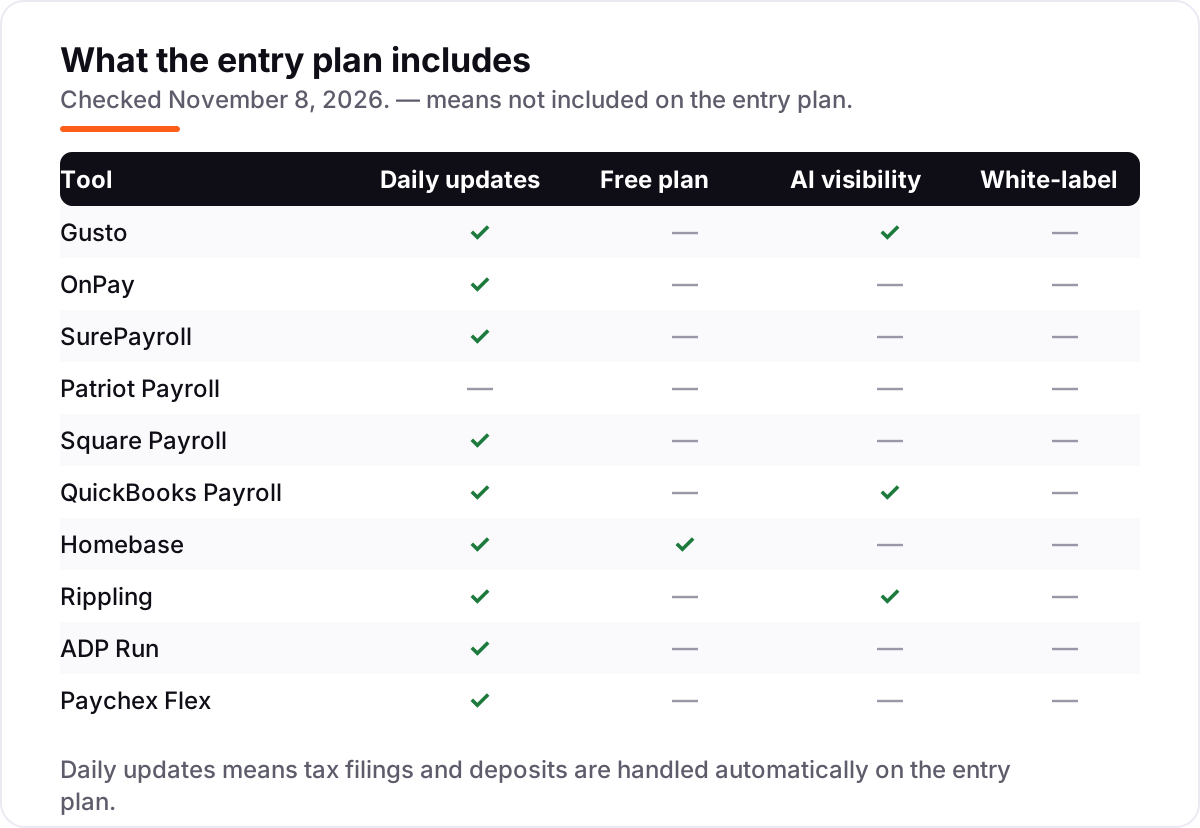
- Check the state line. Gusto Simple and QuickBooks Core cover one state on the entry plan; OnPay, Square Payroll and Homebase payroll cover all states. Crews that cross a state line pay more on the wrong plan.
- Decide who files the taxes. Patriot Basic and SurePayroll's no-tax-filing tier leave filings to you; every other entry plan here files and deposits taxes for you.
- Match the time clock to the payroll. Hourly crews need hours to flow into pay — Homebase and Square Payroll do that natively, while Gusto, OnPay and Patriot need a separate time-tracking app.
- Plan for the off-season. Seasonal crews shrink in winter, and most tools bill only for people paid that month — ask whether dormant workers still count before you sign.
Payroll is one system in your stack, not the whole stack. If the business also needs to be found online, our local SEO service handles the visibility side, from the Google Business Profile to the map pack. And before you publish new pages for the services you sell, run your titles through the free SERP snippet preview tool — it shows exactly how the title and description will look in Google.
Whatever you shortlist, try it with real data before you pay. The free plans and trials in this list are long enough to run one genuine pay cycle — your crew, your hours, your pay schedule — and that cycle tells you more than any review can. Check two things in the trial: that overtime calculates the way your state requires, and that the tax filings actually go through without you chasing them.
Landscaping payroll pricing: what you will actually pay
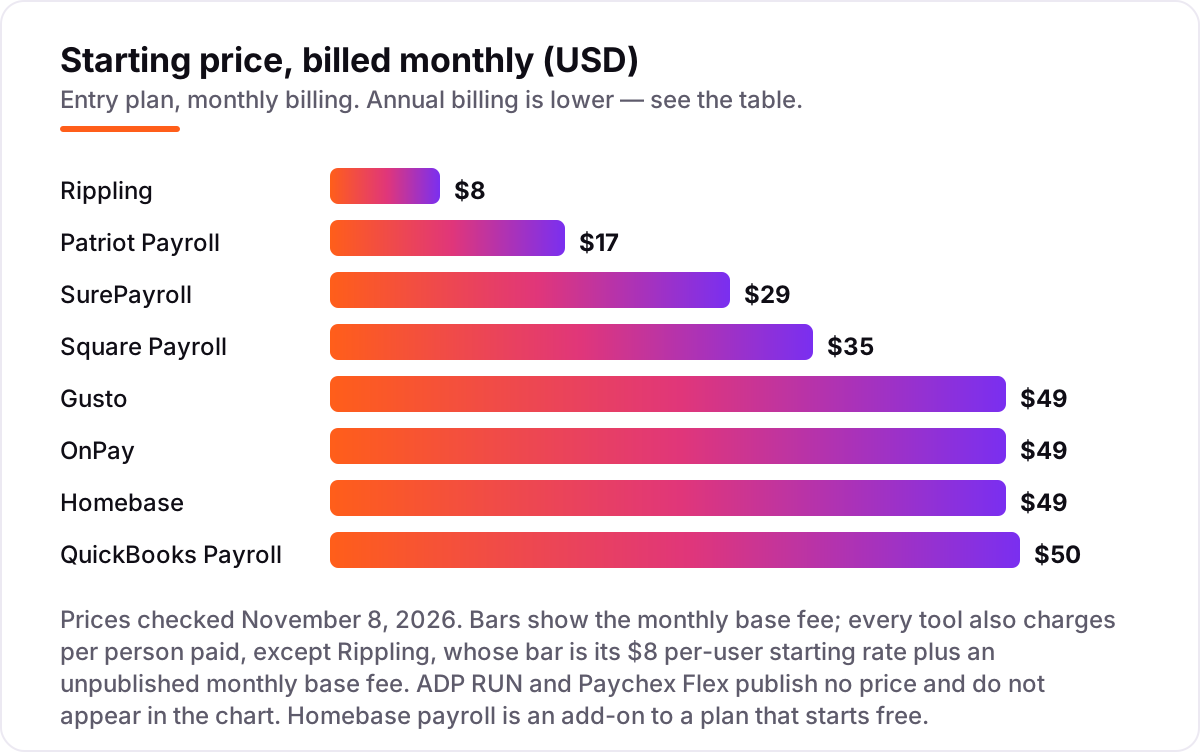
Take an 8-person landscaping crew: six field workers, one crew leader and one office manager, paid every two weeks. On list prices, the monthly bill is $49 on Patriot Basic, $64 on Rippling before its unpublished base fee, $83 on Square Payroll, $85 on SurePayroll Full Service, $97 on Gusto Simple, OnPay or the Homebase payroll add-on, and $106 on QuickBooks Core. ADP RUN and Paychex Flex publish no price, so they sit outside this comparison until you get a quote.
Over a year, that is $588 on Patriot, $996 on Square Payroll, $1,020 on SurePayroll, $1,164 on Gusto, OnPay or Homebase, and $1,272 on QuickBooks. The gap between the cheapest and the dearest is $684 a year for the same eight people and the same pay schedule — and it comes entirely from the base fee and the per-person rate, not from features.
Three costs sit outside every number above. First, the add-ons: multi-state payroll costs $9.99 a month extra on SurePayroll, time tracking costs $6 per person on Gusto Simple, and extra state filings cost $12 a month each on QuickBooks Core. Second, the year-end forms: SurePayroll bills W-2s and 1099s at $50 plus $5 per form, and ADP charges extra for them too. Third, the base plan underneath the add-on: Homebase payroll sits on a scheduling plan that is free for one location, but a second yard means a second paid plan. If the crew shrinks in winter, the per-person fees shrink with it on most tools here — but confirm that dormant workers are not billed before you sign.
Know the difference: payroll apps vs time-tracking apps
The confusion in this category is between tracking hours and paying people. A time-tracking app such as ClockShark or Workyard records when the crew clocks in, where they worked and how many hours each job took — but it does not pay anyone, file taxes or issue W-2s. A payroll app does all of that, and it takes hours in from a time clock or a schedule. The two tools work together; neither replaces the other.
There is a second, quieter confusion: contractor-only plans are not employee payroll. Gusto's Contractor Only plan at $35 a month plus $6 per contractor and QuickBooks' contractor-only plan at $15 a month cover 1099 workers only. If your crew are W-2 employees — and most landscaping crews are — those plans do not cover them, and you need the full employee payroll plan instead.
A third distinction worth knowing is payroll software versus a PEO. A payroll app like the ones in this list runs your payroll while you stay the employer of record. A PEO such as Paychex's HR PEO becomes a co-employer, taking on HR, benefits and compliance for a fee on top of payroll. Landscaping companies with a handful of employees rarely need a PEO; the payroll app plus a good accountant covers it.
Quick comparison: tool type by need
| Buyer | Best pick | Why |
|---|---|---|
| Smallest crew, tightest budget | Patriot Payroll | $17/month + $4/worker, US phone support |
| Most landscaping crews | Gusto | Easiest setup, from $49/month + $6/person |
| Flat price, crews in several states | OnPay | One plan, multi-state included, $49/month + $6/worker |
| Cheapest full-service with tax filing | SurePayroll | Taxes filed for you, $29/month + $7/employee |
| Already run Square | Square Payroll | Hours flow from Square time cards, $35/month + $6/person |
| Already run QuickBooks | QuickBooks Payroll | Payroll posts to your books, $50/month + $7/employee |
| Scheduling matters as much as payday | Homebase | Free scheduling app, payroll add-on $49/month + $6/employee |
Mistakes to avoid
- Budgeting on the base fee alone. The base fee is less than half the bill for an 8-person crew on most tools here. Multiply the per-person fee by your headcount first, then compare.
- Buying the contractor-only plan for W-2 employees. Contractor plans are cheaper because they do less: they do not cover employee tax withholding, workers' comp or W-2s.
- Ignoring the state line. A crew that mows in two states needs multi-state payroll and filings. On Gusto Simple or QuickBooks Core that means a more expensive plan or a per-state fee.
- Paying for payroll before you have the hours right. Payroll is only as accurate as the time data feeding it. Fix the time clock first, then automate the pay run — otherwise you automate the mistakes.
- Signing a quote-only provider without a written fee list. ADP RUN and Paychex Flex publish no prices, and setup, year-end and off-cycle fees sit outside the quote. Get every fee in writing before you sign.
How we chose
We checked each vendor's own pricing page on November 8, 2026 and recorded the starting price exactly as shown, and we ranked the tools by fit for the most common buyer — a US landscaping owner with a small hourly crew — not by brand size. Two prices need a note. Intuit's own pricing page no longer lists plan prices — it now promotes QuickBooks Workforce bundles — so the $50-a-month Core figure comes from G2's Workforce listing and Fit Small Business, both checked November 8, 2026; the older $45 figure still circulating in 2026 roundups is stale. Rippling's page publishes $8 per user per month but not the monthly base fee, so the chart shows the $8 rate only. SurePayroll's page shows Full Service at both $29 and $39 a month in different blocks; we used $29, the figure its hero and price calculator both show. Paychex no longer publishes a price, so its old $39 Essentials figure is not used. G2 ratings were checked on November 8, 2026. No vendor paid for a place in this list, and none of the links here are affiliate links.
What to do next
Start with the trial or free plan of your top pick and run one real pay cycle through it. Check that overtime calculates correctly, the tax filings go through, and your accountant can see what they need before you commit to a year. If the books are sorted but new customers are not finding you, our monthly SEO service handles the visibility side — or compare providers in our guide to payroll software for small business.
Once your tools are in place, find out what's holding your rankings back.
Your stack only works if people find you
SerpAstra fixes what keeps your site off page one and makes it easy for AI assistants to recommend.
Get a free audit→Sources we checked (20)
- Gusto pricing — gusto.com/pricing (checked November 8, 2026)
- OnPay pricing — onpay.com/payroll/software/costs-pricing (checked November 8, 2026)
- SurePayroll pricing — surepayroll.com/pricing (checked November 8, 2026)
- Patriot Payroll pricing — patriotsoftware.com/payroll/pricing (checked November 8, 2026)
- Square Payroll pricing — squareup.com/us/en/payroll/pricing (checked November 8, 2026)
- QuickBooks Payroll pricing — quickbooks.intuit.com/payroll/pricing (checked November 8, 2026)
- Homebase payroll pricing — joinhomebase.com/payroll/pricing (checked November 8, 2026)
- Rippling pricing — rippling.com/pricing (checked November 8, 2026)
- ADP RUN payroll — adp.com/small-business/payroll (checked November 8, 2026)
- Paychex Flex — paychex.com/payroll/paychex-flex-essentials (checked November 8, 2026)
- Gusto on G2 — g2.com/products/gusto/reviews (checked November 8, 2026)
- OnPay on G2 — g2.com/products/onpay/reviews (checked November 8, 2026)
- SurePayroll on G2 — g2.com/products/surepayroll/reviews (checked November 8, 2026)
- Patriot Software on G2 — g2.com/products/patriot-software/reviews (checked November 8, 2026)
- Square Payroll on G2 — g2.com/products/square-payroll/reviews (checked November 8, 2026)
- QuickBooks Workforce on G2 — g2.com/products/intuit-quickbooks-payroll/reviews (checked November 8, 2026)
- Homebase on G2 — g2.com/products/homebase/reviews (checked November 8, 2026)
- Rippling on G2 — g2.com/products/rippling/reviews (checked November 8, 2026)
- RUN Powered by ADP on G2 — g2.com/products/run-powered-by-adp/reviews (checked November 8, 2026)
- Paychex Flex on G2 — g2.com/products/paychex-flex/reviews (checked November 8, 2026)
Shamim
Founder of SerpAstra
A full-stack SEO and digital marketer who spends most days on Local SEO for dental practices, AI search visibility and lead generation.
Frequently asked questions
What is the best landscaping payroll app?
Gusto is the best fit for most landscaping crews: the easiest setup, unlimited pay runs and automatic tax filings from $49 a month plus $6 per person. OnPay matches the price with multi-state payroll included, and Patriot Payroll is the cheapest entry at $17 a month plus $4 per worker. Homebase is the pick when scheduling matters as much as payday.
How much does payroll software cost for a landscaping business?
Entry prices run from $17 to $50 a month in base fees, plus $4 to $7 per person paid. An 8-person crew costs $49 a month on Patriot Basic, $85 on SurePayroll Full Service and $106 on QuickBooks Core. ADP RUN and Paychex Flex publish no prices, so budget them only after a written quote.
Can landscaping payroll apps handle seasonal workers?
Yes, with a caveat. Most tools here bill only for people paid in a given month, so a crew that shrinks in winter costs less in winter. Gusto bills every active employee, so mark seasonal workers as dismissed or inactive in the off-season. Confirm how dormant workers are billed before you sign.
Do I need time tracking with my payroll app?
For hourly crews, yes — payroll is only as accurate as the hours feeding it. Homebase and Square Payroll include time tracking, so hours flow into pay with no re-entry. Gusto, OnPay, Patriot and SurePayroll need a separate time clock or scheduling app, which adds a second subscription.
What is the difference between a payroll app and a PEO?
A payroll app runs your payroll while you stay the employer of record: you keep the employer responsibilities and the app handles the calculations, filings and payments. A PEO becomes a co-employer, taking on HR, benefits and compliance for an extra fee. Most small landscaping companies need the app, not the PEO.
Can these apps pay 1099 subcontractors as well as employees?
Yes. Every tool in this list pays 1099 contractors alongside W-2 employees, and most issue 1099 forms at year-end. Gusto and QuickBooks also sell cheaper contractor-only plans — $35 and $15 a month — but those plans do not cover W-2 employees, so check which workers each plan covers.
Free SEO and AI visibility audit
Find out what is holding your rankings back
Send us your site. Within 2 business days you get a written audit, an AI visibility check and a short fix list ranked by impact. Free, with no contract attached.
Request my free audit→Related guides
 Accounting, Tax & Finance10 Best Bookkeeping and Payroll Software for Small Business in 2026, ComparedThe 10 best bookkeeping and payroll software for small business, compared on real 2026 prices, per-employee payroll fees and free plans at your headcount.Read guide →
 Local Business & Vertical Software8 Best Invoice Software for Landscaping in 2026, ComparedCompare the 8 best invoice software for landscaping on price, free plans, field tools and payment fees, with every price checked November 8, 2026.Read guide →
 Local Business & Vertical Software7 Best Landscape Business Management Software in 2026, ComparedCompare the 7 best landscape business management software options on price, free plans, routing and job costing, with every price checked November 8, 2026.Read guide →