
8 Best Local Job Listings Apps in 2026: Free and Paid Apps Ranked
Compare the 8 best local job listings app picks for 2026: free apps, real prices and local filters, with every price checked November 4, 2026.
 Shamim Mia, Founder, SerpAstraLast verified November 4, 202612 min read
We compare pricing pages, documentation and public reviews. We never accept payment for rankings.

Key takeaways
- Indeed is the best fit for most local seekers and is free; Glassdoor follows free with salary and review research built in, and LinkedIn is free to use with Premium Career at $39.99/month for applicant insights.
- Seven of the eight apps are completely free for job seekers — only LinkedIn sells a paid upgrade, and its free account still runs the full search.
- The single most important buying factor is the radius: set your commute first, then your title, or the widest app in the world will still show you jobs you cannot reach.
- No legitimate app charges you to apply — any listing or recruiter that asks you to pay to apply, train or receive equipment is a scam.
On this page
Quick comparison
| Tool | Best for | Starting price | Free plan |
|---|---|---|---|
| Indeed | Job seekers who want the widest pool of local listings in one search, from hourly shifts to salaried roles | Free | Yes (free) |
| Professionals who want job search combined with networking, recruiter visibility and applicant insights | $39.99/mo | Yes (free Basic) | |
| Glassdoor | Seekers who check pay, reviews and interview reports before applying to a local employer | Free | Yes (free) |
| ZipRecruiter | Seekers who want matched jobs pushed to them daily and one-tap applications | Free | Yes (free) |
| Snagajob | Hourly workers in food service, retail, warehouse and hospitality who want shifts near home | Free | Yes (free) |
| Monster | Seekers who want a long-established general board with a searchable resume profile employers can find | Free | Yes (free) |
| JobGet | Hourly workers who want an app-first search with chat-based hiring and same-day interview scheduling | Free | Yes (free) |
| Dice | Tech professionals looking for local software, IT and engineering roles | Free | Yes (free) |
Make one of these tools?
We re-check this list every quarter. Send a correction, request a review, or ask about a clearly labeled sponsored spot.
Request a listingThe best local job listings apps

Indeed
Best for: Job seekers who want the widest pool of local listings in one search, from hourly shifts to salaried roles
Indeed is the starting point for most local job searches because it simply lists more openings near you than any other app. Set your ZIP code, a radius that matches your commute and a pay floor, then turn on alerts and let new postings come to you. Most listings show the pay, and company pages carry reviews from people who worked there, so you can judge an employer before you apply.
Applying is fast: one click with a stored resume covers many listings, and saved searches keep the hunt running while you work. The catch is the mix at the top of every search — sponsored posts sit above organic results — and some listings stay live after the role is filled. Start here, then check one specialist app for the roles Indeed misses.
What we like
- The widest local pool in this list: ZIP code and radius filters narrow results to a real commute
- Pay is shown on a large share of postings, and company pages carry reviews from current and former staff
- One-click apply with a stored resume, saved searches and fast job alerts
- Free for job seekers with no paid tier to unlock
Watch out for
- Listings include sponsored posts mixed in with organic results, so the top of a search is often paid placement
- Application tracking is thin: many listings redirect to employer sites and the app loses sight of the application
- Some postings stay live after the role is filled, so a share of applications go nowhere

Best for: Professionals who want job search combined with networking, recruiter visibility and applicant insights
LinkedIn is the only app in this list where the profile does the hunting for you. Recruiters search the network for candidates, so a complete profile with the right title and skills can bring interviews without a single application. Easy Apply covers many listings, and the network shows who you know inside a company before you apply.
The free account handles the job search well; Premium Career at $39.99 a month adds applicant insights, 5 InMail credits a month and LinkedIn Learning, which matter most during an active search. The trade-off is coverage: listings lean toward professional and salaried roles, and hourly and shift work is thin. Use it alongside Indeed, not instead of it.
What we like
- The only app here where the profile itself attracts recruiters, not just applications you send
- Easy Apply covers many listings, and the network shows who you know inside a hiring company
- Premium Career adds applicant insights, 5 InMail credits a month and LinkedIn Learning
- Job alerts and saved searches work well on the free account
Watch out for
- The free account hides who viewed your profile and how you rank against other applicants
- Premium Career costs $39.99 a month, and the value fades fast once the search ends
- Job listings skew toward professional and salaried roles, with thin coverage of hourly and shift work

Glassdoor
Best for: Seekers who check pay, reviews and interview reports before applying to a local employer
Glassdoor earns its place by answering the question the other apps skip: what is it actually like to work there? Salary data, company reviews and interview reports sit next to the listings, so you can check pay and culture before you spend an application. Local filters cover city, salary range and company size.
The research is only as good as its freshness — some reviews and salary figures are years old, and small local employers may have no reviews at all. Listings also overlap heavily with Indeed, since both sit under Recruit Holdings. Use Glassdoor as the second check on any employer you are serious about, not as your only search.
What we like
- Salary data, company reviews and interview reports sit next to the listings, so you research before you apply
- Local filters cover city, salary range and company size, not just job title
- Job alerts and saved searches match the general boards, at no cost
- Useful for checking whether a local employer's pay matches its posting
Watch out for
- Some company reviews and salary figures are outdated, and coverage is thin for small local employers
- Full access to some salary and review detail requires contributing a review or salary of your own
- Job listings overlap heavily with Indeed, since both sit under the same parent company

ZipRecruiter
Best for: Seekers who want matched jobs pushed to them daily and one-tap applications
ZipRecruiter flips the search around: instead of you scanning listings, its matching sends a daily list of jobs that fit your resume. One-tap apply keeps the friction low, and the app tells you when an employer views your resume, which is more feedback than most boards give. It holds the highest G2 score in this list, 4.8 out of 5 from 1,478 reviews.
The matching is good but not perfect — some recommendations miss on seniority or location, so the daily email needs a quick filter. The app also pushes notifications hard, and smaller local employers appear less often because employers pay per posting. Keep it as your daily digest while Indeed handles the deep search.
What we like
- AI matching sends a daily list of jobs that fit your resume, so the search comes to you
- One-tap apply and resume highlighting put your application in front of employers faster
- The highest G2 score in this list at 4.8 out of 5 from 1,478 reviews
- Clean interface with straightforward filters for title, location and job type
Watch out for
- Some recommendations miss the mark on seniority or location, so the daily email needs filtering
- The app pushes notifications and emails hard; taming them takes a settings visit
- Employers pay per posting, so smaller local employers appear less often than on free boards

Snagajob
Best for: Hourly workers in food service, retail, warehouse and hospitality who want shifts near home
Snagajob has specialised in hourly work since 1999, and it shows: shifts, pay per hour and distance are first-class filters, not afterthoughts. Your profile acts as the application, so you can apply to a restaurant or warehouse opening near home without filling in the same form for the tenth time. It is now owned by JobGet, which added fast interview scheduling.
The focus is also the limit: there are almost no salaried or professional roles here, so the search ends when you outgrow hourly work. Its G2 score of 3.4 out of 5 is the lowest in this list, with reviewers citing stale listings and heavy email. For shift work within a bus ride of home, though, its local depth in food service, retail and warehouse roles is the best here.
What we like
- Built for hourly work since 1999: shifts, pay per hour and distance are first-class filters
- Your profile acts as the application, so you apply to local openings without repeated paperwork
- Now owned by JobGet, with fast interview scheduling carried over from the parent app
- Strongest local depth in this list for food service, retail and warehouse shifts
Watch out for
- Almost no salaried or professional roles, so the search ends when you outgrow hourly work
- G2 score of 3.4 out of 5 is the lowest here, with reviewers citing stale listings and heavy email
- Some listings are ads or lead-generation posts rather than real openings

Monster
Best for: Seekers who want a long-established general board with a searchable resume profile employers can find
Monster is the oldest name in this list, and its strength is the resume database: upload a profile once and employers can find you, instead of you finding them. Boolean and advanced search suit seekers who know exactly what they want, and the listings still span most industries, with salary tools and career advice attached.
Age shows in places. Some listings are outdated or already filled, the same role can appear more than once, and G2 reviewers rate the match quality as uneven. The app also feels dated next to Indeed and ZipRecruiter. Treat Monster as a second net: keep a resume live there, and check it weekly rather than daily.
What we like
- A searchable resume profile means employers can find you, not just the other way round
- Boolean and advanced search filters suit seekers who know exactly what they want
- Broad listings across industries, with salary tools and career advice attached
- Free for job seekers, with a mobile app on iOS and Android
Watch out for
- Some listings are outdated or already filled, and the same role can appear more than once
- G2 reviewers note match quality is uneven, with recommendations outside the chosen location or field
- The interface and app feel dated next to Indeed and ZipRecruiter

JobGet
Best for: Hourly workers who want an app-first search with chat-based hiring and same-day interview scheduling
JobGet is built for the phone first: JobGenie, its AI assistant, finds daily matches you swipe to apply to, and one-tap apply plus in-app chat can take you from match to interview slot in minutes. A free resume builder creates a profile in under a minute, so no resume is no barrier. It now owns Snagajob, giving it the deepest hourly employer base here.
The hourly focus means few professional roles, and job variety depends heavily on your city — big metros see far more listings than small towns. Some listings lack a location, pay rate or description, so each match needs vetting. The GetCash side feature, which pays for games and surveys, is a distraction from the search. Use JobGet when speed matters: a shift this week, not a career next year.
What we like
- JobGenie AI finds daily matches you swipe to apply to, built for hourly work
- One-tap apply and instant interview scheduling, with in-app chat to employers
- Free resume builder creates a profile in under a minute with no resume needed
- Now owns Snagajob, giving it the deepest hourly employer base in this list
Watch out for
- Hourly focus means few professional or salaried roles, and job variety depends heavily on your city
- Some listings lack a location, pay rate or description, so vetting each match takes care
- The GetCash side feature pays for games and surveys, which distracts from the job search itself

Dice
Best for: Tech professionals looking for local software, IT and engineering roles
Dice is the specialist: tech-only listings with skills matching, so a search for a software or IT role is never diluted by unrelated openings. Salary data sits next to the listings, and alerts can follow a specific skill or technology rather than a job title. For developers, engineers and IT support staff, that focus saves real time.
The scope is also the weakness. There are no listings outside software, IT and engineering, and local coverage thins out fast beyond the major tech hubs — smaller towns may show only a handful of roles. It holds a 4.3 out of 5 score on G2 from 191 reviews. Use Dice as the tech supplement to Indeed, not the whole search.
What we like
- Tech-only listings with skills matching, so searches stay inside software and IT roles
- Salary data and tech career resources sit next to the listings
- Job alerts tuned to specific skills and technologies, not just titles
- Free for job seekers, with a mobile app on iOS and Android
Watch out for
- Tech-only scope means no listings outside software, IT and engineering
- Local coverage is thin outside major tech hubs, so smaller towns see few results
- Employer-side pricing is steep — a single job posting costs $399 — so smaller local employers appear less often
The best local job listings app for most seekers is the one that shows the most real openings within driving distance — and lets you apply before the shift is filled. We ranked the eight apps below by fit for a US job seeker searching near home, starting with the widest local pool and ending with the specialists, and every price was checked on November 4, 2026. Seven of the eight are completely free for job seekers; only LinkedIn sells a paid upgrade, and its free account still handles the search. Employers pay to post and promote — that is the business model — so any listing, message or recruiter that asks you to pay to apply, to be trained or to receive equipment is a scam, whatever logo it carries.
How to choose the best local job listings app
- Set your radius before your title. A 10-mile radius around your ZIP code beats a 50-mile search every time: the jobs you can actually reach are the only ones that count, and every app here filters by distance.
- Match the app to the role type. Hourly and shift work belongs on Snagajob and JobGet; professional and salaried roles belong on LinkedIn and Indeed; tech roles belong on Dice. The wrong app for your role type shows you the wrong jobs.
- Check pay before you apply. Glassdoor's salary data and company reviews tell you whether the posted pay matches reality. If an employer hides the pay and has no reviews, treat the listing with care.
- Decide whether you need a network or a list. LinkedIn is the only app here where your profile attracts recruiters; the rest are lists you search. If you want inbound interest, keep the LinkedIn profile current alongside the applications.
- Watch how applications leave the app. One-click apply keeps your search inside the app with tracking; listings that redirect to employer sites lose that tracking. Prefer in-app apply when the choice is equal.
If you are on the other side of the listing — a local business posting the roles — the visibility side matters as much as the board you pick: our local SEO service helps nearby customers and candidates find you first. And if you run a careers page, check how it appears in search with the free SERP snippet preview tool before you pay to promote the posting.
Whatever you shortlist, run two apps in parallel for a week before you settle on one. The first pages of the big boards barely overlap, so a second app genuinely finds jobs the first one missed — and a week of real applications tells you more than any review can. Check two things in that week: that alerts arrive for fresh openings within hours, and that the applications you send actually get viewed or answered.
Local job listings app pricing: what you will actually pay
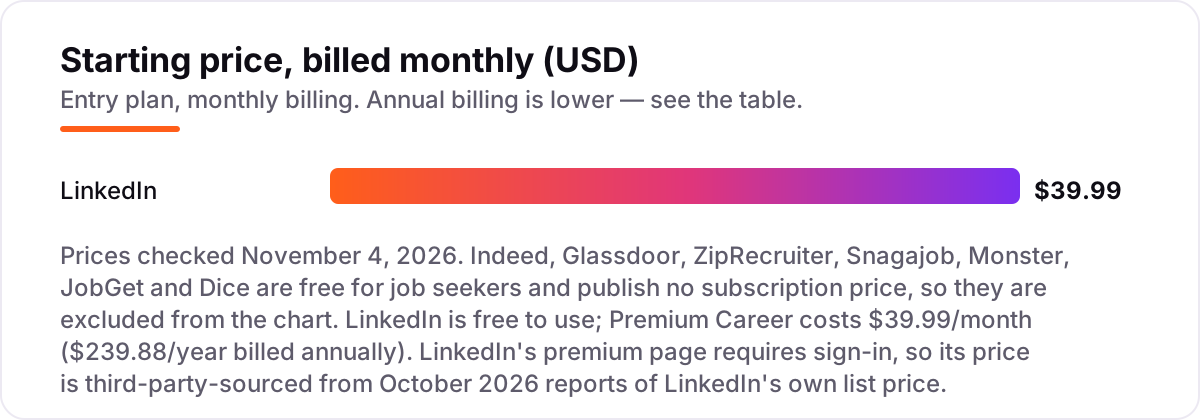
Take a job seeker running a three-month search. On seven of the eight apps the cost is $0 — Indeed, Glassdoor, ZipRecruiter, Snagajob, Monster, JobGet and Dice charge job seekers nothing to search and apply, and none of them sells a subscription that unlocks more listings. The only money in this list is LinkedIn Premium Career at $39.99 a month, or $239.88 a year billed annually, which works out to about $19.99 a month.
Over three months, Premium Career on monthly billing costs 3 × $39.99, or $119.97. The annual plan costs $239.88, which is exactly six months of monthly billing — so the annual plan only pays off if the search runs longer than six months, and a three-month search should stay on monthly billing. Add the 1-month free trial for eligible accounts and the first month can cost $0, bringing a three-month search to $79.98.
The worked example has one more number worth knowing: $0 is also what a scam costs you if you pay it. No legitimate app in this list charges to apply, and the Federal Trade Commission's rule is plain — an honest employer never asks you to pay to get a job. Budget $0 for the apps, and if you buy Premium Career, budget it for the months you are actively applying, then cancel the month the search ends. If the search is for a small business rather than a single job, the tools differ — see our guide to automation apps for small business.
Know the difference: aggregators, job boards and company career pages
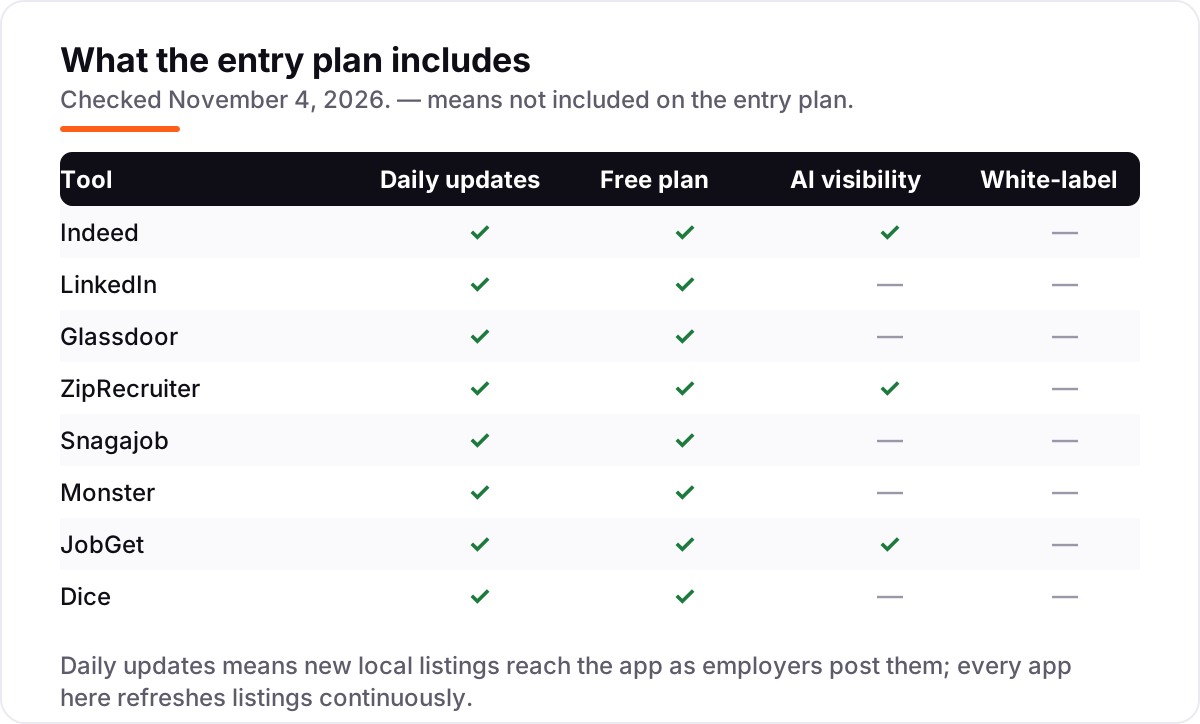
The confusion in this category is between three kinds of listing. An aggregator — Indeed is the biggest — collects openings from company sites and other boards into one search, so it shows the most jobs but also the most duplicates. A job board — ZipRecruiter, Monster, Dice — hosts its own listings, posted directly by employers, so the inventory is smaller but cleaner. A company career page is the employer's own site, where the posting is always current and the application goes straight to the hiring team.
For a local search, the order matters. Start with an aggregator to see the widest pool, then check one direct board for the roles the aggregator missed, then apply on the company career page when the posting links there — applications sent direct are tracked better and reach the hiring team faster. Glassdoor sits across all three: it lists jobs, but its real job is the research layer of salaries and reviews that tells you whether the posting is worth the application.
There is a second, quieter confusion: a listing is not a job offer. A posting that asks you to pay for training, equipment or a background check before you start is not an employer — it is a scam wearing an employer's listing. The apps in this list are free for seekers precisely so that no payment ever changes hands on your side; if money is requested, report the listing inside the app and move on.
Quick comparison: tool type by need
| Buyer | Best pick | Why |
|---|---|---|
| Widest local pool | Indeed | Most listings in one search, free, with ZIP and radius filters |
| Professional roles and networking | Free to use; Premium Career is $39.99/month for applicant insights | |
| Research pay and culture first | Glassdoor | Free, with salaries, reviews and interview reports |
| Daily matched jobs | ZipRecruiter | Free, with AI matching and one-tap apply |
| Hourly shifts near home | Snagajob | Free, and your profile acts as the application |
| Tech roles only | Dice | Free, with skills matching and salary data |
Mistakes to avoid
- Paying to apply. No legitimate app charges you to apply, and no honest employer asks you to pay for training or equipment. If money is requested, it is a scam — report it and move on.
- Searching too wide. A 50-mile radius fills your results with jobs you cannot reach. Set the radius to your real commute first, then filter by title and pay.
- Using only one app. The big boards' first pages barely overlap, so one app alone misses real openings. Run Indeed plus one specialist for your role type for at least a week.
- Skipping the employer check. A listing tells you the role; Glassdoor tells you the employer. Check pay and reviews before you apply, not after the interview.
- Buying Premium before the free search runs out. LinkedIn's free account runs the full search. Use the 1-month free trial during the busiest month of applications, not the first week.
How we chose
We checked each vendor's own site and app listing on November 4, 2026 and recorded the starting price exactly as shown: seven apps are free for job seekers with no subscription price published, and LinkedIn Premium Career costs $39.99 a month. LinkedIn's premium page requires sign-in, so its price is third-party-sourced from October 2026 reports of LinkedIn's own list price, and the older $29.99 figure still found in some sources predates the April 2026 price rise. G2 scores come from the vendors' G2 product pages opened on November 4, 2026; those pages review the hiring platforms and mix employer and job-seeker reviews. This list carries no rating for LinkedIn or JobGet: LinkedIn has no single G2 product page, and JobGet's G2 page has no reviews yet. We ranked the apps by fit for the most common buyer — a US job seeker searching near home — not by brand size. No vendor paid for a place in this list, and none of the links here are affiliate links.
What to do next
Start with Indeed and one specialist for your role type — Snagajob or JobGet for hourly work, Dice for tech, LinkedIn for professional roles — and run both for a week with alerts on. Check the employer on Glassdoor before you apply anywhere you are serious about, and keep your resume and profile current in the app where employers can find you. If the search itself is sorted but your business is not being found by local customers, our monthly SEO service handles the visibility side. Once your tools are in place, find out what's holding your rankings back.
Your stack only works if people find you
SerpAstra fixes what keeps your site off page one and makes it easy for AI assistants to recommend.
Get a free audit→Sources we checked (14)
- Indeed — indeed.com (checked November 4, 2026)
- LinkedIn Premium Career pricing — linkedin.com/premium/products (requires sign-in; price from October 2026 reports of LinkedIn's own list price)
- Glassdoor — glassdoor.com (checked November 4, 2026)
- ZipRecruiter — ziprecruiter.com (checked November 4, 2026)
- Snagajob — snagajob.com (checked November 4, 2026)
- Monster — monster.com (checked November 4, 2026)
- JobGet — jobget.com (checked November 4, 2026)
- Dice — dice.com (checked November 4, 2026)
- Indeed G2 reviews — g2.com/products/indeed/reviews (checked November 4, 2026)
- Glassdoor G2 reviews — g2.com/products/glassdoor/reviews (checked November 4, 2026)
- ZipRecruiter G2 reviews — g2.com/products/ziprecruiter/reviews (checked November 4, 2026)
- Snagajob G2 reviews — g2.com/products/snagajob/reviews (checked November 4, 2026)
- Monster G2 reviews — g2.com/products/monster/reviews (checked November 4, 2026)
- Dice G2 reviews — g2.com/products/dice/reviews (checked November 4, 2026)
Shamim
Founder of SerpAstra
A full-stack SEO and digital marketer who spends most days on Local SEO for dental practices, AI search visibility and lead generation.
Frequently asked questions
What is the best local job listings app?
Indeed is the best fit for most local seekers: the widest pool of nearby listings, ZIP and radius filters, pay shown on many postings and one-click apply, all free. Glassdoor is the best second app for checking pay and reviews, and Snagajob or JobGet lead for hourly shift work.
Are job search apps really free?
Yes, for job seekers. Seven of the eight apps here charge seekers nothing at all, and LinkedIn's free account runs the full job search. Employers pay to post and promote listings, which is the business model. Any listing or recruiter that asks you to pay to apply is a scam.
Is LinkedIn Premium worth it for a job search?
For one to three months of active searching, often yes: Premium Career at $39.99 a month adds applicant insights, 5 InMail credits a month and LinkedIn Learning. Start on the free account first, and use the 1-month free trial before paying. Cancel the month the search ends.
What is the difference between Indeed and Glassdoor?
Indeed is the bigger listings pool; Glassdoor is the research layer. Both sit under Recruit Holdings, so their listings overlap heavily. Use Indeed to find the opening and Glassdoor to check the pay, reviews and interview reports before you apply.
Which app is best for hourly or shift work?
Snagajob and JobGet lead for hourly work. Snagajob has specialised in hourly roles since 1999 with shift, pay and distance filters, and JobGet adds AI matching with instant interview scheduling. Both are free for job seekers, and JobGet now owns Snagajob, giving the pair the deepest hourly employer base.
How do I avoid job scams on these apps?
Never pay to apply, to be trained or to receive equipment — honest employers never ask. Be wary of listings with no company name, no location and no pay rate, and of recruiters who move the conversation to WhatsApp or Telegram. Check the employer on Glassdoor before sharing personal details.
Can I find a job without a resume?
Yes, for hourly work. Snagajob and JobGet let your profile act as the application, and JobGet's free resume builder creates one in under a minute. For professional roles, build a simple one-page resume first — LinkedIn's profile can serve as the starting draft.
Free SEO and AI visibility audit
Find out what is holding your rankings back
Send us your site. Within 2 business days you get a written audit, an AI visibility check and a short fix list ranked by impact. Free, with no contract attached.
Request my free audit→Related guides
 AI, Data & Analytics10 Best Automation Apps for Small Business in 202610 best automation apps for small business compared on price, free plans and billing units, with starting prices checked on vendor pages, November 2, 2026.Read guide →
 AI, Data & Analytics9 Best AI Chatbot Apps for Small Business in 20269 best AI chatbot apps for small business compared on price, free plans and AI features, with real starting prices checked November 2, 2026.Read guide →
 Accounting, Tax & Finance8 Best Mobile Payment Apps for Small Business in 20268 best mobile payment app for small business options compared on in-person fees, hardware and free plans — real prices checked November 2, 2026.Read guide →