
12 Best Marketing Reporting Software in 2026, Compared
Compare the 12 best marketing reporting software tools on price, white-label reports, free plans and AI features, with prices checked November 5, 2026.
 Shamim Mia, Founder, SerpAstraLast verified November 5, 202613 min read
We compare pricing pages, documentation and public reviews. We never accept payment for rankings.

Key takeaways
- Looker Studio is free and the best starting point; AgencyAnalytics at $25 per client and Databox at $71 a month billed annually lead the paid picks.
- The metering unit decides the bill: per client, per source, per dashboard or per seat — count yours before comparing headline prices.
- Whatagraph at €699 a month and the custom-quoted NinjaCat and TapClicks are enterprise buys; everyone else here costs $120 a month or less.
- Ratings are close across the list — AgencyAnalytics and DashThis lead at 4.7/5 on G2 — so buy on the metering unit, not the star score.
On this page
Quick comparison
| Tool | Best for | Starting price | Free plan |
|---|---|---|---|
| Looker Studio | Marketing teams that want free, shareable dashboards on top of Google Analytics and Google Ads | Free | Yes (free) |
| AgencyAnalytics | Agencies that send white-label client reports every month and bill per client | $25/mo per client | No (14-day trial) |
| Databox | Teams that want AI answers on top of live KPI dashboards, not just static reports | $71/mo (annual) | Yes (free plan) |
| DashThis | Agencies that want preset report templates filled automatically each month | $54/mo | No (14-day trial) |
| Swydo | Agencies that want one flat base price and pay only for the data sources they connect | €69/mo | No (14-day trial) |
| Supermetrics | Teams that already report in Looker Studio, Sheets or Excel and need reliable connectors | $55/mo | No (14-day trial) |
| ReportGarden | Small agencies that want white-label client reports from $75 a month | $75/mo | No (14-day trial) |
| Klipfolio | Teams that monitor live KPIs on wallboards and want fast refresh rates | $140/mo | No (14-day trial) |
| HubSpot Marketing Hub | Teams that already run marketing in HubSpot and want reports next to the CRM | $20/mo per seat | Yes (free plan) |
| Whatagraph | Large agencies that want a governed data foundation plus AI-built reports | €699/mo (annual) | No (14-day trial) |
| NinjaCat | Mid-size and enterprise agencies that need data transformation before the report | Custom quote | No (free trial) |
| TapClicks | Agencies and brands that want reporting plus order management and workflow in one platform | Custom quote | No (free trial) |
Make one of these tools?
We re-check this list every quarter. Send a correction, request a review, or ask about a clearly labeled sponsored spot.
Request a listingThe best marketing reporting software

Looker Studio
Best for: Marketing teams that want free, shareable dashboards on top of Google Analytics and Google Ads
Looker Studio is Google's free dashboard tool, and it is the default starting point for reporting on Google Analytics, Google Ads and Search Console. You connect a source, drag charts onto a canvas, and share a live link or embed the dashboard anywhere. There is no seat fee, no report cap and no trial clock, which is why small teams and freelancers start here before paying for anything.
The catch is connectors. Native Google sources are free, but Meta, TikTok, LinkedIn and most ad platforms need a paid third-party connector such as Supermetrics, which can cost more than a dedicated reporting tool. Scheduled email delivery exists but is basic, and support is documentation and community forums only. Start on Looker Studio when your stack is mostly Google; buy a dedicated tool when client-ready PDF reports and white-labeling matter.
What we like
- Free forever: unlimited dashboards and reports with no seat fee or report cap
- Native connectors for Google Analytics, Google Ads and Search Console at no cost
- More than 1,000 community and partner connectors extend it beyond Google
- Easy sharing by live link or embed, with viewer access controls
Watch out for
- No native connectors for Meta, TikTok or LinkedIn — those need a paid third-party connector
- Scheduled email delivery is basic compared with dedicated agency reporting tools
- Support is documentation and community forums only, with no phone or chat support

AgencyAnalytics
Best for: Agencies that send white-label client reports every month and bill per client
AgencyAnalytics is built for one job: sending a white-label client report every month without rebuilding it by hand. Core costs $25 per client a month, or $20 per client on annual billing, and every plan includes all 90-plus integrations, so adding a channel never forces a tier upgrade. Built-in SEO tools — rank tracking, site audits and backlink monitoring — mean many agencies drop a separate SEO subscription.
The pricing catch is the client count. Ten clients cost $250 a month on monthly billing, and past 25 clients the price moves to a custom Enterprise quote. Reviewers also ask for data blending, which AgencyAnalytics does not offer, so teams that merge sources before reporting should look at Whatagraph or Databox instead. Pick it when monthly client reporting is the product you sell.
What we like
- All 90-plus integrations on every plan, so adding a channel never forces a tier upgrade
- White-label reports and client dashboards included on the Core plan
- Built-in SEO tools — rank tracking, site audits and backlink monitoring
- Per-client pricing scales cleanly: $25 a month, or $20 on annual billing
Watch out for
- No data blending — reviewers ask for it, so teams that merge sources should look elsewhere
- Past 25 clients the price moves to a custom Enterprise quote
- No free plan, only a 14-day free trial

Databox
Best for: Teams that want AI answers on top of live KPI dashboards, not just static reports
Databox pairs live KPI dashboards with Genie, an AI analyst that answers questions from your connected data instead of making you build another chart. Analyst costs $71 a month billed annually, or $89 billed monthly, for one user, five data sources, hourly sync and 150 AI credits a month. The free plan — one user, three sources, one dashboard — is genuinely usable for a solo marketer.
The catch is seats. Analyst covers one user only, so a second login jumps to Team Core at $249 a month, and white-labeling is a paid add-on rather than included. AI credits also cap the month: 150 questions on Analyst, then you wait or upgrade. Choose Databox when you want answers from the data, not just prettier charts, and when one analyst owns the dashboards.
What we like
- Genie, the AI analyst, answers questions from your data on every plan including Free
- More than 130 integrations across CRMs, ad platforms and spreadsheets
- Hourly sync on Analyst, with unlimited dashboards and reports
- The free plan is genuinely usable: 1 user, 3 sources, 1 dashboard, 50 AI credits
Watch out for
- Analyst covers one user only — a second login jumps to Team Core at $249/month
- White-labeling is a paid add-on rather than included on the entry plan
- AI credits cap the month: 150 questions on Analyst, then you wait or upgrade

DashThis
Best for: Agencies that want preset report templates filled automatically each month
DashThis is the template-first reporting tool: pick a preset for Google Ads, Meta or SEO, connect the accounts, and the report fills itself every month. Individual costs $54 a month, or $44 billed annually, for three dashboards and 15 data sources, with unlimited users and every integration on every plan. Agencies that send the same report format to every client save the most time here.
The limit is dashboards, not users. One dashboard is one client report, so a fourth client moves you to Professional at $164 a month for ten dashboards. The integration list is marketing-focused at around 30 sources, narrower than Databox or AgencyAnalytics, and AI insights cost $19 a month extra. Pick DashThis when speed of setup beats depth of customization.
What we like
- Template-first: pick a preset, connect the accounts, and the report fills itself monthly
- Unlimited users on every plan, with every integration on every plan
- White-labeling included from the entry plan
- All-inclusive pricing with no per-connector or per-source charges
Watch out for
- Priced by dashboard count — a fourth client moves you to Professional at $164/month
- Around 30 integrations, narrower than Databox or AgencyAnalytics
- AI insights cost $19/month extra as an add-on

Swydo
Best for: Agencies that want one flat base price and pay only for the data sources they connect
Swydo sells one plan and bills it by data source: €69 a month, or €62 billed annually, covers the first ten sources, with unlimited clients, users, reports and dashboards on top. A source is one connected account — one Google Ads account, one GA4 property, one Meta page — and extra sources cost €4.50 each up to 100, then less at volume. White-labeling and monitoring come in the base price, not a higher tier.
The math decides the fit. An agency with five clients on three channels each runs 15 sources and pays €91.50 a month, but twenty clients on the same three channels run 60 sources and pay €294. Swydo bills in euros, so buyers see €69 rather than a dollar price. Pick it when your clients use few channels each and you hate per-client pricing.
What we like
- Unlimited clients, users, reports and dashboards on the single plan
- White-labeling and monitoring included in the base price, not a higher tier
- Per-source math favors agencies whose clients use few channels each
- MCP connector lets AI clients pull client data directly
Watch out for
- The bill grows per connected account — 60 sources cost €294/month on monthly billing
- No tiers means no cheaper small plan for a one-client freelancer
- Billed in euros, so buyers see €69 rather than a dollar price

Supermetrics
Best for: Teams that already report in Looker Studio, Sheets or Excel and need reliable connectors
Supermetrics is not a reporting tool — it is the connector that feeds one. Starter costs $55 a month, or $44 billed annually, for three data sources, three accounts per source, one user and one destination, with 170-plus connectors available on every tier. It moves ad, social and analytics data into Looker Studio, Google Sheets, Excel or a warehouse, with flat fees and no charges for data volume.
The costs hide in the caps. A second destination costs $49 a month, an extra user $37, and Starter refreshes weekly — daily refresh needs Growth at $177 a month billed annually. There is no free plan, only a 14-day trial, and you still need somewhere to show the data. Buy Supermetrics when you already love Looker Studio or Sheets and just need reliable pipes.
What we like
- More than 170 connectors, with the same catalog on every tier
- Flat fees with no charges for data volume
- Studio AI dashboards and an Insights Agent on every plan
- Moves data to Looker Studio, Sheets, Excel and warehouses
Watch out for
- Starter covers 3 sources, 1 user and 1 destination — extras run $37–$49/month each
- Weekly refresh on Starter; daily refresh needs Growth at $177/month billed annually
- No free plan, only a 14-day trial, and you still need somewhere to show the data
ReportGarden
Best for: Small agencies that want white-label client reports from $75 a month
ReportGarden is the cheapest white-label agency reporting in this list: Standard costs $75 a month for up to five clients, with unlimited reports and dashboards, custom metrics, data blending and all integrations included. Reports are built from templates, scheduled automatically, and sent under your own branding, which is the whole job for a small agency.
The cap is clients, not features. A sixth client moves you to Professional at $125 a month for ten clients, and the annual discount is not published — you contact sales for it. The review base is also the smallest here, with 29 G2 reviews against hundreds for the bigger tools. Pick ReportGarden when five clients and a tight budget describe your agency today.
What we like
- Cheapest white-label agency reporting here at $75/month for 5 clients
- Unlimited reports and dashboards on every plan
- Custom metrics and data blending included on Standard
- More than 100 integrations across SEO, PPC and social
Watch out for
- Five-client cap on Standard — a sixth client needs Professional at $125/month
- Annual discount is not published; you contact sales for annual terms
- Smallest review base here, with 29 G2 reviews against hundreds for bigger tools

Klipfolio
Best for: Teams that monitor live KPIs on wallboards and want fast refresh rates
Klipfolio is a real-time KPI dashboard builder: Base costs $140 a month billed monthly, or $120 billed annually, for three dashboards, unlimited users, 130-plus integrations and a refresh every four hours. Teams put it on wallboards and in Slack channels to watch sales, support and marketing numbers move through the day, and the template gallery gets a first dashboard up fast.
The price is the hurdle: $140 is the dearest dashboard-only entry here, billed monthly ($120 billed annually). PowerMetrics, Klipfolio's metric-tracking product, is billed separately per user, and premium connectors carry their own annual fee. Pick Klipfolio when live numbers on a screen matter more than monthly client PDFs.
What we like
- Refresh every 4 hours on Base, up to real-time on the top tier
- More than 130 integrations with data modelling built in
- Unlimited users on every business plan
- Add-your-logo branding and published links on the entry plan
Watch out for
- $140 is the dearest dashboard-only entry here, billed monthly ($120 billed annually)
- PowerMetrics, the metric-tracking product, is billed separately per user
- Premium connectors carry their own annual fee on top of the plan

HubSpot Marketing Hub
Best for: Teams that already run marketing in HubSpot and want reports next to the CRM
HubSpot Marketing Hub reports on the same CRM data your campaigns already live in, which is its real advantage: no connectors, no sync lag, no second login. Starter costs $20 a month per seat and includes 1,000 marketing contacts, with a free plan below it for two users. A new-customer promotion drops Starter to $7 a seat on annual billing, but the regular price is $20.
The reporting ceiling is the catch. Attribution reporting, custom report builders and forecasting wait for Professional at $890 a month, plus a $3,000 one-time onboarding fee, and extra contacts cost $50 per 1,000 beyond the included block. Starter reporting covers dashboards and basic campaign results only. Pick HubSpot when the CRM is already home and reporting is a bonus, not the purchase reason.
What we like
- Reports sit on the same CRM data as campaigns — no connectors, no sync lag
- Free plan to start, with Starter at $20/month per seat
- A new-customer promotion drops Starter to $7 a seat on annual billing
- 1,000 marketing contacts included on Starter
Watch out for
- Attribution reporting and custom report builders wait for Professional at $890/month
- Per-seat plus per-1,000-contact billing: $50 per extra 1,000 contacts past the included block
- Professional carries a $3,000 one-time onboarding fee

Whatagraph
Best for: Large agencies that want a governed data foundation plus AI-built reports
Whatagraph is the premium end of agency reporting: Max costs €699 a month billed annually, with at least 50 source credits, IQ Agents that set up sources and build reports, data groups and blends, white-labeling and a dedicated success manager. It is built for agencies whose client report is the product, not a chore, and it shows in the polish.
The price rules most buyers out: €699 a month, annual-only, with no monthly option, and premium integrations plus a custom report domain wait for Prime at a custom quote. One credit is one connected account, so a 60-account agency pays for extra credits on top of Max. Buy Whatagraph when reporting quality wins clients and the fee is a rounding error.
What we like
- IQ Agents set up sources, build blends and ship reports for you
- White-labeling included on Max, with a dedicated success manager
- Data groups and blends plus KPI overviews with alerts
- Unlimited users and reports on both plans
Watch out for
- €699 a month, annual-only, with no monthly billing option at any tier
- Premium integrations and a custom report domain wait for Prime at a custom quote
- One credit is one connected account, so extra credits stack on top of Max

NinjaCat
Best for: Mid-size and enterprise agencies that need data transformation before the report
NinjaCat is an agency reporting platform with a data engine underneath: it connects, cleans and transforms marketing data before the report is built, then ships the result to dashboards or a warehouse through its API. White-label client dashboards, call tracking integrations and cross-channel campaign reporting are its core, and reviewers praise its reporting flexibility.
The buying problem is price opacity. NinjaCat publishes no prices — every tier routes to a sales contact — so budgeting means requesting a quote and waiting. Directory listings suggest an entry around $1,500 a month, but that figure is third-party-sourced, not vendor-published, and reviewers note occasional instability on large data volumes. Shortlist NinjaCat when data cleanup matters as much as the report itself.
What we like
- Data engine connects, cleans and transforms marketing data before reporting
- White-label client dashboards with cross-channel campaign reporting
- Ships cleaned data to warehouses through its API
- Call tracking integrations alongside ad and analytics sources
Watch out for
- No published prices — every tier routes to a sales contact form
- Directory listings suggest around $1,500/month entry, but that is third-party-sourced, not vendor-published
- Reviewers note occasional instability on large data volumes

TapClicks
Best for: Agencies and brands that want reporting plus order management and workflow in one platform
TapClicks is a unified marketing operations platform, not just a reporting tool: dashboards and automated reports sit next to order management, workflow automation and campaign lifecycle tracking. Agencies that run media buying end to end use it to keep orders, spend and results in one system, with customizable client dashboards and white-labeling throughout.
The trade-off is price and complexity. TapClicks publishes no prices, so every deal is quoted, and directory listings put entry around $599 a month — again third-party-sourced, not vendor-published. Reviewers also warn that setup can feel overwhelming for small teams. Pick TapClicks when reporting is one part of a bigger operations job, not the whole job.
What we like
- Reporting sits next to order management and workflow automation
- Customizable client dashboards with white-labeling throughout
- Hundreds of marketing data connectors across channels
- Built for media-buying operations end to end, not just reporting
Watch out for
- No published prices — every deal is quoted by the vendor
- Directory listings put entry around $599/month, but that is third-party-sourced, not vendor-published
- Reviewers warn that setup can feel overwhelming for small teams
The best marketing reporting software turns ad, social, search and email numbers into a report a client or a boss can read in two minutes, without a spreadsheet rebuild every month. We ranked the 12 tools below by fit for the most common buyer — a small agency or marketing team reporting to clients — starting with the free option and ending with the custom-quoted enterprise platforms. Every published price was checked on the vendor's own pricing page on November 5, 2026; the two tools with no published price are marked custom quote.
How to choose the best marketing reporting software
- Count your metering unit first. AgencyAnalytics bills per client, Swydo per data source, DashThis per dashboard and HubSpot per seat — the unit you trip over first is your real price.
- Check the connector list for the channels you actually run. A tool with 170 connectors is no help if it lacks the one social network your clients pay for.
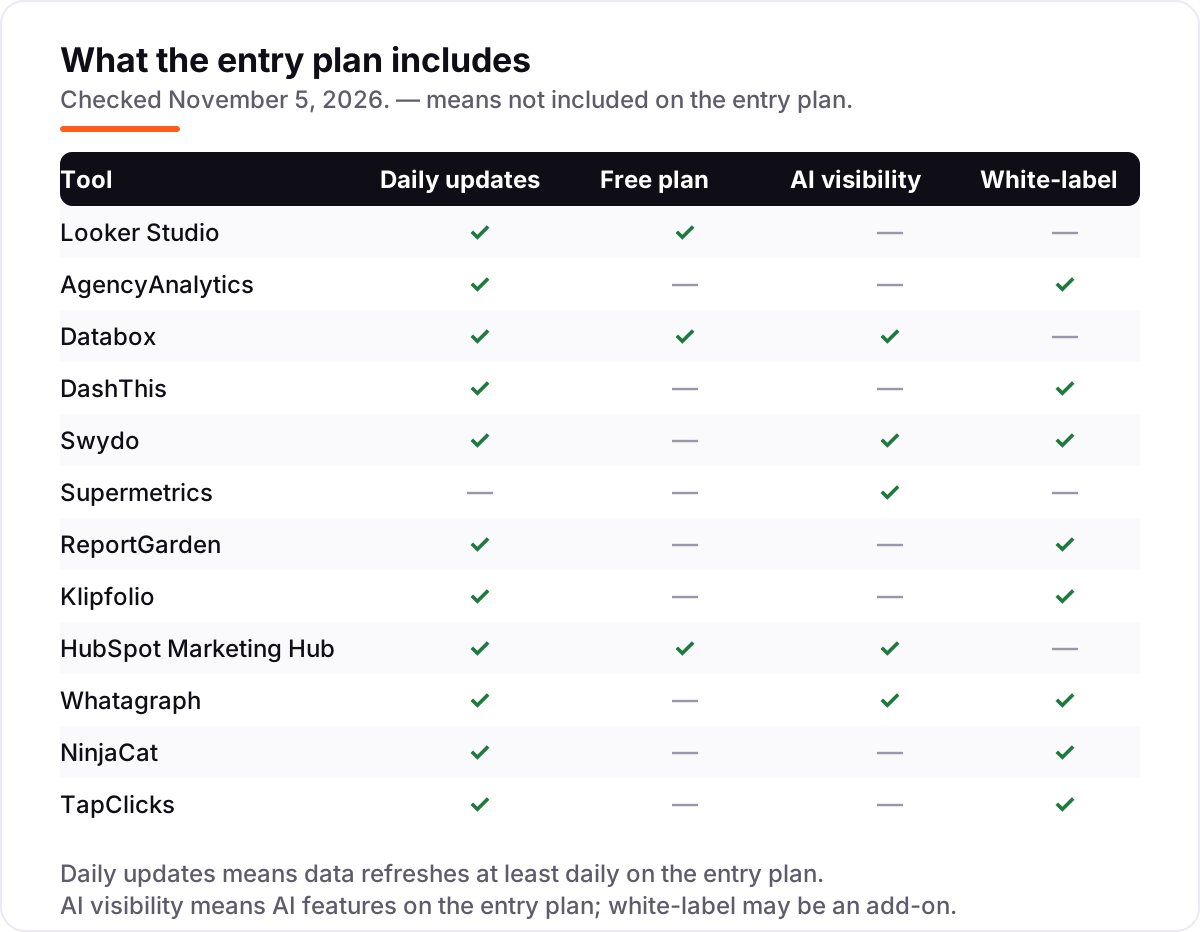
- Decide whether white-labeling is included or an add-on. It is included on most agency tools here but costs extra on Databox, and Looker Studio dashboards carry Google branding unless embedded.
- Check the refresh frequency. Supermetrics Starter refreshes weekly, most agency tools refresh daily, and Klipfolio refreshes every four hours on its entry plan.
- Try the trial with real client data. Every paid tool here offers a 14-day trial; run one genuine reporting cycle through it before paying.
Reporting is one system in your stack, not the whole stack. If the business also needs to track campaign links cleanly, the free UTM builder tool keeps every link tagged the same way, so the numbers in your reports actually reconcile. And before you buy, check that the tool covers the channels in your mix — a missing connector is the most common reason teams switch within six months.
Whatever you shortlist, test it with one real client first. Connect the accounts, build the report the client already receives, and compare the numbers against the old report for one month. That month tells you more than any demo, because it exposes the connector gaps, the refresh delays and the white-label limits that only show up on real data.
Marketing reporting software pricing: what you will actually pay
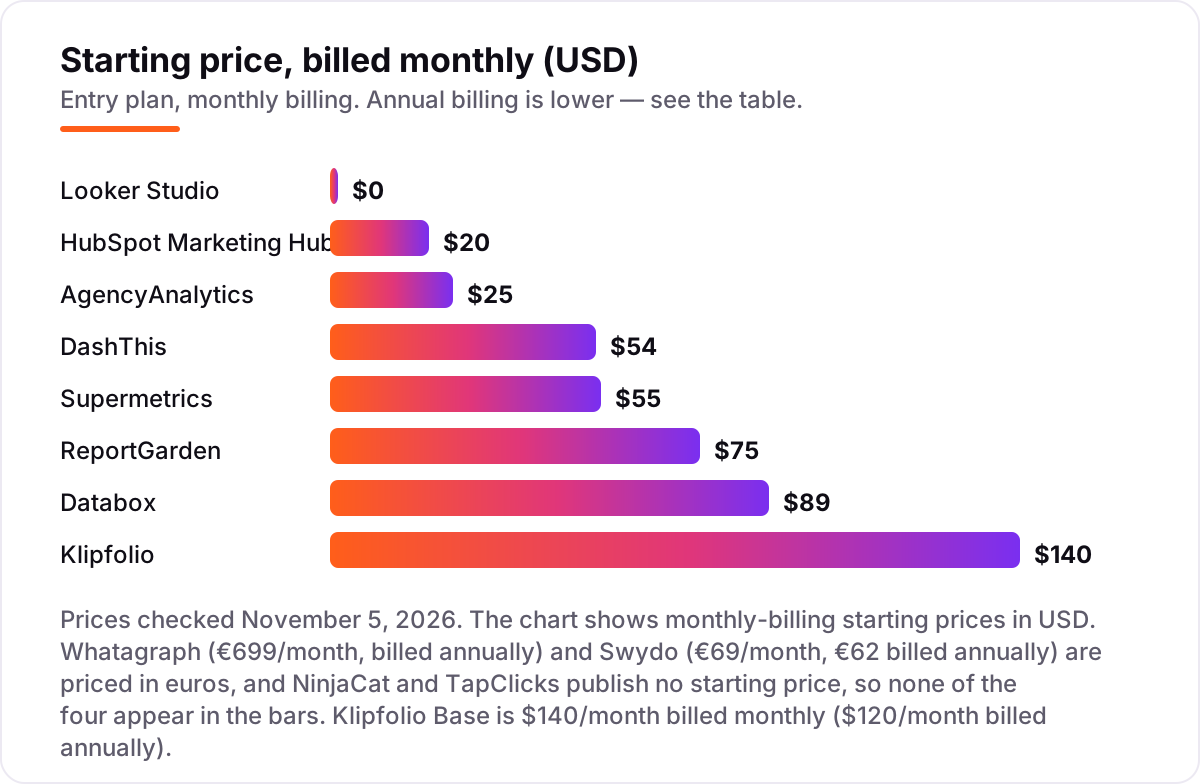
Take a ten-client agency where each client runs Google Ads, Meta and GA4 — 30 data sources in total. On monthly billing, ReportGarden Professional covers ten clients for $125 a month, Databox Agency starts at $99 plus two $25 account packs for $149, Swydo costs €69 plus 20 extra sources at €4.50 for €159, DashThis Professional covers ten dashboards for $164, and AgencyAnalytics costs ten times $25 for $250. Looker Studio itself is $0, but connecting Meta and the other non-Google channels needs a paid connector, and a Supermetrics Starter plan cannot cover 30 sources — it caps at three.
Over a year, annual billing cuts the bill on most of these: AgencyAnalytics drops to $200 a month for ten clients, DashThis Professional to $139, and Swydo to €152. Databox offers a 20% annual discount, and HubSpot Starter for a three-seat team runs $60 a month before contact overages. ReportGarden publishes no annual rate, Klipfolio's published rate is annual billing only, and Whatagraph is annual-only at €699 a month.
Three costs sit outside every number above. First, connectors: a Looker Studio setup for non-Google channels needs Supermetrics from $55 a month, and that plan still caps at three sources. Second, white-labeling on Databox is a paid add-on, and HubSpot contact overages run $50 per extra 1,000 contacts. Third, usage overages: Whatagraph charges for source credits past 50, and Swydo charges €4.50 per source past ten. If the team also needs to prove which channel drove the sale, not just report the numbers, see our guide to marketing attribution software.
Know the difference: reporting software vs a data connector
The confusion in this category is between moving data and presenting it. A data connector, like Supermetrics, pulls numbers from ad platforms into somewhere else — Looker Studio, Sheets, Excel or a warehouse — but shows you nothing on its own. A reporting tool, like DashThis or AgencyAnalytics, builds the client-ready report itself, with templates, scheduling and white-labeling. Buying a connector when you need a report leaves you building dashboards by hand; buying a reporting tool when you need a warehouse feed leaves you exporting CSVs by hand.
Some tools do both, and they charge for it. Databox connects sources and presents dashboards with an AI analyst on top, and Whatagraph pairs a governed data foundation with AI-built reports. Those are the right buys when one team owns both the data and the client report. Looker Studio sits on the presentation side only: it is free and excellent, but every non-Google source needs a connector, and that connector is where the bill appears.
A third distinction worth knowing is scheduled reports versus live dashboards. Agency tools here send a finished PDF on a schedule, which is what clients actually read. Klipfolio and Databox lean toward live dashboards that a team watches all day. If your buyer is a client who gets one email a month, buy the scheduled report; if your buyer is an internal team watching numbers move, buy the live dashboard.
Quick comparison: tool type by need
| Buyer | Best pick | Why |
|---|---|---|
| Solo marketer on a budget | Looker Studio | Free, with native Google connectors and unlimited dashboards |
| Agency sending monthly client reports | AgencyAnalytics | Per-client pricing, white-label included, from $25/month per client |
| Team that wants AI answers | Databox | Genie AI analyst on every plan, free plan to start |
| Fastest setup for templated reports | DashThis | Preset templates that fill themselves, from $54/month |
| Cheapest white-label agency reports | ReportGarden | $75/month for 5 clients, unlimited reports and dashboards |
| Enterprise reporting plus operations | TapClicks | Reporting, orders and workflow in one platform, custom quote |
Mistakes to avoid
- Budgeting on the entry price without counting the metering unit. A $25 per-client tool is $250 for ten clients, and a $69 per-source tool is $294 for 60 sources — the headline price is never the bill.
- Buying a connector when you need a report, or the reverse. Supermetrics moves data but shows nothing; DashThis shows a report but will not feed your warehouse. Match the tool to the job.
- Assuming white-label is included. It is included on most agency tools here but costs extra on Databox, and Looker Studio dashboards carry Google branding unless embedded.
- Ignoring refresh frequency. Weekly refresh on Supermetrics Starter means Monday's report shows last week's numbers; if clients expect fresh data, that alone rules it out.
- Paying for a year before the trial month. Every paid tool here offers a 14-day trial. Run one real reporting cycle first — connector gaps and refresh delays only show up on real data.
How we chose
We checked each vendor's own pricing page on November 5, 2026 and recorded the starting price exactly as shown, including the annual-billing figure where the page lists one, and we ranked the tools by fit for the most common buyer — a small agency or marketing team reporting to clients — not by brand size. NinjaCat and TapClicks publish no prices, so both are listed as custom quote; directory figures of around $1,500 a month for NinjaCat and $599 for TapClicks are third-party-sourced, not vendor-published, and are not used as prices. Whatagraph is priced in euros (€699 a month billed annually, from its own pricing page, which supersedes conflicting third-party dollar figures), Klipfolio Base is $140 a month billed monthly ($120 billed annually), and HubSpot's $7 a seat figure is a new-customer annual promotion against the regular $20. Ratings come from G2 review pages, and no vendor paid for a place in this list.
What to do next
Start with the free plan or trial of your top pick and run one real reporting cycle through it — one client, real accounts, the report the client already receives. Check that the numbers match the old report and that the white-labeling looks right before you commit to a year. If the reports are sorted but new customers are not finding you, our monthly SEO service handles the visibility side. Once your tools are in place, find out what's holding your rankings back.
Your stack only works if people find you
SerpAstra fixes what keeps your site off page one and makes it easy for AI assistants to recommend.
Get a free audit→Sources we checked (24)
- Looker Studio — lookerstudio.google.com (checked November 5, 2026)
- AgencyAnalytics pricing — agencyanalytics.com/pricing (checked November 5, 2026)
- Databox pricing — databox.com/pricing (checked November 5, 2026)
- DashThis pricing — dashthis.com/pricing (checked November 5, 2026)
- Swydo pricing — swydo.com/pricing (checked November 5, 2026)
- Supermetrics pricing — supermetrics.com/pricing (checked November 5, 2026)
- ReportGarden pricing — reportgarden.com/pricing (checked November 5, 2026)
- Klipfolio pricing — klipfolio.com/pricing (checked November 5, 2026)
- HubSpot Marketing Hub pricing — hubspot.com/pricing/marketing (checked November 5, 2026)
- Whatagraph pricing — whatagraph.com/pricing (checked November 5, 2026)
- NinjaCat pricing — ninjacat.io/pricing (checked November 5, 2026)
- TapClicks pricing — tapclicks.com/pricing (checked November 5, 2026)
- Looker Studio (Data Studio) on G2 — g2.com/products/data-studio/reviews (checked November 5, 2026)
- AgencyAnalytics on G2 — g2.com/products/agencyanalytics/reviews (checked November 5, 2026)
- Databox on G2 — g2.com/products/databox-databox/reviews (checked November 5, 2026)
- DashThis on G2 — g2.com/products/dashthis/reviews (checked November 5, 2026)
- Swydo on G2 — g2.com/products/swydo/reviews (checked November 5, 2026)
- Supermetrics on G2 — g2.com/products/supermetrics/reviews (checked November 5, 2026)
- ReportGarden on G2 — g2.com/products/reportgarden/reviews (checked November 5, 2026)
- Klipfolio on G2 — g2.com/products/klipfolio/reviews (checked November 5, 2026)
- HubSpot Marketing Hub on G2 — g2.com/products/hubspot-marketing-hub/reviews (checked November 5, 2026)
- Whatagraph on G2 — g2.com/products/whatagraph/reviews (checked November 5, 2026)
- NinjaCat on G2 — g2.com/products/ninjacat/reviews (checked November 5, 2026)
- TapClicks on G2 — g2.com/products/tapclicks/reviews (checked November 5, 2026)
Shamim
Founder of SerpAstra
A full-stack SEO and digital marketer who spends most days on Local SEO for dental practices, AI search visibility and lead generation.
Frequently asked questions
What is the best marketing reporting software?
AgencyAnalytics is the best fit for most agencies: white-label monthly client reports billed per client from $25 a month. Looker Studio is the best free option, and Databox is the better pick when you want an AI analyst answering questions from the data. The right choice depends on whether you bill per client, per source or per dashboard.
How much does marketing reporting software cost?
Entry prices run from $0 to $120 a month for most tools, with Looker Studio free and ReportGarden at $75 a month the cheapest agency options. Whatagraph starts at €699 a month billed annually, and NinjaCat and TapClicks publish no prices at all. A ten-client agency typically pays $125 to $250 a month before connectors and add-ons.
Is there really free marketing reporting software?
Yes. Looker Studio is free with a Google account and covers unlimited dashboards, though non-Google channels need paid connectors. Databox has a free plan with one user, three data sources and one dashboard, and HubSpot Marketing Hub has a free plan for two users. Free plans suit solo marketers; agencies outgrow them fast.
What is the difference between a reporting tool and a data connector?
A connector moves data; a reporting tool presents it. Supermetrics pulls ad and analytics data into Looker Studio, Sheets or a warehouse but shows you nothing on its own. DashThis, AgencyAnalytics and Swydo build the client-ready report itself. Databox and Whatagraph do both, which is why they cost more than a pure connector.
Do I need white-label reporting?
You need it the moment clients see the report. AgencyAnalytics, DashThis, Swydo, ReportGarden, Whatagraph, NinjaCat and TapClicks all include white-labeling on their entry or quoted plans. Databox charges extra for it, and Looker Studio dashboards carry Google branding unless you embed them. If clients never see the dashboard, skip it.
Can I switch marketing reporting software later?
Yes, but plan the move between reporting cycles. Export your report templates, reconnect every data source in the new tool, and run both systems for one month to check the numbers match. The painful part is rebuilding custom metrics and blends, so document those before you cancel. Most tools offer a 14-day trial for exactly this test.
Free SEO and AI visibility audit
Find out what is holding your rankings back
Send us your site. Within 2 business days you get a written audit, an AI visibility check and a short fix list ranked by impact. Free, with no contract attached.
Request my free audit→Related guides
 Digital Marketing & Ads11 Best Marketing Analytics Platforms in 2026, ComparedCompare the 11 best marketing analytics platforms in 2026 on price, free plans and reporting, with every price checked November 4, 2026 for US teams.Read guide →
 Digital Marketing & Ads9 Best Marketing Attribution Software in 2026, ComparedCompare the 9 best marketing attribution software tools in 2026 on price, attribution models and free plans, with every price checked November 4, 2026.Read guide →
 SEO & AI Search12 Best Marketing Platforms for Small Business SEO in 2026, ComparedThe 12 best marketing platforms for small business SEO, compared on real prices, SEO tools and AI visibility. Every price checked November 1, 2026.Read guide →