
11 Best Marketing Analytics Platforms in 2026, Compared
Compare the 11 best marketing analytics platforms in 2026 on price, free plans and reporting, with every price checked November 4, 2026 for US teams.
 Shamim Mia, Founder, SerpAstraLast verified November 4, 202614 min read
We compare pricing pages, documentation and public reviews. We never accept payment for rankings.

Key takeaways
- Google Analytics leads free at $0, Looker Studio is free too, and HubSpot Marketing Hub is the cheapest paid start at $20 a seat a month — Adobe Analytics is the only quote-only tool here.
- Free plans are real in this category: GA4, Looker Studio, Mixpanel and Amplitude all run useful free tiers, while Supermetrics, AgencyAnalytics and Tableau offer trials only.
- The single most important buying factor is what you need to measure: web traffic, product behaviour or client reporting — each needs a different tool, and no one platform does all three well.
- Per-seat and per-volume pricing beats the headline: HubSpot charges per seat, Tableau per user, and Mixpanel and Amplitude by events, so price your real team and traffic before you compare.
On this page
Quick comparison
| Tool | Best for | Starting price | Free plan |
|---|---|---|---|
| Google Analytics | Almost every website owner who needs free, standard web and campaign analytics | Free | Yes (free) |
| HubSpot Marketing Hub | Small B2B teams that want CRM, email and campaign analytics in one login | $20/seat/mo | Yes (free plan) |
| Looker Studio | Small teams and freelancers who need free, shareable marketing dashboards | Free | Yes (free) |
| Mixpanel | Product and growth teams that need funnel, retention and cohort analysis | $0 | Yes (free plan) |
| Amplitude | Product teams that want the largest free event allowance before paying | $0 | Yes (free plan) |
| Matomo | Privacy-focused teams that want to own their analytics data outright | $29/mo | Yes (self-hosted) |
| Databox | Solo marketers and small teams that need one dashboard across all channels | $71/mo | Yes (free plan) |
| Supermetrics | Marketers who need ad and analytics data piped into Sheets, Looker Studio or a BI tool | $44/mo | No (14-day trial) |
| AgencyAnalytics | Agencies that send branded client reports across many channels | $25/mo | No (14-day trial) |
| Tableau | Analysts who build deep, interactive dashboards for leadership teams | $75/user/mo | No (free trial) |
| Adobe Analytics | Large enterprises that need unsampled data at very high volume | Custom quote | No (demo only) |
Make one of these tools?
We re-check this list every quarter. Send a correction, request a review, or ask about a clearly labeled sponsored spot.
Request a listingThe best marketing analytics platforms

Google Analytics
Best for: Almost every website owner who needs free, standard web and campaign analytics
Google Analytics 4 is the default analytics install: it is free and on most of the web, and it answers the first questions every marketer asks — where visitors come from, what they do, and which campaigns turn into key events. The standard version costs $0, and it links natively to Google Ads, Search Console and BigQuery export, so the data flows into the rest of your stack without a connector bill.
The catches are sampling and the ceiling. Exploration reports sample data above 10 million events, history stops at 14 months, and the only way past either limit is Google Analytics 360, quote-based with a reported starting price around $50,000 a year. There is no middle plan. Choose GA4 as your measurement foundation, then add a product or reporting tool beside it when you need behaviour or client-ready dashboards.
What we like
- Free with no traffic fee, and the default analytics install on most of the web
- Tracks traffic sources, pages, key events and ecommerce out of the box
- Native links to Google Ads, Search Console and BigQuery export
Watch out for
- Exploration reports sample data above 10 million events, and exploration history is capped at 14 months
- The interface takes real learning time, and the paid 360 tier is quote-only with no middle plan

HubSpot Marketing Hub
Best for: Small B2B teams that want CRM, email and campaign analytics in one login
HubSpot Marketing Hub is the all-in-one pick in this list: the CRM, the email tool, the landing pages and the analytics live in one login, so a campaign report shows revenue against real contacts instead of anonymous sessions. Starter costs $20 a seat a month and includes 1,000 marketing contacts, email automation, landing pages and live chat, with a $7 a seat promotional price for new customers.
The bill has two multipliers to watch. Seats are charged per person, so five marketers pay $100 a month before contacts, and extra marketing contacts cost $50 a month per 1,000 on Starter. The bigger cliff is Professional at $890 a month plus a $3,000 one-time onboarding fee. Buy HubSpot when the CRM is the centre of your marketing; buy a cheaper analytics tool when you only need reports.
What we like
- Campaign, email, landing page and ad results report against the same CRM contacts
- Starter includes 1,000 marketing contacts, email automation, landing pages and live chat
- Attribution and journey reporting arrive on Professional without a second tool
Watch out for
- Starter is billed per seat, so a team of five pays five times the $20 headline before contacts
- Professional jumps to $890 a month plus a $3,000 one-time onboarding fee, with no step between
- Extra marketing contacts cost $50 a month per 1,000 on Starter, so list growth raises the bill fast

Looker Studio
Best for: Small teams and freelancers who need free, shareable marketing dashboards
Looker Studio is Google's free dashboard layer, and for teams that live on Google data it is the cheapest way to a shareable marketing dashboard. The free tier costs $0 for creators and viewers, with unlimited reports and more than 20 native Google connectors, so GA4, Google Ads, Search Console, Sheets and BigQuery blend into one view that shares by link and schedules by email.
The free price has edges. Meta, LinkedIn and other non-Google sources need paid third-party connectors, and those connectors are where the real cost lands. Pro costs $9 per user per project per month, and the per-project billing multiplies fast across clients. Choose Looker Studio when Google data is most of the story; add Supermetrics or Databox when it is not.
What we like
- Free for creators and viewers, with unlimited reports and 20-plus native Google connectors
- Dashboards blend GA4, Google Ads, Search Console, Sheets and BigQuery in one view
- Reports share by link and schedule by email without a paid seat for viewers
Watch out for
- No built-in marketing connectors beyond Google's own; Meta and LinkedIn need paid third-party connectors
- Pro is billed per user per project, so the same people across many client projects multiply the cost
- No AI analysis or governed metrics on the free tier; support needs a separate Cloud support plan

Mixpanel
Best for: Product and growth teams that need funnel, retention and cohort analysis
Mixpanel is the product-analytics pick in this list: it tracks what people do inside your product, not just how they arrived at your site. Funnels show where signups drop off, retention curves show who comes back, and cohorts compare one group of users against another. The first 1 million events a month are free, and Growth starts at $0 before usage, with paid volume from $140 a month at 1.5 million events.
The pricing catch is volume. Events are the meter, and a busy product crosses into hundreds of dollars a month quickly — $259 at 2 million events and $1,176 at 10 million on monthly billing. Group Analytics for account-level B2B reporting is also a paid add-on. Choose Mixpanel when user behaviour is the question; pair it with GA4 when the question is where the users came from.
What we like
- Funnels, retention curves and cohorts answer what users do after they arrive, not just how they arrived
- First 1 million events a month are free on both the Free and Growth plans
- Unlimited seats on every plan, with session replay and feature flags included
Watch out for
- The bill scales with event volume, so a busy product can pass $1,000 a month before it feels big
- Group Analytics for account-level B2B reporting is a paid add-on, not included on Growth
- No marketing-channel reporting depth; it needs a web analytics tool beside it

Amplitude
Best for: Product teams that want the largest free event allowance before paying
Amplitude is the generous free tier in this list: the free plan covers 2 million events a month with no time limit, double Mixpanel's allowance, and it includes session replay, feature flags, guides and surveys on the same user record. Plus starts at $0 for the first 2 million events and scales to 70 million events, adding behavioural cohorts, heatmaps and two-year retention.
The catch is transparency past the free line. Amplitude publishes no per-volume rate for Plus, so a team past 2 million events prices its usage through the calculator on the pricing page, and Growth and Enterprise are custom-quoted with no public figure at all. Choose Amplitude when the free allowance covers your volume; choose Mixpanel when you want a published price at every volume.
What we like
- The largest free allowance here: 2 million events a month, with no time limit
- Plus scales to 70 million events and adds cohorts, heatmaps and 2-year retention
- Session replay, feature flags, guides and surveys share one user record
Watch out for
- Plus publishes no per-volume rate past the free allowance, so the bill past 2M events needs the estimator
- Growth and Enterprise are custom-quoted, with no public price to budget against
- Plus requires a credit card even while the first 2M events are free

Matomo
Best for: Privacy-focused teams that want to own their analytics data outright
Matomo is the privacy pick: an open-source analytics platform where you own 100% of the data. The Cloud plan hosts it for you in the EU from $29 a month for 50,000 hits, with funnels, heatmaps, session recordings and A/B testing included, and there is no data sampling at any volume. The self-hosted Community edition is free, and you run it on your own server.
The trade-off is the hit meter. Cloud pricing climbs with monthly hits — $42 at 100,000, $85 at 300,000 and $204 at 1 million — so a high-traffic site pays far more than the $29 headline. The free self-hosted route avoids the meter but costs your time in servers, updates and backups. Choose Matomo when data ownership or privacy law drives the decision; choose GA4 when it does not.
What we like
- You own 100% of the data, hosted in the EU on Cloud or on your own servers
- No data sampling, with funnels, heatmaps, session recordings and A/B testing included on Cloud
- Cookie-free tracking options and full GDPR-friendly controls without a consent banner trade-off
Watch out for
- Cloud pricing rises with monthly hits, so a high-traffic site outgrows the $29 starting tier quickly
- The self-hosted edition is free but needs a server, updates and backups you run yourself
- Fewer native marketing integrations than GA4, so some connectors need extra setup

Databox
Best for: Solo marketers and small teams that need one dashboard across all channels
Databox is the reporting pick for marketers who are tired of opening six tools to answer one question. More than 130 native integrations pull GA4, ads, CRM and social into one dashboard, and the AI analyst answers performance questions and flags anomalies on every plan, including the free one. Analyst costs $71 a month billed annually, with one user, five data sources and unlimited dashboards.
The catch is the single seat. Analyst covers one user, so the moment a teammate needs access the bill jumps to the $199-a-month Team plan, and white-label branding is a paid add-on on top. AI usage is also metered in credits. Choose Databox when one dashboard across channels is the job; choose Looker Studio when the budget is $0 and Google data is enough.
What we like
- 130-plus native integrations pull GA4, ads, CRM and social into one dashboard
- The AI analyst answers performance questions and flags anomalies on every plan
- Prebuilt metrics and a governed semantic layer keep every report using the same numbers
Watch out for
- Analyst is a single-user plan, so a second teammate forces the $199-a-month Team plan
- White-label branding is a paid add-on, not included on Analyst
- AI usage is metered in credits, so heavy questioning of the AI analyst costs extra

Supermetrics
Best for: Marketers who need ad and analytics data piped into Sheets, Looker Studio or a BI tool
Supermetrics is a pipeline, not a dashboard: it moves marketing data from more than 170 sources into Sheets, Excel, Looker Studio or Power BI, where you report on it. Starter costs $44 a month billed annually and covers one destination, three data sources and one user, with AI assistants including Claude and ChatGPT as destinations from the entry plan.
Two limits decide whether it fits. Starter refreshes weekly, so daily reporting needs Growth at $177 a month billed annually, and every extra destination or source is a paid add-on — a second destination adds $49 a month. Supermetrics also shows nothing on its own, so budget for the reporting tool too. Choose it when your dashboards live in Sheets or Looker Studio and the data is scattered.
What we like
- 170-plus connectors move ad, social and analytics data into Sheets, Excel, Looker Studio and Power BI
- AI assistants including Claude and ChatGPT are core destinations from the Starter plan
- Data blending and scheduled refreshes run without storing the data first
Watch out for
- Starter refreshes weekly, so daily reporting needs Growth at $177 a month billed annually
- Every extra destination and source is a paid add-on, so the $44 headline grows with each connection
- No dashboards of its own: it moves data, and you still need a reporting tool to see it

AgencyAnalytics
Best for: Agencies that send branded client reports across many channels
AgencyAnalytics is built for one job: sending branded client reports without building them by hand. White-label dashboards and reports carry your agency's brand, more than 80 integrations cover SEO, PPC, social, email and call tracking, and reports schedule automatically into a client portal. Pricing is per client from $25 a month, with every feature included in the single plan.
The catch is the client meter. Pricing is per client, not per user, so a 25-client roster costs far more than the $25 starting figure, and the AI Tracker and Rank Tracker are paid add-ons rather than included. Database connectors also sit behind the 25-plus-client volume tier. Choose it when client reporting is the product; choose Databox when the reports are for your own team.
What we like
- White-label dashboards and reports carry your agency brand on every plan
- 80-plus integrations cover SEO, PPC, social, email and call tracking in one report
- Unlimited reports with scheduling and a client portal, priced per client rather than per user
Watch out for
- Pricing is per client, so the bill grows with every client you add, not with seats
- AI Tracker and Rank Tracker are paid add-ons, not included in the base plan
- Database connectors sit behind the 25-plus-client volume tier, not the entry plan

Tableau
Best for: Analysts who build deep, interactive dashboards for leadership teams
Tableau is the BI heavyweight in this list: the deepest visual analysis here, with drag-and-drop dashboards that leadership teams can explore themselves instead of asking for a new report each week. It connects to almost any source, from spreadsheets to warehouses, and its community and template library mean most marketing dashboards already exist in some form. A Creator licence costs $75 a user a month billed annually.
The pricing trap is the role ladder. Every deployment needs at least one Creator, so the $15 Viewer price is never the whole bill — one Creator plus five Viewers is $150 a month — and all plans are billed annually with no monthly option. White-label branding needs Enterprise at $115 a Creator. Choose Tableau when dashboards are a leadership product; choose Looker Studio when they are a quick view.
What we like
- The deepest visual analysis here, with drag-and-drop dashboards leaders can explore themselves
- Connects to almost any source, from spreadsheets to warehouses, with live or extract data
- A huge community and template library means most marketing dashboards already exist in some form
Watch out for
- Every deployment needs at least one $75 Creator licence, so the $15 Viewer price is never the whole bill
- All plans are billed annually, with no monthly billing option at any tier
- White-label branding and row-level security need the Enterprise tier at $115 a Creator a month

Adobe Analytics
Best for: Large enterprises that need unsampled data at very high volume
Adobe Analytics is the enterprise end of this list: unsampled data at any volume, real-time reporting, and Analysis Workspace for deep segmentation, calculated metrics and attribution across web, app and offline data. It sits inside Experience Cloud, so it pairs with Target, Campaign and Real-Time CDP when the marketing stack is already Adobe. There is no published price and no self-serve trial.
The quote is built on server calls — every page view, click and video start you send — across three tiers called Select, Prime and a top tier, and contracts typically run one to three years. Only a quote from Adobe is reliable, because the vendor publishes no price list. Choose it when volume and Adobe lock-in demand it; choose GA4 or Matomo for anything smaller.
What we like
- Unsampled data at any volume, with real-time reporting and Analysis Workspace
- Deep segmentation, calculated metrics and attribution across web, app and offline data
- Sits inside Experience Cloud, so it pairs with Target, Campaign and Real-Time CDP
Watch out for
- No published price and no self-serve trial, so every deal starts with a sales conversation
- Pricing is built on server calls, which makes the bill hard to forecast before you buy
- Implementation is a project in itself, with setup and training costs on top of the licence
The best marketing analytics platforms answer a different question from the one most buyers ask first. The question is not which tool has the most charts, but which one measures the thing your business actually sells: website visits, product usage, or client results. We ranked the 11 tools below by fit for the most common buyer — a US marketing team choosing its main analytics platform — and every price was checked on November 4, 2026.
How to choose the best marketing analytics platforms
- Name the thing to measure first. Web traffic needs GA4 or Matomo, product behaviour needs Mixpanel or Amplitude, and client reporting needs Databox or AgencyAnalytics. Buying before you name it is how teams end up with three tools doing one job.
- Price your real volume, not the headline. HubSpot charges per seat, Tableau per user, Mixpanel and Amplitude by events, and Matomo by hits. A $0 or $20 headline becomes a real bill only at your team size and traffic.
- Check the free tier against your actual use. GA4 and Looker Studio are free without a time limit, Mixpanel gives 1 million events a month and Amplitude 2 million. If your volume fits inside a free tier, do not pay for a plan yet.
- Test the trial on a real campaign. Every paid tool here offers a trial, and one genuine campaign — your channels, your UTMs, your report — tells you more than any demo can.
- Count the connectors you need. Looker Studio covers Google sources free, but Meta and LinkedIn need paid third-party connectors. Add those connector costs to the tool price before you compare.
Analytics is one system in your stack, not the whole stack. Before you trust any campaign report, build your links properly: the free UTM builder tool makes clean, consistent campaign links so the source data in GA4 is actually right. And if you want the wider picture, our guide to analytics software compares the broader analytics market beyond marketing alone.
Whatever you shortlist, try it with real data before you pay. The trials in this list are long enough to run one genuine campaign through — your channels, your budget, your report — and that campaign tells you more than any review can. Check two things in the trial: that the numbers match what your ad platforms report, and that your team can build the report they need without asking an analyst. If either fails, the price does not matter.
Best marketing analytics platforms pricing: what you will actually pay
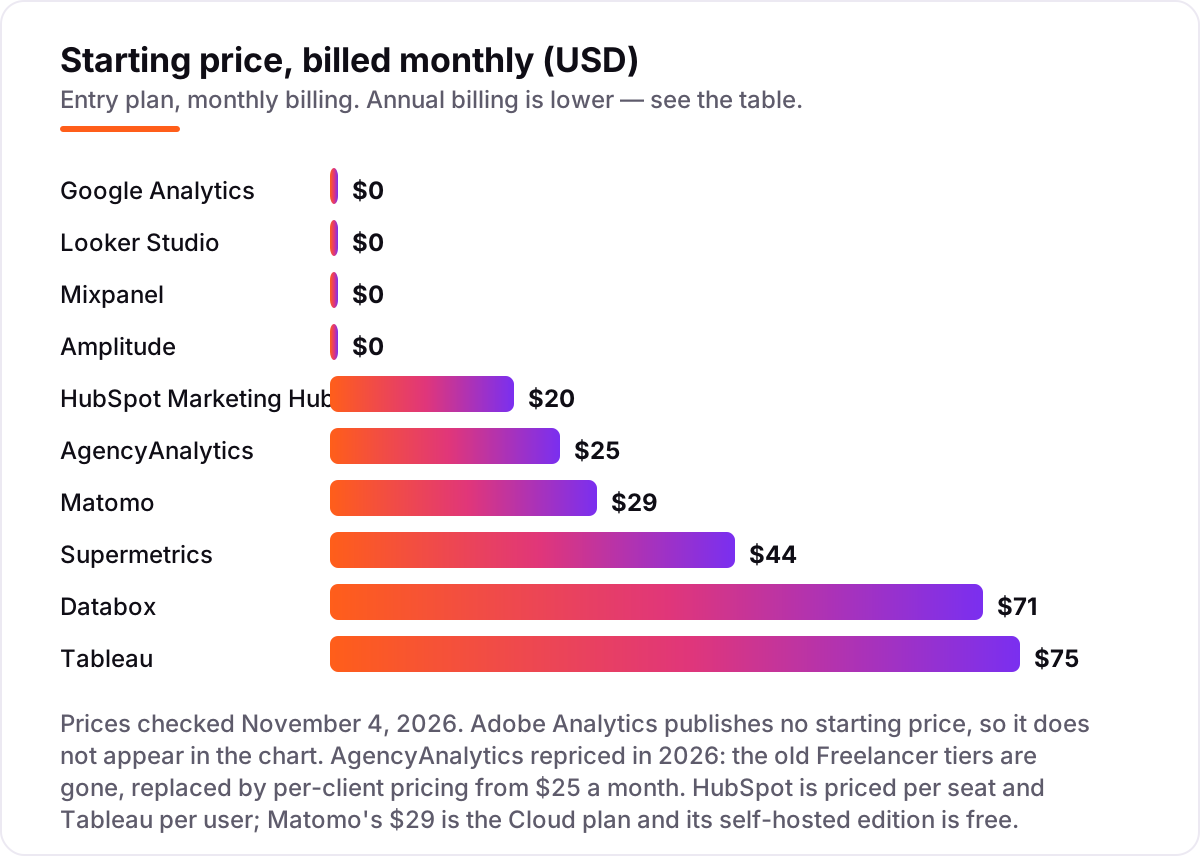
Take a five-person marketing team that runs campaigns across Google, Meta and email for a year. On list prices, the analytics bill is $0 on Google Analytics, $0 on Looker Studio, $0 on Mixpanel and Amplitude while volume stays inside the free allowances, $348 on Matomo Cloud at the $29 starting tier, $528 on Supermetrics Starter billed annually, $852 on Databox Analyst billed annually, $900 on Tableau for one Creator, $1,200 on HubSpot Starter at $20 a seat for five seats, and $1,500 on AgencyAnalytics at $25 a month for five clients.
Three of those numbers need adjusting before they are real. First, HubSpot's $1,200 assumes the list price; new customers see a $7-a-seat promotional price, which would cut the same five seats to $420 for the first term. Second, the volume meters: Mixpanel stays free only up to 1 million events a month, and at 2 million events it costs $259 a month, or $3,108 a year — more than every paid tool in this list except HubSpot. Third, Tableau's $900 is one Creator only; five Viewers add $900 a year, and the team that actually builds dashboards needs more than one Creator.
Three costs sit outside every number above. First, the connectors: Looker Studio is free, but Meta and LinkedIn connectors are paid third-party add-ons, so a three-channel dashboard can cost more than Databox. Second, the second tool: most teams in this list pair a web analytics tool with a product or reporting tool, so budget for GA4 plus Mixpanel, or GA4 plus Databox. Third, the reporting time: a tool nobody opens is a wasted subscription, so the cheapest tool your team actually uses beats the most powerful one it ignores. For the wider market context, our guide to digital analytics software shows how these prices compare across analytics categories.
Know the difference: web analytics vs product analytics
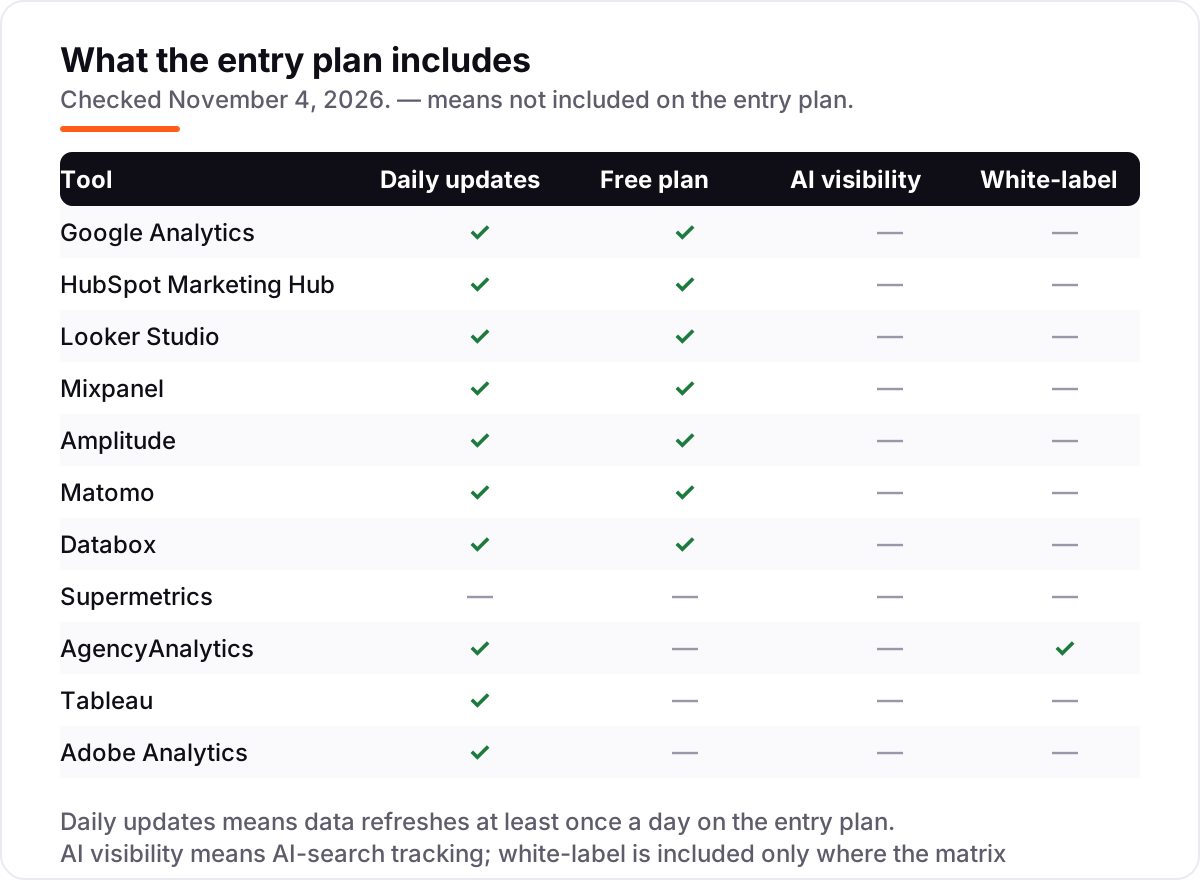
The confusion in this category is between two different jobs that share the word analytics. Web analytics — Google Analytics, Matomo and Looker Studio dashboards — measures visits: where people come from, which pages they view, and which campaigns turn into a signup or a sale. Product analytics — Mixpanel and Amplitude — measures behaviour inside the product: which features people use, where they drop off in a funnel, and who comes back a week later.
There is a second, quieter confusion: reporting tools are not measurement tools. Databox, AgencyAnalytics and Tableau do not collect the data themselves; they take data that GA4, Mixpanel or an ad platform collected and turn it into dashboards and client reports. Supermetrics goes one step further back: it moves the data, and you still need a reporting tool to see it.
The practical rule is simple. If the question is which campaign brought the customer, buy web analytics. If the question is what the customer did after signing up, buy product analytics. If the question is how to show the results to a boss or a client, buy a reporting tool and point it at the first two. Buying a reporting tool and expecting it to collect data is the most common expensive mistake in this category.
Quick comparison: tool type by need
| Buyer | Best pick | Why |
|---|---|---|
| Every website, starting out | Google Analytics | Free web and campaign analytics, from $0, with no time limit |
| Small B2B team on one login | HubSpot Marketing Hub | Marketing and CRM in one place, from $20 a seat a month |
| Free shareable dashboards | Looker Studio | Unlimited reports on Google data for $0, Pro at $9 a user |
| Product funnels and retention | Mixpanel | Funnel and cohort analysis from $0, paid from $140 a month |
| Biggest free event allowance | Amplitude | 2 million events a month free, Plus starting at $0 |
| Privacy and data ownership | Matomo | Owned data with no sampling, from $29 a month hosted |
| One dashboard, all channels | Databox | 130-plus integrations in one view, from $71 a month |
| Data into Sheets or Looker Studio | Supermetrics | 170-plus connectors feeding your dashboards, from $44 a month |
| Agency client reporting | AgencyAnalytics | White-label reports, from $25 a month per client |
| Deep leadership dashboards | Tableau | The most powerful visual analysis here, from $75 a Creator a month |
| Enterprise scale, unsampled | Adobe Analytics | Unsampled data at any volume, priced by quote only |
Mistakes to avoid
- Budgeting on the monthly headline. HubSpot is $20 a seat, not $20 a team, and Tableau needs a $75 Creator before any $15 Viewer works. Multiply every price by your real seats, users and volume first.
- Buying a reporting tool and expecting it to collect data. Databox, AgencyAnalytics and Tableau show data; GA4, Mixpanel and Amplitude collect it. Budget for both halves or the dashboard stays empty.
- Ignoring the volume meter. Mixpanel is free to 1 million events and $259 a month at 2 million; Matomo's $29 tier covers 50,000 hits. Check your real monthly volume before you pick the free tier.
- Forgetting the connector bill. Looker Studio is free, but Meta and LinkedIn connectors are paid third-party add-ons. Add them to the price before you compare.
- Skipping the trial on a real campaign. A demo dashboard hides the setup work. Run one genuine campaign through the trial and check that the numbers match your ad platforms before you commit to a year.
How we chose
We checked each vendor's own pricing page on November 4, 2026 and recorded the starting price exactly as shown, including the annual-billing figure where the page lists one, and we ranked the tools by fit for the most common buyer — a US marketing team choosing its main analytics platform — not by brand size. Three figures need a note. AgencyAnalytics repriced during 2026: the old Freelancer tiers at $79 and $59 a month are gone, replaced by per-client pricing from $25 a month on the vendor's own pricing page, and this post uses the new figure. Supermetrics publishes different starting prices by region, and the $44 figure is the US annual-billing price; its EU list shows €39 a month. Google Analytics 360's reported $50,000-a-year starting price comes from reseller reports, not a Google price list, because Google publishes no 360 price. Adobe Analytics publishes no price at all, so it is listed as a custom quote and left out of the price chart. Only Google Analytics carries a rating here, from its G2 page read on November 4, 2026; G2 rate-limited our other review-page requests that day, so the rest are omitted rather than estimated. No vendor paid for a place in this list, and none of the links here are affiliate links.
What to do next
Start with the free tier of your top pick and run one real campaign through it. Check that the numbers match what your ad platforms report and that your team can build the report they need without asking an analyst before you commit to a year. If the tools are sorted but new clients are not finding you, our monthly SEO service handles the visibility side — or compare providers in our guide to content analytics software. Once your tools are in place, find out what's holding your rankings back.
Your stack only works if people find you
SerpAstra fixes what keeps your site off page one and makes it easy for AI assistants to recommend.
Get a free audit→Sources we checked (12)
- Google Analytics product page — marketingplatform.google.com (checked November 4, 2026)
- HubSpot Marketing Hub pricing — hubspot.com (checked November 4, 2026)
- Looker Studio pricing — cloud.google.com (checked November 4, 2026)
- Mixpanel pricing — mixpanel.com (checked November 4, 2026)
- Amplitude pricing — amplitude.com (checked November 4, 2026)
- Matomo pricing — matomo.org (checked November 4, 2026)
- Databox pricing — databox.com (checked November 4, 2026)
- Supermetrics pricing — supermetrics.com (checked November 4, 2026)
- AgencyAnalytics pricing — agencyanalytics.com (checked November 4, 2026)
- Tableau pricing — tableau.com (checked November 4, 2026)
- Adobe Analytics — adobe.com (checked November 4, 2026)
- Google Analytics reviews on G2 — g2.com (checked November 4, 2026)
Shamim
Founder of SerpAstra
A full-stack SEO and digital marketer who spends most days on Local SEO for dental practices, AI search visibility and lead generation.
Frequently asked questions
What is the best marketing analytics platform?
Google Analytics 4 is the best starting point for most teams because it is free and covers web and campaign reporting. HubSpot Marketing Hub is the better pick when marketing and CRM live together, and Mixpanel or Amplitude win when product behaviour matters more than traffic. The right tool depends on what you need to measure.
How much do marketing analytics platforms cost?
Entry prices run from $0 to a custom quote. GA4, Looker Studio, Mixpanel and Amplitude all start free, Matomo Cloud costs $29 a month, Supermetrics $44, Databox $71, Tableau $75 a Creator and AgencyAnalytics $25 a client. HubSpot starts at $20 a seat, and Adobe Analytics is quote-only.
Is Google Analytics enough for marketing analytics?
For most small teams, yes — GA4 covers traffic sources, campaigns, key events and ecommerce for free. It falls short on product behaviour, where Mixpanel or Amplitude fit better, and on client-ready reporting, where Databox or AgencyAnalytics fit better. Most teams pair GA4 with one of those rather than replacing it.
What is the difference between web analytics and product analytics?
Web analytics tools like GA4 and Matomo measure visits: where people come from, which pages they view and which campaigns convert. Product analytics tools like Mixpanel and Amplitude measure behaviour inside the product: funnels, retention and cohorts. Most marketing teams need the first; product-led teams need both.
Which marketing analytics platform is free?
Google Analytics 4 and Looker Studio are completely free with no time limit. Mixpanel is free up to 1 million events a month and Amplitude up to 2 million, and Matomo's self-hosted Community edition is free. Databox has a free plan with three data sources, while Supermetrics, AgencyAnalytics and Tableau offer trials only.
Can I switch marketing analytics platforms later?
Yes, but plan the move between campaigns, not mid-campaign. Export your historical data first, because event history rarely migrates cleanly, then run the old and new tools side by side for a month to check the numbers match. The reports move easily; the history and the team's habits do not, so budget a month for the switch.
Free SEO and AI visibility audit
Find out what is holding your rankings back
Send us your site. Within 2 business days you get a written audit, an AI visibility check and a short fix list ranked by impact. Free, with no contract attached.
Request my free audit→Related guides
 AI, Data & Analytics12 Best Analytics Software in 2026: Pricing, Features and Pros & ConsThe 12 best analytics software tools for 2026, compared on price, free plans and what each one measures, with every price checked on the pricing page.Read guide →
 AI, Data & Analytics10 Best Digital Analytics Software in 2026, Compared10 best digital analytics software options compared on price, free plans and AI features, with every starting price checked on November 2, 2026.Read guide →
 AI, Data & Analytics12 Best Content Analytics Software in 2026, ComparedCompare the 12 best content analytics software options for 2026, with real starting prices, free plans and G2 ratings — from free GA4 to Parse.ly.Read guide →