
10 Best Marketing Tools for Small Businesses Budget in 2026, Compared
Compare the 10 best marketing tools for small businesses budget on price, free plans and what each tool includes, with every price checked November 5, 2026.
 Shamim Mia, Founder, SerpAstraLast verified November 5, 202614 min read
We compare pricing pages, documentation and public reviews. We never accept payment for rankings.

Key takeaways
- Brevo is the best budget pick at $9/month; MailerLite follows with a free plan and Comfort at $12/month, and Sender has the biggest free plan in this list at 2,500 subscribers.
- Seven of the ten tools here have a genuinely free plan — Brevo, MailerLite, Sender, Mailchimp, Systeme.io, Canva and Buffer — so a small business can start marketing at $0.
- The single most important buying factor is the limit that forces your next upgrade: contact caps, send caps and channel caps decide what you actually pay, not the headline price.
- Every paid plan here scales with list size or volume, so budget on the price at the list size you expect in twelve months, not the entry tier.
On this page
Quick comparison
| Tool | Best for | Starting price | Free plan |
|---|---|---|---|
| Brevo | Small businesses that want email, SMS and a basic CRM in one cheap account | $9/mo | Yes (free plan) |
| MailerLite | Small businesses that want a clean email tool with landing pages and a website builder at the lowest paid price | Free; Comfort $12/mo | Yes (free plan) |
| Sender | Small businesses that want the biggest free plan in this list, with automation included | Free; Standard $9/mo | Yes (free plan) |
| Mailchimp | Small businesses that want the biggest template library and the widest integration list | Free; Essentials $13/mo | Yes (free plan) |
| GetResponse | Small businesses that want email plus webinars and courses in one account | $19/mo | Yes (free plan) |
| Constant Contact | Small businesses and nonprofits that run events and want phone support with their email | $12/mo | No (30-day trial) |
| AWeber | Small businesses that want reliable deliverability and real human support on a simple plan | $15/mo | No (14-day trial) |
| Systeme.io | Small businesses that want funnels, email, courses and checkout in one cheap account | Free; Startup $17/mo | Yes (free plan) |
| Canva | Small businesses that make their own social posts, flyers and ads without a designer | Free; Pro $18/mo | Yes (free plan) |
| Buffer | Small businesses that want simple social scheduling without learning a complex platform | Free; $6/channel/mo | Yes (free plan) |
Make one of these tools?
We re-check this list every quarter. Send a correction, request a review, or ask about a clearly labeled sponsored spot.
Request a listingThe best marketing tools for small businesses budget

Brevo
Best for: Small businesses that want email, SMS and a basic CRM in one cheap account
Brevo is the cheapest way to run email, SMS and a basic CRM from one account, and it prices by how many emails you send rather than how many contacts you store. Starter costs $9 a month for 5,000 emails and 500 contacts; the free plan sends 300 emails a day. That volume pricing is why it wins on a budget: emailing 5,000 people twice a month costs far less here than on a contact-priced tool.
The trade-off is that the $9 tier is small. Past 500 contacts or 5,000 emails, the price climbs by volume, and removing the Brevo logo costs another $12 a month on Starter. Automation covers the basics but stays simpler than GetResponse. Pick Brevo when email plus SMS in one cheap account is the job; pick MailerLite for landing pages and a website instead.
What we like
- Cheapest way to run email, SMS, WhatsApp and a basic CRM from one account
- Prices by emails sent, not contacts stored, so a large quiet list costs less
- Free plan covers 300 emails a day with unlimited contacts and automation for 2,000 contacts
- Yearly billing cuts Starter to $8.08/month, about 10% off
Watch out for
- The $9 Starter tier holds only 500 contacts — a bigger list pushes the price up by volume
- Logo removal on Starter costs $12/month extra; it is included only from Standard
- Automation is solid but shallower than dedicated automation platforms

MailerLite
Best for: Small businesses that want a clean email tool with landing pages and a website builder at the lowest paid price
MailerLite is the value pick because the free plan is a real working tool, not a demo: 250 subscribers, 2,500 emails a month, automations, a website, a landing page and all three email editors at $0. Comfort costs $12 a month for 500 subscribers and adds unlimited templates, an AI writing assistant, dynamic emails and a preference center. Power costs $25 and removes most of the caps.
The catches are the ceilings. The free plan fell from 1,000 subscribers to 250 in June 2026, so most growing lists reach the paid tier within months, and new accounts wait for an approval check before they can send. Automation is good for welcome sequences and simple flows but thinner than GetResponse. Choose MailerLite when the budget matters most and you want landing pages and a website in the same cheap plan.
What we like
- Free plan includes automations, a website, a landing page and all three email editors
- Comfort at $12/month is the cheapest first paid step in this list
- Sells digital products and paid newsletters without a second tool
- Cleanest interface here for a non-marketer to run alone
Watch out for
- Free plan shrank to 250 subscribers in June 2026, so most lists pay sooner than before
- New accounts go through an approval check before they can send
- Advanced automation logic is thinner than on GetResponse or ActiveCampaign

Sender
Best for: Small businesses that want the biggest free plan in this list, with automation included
Sender has the most generous free plan in this list by a wide margin: 2,500 subscribers and 15,000 emails a month at $0, with automation, segmentation, forms, popups and ten landing pages included. Standard costs $9 a month for 500 subscribers and 6,000 emails, and Professional costs $15. A business can run on the free plan for a long time before paying anything at all.
The free plan's weakness is polish. Templates look plainer than Mailchimp or Canva, there is no CRM pipeline — Sender is email and SMS only — and SMS runs on credits you buy separately. The 30% annual discount applies to the first year only, then drops to 20%. Start on Sender when the list is small and the budget is $0; upgrade to Standard the month you want the branding off your emails.
What we like
- Biggest free plan here: 2,500 subscribers and 15,000 emails a month at $0, with automation
- Standard at $9/month is joint-cheapest paid entry with Brevo
- Free emails carry Sender branding, but paid Standard removes it
- 30% off annual billing in the first year drops Standard to $6.30/month
Watch out for
- Template library looks plainer and less modern than Mailchimp or Canva
- No built-in CRM pipeline — it is email and SMS only
- SMS runs on separately purchased credits, not bundled in the plan

Mailchimp
Best for: Small businesses that want the biggest template library and the widest integration list
Mailchimp is the default recommendation for a reason: the templates look good out of the box and it connects to almost every store, CRM and form tool a small business already uses. The free plan covers 250 contacts and 500 sends a month. Essentials costs $13 a month for 500 contacts and adds A/B testing, scheduling and three seats; Standard costs $20 and adds multi-step automation.
The billing trap is contact counting. Subscribed, unsubscribed and non-subscribed contacts all count until you archive them, so a list of dead addresses costs real money, and the price climbs at every contact band — 5,000 contacts costs $75 a month on Essentials. Pick Mailchimp when the ecosystem matters more than the entry price; pick Brevo or Sender when the list is large and the budget is tight.
What we like
- Largest template and integration ecosystem in this list — it connects to almost everything
- Free plan is a real plan, not a trial, for lists under 250 contacts
- Essentials adds A/B testing, scheduling and 3 seats for $13/month
- No annual billing maze: Essentials and Standard publish no annual rate, the monthly price is the price
Watch out for
- Free plan covers only 250 contacts and 500 sends a month — most lists outgrow it fast
- Bills unsubscribed and non-subscribed contacts until you archive them
- Essentials has no generative AI features and caps automation flows at 4 steps

GetResponse
Best for: Small businesses that want email plus webinars and courses in one account
GetResponse is the pick when email is only half the job. Starter costs $19 a month for 1,000 contacts and bundles webinars, a landing page builder, signup forms and AI content tools alongside the email campaigns, with unlimited monthly sends on every plan. Marketer costs $59 and adds unlimited automation workflows, abandoned-cart recovery and sales funnels; Creator costs $69 and adds courses and premium newsletters.
The limits to watch are the workflow cap and the list ladder. Starter allows exactly one automation workflow, so a business that wants several journeys needs Marketer, and 5,000 contacts costs $54 a month on Starter. There is a free plan for up to 500 contacts, plus a 30-day trial. Choose GetResponse when webinars or courses are part of the marketing plan; choose Brevo or MailerLite when email alone is the job.
What we like
- Only tool here that bundles webinars into the email plan
- Every plan includes unlimited monthly email sends
- Starter includes 3 seats, a landing page builder and AI content tools
- Annual billing saves 18%, dropping Starter to $15.58/month
Watch out for
- Starter includes only one automation workflow — unlimited workflows start on Marketer at $59/month
- No permanent free plan, only a trial and a limited post-trial version
- Price climbs steeply with list size: 5,000 contacts costs $54/month on Starter

Constant Contact
Best for: Small businesses and nonprofits that run events and want phone support with their email
Constant Contact is the simplest tool in this list to pick up: the editor is plain, the templates are ready to send, and US phone support answers when something breaks. Lite costs $12 a month for 500 contacts and includes event registration, social posting, an AI writing assistant and a welcome-series automation. Standard costs $35 and adds deeper automation and A/B testing; Premium costs $80 and adds the full automation suite.
The trade-off is that there is no free plan to fall back on — the 30-day trial (100 sends) is the only free look, and after it you pay. Lite also caps sends at ten times your contact count and allows only the welcome-series automation. Pick Constant Contact when events drive the business and a human on the phone matters; pick MailerLite when a free plan matters more.
What we like
- Longest free trial here at 30 days (100 sends), with no credit card required
- Built-in event registration and social posting on the entry plan
- Easiest interface here for a complete beginner, with US phone support
- Nonprofits get up to 30% off prepaid plans
Watch out for
- No free plan at all — the 30-day trial is the only free look
- Lite caps sends at 10x contacts and allows only a welcome-series automation
- Prepaying a year saves 15% but the prepayment is non-refundable

AWeber
Best for: Small businesses that want reliable deliverability and real human support on a simple plan
AWeber has been sending small-business email since 1998, and it shows in the two things that matter most: deliverability and support. Lite costs $15 a month for 500 subscribers and 5,000 emails, with three team seats included, and support answers around the clock by phone, chat and email. Plus costs $30 and removes the caps on lists, landing pages and automations.
The limits are the Lite caps: one list, three landing pages, three automations and one saved segment, which a growing business hits quickly. The pricing page offers only a 14-day trial, though AWeber's help pages still describe a free plan — check what your signup actually offers before you count on it. Pick AWeber when reliability and a human on the phone matter more than a modern interface.
What we like
- One of the oldest email platforms still running, with a reputation for deliverability
- 24/7 support by phone, chat and email, included on Lite
- Lite includes 3 team seats at $15/month — most rivals charge extra per seat
- Built-in paid-subscription and landing-page tools for selling a newsletter
Watch out for
- Lite is tightly capped: 1 list, 3 landing pages, 3 automations and 3 users
- No free plan on the pricing page — only a 14-day trial, though AWeber help pages still describe a free plan
- Interface and templates look dated next to Mailchimp and MailerLite

Systeme.io
Best for: Small businesses that want funnels, email, courses and checkout in one cheap account
Systeme.io is the all-in-one pick: one account covers sales funnels, email, online courses, communities, blogs and checkout, with 0% transaction fees on every plan — only Stripe or PayPal take their usual cut. The free plan covers 2,000 contacts, three funnels, one course and unlimited email sends. Startup costs $17 a month for 5,000 contacts, ten funnels and five courses; Webinar costs $47 and Unlimited $97.
The catches are the sales cap and the polish. Free accounts stop taking payments after $10,000 in lifetime sales, and the page builder and email templates are plainer than a dedicated design or email tool. Paid plans are not refundable. Pick Systeme.io when one cheap subscription should replace three or four; pick Brevo plus Canva when design quality matters more than consolidation.
What we like
- Replaces four subscriptions at once: funnels, email, courses, communities and checkout
- 0% transaction fees on every plan, including Free — only Stripe or PayPal take a cut
- Free plan covers 2,000 contacts with unlimited email sends and no card required
- Startup at $17/month is the cheapest all-in-one entry in this list
Watch out for
- Free plan stops taking payments after $10,000 in lifetime sales
- Page builder and email templates are plainer than dedicated design tools
- Paid plans are not refundable, and prices can change at any time

Canva
Best for: Small businesses that make their own social posts, flyers and ads without a designer
Canva is the design half of a budget marketing stack: the tool that makes the emails and social posts in this list actually look good. The free plan covers 250,000 templates and 5GB of storage. Pro costs $18 a month, or $144 a year, and adds 610,000 premium templates, 141 million stock photos and graphics, five Brand Kits, Magic Resize, background removal and 100GB of storage.
The limits are seats and AI credits. Pro covers one person only, so a second designer means Business at $25 a month per person, and the AI tools carry monthly credit caps with a $100-a-month add-on for more. Prices also exclude tax. Pick Canva when the business makes its own visuals every week; skip Pro and stay free when the design load is one flyer a month.
What we like
- Largest template library in this list, with 141M+ premium stock photos and graphics on Pro
- Magic Resize reformats one design for every social channel in a click
- Brand Kits keep logos, fonts and colors consistent across the whole team
- Social scheduling is built in, so designs can go straight to the queue
Watch out for
- Pro covers one person only — a second person means Business at $25/month per person
- AI features carry monthly credit caps, and an AI add-on costs $100/month
- Prices exclude tax, so the invoice runs higher than the headline

Buffer
Best for: Small businesses that want simple social scheduling without learning a complex platform
Buffer is the calmest social scheduler in this list, and that is a feature: a queue, a composer and a calendar, with nothing to learn and nothing to configure. The free plan connects three channels with ten scheduled posts per channel, and the AI assistant is included. Essentials costs $6 a channel a month for unlimited scheduled posts, advanced analytics, a hashtag manager and first-comment scheduling.
The catch is the per-channel math. Six dollars is a rate, not a bill — three channels cost $18 a month, and Essentials covers one user only, so approvals and extra seats need Team at $12 a channel. There is no social listening and no DM inbox. Pick Buffer when scheduling is the whole job and the channel count is small; pick a bigger scheduler when the team needs approvals.
What we like
- Calmest scheduler here: a queue, a composer and a calendar, nothing to learn
- Free plan covers 3 channels with the AI assistant included
- Per-channel pricing means a one-channel business pays $6, not $25
- Rate drops to $4 a channel once you pass 10 channels
Watch out for
- $6 is a per-channel rate, not a flat fee — 3 channels cost $18/month on Essentials
- Essentials covers one user only; approvals and extra seats need Team at $12/channel
- No social listening and no DM inbox comparable to bigger schedulers
The best marketing tools for small businesses budget are the ones that charge for what you actually use, not for the size of your ambitions. This list ranks ten tools a small business can start on for $0 to $19 a month, covering email, social scheduling, design and all-in-one funnels, and every price was checked on the vendor's own pricing page on November 5, 2026.
How to choose the best marketing tools for small businesses budget
- Count your contacts first. Brevo Starter holds 500 contacts at $9 a month, Mailchimp Essentials holds 500 at $13, and Sender's free plan holds 2,500. The cap you hit first is your real starting price.
- Count your sends, not just your list. A list emailed twice a month needs twice the send allowance of a list emailed once, and Brevo prices by sends while Mailchimp prices by contacts.
- Check what the free plan really includes. Sender's free plan includes automation; Mailchimp's does not include scheduling or automation flows. A free plan without the feature you need is not free.
- Decide whether you need one tool or a stack. Email alone is cheapest on Brevo or Sender; email plus design plus scheduling is a stack, and Systeme.io replaces most of it for $17 a month.
- Price the second year, not the first. Introductory discounts end — Sender's 30% annual discount is a first-year offer, and Constant Contact's 15% prepay discount locks money in for a year.
Marketing is one system in your stack, not the whole stack. If the business also needs to be found on Google, our guide to marketing platforms for small business SEO covers the visibility side. And before you spend on ads, build your campaign links with the free UTM builder — it tags every link so you can see in analytics which email or post actually brought the sale.
Whatever you shortlist, try it with real data before you pay. The free plans and trials in this list are long enough to run one genuine month — your list, your sends, your posts — and that month tells you more than any review can. Check two things in the trial: that your emails land in the inbox and not the spam folder, and that the tool exports your contacts cleanly if you leave. Every tool here lets you export your list, so there is no reason to buy before you have tested it.
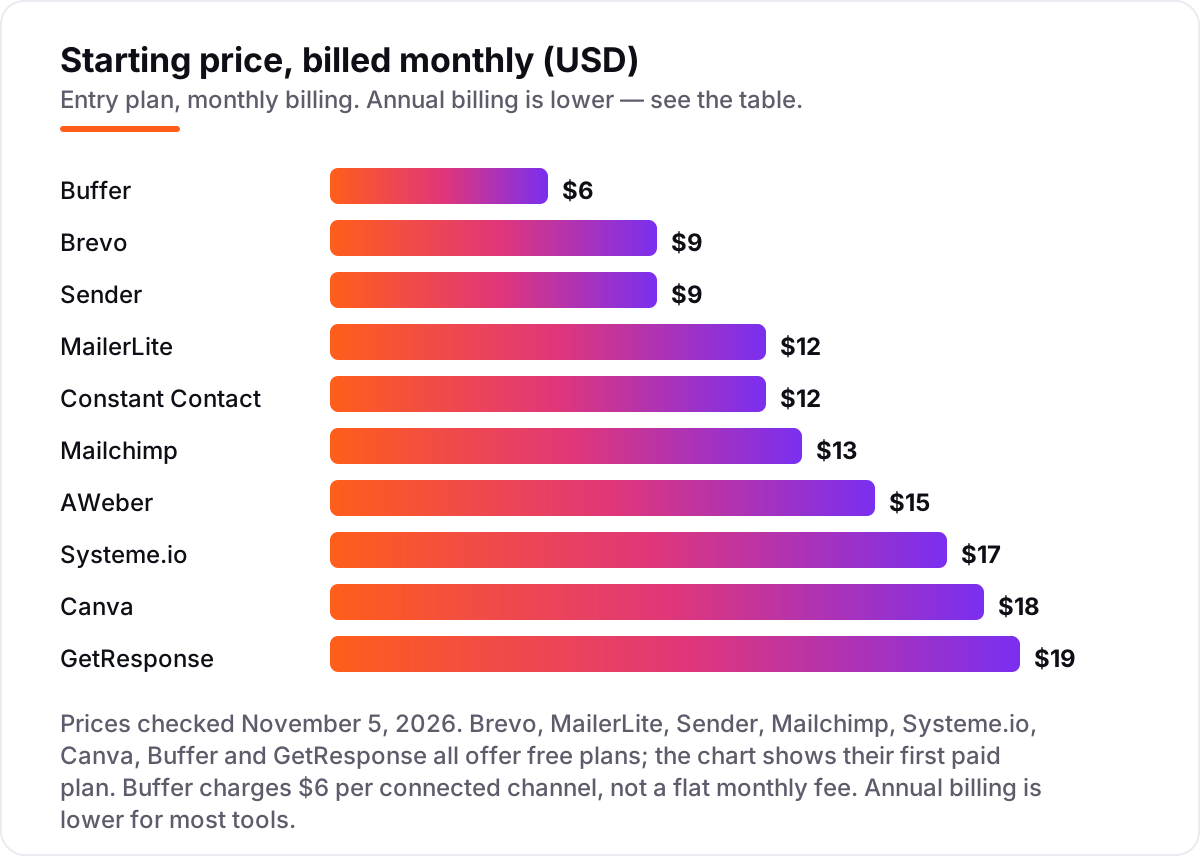
Marketing tool pricing: what you will actually pay
Take a small business with 500 contacts, sending two emails a month, posting to three social channels, and making its own graphics. Email alone costs $9 a month on Brevo Starter or Sender Standard, $12 on MailerLite Comfort or Constant Contact Lite, $13 on Mailchimp Essentials, $15 on AWeber Lite and $19 on GetResponse Starter. Add Canva Pro at $18 a month for design and Buffer Essentials at $6 a channel — $18 for three channels — and the full stack is $45 a month on Brevo, $48 on MailerLite, or $49 on Mailchimp. Over a year that is $540, $576 and $588.
Swap the three separate tools for Systeme.io Startup at $17 a month, which covers email and funnels but not design, and the stack is $35 a month with Canva Pro, or $420 a year. Annual billing trims more: Canva Pro drops from $216 to $144 a year, Brevo Starter from $108 to $97, and MailerLite Comfort from $144 to $129.60. Two costs sit outside every number above. First, SMS credits: Brevo and Sender both charge SMS separately, so a business that texts customers pays per message on top of the subscription. Second, card processing on anything you sell through a funnel or checkout, which is charged per transaction rather than per month. If the business runs paid ads rather than email, the numbers differ too — see our guide to the best advertising platforms for small businesses.
One more cost to check before you commit: a second brand is a second subscription on every tool in this list. Brevo, Mailchimp and the rest all price per account, so an owner running two businesses pays double whatever the chart shows. And the entry price is only the entry price while the list stays small — at 5,000 contacts, GetResponse Starter costs $54 a month and AWeber Lite $60, so re-price the stack at the list size you expect in twelve months.
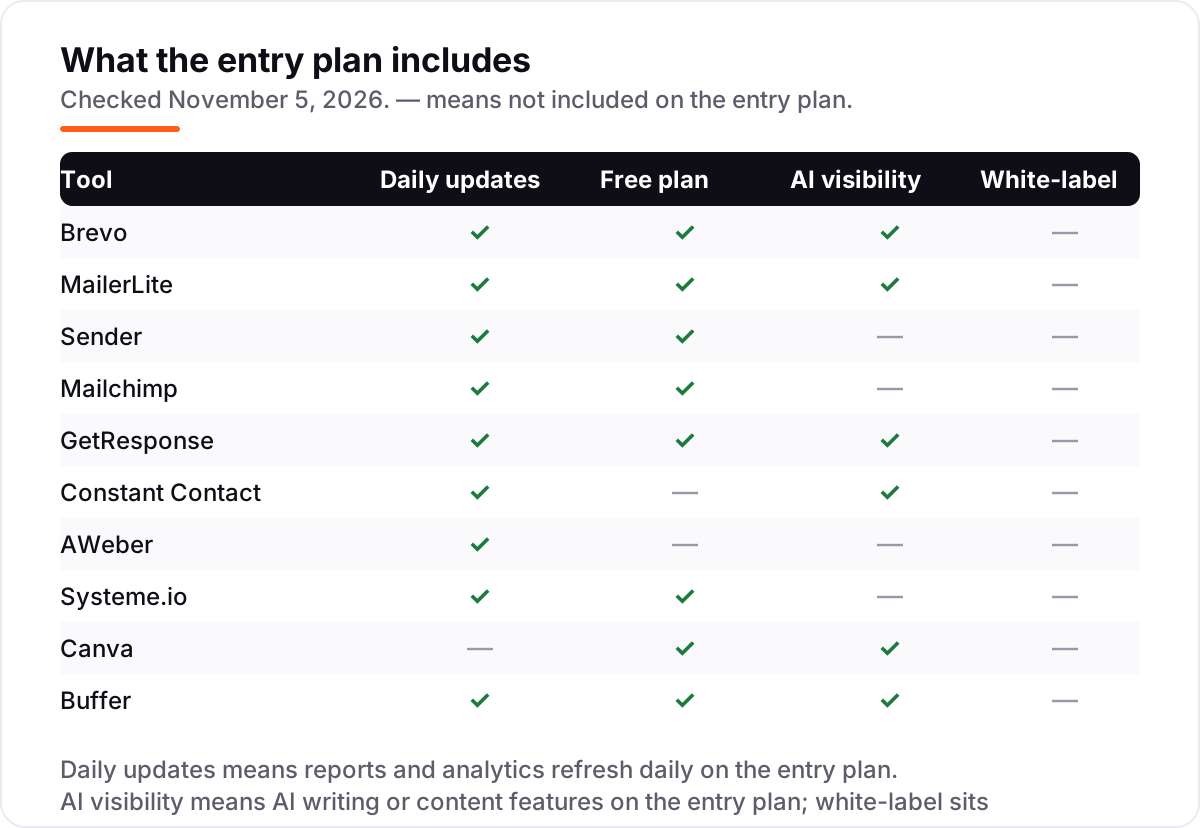
Know the difference: email tool vs all-in-one platform
The confusion in this category is between a tool and a stack. An email tool sends campaigns and automations; an all-in-one platform adds funnels, landing pages, courses and checkout in the same subscription. Systeme.io is the all-in-one here at $17 a month, and it replaces the email tool, the funnel builder and the course host in one bill. If email is the only job, an email tool is cheaper and simpler — Brevo at $9 a month does the job without the funnel features you will never open.
There is a second, quieter confusion: a free plan and a free trial are not the same thing. A free plan never expires — Sender, Systeme.io, Buffer, Canva, MailerLite, Mailchimp and Brevo all have one — while a trial ends and starts billing. Constant Contact has no free plan, only a 30-day trial (100 sends), and AWeber's pricing page offers only a 14-day trial. If a tool only offers a trial, the day it ends is the day you start paying, so set a calendar reminder before the trial runs out.
A third distinction worth knowing is per-contact versus per-send versus per-channel pricing. Mailchimp, MailerLite and AWeber charge by contacts stored; Brevo charges by emails sent; Buffer charges by social channel connected. A big list emailed rarely is cheapest on Brevo, a small list emailed often is cheapest on a contact-priced tool, and a business with one social channel pays Buffer $6 while a business with ten pays $60. If you want automation to do more of the work, our guide to the best AI marketing automation tools covers the next step up from these budget picks.
Quick comparison: tool type by need
| Buyer | Best pick | Why |
|---|---|---|
| Just starting, $0 budget | Sender | Biggest free plan: 2,500 subscribers and 15,000 emails a month at $0 |
| Cheapest paid email | Brevo | Starter is $9/month for 5,000 emails, with SMS and CRM in the same account |
| Email plus website and landing pages | MailerLite | Comfort is $12/month and includes a website builder and digital products |
| Email plus webinars | GetResponse | Starter is $19/month and bundles webinars with unlimited sends |
| Funnels, courses and email in one | Systeme.io | Startup is $17/month with 0% transaction fees |
| Design and scheduling | Canva + Buffer | Pro is $18/month and Buffer is $6 per channel |
Mistakes to avoid
- Budgeting on the free plan, then finding the feature you need costs extra. Mailchimp's free plan has no scheduling or automation flows — if you need automation, count the paid plan in the price from day one.
- Ignoring the cap that bites first. A tool can be cheap and still be the wrong buy: Brevo Starter at $9 is no bargain once you pass 500 contacts, and MailerLite's free plan at 250 subscribers is no bargain once you pass 250.
- Paying per channel without counting channels. Buffer's $6 is a rate, not a bill — three channels cost $18 a month, and ten cost $60. Count the channels before you compare it to a flat-priced scheduler.
- Buying annual billing before you have trialled the tool. Annual discounts are real — Canva Pro saves $72 a year — but Constant Contact's prepayment is non-refundable and Systeme.io's paid plans are not refundable at all. Trial first, then prepay.
- Forgetting the second brand. If you run two businesses, you pay for two subscriptions on every tool here. Price the second account before you commit to a tool for the first.
How we chose
We checked each vendor's own pricing page on November 5, 2026 and recorded the starting price exactly as shown, including the annual-billing figure where the page lists one, and we ranked the tools by fit for the most common buyer — a US small business owner marketing on a tight budget — not by brand size. Ratings come from each tool's G2 review page, from search-index copies crawled within the last few days. Two prices carry a note: AWeber's pricing page offers only a 14-day trial, though its help pages still describe a free plan, so we count it as having no free plan; and GetResponse's trial is listed as 30 days on its pricing page, though some review sites still quote the older 14 days. No vendor paid for a place in this list, and none of the links here are affiliate links.
What to do next
Start with the free plan or trial of your top pick and run one real month of campaigns through it. Check that your emails reach the inbox, that the reports show opens and clicks, and that the list exports cleanly before you commit to a year. If the tools are sorted but new customers are not finding you, our monthly SEO service handles the visibility side — or compare providers in our guide to SEO companies for small business. Once your tools are in place, find out what's holding your rankings back.
Your stack only works if people find you
SerpAstra fixes what keeps your site off page one and makes it easy for AI assistants to recommend.
Get a free audit→Sources we checked (20)
- Brevo pricing — brevo.com/pricing (checked November 5, 2026)
- Brevo reviews — g2.com/products/brevo-brevo/reviews (checked November 5, 2026)
- MailerLite pricing — mailerlite.com/pricing (checked November 5, 2026)
- MailerLite reviews — g2.com/products/mailerlite/reviews (checked November 5, 2026)
- Sender pricing — sender.net/pricing (checked November 5, 2026)
- Sender reviews — g2.com/products/sender-net/reviews (checked November 5, 2026)
- Mailchimp pricing — mailchimp.com/pricing/marketing (checked November 5, 2026)
- Mailchimp reviews — g2.com/products/mailchimp/reviews (checked November 5, 2026)
- GetResponse pricing — getresponse.com/pricing (checked November 5, 2026)
- GetResponse reviews — g2.com/products/getresponse/reviews (checked November 5, 2026)
- Constant Contact pricing — constantcontact.com/pricing (checked November 5, 2026)
- Constant Contact reviews — g2.com/products/constant-contact/reviews (checked November 5, 2026)
- AWeber pricing — aweber.com/pricing.htm (checked November 5, 2026)
- AWeber reviews — g2.com/products/aweber/reviews (checked November 5, 2026)
- Systeme.io pricing — systeme.io/pricing (checked November 5, 2026)
- Systeme.io reviews — g2.com/products/systeme-io/reviews (checked November 5, 2026)
- Canva pricing — canva.com/pricing (checked November 5, 2026)
- Canva reviews — g2.com/products/canva/reviews (checked November 5, 2026)
- Buffer pricing — buffer.com/pricing (checked November 5, 2026)
- Buffer reviews — g2.com/products/buffer/reviews (checked November 5, 2026)
Shamim
Founder of SerpAstra
A full-stack SEO and digital marketer who spends most days on Local SEO for dental practices, AI search visibility and lead generation.
Frequently asked questions
What is the best marketing tool for a small business on a budget?
Brevo is the best fit for most small businesses on a budget: email, SMS and a basic CRM from $9 a month, with a free plan that sends 300 emails a day. MailerLite is the better pick when you also want landing pages and a website, from $12 a month. Sender is the best free option, with 2,500 subscribers at $0.
How much do marketing tools for small businesses cost?
Entry prices run from $0 to $19 a month. Eight tools here have free plans, and the first paid plans cost $6 to $19 a month. A typical stack — email at $9 to $13, design at $18 and social scheduling at $6 a channel — runs about $45 a month, or $540 a year.
Is there really free marketing software for small businesses?
Yes, with limits. Sender is free for 2,500 subscribers and 15,000 emails a month, Systeme.io is free for 2,000 contacts with funnels and a course, and Buffer is free for 3 social channels. GetResponse is free for 500 contacts, though it shows GetResponse branding and has no automation. Mailchimp and MailerLite cap their free plans at 250 contacts, so growing lists pay sooner.
What is the difference between an email tool and an all-in-one marketing platform?
An email tool sends campaigns and automations; an all-in-one platform adds funnels, landing pages, courses and checkout in the same subscription. Systeme.io is the all-in-one here at $17 a month. Email tools are cheaper and simpler when email is the only job; an all-in-one wins when you would otherwise pay for three separate tools.
Can I switch marketing tools later?
Yes, but plan the move carefully. Export your contacts, automations and templates from the old tool, import them into the new one, and warm up the new sender address before you switch campaigns over. Keep the old account live for a month so nothing is lost mid-send, and re-check that your forms and landing pages still point at the new list.
Do I still need a designer if I use Canva?
Not for everyday marketing. Canva Pro covers social posts, flyers, ads and presentations with templates and Brand Kits for $18 a month, and most small businesses never need more. A designer still earns their fee on a logo, a brand system or a campaign where the visuals carry the sale.
How do I pick between Brevo, MailerLite and Mailchimp?
Pick Brevo when price per send matters most — it bills by email volume from $9 a month. Pick MailerLite when you want landing pages, a website and digital products in the same cheap plan, from $12. Pick Mailchimp when you want the biggest template library and the widest integrations, from $13 a month.
Free SEO and AI visibility audit
Find out what is holding your rankings back
Send us your site. Within 2 business days you get a written audit, an AI visibility check and a short fix list ranked by impact. Free, with no contract attached.
Request my free audit→Related guides
 SEO & AI Search12 Best Marketing Platforms for Small Business SEO in 2026, ComparedThe 12 best marketing platforms for small business SEO, compared on real prices, SEO tools and AI visibility. Every price checked November 1, 2026.Read guide →
 Digital Marketing & Ads10 Best AI Marketing Automation Tools in 2026, Compared10 best AI marketing automation tools compared on price, AI features and free plans — real starting prices checked November 4, 2026, sorted by use case.Read guide →
 Digital Marketing & Ads7 Best Advertising Platforms for Small Businesses in 2026, Compared7 best advertising platforms for small businesses compared on minimum budgets, cost per click and who each one fits — minimums checked on each vendor's page.Read guide →