
Best Micro Investing Apps (2026): 7 Apps Worth Downloading
Compare the 7 best micro investing apps on price, minimums and automation, with every price checked November 5, 2026 — from free trading to $12 a month.
 Shamim Mia, Founder, SerpAstraLast verified November 5, 202612 min read
We compare pricing pages, documentation and public reviews. We never accept payment for rankings.

Key takeaways
- Acorns is the classic micro investing app at $4/month; Cash App Investing, Robinhood, SoFi Invest and Public all start free; Stash is the priciest subscription at $12/month.
- The single most important buying factor is the fee drag on a small balance: a $12 monthly fee is $144 a year, which eats nearly a quarter of a $50 monthly investing habit.
- Free trading is not free investing — subscriptions, advisory fees and transfer fees are where the money actually goes, so read the fee schedule, not just the headline.
- Start with the habit, not the app: a $25 weekly auto-deposit beats a clever portfolio you fund twice and forget.
On this page
Quick comparison
| Tool | Best for | Starting price | Free plan |
|---|---|---|---|
| Acorns | First-time investors who want spare change invested automatically with no stock picking | $4/mo | No |
| Cash App Investing | People who already use Cash App daily and want investing next to payments and banking | Free | Yes (free) |
| Robinhood | Beginners who want free trading plus an optional cheap upgrade for IRA matches and cash yield | Free; Gold $5/mo | Yes (free) |
| SoFi Invest | Beginners who want free self-directed trading plus an automated portfolio option in one app | Free; Plus $10/mo | Yes (free) |
| Stash | Investors who want a guided plan, coaching and stock rewards for a flat monthly fee | $12/mo | No |
| Public | Curious investors who want stocks, ETFs, options, bonds, Treasuries and crypto in one app | Free; Reserve $20/mo | Yes (free) |
| M1 Finance | Patient investors who think in target allocations and want deposits invested automatically | $3/mo (waived $10k+) | No ($3/mo under $10k) |
Make one of these tools?
We re-check this list every quarter. Send a correction, request a review, or ask about a clearly labeled sponsored spot.
Request a listingThe best micro investing apps

Acorns
Best for: First-time investors who want spare change invested automatically with no stock picking
Acorns invented the spare-change category, and Bronze at $4 a month is its purest version: link a card and every purchase rounds up to the next dollar, with the difference swept into an expert-built, diversified portfolio. Silver costs $8 a month and adds emergency savings at 3.59% APY plus a 1% IRA match in year one; Gold costs $12 and adds a kids' account, custom portfolios and a 3% IRA match.
The catch is the subscription itself: no free tier, so the fee applies from month one whether you invest $5 or $5,000 — on a $500 balance, $48 a year is nearly a 10% drag before any market return. Buy Acorns when automation is the whole point and you will fund it; buy a free broker when you want to pick stocks yourself and keep every dollar invested.
What we like
- Round-Ups invest your spare change automatically — customers have invested over $7.3 billion this way
- Expert-built diversified portfolios, so you never pick a stock or fund yourself
- Bronze includes a Later retirement account and an Acorns Checking account
- Earn bonus investments by shopping at 450+ partner brands in the app
Watch out for
- No free tier — Bronze at $4/month is the cheapest way in, and the fee never stops
- No individual stock picking on Bronze; custom portfolios wait for Gold at $12/month
- The $4 monthly fee is a heavy drag on a tiny balance — $48 a year on a $500 account is nearly 10%

Cash App Investing
Best for: People who already use Cash App daily and want investing next to payments and banking
Cash App Investing is the lowest-friction way to own a first share: open the app you already use to send money, tap stocks, and buy a slice of a company for $1, commission-free. Round Ups sweep spare change from card purchases into a stock of your choice, and direct deposit can split a paycheck into stocks or bitcoin. There is no account minimum and no fee to open the account.
The simplicity has hard edges: stocks and ETFs only — no options, bonds, mutual funds and, importantly, no IRA, so no tax-advantaged retirement account here. There are no research tools and no managed portfolio, and fractional shares cannot transfer out, so leaving later means selling and paying tax. Pick Cash App when $1 and zero fees matter most; pick Robinhood or SoFi when you want retirement accounts too.
What we like
- Truly free: no commissions, no monthly fee and no account minimum on stocks and ETFs
- Start with $1 through fractional shares, and Round Ups turn card purchases into stock
- Investing sits inside the app you already use for payments, direct deposit and tax filing
- No commission fees on stock and ETF trades, with only small regulatory fees on sales
Watch out for
- Stocks and ETFs only — no options, bonds, mutual funds or retirement accounts
- No research tools or portfolio guidance; you pick every stock yourself
- Fractional shares cannot transfer to another brokerage, so switching brokers means selling

Robinhood
Best for: Beginners who want free trading plus an optional cheap upgrade for IRA matches and cash yield
Robinhood is the best free all-rounder: commission-free stocks, ETFs and options, fractional shares, recurring investments and both traditional and Roth IRAs, all for $0 a month. The free tier already pays a 1% match on IRA contributions, and Gold at $5 a month or $50 a year lifts that match to 3%, adds 3.60% APY on eligible uninvested cash, and opens margin and extended-hours trading.
What it does not do is automate the spare change. There are no Round-Ups, and there is no managed portfolio for people who do not want to pick investments at all — that job belongs to Acorns or Stash. The free tier is genuinely free, though, and Gold pays for itself for a regular IRA contributor: the extra 2% match is $150 a year on a $7,500 contribution, against $60 a year for Gold.
What we like
- Commission-free stocks, ETFs and options on the free tier, with fractional shares
- Gold at $5/month adds a 3% IRA match (vs 1% free) and 3.60% APY on eligible cash
- Recurring investments automate a weekly or monthly buy without thinking about it
- One of the widest free offerings: stocks, ETFs, options, crypto and retirement accounts
Watch out for
- No spare-change Round-Ups and no managed portfolio option on the free tier
- Gold's margin and extended-hours perks only matter once you trade actively
- Customer support is in-app only, and past outages have frustrated traders at busy moments

SoFi Invest
Best for: Beginners who want free self-directed trading plus an automated portfolio option in one app
SoFi Invest is the free app that covers both kinds of beginner: Active Investing lets you pick your own stocks and ETFs commission-free with fractional shares from $5, while Automated Investing builds and rebalances an ETF portfolio for you at no advisory fee. There are no account fees on the investing account itself, and the same app holds SoFi checking, savings, loans and credit cards for people who want one financial home.
The trade-off is that the genuinely useful extras cost extra. SoFi Plus at $10 a month adds unlimited appointments with a financial planner and a 1% match on recurring deposits into a non-retirement account; without it you get a single thirty-minute planner session. Pick SoFi when you want free trading and a free automated portfolio side by side; pick Acorns when spare-change automation is the habit you need.
What we like
- Commission-free stock and ETF trading with fractional shares, starting from $5
- Active Investing for stock pickers and Automated Investing for hands-off portfolios in one app
- No account fees on the investing account itself, and banking, loans and credit live alongside it
- SoFi Plus at $10/month adds unlimited planner appointments and a 1% recurring-deposit match
Watch out for
- No spare-change Round-Ups; recurring deposits must be set up deliberately
- Automated Investing portfolios are ETF-only, with no individual stock choices inside them
- The useful extras — planner access, 1% invest match — sit behind SoFi Plus at $10/month

Stash
Best for: Investors who want a guided plan, coaching and stock rewards for a flat monthly fee
Stash charges one flat price — $12 a month, or $108 a year — for the whole shelf: brokerage, retirement and custodial accounts, a personalized plan and 24/7 guidance from a registered investment advisor. The Stock-Back Card earns stock instead of cash back, worth up to $120 a year, and retirement contributions earn a 3% match worth up to $225 a year.
It is the priciest subscription here, and there is no free tier, so the fee must be earned back by the perks: the match and stock rewards only cover $144 a year if you contribute enough and spend on the card. Smart Portfolios also add a 0.25% annual advisory fee once the balance passes $1,000. Pick Stash when you want guidance and rewards bundled; pick a free broker when the fee would eat your contributions.
What we like
- One flat plan: brokerage, retirement and custodial accounts plus a personalized plan
- Stock-Back Card earns stock when you spend, worth up to $120 a year per Stash
- Fractional shares from $5 and 24/7 guidance from a registered investment advisor
- 3% retirement match worth up to $225 a year, plus a $10,000 life insurance policy
Watch out for
- The single $12/month plan is the priciest subscription here, and there is no free tier
- Smart Portfolios add a 0.25% annual advisory fee on balances of $1,000 or more
- Built for long-term investing: trades execute in four daily windows, not instantly

Public
Best for: Curious investors who want stocks, ETFs, options, bonds, Treasuries and crypto in one app
Public has the widest free shelf: commission-free stocks and ETFs in both regular and extended hours, plus options, corporate bonds, Treasuries, crypto and a high-yield cash account paying 3.75% APY. Investment Plans automate recurring buys, direct indexing with tax-loss harvesting starts at $1,000, and AI Agents, earnings summaries and a research assistant are built into the app rather than bolted on.
The catch is that the headline extras sit behind Public Reserve at $20 a month or $200 a year — options rebates, match funding on eligible deposits and the lowest margin rates. The free tier is genuinely broad, but there is no spare-change feature and no managed portfolio, so beginners still pick everything themselves. Pick Public when you want many asset types in one free app; pick Acorns or Stash when you want the app to decide.
What we like
- Commission-free stocks and ETFs in regular and extended hours, plus options, bonds and crypto
- AI Agents, earnings summaries and research assistance are built into the app
- High-Yield Cash Account pays 3.75% APY and margin starts at a 5.15% base rate
- Investment Plans automate recurring buys, and direct indexing starts at $1,000
Watch out for
- No spare-change Round-Ups and no managed portfolio for hands-off beginners
- The interesting extras — options rebates, IRA match funding — sit behind Reserve at $20/month
- Social feed and AI tools can nudge toward trading more often than a long-term plan needs

M1 Finance
Best for: Patient investors who think in target allocations and want deposits invested automatically
M1 Finance works differently: instead of buying one stock at a time, you build a Pie, a target mix of stocks and ETFs, and every deposit and dividend flows into the underweight slices automatically. Trading and management cost $0 on self-directed accounts, fractional shares start at $1 per slice, and a high-yield cash account holds idle money. Brokerage accounts need $100 to start and IRAs need $500.
Watch the $3 monthly platform fee, charged whenever total M1 assets stay under $10,000 in a cycle — $36 a year, a real drag on a $1,000 account and nothing on a $10,000 one. Smaller accounts also get one trade window a day rather than instant orders. Pick M1 when you think in allocations and invest on a schedule; pick a free broker when your balance is small and $3 matters.
What we like
- Pies let you set a target allocation once, then auto-invest and rebalance with one tap
- Zero commissions and zero management fees on self-directed brokerage accounts
- Fractional shares from $1 per slice, so every deposit is fully invested
- High-Yield Cash Account for uninvested cash, plus margin borrowing from $2,000 invested
Watch out for
- A $3 monthly platform fee applies below $10,000 in assets — $36 a year on a small account
- Brokerage accounts need a $100 minimum to start, and IRAs need $500
- One scheduled trade window a day for smaller accounts, so no instant buying at a price you pick
The best micro investing apps turn money you would not miss into a portfolio you would not otherwise build: spare change from a coffee, a dollar a day, a slice of a paycheck. We ranked the seven apps below by fit for the most common buyer — a beginner starting with small amounts — and every price was checked on the vendor's own pricing or fee page on November 5, 2026.
How to choose the best micro investing apps
- Start with the fee drag, not the features. A subscription is charged whether the market rises or not: $4 a month is $48 a year, $12 a month is $144, and on a $500 balance that second figure eats nearly 29% before any return.
- Decide who picks: you or the app. Acorns and Stash build the portfolio for you; Cash App, Robinhood, SoFi and Public leave every pick to you, and M1 splits the difference with target allocations you set once.
- Check the minimum that actually gates you. Cash App starts at $1 and SoFi at $5, but M1 needs $100 for a brokerage account and $500 for an IRA — a real barrier for a first-timer.
- Ask whether retirement accounts are included. Only Acorns, Robinhood, SoFi, Stash and M1 offer IRAs here; Cash App and Public's free tier leave retirement saving to another app.
- Look at what the free tier leaves out. Gold, Plus and Reserve memberships hold the IRA matches, planner access and rebates — price the membership, not just the app, if you want those perks.
Micro investing is one part of a money system, not the whole system. If the budget feeding the habit is shaky, our guide to budgeting software for small business covers the planning side. And before you publish anything about your own finance content, run your titles through the free SERP snippet preview tool — it shows exactly how the title and description will look in Google.
Whatever you shortlist, start with an amount you will not notice. A $25 weekly auto-deposit is $1,300 a year, and the app that keeps that deposit running for twelve months beats the app with the cleverest portfolio that you abandon in February. Check two things in the first month: that the deposit actually fires on schedule, and that the fee shown on your statement matches the price on the pricing page. Every app here discloses its fees publicly, so there is no reason to pay a surprise charge.
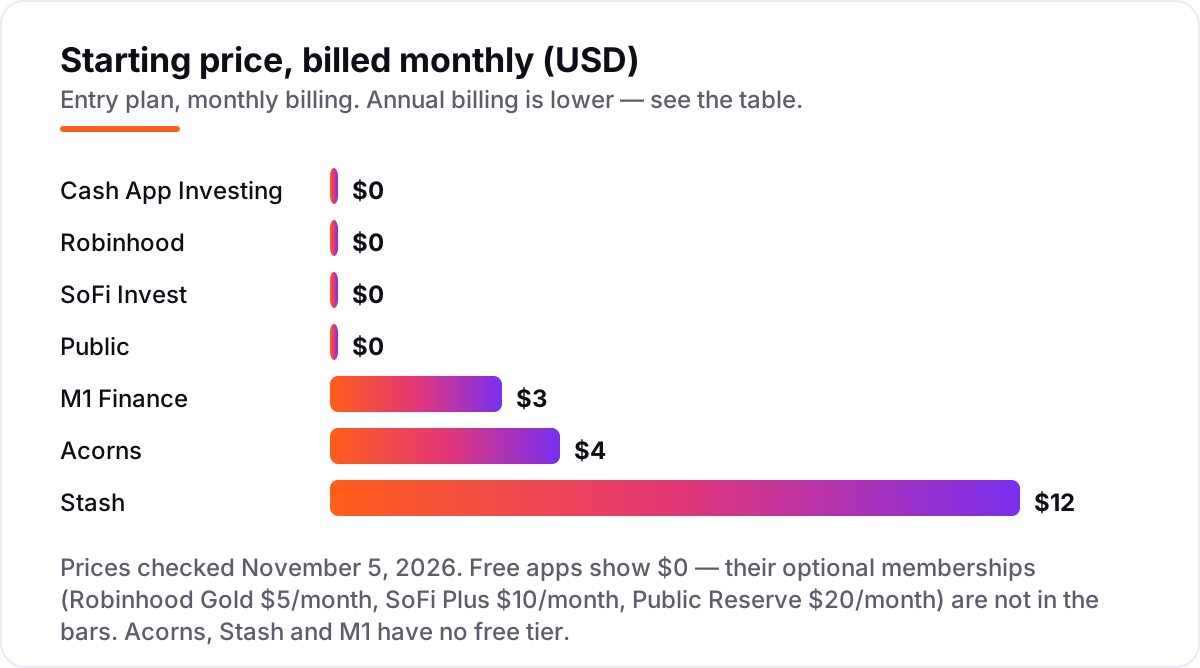
Micro investing apps pricing: what you will actually pay
Take a beginner who invests $50 a month — $600 over a year — and never trades. On Cash App Investing, Robinhood, SoFi Invest or Public, the subscription cost is $0, so the full $600 goes to work. On M1 Finance the $3 monthly platform fee costs $36 a year until assets pass $10,000, leaving $564 invested. On Acorns Bronze the $4 monthly fee costs $48, leaving $552. On Stash the $12 monthly fee costs $144, leaving $456 — nearly a quarter of the year's contributions gone before any market return.
Two adjustments make those numbers real. First, annual billing softens the paid apps: Stash drops to $108 a year billed annually, and Robinhood Gold drops to $50 a year, while Acorns and M1 publish no annual discount. Second, the perks can pay the fee back: Robinhood Gold's extra 2% IRA match is worth $150 a year on a $7,500 IRA contribution against $60 for Gold, and Stash's 3% retirement match is worth up to $225 a year plus up to $120 from the Stock-Back Card. A fee is only expensive when nothing comes back for it — run your own contribution through the same math before deciding.
A third cost sits outside every number above: leaving. Cash App's fractional shares cannot transfer to another broker, so switching means selling and possibly paying tax. M1 charges $100 to terminate an IRA, and Public charges $100 for an outgoing account transfer. If you think you may switch brokers within a year, that exit cost belongs in the first-year price, not in a footnote you read later.
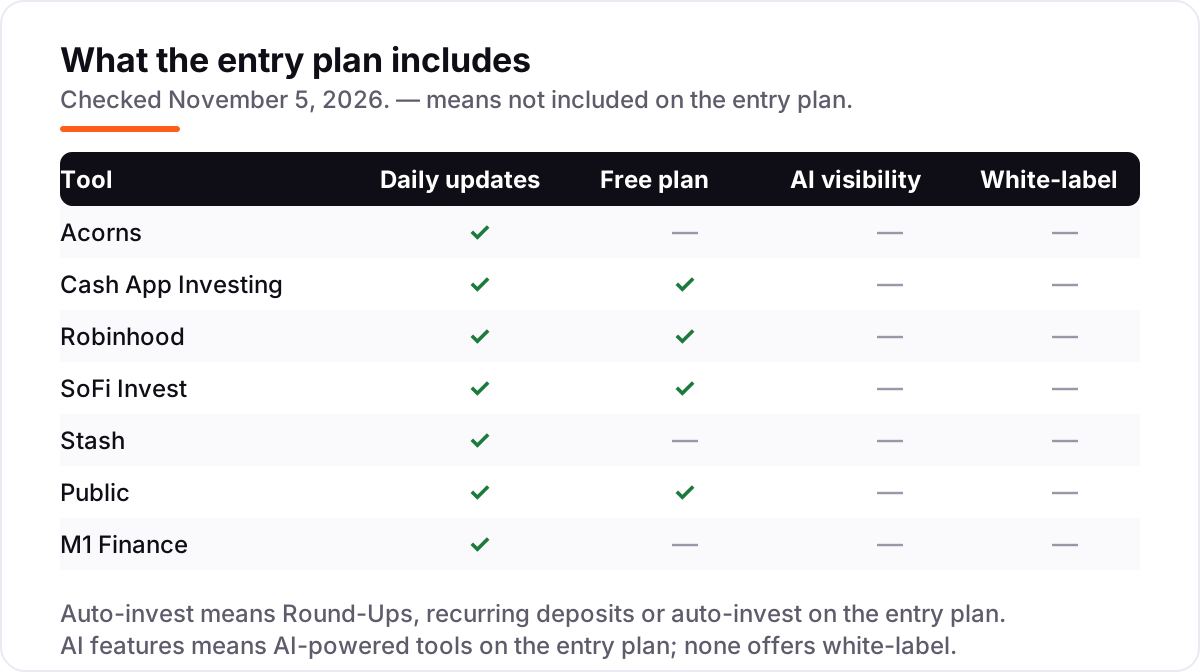
Know the difference: micro investing apps vs robo-advisors
The confusion in this category is between an app that invests small amounts and a service that manages a portfolio. A micro investing app is defined by the size of the deposit — spare change, a dollar, five dollars — and it may or may not manage anything: Cash App and Robinhood simply execute your picks, while Acorns and Stash manage the portfolio too. A robo-advisor is defined by the management — an algorithm builds and rebalances a portfolio for a fee, usually 0.25% of assets a year — and it may demand a much larger minimum: the classic robo-advisors start at $500 or more, not $1.
That distinction decides the fee math. A percentage advisory fee scales with your balance, so it is tiny on a tiny account; a flat subscription does not scale, so it is heavy on a tiny account and trivial on a large one. Stash's $12 a month plus its 0.25% Smart Portfolio fee is the worst of both on a $500 balance and reasonable on a $50,000 one. M1's $3 fee flips the same way at the $10,000 waiver. If your balance is small, prefer the free apps or the cheapest subscription; if it grows past five figures, the flat fees stop mattering and the features start mattering more.
A second distinction is brokerage versus bank. Money in a brokerage account is invested and can lose value; it is not a savings account, even when the app also offers a cash account paying interest. Public's 3.75% APY cash account and Acorns' 3.59% emergency savings rate are bank-like features sitting next to market risk, not instead of it. Keep the emergency fund in an insured bank account, and let the investing app hold only money you can leave alone for years.
Quick comparison: tool type by need
| Buyer | Best pick | Why |
|---|---|---|
| Hands-off spare-change saver | Acorns | Round-Ups and expert portfolios from $4/month |
| Absolute cheapest start | Cash App Investing | Free, $1 minimum, inside an app you already use |
| Free trading plus retirement | Robinhood | Free IRAs, Gold at $5/month for a 3% match |
| Free trading plus automation | SoFi Invest | Active and Automated Investing side by side, free |
| Guided plan with rewards | Stash | One $12/month plan with coaching and stock rewards |
| Widest free asset shelf | Public | Stocks, options, bonds, Treasuries and crypto, free |
| Set-and-forget allocations | M1 Finance | Pies auto-invest every deposit, $3/month under $10k |
Mistakes to avoid
- Judging an app by its trading commission. Every app here charges $0 or close to it for stock trades. The money is in subscriptions, advisory fees and exit fees — read the fee schedule, not the homepage.
- Paying a subscription on a balance too small to carry it. A $12 monthly fee on a $500 account is a 29% annual drag. Start free, and add a paid plan only when the balance or the perks justify it.
- Confusing a cash yield with an investment return. A 3.75% APY on idle cash is interest, not growth, and it sits next to market risk in the same app. Do not let a cash rate sell you a portfolio you do not understand.
- Funding once and forgetting. Micro investing works because deposits repeat. Set the auto-deposit or the Round-Ups on day one, and check after a month that the money actually moved.
- Ignoring the exit cost. Fractional shares that cannot transfer, a $100 IRA termination fee and a $100 transfer fee all make switching expensive. Pick the app you can stay with for a year.
How we chose
We checked each vendor's own pricing or fee page on November 5, 2026 and recorded the starting price exactly as shown, including the annual-billing figure where the page lists one, and we ranked the apps by fit for the most common buyer — a beginner starting with small amounts — not by brand size. M1's $3 platform fee and its $10,000 waiver come from M1's own fee schedule dated October 2026, and Public's Reserve price comes from its published fee schedule. This list carries no review ratings: these are consumer apps, not business software, and their G2 and Capterra listings carry no usable business-review scores, so we show none rather than a stale or estimated one. No vendor paid for a place in this list, and none of the links here are affiliate links.
What to do next
Start with the free tier or the cheapest subscription of your top pick and run one real month of deposits through it. Check that the auto-deposit fires, the fee on your statement matches the pricing page, and the portfolio matches what you expected before you commit to a year. If the money side is sorted but new customers are not finding you, our monthly SEO service handles the visibility side — or compare providers in our guide to SEO platforms for finance. Once your tools are in place, find out what's holding your rankings back.
Your stack only works if people find you
SerpAstra fixes what keeps your site off page one and makes it easy for AI assistants to recommend.
Get a free audit→Sources we checked (8)
- Acorns pricing — acorns.com/pricing (checked November 5, 2026)
- Stash pricing — stash.com/pricing (checked November 5, 2026)
- Robinhood Gold overview — robinhood.com/us/en/support/articles/gold-overview (checked November 5, 2026)
- SoFi Invest — sofi.com/invest (checked November 5, 2026)
- SoFi Plus benefits — sofi.com/sofi-plus-benefits (checked November 5, 2026)
- Cash App stocks — cash.app/stocks (checked November 5, 2026)
- Public fee schedule — public.com/disclosures/fee-schedule (checked November 5, 2026)
- M1 fee schedule — m1.com fee schedule, October 2026 (checked November 5, 2026)
Shamim
Founder of SerpAstra
A full-stack SEO and digital marketer who spends most days on Local SEO for dental practices, AI search visibility and lead generation.
Frequently asked questions
What is the best micro investing app?
Acorns is the best pure micro investing app: Round-Ups invest your spare change automatically into a diversified portfolio, from $4/month. If you want free instead, Cash App Investing starts at $1 with no fees, and Robinhood adds retirement accounts and a 3% IRA match with Gold.
How much money do I need to start micro investing?
As little as $1 on Cash App Investing, $5 on SoFi Invest and Stash, and spare change on Acorns once Round-Ups accumulate. M1 Finance is the exception: brokerage accounts need $100 to start and IRAs need $500. No app here requires thousands to open an account.
Are micro investing apps safe?
Brokerage accounts at these apps are SIPC-protected up to $500,000, including $250,000 for cash, if the firm fails — but SIPC does not protect against market losses, and investments can fall in value. Cash in a partner bank account is FDIC-insured instead. Never invest money you need within the next year or two.
Acorns vs Robinhood: which is better for a beginner?
Acorns suits beginners who want the app to decide: Round-Ups and an expert-built portfolio, for $4/month. Robinhood suits beginners who want to choose: free stock, ETF and options trading plus IRAs, with Gold at $5/month for a bigger IRA match. Pick automation with Acorns, control with Robinhood.
Can I lose money with a micro investing app?
Yes. Your investments rise and fall with the market, and a diversified portfolio can still drop sharply in a bad year. Fees make losses worse on small balances — a $12 monthly fee is $144 a year regardless of performance. Invest money you will not need soon, and keep an emergency fund separate.
Do I need a paid subscription to micro invest?
No. Cash App Investing, Robinhood, SoFi Invest and Public all offer commission-free trading with no monthly fee, and fractional shares let you start small. Subscriptions only buy extras: Acorns automation, Stash guidance, Gold IRA matches, Plus planning and Reserve rebates.
What is the cheapest micro investing app?
Cash App Investing, Robinhood, SoFi Invest and Public all cost $0 a month for stock and ETF trading, so the cheapest price is free. Among paid apps, Acorns Bronze at $4/month is cheapest, then M1 Finance at $3/month below $10,000 in assets — waived entirely above it.
Free SEO and AI visibility audit
Find out what is holding your rankings back
Send us your site. Within 2 business days you get a written audit, an AI visibility check and a short fix list ranked by impact. Free, with no contract attached.
Request my free audit→Related guides
 Accounting, Tax & Finance10 Best Budgeting Software for Small Business in 2026, ComparedCompare the 10 best budgeting software for small business options on price, budgeting depth and bank sync, with real prices checked November 2, 2026.Read guide →
 SEO & AI Search8 Best SEO Platforms for Finance in 2026 (Pros, Cons and Pricing)8 best SEO platform for finance options compared on price, YMYL content tools, branch tracking and AI visibility. All prices checked November 1, 2026.Read guide →
 SEO & AI Search12 Best Marketing Platforms for Small Business SEO in 2026, ComparedThe 12 best marketing platforms for small business SEO, compared on real prices, SEO tools and AI visibility. Every price checked November 1, 2026.Read guide →