
11 Best No-Code Tools to Build SAAS in 2026 (Free and Paid, Compared)
Compare the 11 best no-code tool to build saas options on price, free plans, code export and lock-in, with every price checked November 7, 2026.
 Shamim Mia, Founder, SerpAstraLast verified November 7, 202614 min read
We compare pricing pages, documentation and public reviews. We never accept payment for rankings.

Key takeaways
- Bubble is the best fit for most founders at $39/month; WeWeb follows at $25/month with Vue code export, and FlutterFlow at $39/month for native mobile apps.
- Every tool here has a free plan, but only Bubble, WeWeb and FlutterFlow let you build a full product before paying — Glide's free plan cannot publish a live app.
- The single most important buying factor is what you cannot change later: data ownership, code export and the pricing meter that grows with your users.
- Entry prices run from $5 to $99 a month, but workload units, per-user seats and record caps decide the real bill — model the cost at 1,000 users, not ten.
On this page
Quick comparison
| Tool | Best for | Starting price | Free plan |
|---|---|---|---|
| Bubble | Founders building a complex web SaaS entirely without code, with real workflows and a visual database | $39/mo | Yes (free plan) |
| WeWeb | Founders who want a polished frontend they can export as Vue code and pair with any backend | $25/mo | Yes (free plan) |
| FlutterFlow | Founders whose SaaS lives on phones and needs true native iOS and Android apps | $39/mo | Yes (free plan) |
| Xano | Founders who outgrew a built-in database and want a real Postgres backend with visual APIs | $99/mo | Yes (free plan) |
| Webflow | Design-led founders who need a polished marketing site and frontend for a web SaaS | $18/mo | Yes (free plan) |
| Glide | Founders turning a spreadsheet into a simple customer or internal app in an afternoon | $25/mo | Yes (free plan) |
| Softr | Founders building client portals, directories or membership sites on Airtable or Softr data | $25/mo | Yes (free plan) |
| Backendless | Founders who want a capable visual backend with a UI builder at the lowest production price | $15/mo | Yes (free plan) |
| Adalo | Non-technical founders who want a simple mobile app in the stores quickly | $45/mo | Yes (free plan) |
| AppSheet | Google Workspace teams building internal business apps on Sheets and Workspace data | $5/user/mo | Yes (free plan) |
| Bildr | Technical founders building complex business web apps who want developer-grade control | $29/mo | Yes (free plan) |
Make one of these tools?
We re-check this list every quarter. Send a correction, request a review, or ask about a clearly labeled sponsored spot.
Request a listingThe best no-code tool to build saas

Bubble
Best for: Founders building a complex web SaaS entirely without code, with real workflows and a visual database
Bubble is the closest thing no-code has to a full programming language with the syntax removed. You get a visual database, a workflow editor that handles real logic, user accounts and API connections, all hosted in one place. Starter costs $39 a month on monthly billing, or $32 a month billed annually, and includes 175,000 workload units, a custom domain and recurring workflows.
The catch is the meter. Workload units rise with every workflow run, so a busy app costs more than the plan price suggests, and heavy apps need careful optimization to stay fast. Mobile apps are web wrappers rather than native builds. Choose Bubble when your SaaS is web-first and you want the deepest building power without writing code; choose WeWeb with Xano when you want to own the code and the database.
What we like
- Deepest visual workflow logic in no-code, with a built-in database, auth and hosting in one place
- Huge plugin and template ecosystem, so common SaaS patterns rarely need building from scratch
- Starter includes 175,000 workload units and 1,000 AI credits a month, enough for a real launch
- Custom domain and no Bubble branding from the first paid plan
Watch out for
- Workload-based pricing means a busy app costs more than the plan price suggests
- Heavy apps need careful optimization to stay fast at scale
- Mobile apps are web wrappers, not true native builds

WeWeb
Best for: Founders who want a polished frontend they can export as Vue code and pair with any backend
WeWeb builds the frontend of your SaaS and does it well. The drag-and-drop editor gives you unusual design control for a no-code tool, and it connects to any backend through REST APIs or native integrations with Xano, Supabase and Airtable. Essential costs $25 a month on monthly billing, or $20 a month billed annually, and includes code export, GitHub sync and 10 million AI tokens a month.
The standout feature is code export: you can export the frontend as Vue code and self-host it, which answers the lock-in question that hangs over every no-code platform. The catch is the split: WeWeb does not include a backend, and WeWeb Cloud hosting is billed separately per app. Pick WeWeb when design control and code ownership matter more than having everything in one place.
What we like
- Real code export removes lock-in: export the frontend as Vue code and host it anywhere
- Connects to any backend through REST APIs, Xano, Supabase or its own native backend
- Unlimited app users on every plan, so customer growth does not raise the seat bill
- Strong design control for custom interfaces, with AI-assisted building included
Watch out for
- Frontend only in practice: you must bring or buy a backend, such as Xano
- WeWeb Cloud hosting is billed separately per app, on top of the seat price
- Smaller template and plugin ecosystem than Bubble

FlutterFlow
Best for: Founders whose SaaS lives on phones and needs true native iOS and Android apps
FlutterFlow is the answer when your SaaS lives on phones. It generates real Flutter apps that you publish to the App Store and Google Play, with Firebase handling auth, database and hosting. The visual builder covers most app patterns, and the code download on Basic means you own the output if you ever outgrow the platform. Basic costs $39 a month on monthly billing and includes 50 AI requests a month.
The trade-off is focus. Web app support is weaker than mobile, so a web-first SaaS fits Bubble or WeWeb better, and Firebase or Supabase hosting is a separate cost. One-click store deployment and GitHub integration wait for the higher plans. Choose FlutterFlow when mobile distribution is core to the product, not an afterthought to a web app.
What we like
- Generates true native iOS and Android apps you publish to the App Store and Google Play
- Flutter code download on the entry plan, so you own the output if you outgrow the platform
- Firebase integration built in for auth, database and hosting
- One-click store deployment and GitHub integration arrive on higher plans
Watch out for
- Web app support is weaker than mobile, so web-first SaaS fits Bubble or WeWeb better
- Firebase or Supabase hosting is a separate cost on top of the subscription
- Complex logic still benefits from custom Dart code in places

Xano
Best for: Founders who outgrew a built-in database and want a real Postgres backend with visual APIs
Xano is the backend half of the modern no-code stack. You get a managed Postgres database, a visual builder for APIs and business logic, background tasks and authentication, all without writing server code. It connects to any frontend, from WeWeb to custom code, through standard REST APIs with auto-generated documentation. Essential costs $99 a month on monthly billing, or $85 a month billed annually.
The free plan works for development and testing, with a rate limit of 10 API requests per 20 seconds, but a live app needs Essential. That is real money for an MVP, and direct database access waits for Pro at $224 a month billed annually. Xano earns its price when your SaaS outgrows a built-in database or when you want a backend a future development team can work with.
What we like
- Real Postgres database with no record limits on paid plans
- Visual API builder with server-side logic, background tasks and auto-generated docs
- Flat price per plan with no per-user or per-call charges on Essential and above
- Scales to serious production workloads, with SOC 2 and GDPR compliance included
Watch out for
- Backend only: you still need a separate frontend such as WeWeb or Webflow
- Essential at $99 a month is real money for an MVP that has no users yet
- Direct database access and role-based team permissions wait for Pro at $224 a month

Webflow
Best for: Design-led founders who need a polished marketing site and frontend for a web SaaS
Webflow is the design-led route into a web SaaS: a visual builder with the finest design control in this list, plus hosting, SSL and a CDN in the site plan. Basic costs $18 a month on monthly billing, or $14 a month billed annually, and covers a custom domain, no Webflow badge and up to 150 static pages. It is the right home for a polished marketing site and a SaaS frontend.
The limit is what Basic leaves out. There is no CMS, so any blog or dynamic content means Premium at $25 a month billed annually, and there is no database or backend logic at all — a real SaaS still needs Xano, Supabase or another backend. Each live site also needs its own site plan. Choose Webflow when the design and the marketing site carry the product.
What we like
- Best-in-class visual design control for marketing sites and SaaS frontends
- Hosting, SSL and CDN included in the site plan, with a custom domain from Basic
- Premium at $25 a month adds a CMS with 20,000 items for content-rich products
- Large template marketplace and a mature designer community
Watch out for
- Basic has no CMS, so any dynamic content means Premium at $25 a month billed annually
- No database or backend logic: a real SaaS still needs Xano, Supabase or another backend
- Each live site needs its own site plan, so several products multiply the bill

Glide
Best for: Founders turning a spreadsheet into a simple customer or internal app in an afternoon
Glide turns a Google Sheet or Airtable base into a polished app in an afternoon. For internal tools, dashboards and simple customer-facing apps, nothing is faster. The building experience is the smoothest in no-code, and the results look professional without design effort. Explorer costs $25 a month on monthly billing, or $19 a month billed annually, and covers one published app and 100 personal users.
The ceiling is real, and so is the free-plan catch: the free plan can no longer publish a live app, only drafts, so validation costs money from day one. Complex workflows and intricate data relationships sit outside Glide's comfort zone, and work-domain sign-in forces Business at $199 a month. Use Glide when your product is fundamentally a better interface on structured data.
What we like
- Fastest path from a spreadsheet to a working app, with the smoothest builder here
- Clean mobile-friendly output that looks professional without design effort
- Unlimited personal users on Maker, so community and customer apps stay cheap
- Good for internal tools, dashboards and simple customer-facing apps
Watch out for
- Free plan cannot publish a live app, only drafts, so validation costs money from day one
- Limited custom logic for a SaaS with sophisticated business rules
- Work-domain sign-in forces Business at $199 a month billed annually

Softr
Best for: Founders building client portals, directories or membership sites on Airtable or Softr data
Softr turns your Airtable base, or its own database, into a client portal, directory or internal tool with logins and permissions. The block-based builder is fast, and features like per-record permissions and membership tiers map directly onto common SaaS patterns for agencies, marketplaces and content businesses. Basic costs $25 a month on monthly billing, or $19 a month billed annually.
Custom logic is the limit. If your SaaS needs complex workflows beyond forms, filters and permissions, Softr will frustrate you, and removing Softr branding waits for Pro at $99 a month billed annually. Three meters — records, workflow actions and app users — also make the bill harder to predict. Softr is the best tool here for one shape of product: gated access to structured data.
What we like
- Best in no-code for portals, directories and membership sites with logins and permissions
- Native Airtable integration, plus its own database, Google Sheets and Notion sources
- Flat price per workspace, not per seat, so internal builders never add to the bill
- Block-based builder is fast: a working portal in days, not weeks
Watch out for
- Custom logic is limited: complex workflows beyond forms, filters and permissions frustrate
- Removing Softr branding waits for Pro at $99 a month billed annually
- Three meters at once — records, workflow actions and app users — are hard to track

Backendless
Best for: Founders who want a capable visual backend with a UI builder at the lowest production price
Backendless offers a visual backend — database, APIs, auth and push notifications — plus a UI builder, so you can build more of the product in one place than with Xano alone. Its free tier is genuinely useful for MVPs, and the platform has been around long enough to be stable and proven. Scale starts at $15 a month and includes 100 tables, 10 GB of storage and unlimited developer seats.
The trade-off is ecosystem and billing. The community, templates and third-party content are a fraction of Bubble's, which means more figuring things out yourself, and Function Pack add-ons can quietly push the bill past $15. Variable billing also charges by daily peak API use. Pick Backendless when you want a capable backend at the lowest production price.
What we like
- Lowest production floor here: a live backend from $15 a month with unlimited developer seats
- Visual backend plus a UI builder, so more of the product lives in one place
- Real-time database features and push notifications included on Scale
- Free tier is genuinely useful for MVPs and prototypes
Watch out for
- Function Pack add-ons can quietly push the bill well past $15 a month
- Variable billing charges by daily peak API use, so traffic spikes cost extra
- Smaller community and template library than Bubble, with less polished docs

Adalo
Best for: Non-technical founders who want a simple mobile app in the stores quickly
Adalo is built for founders who want a mobile app in the stores quickly. The visual builder is approachable, publishing to iOS and Android is straightforward from the first paid plan, and the component marketplace covers common patterns like bookings, marketplaces and social features. Starter costs $45 a month on monthly billing, or $36 a month billed annually, with flat pricing and no usage-based charges.
It is not a complex-SaaS platform. Backend logic, data relationships and scale are all limited compared with Bubble or a Xano-backed stack, and the public G2 rating rests on only 7 reviews, so treat it as a weak signal. Adalo fits MVPs that test a concept with real users. If the concept works and the product needs to grow teeth, plan for a rebuild on a stronger foundation.
What we like
- Beginner-friendly mobile builder with publishing to iOS and Android from Starter
- Flat pricing with no usage-based charges: app actions are unlimited on every paid plan
- Component marketplace covers common patterns like bookings and marketplaces
- Paid plans include unlimited database records after the Adalo 3.0 rebuild
Watch out for
- Limited backend power for a SaaS with complex logic or data relationships
- Only 7 G2 reviews, so the public rating rests on a very small sample
- Performance and design constraints show once the product grows past MVP size

AppSheet
Best for: Google Workspace teams building internal business apps on Sheets and Workspace data
AppSheet is Google's no-code app builder, and it is the strongest option here for teams already on Google Workspace. It reads your sheet, builds an app with views, forms and automations, and lets you add logic with expressions. You can build and test free with up to 10 users; Starter costs $5 per user a month, and Core at $10 a user a month is already included in most paid Workspace plans.
The catch is the audience. Per-user pricing works for a defined internal team and breaks for a public SaaS: 500 users on Starter costs $2,500 a month, and there is no public app store path. Google also moved AppSheet to stability-first development in May 2026, with fewer new features. Choose AppSheet for internal business apps, not for a consumer SaaS.
What we like
- Deep Google Workspace integration: Sheets, Drive, Gmail and Calendar as data sources
- Core at $10 a user a month is already included in most paid Google Workspace plans
- Strong automation with scheduled events, bots and expressions, no code needed
- Highest G2 rating here at 4.8 from 405 reviews
Watch out for
- Per-user pricing breaks for a public SaaS: 500 users on Starter costs $2,500 a month
- Built for internal tools, not consumer products: no public app store path
- Google moved AppSheet to stability-first development in May 2026, with fewer new features

Bildr
Best for: Technical founders building complex business web apps who want developer-grade control
Bildr sits between no-code and low-code, aimed at complex business applications. Its visual logic builder and state management go deeper than Glide or Softr, letting you build sophisticated internal tools and customer apps without writing code. Reusable components help as apps grow beyond MVP size. The Builder plan costs $29 a month and includes a custom domain and white-label branding.
The learning curve is steeper than the beginner-friendly tools here, and the community is small, so expect to solve problems on your own. There are also no native mobile apps: output is web apps and progressive web apps only. Bildr suits technically minded founders building serious business applications who find Bubble too opinionated and raw code too slow.
What we like
- Advanced state management and a visual logic builder deeper than Glide or Softr
- Reusable components help as apps grow beyond MVP size
- White-label branding and a custom domain from the $29 Builder plan
- More developer-grade control than most no-code tools, including Web3 support
Watch out for
- Steeper learning curve than the beginner-friendly tools in this list
- Smaller ecosystem and community, so expect to solve problems on your own
- No native mobile apps: output is web apps and progressive web apps only
The best no-code tool to build saas products is the one that fits your product's shape, not the one with the longest feature list. A web SaaS with subscriptions and workflows needs a different platform from a mobile MVP or a client portal, and the wrong pick means a rebuild a year later. We ranked the 11 tools below by fit for the most common buyer — a solo founder launching a first paid product — and every price was checked on the vendor's own pricing page, or a fresh crawl of it, on November 7, 2026.
How to choose the best no-code tool to build saas
- Start with the product's shape. A complex web app belongs on Bubble, a native mobile app on FlutterFlow or Adalo, a client portal on Softr, and a spreadsheet app on Glide. The shape decides the shortlist.
- Check what the entry plan can actually publish. Bubble, WeWeb and FlutterFlow let you build free and pay to launch; Glide's free plan cannot publish a live app at all, so validation costs money from day one.
- Map your three hardest workflows. Conditional logic, scheduled jobs and webhooks are where no-code platforms diverge. If any workflow needs an awkward workaround in the trial, it becomes permanent pain.
- Read the meter, not just the plan price. Bubble bills workload units, Xano is flat, AppSheet bills per user and Glide bills updates. Model the cost at 1,000 users before you commit.
- Check the exit. WeWeb and FlutterFlow export code; Bubble does not. If you cannot leave with your code or your data, the platform owns your business, not you.
No-code is one system in your stack, not the whole stack. Once the product exists, it still needs to be found — our guide to the best SaaS tools for startups covers the wider toolkit, and before you publish your marketing pages, run your titles through the free SERP snippet preview tool to see exactly how they will look in Google.
Whatever you shortlist, build a real slice before you pay. The free plans in this list are long enough to build one genuine feature — your data model, your hardest workflow, your signup flow — and that slice tells you more than any review can. Check two things in the trial: that the workflow you feared most actually works, and that you can export your data. Every tool here lets you try before you buy, so there is no reason to commit before you have built something real.
No-code SaaS pricing: what you will actually pay
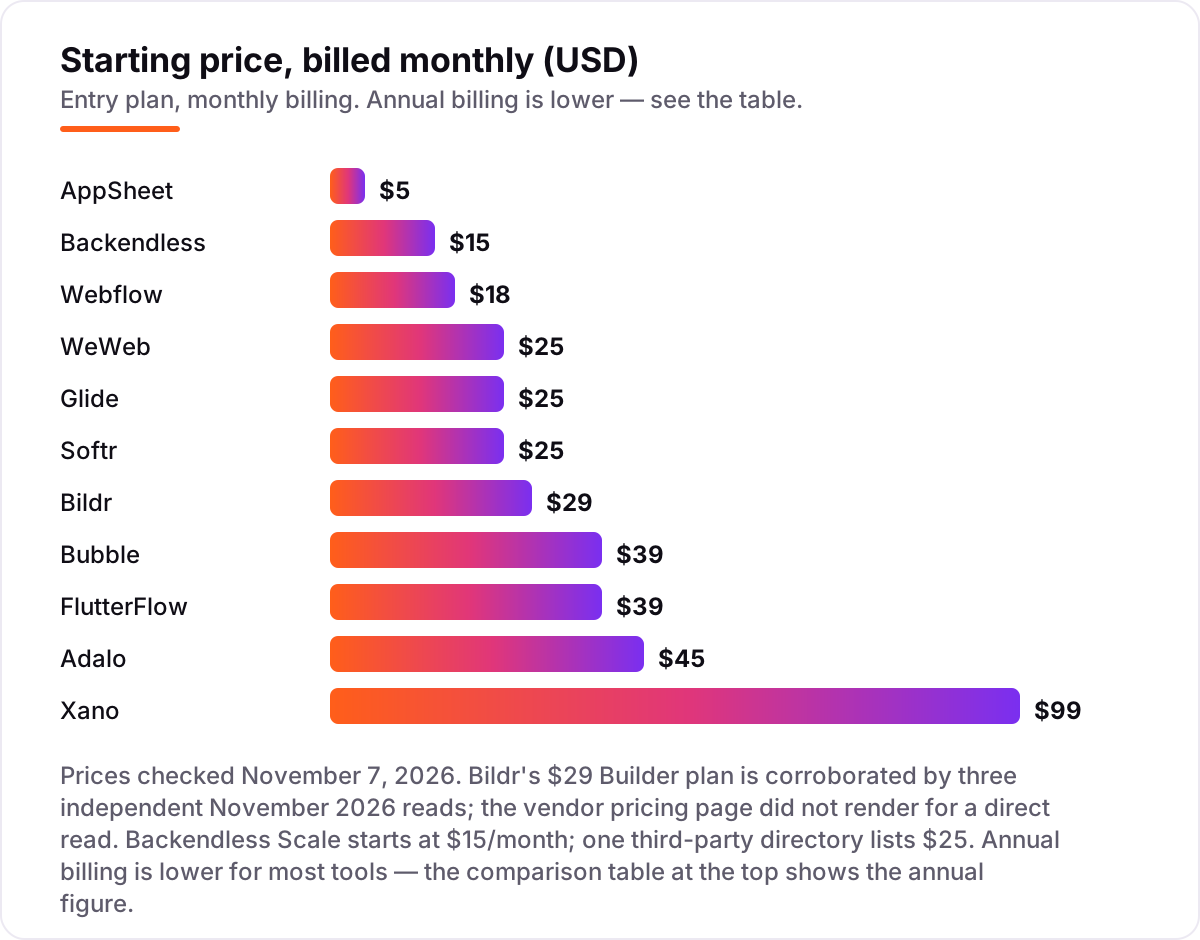
Take a solo founder launching a web SaaS with 500 end users. On monthly billing, the subscription costs $15 a month on Backendless Scale, $18 on Webflow Basic, $25 on WeWeb Essential, Glide Explorer or Softr Basic, $29 on Bildr Builder, $39 on Bubble Starter or FlutterFlow Basic, $45 on Adalo Starter and $99 on Xano Essential. Two of those numbers need adjusting before they are real: Webflow Basic has no database, so a real SaaS needs a backend on top, and WeWeb needs one too — pair WeWeb Essential with Xano Essential and the stack costs $124 a month.
Over a year on annual billing, that same founder pays $180 on Backendless, $168 on Webflow Basic, $240 on WeWeb Essential, $228 on Glide Explorer or Softr Basic, $348 on Bildr, $384 on Bubble Starter, $468 on Adalo Starter and $1,020 on Xano Essential. The WeWeb plus Xano stack costs $105 a month on annual billing, or $1,260 a year. The gap between the cheapest flat plan and the split stack is about $1,000 a year — and the stack buys a real Postgres database and code you own.
Two costs sit outside every number above. First, the meter: Bubble's workload units, Glide's updates and Softr's workflow actions all rise with usage, so a busy app costs more than the plan price. Second, per-user pricing: AppSheet Starter looks cheapest at $5 a user a month, but 500 users cost $2,500 a month, which is why per-user tools suit internal apps, not public SaaS products. If you would rather hire a team than build it yourself, compare providers in our guide to the best SaaS development company.
Know the difference: full-stack builders, frontends and backends
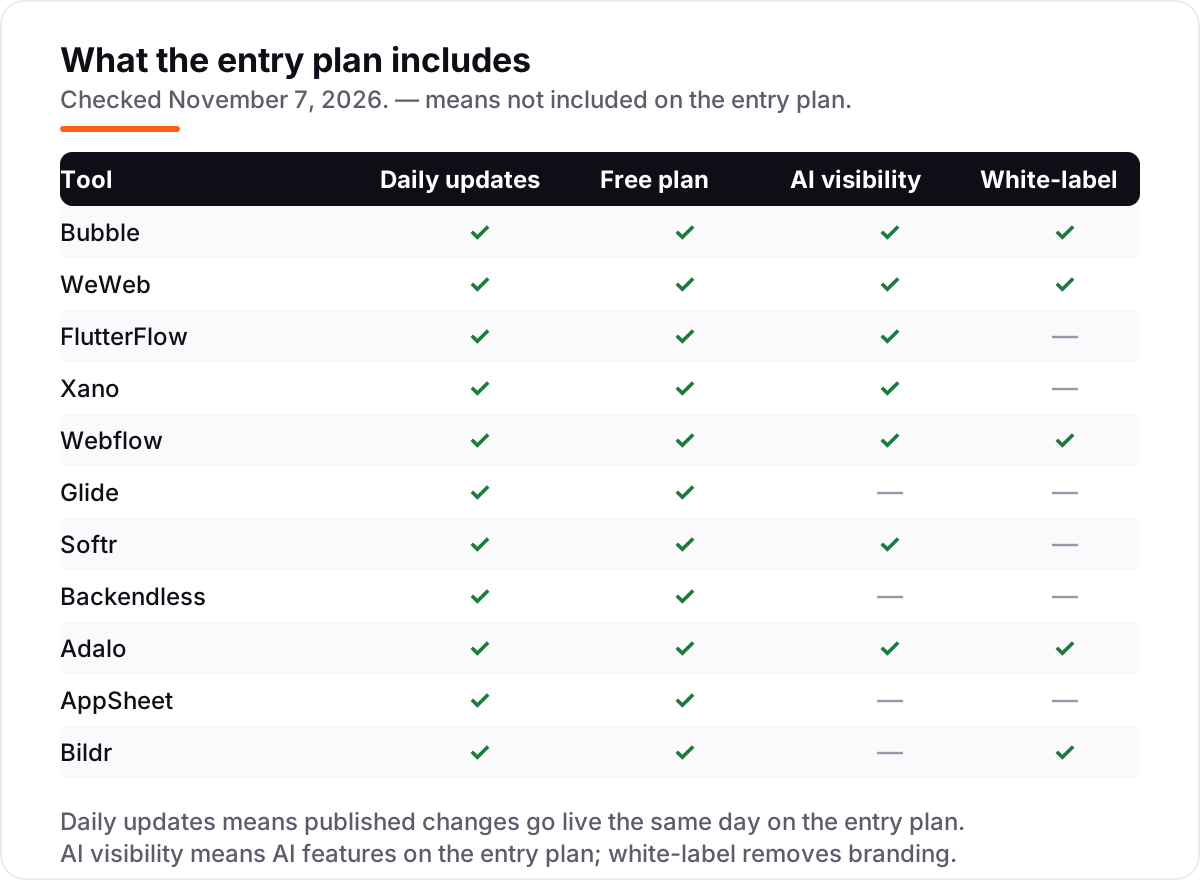
The confusion in this category is that three different kinds of tool all call themselves no-code app builders. A full-stack builder such as Bubble or Adalo covers the database, the logic and the interface in one place: you build the whole product there and you pay one subscription. A frontend such as WeWeb or Webflow builds only the interface: it looks better and you can export the code, but it holds no data and runs no server logic, so it needs a backend.
A backend such as Xano or Backendless is the opposite half: database, APIs, auth and business logic, with no real interface of its own. Xano pairs with WeWeb, Webflow or a custom frontend, and Backendless adds a UI builder so more of the product lives in one place. The mistake is buying one half and expecting a whole product. Before you pay, write down which half you are buying and what the other half will cost — the split stack is usually $100 or more a month, while a full-stack builder starts under $40.
There is a second, quieter confusion: no-code versus low-code. No-code tools such as Glide and Softr keep you entirely in a visual builder; low-code tools such as Bildr and FlutterFlow expect you to drop into code for the hard parts. Neither is better in general — low-code suits technical founders who want control, no-code suits founders who want speed — but a non-technical founder who picks a low-code tool will hit the code wall sooner or later.
Quick comparison: tool type by need
| Buyer | Best pick | Why |
|---|---|---|
| Complex web SaaS, no code at all | Bubble | Deepest workflow logic, from $39/month |
| Frontend you can own and export | WeWeb | Vue code export, unlimited app users, from $25/month |
| Native mobile apps | FlutterFlow | Real Flutter code for iOS and Android, from $39/month |
| Serious backend and database | Xano | Real Postgres with a visual API builder, from $99/month |
| Simple app on a spreadsheet | Glide | Fastest from sheet to app, from $25/month |
| Client portal on Airtable | Softr | Permissions and memberships built in, from $25/month |
Mistakes to avoid
- Budgeting on the plan price alone. The meter is the real bill: Bubble's workload units, Glide's updates, Softr's workflow actions and AppSheet's per-user seats all grow with success. Model the cost at 1,000 users, not ten.
- Buying a frontend and expecting a product. WeWeb and Webflow build interfaces, not backends. A real SaaS needs a database and logic too, so price the second half — usually Xano at $99 a month — before you commit to the first.
- Building on a free plan that cannot publish. Glide's free plan allows drafts only, and Bubble's free plan cannot go live. If validation needs real users, the first paid plan is part of the build cost, not a later decision.
- Ignoring the exit before you build. Bubble does not export code. If you ever need to leave, you rebuild. Check code export and data export on day one, when switching is still cheap.
- Picking per-user pricing for a public product. AppSheet at $5 a user a month is cheap for a 10-person team and ruinous for 500 customers. Per-user tools are for internal apps; flat-price tools are for customer-facing SaaS.
How we chose
We checked each vendor's own pricing page on November 7, 2026 and recorded the starting price exactly as shown, including the annual-billing figure where the page lists one, and we ranked the tools by fit for the most common buyer — a solo founder launching a first paid SaaS product — not by brand size. Two prices need a note: Bildr's $29 Builder plan comes from three independent November 2026 reads, because the vendor's pricing page did not render for a direct read, and Backendless Scale starts at $15 a month on the vendor's own pricing, though one third-party directory lists $25. Bildr carries no review rating because G2 has no listing for Bildr — the G2 product named Bild is a different CAD tool — and we would rather show no rating than the wrong product's score. No vendor paid for a place in this list, and none of the links here are affiliate links.
What to do next
Start with the free plan of your top pick and build one real feature — your data model, your hardest workflow, your signup flow — before you pay anything. Check that the workflow fits without a workaround, that you can export your data, and that the price still works at 1,000 users. If the product is built but new customers are not finding you, our monthly SEO service handles the visibility side — or compare analytics options in our guide to mobile app analytics. Once your tools are in place, find out what's holding your rankings back.
Your stack only works if people find you
SerpAstra fixes what keeps your site off page one and makes it easy for AI assistants to recommend.
Get a free audit→Sources we checked (21)
- Bubble pricing — bubble.io/pricing (checked November 7, 2026)
- WeWeb pricing — weweb.io/pricing (checked November 7, 2026)
- FlutterFlow pricing — flutterflow.io/pricing (checked November 7, 2026)
- Xano pricing — xano.com/pricing (checked November 7, 2026)
- Webflow pricing — webflow.com/pricing (checked November 7, 2026)
- Glide pricing — glideapps.com/pricing (checked November 7, 2026)
- Softr pricing — softr.io/pricing (checked November 7, 2026)
- Backendless pricing — backendless.com/pricing (checked November 7, 2026)
- Adalo pricing — adalo.com/pricing (checked November 7, 2026)
- AppSheet pricing — appsheet.com/pricing (checked November 7, 2026)
- Bildr pricing — bildr.com/pricing (checked November 7, 2026)
- Bubble reviews on G2 — 4.4/5 from 166 reviews (checked November 7, 2026)
- WeWeb reviews on G2 — 4.9/5 from 25 reviews (checked November 7, 2026)
- FlutterFlow reviews on G2 — 4.5/5 from 30 reviews (checked November 7, 2026)
- Xano reviews on G2 — 4.7/5 from 67 reviews (checked November 7, 2026)
- Webflow reviews on G2 — 4.4/5 from 995 reviews (checked November 7, 2026)
- Glide reviews on G2 — 4.7/5 from 820 reviews (checked November 7, 2026)
- Softr reviews on G2 — 4.7/5 from 754 reviews (checked November 7, 2026)
- Backendless reviews on G2 — 4.4/5 from 56 reviews (checked November 7, 2026)
- Adalo reviews on G2 — 4.4/5 from 7 reviews (checked November 7, 2026)
- AppSheet reviews on G2 — 4.8/5 from 405 reviews (checked November 7, 2026)
Shamim
Founder of SerpAstra
A full-stack SEO and digital marketer who spends most days on Local SEO for dental practices, AI search visibility and lead generation.
Frequently asked questions
Can you really build a SaaS with no code?
Yes, for most web and mobile products. Bubble, WeWeb and FlutterFlow all run production SaaS apps with paying users, real databases and billing. The limits are edge cases: very heavy computation, unusual integrations and extreme scale still need custom code, so map your three most complex workflows onto the platform during the trial before you commit.
What is the best no-code tool to build a SaaS?
Bubble is the best fit for most founders because it covers the whole product: database, workflows, auth and hosting from $39 a month. WeWeb is better when you want to export the frontend code, FlutterFlow wins for native mobile apps, and Xano is the pick when the backend needs a real Postgres database.
How much does it cost to build a SaaS with no code?
Entry prices run from $5 to $99 a month, and most founders pay $18 to $45 a month for the first live plan. The real bill comes from the meter: Bubble charges for workload units, Glide and Softr cap updates and records, and AppSheet charges per user. Budget for the plan plus the meter, not the headline price.
Is there a free no-code tool to build a SaaS?
Every tool here has a free plan, but free rarely means live. Bubble, WeWeb and FlutterFlow let you build free and pay when you launch. Glide's free plan cannot publish a live app at all, and AppSheet's free plan covers testing with up to 10 users. Expect to pay $15 to $45 a month for a live product.
Bubble vs WeWeb: which is better for a SaaS?
Bubble is better when you want everything in one place and the deepest workflow logic, from $39 a month. WeWeb is better when design control and code ownership matter: you get Vue code export and unlimited app users from $25 a month, but you must bring a backend such as Xano. Most founders who fear lock-in pick WeWeb; most who want speed pick Bubble.
Do no-code SaaS tools let you export your code or data?
Some do, some do not. WeWeb exports the frontend as Vue code and FlutterFlow lets you download Flutter code on the entry plan. Xano gives you direct database access on paid plans. Bubble does not export code, though you can export data, so check the export story before you build your business on a platform.
What should I check before choosing a no-code SaaS tool?
Check four things during the trial: whether your most complex workflow fits without a workaround, whether records and data export are free, what the price becomes at 1,000 users, and whether the entry plan removes the vendor's branding. If any answer disappoints on day one, it will only get worse as the product grows.
Free SEO and AI visibility audit
Find out what is holding your rankings back
Send us your site. Within 2 business days you get a written audit, an AI visibility check and a short fix list ranked by impact. Free, with no contract attached.
Request my free audit→Related guides
 Design, Video & Creative11 Best SAAS Tools for Startups in 2026 (Free and Paid, Compared)Compare the 11 best saas tools for startups on price, free plans and the limits that force an upgrade, with every price checked November 4, 2026.Read guide →
 Companies & Services11 Best SAAS Development Companies in 2026Compare 11 of the best saas development company options by delivery model, reviews and cost, with every quote and rating checked on November 4, 2026.Read guide →
 SEO & AI SearchBest Mobile App Analytics (2026): 12 Apps Worth Downloading12 best mobile app analytics tools compared on price, free plans and attribution, with real starting prices checked on vendor pages, November 2, 2026.Read guide →