
11 Best SAAS Tools for Startups in 2026 (Free and Paid, Compared)
Compare the 11 best saas tools for startups on price, free plans and the limits that force an upgrade, with every price checked November 4, 2026.
 Shamim Mia, Founder, SerpAstraLast verified November 4, 202615 min read
We compare pricing pages, documentation and public reviews. We never accept payment for rankings.

Key takeaways
- Notion ($12/month), Slack ($8.75/month) and HubSpot's free CRM are the short list for most new startups: one workspace, one chat app and one CRM, with the first paid step under $25 a month per tool.
- The single most important buying factor is the billing unit: per-user tools multiply with headcount, while Stripe and Xero charge one flat rate no matter how many people use them.
- Eight of the eleven tools have real free plans — Notion, Slack, HubSpot, Asana, Trello, Canva, Mailchimp and Calendly — so a pre-revenue startup can run on $0 until it needs the paid limits.
- Annual billing saves $588 a year on the full eleven-tool stack for a five-person team — but only commit yearly after a month on monthly billing.
On this page
Quick comparison
| Tool | Best for | Starting price | Free plan |
|---|---|---|---|
| Notion | Founders who want one workspace for docs, wikis and project tracking instead of four separate apps | $12/mo | Yes (free plan) |
| Slack | Small teams that run their day in chat and want every app alert in one place | $8.75/mo | Yes (free plan) |
| HubSpot | Startups that want a real CRM free on day one and a paid upgrade path when sales picks up | $20/seat/mo | Yes (free CRM) |
| Google Workspace | Startups that want business email, Docs, Sheets and Meet on one bill | $8.40/mo | No (14-day trial) |
| Stripe | Startups that sell online and want to take card payments with no monthly subscription | $0/mo + 2.9% | No (pay per sale) |
| Asana | Teams that need shared projects, deadlines and dashboards without a setup project of their own | $13.49/mo | Yes (free, 2 users) |
| Trello | Small teams that want visual boards they can set up in ten minutes | $6/mo | Yes (free plan) |
| Canva | Startups that need pitch decks, social posts and ads designed without hiring a designer | $18/mo | Yes (free plan) |
| Mailchimp | Startups building an email list that will grow past 250 contacts | $13/mo | Yes (free plan) |
| Xero | Startups that want proper double-entry books with unlimited users for one flat price | $27/mo | No (30-day trial) |
| Calendly | Founders who book sales calls and demos and want the back-and-forth to stop | $12/mo | Yes (free plan) |
Make one of these tools?
We re-check this list every quarter. Send a correction, request a review, or ask about a clearly labeled sponsored spot.
Request a listingThe best saas tools for startups
Notion
Best for: Founders who want one workspace for docs, wikis and project tracking instead of four separate apps
Notion is the closest thing to one workspace for a startup: docs, wikis and project tracking live in one app instead of four subscriptions. Plus costs $12 a month per member on monthly billing, or $10 on annual billing, and it removes the free plan's block limit, adds unlimited file uploads and 30-day page history. Guests are free, so investors and contractors can read pages without a seat.
The catch is the AI packaging. Full Notion AI — the Agent, AI Meeting Notes and Enterprise Search — needs Business at $20 a member a month, so Plus buyers get only a limited trial. The free plan is limited too: blocks cap at 1,000 once a second member joins. Buy Notion when one workspace matters more than any single feature; buy a project tool when the work is mostly deadlines.
What we like
- One workspace for docs, wikis, meeting notes and project tracking, instead of four subscriptions
- Plus removes the free plan's block limit and adds unlimited file uploads and 30-day page history
- Guests are free on every plan, so investors and contractors can read pages without a seat
- Custom forms, custom sites, charts and database automations included on Plus
Watch out for
- Full Notion AI (Agent, AI Meeting Notes, Enterprise Search) needs the Business plan at $20/member/month
- The free plan caps blocks at 1,000 once a second member joins, so a team outgrows it fast
- Large, database-heavy pages can feel slow to load, and the learning curve is real for new users

Slack
Best for: Small teams that run their day in chat and want every app alert in one place
Slack is where startup teams spend their day, and Pro is the plan that makes it usable. It costs $8.75 a user a month on monthly billing, or $7.25 on annual billing, and it removes the free plan's 90-day message limit, so old decisions stay searchable. Pro also opens unlimited app integrations — more than 2,600 in the directory — and adds group huddles and basic AI summaries.
The cost to watch is headcount. Every person is a paid seat, so a 20-person team pays $175 a month on monthly billing, and contractors need seats too. The free plan is fine for a two-founder team, but the 90-day history means anything older than three months is gone. Buy Slack when the team already lives in chat; buy something quieter when the work is mostly documents.
What we like
- Unlimited message history on Pro, so nothing disappears after 90 days
- More than 2,600 app integrations, the widest directory in this list
- Huddles for quick audio meetings and basic AI conversation summaries included on Pro
- 50% off for 3 months for new customers on Pro and Business+
Watch out for
- Price is per user, so a 20-person team pays $175/month on monthly billing
- The free plan keeps only 90 days of message history, so old decisions vanish
- Advanced AI, SSO and SCIM wait for Business+ at $15/user/month billed annually

HubSpot
Best for: Startups that want a real CRM free on day one and a paid upgrade path when sales picks up
HubSpot's free CRM is the best starting point in this list: two users, 1,000 contacts, deal pipelines and meeting links at $0. When the pipeline grows, Sales Hub Starter costs $20 a seat a month and adds email sequences, calling, email tracking and 500 Breeze AI credits a month. There is no onboarding fee on Starter, and sales, marketing and service data share one contact record.
Budget on the list price, not the promo. HubSpot runs a $7-a-seat offer for new customers, but it is time-limited, and the standard rate is $20. Professional jumps to $90 to $100 a seat a month plus a $1,500 onboarding fee, so the step from Starter to Professional is the expensive one. Buy HubSpot when the CRM will be the system of record; buy a lighter tool when the list is still a spreadsheet.
What we like
- A real free CRM: 2 users, 1,000 contacts, deal pipelines and meeting links at $0
- Starter adds email sequences, calling and 500 Breeze AI credits a month
- No onboarding fee on Starter, and email tracking is unlimited from the first paid seat
- Sales, marketing and service data share one contact record, so nothing is re-entered
Watch out for
- The $20/seat list price is the standard rate; the $7 annual promo is for new customers only and time-limited
- Professional jumps to $90-$100/seat/month plus a $1,500 one-time onboarding fee
- Sequences, forecasting and custom reporting stay on the higher tiers

Google Workspace
Best for: Startups that want business email, Docs, Sheets and Meet on one bill
Google Workspace is the tool most startups buy first: business email on your own domain, plus Docs, Sheets, Slides, Meet and Drive on a single bill. Business Starter costs $8.40 a user a month on monthly billing, or $7 on a one-year commitment, and it includes 30 GB of pooled storage per user and the Gemini AI assistant in Gmail. A 14-day trial lets you test it first.
There is no free plan, so every user is a paid seat — including the shared inbox, which takes a license of its own. Starter caps at 300 users and Meet at 100 participants, and Gemini in Docs, Sheets and Meet needs Standard at $14 a user a month on annual billing. Buy Workspace when email and documents are the work; buy Microsoft 365 only if the team lives in Outlook.
What we like
- Custom business email plus Docs, Sheets, Slides, Meet and Drive in one price
- Gemini AI assistant in Gmail and the Gemini app included on the Starter plan
- 30 GB pooled storage per user and a 14-day trial before you pay anything
- Real-time co-editing on every document, with no extra charge for collaborators
Watch out for
- No free plan — every user is a paid seat from day one, so the bill grows with headcount
- Business Starter caps at 300 users and Meet calls at 100 participants
- Gemini in Docs, Sheets and Meet needs Standard at $14/user/month billed annually

Stripe
Best for: Startups that sell online and want to take card payments with no monthly subscription
Stripe is the only tool here with no monthly fee at all: you create an account free, and you pay 2.9% plus 30 cents only when a domestic card payment succeeds. Checkout and payment links are included with Payments at no extra charge, and in-person card payments cost 2.7% plus 5 cents. With no setup or monthly fees, Stripe is the cheapest way for a pre-revenue startup to be ready to take money.
The catch is that the fee scales with revenue, not with seats. At $10,000 a month in card sales, Stripe takes about $320, and international cards add 1.5% while currency conversion adds another 1%. Disputes cost $15 each, and Billing, Tax and advanced fraud tools are separate paid products. Buy Stripe when the business sells online; buy a simpler checkout when the fees would eat the margin.
What we like
- No setup fee and no monthly fee — you pay only 2.9% + 30¢ when a card payment succeeds
- Checkout and payment links are included with Payments at no extra charge
- Takes cards, prepaid cards and digital wallets online, plus in-person payments at 2.7% + 5¢
- International cards add 1.5% and currency conversion adds 1%, all published on the pricing page
Watch out for
- Fees scale with revenue: $10,000 a month in card sales costs about $320 in fees
- Disputes cost $15 each, and the received fee is charged even when you win the dispute
- Billing, Tax and advanced fraud tools are separate paid products, not part of Payments

Asana
Best for: Teams that need shared projects, deadlines and dashboards without a setup project of their own
Asana Starter is the project tool for teams that outgrow a board of cards. It costs $13.49 a user a month on monthly billing, or $10.99 on annual billing, and it adds Timeline and Gantt views, reporting dashboards and unlimited automations to the free plan's task lists. AI Teammates, Asana Dash and AI Studio are included on Starter, and guests are free, so clients can follow work without a seat.
The free Personal plan covers only two users, so a team of three pays from the first seat. Advanced jumps to $24.99 a user a month on annual billing, more than double Starter, and ten people cost $109.90 a month on annual billing. Buy Asana when projects have owners, deadlines and dependencies; buy Trello when a simple board is honestly enough.
What we like
- AI Teammates, Asana Dash and AI Studio are included on Starter, not held for the top tier
- Timeline and Gantt views plus reporting dashboards on the entry paid plan
- Unlimited automations and unlimited free guests for clients and contractors
- More than 100 free integrations, including Google Workspace, Slack and Microsoft 365
Watch out for
- The free Personal plan covers only 2 users, so a team of 3 pays from the first seat
- Advanced jumps to $24.99/user/month billed annually, more than double Starter
- Per-user pricing adds up: 10 people on Starter cost $109.90/month on annual billing

Trello
Best for: Small teams that want visual boards they can set up in ten minutes
Trello is the fastest tool in this list to set up: a board, some lists, some cards, and the team is working in ten minutes. The free plan covers up to 10 collaborators per Workspace, and Standard costs $6 a user a month on monthly billing, or $5 on annual billing. Standard adds unlimited boards and collaborators, AI features, card mirroring, Custom Fields and 1,000 automation runs a month.
The limits show up as the work gets bigger. Timeline, Calendar and Dashboard views need Premium at $10 a user a month on annual billing, and boards get hard to navigate past 30 or 40 cards. Reporting is thin next to Asana, and there is no real workload view. Buy Trello when the work is a simple pipeline of cards; buy Asana when projects need owners, dates and reports.
What we like
- Standard adds unlimited boards, AI features, card mirroring and Custom Fields
- 1,000 automation command runs a month on Standard, with 250 MB file attachments
- The free plan covers up to 10 collaborators per Workspace at $0
- A new team can build its first board in minutes, with no training needed
Watch out for
- Timeline, Calendar and Dashboard views need Premium at $10/user/month billed annually
- Boards get hard to navigate past 30-40 cards, and search for old cards is weak
- Reporting and workload views are thin next to Asana, so growing teams outgrow it

Canva
Best for: Startups that need pitch decks, social posts and ads designed without hiring a designer
Canva Pro is how a startup without a designer ships a pitch deck, a social post and an ad in the same afternoon. It costs $18 a month on monthly billing, or $144 a year, and it adds Magic Studio AI tools, Brand Kit, 100 GB of storage and premium templates and stock assets to the free plan. Magic Resize adapts one design to every format, and the free plan covers everyday posts.
Pro covers one person, so a second designer needs the Business plan, priced per person, and the cost climbs with every seat. Many of the nicest templates and stock assets are paywalled on the free plan, and typography and vector editing are limited next to a design tool. Buy Canva when speed matters more than precision; buy a professional tool when the brand work needs precision.
What we like
- Magic Studio AI tools and Brand Kit are included on Pro, not held for teams
- 100 GB storage and premium templates and stock assets on the Pro plan
- Magic Resize adapts one design to every social format in a click
- The free plan covers everyday social posts, with 250,000+ templates and 5 GB storage
Watch out for
- Pro covers one person — a second designer needs the Business plan, priced per person
- Many premium templates and stock assets are paywalled on the free plan
- Precise typography and vector editing are limited next to a dedicated design tool

Mailchimp
Best for: Startups building an email list that will grow past 250 contacts
Mailchimp Essentials is the entry point for a startup building a list it intends to keep. It costs $13 a month for 500 contacts and sends up to 10 times your contact limit a month, so 5,000 sends at the starting tier. Essentials includes 3 seats, 3 audiences, pre-built templates, email scheduling and 24/7 email and chat support, and you can remove Mailchimp branding.
The price follows the list, not the features. At 10,000 contacts the same plan costs far more than $13, and unsubscribed contacts still count toward billing unless you archive or delete them. Generative AI and A/B testing need Standard at $20 a month for 500 contacts, and automations on Essentials stop at four flow steps. Buy Mailchimp when email is a real channel; buy a cheaper sender when the list rarely gets mailed.
What we like
- Essentials sends 10x your contact limit a month — 5,000 sends at the 500-contact tier
- 3 seats and 3 audiences on Essentials, with 24/7 email and chat support
- More than 300 integrations, including Shopify, WordPress and Zapier
- You can remove Mailchimp branding from emails on the Essentials plan
Watch out for
- The price rises with your list, and unsubscribed contacts still count toward billing
- Generative AI features and A/B testing need Standard at $20/month for 500 contacts
- Automations on Essentials stop at 4 flow steps, so complex journeys need Standard
Xero
Best for: Startups that want proper double-entry books with unlimited users for one flat price
Xero Early is the accounting pick for a startup that wants proper books without per-seat pricing. It costs $27 a month, with no annual billing option, and every plan includes unlimited users, so the whole founding team can touch the books for one flat price. Early covers quotes, 20 invoices and 5 bills a month, with bank reconciliation and Hubdoc receipt capture included.
The cap to watch is the invoice count. Most active startups pass 20 invoices a month quickly, and the next step is Growing at $59 a month. Multi-currency, projects and expense claims wait for Established at $97 a month, and US payroll runs through Gusto at $36 a month plus $6 per person. Buy Xero when the books need to be real from day one; buy Wave or Zoho Books when the budget is $0.
What we like
- Unlimited users on every plan, including Early at $27/month — no per-seat fees
- Bank reconciliation and Hubdoc receipt capture included from the entry plan
- More than 1,000 app integrations, the widest marketplace in this list
- A single flat price per plan with no annual-billing maze — the monthly price is the price
Watch out for
- Early caps at 20 invoices and 5 bills a month — most active startups need Growing at $59/month
- Multi-currency, projects and expense claims wait for Established at $97/month
- US payroll runs through Gusto at $36/month plus $6 per person paid

Calendly
Best for: Founders who book sales calls and demos and want the back-and-forth to stop
Calendly Standard ends the back-and-forth of booking a meeting. It costs $12 a seat a month on monthly billing, or $10 on annual billing, and it unlocks unlimited event types, up to six calendar connections, automations and reminders, and HubSpot and Mailchimp connections. Clients can also pay at booking through Stripe and PayPal, which suits founders who charge for consultations.
The free plan allows only one event type and one calendar connection, so a founder who needs a 15-minute intro call and a 30-minute demo needs Standard. Round-robin and routing forms wait for Teams at $16 a seat a month on annual billing, and the AI notetaker and Callie need the Standard Plus add-on, priced on inquiry. Buy Calendly when booking is a daily job; buy a free form when meetings are rare.
What we like
- Unlimited event types and up to 6 calendar connections on Standard
- Automations and reminders cut no-shows without manual follow-up
- Stripe and PayPal payment collection on Standard, so clients can pay at booking
- HubSpot and Mailchimp connections on Standard, so bookings feed the CRM and list
Watch out for
- The free plan allows only 1 event type — a second meeting type needs Standard
- Round-robin and routing forms wait for Teams at $16/seat/month billed annually
- The AI notetaker and Callie need the Standard Plus add-on, priced on inquiry
The best saas tools for startups are the ones that earn their keep before the business earns its first dollar: a workspace for the plan, a chat app for the team, a CRM for the pipeline, and a way to take payments. We ranked the eleven tools below by fit for the most common buyer — a small founding team buying its first stack — and every price was checked on the vendor's own pricing page on November 4, 2026.
How to choose the best saas tools for startups
- Count the billing unit first. Notion, Slack, Asana and Trello charge per user, so the bill grows with every hire; Stripe charges per transaction and Xero charges one flat price for unlimited users.
- Read the free plan's real limit. Slack keeps 90 days of history, Trello caps at 10 collaborators, Asana's free plan covers two people, and Mailchimp's free plan stops at 250 contacts.
- Check what the entry plan leaves out. Notion's full AI needs Business, Canva's Brand Kit needs Pro, and Mailchimp's A/B testing needs Standard — the feature you want may be one tier up.
- Count the seats, not the users. Contractors, investors and part-timers often need seats too, and per-user tools charge for every one of them.
- Think about switching costs. The tool that holds your docs, messages or invoices is the hardest to leave, so pick the one you can live with for two years.
Start with the free plans and pay for the tool that hits its limit first. That order matters: a pre-revenue startup can run Notion, Slack, HubSpot's free CRM, Trello and Calendly at $0, and the first paid step is usually Slack Pro or Notion Plus. Before you publish the landing page those tools point to, run your titles through the free SERP snippet preview tool — it shows exactly how the title and description will look in Google.
One more check before you buy: confirm the tool connects to the rest of your stack. Every tool in this list integrates with Slack, Google Workspace or Zapier, but the depth varies — Calendly connects to HubSpot and Mailchimp on Standard, while Xero's 1,000-plus integrations include Stripe and Shopify. If the business also needs to be found online, our guide to marketing platforms for small business SEO covers the visibility side.
Startup software pricing: what you will actually pay
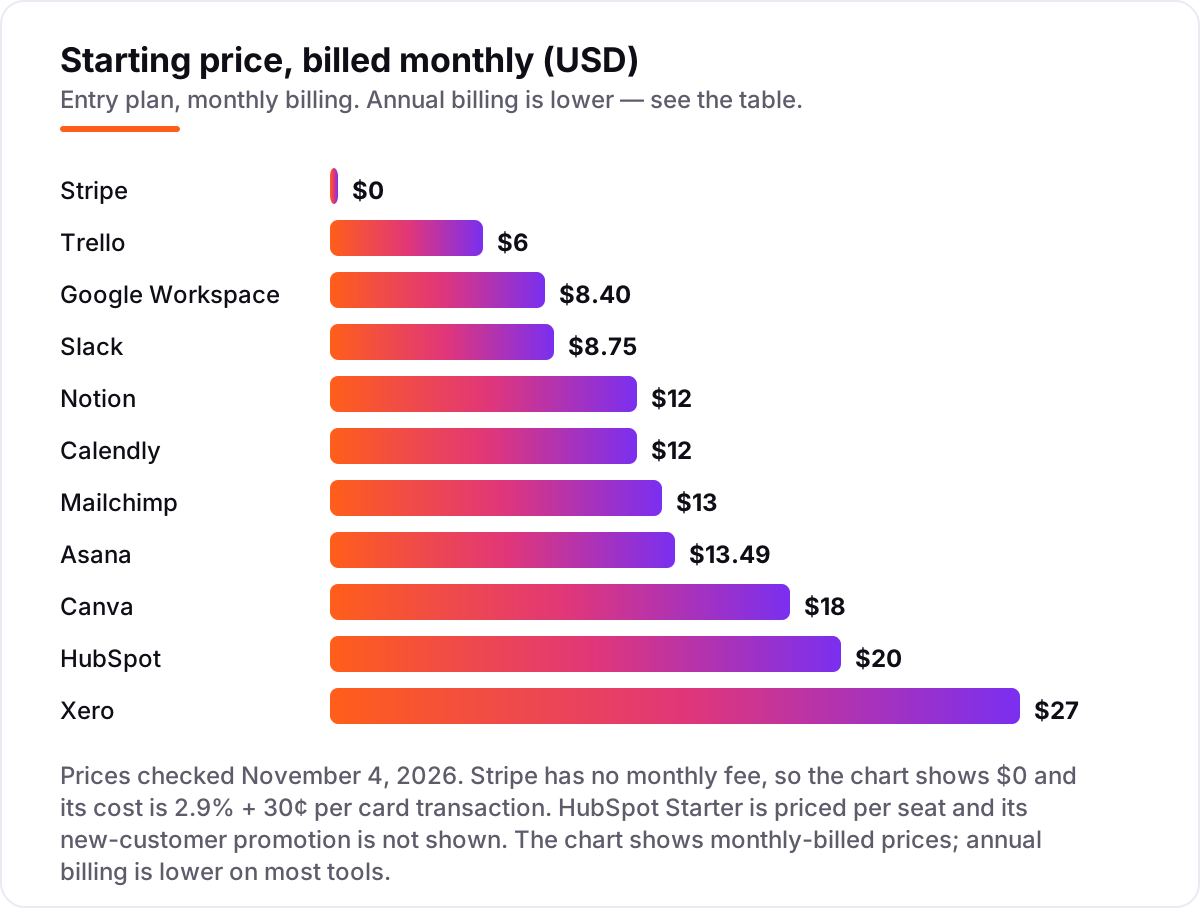
Take a five-person startup that buys all eleven tools in this list. On monthly billing the stack costs $353.20 a month: Notion $60, Slack $43.75, HubSpot $40 for two Starter seats, Google Workspace $42, Stripe $0, Asana $67.45, Trello $30, Canva $18, Mailchimp $13, Xero $27 and Calendly $12. On annual billing the same stack costs $303.20 a month, or $3,638.40 a year — $600 less than the $4,238.40 a year monthly billing costs.
Three costs sit outside those numbers. First, Stripe's fee: at $10,000 a month in card sales, 2.9% plus 30 cents per $100 transaction comes to about $320 a month, and international cards add 1.5%. Second, the per-user tools multiply with hiring: adding a sixth person costs $12 on Notion, $8.75 on Slack and $13.49 on Asana, while Xero and Stripe cost nothing extra for the new hire. Third, the promos: Slack offers 50% off for three months and HubSpot runs a $7-a-seat annual offer for new customers, but both end, so budget on the list price. If the stack also needs analytics, our guide to the best product analytics tools for startups covers the tools that show what users actually do.
Annual billing cuts the bill on seven of the eleven tools: Notion drops from $12 to $10 a member, Slack from $8.75 to $7.25, Google Workspace from $8.40 to $7, Asana from $13.49 to $10.99, Trello from $6 to $5, Canva from $18 to $12 a month on the yearly plan, and Calendly from $12 to $10 a seat. HubSpot, Mailchimp and Xero publish no annual discount on the list price, so the monthly figure is the whole story for those three. One more cost to check before you commit: a second business is a second subscription on every tool in this list, so price the second set of logins before you commit to a tool for the first.
Know the difference: a free plan and a free trial
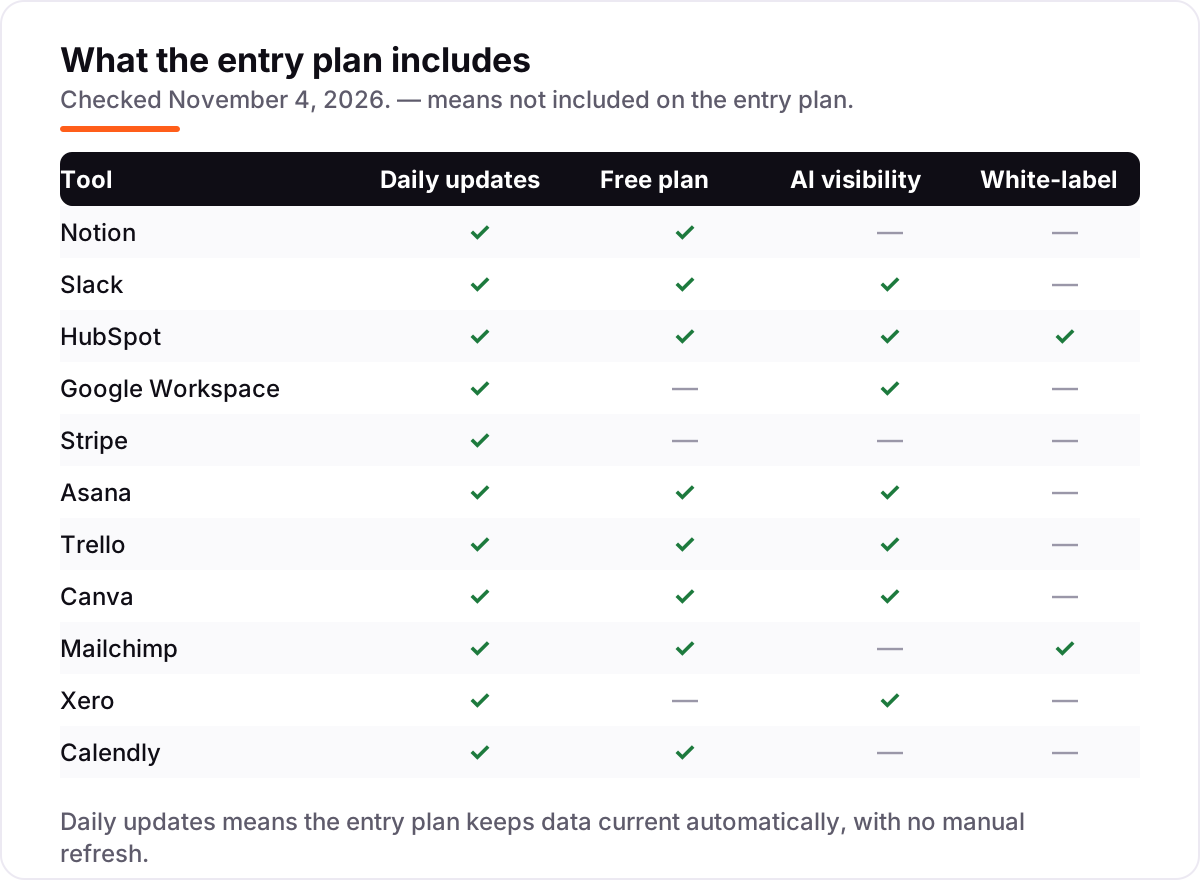
The confusion in this category is between a plan that is free forever and a plan that is free for a while. A free plan — Notion, Slack, HubSpot, Asana, Trello, Canva, Mailchimp and Calendly all have one — costs $0 until you hit a limit, and you can stay on it for years. A free trial — Google Workspace's 14 days, Xero's 30 days, Canva Pro's 30 days — ends on a date, and then you pay or lose access.
There is a second, quieter confusion: a free plan is not the same as a cheap plan. Slack's free plan keeps 90 days of message history, so a decision made four months ago is gone; Asana's free plan covers two people, so a team of three pays from the first seat; Mailchimp's free plan stops at 250 contacts and 500 sends a month. The free plan is worth taking when its limit sits above your real usage, and worth skipping when you will hit the limit in the first month.
A third distinction worth knowing is per-user pricing versus flat pricing. Notion, Slack, Asana, Trello and Calendly charge per person, so the bill grows with the team. Stripe charges per transaction and Xero charges one flat monthly price for unlimited users, so neither costs more when the team grows. If the headcount will double this year, the flat-priced tools are the cheaper buy.
Quick comparison: tool type by need
| Buyer | Best pick | Why |
|---|---|---|
| Solo founder on a budget | Notion | Free plan for one person, Plus is $12/month when the team grows |
| Team that lives in chat | Slack | Unlimited history and 2,600+ integrations, Pro is $8.75/user/month |
| Startup that needs a CRM | HubSpot | Free CRM for 2 users, Starter is $20/seat/month |
| Team that needs email and docs | Google Workspace | Gmail, Docs and Meet in one bill, from $7/user/month on an annual plan |
| Startup that takes card payments | Stripe | No monthly fee — 2.9% + 30¢ per card transaction |
| Team that needs simple project boards | Trello | Free for up to 10 collaborators, Standard is $5/user/month billed annually |
Mistakes to avoid
- Budgeting on the promo price. Slack's 50% off lasts three months and HubSpot's $7 offer is for new customers only. The list price is what you pay after the promo, so compare tools on that number.
- Buying annual billing before the trial month. Annual billing saves $588 a year on the full stack, but only after you know the tool fits. Run one month on monthly billing first, then switch to annual.
- Ignoring the cap that bites first. A tool can be free and still be the wrong buy: Asana's free plan covers two people, Mailchimp's free plan stops at 250 contacts, and Xero Early stops at 20 invoices a month.
- Paying for overlapping tools. Asana and Trello do the same job, and Notion can replace both for a small team. Pick one project tool and one docs tool, not two of each.
- Forgetting the per-user multiplier. A $8.75 tool is $43.75 a month for five people and $87.50 for ten. Price the tool at the team size you will have in six months, not the team size you have today.
How we chose
We checked each vendor's own pricing page on November 4, 2026 and recorded the starting price exactly as shown, including the annual-billing figure where the page lists one, and we ranked the tools by fit for the most common buyer — a small founding team buying its first stack — not by brand size. Ratings come from the G2 and Capterra pages we opened on November 4, 2026. Two ratings are missing: Stripe's G2 page covers only its billing sub-product, not Stripe Payments, and Canva's aggregate score did not load from its G2 page, so we show no rating for either rather than an estimated one. Canva's pricing page blocks automated reads, so its $15 a month figure is the rate that page publishes, confirmed against independent reads of the same page. No vendor paid for a place in this list, and none of the links here are affiliate links.
What to do next
Start with the free plans — Notion, Slack, HubSpot's free CRM, Trello and Calendly all cost $0 — and run one real week of work through them. Check that the limits sit above your real usage before you pay for anything. If the stack is sorted but new customers are not finding you, our AI search optimization service handles the visibility side — or compare providers in our guide to SEO companies for small business. Once your tools are in place, find out what's holding your rankings back.
Your stack only works if people find you
SerpAstra fixes what keeps your site off page one and makes it easy for AI assistants to recommend.
Get a free audit→Sources we checked (20)
- Notion pricing — notion.com/pricing (checked November 4, 2026)
- Slack pricing — slack.com/pricing (checked November 4, 2026)
- HubSpot pricing — hubspot.com/pricing (checked November 4, 2026)
- Google Workspace pricing — workspace.google.com/pricing.html (checked November 4, 2026)
- Stripe pricing — stripe.com/pricing (checked November 4, 2026)
- Asana pricing — asana.com/pricing (checked November 4, 2026)
- Trello pricing — trello.com/pricing (checked November 4, 2026)
- Canva pricing — canva.com/pricing (checked November 4, 2026)
- Mailchimp pricing — mailchimp.com/pricing (checked November 4, 2026)
- Xero pricing — xero.com/us/pricing-plans (checked November 4, 2026)
- Calendly pricing — calendly.com/pricing (checked November 4, 2026)
- Notion reviews — g2.com/products/notion/reviews (checked November 4, 2026)
- Slack reviews — capterra.com/p/135003/Slack/reviews (checked November 4, 2026)
- HubSpot Sales Hub reviews — g2.com/products/hubspot-crm/reviews (checked November 4, 2026)
- Google Workspace reviews — g2.com/products/google-workspace/reviews (checked November 4, 2026)
- Asana reviews — g2.com/products/asana/reviews (checked November 4, 2026)
- Trello reviews — g2.com/products/trello/reviews (checked November 4, 2026)
- Mailchimp reviews — g2.com/products/mailchimp/reviews (checked November 4, 2026)
- Xero reviews — g2.com/products/xero/reviews (checked November 4, 2026)
- Calendly reviews — g2.com/products/calendly/reviews (checked November 4, 2026)
Shamim
Founder of SerpAstra
A full-stack SEO and digital marketer who spends most days on Local SEO for dental practices, AI search visibility and lead generation.
Frequently asked questions
What is the best SaaS tool for a startup?
There is no single best tool, because a startup needs a stack, not one app. For most new teams the short list is Notion for docs and projects, Slack for chat and HubSpot's free CRM for the pipeline, with Stripe for payments. Start with the free plans, then pay for the tool that hits its limit first.
How much do SaaS tools for startups cost?
A five-person startup buying all eleven tools in this list pays $353.20 a month on monthly billing, or $303.20 on annual billing. The cheapest useful stack — Notion, Slack, HubSpot's free CRM and Stripe — costs about $104 a month on monthly billing for five people, before card fees.
Are there really free SaaS tools for startups?
Yes. Eight of the eleven tools here have real free plans, including Notion, Slack, HubSpot's free CRM, Asana, Trello, Canva, Mailchimp and Calendly. The free plans have real limits — Slack keeps 90 days of history and Trello caps at 10 collaborators — so read the limit before you build on one.
Should a startup buy one suite or separate tools?
Separate tools, for most startups. A suite like Google Workspace covers email and documents, but no suite here covers chat, CRM, payments and design well. Buy the best tool for each job, then check they integrate — every tool in this list connects to Slack, Google Workspace or Zapier.
What is the difference between per-user and per-seat pricing?
They are the same thing: one price per person who uses the tool. The number that matters is how many people need a seat. Notion, Slack, Asana and Trello charge per user, while Stripe charges per transaction and Xero charges one flat price for unlimited users.
Can I switch SaaS tools later?
Yes, but plan the move for a quiet week, not mid-launch. Export your data — pages, channels, contacts, invoices — from the old tool, import it into the new one, and run both in parallel for a few days. Switching costs the most when the old tool holds your history, so export early and often.
Do I need a CRM from day one?
Yes, and it can be free. HubSpot's free CRM covers two users and 1,000 contacts, which is enough for the first year of most startups. A spreadsheet works until about fifty contacts, then deals start slipping. Start free, and pay for Starter when you need sequences and calling.
Free SEO and AI visibility audit
Find out what is holding your rankings back
Send us your site. Within 2 business days you get a written audit, an AI visibility check and a short fix list ranked by impact. Free, with no contract attached.
Request my free audit→Related guides
 SEO & AI Search8 Best Product Analytics Tools for Startups in 2026, Compared8 best product analytics tools for startups compared on price, free tiers and fit — with starting prices and free tiers checked November 2, 2026.Read guide →
 SEO & AI Search12 Best Marketing Platforms for Small Business SEO in 2026, ComparedThe 12 best marketing platforms for small business SEO, compared on real prices, SEO tools and AI visibility. Every price checked November 1, 2026.Read guide →
 SEO & AI Search12 Best Accounting Software for SAAS in 2026, Compared12 best accounting software for saas tools compared with real 2026 prices, from $0 billing layers to full ledgers and ERP, sorted by what your SaaS needs.Read guide →