
12 Best Payment Processing Software for Small Business in 2026, Compared
Compare the 12 best payment processing software for small business options on fees, rates and payouts, with every price checked November 4, 2026.
 Shamim Mia, Founder, SerpAstraLast verified November 4, 202615 min read
We compare pricing pages, documentation and public reviews. We never accept payment for rankings.

Key takeaways
- Square is the best fit for most small businesses at $0 a month and 2.6% + 15¢ in person; Stripe follows at 2.9% + 30¢ online, and Helcim's interchange-plus pricing beats both once volume grows.
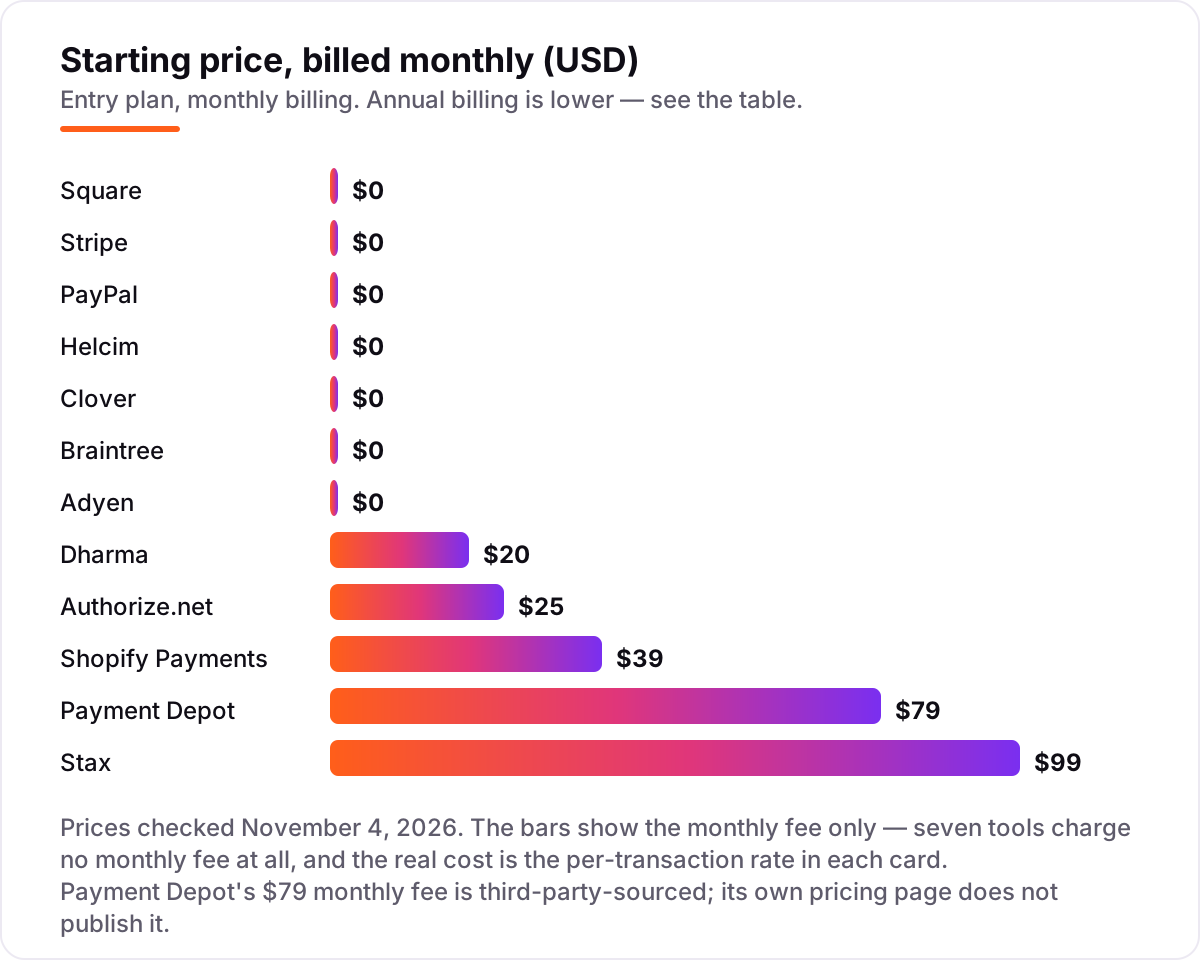
- Seven of the 12 tools charge no monthly fee at all — you pay only when a customer pays — so the per-transaction rate, not the subscription, decides your bill.
- The single most important buying factor is how your customers actually pay: in-person, online and keyed-in rates differ by up to a full percentage point on the same tool.
- Interchange-plus pricing (Helcim, Dharma, Stax, Payment Depot) is usually cheaper than flat rates above roughly $10,000 a month in card sales, but only if you read the markup, not just the headline rate.
On this page
Quick comparison
| Tool | Best for | Starting price | Free plan |
|---|---|---|---|
| Square | Shops, cafes and market stalls that take most payments face to face and want the till, invoices and online store in one free app | $0/mo | Yes (Free plan) |
| Stripe | Online stores and SaaS businesses that sell through a website and want the most capable checkout and API | $0/mo | No (pay as you go) |
| PayPal | Stores whose customers already pay with PayPal and want the most recognized checkout button on the internet | $0/mo | No (pay as you go) |
| Helcim | Small businesses that want the lowest interchange-plus rates with no monthly fee and no contract | $0/mo | No (pay as you go) |
| Shopify Payments | Shopify store owners who want payments, payouts and chargebacks in the same dashboard as their orders | $39/mo | No (Shopify plan) |
| Clover | Retail shops and restaurants that want a full point-of-sale system with inventory and staff tools | $0/mo | Yes (Starter plan) |
| Braintree | Online businesses with a developer on hand that want PayPal, Venmo and cards in one integration | $0/mo | No (pay as you go) |
| Adyen | Growing businesses that sell in several countries and want one processor for online and in-person payments | $0/mo | No (pay as you go) |
| Dharma | Established small businesses and nonprofits that want published interchange-plus rates and no contract | $20/mo | No |
| Authorize.net | Businesses that already hold a merchant account and need a reliable gateway for their website | $25/mo | No |
| Stax | High-volume businesses processing $10,000 or more a month that want zero markup on interchange | $99/mo | No |
| Payment Depot | High-volume businesses that want membership pricing — interchange at cost for a flat monthly fee | $79/mo | No |
Make one of these tools?
We re-check this list every quarter. Send a correction, request a review, or ask about a clearly labeled sponsored spot.
Request a listingThe best payment processing software for small business

Square
Best for: Shops, cafes and market stalls that take most payments face to face and want the till, invoices and online store in one free app
Square is the easiest way for a small business to start taking cards: the Free plan costs $0 a month, the app runs on a phone or tablet, and a $49 card reader is the only hardware most shops need. In-person sales cost 2.6% + 15¢, online and invoice payments cost 3.3% + 30¢, and money usually lands next business day. Invoicing, a basic online store, bookings and staff scheduling are all included.
The catch is the online rate: 3.3% + 30¢ is the highest online card rate here, so a business that sells mostly online pays more than on Stripe or Braintree. Plus costs $49 a month per location and Premium $149, and both cut the in-person rate slightly. Pick Square when most sales happen face to face and you want one app for till and store.
What we like
- Free plan costs $0 a month and includes the POS app, online store, invoicing and bookings
- In-person cards cost 2.6% + 15¢, and money usually reaches your bank the next business day
- No contract and no monthly fee on the Free plan — you pay only when a customer pays
- Hardware starts at a $49 card reader, and Tap to Pay works on a phone with no reader at all
Watch out for
- Online and invoice card payments cost 3.3% + 30¢ on the Free plan — the highest online rate here
- Plus costs $49 a month per location and Premium $149, and both are charged per location
- Account holds on larger or unusual payments are a recurring complaint in reviews

Stripe
Best for: Online stores and SaaS businesses that sell through a website and want the most capable checkout and API
Stripe is the standard for selling online: a hosted checkout, payment links and invoicing are included, and the standard rate is 2.9% + 30¢ per successful domestic card payment, with no setup or monthly fee. It accepts cards, Apple Pay, Google Pay, bank debits and buy-now-pay-later, and Radar fraud screening runs on every payment. Payouts are sent daily, arrive in about two business days, and the API is the best-documented here.
The trade-off is support and account risk: no phone number to call, and Stripe can hold funds or close an account it judges risky, with little warning — a complaint that recurs in user reviews. In-person payments need Stripe's own card readers, at 2.7% + 5¢. Pick Stripe when the website is the shop and you want the most capable checkout; pick Square when the counter is the shop.
What we like
- No setup or monthly fees — the standard rate is 2.9% + 30¢ per successful domestic card payment
- Hosted checkout, payment links, invoicing and Radar fraud screening are included
- Accepts cards, Apple Pay, Google Pay, bank debits and buy-now-pay-later options
- The best-documented API in this list, with payouts sent daily
Watch out for
- No phone support — help runs through chat, email and documentation
- Stripe can hold funds or close an account it judges risky, with little warning
- In-person payments need Stripe's own card readers, at 2.7% + 5¢ per sale

PayPal
Best for: Stores whose customers already pay with PayPal and want the most recognized checkout button on the internet
PayPal is the processor customers already trust: hundreds of millions of shoppers hold a PayPal account, and offering it at checkout can lift conversion for stores whose buyers hesitate to type card numbers into an unfamiliar site. Standard card payments cost 2.99% + 49¢, PayPal Checkout costs 3.49% + 49¢, and there is no monthly fee. Seller Protection covers eligible transactions, and Venmo and Pay Later come in the same account.
The price is the problem: 2.99% + 49¢ is the most expensive standard card rate here, and the 49¢ fixed fee stings on small tickets — a $10 sale costs 79¢ to process. Account holds and slow dispute handling are the most common complaints in reviews. Pick PayPal when your buyers ask for it by name; pick Stripe or Braintree when the card rate is what matters.
What we like
- Hundreds of millions of shoppers already hold a PayPal account, which can lift checkout conversion
- No monthly fee — standard card payments cost 2.99% + 49¢ per transaction
- Seller Protection covers eligible transactions, and Venmo and Pay Later come in the same account
- Payment links, invoicing and QR codes work without a website
Watch out for
- 2.99% + 49¢ is the most expensive standard card rate here, and the 49¢ fee stings on small tickets
- PayPal Checkout costs 3.49% + 49¢, higher than the standard card rate
- Account holds and slow dispute handling are the most common complaints in reviews

Helcim
Best for: Small businesses that want the lowest interchange-plus rates with no monthly fee and no contract
Helcim is the cheapest honest pricing in this list for most small businesses: interchange-plus with a 0.40% + 8¢ markup in person and 0.50% + 25¢ online, no monthly fee, no contract and no cancellation fee. The platform includes a free point-of-sale app, invoicing, recurring billing and a virtual terminal, and deposits arrive the next business morning. Volume discounts cut the markup automatically once you pass $50,000 a month.
The catches are onboarding and scale: Helcim asks for more paperwork than Square or Stripe — financial statements are a common request — and it is built for small businesses, not multi-location chains. The published rates are margins on top of interchange, so your total depends on the cards your customers use. Pick Helcim when you want the lowest possible rate with no monthly fee and you will do the paperwork.
What we like
- Interchange-plus with a 0.40% + 8¢ markup in person and 0.50% + 25¢ online — the lowest published margins here
- No monthly fee, no contract, no cancellation fee and no PCI fee
- Free POS app, invoicing, recurring billing and virtual terminal included
- Deposits arrive the next business morning, and volume discounts cut the markup automatically
Watch out for
- Onboarding asks for more paperwork than Square or Stripe — financial statements are a common request
- The platform is built for small businesses, not multi-location chains
- Your total rate depends on the cards your customers use, so the headline margin is not the whole bill

Shopify Payments
Best for: Shopify store owners who want payments, payouts and chargebacks in the same dashboard as their orders
Shopify Payments is the payment processor built into Shopify, and it is the obvious pick for any store already running on the platform: no third-party gateway, no extra transaction fee, and payouts, refunds and chargebacks all live in the same dashboard as the orders. On the Basic plan, online cards cost 2.9% + 30¢ and in-person sales cost 2.6% + 10¢. The plan costs $39 a month billed monthly, or $29 a month billed annually.
The catch is the lock-in: Shopify Payments only works inside a Shopify store, so leaving Shopify means rebuilding checkout elsewhere, and the $39 plan fee is due even in a slow month. Using any other gateway on Shopify adds a 2% fee per sale on Basic. Pick it when the store already runs on Shopify; pick Stripe or Square when the store lives anywhere else.
What we like
- No third-party gateway and no extra Shopify transaction fee when you use it
- Online cards cost 2.9% + 30¢ and in-person sales cost 2.6% + 10¢ on the Basic plan
- Payouts, refunds and chargebacks live in the same dashboard as the orders
- Fraud analysis runs on every order at no extra charge
Watch out for
- Only works inside a Shopify store — leaving Shopify means rebuilding checkout elsewhere
- The $39 monthly plan fee is a real cost even in a slow month
- Using any other gateway on Shopify adds a 2% fee per sale on the Basic plan

Clover
Best for: Retail shops and restaurants that want a full point-of-sale system with inventory and staff tools
Clover is the point-of-sale system for shops and restaurants that want hardware and software from one company: the Starter plan costs $0 a month, in-person cards cost 2.6% + 10¢, and online or keyed-in cards cost 3.5% + 10¢. Hardware runs from a $199 handheld reader to a full countertop Station, and the app market adds inventory, loyalty, employee management and reporting. Payouts arrive the next business day.
The catch is the contract and the add-ons: full systems are commonly financed over 36 months, better plans cost $29.95 to $129.85 a month, and the most useful apps charge their own monthly fees. Rates also vary by reseller — the figures here are Clover's own direct prices. Pick Clover when you want a proper till with inventory and staff tools; pick Square when you want the same job with no contract.
What we like
- Starter plan costs $0 a month, with in-person cards at 2.6% + 10¢
- Hardware runs from a $199 handheld reader to a full countertop Station
- App market adds inventory, loyalty, employee management and reporting
- Payouts arrive the next business day
Watch out for
- Full systems are commonly financed over 36 months, and the better plans cost $29.95 to $129.85 a month
- The most useful apps charge their own monthly fees on top of the software plan
- Rates vary by reseller — the figures here are Clover's own direct prices, not every quote

Braintree
Best for: Online businesses with a developer on hand that want PayPal, Venmo and cards in one integration
Braintree is PayPal's developer-friendly processor, and it suits online businesses that want PayPal, Venmo and cards in one integration without paying Stripe's prices. Standard card payments cost 2.89% + 29¢, a touch under Stripe and PayPal, with no monthly fee, and Venmo costs 3.49% + 49¢. ACH payments cost 0.75% capped at $5, and the API and SDKs are well documented for subscriptions and marketplaces.
The trade-off is the learning curve: Braintree is built for developers, so a non-technical owner will need help setting it up, and the dashboard is plainer than Stripe's. Fraud Protection Lite costs 5¢ per check and full chargeback protection starts at 0.4% per transaction. Pick Braintree when you sell online, want Venmo at checkout and have a developer on hand; pick Stripe when you want the same job with a friendlier dashboard.
What we like
- Standard card payments cost 2.89% + 29¢ — a touch under Stripe and PayPal — with no monthly fee
- PayPal, Venmo and cards in one integration, with subscriptions and a vault included
- ACH payments cost 0.75% capped at $5 per transaction
- Well-documented API and SDKs for subscriptions and marketplaces
Watch out for
- Built for developers — a non-technical owner will need help setting it up
- The dashboard is plainer than Stripe's, and reporting is basic
- Fraud Protection Lite costs 5¢ per check and full chargeback protection starts at 0.4% per transaction

Adyen
Best for: Growing businesses that sell in several countries and want one processor for online and in-person payments
Adyen is the processor for businesses selling in more than one country: one integration covers cards, local payment methods and terminals in dozens of markets, at interchange-plus 0.60% + 13¢ per transaction, and no setup or monthly fee. Payouts are flexible — you choose when and in which currency you settle — and the reporting shows the exact cost of every payment. A minimum invoice applies, so it suits businesses with real volume.
The catch is the audience: Adyen is built for mid-market and larger companies, and a small business will find the onboarding and the enterprise sales process heavy. The pricing page is a long table of payment methods, not a simple rate card, so quoting your cost takes a call. Pick Adyen when you sell internationally and outgrow the flat-rate tools; pick Stripe for one country.
What we like
- One integration covers cards, local payment methods and in-person terminals in dozens of markets
- Interchange-plus pricing at 0.60% + 13¢ per transaction on top of interchange
- No setup or monthly fees, and you choose when and in which currency you settle
- Reporting shows the exact cost of every payment, down to the transaction
Watch out for
- Built for mid-market and larger companies — onboarding and the minimum invoice are heavy for a small shop
- The pricing page is a long table of payment methods, not a simple rate card
- Quoting your own cost takes a conversation with sales, not a glance at a price list

Dharma
Best for: Established small businesses and nonprofits that want published interchange-plus rates and no contract
Dharma is a small, long-running processor that publishes its whole fee table — rare in this industry. Standard accounts pay interchange plus 0.15% + 8¢ in person, 0.20% + 11¢ online, on a $20 monthly fee, with no annual, PCI or contract fees. Nonprofits pay 0.10% plus 8¢ or 11¢ on $15 a month. The MX Merchant gateway is included.
The catches are the small print: recurring billing costs $10 a month extra and an ecommerce gateway is another $10 plus 5¢ per sale, and the rate pages list a $49 account closure fee that another Dharma page contradicts — get the term in writing. It has no G2 rating yet. Pick Dharma when you process enough volume for interchange-plus to beat flat rates and value published fees; pick Helcim when you want the same model with no monthly fee.
What we like
- Publishes its whole fee table — a rarity in this industry
- Interchange plus 0.15% + 8¢ in person or 0.20% + 11¢ online, on a $20 monthly account fee
- No annual fee, no PCI fee and no long-term contract
- Nonprofits pay less: 0.10% plus 8¢ or 11¢ on a $15 monthly fee
Watch out for
- Recurring billing costs $10 a month extra, and an ecommerce gateway integration is another $10 plus 5¢ per sale
- The rate pages list a $49 account closure fee that another Dharma page contradicts — get the term in writing
- No G2 rating yet, so there is no independent review score to check

Authorize.net
Best for: Businesses that already hold a merchant account and need a reliable gateway for their website
Authorize.net is the veteran payment gateway — the software between your checkout and your merchant account — and it suits anyone who already has a merchant account and only needs the gateway. Gateway Only costs $25 a month plus 10¢ per transaction and a 10¢ daily batch fee; All-in-One adds a merchant account for $25 a month plus 2.9% + 30¢ per sale. Recurring billing, customer profiles and fraud detection carry no extra monthly fee.
The catch: it is a gateway, not a complete processor. On Gateway Only, processing is billed separately by your own merchant account provider, so the headline price is only half the bill. The interface is dated and reporting is basic next to Stripe. Pick it when you already bank with a merchant account provider; pick Stripe when you want gateway and processing in one account.
What we like
- Gateway Only costs $25 a month plus 10¢ per transaction and a 10¢ daily batch fee
- All-in-One adds a merchant account for $25 a month plus 2.9% + 30¢ per sale
- Recurring billing, customer profiles and the fraud detection suite carry no extra monthly fee
- No setup fee and no contract or early termination fee on either plan
Watch out for
- It is a gateway, not a complete processor — on Gateway Only, processing is billed separately by your merchant account provider
- The interface is dated and the reporting is basic next to Stripe
- All-in-One is only available where the bundled merchant account is offered, subject to eligibility

Stax
Best for: High-volume businesses processing $10,000 or more a month that want zero markup on interchange
Stax swaps the percentage markup for a flat subscription: $99 a month buys interchange at cost with 0% markup, plus 8¢ per in-person sale and 15¢ per online sale. ACH costs 1% capped at $10, funding arrives the next business day, and the plan includes invoicing, payment links, recurring billing, fraud protection and unlimited users. There are no cancellation fees and no long-term contract.
The catch is the break-even: $99 a month only pays for itself once your volume is high enough that the 0% markup saves more than the subscription costs — roughly $10,000 a month in card sales against a 2.9% flat rate. Below that, Helcim's no-fee interchange-plus is cheaper. The $19 monthly terminal protection plan is optional but easy to overlook. Pick Stax when you process $10,000 or more a month and want the markup gone entirely.
What we like
- $99 a month buys interchange at cost with 0% markup — 8¢ per in-person sale, 15¢ online
- ACH costs 1% capped at $10, and funding arrives the next business day
- Invoicing, payment links, recurring billing and fraud protection are included
- Unlimited users, with no cancellation fees and no long-term contract
Watch out for
- $99 a month only pays for itself once volume is high enough — below about $10,000 a month, Helcim is cheaper
- The $19 monthly terminal protection plan is optional but easy to overlook
- No free plan and no free trial, so you pay the subscription before the first sale

Payment Depot
Best for: High-volume businesses that want membership pricing — interchange at cost for a flat monthly fee
Payment Depot sells membership pricing: a flat monthly fee buys wholesale interchange rates with no markup — interchange plus 8¢ in person and 15¢ online. The entry membership is $79 a month for businesses processing up to $250,000 a year, contract-free. It is the same model as Stax at a lower monthly price, for businesses whose volume is high enough that a flat fee beats a percentage.
The catch is the price itself: Payment Depot's own pricing page does not publish the membership fee — the $79 figure comes from independent comparisons, and higher-volume pricing is quote-only. That makes the exact break-even harder to pin down before you talk to sales. Pick Payment Depot when you process high volume and want Stax's model for less; pick Stax when you want the same deal with the price on the page.
What we like
- A flat monthly membership buys wholesale interchange rates with no percentage markup
- Interchange plus 8¢ in person and 15¢ online — the lowest per-sale fees here
- No contract, and no setup fees on the entry membership
- The same model as Stax at a lower monthly price for businesses under $250,000 a year
Watch out for
- Its own pricing page does not publish the membership fee — the $79 figure comes from independent comparisons, and higher-volume pricing is quote-only
- That makes the exact break-even harder to pin down before you talk to sales
- No free plan and no free trial, so the membership starts before the savings do
The best payment processing software for small business does one job well: it takes a customer's card — in person, online or over the phone — and puts the money in your bank account quickly, for a fee you can predict. We ranked the 12 tools below by fit for the most common buyer — a US small business taking cards both at the counter and on a website — and every price was checked on November 4, 2026, as explained in How we chose.
How to choose the best payment processing software for small business
- Start with how your customers pay. In-person, online and keyed-in rates are different prices on the same tool — Square charges 2.6% + 15¢ in person but 3.3% + 30¢ online, and Clover charges 2.6% + 10¢ in person but 3.5% + 10¢ online.
- Compare the whole sale, not just the percentage. The fixed fee matters most on small tickets: PayPal's 49¢ per sale costs $196 on 400 sales of $50, while Braintree's 29¢ costs $116 on the same sales.
- Work out whether a monthly fee pays for itself. A $99 Stax subscription only beats a free flat-rate plan once your volume is high enough that the 0% markup saves more than $99 — roughly $10,000 a month.
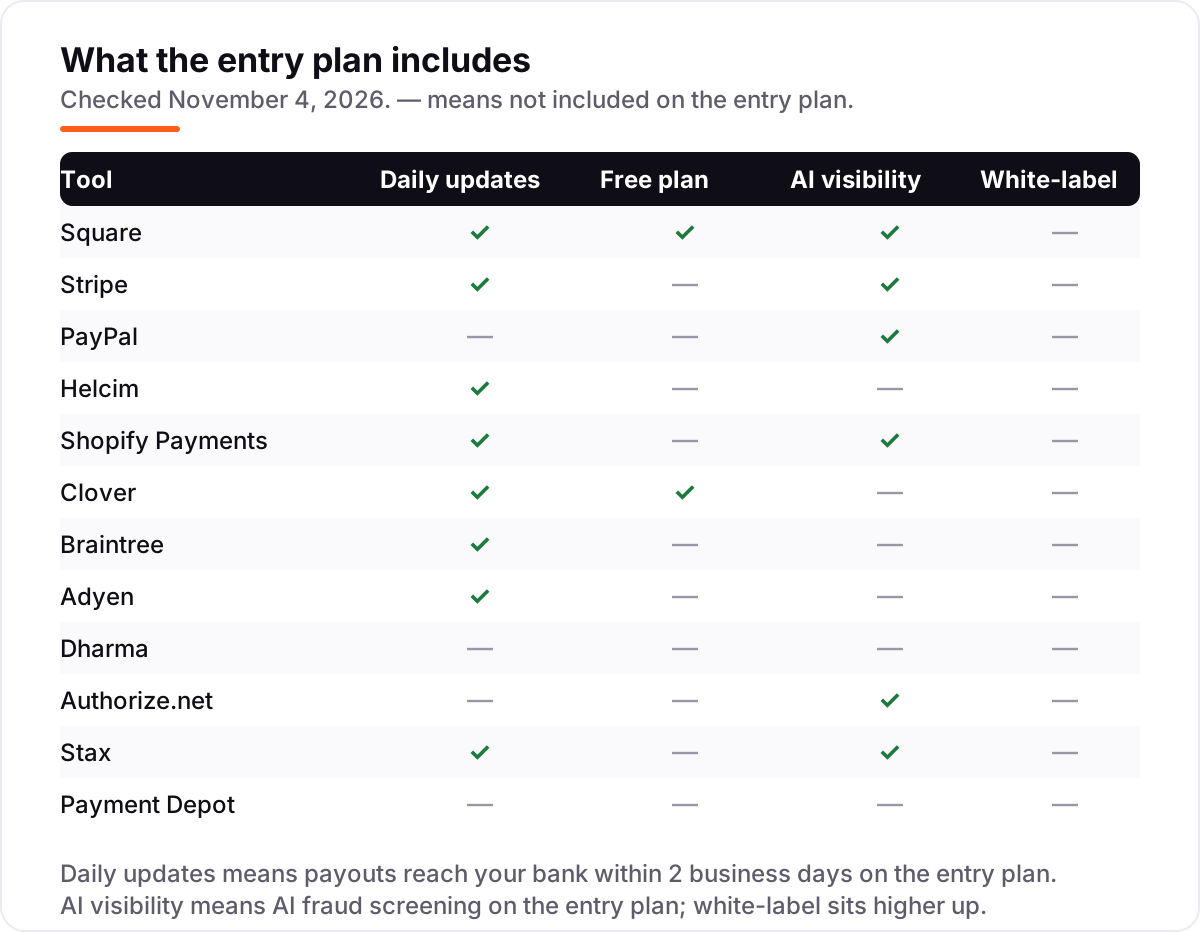
- Check when the money arrives. Square, Helcim, Clover and Stax pay out the next business day; Stripe, Braintree and Shopify Payments take about two business days. If cash flow is tight, payout speed is worth as much as a tenth of a percent.
- Ask what happens when a payment goes wrong. Chargebacks cost $15 on Stripe and Braintree and $15 on Helcim when lost, and holds on unusual payments are the most common complaint against the flat-rate tools.
A payment processor is one system in your stack, not the whole stack. The money it collects still has to be recorded, so pair it with the right ledger — our guide to the best accounting software for small businesses covers that side — and if you invoice clients as well as taking cards, compare the best invoicing software for small business. After a customer pays, ask for a Google review while the sale is fresh, using the free Google review link generator.
Whatever you shortlist, run real sales through it before you commit. The pay-as-you-go tools cost nothing to try — take a week of genuine payments, check the payout lands when promised, and confirm the fee matches the pricing page. If you take cards on a phone as well as at a counter, our guide to the best mobile payment app for small business covers the phone-first options in more detail.
Payment processing software for small business pricing: what you will actually pay
Take a business doing $20,000 a month in online card sales across 400 orders of $50. On the flat-rate tools, the monthly processing bill is $694 on Braintree (2.89% is $578 plus 400 × 29¢ is $116), $700 on Stripe (2.9% is $580 plus $120), $725 on Authorize.net All-in-One ($25 plus $700), $739 on Shopify Payments Basic billed monthly ($39 plus $700), $780 on Square Free (3.3% is $660 plus $120) and $794 on PayPal (2.99% is $598 plus 400 × 49¢ is $196). The same sales, the same 400 orders — an even $100 a month separates the cheapest flat rate from the dearest, and the gap is almost entirely the fixed per-sale fee.
The interchange-plus tools look different because their markup is the only fixed part. On the same $20,000 and 400 sales, Helcim's markup is $200 (0.50% is $100 plus 400 × 25¢ is $100), Dharma's is $104 ($40 in percentage plus $44 in per-sale fees, plus its $20 monthly fee), Stax's is $159 ($99 plus 400 × 15¢ is $60), Payment Depot's is $139 ($79 plus $60) and Adyen's is $172 (0.60% is $120 plus 400 × 13¢ is $52). Interchange itself — the card networks' cost, which varies by card type — sits on top of each of those numbers. If interchange averages 1.8% on your mix, that is $360, putting Helcim at about $560 a month, Dharma at about $464, Stax at about $519, Payment Depot at about $499 and Adyen at about $532 — all below the cheapest flat rate.
In person, the numbers shift. The same $20,000 across 400 sales of $50 costs $580 on Square Free (2.6% is $520 plus 400 × 15¢ is $60), $560 on Clover Starter (2.6% is $520 plus 400 × 10¢ is $40) and $560 on Stripe in person (2.7% is $540 plus 400 × 5¢ is $20). Helcim's in-person markup is $112 (0.40% is $80 plus 400 × 8¢ is $32) plus interchange at cost, and Dharma's is $82 (0.15% is $30 plus $32, plus its $20 monthly fee) plus interchange. The lesson is the same in both channels: the monthly fee is the small number, and the per-sale rate is the big one.
Know the difference: flat-rate vs interchange-plus pricing
The confusion in this category is between two ways of charging for the same sale. Flat-rate pricing charges one fixed percentage plus one fixed fee on every transaction — 2.9% + 30¢, say — whatever card the customer uses. The processor keeps the difference between that flat rate and the actual interchange cost, so a debit card costing 1% still earns them the full 2.9%. It is simple, predictable, and it is what Square, Stripe, PayPal and Braintree sell.
Interchange-plus pricing passes the card networks' interchange cost through at cost and adds a stated markup on top — Helcim's 0.40% + 8¢ in person, Dharma's 0.15% + 8¢, Adyen's 0.60% + 13¢. Your bill moves with the cards your customers actually use: debit cards cost less, premium rewards cards cost more. It is harder to quote in advance, because interchange itself is not a single number, but it is usually cheaper once you process roughly $10,000 a month or more.
A third model sits between them: the subscription. Stax and Payment Depot charge a flat monthly fee — $99 and $79 — and pass interchange through with little or no percentage markup at all. That model wins at high volume and loses at low volume, because the subscription is due whether you sell $1,000 or $100,000. The rule of thumb: under about $5,000 a month, take a $0 flat-rate plan; between $5,000 and $10,000, compare Helcim's no-fee interchange-plus; above $10,000, price the subscription models against it.
Quick comparison: tool type by need
| Buyer | Best pick | Why |
|---|---|---|
| Shop or café taking cards at the counter | Square | Free plan, 2.6% + 15¢ in person, next-business-day payouts |
| Online store or SaaS business | Stripe | 2.9% + 30¢ online, no monthly fee, best checkout and API |
| Customers who already pay with PayPal | PayPal | Most recognized checkout button, 2.99% + 49¢ per card sale |
| Lowest rate with no monthly fee | Helcim | Interchange-plus from 0.40% + 8¢, $0 a month, no contract |
| Shopify store | Shopify Payments | Built in, 2.9% + 30¢ online, no gateway fee, Basic is $39 a month |
| High volume, $10,000+ a month | Stax | $99 a month for 0% markup on interchange |
Mistakes to avoid
- Comparing only the percentage. The fixed fee decides the bill on small tickets: PayPal's 49¢ costs $80 a month more than Braintree's 29¢ on 400 sales, even though the percentages differ by only a tenth of a point.
- Paying a monthly fee before volume justifies it. Stax at $99 a month and Payment Depot at $79 only beat a free flat-rate plan once your volume is high enough — roughly $10,000 a month against a 2.9% flat rate.
- Assuming the online rate equals the in-person rate. Square charges 3.3% + 30¢ online against 2.6% + 15¢ in person, and Clover charges 3.5% + 10¢ online against 2.6% + 10¢ in person. Price the channel you actually sell through.
- Ignoring payout timing and holds. A tenth of a percent saved means little if the money takes three days to arrive or a hold freezes a week's sales. Check the payout schedule and the hold policy before you commit.
- Signing a hardware contract without reading the term. Clover systems are commonly financed over 36 months, and the hardware is yours to pay for even if you switch processors. Buy the terminal outright or confirm the term in writing first.
How we chose
We checked each vendor's own pricing page on November 4, 2026 and recorded the starting price exactly as shown, and we ranked the tools by fit for the most common buyer — a US small business taking cards in person and online — not by brand size. Two prices in this list are not read directly from the vendor's page today: Payment Depot's $79 monthly fee is not published on its own pricing page, so we used the figure agreed by independent comparisons and say so here; and the Square, Shopify Payments, Clover, Dharma and Authorize.net figures were confirmed from those vendors' own pricing pages as quoted in independent reads in October 2026, because the pages themselves render too little of their rate tables as plain text to read directly. Ratings come only from G2 pages opened on November 4, 2026. Four tools carry no rating: Stripe, because G2's Stripe profiles cover Billing and Connect rather than Payments; Dharma, whose G2 profile has no reviews yet; Stax, whose G2 profile belongs to a different product; and Shopify Payments, which has no G2 profile. No vendor paid for a place in this list, and none of the links here are affiliate links.
What to do next
Start with the free plan or pay-as-you-go account of your top pick and run a week of real sales through it. Check that the payout lands when promised and that the fee on the statement matches the rate on the pricing page before you move all your sales across. If the payments are sorted but new customers are not finding you, our monthly SEO service handles the visibility side — or compare providers in our guide to SEO companies for small business. Once your tools are in place, find out what's holding your rankings back.
Your stack only works if people find you
SerpAstra fixes what keeps your site off page one and makes it easy for AI assistants to recommend.
Get a free audit→Sources we checked (20)
- Square pricing — squareup.com/us/en/pricing (checked November 4, 2026)
- Stripe pricing — stripe.com/pricing (checked November 4, 2026)
- PayPal merchant fees — paypal.com/us/webapps/mpp/merchant-fees (checked November 4, 2026)
- Helcim pricing — helcim.com/pricing (checked November 4, 2026)
- Shopify pricing — shopify.com/pricing (checked November 4, 2026)
- Clover pricing — clover.com/pricing (checked November 4, 2026)
- Braintree fees — braintreepayments.com/pricing (checked November 4, 2026)
- Adyen pricing — adyen.com/pricing (checked November 4, 2026)
- Dharma pricing — dharmamerchantservices.com/pricing (checked November 4, 2026)
- Authorize.net pricing — authorize.net/sign-up/pricing.html (checked November 4, 2026)
- Stax pricing — staxpayments.com/pricing (checked November 4, 2026)
- Payment Depot pricing — paymentdepot.com/pricing (checked November 4, 2026; fee third-party-sourced)
- Square Payments reviews — g2.com/products/square-payments/reviews (checked November 4, 2026)
- PayPal Payments reviews — g2.com/products/paypal/reviews (checked November 4, 2026)
- Helcim reviews — g2.com/products/helcim/reviews (checked November 4, 2026)
- Clover reviews — g2.com/products/clover/reviews (checked November 4, 2026)
- Braintree reviews — g2.com/products/braintree/reviews (checked November 4, 2026)
- Adyen reviews — g2.com/products/adyen/reviews (checked November 4, 2026)
- Authorize.net reviews — g2.com/products/authorize-net/reviews (checked November 4, 2026)
- Payment Depot reviews — g2.com/products/payment-depot/reviews (checked November 4, 2026)
Shamim
Founder of SerpAstra
A full-stack SEO and digital marketer who spends most days on Local SEO for dental practices, AI search visibility and lead generation.
Frequently asked questions
What is the best payment processing software for small business?
Square is the best fit for most small businesses: a $0 plan, 2.6% + 15¢ in person, and one app for the till, invoices and online store. Stripe is the better pick for online sales at 2.9% + 30¢, and Helcim is the cheapest once volume grows, with interchange-plus pricing and no monthly fee.
How much does payment processing cost a small business?
On $20,000 a month in online card sales across 400 orders of $50, Stripe costs about $700, Braintree about $694, Square about $780 and PayPal about $794. Interchange-plus tools cost far less in markup — Helcim about $200 plus interchange at cost — but the interchange itself is extra.
What is the cheapest payment processor for a small business?
Helcim is the cheapest for most small businesses: interchange-plus with a 0.40% + 8¢ markup in person, no monthly fee and no contract. Dharma is nearly as cheap at a $20 monthly fee. Flat-rate tools only win at very low volume, where a $0 plan with no subscription beats any monthly fee.
What is the difference between flat-rate and interchange-plus pricing?
Flat-rate pricing charges one fixed percentage plus a fixed fee on every sale — 2.9% + 30¢, say — whatever card the customer uses. Interchange-plus passes the card networks' interchange cost through at cost and adds a stated markup, such as 0.40% + 8¢. Interchange-plus is usually cheaper above $10,000 a month in card sales.
Do I need a monthly subscription to accept card payments?
No. Seven of the 12 tools here charge no monthly fee at all — Square, Stripe, PayPal, Helcim, Clover, Braintree and Adyen all let you pay only when a customer pays. Monthly fees buy lower per-sale rates: Stax charges $99 a month for 0% markup, and Payment Depot charges $79 a month for wholesale rates.
How fast do I get my money after a sale?
Square, Helcim, Clover and Stax pay out the next business day. Stripe, Braintree and Shopify Payments take about two business days, and PayPal standard bank transfers take one to three business days. Instant payouts are available on several tools for an extra per-payout fee.
Can I switch payment processors later?
Yes, and most tools here have no contract, so you can leave any month. Export your customer list and any stored card tokens first — moving stored cards between processors takes a token migration and can take weeks. Clover is the exception to watch: full systems are commonly financed over 36 months, so check the hardware term before you sign.
Free SEO and AI visibility audit
Find out what is holding your rankings back
Send us your site. Within 2 business days you get a written audit, an AI visibility check and a short fix list ranked by impact. Free, with no contract attached.
Request my free audit→Related guides
 Accounting, Tax & Finance7 Best Accounting Software for Small Businesses in 2026, ComparedCompare the 7 best accounting software for small businesses on price, free plans, bank feeds and AI features, with every price checked November 2, 2026.Read guide →
 Accounting, Tax & Finance8 Best Mobile Payment Apps for Small Business in 20268 best mobile payment app for small business options compared on in-person fees, hardware and free plans — real prices checked November 2, 2026.Read guide →
 Accounting, Tax & Finance11 Best Invoicing Software for Small Business in 2026, Compared11 best invoicing software for small business compared on price, free plans and payment fees. Prices checked on vendor pricing pages, November 2, 2026.Read guide →