
Best PC Cleaning Software for 2026: 7 Options Compared by Use Case
Compare the 7 best pc cleaning software options for home users on price, free plans, automation and safety, with every price checked November 8, 2026.
 Shamim Mia, Founder, SerpAstraLast verified November 8, 202613 min read
We compare pricing pages, documentation and public reviews. We never accept payment for rankings.

Key takeaways
- CCleaner is the best fit for most home users at $44.95 a year; Advanced SystemCare Pro follows at $29.99 a year with one-click care, and Glary Utilities Pro is the cheapest paid plan at $19.97 a year for up to 3 PCs.
- BleachBit is completely free and open source, and the free editions of CCleaner, Advanced SystemCare, Glary Utilities and Wise Care 365 all clean a PC at $0.
- The single most important buying factor is the renewal price, not the first-year price: Avast Cleanup renews at $65.99 a year after a $32.99 first year, and System Mechanic renews at $54.95 after $43.94.
- No cleaner here replaces antivirus software, and none of them can speed up a PC with failing hardware — they remove junk and manage startup, nothing more.
On this page
Quick comparison
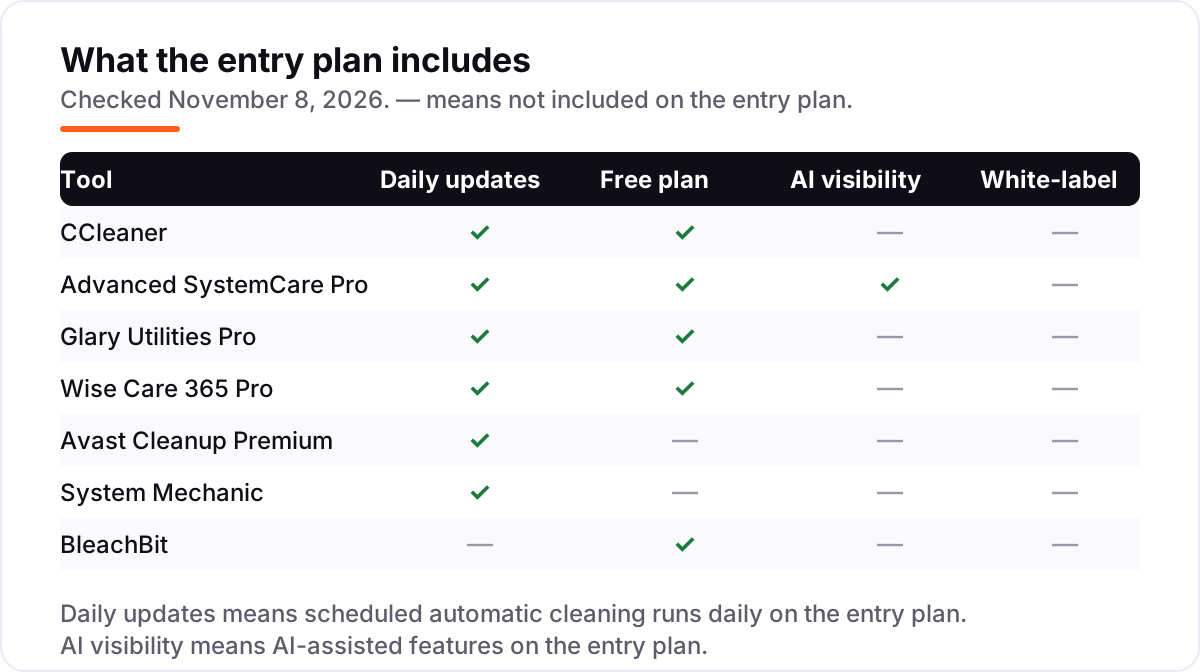
| Tool | Best for | Starting price | Free plan |
|---|---|---|---|
| CCleaner | Home Windows users who want the best-known cleaner with a capable free version and simple one-click maintenance | $44.95/yr | Yes (free plan) |
| Advanced SystemCare Pro | Beginners who want one button to run the whole cleanup, with real-time protection running in the background | $29.99/yr | Yes (free edition) |
| Glary Utilities Pro | Windows users who want more than 20 maintenance tools in one light package and the cheapest paid plan here | $19.97/yr | Yes (free edition) |
| Wise Care 365 Pro | Windows users who want a fast, lightweight one-click checkup and are happy to stay on the free edition | $29.95/yr | Yes (free edition) |
| Avast Cleanup Premium | Households that want one subscription to cover up to 10 devices, including phones and Macs | $65.99/yr | No (30-day trial) |
| System Mechanic | Households with several Windows PCs that want a deep, automated tune-up suite on every machine | $54.95/yr | No (30-day trial) |
| BleachBit | Privacy-minded users who want a free, open-source cleaner with no ads, accounts or upsells | $0 | Yes (free) |
Make one of these tools?
We re-check this list every quarter. Send a correction, request a review, or ask about a clearly labeled sponsored spot.
Request a listingThe best pc cleaning software

CCleaner
Best for: Home Windows users who want the best-known cleaner with a capable free version and simple one-click maintenance
CCleaner is the cleaner most people have already heard of, and that familiarity is its main strength: the free version handles the everyday job — junk files, browser traces, broken shortcuts and startup items — without asking for payment or an account. Professional costs $44.95 a year for one PC, with the first year discounted to $29.95, and adds automatic cleaning, a driver updater and a performance optimizer that puts idle apps to sleep.
The trade-off is that the free version only cleans when you run it, so a PC that needs hands-off maintenance needs the paid plan. Registry cleaning is also in the mix, and it should be used with a backup in place. Buy CCleaner when you want the safe, well-known choice; buy Glary Utilities or BleachBit when the budget is $0 to $20 a year.
What we like
- The best-known PC cleaner here, with the largest review base: 4.5 out of 5 on G2 from 627 reviews
- Free version covers the everyday job — junk files, browser traces and startup items — at $0
- Professional adds automatic cleaning, driver updates and performance optimization in one subscription
- 30-day money-back guarantee on paid plans, and a 14-day free trial before you pay
Watch out for
- Professional renews at $44.95 a year after a $29.95 first year, so the second year costs half as much again
- The free version cleans only when you run it by hand — automation, driver updates and monitoring are paid
- Registry cleaning carries risk, so back up before running aggressive fixes

Advanced SystemCare Pro
Best for: Beginners who want one button to run the whole cleanup, with real-time protection running in the background
Advanced SystemCare is built around a single button: run the scan and the tool cleans junk files, sweeps privacy traces, repairs registry entries and tunes system settings in one pass. The free edition covers the everyday cleaning, while Pro costs $29.99 a year, adds real-time protection, deep optimization, automatic background maintenance and 24/7 support, and one licence covers up to 3 PCs.
The catch is the sales pressure. The free version pushes upgrades and bundled IObit tools during install and use, and some antivirus engines flag the installer because of those bundles — download it only from iobit.com. Pick Advanced SystemCare when you want the simplest one-click routine; pick CCleaner when you want the quieter, better-known brand.
What we like
- One-click care runs junk cleaning, registry repair, startup tuning and privacy sweeping in a single pass
- Pro adds real-time protection, deep optimization, automatic background maintenance and 24/7 support
- A single Pro licence covers up to 3 PCs, so one subscription cleans a small household
- 60-day money-back guarantee, the longest refund window in this list
Watch out for
- The free version nags with upsell prompts and bundled-tool offers during install and use
- Some antivirus engines flag IObit installers as potentially unwanted because the setup bundles other tools
- Pro features overlap with IObit's other products, so a household with several IObit tools may pay twice

Glary Utilities Pro
Best for: Windows users who want more than 20 maintenance tools in one light package and the cheapest paid plan here
Glary Utilities is the toolbox pick in this list: more than 20 maintenance tools — junk cleaning, registry repair, duplicate finder, startup manager, disk analysis and a file shredder — in one light package. The free edition covers manual cleaning with the full toolset, while Pro costs $19.97 a year for up to 3 PCs, adds automatic maintenance, scheduled tasks and priority support, and renews at the same $19.97.
The price needs a careful read: $19.97 is the discounted offer shown against a $39.95 reference price, so confirm the renewal at checkout. The software updater also has a habit of false positives, so check its suggestions before applying them. Buy Glary Utilities when you want the most tools for the least money; buy CCleaner when you want a simpler, single-purpose cleaner.
What we like
- More than 20 tools in one package: junk cleaning, registry repair, duplicate finder, startup manager and disk analysis
- Cheapest paid plan here at $19.97 a year, covering up to 3 PCs, with the same $19.97 renewal
- Light on resources and quick to scan, with scheduled maintenance on the Pro plan
- 90-day money-back guarantee on Pro purchases
Watch out for
- The $19.97 price is a discounted offer against a $39.95 reference price, so the price you see can change
- Support is slower than the bigger brands, reviewers say, and update prompts can be intrusive
- The software updater has drawn complaints for false positives, so check its suggestions before applying them

Wise Care 365 Pro
Best for: Windows users who want a fast, lightweight one-click checkup and are happy to stay on the free edition
Wise Care 365 does one thing well: a quick, clear PC checkup that scans for junk, registry issues, privacy traces and startup drag, then fixes them in one pass. The whole program is under 40 MB, the scan finishes in seconds, and the free edition is genuinely usable with no ads — which is rare among free cleaners. Pro costs $29.95 a year for one PC and adds real-time protection, silent automatic cleaning and faster boot optimization.
The limits are platform and upgrades. There is no Mac or Linux version, and moving to a newer major version means removing the old one first. The lifetime licence also covers only the current major version. Pick Wise Care 365 when you want the fastest, lightest free checkup; pick Advanced SystemCare when you want real-time protection bundled in.
What we like
- One-click PC Checkup scans junk, registry issues, privacy traces and startup drag in a single pass
- Light on resources at under 40 MB, with a scan that finishes in seconds rather than minutes
- Free edition is genuinely usable with no ads, unlike most free cleaners here
- Pro adds real-time protection, silent automatic cleaning and faster boot optimization
Watch out for
- Windows only — there is no macOS or Linux version
- Upgrading to a newer version means removing the old one first, which reviewers call awkward
- The lifetime licence covers only the current major version, not future versions

Avast Cleanup Premium
Best for: Households that want one subscription to cover up to 10 devices, including phones and Macs
Avast Cleanup Premium is the household plan in this list: one subscription covers up to 10 devices across Windows, Mac, Android and iOS, so a family shares a single licence instead of buying one per PC. Its signature feature is Sleep Mode, which puts background apps to sleep to free memory and CPU without uninstalling them, and it adds automatic software updates, disk defragmentation and browser cleanup on a schedule.
The price is the catch. A single PC costs $65.99 a year at renewal after a $32.99 first year, which makes it the most expensive one-PC plan here — the value only appears on the 10-device plan. There is also no free plan, only a 30-day trial. Buy Avast Cleanup when one subscription must cover the whole household; buy CCleaner when a single PC is all you need.
What we like
- Sleep Mode puts background apps to sleep, freeing memory and CPU without uninstalling anything
- One 10-device plan covers Windows, Mac, Android and iOS, so a household shares a single subscription
- Automatic software updates, disk defragmentation and browser cleanup run on a schedule
- Made by Avast, a long-established security company, with a 30-day money-back guarantee
Watch out for
- The renewal price is about double the first-year price: $65.99 a year after $32.99 in year one
- No free plan — only a 30-day trial — so the free cleaners here do the basic job for $0
- It is a maintenance utility, not antivirus: it gives no real-time malware protection

System Mechanic
Best for: Households with several Windows PCs that want a deep, automated tune-up suite on every machine
System Mechanic is the deep suite in this list: more than 50 precision tools that clean junk files, fix registry errors, manage startup programs and optimize system resources, with Smart ActiveCare running the maintenance automatically in the background. One licence covers up to 10 Windows PCs in a household, which is the widest PC coverage here, and the base edition costs $54.95 a year at renewal after a $43.94 first year.
The complaints about System Mechanic are about billing, not cleaning: auto-renewal surprises and a premium support add-on offered at checkout, so read the order page carefully. There is also no free version and no antivirus in the base edition. Buy System Mechanic when several household PCs need automated care; buy Avast Cleanup when the household also has Macs and phones to cover.
What we like
- More than 50 precision tools in one suite, with Smart ActiveCare running maintenance automatically in the background
- One licence covers up to 10 Windows PCs in a household, the widest PC coverage here
- DeepClean, LiveBoost and a privacy shield cover junk, startup, memory and tracking in one pass
- 30-day money-back guarantee, and the product has been sold since 1998
Watch out for
- The first year costs $43.94, but renewal is $54.95 a year, so budget on the renewal price
- Reviewers complain most about billing: auto-renewal and a support add-on offered at checkout
- No free version, and the base edition has no antivirus — security waits for the higher tiers

BleachBit
Best for: Privacy-minded users who want a free, open-source cleaner with no ads, accounts or upsells
BleachBit is the anti-commercial cleaner: open source, free forever, with no ads, no upsells, no accounts and no premium tier to be pushed into. It frees disk space by cleaning the cache, cookies, history and temporary files of thousands of applications, and it can shred files so they cannot be recovered and wipe free disk space to hide traces of deleted files. A portable version runs without installing anything.
The trade-off is that BleachBit does nothing on its own: no scheduling, no automation and no real-time protection, so every clean is a manual run. The Windows interface is plain, and because it deletes exactly what you select, a wrong checkbox can remove files you wanted. Pick BleachBit when privacy and $0 matter most; pick a paid cleaner when you want the PC to maintain itself.
What we like
- Completely free and open source under the GPLv3 licence — no ads, no upsells, no accounts, no premium tier
- Cleans thousands of applications, shreds files so they cannot be recovered, and wipes free disk space
- Runs on Windows and Linux, with a command-line version for scripted cleaning on shared machines
- Portable version runs without installing anything, so it leaves no trace of its own
Watch out for
- No automation or scheduling — every clean is a manual run, and there is no real-time protection
- The Windows interface is plain and dated, and G2 carries only 2 reviews, so the rating means little
- It deletes what you select, so a wrong checkbox can remove files you wanted — check the list before cleaning
The best pc cleaning software does a small job well: it removes junk files, browser traces and leftover installers, trims the startup list, and keeps a Windows PC tidy without asking the owner to learn the system. We ranked the seven tools below by fit for the most common buyer — a home Windows user who wants a cleaner PC without a subscription headache — starting with the best-known all-rounder and ending with the free open-source pick, and every price was checked on November 8, 2026.
How to choose the best pc cleaning software
- Start with the free edition. Four tools here clean a PC at $0, and BleachBit is free with no paid tier at all. Run the free edition for a month before paying — if it covers your needs, the subscription buys nothing.
- Budget on the renewal price, not the first year. Avast Cleanup costs $32.99 in year one and $65.99 after that; System Mechanic costs $43.94, then $54.95; CCleaner costs $29.95, then $44.95. The renewal is the real price.
- Count your PCs before you count the price. Glary Utilities Pro covers 3 PCs for $19.97 a year, while CCleaner Professional covers one PC for $44.95 — the cheapest per-PC price is not always the cheapest headline price.
- Decide whether you need automation. Free editions clean only when you run them. If the PC will not be maintained by hand, pay for the plan with scheduled automatic cleaning.
- Remember what a cleaner cannot do. No cleaner here replaces antivirus software, and none of them can speed up a PC with too little RAM or a failing drive. Buy the cleaner for tidiness, not for miracles.
A cleaner is one small part of keeping a PC healthy, and the same care applies to the website that brings in your customers: our monthly SEO service keeps a site visible while the tools keep the PC tidy. And before you publish new pages for the services you sell, run your titles through the free SERP snippet preview tool — it shows exactly how the title and description will look in Google.
Whatever you shortlist, try it with real use before you pay. The free editions and trials in this list are long enough to run one genuine month — your browser, your startup list, your disk — and that month tells you more than any review can. Check two things in the trial: that the cleaner removes what it promises without deleting something you wanted, and that the renewal price is one you would pay again next year. Every paid tool here carries a money-back guarantee of 30 days or more, so there is no reason to buy before the trial has had its month.
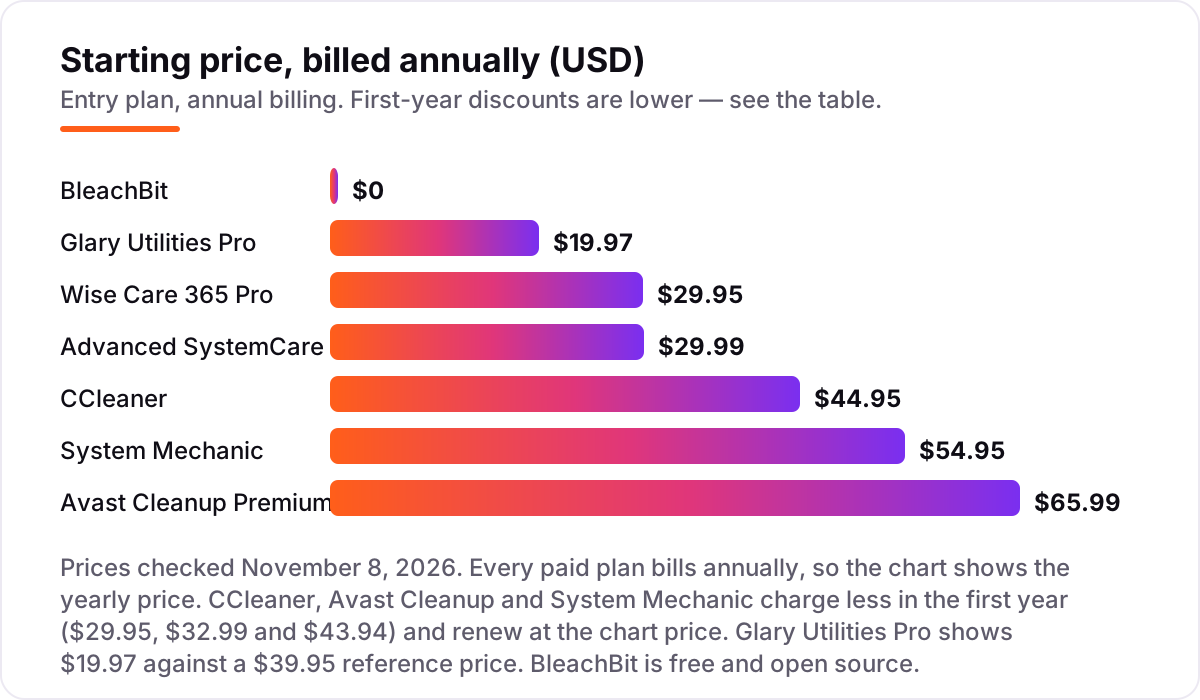
PC cleaning software pricing: what you will actually pay
Take a household with 3 Windows PCs. In the first year, the bill is $0 on BleachBit, $19.97 on Glary Utilities Pro, $29.99 on Advanced SystemCare Pro, $39.95 on Wise Care 365 Pro for 3 PCs, $39.95 on CCleaner Professional Plus for 3 PCs, $43.94 on System Mechanic, and $34.99 on Avast Cleanup Premium for 10 devices. Every one of those first-year prices is a discount, and the renewal year is where the ranking changes: Glary Utilities Pro stays at $19.97, Advanced SystemCare Pro at $29.99, Wise Care 365 Pro at $39.95, System Mechanic rises to $54.95, CCleaner Professional Plus rises to $64.95, and Avast Cleanup Premium rises to $79.99.
Over three years, that household pays $0 on BleachBit, $59.91 on Glary Utilities Pro, $89.97 on Advanced SystemCare Pro, $119.85 on Wise Care 365 Pro, $153.84 on System Mechanic, $169.85 on CCleaner Professional Plus, and $194.97 on Avast Cleanup Premium. The gap between the cheapest paid plan and the dearest is $135.06 over three years — and it comes entirely from first-year discounts and device counts, not from features.
Two costs sit outside every number above. First, a second household member's Mac or phone is not covered by the Windows-only tools — only Avast Cleanup covers Mac, Android and iOS in this list. Second, the support add-ons: iolo offers a premium support subscription at checkout for about $19.95 a month, which would dwarf the cleaner itself if left switched on. If the PC also needs security rather than tidiness, see our guide to the best antivirus software — a cleaner is an addition to antivirus, never a replacement.
Know the difference: PC cleaners vs Windows built-in tools
The confusion in this category is between a paid cleaner and the tools Windows already ships. Windows has Disk Cleanup, Storage Sense, the Startup tab in Task Manager and a defragmenter built in, and they cover the basics — junk removal and startup control — at $0. A paid cleaner earns its price only when it adds something Windows does not: scheduled automatic cleaning, driver updates, a one-click routine across a dozen tools, or coverage for several PCs under one licence.
There is a second, quieter confusion: cleaning and security are different jobs. A PC cleaner removes junk files and browser traces; it does not detect malware, block phishing or protect against ransomware. Avast Cleanup and the base edition of System Mechanic both say so plainly — neither includes real-time malware protection. If a cleaner claims to replace antivirus, treat that claim as a warning sign, not a feature.
A third distinction worth knowing is speed claims versus space recovered. Deleting 8 GB of cache is measurable storage recovery; claiming the computer became 30% faster needs a defined workload and a repeatable before-and-after test, and none of the vendors here publish one. Judge a cleaner on the gigabytes it frees and the startup items it trims, not on a percentage speed claim.
Quick comparison: tool type by need
| Buyer | Best pick | Why |
|---|---|---|
| Most home users | CCleaner | The best-known cleaner, free edition covers the basics, Professional is $44.95/year |
| Beginners who want one button | Advanced SystemCare Pro | One-click care across the whole PC, $29.99/year for up to 3 PCs |
| Cheapest paid plan | Glary Utilities Pro | 20+ tools for 3 PCs at $19.97/year, same price on renewal |
| Lightest, fastest checkup | Wise Care 365 Pro | Under 40 MB, scan finishes in seconds, $29.95/year for 1 PC |
| Whole household, all devices | Avast Cleanup Premium | One plan covers 10 devices including Macs and phones, $65.99/year |
| Several Windows PCs, deep care | System Mechanic | 50+ tools and automatic care for up to 10 PCs, $54.95/year |
| Free and open source | BleachBit | No ads, no upsells, no accounts, $0 forever |
Mistakes to avoid
- Budgeting on the first-year price. Avast Cleanup doubles from $32.99 to $65.99 in year two, and System Mechanic rises from $43.94 to $54.95. The renewal price is what you pay in year two, so compare tools on that number.
- Paying for one PC when the plan covers three. CCleaner Professional at $44.95 covers a single PC, while Glary Utilities Pro at $19.97 covers three. Count the household's PCs before you count the price.
- Running registry cleaning without a backup. Registry fixes are the riskiest part of any cleaner here. Use the backup or undo feature first, and skip aggressive registry options on a PC that is working fine.
- Buying a cleaner to replace antivirus. No cleaner in this list detects malware in real time. A clean PC with no antivirus is still an unprotected PC — keep the security software separate.
- Leaving a support add-on switched on at checkout. iolo offers a premium support subscription at about $19.95 a month during checkout. Untick it unless you genuinely want it, or it will cost more than the cleaner itself.
How we chose
We checked each vendor's own pricing page on November 8, 2026 and recorded the starting price exactly as shown, using the renewal price where the vendor shows a lower first-year offer, and we ranked the tools by fit for the most common buyer — a home Windows user who wants a cleaner PC without a subscription headache — not by brand size. Two notes on method: the browser reader and direct page fetches were both unavailable on November 8, 2026, so prices were verified from fresh search-index crawls of the vendors' own pricing pages, corroborated by independent October and November 2026 reads that quote the same vendor pages. AVG TuneUp was left out because it is a near-duplicate of Avast Cleanup — same parent company, same features, same price — and including both would add nothing. Ratings appear only where a G2 or Trustpilot page was verified by a fresh crawl: CCleaner, Glary Utilities Pro, BleachBit and Wise Care 365 carry one, while Advanced SystemCare Pro, Avast Cleanup Premium and System Mechanic carry none because no G2 or Capterra page for those products could be verified. No vendor paid for a place in this list, and none of the links here are affiliate links.
What to do next
Start with the free edition or trial of your top pick and run one real month of use through it. Check that it removes what it promises without deleting anything you wanted, and that the renewal price is one you would pay again next year. If the PC is sorted but new customers are not finding your business online, our monthly SEO service handles the visibility side — or compare providers in our guide to security software for small business. Once your tools are in place, find out what's holding your rankings back.
Your stack only works if people find you
SerpAstra fixes what keeps your site off page one and makes it easy for AI assistants to recommend.
Get a free audit→Sources we checked (11)
- CCleaner pricing — ccleaner.com/ccleaner/plans (checked November 8, 2026)
- Advanced SystemCare pricing — iobit.com/en/advancedsystemcarefree.php (checked November 8, 2026)
- Glary Utilities pricing — glarysoft.com/download (checked November 8, 2026)
- Wise Care 365 pricing — wisecleaner.com/wise-care-365.html (checked November 8, 2026)
- Avast Cleanup pricing — avast.com/en-us/cleanup (checked November 8, 2026)
- System Mechanic pricing — iolo.com/products/system-mechanic (checked November 8, 2026)
- BleachBit — bleachbit.org (checked November 8, 2026)
- CCleaner reviews — g2.com/products/ccleaner/reviews (checked November 8, 2026)
- Glary Utilities Pro reviews — g2.com/products/glary-utilities-pro/reviews (checked November 8, 2026)
- BleachBit reviews — g2.com/products/bleachbit/reviews (checked November 8, 2026)
- WiseCleaner reviews — trustpilot.com/review/www.wisecleaner.com (checked November 8, 2026)
Shamim
Founder of SerpAstra
A full-stack SEO and digital marketer who spends most days on Local SEO for dental practices, AI search visibility and lead generation.
Frequently asked questions
What is the best pc cleaning software?
CCleaner is the best fit for most home users: the best-known cleaner, a capable free version, and Professional at $44.95 a year with automation and driver updates. Advanced SystemCare Pro at $29.99 a year is the better pick for one-click care, and BleachBit is the best free option.
How much does PC cleaning software cost?
Paid plans run from $19.97 to $65.99 a year. Glary Utilities Pro is cheapest at $19.97 a year for 3 PCs, Advanced SystemCare Pro and Wise Care 365 Pro cost about $30 a year, and Avast Cleanup Premium renews at $65.99 a year. BleachBit and four free editions here cost $0.
Is there really free PC cleaning software?
Yes. BleachBit is completely free and open source with no paid tier at all. CCleaner, Advanced SystemCare, Glary Utilities and Wise Care 365 all have free editions that clean junk files and browser traces at $0, though automation and driver updates stay behind the paywall.
Is PC cleaning software safe to use?
The tools in this list are safe when downloaded from the vendor's own site, but registry cleaning always carries some risk, so back up or use the undo feature before aggressive fixes. Avoid cleaners from download portals and pop-up ads, which are the usual source of bundled junk.
Do PC cleaners actually make a computer faster?
They free disk space and cut startup drag, which helps a cluttered PC feel quicker, but they cannot fix slow hardware, a full drive, or failing parts. If a PC stays slow after a clean, the cause is usually too little RAM, a spinning hard drive, or a hardware fault.
What is the difference between a PC cleaner and antivirus software?
A PC cleaner removes junk files, browser traces and startup drag; it does not detect or remove malware. Antivirus software protects against viruses, phishing and ransomware in real time. They do different jobs, so a cleaner is an addition to antivirus, never a replacement for it.
Can I use Windows built-in tools instead of a PC cleaner?
Yes, for the basics. Windows Disk Cleanup, Storage Sense and the Startup tab in Task Manager cover junk removal and startup control at $0. A cleaner earns its price only when you want scheduled automatic cleaning, driver updates, or one place for a dozen maintenance tools.
Free SEO and AI visibility audit
Find out what is holding your rankings back
Send us your site. Within 2 business days you get a written audit, an AI visibility check and a short fix list ranked by impact. Free, with no contract attached.
Request my free audit→Related guides
 IT, Security & DevOpsBest Antivirus Software Review for 2026: 10 Options Compared by Use CaseCompare the best antivirus software review picks for 2026: 10 suites with prices, renewal costs, free plans and device limits, checked November 6, 2026.Read guide →
 IT, Security & DevOps12 Best Security Software for Small Business in 2026, ComparedCompare the 12 best security software for small business options on price, endpoint protection and passwords, with prices checked November 7, 2026.Read guide →
 Digital Marketing & Ads11 Best Online Data Backup Services in 2026Compare the 11 best online data backup services on price, storage caps, device limits and encryption, with every price checked November 5, 2026.Read guide →