
11 Best Online Data Backup Services in 2026
Compare the 11 best online data backup services on price, storage caps, device limits and encryption, with every price checked November 5, 2026.
 Shamim Mia, Founder, SerpAstraLast verified November 5, 202613 min read
We compare pricing pages, documentation and public reviews. We never accept payment for rankings.

Key takeaways
- Backblaze is the best fit for most buyers at $9 a month: unlimited backup for one computer with no storage cap to track. IDrive follows at $11.99 a month for households with several computers, since one 5 TB plan covers unlimited devices.
- Google One, iCloud+ and Microsoft 365 Basic all start at $0.99–$1.99 a month, but they sell storage, not true backup: they sync files and keep deleted copies only for a limited window, so check version history before you rely on them.
- The limit that decides your real bill is the one you hit first: Backblaze charges per computer, Carbonite charges per computer, and the capped plans charge for every gigabyte over the allowance — count your computers and your data before you buy.
- Every price in this list was checked on the vendor's own pricing page, or a fresh crawl of it, on November 5, 2026, except IDrive's monthly rate, which comes from independent October 2026 reads of IDrive's pricing page, and Acronis, which bills annually only.
On this page
Quick comparison
| Tool | Best for | Starting price | Free plan |
|---|---|---|---|
| Backblaze | Home users who want unlimited backup for one computer at a flat price, with no storage cap to track | $9/mo | No (15-day trial) |
| IDrive | Households and small teams that want one plan to cover every computer, phone and tablet they own | $11.99/mo | Yes (10 GB free) |
| Google One | Android and Gmail users who want phone backup, photo storage and family sharing in one cheap plan | $1.99/mo | Yes (15 GB free) |
| iCloud+ | iPhone, iPad and Mac owners who want device backup that happens with no setup at all | $0.99/mo | Yes (5 GB free) |
| Microsoft OneDrive | Windows and Microsoft 365 users who want PC folder backup plus Office apps in one subscription | $1.99/mo | Yes (5 GB free) |
| Dropbox | People and teams who share large files constantly and want the most reliable sync in the business | $11.99/mo | Yes (2 GB free) |
| pCloud | Buyers who hate subscriptions and want a one-time lifetime plan for their files | $4.99/mo | Yes (up to 10 GB free) |
| Carbonite Safe | Owners of a single Windows or Mac computer who want unlimited, automatic backup with no storage math | $8/mo | No (15-day trial) |
| CrashPlan | Small businesses that need unlimited endpoint backup with strong retention for under 250 staff | $7.33/mo | No (free trial) |
| Acronis True Image | Owners who want full-disk imaging plus ransomware protection in one Windows or Mac app | $49.99/yr | No (30-day trial) |
| SpiderOak One Backup | Privacy-first buyers who want zero-knowledge encryption on every file they back up | $6/mo | No (21-day trial) |
Make one of these tools?
We re-check this list every quarter. Send a correction, request a review, or ask about a clearly labeled sponsored spot.
Request a listingThe best online data backup services

Backblaze
Best for: Home users who want unlimited backup for one computer at a flat price, with no storage cap to track
Backblaze Computer Backup does one job and charges one price: $9 a month backs up one Mac or Windows computer and its connected external drives, with unlimited storage and no file-size limit. There is no storage tier to pick and no cap to watch — the first backup copies everything, then continuous backup keeps new and changed files current without you touching anything.
The limits are about machines, not megabytes. Each computer needs its own $9 license, so a three-computer household pays $27 a month, and network drives are not covered. Version history runs 30 days by default, extendable to one year for an extra $2 a month, and restores work by download or by a mailed USB drive. Buy Backblaze when one computer holds nearly everything you would hate to lose.
What we like
- Unlimited storage for one computer and its connected external drives, with no file-size limit
- Continuous, automatic backup that runs quietly in the background once it is set up
- Version history keeps deleted and changed files for 30 days, extendable to one year for $2 a month
- Restore by download, or by a mailed USB drive for large recoveries
Watch out for
- Priced per computer, so a three-computer household pays $27 a month, not $9
- No backup for network drives, and Linux support is limited to the B2 storage product
- No free plan, only a 15-day trial

IDrive
Best for: Households and small teams that want one plan to cover every computer, phone and tablet they own
IDrive Personal is the multi-device answer to Backblaze's one-computer price: $11.99 a month covers unlimited PCs, Macs, phones and tablets under one 5 TB account, with NAS and external drives included. The same plan adds an equal 5 TB of Cloud Drive sync space, so backed-up files and synced files live side by side, and a private-key encryption option keeps even IDrive from reading your data.
Read the billing tabs before you buy. Monthly billing is $11.99, but annual billing shows a first-year rate of $83.88 that rises to the $119.88 standard rate from year two, and the plan covers one user only — separate logins need the Team plan. Over the 5 TB cap, overage runs $0.25 per GB a month. Pick IDrive when several devices share one household and one bill.
What we like
- One plan backs up unlimited computers, phones and tablets, plus NAS and external drives
- 5 TB of storage with matching Cloud Drive sync space included in the same plan
- Private-key encryption option means only you can read the backed-up files
- Express backup and restore by mailed drive for very large first backups and recoveries
Watch out for
- First-year annual pricing is promotional: the standard annual rate is $119.88, not $83.88
- Storage is capped at 5 TB on the entry plan, and overage costs $0.25 per GB a month
- One user only on Personal — a family that wants separate logins needs Team

Google One
Best for: Android and Gmail users who want phone backup, photo storage and family sharing in one cheap plan
Google One Basic is the cheapest way to stop the 'storage full' warnings on an Android phone: $1.99 a month buys 100 GB shared across Drive, Gmail and Photos, with automatic phone and photo backup built in and sharing for up to five other people. The free 15 GB that comes with every Google account counts toward the 100 GB, and annual billing cuts the price to $19.99 a year.
Know what you are buying: Google One is storage with backup features, not a full-computer backup service. Desktop backup covers the folders you choose, not a disk image, and the shared pool means a full Gmail inbox shrinks the room left for photos. Deleted files and versions are kept only for a limited window. Choose Google One when your phone and your Google account are the center of your life.
What we like
- The cheapest paid step in this list after iCloud+, with 100 GB shared across Drive, Gmail and Photos
- Automatic Android phone backup and photo backup with no extra app to install
- Share the storage with up to five other people at no extra cost
- Annual billing drops Basic to $19.99 a year, about $1.66 a month
Watch out for
- Storage is shared with Gmail and Photos, so a full inbox eats backup room
- No true full-computer backup: desktop backup covers selected folders only
- AI features wait for the Google AI plans, which cost more

iCloud+
Best for: iPhone, iPad and Mac owners who want device backup that happens with no setup at all
iCloud+ is the backup most iPhone owners already have and never think about: $0.99 a month buys 50 GB, and the phone backs itself up every night on Wi-Fi — settings, app data, messages and photos included. There is nothing to install and nothing to remember, and a lost or broken phone restores onto its replacement from the same backup, with family sharing for up to five other people.
The catch is capacity. The free 5 GB fills up quickly, and 50 GB rarely holds a photo library, so most owners land on 200 GB at $2.99 a month or 2 TB at $9.99. Apple bills monthly only, so there is no annual discount, and an iPhone backup restores only onto Apple hardware. Pick iCloud+ when every device in the house carries the Apple logo.
What we like
- The cheapest paid plan in this list, and device backup runs automatically every night on Wi-Fi
- Backs up the whole device — settings, app data, messages and photos — not just files
- Family sharing lets up to five other people draw from the same storage pool
- Private Relay and Hide My Email are included on every paid tier
Watch out for
- 50 GB is small for a photo library: most iPhone owners need 200 GB at $2.99 a month
- Windows and Android support is thin, and there is no annual billing discount
- Full-device restore works only onto an Apple device

Microsoft OneDrive
Best for: Windows and Microsoft 365 users who want PC folder backup plus Office apps in one subscription
Microsoft 365 Basic is the Windows answer to Google One: $1.99 a month buys 100 GB of OneDrive storage with ransomware detection, file restore and ad-free Outlook mail, and PC folder backup keeps Desktop, Documents and Pictures synced automatically. Personal Vault adds a locked folder for sensitive files, and the same subscription family scales to Personal at $9.99 a month with 1 TB and the desktop Office apps.
The same warning applies as with Google One: this is synced storage, not a disk image, so a failed drive means reinstalling Windows and apps before files come back. The free allowance is only 5 GB, there is no step between 100 GB and the 1 TB bundle, and cancelling drops you back to 5 GB. Choose OneDrive when Windows and Office already run your working day.
What we like
- 100 GB for $1.99 a month, with ransomware detection and file restore built in
- PC folder backup keeps Desktop, Documents and Pictures synced to the cloud automatically
- Personal Vault adds a second locked folder for sensitive files
- The step up to Personal at $9.99 a month adds 1 TB and the desktop Office apps
Watch out for
- Only 5 GB free, and there is no middle step between 100 GB and the 1 TB bundle
- Full-device backup is not offered: it syncs folders, it does not image a disk
- Cancelling a paid plan drops the allowance back to 5 GB

Dropbox
Best for: People and teams who share large files constantly and want the most reliable sync in the business
Dropbox Plus is the sync-first pick: $11.99 a month buys 2 TB for one person, and block-level sync means editing a large file uploads only the changed blocks, not the whole file again. Dropbox Backup covers PC or Mac folders and an external drive, version history runs 30 days, and the same experience holds across Windows, Mac, Linux, iOS and Android.
The price is the argument against it. There is no paid step between the 2 GB free plan and Plus at $11.99 a month, or $9.99 billed annually, so a modest library pays for 2 TB it will never fill. Longer version history and bigger transfer limits wait for the team plans. Pick Dropbox when files move between people and devices all day and sync speed matters more than the lowest price.
What we like
- Block-level sync uploads only the changed part of a file, so large files update fast
- Dropbox Backup covers an external drive and PC or Mac folders on the Plus plan
- 30-day version history and file recovery on every paid plan
- Works the same on Windows, Mac, Linux, iOS and Android
Watch out for
- No paid plan under $11.99 a month: the free plan is only 2 GB
- 2 TB is the only size for one person — light users pay for room they never touch
- Advanced backup features like longer version history need a team plan

pCloud
Best for: Buyers who hate subscriptions and want a one-time lifetime plan for their files
pCloud Premium is the buy-once alternative in a list of subscriptions: $4.99 a month, or $49.99 a year, buys 500 GB with apps for every system including Linux and a virtual drive that mounts the storage locally. The lifetime option costs $219 once for 500 GB or $499 for 2 TB, which pays for itself in about four and a half years against the annual price — if pCloud is still around then.
Two things to price in before the lifetime deal tempts you. Client-side, zero-knowledge encryption is not included: the Crypto Folder add-on costs $49.99 a year or $150 once, and the refund window is only 14 days. The free plan starts at 2 GB, reaching 10 GB only by completing tasks. Choose pCloud when a one-time payment beats another bill and your files fit the folders you pick.
What we like
- Lifetime plans end the bill: 500 GB for $219 once, 2 TB for $499 once
- Apps for every system, including Linux, with a virtual drive that mounts storage locally
- File history, password-protected links and a 14-day refund window on paid plans
- Swiss-based storage with a choice of US or EU data region
Watch out for
- True zero-knowledge encryption is a paid extra: the Crypto Folder costs $49.99 a year
- The free plan starts at 2 GB, growing to 10 GB only by completing tasks
- Backup is folder-based: there is no full-disk image option

Carbonite Safe
Best for: Owners of a single Windows or Mac computer who want unlimited, automatic backup with no storage math
Carbonite Safe Basic is the set-and-forget pick for a single computer: $8.00 a month, billed as $95.99 a year, buys unlimited encrypted backup that runs continuously in the background. There is no storage cap to watch and no folder-picking ritual — files under 4 GB are selected automatically — and a first-year promotion cuts the first year to $56.99.
The price structure needs a second look. Billing is annual only, the promotion ends after year one, and each computer needs its own plan, so two machines cost double. Basic also skips video files in automatic selection and covers no external drive — that waits for Plus at $131.99 a year. Pick Carbonite when one computer holds everything and you never want to think about storage again.
What we like
- Unlimited storage for one computer, with automatic encrypted backup that runs continuously
- Plus adds Webroot antivirus and external-drive backup; Prime adds priority support and $9.99 courier recovery
- Files under 4 GB back up automatically on Basic, with no cap on total data
- Remote file access from any browser, plus a 30-day money-back guarantee
Watch out for
- Annual billing only, and the first-year promotion jumps to $95.99 on renewal
- One computer per plan: a second computer needs a second subscription
- Video files are excluded from automatic selection on Basic, and restores are slow by reviewer accounts

CrashPlan
Best for: Small businesses that need unlimited endpoint backup with strong retention for under 250 staff
CrashPlan is the business-grade pick in a mostly consumer list: $7.33 a user a month, billed annually at $88 a year, buys unlimited storage and unlimited versioning for endpoints running Windows, macOS or Linux, with self-serve restore and device migration that needs no IT ticket. Separate small-business plans cover servers at $15.75 a month and Microsoft 365 or Google Workspace at $2.50 a user a month.
The trade-off is that CrashPlan no longer sells to households: the consumer plans were discontinued, so a family pays the business rate, and the per-user price multiplies fast — twenty users cost about $147 a month. It also backs up files, not disk images, so a dead machine still needs its system rebuilt. Choose CrashPlan when a small team needs serious retention without enterprise paperwork.
What we like
- Unlimited cloud storage and unlimited versioning for every covered device
- Covers Windows, macOS and Linux, with self-serve restore and device migration
- Separate low-cost plans for servers ($15.75 a month) and Microsoft 365 or Google Workspace ($2.50 a user a month)
- No IT ticket needed: users restore their own files the same day they sign up
Watch out for
- No consumer plan: the old personal plans were discontinued, so households pay business prices
- Priced per user, so a 20-person team pays about $147 a month before any add-ons
- No disk imaging: it backs up files, not whole system images

Acronis True Image
Best for: Owners who want full-disk imaging plus ransomware protection in one Windows or Mac app
Acronis True Image, formerly Cyber Protect Home Office, is the imaging pick: $49.99 a year buys Essentials for one computer, with full-disk imaging and cloning plus anti-ransomware and cryptomining protection. A failed drive restores to a bootable system rather than a pile of files, and you can back up to local disks, network storage or FTP destinations as well as the cloud.
Read the tier names before checkout. Essentials has no cloud storage at all — online backup starts with Advanced at $72.99 a year, and Premium at $124.99 adds 1 TB of Acronis cloud space. Billing is annual only, the first-year discount ends at renewal, and each computer needs its own license. Pick Acronis when a bootable restore matters more than the lowest monthly price.
What we like
- Full-disk imaging and cloning, so a dead drive restores to a working system, not just files
- Anti-ransomware and cryptomining protection built into the entry plan
- Local, network and FTP destinations included alongside optional Acronis cloud storage
- Free upgrades to the newest product version for the life of the subscription
Watch out for
- Essentials includes no cloud storage: online backup needs Advanced at $72.99 a year
- Annual billing only, and the first-year discount does not carry to renewal
- One computer per license, so a household pays per machine

SpiderOak One Backup
Best for: Privacy-first buyers who want zero-knowledge encryption on every file they back up
SpiderOak One Backup is the privacy pick: $6 a month buys 150 GB with zero-knowledge encryption, which means SpiderOak itself cannot read your files — the keys stay with you. Every plan covers unlimited devices and keeps unlimited historic versions within the storage cap, and the same client handles backup, sync and read-only sharing on Windows, Mac and Linux.
The price of that privacy is capacity. A full computer rarely fits in 150 GB, and the 2 TB plan costs $14 a month — more than Backblaze charges for unlimited storage on one machine. There is no free plan, only a 21-day trial, and no unlimited tier exists at any price. Choose SpiderOak when keeping the provider itself out of your files matters more than the cheapest gigabyte.
What we like
- Zero-knowledge encryption: SpiderOak cannot read your files, even if asked
- Unlimited devices on every plan, with unlimited historic versions within the storage cap
- Backup, sync and read-only sharing in one client, on Windows, Mac and Linux
- Plans from 150 GB to 5 TB, so you pay for the room you actually need
Watch out for
- 150 GB is small for a full computer, and 2 TB costs $14 a month — more than unlimited rivals
- No free plan, only a 21-day trial with 250 GB of trial storage
- Sharing is read-only, and there is no unlimited-storage plan at any price
The best online data backup services solve a simple fear: one dead drive, one stolen laptop or one ransomware attack should not cost you your photos, your documents or your work. We ranked the eleven tools below by fit for the most common buyer — a household or small business that wants its files copied offsite automatically — starting with unlimited one-computer backup and ending with the privacy-first options, and every price was checked on the vendor's own pricing page, or a fresh crawl of it, on November 5, 2026.
How to choose the best online data backup services
- Count your computers first. Backblaze, Carbonite and Acronis charge per computer, while IDrive covers unlimited devices on one plan and the storage services charge for the pool, not the machine.
- Count your data second. Unlimited plans remove the question; capped plans like IDrive 5 TB, pCloud 500 GB and SpiderOak 150 GB need a real measurement before you buy.
- Decide what a restore must do. A disk image (Acronis) brings a dead machine back whole; file backup restores files onto a working system; synced storage just mirrors folders.
- Check version history and deletion windows. A backup that mirrors deletions immediately is not a backup — look for 30 days or more of versions.
- Read the renewal price, not the first-year price. IDrive, Carbonite and Acronis all discount year one; the standard rate is what you pay from year two.
Backup is one system in your stack, not the whole stack. If the business also needs to be found online, our monthly SEO service handles the visibility side. And before you publish new pages for the services you sell, run your titles through the free SERP snippet preview tool — it shows exactly how the title and description will look in Google.
Whatever you shortlist, try it with real data before you pay. The free plans and trials in this list are long enough to run one genuine backup cycle — your files, your devices, your restore — and that cycle tells you more than any review can. Check two things in the trial: that the first backup finishes, and that you can restore one file without help.
Online data backup pricing: what you will actually pay
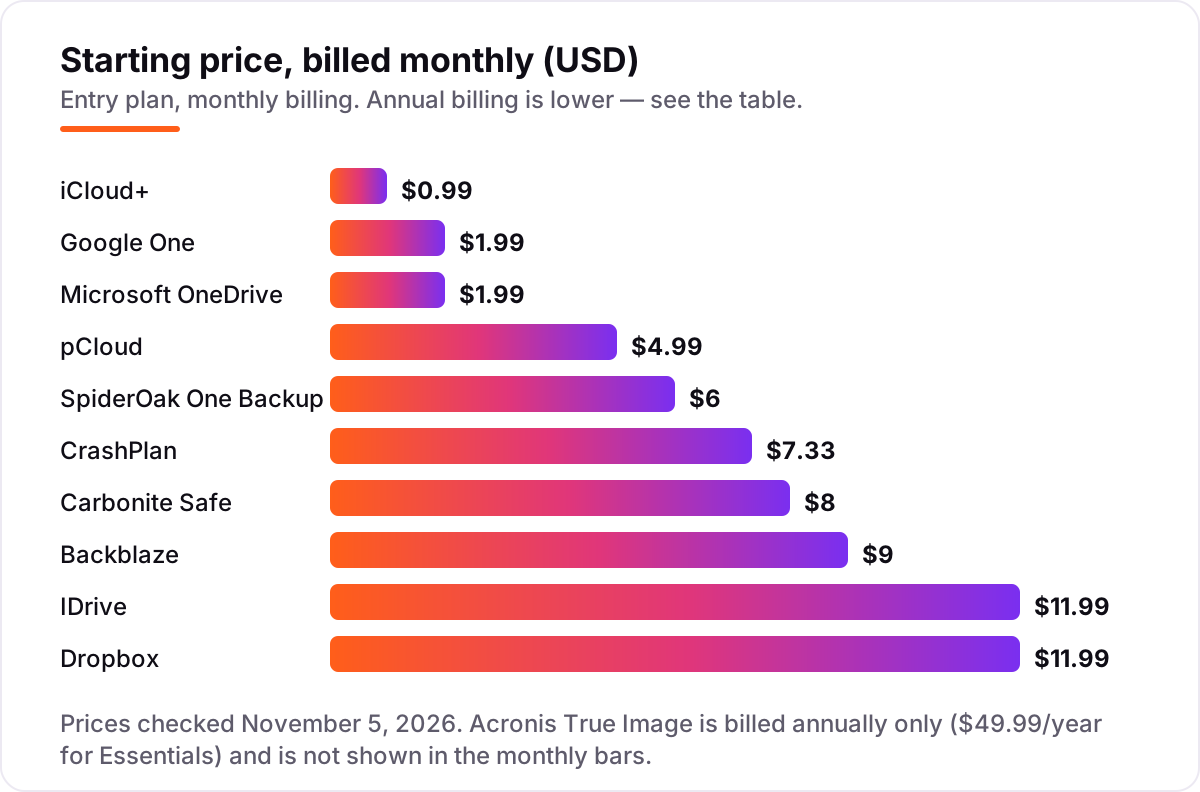
Take a household with three computers and about 1 TB of files that matter. On list prices, the monthly subscription costs $1.99 on Google One Basic or Microsoft 365 Basic, $2.99 on iCloud+ 200 GB, $4.99 on pCloud Premium, $6 on SpiderOak 150 GB — too small for 1 TB — $7.33 a user on CrashPlan, $8.00 on Carbonite Basic, $9 per computer on Backblaze, and $11.99 on IDrive Personal or Dropbox Plus. Three computers change the math: Backblaze costs $27 a month and Carbonite $24, Acronis about $150 a year for three licenses, while IDrive still costs $11.99 because one plan covers every device.
Over a year, that is $19.99 on Google One Basic billed annually, $35.88 on iCloud+ 200 GB, $49.99 on pCloud Premium billed annually, $88 on CrashPlan for one user, $95.99 on Carbonite Basic, $99 on Backblaze for one computer — $297 for three — $119.88 on Dropbox Plus billed annually, and $119.88 on IDrive at the standard annual rate, or $83.88 in the first year. The same files cost $19.99 a year at the cheap end and $297 at the dear end, and the gap comes almost entirely from per-computer pricing, not from features.
Three costs sit outside every number above. First, the first-year promotions — IDrive's $83.88, Carbonite's $56.99 and Acronis's discounted first year — end, so budget on the standard rate. Second, add-ons: pCloud's Crypto Folder at $49.99 a year, Backblaze's extended version history at $2 a month, and SpiderOak's larger tiers. Third, the storage services are not true backup: if a file is deleted from a synced folder, the deletion can sync too, so the version window is the real protection.
Know the difference: backup vs sync vs storage
The confusion in this category is between backup, sync and storage, and vendors blur the lines on purpose. True backup copies files on a schedule or continuously and keeps old versions so you can roll back after deletion, corruption or ransomware. Sync mirrors files between devices: change or delete a file on one device and the change spreads everywhere, which is convenient and the opposite of protection unless version history catches it. Storage is just rented space with no opinion about what happens to your files.
That is why this list mixes two kinds of product honestly. Backblaze, IDrive, Carbonite, CrashPlan, Acronis and SpiderOak are backup-first: they exist to restore. Google One, iCloud+, OneDrive, Dropbox and pCloud are storage-first: they exist to sync and share, with backup features layered on. Neither kind is wrong, but buying storage-first and expecting backup-grade protection is how people lose files they thought were safe.
A second distinction is device backup versus file backup. iCloud+ and Google One back up a whole phone; Backblaze and Carbonite back up a whole computer's files; Acronis images the whole disk so a dead machine comes back bootable. Match the product to the disaster you actually fear: a lost phone, a dead drive, or a ransomware attack that encrypts everything at once.
Quick comparison: tool type by need
| Buyer | Best pick | Why |
|---|---|---|
| One computer, unlimited data | Backblaze | $9/month, no storage cap, per-computer pricing |
| Several computers, one bill | IDrive | $11.99/month, 5 TB across unlimited devices |
| iPhone household | iCloud+ | $0.99/month for 50 GB, automatic device backup |
| Android and Gmail household | Google One | $1.99/month for 100 GB, shared with up to 5 people |
| Windows and Office household | Microsoft OneDrive | $1.99/month for 100 GB, ransomware protection included |
| Constant file sharing | Dropbox | $11.99/month for 2 TB, fastest sync here |
| One-time payment | pCloud | $4.99/month, or $219 once for 500 GB for life |
| Small business endpoints | CrashPlan | $7.33/user/month, unlimited storage and versions |
| Full-disk restore | Acronis True Image | $49.99/year, imaging plus ransomware protection |
| Maximum privacy | SpiderOak One Backup | $6/month for 150 GB, zero-knowledge encryption |
Mistakes to avoid
- Buying on the first-year price. IDrive, Carbonite and Acronis all discount year one; compare on the renewal rate.
- Confusing sync with backup. A synced folder that mirrors deletions is not a backup — check the version window before you rely on it.
- Paying per computer when one plan covers the house. Three computers on Backblaze cost $27 a month; one IDrive plan covers them all for $11.99.
- Ignoring the storage cap. A 150 GB plan cannot hold a 1 TB photo library; measure your data before you buy, not after.
- Skipping the restore test. A backup you have never restored from is a hope, not a plan — restore one file during the trial.
How we chose
We verified every price on November 5, 2026 against the vendor's own pricing page — opened directly where the page loads as text, and otherwise via a fresh search-index crawl of that page — and recorded the starting price exactly as shown, including the annual-billing figure where the page lists one. We ranked the tools by fit for the most common buyer — a household or small business that wants its files copied offsite automatically — not by brand size. Two disclosures: IDrive's $11.99 monthly rate comes from independent October 2026 reads of IDrive's pricing page, since the live page renders its prices in script the text fetch could not read; and Acronis True Image bills annually only, so it is left out of the monthly price chart rather than shown at a monthly figure we calculated. This list carries G2 ratings only for Backblaze, IDrive and Dropbox, where a fresh G2 listing for the exact product was available; other ratings were omitted rather than estimated. No vendor paid for a place in this list, and none of the links here are affiliate links.
What to do next
Start with the free plan or trial of your top pick and run one real backup cycle through it. Check that the first backup finishes and that you can restore one file without help before you commit to a year. If the books are sorted but new customers are not finding you, our monthly SEO service handles the visibility side — or compare providers in our guide to email backup software. Once your tools are in place, find out what's holding your rankings back.
Your stack only works if people find you
SerpAstra fixes what keeps your site off page one and makes it easy for AI assistants to recommend.
Get a free audit→Sources we checked (14)
- Backblaze Computer Backup — backblaze.com/cloud-backup/personal (checked November 5, 2026)
- IDrive pricing — idrive.com/pricing (checked November 5, 2026)
- Google One plans — one.google.com/about/plans (checked November 5, 2026)
- Apple iCloud+ plans and pricing — support.apple.com/en-us/108047 (checked November 5, 2026)
- Microsoft 365 plans — microsoft.com/en-us/microsoft-365 (checked November 5, 2026)
- Dropbox plans — dropbox.com/buy (checked November 5, 2026)
- pCloud pricing — pcloud.com/pricing (checked November 5, 2026)
- Carbonite Safe pricing — carbonite.com/safe/shopping/ (checked November 5, 2026)
- CrashPlan pricing — crashplan.com/pricing/ (checked November 5, 2026)
- Acronis True Image — acronis.com/en-us/products/true-image/ (checked November 5, 2026)
- SpiderOak One — spideroak.com/one/ (checked November 5, 2026)
- Backblaze Computer Backup G2 reviews — g2.com/products/backblaze-computer-backup/reviews (checked November 5, 2026)
- IDrive G2 reviews — g2.com/products/idrive-online-and-saas-backup-object-storage-e2/reviews (checked November 5, 2026)
- Dropbox G2 reviews — g2.com/products/dropbox/reviews (checked November 5, 2026)
Shamim
Founder of SerpAstra
A full-stack SEO and digital marketer who spends most days on Local SEO for dental practices, AI search visibility and lead generation.
Frequently asked questions
What is the best online data backup service?
Backblaze is the best fit for most buyers: $9 a month buys unlimited backup for one computer with no storage cap to track. IDrive is the better pick for households with several computers, since one 5 TB plan covers unlimited devices. iCloud+ is the obvious choice for iPhone owners, and Google One for Android households.
How much does online backup cost?
Entry prices run from $0.99 a month for iCloud+ 50 GB to $11.99 a month for IDrive 5 TB or Dropbox Plus 2 TB, with Backblaze at $9 a month for unlimited storage. Annual billing cuts these: Backblaze drops to $99 a year, Dropbox Plus to $119.88, and Carbonite Basic to $95.99. A three-computer household should budget $27 a month on Backblaze or one $11.99 IDrive plan.
What is the difference between online backup and cloud storage?
Online backup copies your files automatically and keeps versions so you can restore after a crash, theft or ransomware attack. Cloud storage syncs files between devices so you can reach them anywhere, but it usually mirrors deletions and keeps old versions only briefly. Backblaze, IDrive, Carbonite, CrashPlan and SpiderOak are backup-first; Google One, iCloud+, OneDrive, Dropbox and pCloud are storage-first with backup features.
Is there really free online backup?
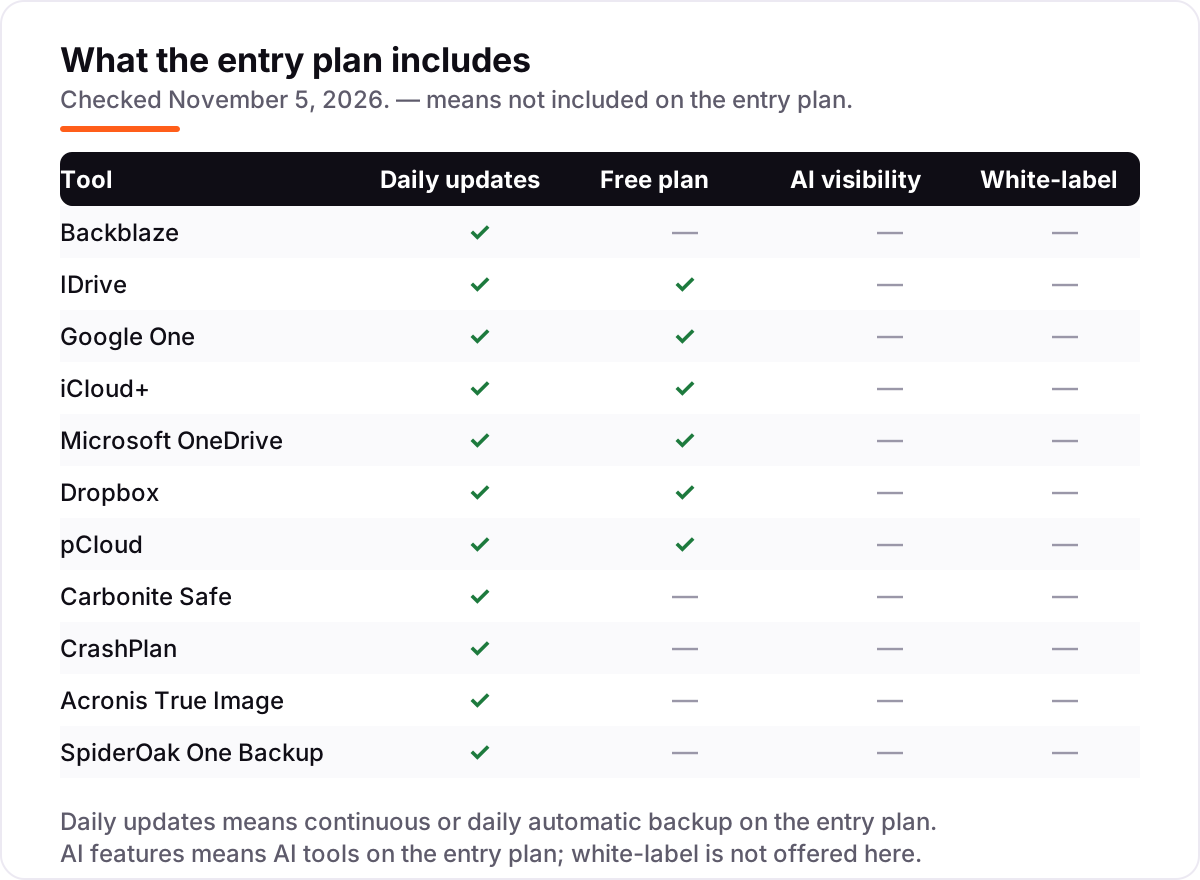
Yes, with limits. Google One gives 15 GB free, iCloud+ 5 GB, OneDrive 5 GB, Dropbox 2 GB and IDrive 10 GB, and pCloud grows from 2 GB to 10 GB as you complete setup steps. Those allowances cover a phone's essentials or a small documents folder, not a whole computer. Backblaze, Carbonite, CrashPlan, Acronis and SpiderOak offer trials instead, from 15 to 30 days.
How much storage do I actually need?
Add up the used space on every device you want covered, then add room to grow. A documents-and-photos computer often fits in 200 GB to 500 GB, while a video library or a photographer's archive can pass 2 TB quickly. Unlimited plans like Backblaze and Carbonite remove the question for one computer; capped plans like IDrive 5 TB or pCloud 500 GB need a real count first.
Can I switch backup services later?
Yes, but overlap the two services for one full backup cycle before cancelling the old one. Install the new service, let it finish its first complete backup, restore one test file to prove it works, then cancel. Cancelling first leaves a gap where a crash costs you everything, and some services delete your backed-up data within days of cancellation.
Free SEO and AI visibility audit
Find out what is holding your rankings back
Send us your site. Within 2 business days you get a written audit, an AI visibility check and a short fix list ranked by impact. Free, with no contract attached.
Request my free audit→Related guides
 Digital Marketing & AdsBest Email Backup Software for 2026: 9 Options Compared by Use CaseCompare the 9 best email backup software options for Microsoft 365 and Google Workspace on price and storage, with every price checked November 5, 2026.Read guide →
 SEO & AI Search12 Best Marketing Platforms for Small Business SEO in 2026, ComparedThe 12 best marketing platforms for small business SEO, compared on real prices, SEO tools and AI visibility. Every price checked November 1, 2026.Read guide →
 Communication & Customer Support12 Best Online Fax Services for Small Business in 2026Compare the 12 best online fax service for small business options on price, included pages and HIPAA cover, with every price checked November 4, 2026.Read guide →