
10 Best PDF Combining Tools with No Ads in 2026, Compared
Compare the 10 best pdf combining tool with no ads on price, limits and privacy, with every price checked November 5, 2026, before you merge your next file.
 Shamim Mia, Founder, SerpAstraLast verified November 5, 202613 min read
We compare pricing pages, documentation and public reviews. We never accept payment for rankings.

Key takeaways
- PDFgear is the best free pick: a full editor and merger at $0 with no ads, no signup and no watermark, on desktop and in the browser.
- PDFsam Basic and PDF Arranger are the best free desktop mergers: open source, offline, and free of watermarks, limits and ads.
- Sejda is the best free web merger at $0, but the free tier stops at 3 tasks an hour and 50 MB files — paid plans start at $7.50 a month.
- The only paid tools worth buying here are Foxit at $10.99 a month and Adobe Acrobat Standard at $14.99 a month; both merge without third-party ads.
On this page
Quick comparison
| Tool | Best for | Starting price | Free plan |
|---|---|---|---|
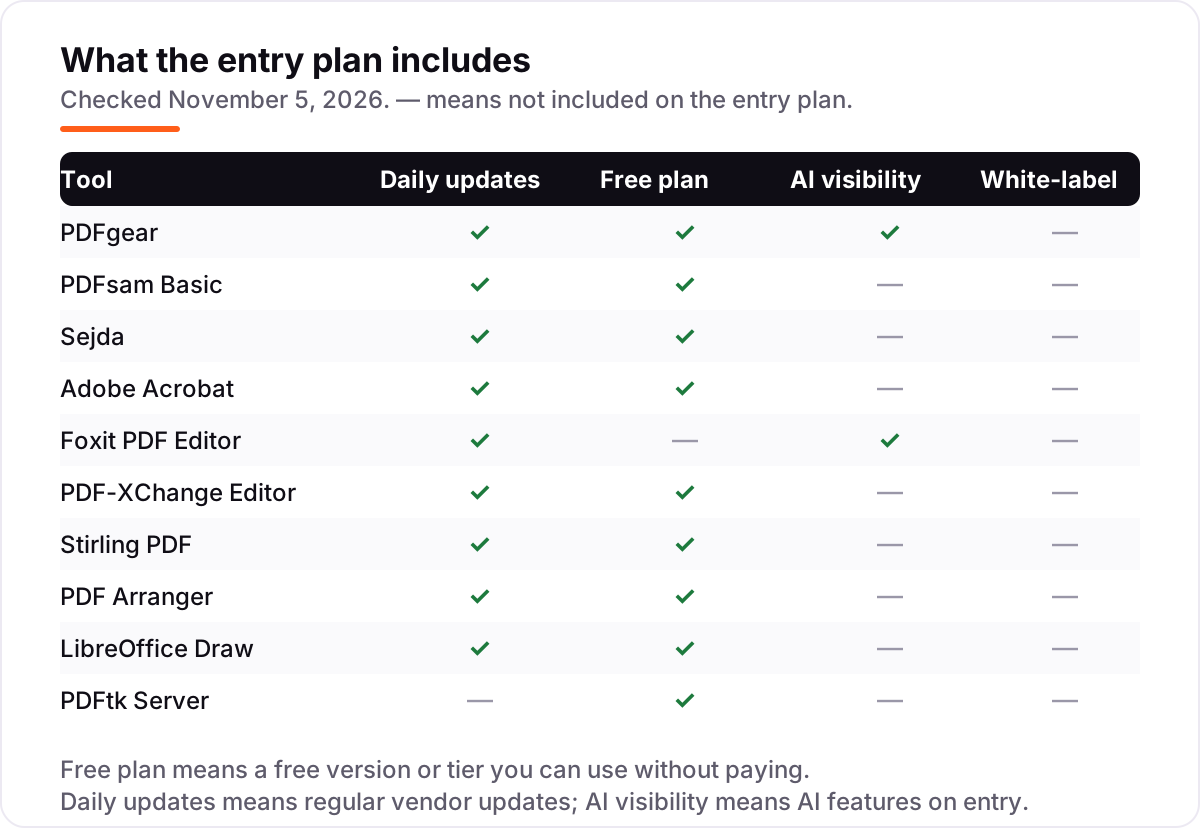
| PDFgear | People who want a full PDF editor and merger free, with no ads, no signup and no watermark | Free | Yes (free) |
| PDFsam Basic | Windows, Mac and Linux users who want a dedicated offline merger that stays free forever | Free | Yes (free) |
| Sejda | Occasional mergers who want a clean web tool with no signup and no ads | $7.50/mo | Yes (free tier) |
| Adobe Acrobat | Professionals who want the reference-standard editor and a free online merge tool | $14.99/mo | Yes (online tool) |
| Foxit PDF Editor | Teams and professionals who want Acrobat-class editing at a lower price | $10.99/mo | No (14-day trial) |
| PDF-XChange Editor | Windows users who want a powerful editor free, with a one-time license to remove watermarks | Free; $62 once | Yes (free version) |
| Stirling PDF | Privacy-minded users and teams who self-host a full PDF toolkit | Free | Yes (free) |
| PDF Arranger | Anyone who wants a visual drag-and-drop way to merge and reorder pages | Free | Yes (free) |
| LibreOffice Draw | Users who already have LibreOffice and merge PDFs occasionally | Free | Yes (free) |
| PDFtk Server | Scripters and IT staff who merge PDFs from the command line or batch jobs | Free | Yes (free) |
Make one of these tools?
We re-check this list every quarter. Send a correction, request a review, or ask about a clearly labeled sponsored spot.
Request a listingThe best pdf combining tool with no ads

PDFgear
Best for: People who want a full PDF editor and merger free, with no ads, no signup and no watermark
PDFgear is the strongest free pick in this list because it refuses the usual free-tool bargain: no ads, no signup, no watermark and no premium version waiting behind a paywall. Its own online editor page states this plainly, and the desktop app covers the same ground offline. You can merge, split, reorder and rotate pages, edit text, convert files, sign documents and run OCR without paying anything.
The limits are modest. The online editor caps each file at 100 MB and cannot change existing text — that job needs the desktop app, which has no file-size limit. The AI Copilot is capped at 50 answers a day. Pick PDFgear first when you want one free tool for merging and everyday editing; pick PDFsam Basic when you want a dedicated offline merger and nothing else.
What we like
- Completely free with no ads, no signup, no watermarks and no premium version, on desktop and in the browser
- Merges, splits, reorders and rotates pages, and edits text, converts files and runs OCR in the same app
- Online editor processes files locally in the browser, so documents are not uploaded to a server
- Desktop app works offline with no file-size limit, unlike the 100 MB cap on the online editor
Watch out for
- The vendor has said fees for some advanced features were under consideration, so free forever is not a contractual promise
- Online editor cannot change existing text — that needs the desktop app
- AI Copilot answers are capped at 50 a day on the free version

PDFsam Basic
Best for: Windows, Mac and Linux users who want a dedicated offline merger that stays free forever
PDFsam Basic is the dedicated merger in this list: a free and open source desktop app that splits, merges, mixes, extracts and rotates PDF files, and nothing else. The vendor's FAQ confirms it is completely free with no watermarks and no file size limit, and it runs on Windows, Mac and Linux with Java bundled in. There is no account, no upload and no advertising anywhere in the app.
The trade-off is the workflow. Basic asks you to type page numbers and ranges rather than drag thumbnails, so visual page sorting needs the paid Visual edition, and text editing, OCR and forms need the paid Enhanced edition. Choose PDFsam Basic when merging is the whole job and you want it offline and free forever; choose PDF Arranger when you want to see the pages first.
What we like
- Built for exactly this job: merge, split, mix, extract pages and rotate, with no watermarks and no file size limit
- Open source under the AGPL and free for company use, so the price never changes on you
- Runs fully offline on Windows, Mac and Linux, so files never leave your computer
- A command line interface through sejda-console covers batch jobs and scripts
Watch out for
- Basic works by typing page numbers and ranges, not by dragging thumbnails — visual merging needs the paid Visual edition
- No text editing, OCR or form filling; those live in the separate paid Enhanced and Visual editions
- The interface is plain next to full PDF editors, and there is no mobile app

Sejda
Best for: Occasional mergers who want a clean web tool with no signup and no ads
Sejda is the best free web merger here: open the merge tool, drop in files, arrange pages and download one PDF, with no account and no third-party ads. Page mode lets you drag, delete and rotate pages before combining, and the page tools add no watermark to free output. A desktop app covers the same tools.
The free tier is strict. Web users get 3 tasks an hour and desktop users 3 a day, files are capped at 50 MB or 200 pages, and merging stops at 30 files or 50 pages. Paid plans start with a $5 week pass, Web Monthly at $7.50 a month and Desktop plus Web Annual at $63 a year. Pick Sejda for a few merges a week; pick PDFgear when the quota gets in your way.
What we like
- Clean web workspace with no third-party ads and no signup required to merge
- Merge works in page mode, so you can drag, delete and rotate individual pages before combining
- Page tools like merge, split and rotate add no watermark to free output
- Desktop app processes documents locally, so sensitive files never need uploading
Watch out for
- Free web use stops at 3 tasks an hour, and the desktop app at 3 tasks a day
- Free files are capped at 50 MB or 200 pages, and merging at 30 files or 50 pages
- Batch processing and 500 MB uploads need a paid plan

Adobe Acrobat
Best for: Professionals who want the reference-standard editor and a free online merge tool
Adobe Acrobat is the reference standard everything else is measured against: a full desktop editor plus online tools and mobile apps, with editing, conversion, OCR, redaction, forms and e-signatures in one subscription. For merging alone, the free online merge tool does the job with no subscription and no third-party advertising, which is why Acrobat belongs on a no-ads list despite its price.
The paid entry point is Standard at $14.99 a month on an annual plan billed monthly, with Pro at $19.99 adding redaction, comparison and OCR on scans. Acrobat is also the heaviest app here and a poor value if you only merge files a few times a month. Buy it when PDF work is a daily job; use the free online tool or PDFgear when it is not.
What we like
- The most complete PDF toolset here: edit, convert, OCR, redact, sign and organize in one subscription
- Free online merge tool needs no subscription and carries no third-party advertising
- Deep Microsoft 365, Google Drive, Dropbox and Box integration for team workflows
- Paid plans include 100 GB of cloud storage and desktop, web and mobile apps
Watch out for
- Desktop access is subscription only — Adobe no longer sells perpetual licenses to new customers
- Standard lacks Pro features like redaction, document comparison and OCR on scans
- The heaviest and priciest pick here when merging alone is the job

Foxit PDF Editor
Best for: Teams and professionals who want Acrobat-class editing at a lower price
Foxit PDF Editor is the value pick among paid editors: professional editing, conversion, OCR, forms and security on Windows, macOS and the web, starting at $10.99 a month billed annually at $129.99 a year. Its own product page states that starting price, and a perpetual license at $209.99 one-time covers buyers who refuse subscriptions. Merging sits inside a full editor, with no third-party ads anywhere in the app.
The catches are the trial and the tiers. There is no free plan — only a 14-day trial, since the free Reader only views and annotates — and mobile apps plus Smart Redact wait for Editor Plus at $159.99 a year. Choose Foxit when Acrobat's price stings but you still need a real editor; choose PDFgear when free is the requirement.
What we like
- Full editing, OCR, forms and conversion at a price well below Acrobat Pro
- Perpetual license at $209.99 one-time for buyers who refuse subscriptions
- Document management system and 300 AI credits a month included with subscriptions
- Reviewers rate it lighter and faster than Acrobat on everyday documents
Watch out for
- No free plan beyond the 14-day trial — the free Reader only views and annotates
- Editor Plus at $159.99 a year is needed for mobile apps and Smart Redact
- Support reviews mention slow help with billing and technical issues

PDF-XChange Editor
Best for: Windows users who want a powerful editor free, with a one-time license to remove watermarks
PDF-XChange Editor is the Windows power user's bargain: a fast desktop editor whose free version leaves about 70% of its features unrestricted, covering viewing, annotation and everyday edits. The vendor's own comparison chart lists the free version alongside a $62 one-time Editor license and a $79 Editor Plus license, so the upgrade is a single payment, not a subscription. Merging and page work happen entirely offline, with no advertising in the app.
The limits are platform and licensing. There is no Mac, Linux or mobile version, and any output that uses a paid feature carries a watermark until you license it. There are also no refunds once keys are issued. Pick PDF-XChange Editor when you live on Windows and like paying once; pick Foxit when you need Mac or mobile apps.
What we like
- Free version covers viewing, annotation and everyday edits with about 70% of features unrestricted
- One-time license at $62, with no subscription to keep paying
- Fast, light Windows editor with more than 400 features, including OCR and document comparison on paid tiers
- Plus edition at $79 adds enhanced OCR, fillable forms and dynamic stamps
Watch out for
- Windows only — there is no Mac, Linux or mobile version
- Paid features watermark output until you buy a license
- No refunds once license keys are issued, so test the free version first

Stirling PDF
Best for: Privacy-minded users and teams who self-host a full PDF toolkit
Stirling PDF is the self-hosted answer to the whole category: a free, open source web app with more than 50 PDF tools, including merge, split, OCR, conversion, signing, redaction and compression. Because you run it on your own server or machine, files never go to a third party, there is no telemetry, and there is nothing to show an ad in. Version 2.0 added native desktop apps for Windows, macOS and Linux alongside the browser interface.
The cost is setup, not money. You need Docker or a server to run it, and the software alone does not remove the hosting bill if you put it on a VPS. Paid tiers cover single sign-on and larger-team features. Choose Stirling PDF when privacy or automation matters most; choose PDFgear when you want zero setup.
What we like
- More than 50 tools — merge, split, OCR, convert, sign, redact and compress — in one web interface
- Files stay on your own server with no telemetry and no third-party processing
- Full REST API for automation and batch workflows
- Native desktop apps for Windows, macOS and Linux arrived with version 2.0
Watch out for
- Needs a server or Docker setup — it is not a download-and-go desktop app
- Paid tiers are needed for single sign-on and larger-team features
- As a Java app it wants roughly 1–2 GB of RAM, more than a simple desktop tool
PDF Arranger
Best for: Anyone who wants a visual drag-and-drop way to merge and reorder pages
PDF Arranger is the simplest visual merger here: a free, open source desktop app that shows every page as a thumbnail, so you drag pages into order, delete the ones you do not want, and export a single PDF. It is a fork of the older PDF-Shuffler project, licensed under the GPL-3.0, and it runs fully offline on Windows, Mac and Linux, so your files never leave your machine and there is no surface for advertising.
The scope is deliberately narrow. PDF Arranger organizes pages — it does not edit text, run OCR or fill forms — and its interface is functional rather than polished. There is also no official web version. Pick PDF Arranger when you want to see the pages before merging; pick PDFsam Basic when you prefer typing page ranges.
What we like
- See every page as a thumbnail before you merge, so mistakes are visible before export
- Merge, split, rotate, crop and rearrange pages in one drag-and-drop view
- Fully offline — files are never uploaded to any server
- No paywall, no watermark and no premium tier of any kind
Watch out for
- A page organizer only — no text editing, OCR or form filling
- The interface is functional rather than polished, and there is no official web version
- Mac and Windows builds come from the GitHub releases page, not an app store

LibreOffice Draw
Best for: Users who already have LibreOffice and merge PDFs occasionally
LibreOffice Draw is the no-new-software option: the drawing module of the free LibreOffice suite opens PDFs, lets you assemble pages from several documents into one, and exports a single combined file. If LibreOffice is already on the machine, merging costs nothing extra, needs no account, and shows no advertising, since the whole suite is open source and community maintained.
The honest caveat is that Draw is not a dedicated merger. Combining files means assembling pages by hand rather than clicking one merge button, complex layouts can shift during editing, and large scanned files open slowly. Use Draw for the occasional merge when LibreOffice is already there; use PDF Arranger when merging is a weekly job.
What we like
- No extra download when LibreOffice is already installed on the machine
- Assemble pages from several PDFs into one document and export a single file
- Full drawing and annotation tools come with the office suite
- Runs on Windows, macOS and Linux with no account and no ads
Watch out for
- Merging is manual page assembly, not a one-click merge tool
- Editing can shift complex layouts, so check the output before sharing
- Large or scanned PDFs open slowly compared with dedicated mergers

PDFtk Server
Best for: Scripters and IT staff who merge PDFs from the command line or batch jobs
PDFtk Server is the command line workhorse of this list: a free tool under the GPL that merges, splits, rotates, stamps and encrypts PDFs from a terminal, with no graphical interface at all. The vendor's license page confirms it can be used at no charge, and it runs on Windows, macOS and Linux. For scripted work — nightly reports, bulk merges, server jobs — one short command replaces a whole afternoon of clicking.
The price of that power is the interface: there is none, so there is no page preview and no drag-and-drop, and upstream development has been quiet since the 2013 release. Encrypted files also need the owner password first. Pick PDFtk Server when merges must run themselves; pick any visual tool above when a person does the merging.
What we like
- One command merges, splits, rotates, stamps and encrypts PDFs
- Scriptable for nightly reports, bulk jobs and server workflows
- Runs on Windows, macOS and Linux with no graphical interface at all
- No interface means no surface for advertising, pop-ups or upsells
Watch out for
- Command line only — there is no visual page preview before merging
- Upstream development is quiet, with the last major release dating to 2013
- Encrypted inputs need the owner password before most operations run
The best pdf combining tool with no ads is the one you can open, merge and close without a banner, a pop-up or a countdown pushing a paid plan. Every tool below merges PDFs with no third-party advertising in the free experience, and every price was checked on the vendor's own page on November 5, 2026. Free tools lead the list because merging is a solved problem — you should not pay a subscription for it — and the paid picks earn their place only where they add editing, OCR or team features.
How to choose the best pdf combining tool with no ads
- Start with where the file goes. Desktop and self-hosted tools never upload your document; web tools process it on someone else's server. For contracts and medical records, pick an offline tool first.
- Check the free limit that bites first. Sejda stops at 3 tasks an hour, PDFgear's online editor at 100 MB a file, and PDF-XChange Editor watermarks paid features. The limit you hit decides your real price.
- Match the tool to the job. A dedicated merger beats a full editor for a weekly merge, and a full editor beats a merger when you also edit text, run OCR or fill forms.
- Count the platforms. PDF-XChange Editor is Windows only and PDF Arranger has no mobile app, while PDFgear and Foxit cover desktop, web and mobile.
- Read the ad model, not just the price. Free does not mean ad-free: some popular free mergers fund the free tier with advertising, so check the vendor's own wording before you trust a tool.
Merging PDFs is one small job in a wider visibility workflow. If the business also needs to be found online, our guide to marketing platforms for small business SEO covers that side. And before you publish the merged document as a lead magnet or guide, run its title through the free SERP snippet preview tool — it shows exactly how the title and description will look in Google.
Whatever you shortlist, test it with real files before you pay. Merge the ugliest documents you own — a scanned contract, a 200-page report, a set of landscape and portrait pages mixed together — and check the output page by page. A merger that scrambles page order or drops bookmarks will cost more in rework than any subscription saves. The free tools in this list are generous enough to run that test properly, with no card and no trial clock.
PDF combining tools pricing: what you will actually pay
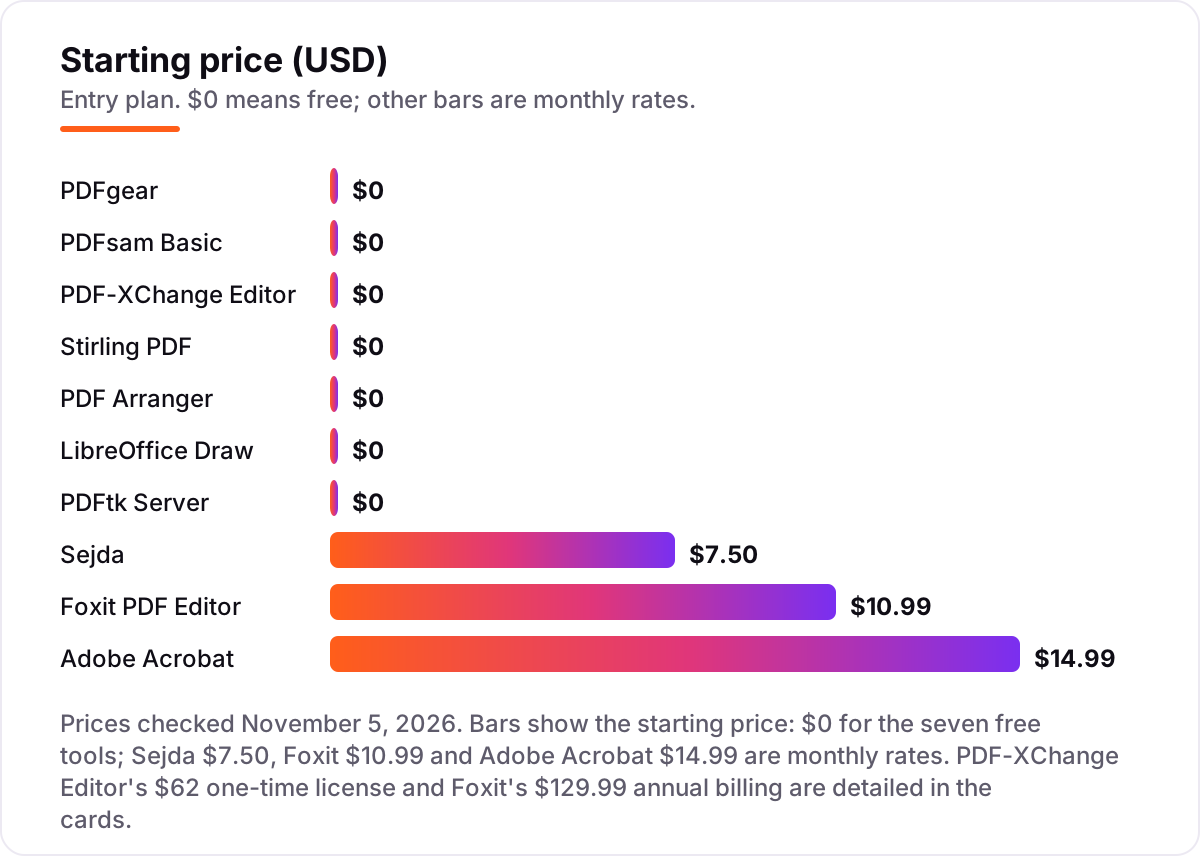
Take a small business that merges about 20 client documents a month. On the tools in this list, the software costs $0 a year on PDFgear, PDFsam Basic, Stirling PDF, PDF Arranger, LibreOffice Draw or PDFtk Server, since all seven are free with no subscription. Sejda's Web Monthly plan costs $90 a year, or $63 a year on the Desktop plus Web Annual plan, and its $5 week pass covers a one-off project week.
The paid editors change the math. Foxit PDF Editor costs $129.99 a year billed annually, or $209.99 once for the perpetual license, which pays for itself against the subscription in under two years. Adobe Acrobat Standard costs $179.88 a year at $14.99 a month, and PDF-XChange Editor costs $62 once with nothing further to pay. Over three years, that is $0 on the free tools, $62 on PDF-XChange Editor, $189 on Sejda's annual plan, $389.97 on Foxit billed annually, and $539.64 on Acrobat Standard.
Three costs sit outside every number above. First, hosting: Stirling PDF is free software, but a server to run it on costs a few dollars a month unless you run it on a machine you already own. Second, the paid features: PDF-XChange Editor's free version watermarks output that uses paid features, so budget the $62 license if your merges touch them. Third, the team multiplier: Foxit and Acrobat are priced per user, so five seats multiply the annual figure by five, while the free tools cost the same $0 for the whole team. If you also advertise the merged guides you produce, compare channels in our guide to advertising platforms for small businesses.
Know the difference: merging files vs editing PDFs
The confusion in this category is between combining pages and editing documents. A merger joins files and rearranges pages; an editor also changes text, fills forms, runs OCR and redacts content. PDFsam Basic, PDF Arranger and PDFtk Server are mergers — excellent at the first job, silent on the second. PDFgear, Adobe Acrobat, Foxit and PDF-XChange Editor are editors that also merge, and they cost more precisely because they do more.
There is a second, quieter confusion: free versus ad-free. A tool can cost $0 and still show advertising — PDF24's own merge page describes its online tools as "100% free thanks to advertising", which is why it is not in this list even though it merges well. The tools here were checked the other way: either the vendor states there are no ads, as PDFgear does, or the software is an open source desktop tool with no advertising surface at all.
A third distinction worth knowing is online versus local processing. Web mergers upload your file to a server, process it there and hand back the result; desktop and self-hosted tools do the whole job on your machine. For everyday documents the difference is convenience, but for contracts, medical records and financial statements it is a privacy decision — and the local tools in this list make it for free.
Quick comparison: tool type by need
| Buyer | Best pick | Why |
|---|---|---|
| Tightest budget, full editor | PDFgear | Free, no ads, no watermark, desktop and web |
| Dedicated offline merger | PDFsam Basic | Free, open source, no limits or watermarks |
| Occasional web merges | Sejda | Free tier, no signup, no ads |
| Professional editing suite | Adobe Acrobat | Reference standard, free online merge tool |
| Best value paid editor | Foxit PDF Editor | $10.99/month, perpetual license option |
| Self-hosted privacy | Stirling PDF | Free, files stay on your own server |
Mistakes to avoid
- Assuming free means ad-free. Some popular free mergers fund the free tier with advertising. Check the vendor's own wording — if it says "free thanks to advertising", it does not belong in a no-ads workflow.
- Buying a subscription for merging alone. Merging is a solved problem with excellent free tools. Pay only when you also need editing, OCR, forms or team features.
- Ignoring the free-tier quota. Sejda's 3 tasks an hour runs out mid-batch, and PDFgear's online editor stops at 100 MB a file. Test your largest real files before you commit.
- Merging sensitive files on a random web tool. Uploads go to someone else's server with someone else's retention policy. Use an offline tool for contracts, medical records and financial documents.
- Forgetting the platform. PDF-XChange Editor is Windows only and PDF Arranger has no mobile app. If the team works across Mac, Windows and phones, pick a tool that covers all three.
How we chose
We checked each vendor's own pricing or product page on November 5, 2026 and recorded the starting price exactly as shown. We verified the ad-free claim three ways: the vendor's own statement (PDFgear's editor page states there are no ads, no signup and no premium version; Sejda's plan listing includes no advertisements), the nature of the software (PDFsam Basic, PDF Arranger, Stirling PDF, LibreOffice Draw and PDFtk Server are open source desktop tools with no advertising surface), and the paid-desktop model (Adobe Acrobat, Foxit PDF Editor and PDF-XChange Editor show no third-party advertising in the app). One exception to the direct-read rule: Adobe's pricing page renders its prices by script, so the $14.99 Standard figure is corroborated from independent October 2026 reads of Adobe's own pricing page rather than a direct read today. Ratings come from G2 and Capterra pages opened on November 5, 2026; tools with no rating shown had no usable G2 or Capterra page. No vendor paid for a place in this list, and none of the links here are affiliate links.
What to do next
Start with the free tool that matches your platform: PDFgear for a full editor, PDFsam Basic or PDF Arranger for a dedicated merger, Stirling PDF when privacy matters most. Run your ugliest real merge through it — mixed orientations, scanned pages, a 200-page report — and check the output page by page before you trust it with client documents. If the books are sorted but new customers are not finding you, our SEO audit service handles the visibility side — or compare providers in our guide to advertising platforms for small businesses. Once your tools are in place, find out what's holding your rankings back.
Your stack only works if people find you
SerpAstra fixes what keeps your site off page one and makes it easy for AI assistants to recommend.
Get a free audit→Sources we checked (15)
- PDFgear online editor — pdfgear.com/edit-pdf (checked November 5, 2026)
- PDFsam FAQ — pdfsam.org/faq (checked November 5, 2026)
- Sejda pricing — sejda.com/upgrade (checked November 5, 2026)
- Adobe Acrobat pricing — adobe.com/acrobat/pricing.html (checked November 5, 2026)
- Foxit PDF Editor — foxit.com/pdf-editor (checked November 5, 2026)
- PDF-XChange comparison chart — pdf-xchange.com (checked November 5, 2026)
- Stirling PDF — github.com/Stirling-Tools/Stirling-PDF (checked November 5, 2026)
- PDF Arranger — github.com/pdfarranger/pdfarranger (checked November 5, 2026)
- LibreOffice — libreoffice.org (checked November 5, 2026)
- PDFtk Server license — pdflabs.com (checked November 5, 2026)
- Adobe Acrobat reviews — g2.com (checked November 5, 2026)
- Foxit PDF Editor reviews — g2.com (checked November 5, 2026)
- PDFgear reviews — g2.com (checked November 5, 2026)
- Sejda reviews — capterra.com (checked November 5, 2026)
- PDF-XChange Editor reviews — g2.com (checked November 5, 2026)
Shamim
Founder of SerpAstra
A full-stack SEO and digital marketer who spends most days on Local SEO for dental practices, AI search visibility and lead generation.
Frequently asked questions
What is the best pdf combining tool with no ads?
PDFgear is the best free pick: a full editor and merger at $0 with no ads, no signup and no watermark, on desktop and in the browser. PDFsam Basic is the best dedicated offline merger, and Sejda is the best free web option. Buy Foxit at $10.99 a month only when you also need professional editing.
Is there really a free PDF merger with no ads?
Yes, several. PDFgear states plainly that its editor has no ads, no signup and no premium version, and the open source tools here — PDFsam Basic, PDF Arranger, Stirling PDF, LibreOffice Draw and PDFtk Server — have no advertising surface at all. Free does not always mean ad-free, so check the vendor's own wording before trusting a free tool.
Do free PDF mergers add watermarks?
The free mergers in this list do not watermark merged output. PDFgear, PDFsam Basic, Sejda's page tools, Stirling PDF, PDF Arranger, LibreOffice Draw and PDFtk Server all export clean files. The exception is PDF-XChange Editor: its free version watermarks output that uses paid features, and the watermark lifts only with the $62 one-time license.
Is it safe to merge PDFs online?
Desktop and self-hosted tools are safest because files never leave your machine — PDFsam Basic, PDF Arranger, PDF-XChange Editor, Stirling PDF and PDFtk Server all work this way. PDFgear's online editor also processes files locally in your browser. With any server-based web tool, read the retention policy first and avoid uploading contracts, medical records or financial documents.
Can I merge PDFs on my phone without ads?
Yes. PDFgear offers free mobile apps with the same no-ads, no-watermark approach as its desktop app, and Sejda's web tools run in a mobile browser with no signup. Foxit's mobile apps need the Editor Plus plan at $159.99 a year, and PDF Arranger and PDF-XChange Editor have no mobile versions, so check the platform before you commit.
What is the cheapest paid PDF merger with no ads?
Sejda is cheapest by subscription: Web Monthly costs $7.50 a month, or $63 a year for Desktop plus Web access, and a $5 week pass covers a one-off project. For a single payment, PDF-XChange Editor's $62 one-time license beats every subscription over time. Both merge with no third-party advertising, so the choice is subscription versus one payment.
Free SEO and AI visibility audit
Find out what is holding your rankings back
Send us your site. Within 2 business days you get a written audit, an AI visibility check and a short fix list ranked by impact. Free, with no contract attached.
Request my free audit→Related guides
 Digital Marketing & Ads7 Best Advertising Platforms for Small Businesses in 2026, Compared7 best advertising platforms for small businesses compared on minimum budgets, cost per click and who each one fits — minimums checked on each vendor's page.Read guide →
 SEO & AI Search12 Best Marketing Platforms for Small Business SEO in 2026, ComparedThe 12 best marketing platforms for small business SEO, compared on real prices, SEO tools and AI visibility. Every price checked November 1, 2026.Read guide →
 SEO & AI Search11 Best Free SEO Keyword Research Tools in 2026, Compared11 best free SEO keyword research tools compared with real prices and free limits — Google Keyword Planner, Ahrefs, Semrush, Moz and more, sorted by need.Read guide →