
7 Best Photo Editing Software for Real Estate Photography in 2026, Compared
Compare the 7 best photo editing software for real estate photography on price, batch editing, sky swaps and free plans, with prices checked November 8, 2026.
 Shamim Mia, Founder, SerpAstraLast verified November 8, 202613 min read
We compare pricing pages, documentation and public reviews. We never accept payment for rankings.

Key takeaways
- Adobe Lightroom is the best fit for most real estate photographers at $11.99/month; Capture One Pro follows at $26.25/month for the most accurate color, and Affinity is free for serious retouching.
- The cheapest way to get both Adobe apps is the Photography plan at $19.99/month — less than Photoshop alone at $22.99/month — and it adds 1TB of storage.
- The single most important buying factor is workflow, not features: batch RAW editing for whole listings, pixel retouching for hero shots, and design tools for flyers are three different jobs.
- One-time purchases still exist here: Affinity is free, and ACDSee Photo Studio starts at $49.95 once, so a subscription is a choice, not a requirement.
On this page
Quick comparison
| Tool | Best for | Starting price | Free plan |
|---|---|---|---|
| Adobe Lightroom | Real estate photographers who shoot whole listings and need batch edits that stay consistent from room to room | $11.99/mo | No (7-day trial) |
| Capture One Pro | Photographers who shoot tethered on site and need the most accurate color straight out of camera | $26.25/mo | No (30-day trial) |
| Adobe Photoshop | Agents and photographers who need pixel-level retouching: object removal, window views and twilight conversions | $22.99/mo | No (7-day trial) |
| Affinity | Agents and photographers who want professional retouching at $0 and never want a subscription | Free | Yes (free) |
| ACDSee Photo Studio | Photographers with large listing libraries who want organizing and editing in one app for a single payment | $49.95 once | No (30-day trial) |
| Canva Pro | Agents who turn listing photos into flyers, social posts and just-listed graphics the same day | $18/mo | Yes (free plan) |
| Pixlr | Agents who need a fast browser fix — a quick brighten, crop or background cleanup — without installing anything | $2.49/mo | Yes (free plan) |
Make one of these tools?
We re-check this list every quarter. Send a correction, request a review, or ask about a clearly labeled sponsored spot.
Request a listingThe best photo editing software for real estate photography

Adobe Lightroom
Best for: Real estate photographers who shoot whole listings and need batch edits that stay consistent from room to room
Adobe Lightroom is the workhorse of real estate photography because it is built for volume. Import a whole shoot, apply one preset to every room, then fine-tune exposure and white balance shot by shot. The Lightroom plan costs $11.99 a month on an annual plan, or $119.88 a year prepaid, and includes Lightroom on desktop, mobile and web plus Lightroom Classic and 1TB of cloud storage.
The catch is the subscription and the catalog. Stop paying and the app stops working, and Lightroom Classic only feels fast once the catalog, presets and export settings are set up. Buy Lightroom when you shoot whole listings and need every room to match; buy Capture One when color accuracy on site matters more.
What we like
- Batch editing with presets and sync keeps every room in a listing matched in minutes
- AI masking selects skies, windows and interiors automatically, and Generative Remove erases clutter
- Non-destructive edits with a catalog, so the original RAW files are never touched
- Lightroom Classic is included, which is the desktop catalog most working photographers already use
Watch out for
- Subscription only — stop paying and the app stops working, with no perpetual license to fall back on
- Cloud storage caps bite fast: 1TB fills quickly with RAW brackets from a busy week of shoots
- Lightroom Classic's catalog workflow takes real setup before batch editing feels fast

Capture One Pro
Best for: Photographers who shoot tethered on site and need the most accurate color straight out of camera
Capture One Pro is the choice for photographers who shoot tethered and want the color right before the files ever reach a computer. Its camera profiles are built per body, so skin tones, wood floors and white walls render the way they look in the room. Pro costs $26.25 a month on an annual plan, or $40 a month billed monthly, and a perpetual license is also sold.
Sessions are the real-estate-friendly part: each listing gets one folder with its files, selects and exports, so nothing from one property leaks into the next. The trade-off is price and learning curve — it is the priciest subscription here, and the session workflow takes practice. Buy it when you shoot on site with a client watching.
What we like
- Color accuracy reviewers rate best in class, with camera profiles built per body
- Tethered shooting with live view, so the agent sees finished-looking shots on site
- Sessions keep each listing's files, selects and exports in one folder
- AI masking, AI Crop and Match Look speed up the repetitive parts of a listing edit
Watch out for
- The priciest subscription here, and the price has risen since 2025 — older $18/month figures are stale
- Steep learning curve: the interface and session workflow take real practice before a shoot day
- No cloud sync or mobile editing on the Pro plan — those need the All in One tier

Adobe Photoshop
Best for: Agents and photographers who need pixel-level retouching: object removal, window views and twilight conversions
Adobe Photoshop is the tool for the shots that need more than a preset: a window view rebuilt with Generative Fill, a cluttered counter cleared with Generative Remove, or a midday exterior converted to twilight. The single-app plan costs $22.99 a month on an annual plan, or $34.49 a month billed monthly, with 100GB of cloud storage and Adobe Express Premium.
Do not buy Photoshop on its own before checking the bundle. The Photography plan costs $19.99 a month and adds Lightroom, Lightroom Classic and 1TB of storage — three dollars less than Photoshop alone. Buy the single app only when you already have a RAW editor and need Photoshop for retouching.
What we like
- Generative Fill and Remove rebuild window views, skies and missing corners from a text prompt
- Layers, masks and frequency separation give full control over every pixel of a hero shot
- The largest plugin ecosystem here, including real estate presets, sky packs and virtual staging tools
- Runs as a Lightroom plugin, so the batch workflow and the retouching stay in one pipeline
Watch out for
- Costs more than the Photography plan while delivering less: $22.99 a month against $19.99 for Photoshop plus Lightroom and 1TB
- The annual contract carries an early-termination fee of 50% of the remaining months
- Steep learning curve — the full toolset takes weeks to learn, not an afternoon

Affinity
Best for: Agents and photographers who want professional retouching at $0 and never want a subscription
Affinity is the surprise of this list: since October 2025 the full professional editor is free, with a Canva account as the only requirement. There is no watermark and no feature gate — layers, masks, frequency separation, 32-bit HDR and a full RAW develop persona are all included, and the app opens PSD files.
The free price has one real limit: the AI tools, including Generative Fill and background removal, need a paid Canva plan. There is also no catalog or cloud sync, so it suits retouching more than organizing a whole archive. Buy nothing — download it — when Photoshop's price is the problem and AI fill is not essential.
What we like
- Completely free since October 2025: the full professional editor, no watermark, no feature gate
- Layers, masks, frequency separation and 32-bit HDR cover serious retouching work
- Fast on modest hardware, with live filters that preview without rendering delays
- Opens PSD files, so work can move between Affinity and Photoshop without starting over
Watch out for
- The AI tools (Generative Fill, background removal) need a paid Canva plan — the free app has none
- Smaller community and fewer real estate presets and tutorials than the Adobe apps
- No cloud sync or catalog: files live on the computer, and the iPad version is still to come

ACDSee Photo Studio
Best for: Photographers with large listing libraries who want organizing and editing in one app for a single payment
ACDSee Photo Studio is built for photographers who manage large libraries: digital asset management, non-destructive RAW editing and layered retouching live in one desktop app. The Home edition costs $49.95 as a one-time purchase, with higher editions above it, and a 30-day trial is available.
The one-time price is the point — there is no subscription to maintain, and the cost stops after the first payment. The limits are platform and polish: The top edition is Windows-only, and very large libraries can feel slow. Buy ACDSee when your archive is the problem, not just your edits.
What we like
- One app covers digital asset management, RAW editing and layered retouching for whole archives
- Fast browsing and batch tools make culling and exporting a full listing quick
- One-time purchase with no subscription, so the cost stops after the first payment
- AI tools for keywording, face detection and subject selection speed up organizing
Watch out for
- The 2026 Home edition starts at $49.95, while the top edition costs more — check which edition is on sale
- The top edition is Windows-only, so Mac photographers need the Home or Professional edition instead
- Can feel slow with very large libraries, and the interface packs in a lot to learn

Canva Pro
Best for: Agents who turn listing photos into flyers, social posts and just-listed graphics the same day
Canva Pro is not a photo editor in the Lightroom sense — it is the tool that turns finished photos into marketing. Pro costs $18 a month billed monthly, or $144 a year billed annually, and adds the background remover, Magic Edit, Magic Resize, a Brand Kit and 100GB of storage on top of the free plan.
For a listing agent, the value is speed: one photo becomes a flyer, a just-listed post and a story graphic in minutes, all on the brokerage colors. The limit is the edit itself — there is no RAW processing and no batch color correction. Buy Canva Pro for marketing, not for editing the shoot.
What we like
- Background remover and Magic Edit clean up listing photos without opening a photo editor
- Magic Resize turns one listing graphic into every social size in a click
- Brand Kit keeps every flyer on the brokerage colors, fonts and logo
- Thousands of real estate flyer and social templates, so a just-listed post takes minutes
Watch out for
- A design platform first: no RAW processing, no batch color correction and no layered retouching
- Background remover and Magic Edit sit behind Pro — the free plan cannot touch up photos
- Export quality and print control are weaker than a dedicated photo editor

Pixlr
Best for: Agents who need a fast browser fix — a quick brighten, crop or background cleanup — without installing anything
Pixlr is the quick-fix tool in this list: it runs in the browser, so a brighten, crop or background cleanup works from any computer with nothing to install. Plus costs $2.49 a month billed monthly, or $1.99 a month billed yearly, and removes ads, unlocks unlimited saves and adds 80 AI credits a month.
The credit system is the catch. Every AI action spends credits, so an agent fixing dozens of photos a week will outgrow Plus and need Premium at $9.99 a month. Buy Pixlr when the job is one photo at a time; buy Lightroom when the job is a whole listing.
What we like
- Runs in the browser with nothing to install, so a quick fix works from any computer
- Plus is the cheapest paid plan here at $2.49 a month, or $1.99 a month billed yearly
- Generative Fill, generative expand and background remover handle common listing fixes
- Pixlr Editor adds layers and masks for agents who want more than one-click fixes
Watch out for
- AI actions run on monthly credits, so heavy use on many listings burns through the allowance
- No RAW processing and no catalog, so it cannot replace a desktop editor for full shoots
- The free plan shows ads and limits saves, and paid tiers are the only way past the credit caps
The best photo editing software for real estate photography does one job well: it takes a full listing of RAW files and turns them into bright, consistent, MLS-ready photos without eating the whole evening. We ranked the seven tools below by fit for the most common buyer — a photographer or agent shooting whole listings — starting with the batch RAW editors and ending with the quick-fix browser tool, and every price was checked on November 8, 2026.
How to choose the best photo editing software for real estate photography
- Start with the workflow, not the feature list. Batch RAW editing covers a whole listing; pixel retouching fixes one hero shot; design tools make flyers. Most buyers need the first, some need the second, and almost nobody needs all three in one app.
- Count the photos per week. Forty photos a week is a batch-editing job for Lightroom or Capture One; four photos a month is a Pixlr or Canva job, and paying $26.25 a month for that volume is wasteful.
- Check RAW support for your camera before you pay. Every desktop editor here handles common RAW files, but new camera bodies need new updates — run the trial with your own files, not sample images.
- Decide whether you want a subscription. Affinity is free and ACDSee Photo Studio is a $49.95 one-time purchase, so a monthly bill is a choice here, not a requirement.
- Think about who sees the work. If an agent watches the shoot, tethered shooting in Capture One sells the service on the spot; if the photos go straight to the MLS, Lightroom's presets and batch export matter more.
Photo editing is one system in a listing workflow, not the whole job. If the business also needs to be found online, our local SEO service covers the visibility side, and our guide to booking software for photographers covers the scheduling side. Before you publish new listing pages, run your titles through the free SERP snippet preview tool — it shows exactly how the title and description will look in Google.
Whatever you shortlist, try it with a real listing before you pay. The trials in this list run 7 to 30 days, which is long enough to shoot one property, edit every room, and export the full set. Check two things in the trial: that a preset synced across forty photos still looks right on the last one, and that the export matches your MLS size and quality rules. Every tool here either has a free plan or a trial, so there is no reason to buy before a real shoot has run through it.
Real estate photo editing pricing: what you will actually pay
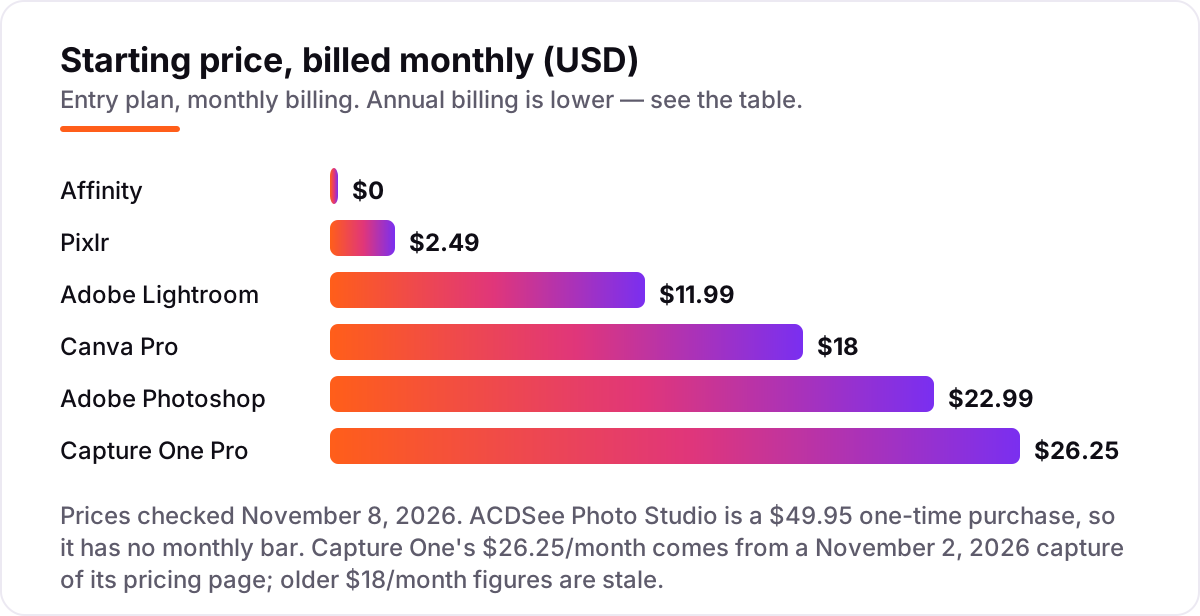
Take a photographer who shoots two listings a week, about 40 photos each, and edits them all. On list prices, the subscription costs $2.49 a month on Pixlr Plus, $11.99 on Lightroom, $18 on Canva Pro, $22.99 on Photoshop alone, and $26.25 on Capture One Pro. Affinity costs $0, and ACDSee Photo Studio costs $49.95 once. Over a year, that is $23.88 on Pixlr Plus billed annually, $119.88 on Lightroom prepaid, $144 on Canva Pro billed annually, $275.88 on Photoshop alone, $315 on Capture One Pro, and $49.95 once on ACDSee.
Two of those numbers need adjusting before they are real. First, Photoshop alone is the wrong way to buy Photoshop: the Photography plan costs $19.99 a month, or $239.88 a year, and adds Lightroom, Lightroom Classic and 1TB of storage — $179.88 a year less than buying Lightroom at $143.88 and Photoshop at $275.88 separately. Second, Pixlr's credit system means heavy weeks cost more than the Plus price: an agent fixing dozens of photos a week will need Premium at $9.99 a month, or $119.88 a year, once the 80 monthly AI credits run out.
Over three years, the gap is wide: $0 on Affinity, $49.95 on ACDSee, $71.64 on Pixlr Plus billed annually, $359.64 on Lightroom prepaid, $432 on Canva Pro billed annually, $719.64 on the Photography plan, and $945 on Capture One Pro. The same two listings a week cost nothing at the cheap end and $945 at the dear end — and the dear end is the right buy only when tethered shooting and color accuracy earn their keep on site. If the photos also need organizing across hundreds of listings, see our guide to digital asset management software for photographers.
Know the difference: batch editing vs retouching vs design
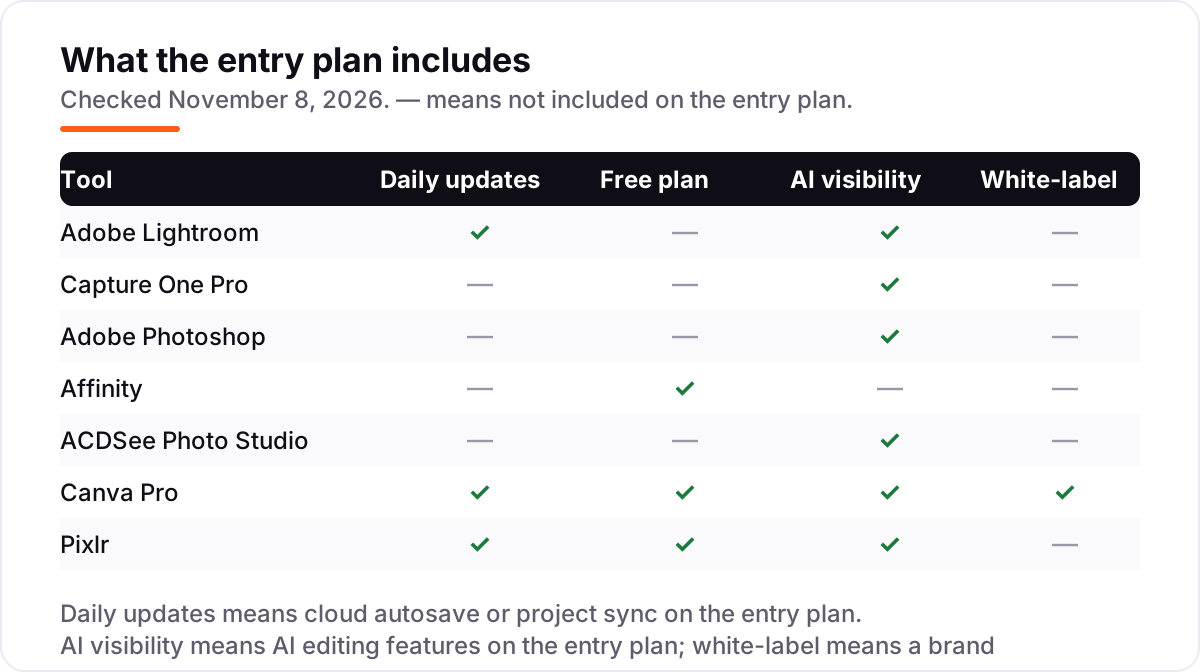
The confusion in this category is between three different jobs that all get called photo editing. Batch editing is the listing job: one preset applied to forty RAW files, with exposure and white balance synced across rooms so the whole property looks consistent. Lightroom, Capture One and ACDSee do this. Retouching is the hero-shot job: rebuilding a window view, removing a trash bin, or converting one exterior to twilight, pixel by pixel. Photoshop and Affinity do this. Design is the marketing job: turning a finished photo into a flyer or a social post. Canva and Pixlr do this.
Buying the wrong kind is the most expensive mistake here. Photoshop cannot batch-edit a listing the way Lightroom does, Canva cannot process RAW files at all, and Pixlr cannot organize an archive. The right stack for most real estate photographers is one batch editor plus one retoucher — Lightroom with Photoshop through the $19.99 Photography plan, or Capture One with Affinity at $0 — and a design tool only when the agent also makes the marketing.
A second distinction worth knowing is subscription versus one-time cost. Lightroom, Photoshop, Capture One, Canva Pro and Pixlr all stop working, or lose their paid features, when the subscription ends. Affinity keeps working because it is free, and ACDSee keeps working because the $49.95 license is a one-time purchase for that version. Neither is automatically cheaper: three years of Lightroom costs $359.64, while ACDSee costs $49.95 once — but only if the batch workflow in ACDSee is fast enough for your volume, which the trial will tell you.
Quick comparison: tool type by need
| Buyer | Best pick | Why |
|---|---|---|
| Most real estate photographers | Adobe Lightroom | Batch presets and AI masking for whole listings, from $11.99/month |
| Tethered shooting on site | Capture One Pro | Best color accuracy and live view, from $26.25/month |
| Hero-shot retouching | Adobe Photoshop | Generative Fill and layers, from $22.99/month — or $19.99 in the bundle |
| Best free editor | Affinity | Full professional retouching at $0, with a Canva account |
| Big archives, one payment | ACDSee Photo Studio | Organizing plus editing for $49.95 once |
| Flyers and social posts | Canva Pro | Templates and Brand Kit, from $18/month |
| Quick browser fixes | Pixlr | Nothing to install, Plus from $2.49/month |
Mistakes to avoid
- Buying Photoshop alone. The single-app plan costs $22.99 a month, while the Photography plan costs $19.99 and adds Lightroom, Lightroom Classic and 1TB of storage. Check the bundle before buying any Adobe app on its own.
- Paying for a batch editor to fix four photos a month. Lightroom and Capture One earn their price on volume. At four photos a month, Pixlr Plus at $2.49 or Affinity at $0 does the job, and the subscription is wasted money.
- Trusting a sky swap without checking the light. A twilight exterior looks fake when the interior shadows still show midday sun. Match the sky to the light in the room, and keep the swap subtle on overcast days.
- Ignoring the credit cap on Pixlr. Plus includes only 80 AI credits a month, so a busy week of fixes pushes you to Premium at $9.99 a month. Count your AI actions before you commit to the cheapest tier.
- Buying on the monthly price and forgetting the annual discount. Lightroom drops from $143.88 to $119.88 a year prepaid, Canva Pro from $216 to $144, and Pixlr Plus from $29.88 to $23.88 — the annual figure is the real comparison number.
How we chose
We checked each vendor's own pricing page through fresh search-index copies of those pages, because Adobe's, Capture One's and Pixlr's pages are JavaScript-gated and return no prices to a direct fetch, and we recorded the starting price exactly as shown, including the annual-billing figure where the page lists one. Two prices are third-party-sourced rather than read on the vendor page: Capture One Pro at $26.25 a month comes from a November 2, 2026 capture of its pricing page, since the live page shows no prices in text, and ACDSee Photo Studio at $49.95 one-time comes from a directory read of October 26, 2026, with the vendor's own store showing a $59.99 to $149.99 range across editions, so confirm the edition at checkout. Ratings are shown only where a G2 page was crawled within the last few days; Lightroom, Affinity and Pixlr carry no rating here because the freshest G2 crawls for Lightroom and Affinity were weeks old and Pixlr has no G2 listing. We ranked the tools by fit for the most common buyer — a photographer shooting whole listings — not by brand size. No vendor paid for a place in this list, and none of the links here are affiliate links.
What to do next
Start with the free plan or trial of your top pick and run one real listing through it — shoot the property, edit every room, and export the full set before you pay. Check that a preset synced across forty photos still looks right on the last one, and that the export matches your MLS size and quality rules. If the photos are sorted but new clients are not finding you, our local SEO service handles the visibility side — or compare providers in our guide to video editing software for small business. Once your tools are in place, find out what's holding your rankings back.
Your stack only works if people find you
SerpAstra fixes what keeps your site off page one and makes it easy for AI assistants to recommend.
Get a free audit→Sources we checked (10)
- Adobe Creative Cloud plans — adobe.com/creativecloud/plans.html (checked November 8, 2026)
- Capture One Pro pricing — captureone.com/en/pricing/capture-one-pro (checked November 8, 2026)
- Canva pricing — canva.com/pricing (checked November 8, 2026)
- Affinity — affinity.studio (checked November 8, 2026)
- ACDSee Photo Studio — acdsee.com (checked November 8, 2026)
- Pixlr pricing — pixlr.com/pricing (checked November 8, 2026)
- Adobe Photoshop on G2 — g2.com/products/adobe-photoshop/reviews (checked November 8, 2026)
- Capture One Pro on G2 — g2.com/products/capture-one-pro/reviews (checked November 8, 2026)
- Canva on G2 — g2.com/products/canva/reviews (checked November 8, 2026)
- ACDSee on G2 — g2.com/products/acdsee/reviews (checked November 8, 2026)
Shamim
Founder of SerpAstra
A full-stack SEO and digital marketer who spends most days on Local SEO for dental practices, AI search visibility and lead generation.
Frequently asked questions
What is the best photo editing software for real estate photography?
Adobe Lightroom is the best fit for most real estate photographers: batch presets, AI masking and a catalog, from $11.99/month. Capture One Pro is better for tethered shooting and color accuracy at $26.25/month, and Affinity is the best free option for retouching.
How much does photo editing software for real estate photography cost?
Entry prices run from $0 to $26.25 a month. Affinity is free, Pixlr Plus is $2.49 a month, Lightroom is $11.99, Canva Pro is $18, and Capture One Pro is $26.25. ACDSee Photo Studio is a $49.95 one-time purchase instead of a subscription.
Is there free photo editing software for real estate photos?
Yes. Affinity is completely free with a Canva account and covers professional retouching, layers and HDR. Canva and Pixlr both have free plans for quick fixes and flyers, but their AI touch-up tools need a paid plan. Lightroom, Photoshop and Capture One offer trials only.
Do I need Lightroom and Photoshop, or is one enough?
One is usually enough. Lightroom handles the whole listing — batch edits, presets and exports — while Photoshop is for individual hero shots that need pixel-level work. If you buy both, get the Photography plan at $19.99/month instead of Photoshop alone at $22.99.
What is the fastest way to edit a whole listing?
Shoot in RAW, import into Lightroom or Capture One, and edit one room fully before syncing those settings across the rest. Presets for bright interiors, window pulls and twilight exteriors do most of the work, and batch export delivers every size at once.
Can AI sky replacement and twilight conversion look natural?
Yes, when the light matches. A sky swap looks fake if the shadows and window reflections still show midday sun, so check the direction of light in the room and the sky. The best results come from subtle swaps on overcast days, not dramatic sunsets on every exterior.
What should I check before paying for a photo editor?
Check three things in the trial: that it opens your camera's RAW files, that batch presets sync across a full listing, and that exports match the MLS size and quality rules. Also confirm the real price — the Photography plan at $19.99/month undercuts Photoshop alone, and Capture One's price has risen twice since 2025.
Free SEO and AI visibility audit
Find out what is holding your rankings back
Send us your site. Within 2 business days you get a written audit, an AI visibility check and a short fix list ranked by impact. Free, with no contract attached.
Request my free audit→Related guides
 Local Business & Vertical Software10 Best Booking Software for Photographers in 2026, ComparedCompare the 10 best booking software for photographers on price, free plans, galleries and booking tools, with every price checked November 7, 2026.Read guide →
 Local Business & Vertical Software7 Best Digital Asset Management Software for Photographers in 2026, ComparedCompare the 7 best digital asset management software for photographers on price, catalogs, culling speed and free plans, with prices checked November 7, 2026.Read guide →
 Design, Video & Creative10 Best Video Editing Software for Small Business in 2026, ComparedCompare the 10 best video editing software for small business tools on price, free plans and AI features, with prices checked November 4, 2026.Read guide →