
10 Best Video Editing Software for Small Business in 2026, Compared
Compare the 10 best video editing software for small business tools on price, free plans and AI features, with prices checked November 4, 2026.
 Shamim Mia, Founder, SerpAstraLast verified November 4, 202614 min read
We compare pricing pages, documentation and public reviews. We never accept payment for rankings.
Key takeaways
- CapCut Pro is the best fit for most small businesses at $19.99/month; Canva Pro follows at $18/month for branded social video, and Clipchamp Premium at $11.99/month for Microsoft 365 shops.
- DaVinci Resolve and CapCut both offer genuinely free plans — Resolve's free version exports 4K with no watermark, while CapCut's free plan covers basic editing at $0.
- The single most important buying factor is the export limit that forces your next upgrade: 1080p caps, watermarks and monthly AI credit caps decide what you actually pay, not the headline price.
- Two pro editors sell once instead of monthly: DaVinci Resolve Studio costs $295 and Final Cut Pro costs $299.99, and both beat three years of a $22.99 subscription.
On this page
Quick comparison
| Tool | Best for | Starting price | Free plan |
|---|---|---|---|
| CapCut | Small businesses that publish short social video weekly and want templates, auto-captions and 4K export without learning a pro editor | $19.99/mo | Yes (free plan) |
| Canva | Small businesses that want one subscription for branded social video, graphics and presentations | $18/mo | Yes (free plan) |
| Descript | Small businesses that record talking-head video and want to edit by deleting words from a transcript | $24/mo | Yes (free plan) |
| Clipchamp | Windows and Microsoft 365 businesses that want a browser editor with 4K export and a brand kit | $11.99/mo | Yes (free plan) |
| Filmora | Beginners who want a simple desktop timeline with effects, titles and AI tools | $19.99/mo | Yes (free plan) |
| VEED | Small businesses that publish captioned social video and need subtitles and translations fast | $24/mo | Yes (free plan) |
| InVideo | Small businesses that want AI to turn a prompt or script into a finished social video | $20/mo | Yes (free plan) |
| Adobe Premiere Pro | Small businesses with an editor on staff who need the industry-standard timeline and pro color and audio | $22.99/mo | No (7-day trial) |
| DaVinci Resolve | Small businesses that want pro color grading and editing free, and will pay once for Studio AI tools | $295 once | Yes (free version) |
| Final Cut Pro | Mac-only businesses that want a fast pro editor they buy once and keep | $299.99 once | No (90-day trial) |
Make one of these tools?
We re-check this list every quarter. Send a correction, request a review, or ask about a clearly labeled sponsored spot.
Request a listingThe best video editing software for small business

CapCut
Best for: Small businesses that publish short social video weekly and want templates, auto-captions and 4K export without learning a pro editor
CapCut is the fastest route from a phone clip to a posted video. The free plan covers trimming, captions and 1080p export, and Pro costs $19.99 a month, or $179.99 a year, adding 4K export, the full AI toolkit, about 1 TB of cloud storage and the premium template library. Desktop, web and mobile apps share projects, so phone clips finish on a laptop.
The catch is the price history. Pro cost $89.99 a year before the 2026 restructure, so $179.99 a year is roughly double what long-time users paid, and the old Pro tier is now Standard at $9.99 a month in the mobile app. Check music and stock terms before using a CapCut video in a paid ad. Buy CapCut when speed and social templates matter most; buy Canva when brand consistency matters more.
What we like
- Pro unlocks 4K export, the full AI toolkit and about 1 TB of cloud storage for $19.99 a month
- Auto-captions, background removal and trending templates are built for vertical social video
- Desktop, web and mobile apps share projects, so edits started on a phone finish on a laptop
- The free plan covers basic trimming, captions and 1080p export at $0
Watch out for
- Pro rose to $19.99 a month in 2026 after a steep rise from the old $89.99 a year price
- The free plan watermarks premium templates and caps some exports at 1080p
- Commercial use of built-in music and stock assets carries limits to check before monetizing

Canva
Best for: Small businesses that want one subscription for branded social video, graphics and presentations
Canva is the best pick when video is one part of a wider brand job. Pro costs $18 a month, or $144 a year, and covers video editing, graphics, presentations and scheduling in one login, with a Brand Kit that keeps every clip on brand. Magic Resize turns one video into the right shape for every platform, and the template library means a promo starts from a finished design.
The limits are the timeline and the seat. Canva's editor is simpler than a dedicated video editor — no multicam, no pro color grading — and Pro covers one person only, so a second editor means the Business plan. The free plan is a genuine starting point with 5 GB of storage. Pick Canva when the business needs branded video and graphics together; pick CapCut when video alone is the job.
What we like
- One Pro subscription covers video, graphics, presentations and scheduling, with a real Brand Kit
- Thousands of video templates mean a promo clip starts from a finished design, not a blank timeline
- Magic Studio AI tools — background remover, Magic Resize and text-to-video — sit inside the same editor
- The free plan includes 5 GB of storage and basic video editing at $0
Watch out for
- Pro is priced per person, so a second editor needs the Business plan at $200 a year per person
- The timeline is simpler than a dedicated editor — no multicam, no pro color grading
- Free-plan AI credits are a one-time grant of 50, not a monthly allowance

Descript
Best for: Small businesses that record talking-head video and want to edit by deleting words from a transcript
Descript suits any small business that talks to camera: the editor turns speech into a transcript, and deleting a sentence from the transcript cuts it from the video. Hobbyist costs $24 a month, or $16 a month billed annually, and includes 10 media hours, 400 AI credits, 1080p watermark-free export and 100 GB of storage. Creator costs $35 a month and adds 4K export, 30 media hours and Studio Sound.
The meter is the thing to watch. Media hours and AI credits are capped per month, Hobbyist cannot top up, and a second editor means Creator. The free plan is a real test drive with 1 media hour a month, but exports are watermarked at 720p. Choose Descript when talking-head video, podcasts or training clips are the main output; choose CapCut when the video is mostly b-roll and music.
What we like
- Editing the transcript edits the video, so cutting filler words takes minutes, not hours
- Studio Sound cleans up echo and background noise without a separate audio tool
- Automatic transcription and captions are included, with Overdub voice cloning on paid plans
- The free plan gives 1 media hour a month and 5 GB of storage at $0
Watch out for
- Every plan meters media hours and AI credits, so a busy month can force an upgrade or top-ups
- Hobbyist covers one editor only — a second editor means Creator at $35 a month
- Free exports are watermarked and capped at 720p, and the 100 AI credits never refill

Clipchamp
Best for: Windows and Microsoft 365 businesses that want a browser editor with 4K export and a brand kit
Clipchamp is Microsoft's browser video editor, and its free plan is unusually generous: full timeline editing with 1080p exports and no watermark at $0. Premium costs $11.99 a month, or $119.99 a year, and adds 4K export, the full premium stock library, a brand kit and cloud backup. Auto-captions, text-to-speech and noise suppression are free on every plan, which keeps the real cost low.
The smart buy is usually the bundle, not the standalone plan. Microsoft 365 Personal costs $9.99 a month and includes Clipchamp Premium plus Office apps and 1 TB of OneDrive storage, so most Windows businesses already have Premium without knowing it. The trade-off is the browser: big 4K projects need a solid connection. Pick Clipchamp when the business already pays for Microsoft 365; pick Canva when the template library matters more.
What we like
- The free plan exports at 1080p with no watermark, which is rare among free video editors
- Premium adds 4K export, the full stock library and a brand kit for $11.99 a month
- Auto-captions, text-to-speech and noise suppression are free on every plan
- Premium comes free with Microsoft 365 Personal at $9.99 a month, which also adds Office and 1 TB of storage
Watch out for
- Premium is the most expensive route at $11.99 a month — the Microsoft 365 bundle costs less
- It runs in the browser, so large 4K projects depend on your connection and machine
- No desktop app with offline editing, and the stock library is smaller than Canva's

Filmora
Best for: Beginners who want a simple desktop timeline with effects, titles and AI tools
Filmora is the gentle desktop editor: a simple timeline, drag-and-drop effects and titles, and AI tools that do not demand pro skills. The monthly plan costs $19.99 a month, but Basic costs $49.99 a year — about $4.17 a month — with watermark-free 4K export and continuous upgrades. Advanced costs $59.99 a year and adds 1,000 AI credits a month, and a perpetual license costs $79.99 once.
The billing choice matters more here than anywhere else in this list: monthly billing costs $239.88 a year against $49.99 annually, so never pay monthly past the first month. AI credits beyond the allowance and the full stock library cost extra on every plan. Pick Filmora when you want a simple desktop editor at the lowest annual price; pick CapCut when the work is mostly vertical social video.
What we like
- The Basic annual plan costs $49.99 a year, the cheapest yearly route to watermark-free 4K export here
- A perpetual license costs $79.99 once, for buyers who refuse another subscription
- Effects, titles, transitions and stock assets are built in, with AI Mate on every plan
- The free plan includes the full editor, so you can learn it properly before paying
Watch out for
- Paying monthly costs $19.99 a month, nearly five times the annual plan's monthly equivalent
- AI features beyond the free allowance cost extra credits, and the stock library is a $19.99 a month add-on
- The perpetual license covers one platform and one version — the next major version is a new purchase

VEED
Best for: Small businesses that publish captioned social video and need subtitles and translations fast
VEED is a browser editor built around one job: turning raw talking-head footage into captioned social video. Lite costs $24 a month, or $12 a month billed annually, and includes watermark-free 1080p export, auto-subtitles and stock media. Pro costs $55 a month, or $29 billed annually, and adds 4K export, translations in more than 50 languages, Eye Contact AI and the full brand kit.
The cap to watch is subtitling minutes. Lite includes 120 minutes for the whole year, so a business publishing weekly will burn through them and need Pro. Monthly billing also doubles the price, so annual billing is the only sensible way to buy VEED. Pick VEED when captions and translations are the daily job; pick Descript when transcript editing and audio cleanup matter more.
What we like
- Automatic subtitles are the core strength, with 120 minutes a year on Lite and translation in 50-plus languages on Pro
- Lite costs $12 a month billed annually, half the monthly-billing price
- The browser editor needs no install, and stock audio and video are included on paid plans
- Eye Contact AI and Clean Audio fix the two most common talking-head problems in one click
Watch out for
- Subtitling minutes are capped per year — 120 minutes on Lite runs out fast for weekly publishers
- Monthly billing doubles the price: Lite is $24 a month monthly against $12 billed annually
- Free exports are watermarked at 720p, and 4K export waits for Pro at $29 a month billed annually

InVideo
Best for: Small businesses that want AI to turn a prompt or script into a finished social video
InVideo is the AI-first pick: type a prompt or paste a script and it builds a video with stock footage, voiceover and music, with a timeline editor for fixes. Starter costs $20 a month, or $10 a month billed annually, and includes 400 credits a month. Plus costs $60 a month, or $30 billed annually, with 2,000 credits, and Max costs $150 a month, or $75 billed annually.
Two warnings before you buy. First, the plan names and prices changed in late 2026 — older guides still quote Plus at $20 a month, now the Starter price — so check the live pricing page. Second, credits reset monthly and do not roll over, so a quiet month wastes the allowance. Pick InVideo when you need finished videos from prompts; pick CapCut when you edit footage you shot yourself.
What we like
- Starter costs $10 a month billed annually, the cheapest AI video generation entry here
- A prompt or script becomes a full video with stock footage, voiceover and music, with no timeline skills needed
- The timeline editor stays available, so AI drafts can be fixed by hand before export
- Annual billing halves every plan price, with a 50% off label shown on the pricing page
Watch out for
- InVideo repriced and renamed its plans in late 2026 — the old Plus at $20 a month no longer exists
- Generation runs on monthly credits that do not roll over, so unused credits are lost each month
- Starter caps at 400 credits a month, and heavier AI use means Plus at $30 a month billed annually

Adobe Premiere Pro
Best for: Small businesses with an editor on staff who need the industry-standard timeline and pro color and audio
Premiere Pro is the professional standard, and for a small business with an editor it is the safe hire: freelancers already know it, project files move between editors, and one timeline covers multicam, color, audio and captions. The single-app plan costs $22.99 a month on an annual plan billed monthly, or $34.49 month-to-month, and includes Premiere on desktop and mobile, Adobe Express Premium, Frame.io and 100 GB of cloud storage.
The cost is the commitment: a year runs $275.88 on the annual plan, there is no free plan beyond a 7-day trial, and no perpetual license — access ends the month billing stops. It also wants a strong machine and real skill. Buy Premiere Pro when video is core with trained staff; buy DaVinci Resolve when the budget says free and the editor can learn a new tool.
What we like
- The industry-standard editor, so hiring freelance editors and swapping project files is easy
- Text-based editing, AI object masking and captions cut hours off long-form and interview edits
- The single-app plan includes Premiere on desktop and mobile, Adobe Express Premium and 100 GB of cloud storage
- Frame.io review tools are included, so clients can comment on cuts without extra software
Watch out for
- A year costs $275.88 on the annual plan, and $413.88 paying month-to-month
- There is no free plan and no one-time purchase — stop paying and access ends immediately
- It demands a strong machine and a learning curve no other tool here asks for

DaVinci Resolve
Best for: Small businesses that want pro color grading and editing free, and will pay once for Studio AI tools
DaVinci Resolve is the best free video editor in this list by a wide margin: a full professional editor — editing, color, Fusion effects and Fairlight audio in one app — with 4K export and no watermark, at $0. Studio costs $295 once and adds the DaVinci Neural Engine AI tools, Magic Mask, noise reduction, resolutions past 4K and multi-user collaboration, with lifetime updates.
The price is time, not money. Resolve assumes pro knowledge, wants a strong GPU, and the free version caps at one GPU and Ultra HD. But the math is hard to argue with: three years of Premiere Pro at $22.99 a month costs $827.64, against $295 once for Studio. Pick Resolve when the business has someone willing to learn a pro tool; pick Filmora when the editor needs to be productive on day one.
What we like
- The free version is a full professional editor with 4K export and no watermark — nothing else free comes close
- Studio costs $295 once, with free lifetime updates, and never asks for another payment
- Color grading, Fusion effects and Fairlight audio sit in one app instead of three subscriptions
- Studio unlocks the DaVinci Neural Engine AI tools, noise reduction and multi-user collaboration
Watch out for
- The learning curve is the steepest here — the interface assumes pro editing knowledge
- It wants a strong GPU and plenty of memory, especially for Fusion and noise reduction
- The free version caps at one GPU and Ultra HD, and some AI tools wait for Studio

Final Cut Pro
Best for: Mac-only businesses that want a fast pro editor they buy once and keep
Final Cut Pro is the buy-once pro editor for Mac shops: $299.99 once on the Mac App Store, with free updates, and the magnetic timeline plus Apple silicon optimization make it the fastest editor here on a Mac. A 90-day free trial is the longest here, long enough to cut real client projects before paying. Multicam, captions and pro color tools are included, and Motion and Compressor cost $49.99 each.
The limits are platform and ecosystem: no Windows version, so a mixed-platform team cannot share projects, and some premium content now sits behind Apple Creator Studio at $12.99 a month. The plugin and template library is smaller than Premiere Pro's, and fewer freelance editors know it. Buy Final Cut Pro when the whole team works on Macs and hates subscriptions; buy DaVinci Resolve when the team mixes Mac and Windows.
What we like
- A one-time $299.99 purchase with free updates — no subscription, ever, for the Mac version
- The magnetic timeline and Apple silicon optimization make it the fastest editor here on a Mac
- A 90-day free trial is the longest trial in this list, long enough to cut real projects
- Multicam, captions and pro color tools are included, with Motion and Compressor as $49.99 add-ons
Watch out for
- Mac only — there is no Windows version, so mixed-platform teams cannot share projects
- Some premium content now sits behind Apple Creator Studio at $12.99 a month
- Fewer third-party plugins and templates than Premiere Pro, and a smaller hiring pool
The best video editing software for small business is the one your team will actually open every week: fast enough for a phone-shot clip, cheap enough to keep all year, and able to put captions and your logo on every export without a tutorial. We ranked the ten tools below by fit for that buyer — a US small business owner or marketer making promo and social video — and every price was checked on November 4, 2026.
How to choose the best video editing software for small business
- Start with where the video goes. Vertical social clips favor CapCut, Canva and InVideo; talking-head and training video favors Descript; long-form and client work favors Premiere Pro, DaVinci Resolve or Final Cut Pro.
- Check the export ceiling first. Clipchamp and DaVinci Resolve export without a watermark for free, while most free plans watermark exports or cap them at 720p or 1080p.
- Count the meters, not just the price. Descript meters media hours, VEED meters subtitling minutes, InVideo meters AI credits — the cap you hit first is your real starting price.
- Decide subscription vs buy-once. DaVinci Resolve Studio at $295 and Final Cut Pro at $299.99 are the only one-time purchases here; everything else bills monthly until you cancel.
- Check the machine. Premiere Pro, DaVinci Resolve and Final Cut Pro want a strong computer and a GPU; the browser editors — Clipchamp, Canva, VEED and InVideo — run on almost anything with a connection.
Video is one system in your stack, not the whole stack. Once the videos exist, they need viewers: our guide to video analytics software covers measuring what people actually watch, and our AI tools for video content creation roundup covers the wider AI video workflow. Before you publish the landing pages those videos link to, run your titles through the free SERP snippet preview tool — it shows exactly how the title and description will look in Google.
Whatever you shortlist, try it with real footage before you pay. The free plans and trials in this list are long enough to cut one genuine video — your footage, your logo, your captions — and that video tells you more than any review can. Check two things in the trial: that exports come out watermark-free at the resolution you publish, and that the captions are accurate enough to post without fixing every line by hand.
Video editing software for small business pricing: what you will actually pay
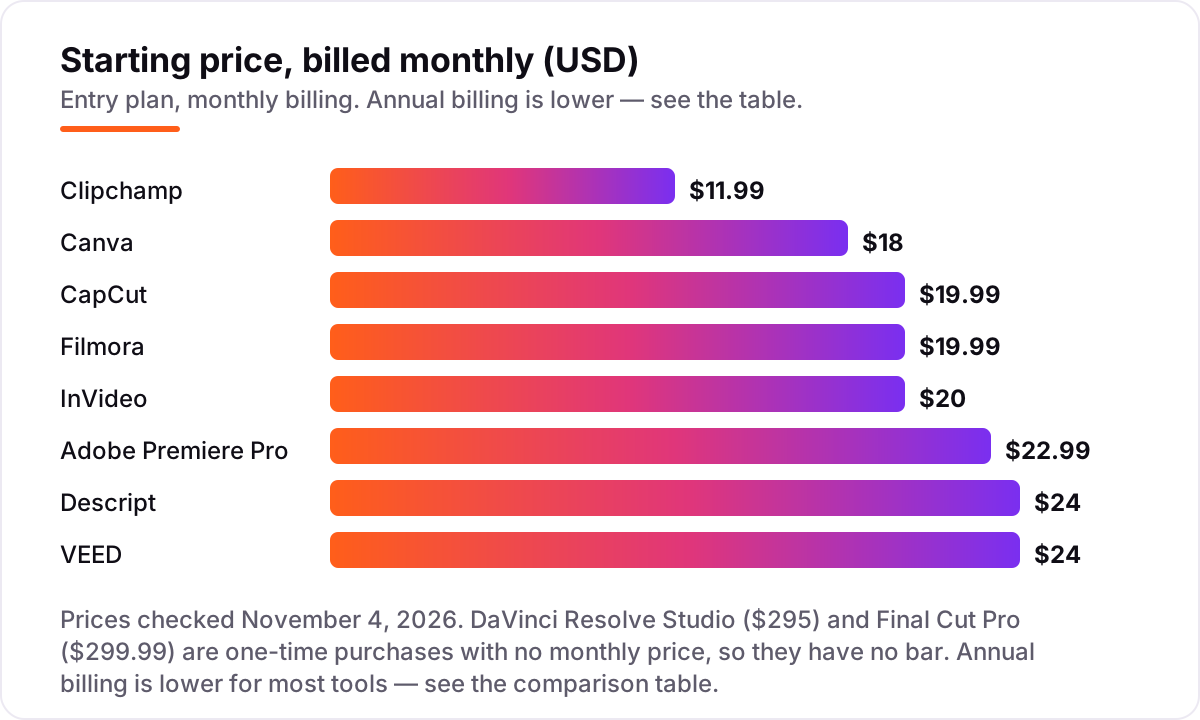
Take one editor making four short videos a month. On monthly billing, the subscription costs $11.99 a month on Clipchamp Premium, $18 on Canva Pro, $19.99 on CapCut Pro or Filmora's monthly plan, $20 on InVideo Starter, $22.99 on Premiere Pro's annual plan, and $24 on Descript Hobbyist or VEED Lite. Over a year that is $143.88 on Clipchamp, $216 on Canva, $239.88 on CapCut or Filmora monthly, $240 on InVideo, $275.88 on Premiere Pro, and $288 on Descript or VEED.
Annual billing cuts most of those bills sharply. The same year costs $119.99 on Clipchamp, $144 on Canva or $120 on InVideo Starter, $144 on VEED Lite, $179.99 on CapCut Pro, $192 on Descript Hobbyist, and $49.99 on Filmora Basic — a $190 gap between Filmora's monthly and annual routes for the same editor. Premiere Pro publishes no cheaper annual prepay on the single-app plan, so $275.88 is the whole story there.
The buy-once comparison is the one that changes the decision. Three years of Premiere Pro at $22.99 a month costs $827.64, against $295 once for DaVinci Resolve Studio and $299.99 once for Final Cut Pro — both with free updates. A business that keeps the same editor for three years saves more than $525 by buying once, before counting the $0 free version of Resolve that already exports 4K.
Three costs sit outside every number above. First, the meters: Descript's media hours, VEED's subtitling minutes and InVideo's AI credits all run out, and the next tier or a top-up is the real cost of a busy month. Second, the add-ons: Filmora's full stock library is $19.99 a month extra, and CapCut's commercial music terms need checking before a paid ad. Third, the second seat: Canva Pro covers one person, Descript Hobbyist covers one editor, and a teammate means a higher plan on both. If video is only part of the marketing job, the visibility side matters too — see our guide to marketing platforms for small business SEO.
Know the difference: a video editor vs an AI video generator
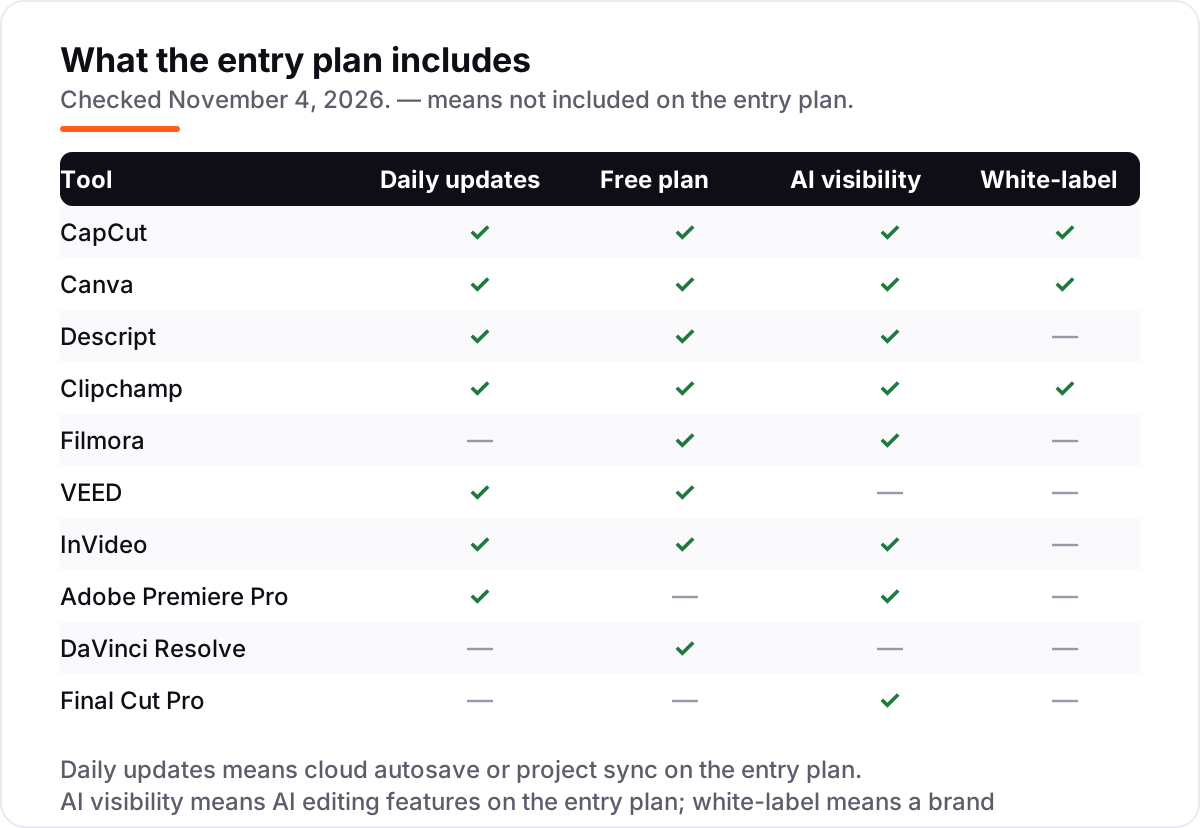
The confusion in this category is between editing footage you shot and generating video you did not. A video editor — CapCut, Premiere Pro, DaVinci Resolve, Final Cut Pro, Filmora, Clipchamp, VEED, Canva and Descript — starts with your clips and gives you a timeline to cut, caption and brand them. An AI video generator — InVideo here — starts with a prompt or a script and builds the video from stock footage and generated clips. Both end with a video file, but they solve different problems.
That difference decides the budget. Generators bill by credits: InVideo Starter gives 400 credits a month, and a month of heavy generation means Plus at $30 a month billed annually. Editors bill by seat and by export limits, and the free versions of DaVinci Resolve and Clipchamp cover real work at $0. A business that films its own shop, staff and products needs an editor; a business with no footage and no camera needs a generator, or a stock library inside an editor.
There is a second, quieter confusion: AI features are not the same as AI generation. Auto-captions, background removal, text-based editing and noise cleanup are AI features inside editors, and most tools here include some on the free or entry plan. AI generation — a whole video from a prompt — is a separate product with its own meter. If a tool's headline feature is a prompt box, check the credit cap before you check the price.
Quick comparison: tool type by need
| Buyer | Best pick | Why |
|---|---|---|
| Fast social video, weekly | CapCut | Templates and auto-captions built for vertical video, Pro is $19.99/month |
| Branded video plus graphics | Canva | One Pro subscription for video, design and scheduling, $18/month |
| Talking-head and training video | Descript | Edit by transcript, Hobbyist is $24/month |
| Microsoft 365 shop on a budget | Clipchamp | Free 1080p exports with no watermark, Premium is $11.99/month |
| Cheapest yearly desktop editor | Filmora | Basic annual plan is $49.99/year for watermark-free 4K export |
| Captions and translations | VEED | Subtitles in 50-plus languages, Lite is $24/month |
| Video from a prompt | InVideo | AI builds the video from a script, Starter is $20/month |
| Pro editing, buy once | DaVinci Resolve | Free version exports 4K, Studio is $295 once |
Mistakes to avoid
- Budgeting on the annual price while paying monthly. Filmora costs $49.99 a year on the annual plan but $19.99 a month on monthly billing, and VEED Lite doubles from $12 to $24 — the monthly figure is what leaves your account.
- Buying on the free plan, then finding exports watermarked. Most free plans here watermark exports or cap them at 720p. DaVinci Resolve and Clipchamp are the exceptions — check the export before you publish.
- Ignoring the meter that bites first. A tool can be cheap and still be the wrong buy: Descript Hobbyist at $24 is no bargain once you pass 10 media hours, VEED Lite once you pass 120 subtitling minutes, and InVideo Starter once you pass 400 credits.
- Trusting an old price from a 2026 guide. CapCut Pro doubled and InVideo renamed its plans in late 2026 — older articles still quote Pro at $9.99 and Plus at $20, and both figures are now wrong.
- Paying for pro power nobody on staff can use. Premiere Pro and DaVinci Resolve are the strongest editors here, and also the hardest to learn. A tool the team never opens costs more than the most expensive subscription.
How we chose
We verified each price on November 4, 2026. The vendor pricing pages could not be opened directly today — the browser service returned rate-limit errors — so every price was checked against search results quoting the vendor's own pricing page, with the figures cross-checked across at least two independent sources, and the two one-time prices confirmed against the vendors' own product pages. No review rating appears in this list because no G2 or Capterra page could be opened today, and we would rather show no rating than a stale or estimated one. We ranked the tools by fit for the most common buyer — a US small business owner or marketer making promo and social video — not by brand size. No vendor paid for a place in this list, and none of the links here are affiliate links.
What to do next
Start with the free plan or trial of your top pick and cut one real video with your own footage, logo and captions. Check that the export is watermark-free at the resolution you publish, and that the captions are accurate enough to post without fixing every line. If the video is sorted but new customers are not finding you, our monthly SEO service handles the visibility side — or compare providers in our guide to SEO companies for small business. Once your tools are in place, find out what's holding your rankings back.
Your stack only works if people find you
SerpAstra fixes what keeps your site off page one and makes it easy for AI assistants to recommend.
Get a free audit→Sources we checked (10)
- CapCut pricing — capcut.com/pricing (checked November 4, 2026)
- Canva pricing — canva.com/pricing (checked November 4, 2026)
- Descript pricing — descript.com/pricing (checked November 4, 2026)
- Clipchamp pricing — clipchamp.com/en/pricing (checked November 4, 2026)
- Filmora pricing — filmora.wondershare.com/shop/buy/buy-video-editor.html (checked November 4, 2026)
- VEED pricing — veed.io/pricing (checked November 4, 2026)
- InVideo pricing — invideo.io/pricing (checked November 4, 2026)
- Adobe Premiere Pro pricing — adobe.com/creativecloud/plans.html (checked November 4, 2026)
- DaVinci Resolve pricing — blackmagicdesign.com/products/davinciresolve (checked November 4, 2026)
- Final Cut Pro pricing — apple.com/final-cut-pro (checked November 4, 2026)
Shamim
Founder of SerpAstra
A full-stack SEO and digital marketer who spends most days on Local SEO for dental practices, AI search visibility and lead generation.
Frequently asked questions
What is the best video editing software for small business?
CapCut Pro is the best fit for most small businesses at $19.99/month: fast social templates, auto-captions and 4K export with almost no learning curve. Canva Pro at $18/month is better when branding matters, and DaVinci Resolve is best when the budget is $0 and someone can learn a pro tool.
How much does video editing software for a small business cost?
Entry prices run from $0 to $24 a month. DaVinci Resolve and Clipchamp have free plans that export without a watermark, and the first paid plans cost $11.99–$24 a month. A one-editor business typically pays $120–$290 a year on annual billing, before any stock or AI credit add-ons.
Is there free video editing software for small business?
Yes, with limits. DaVinci Resolve's free version is a full pro editor with 4K export and no watermark. Clipchamp's free plan exports 1080p with no watermark. CapCut, Canva, Filmora, VEED and InVideo all have free plans, but most watermark exports or cap resolution.
Can I buy video editing software once instead of subscribing?
Yes, two pro editors still sell once. DaVinci Resolve Studio costs $295 one time and Final Cut Pro costs $299.99 once on the Mac App Store, both with free updates. Filmora also sells a perpetual license for $79.99. Every other tool in this list is subscription-only.
What is the difference between CapCut and Adobe Premiere Pro?
CapCut is built for fast social video: templates, auto-captions and AI effects with almost no learning curve, from $19.99/month. Premiere Pro is a pro timeline for trained editors, with multicam, advanced color and audio, from $22.99/month. CapCut suits owners editing their own clips; Premiere suits businesses with an editor on staff.
Do I need a computer, or can I edit video in a browser?
You can edit in a browser. Clipchamp, Canva, VEED and InVideo all run in the browser with nothing to install, and CapCut and Descript have web versions too. Browser editors suit short social clips, while long 4K projects still run better in a desktop app like Premiere Pro or DaVinci Resolve.
What should a small business look for in a video editor?
Check four things: captions and subtitles, a brand kit for logos and colors, watermark-free export at 1080p or better, and stock footage included in the price. Then check the caps — monthly AI credits, subtitling minutes and media hours are the limits that force the next upgrade.
Free SEO and AI visibility audit
Find out what is holding your rankings back
Send us your site. Within 2 business days you get a written audit, an AI visibility check and a short fix list ranked by impact. Free, with no contract attached.
Request my free audit→Related guides
 AI, Data & Analytics12 Best AI Tools for Video Content Creation in 2026, Compared12 best AI tools for video content creation compared with real prices, free plans and G2 ratings, so you can pick the right video maker without overpaying.Read guide →
 SEO & AI SearchBest Video Analytics Software for 2026: 9 Options Compared by Use Case9 best video analytics software tools compared on price, engagement analytics and free plans. Prices checked on the vendor pricing page, November 2, 2026.Read guide →
 SEO & AI Search12 Best Marketing Platforms for Small Business SEO in 2026, ComparedThe 12 best marketing platforms for small business SEO, compared on real prices, SEO tools and AI visibility. Every price checked November 1, 2026.Read guide →