
10 Best Product Analytics Tools in 2026 (Free and Paid, Compared)
10 best product analytics tools compared on price, free plans and fit, from Mixpanel and Amplitude to free GA4. Priced from vendor pages, November 2026.
 Shamim Mia, Founder, SerpAstraLast verified November 2, 202612 min read
We compare pricing pages, documentation and public reviews. We never accept payment for rankings.

Key takeaways
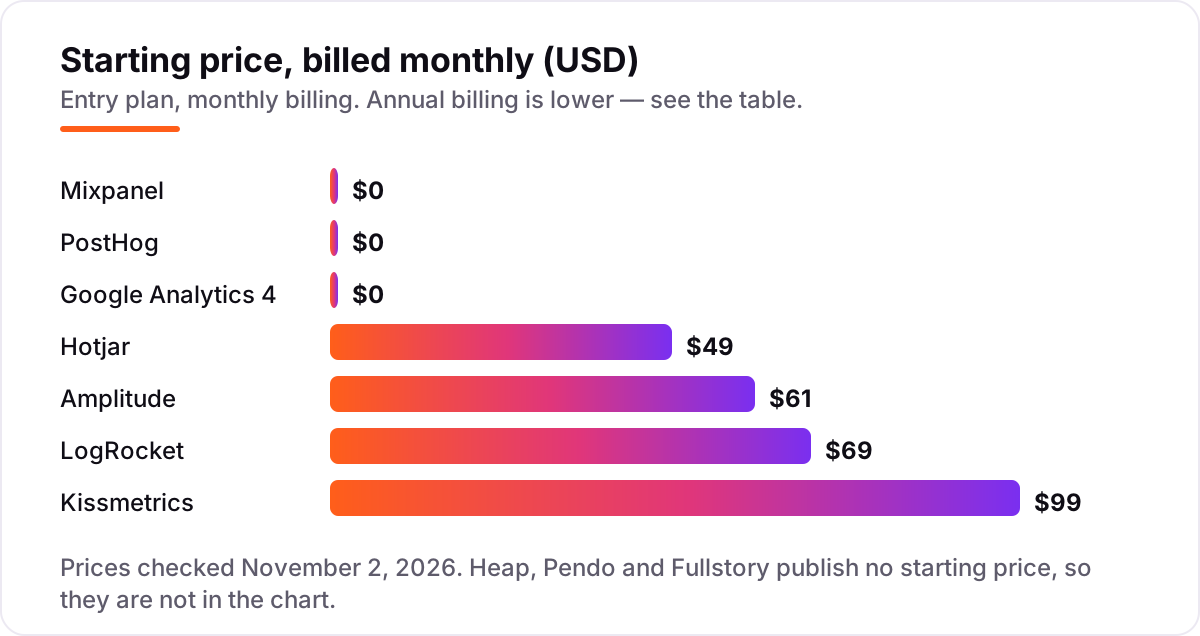
- Mixpanel is the best all-round pick for most product teams: free up to 1M events a month. Amplitude is the deepest, from $61/month billed monthly ($49/month billed annually). PostHog is the best all-in-one, free up to 1M events a month.
- Free plans are real here: GA4 is free at any volume, Fullstory replays 30,000 sessions a month free, and Hotjar covers 200,000 sessions a month free.
- The single most important buying factor is the pricing basis: events, sessions or monthly users. The same product can cost $0 or $500 a month depending on which one you are billed on.
- Heap, Pendo and Fullstory publish no starting price — every paid plan is a custom quote, so budget a sales conversation before you commit.
- Prices below come from the vendors' own pricing pages as published in September–October 2026 reads. Direct re-checks on November 2, 2026 were blocked by a tool failure, and ratings are omitted because the G2 pages could not be opened that day — see 'How we chose'.
On this page
Quick comparison
| Tool | Best for | Starting price | Free plan |
|---|---|---|---|
| Mixpanel | Growing SaaS product teams that want funnels, retention and cohorts without heavy instrumentation | $0/mo (free tier) | Yes (1M events) |
| Amplitude | Mid-size product and growth teams that need deep behavioral cohorts and predictive audiences | $49/mo (annual) | Yes (free Starter) |
| PostHog | Engineering-led SaaS teams that want analytics, replay, flags and experiments in one open-source platform | $0/mo (free tier) | Yes (1M events) |
| Google Analytics 4 | Teams already in the Google Ads ecosystem that need free traffic and event data at any volume | Free | Yes (free forever) |
| Heap | Product teams that want autocapture — every click and pageview tracked with no manual event tagging | Custom quote | Yes (10K sessions) |
| Pendo | Mid-market product teams that want analytics plus in-app guides and feedback in one platform | Custom quote | Yes (500 MAUs) |
| Fullstory | Ecommerce and SaaS teams that need session replay plus funnels to find why users struggle | Custom quote | Yes (30K sessions) |
| Hotjar | Small product and UX teams that want heatmaps, recordings and funnels at a low entry price | $39/mo (annual) | Yes (200K sessions) |
| LogRocket | Engineering teams that need session replay tied to console logs, network requests and errors | $69/mo | Yes (1K sessions) |
| Kissmetrics | Ecommerce and SaaS marketers who need person-based funnels, cohorts and revenue reporting | $99/mo | Yes (Starter free) |
Make one of these tools?
We re-check this list every quarter. Send a correction, request a review, or ask about a clearly labeled sponsored spot.
Request a listingThe best product analytics tools

Mixpanel
Best for: Growing SaaS product teams that want funnels, retention and cohorts without heavy instrumentation
Mixpanel is the default product analytics pick for a reason: the free plan covers a million events a month with unlimited seats, and the core reports — funnels, retention, cohorts — are the ones product teams actually open every week. You can go from install to a first funnel in an afternoon, and the reports stay readable for non-technical teammates.
The catch is the meter. Growth is usage-based from $0, so the bill is $0 until you pass a million events, then climbs per event — the vendor calculator puts 1.5M events at $140 a month billed monthly. If your product fires events freely, instrument with discipline or the invoice will surprise you.
What we like
- Free plan covers 1M events a month with unlimited seats, so small products start at $0
- Funnels, retention and cohort reports are fast to build and easy for non-technical teammates to read
- Session replay, experiments and feature flags are available in the same product
Watch out for
- Costs climb steeply once event volume passes the free 1M events a month
- Group analytics and data pipelines are paid add-ons, not included in Growth

Amplitude
Best for: Mid-size product and growth teams that need deep behavioral cohorts and predictive audiences
Amplitude is the deepest behavioral analytics tool in this list. Starter is free up to 10,000 monthly tracked users and two million events a month, and Plus adds unlimited product analytics with behavioral cohorts and predictive audiences from $49 a month billed annually. If your questions are about who does what, in which order, and who is likely to churn, this is the strongest answer.
The price curve is the trade-off. Growth and Enterprise are quote-only, and the jump from Plus to a negotiated contract is large. MTU billing also punishes viral spikes: a user who fires five hundred events costs the same as one who fires a single event, so count users, not events, when you budget.
What we like
- Starter is free up to 10,000 monthly tracked users and 2M events a month
- Behavioral cohorts, funnel and retention analysis are the deepest in this list
- Session replay, feature flags and web experimentation are included from Starter
Watch out for
- Growth and Enterprise are quote-only, and contracts commonly run into five figures a year
- MTU billing counts a user the same whether they fire one event or five hundred

PostHog
Best for: Engineering-led SaaS teams that want analytics, replay, flags and experiments in one open-source platform
PostHog replaces five tools with one SDK: product analytics, session replay, feature flags, experiments, surveys and error tracking, each with its own monthly free allowance. The analytics allowance is a million events a month, and the vendor says 97% of companies using it pay nothing. For an engineering-led team that wants everything in one place, nothing else in this list bundles as much for $0.
The honest limitation is forecasting. Each product bills separately per unit, so a month with heavy replay and flag usage costs more than the analytics line alone suggests. Set a billing limit per product in the dashboard, and self-host only if your team genuinely wants to run the infrastructure.
What we like
- Every product has a monthly free allowance: 1M analytics events, 5,000 session replays, 1M flag requests
- Analytics, replay, feature flags, experiments, surveys and error tracking share one SDK
- Open source and self-hostable, with no seat fees at any volume
Watch out for
- Usage-based billing across separate products makes the total bill hard to forecast
- The interface assumes technical users, so non-technical teammates need more onboarding

Google Analytics 4
Best for: Teams already in the Google Ads ecosystem that need free traffic and event data at any volume
Google Analytics 4 is the free default, and the scale of that default is hard to argue with: W3Techs data from mid-2025 put Google Analytics at 81.4% of the web analytics market. The standard property costs nothing at any traffic level, includes a free BigQuery raw export, and plugs straight into Google Ads audiences and Search Console.
It is a traffic and marketing tool first, a product tool second. Funnels and cohorts exist, but the event-based model needs careful setup before it answers product questions, and explorations sample above roughly ten million events. Run GA4 alongside a dedicated product tool rather than instead of one.
What we like
- Free at any traffic level, with no per-event or per-visitor fee on the standard property
- Free BigQuery export of raw event data, which used to be an enterprise-only feature
- Deep integration with Google Ads audiences, Search Console and the wider Google stack
Watch out for
- Exploration reports sample data above roughly 10M events, and retention caps at 14 months
- The event-based data model takes real setup time before it answers product questions

Heap
Best for: Product teams that want autocapture — every click and pageview tracked with no manual event tagging
Heap's selling point is autocapture: it records every click, pageview and form interaction automatically, so you define events after the fact instead of instrumenting before it. Ask a question about last month and the data is already there. For teams that keep discovering questions they did not think to track, that retroactive coverage is the whole argument.
The price is the fog. Growth is priced by session volume with an estimate shown only after you install the free snippet, and third-party directories report Growth starting around $3,600 a year. The free plan covers 10,000 sessions a month. Try the free tier first and get the Growth estimate in writing before you plan around it.
What we like
- Autocapture records every interaction automatically, so analysis never waits on instrumentation
- Define events retroactively: ask a question about last month and the data is already there
- Session-based pricing is easy to forecast for sites with steady traffic but few events per visit
Watch out for
- No published starting price: Growth is priced by session volume after installing the snippet
- The free plan covers only 10,000 sessions a month with 6 months of data history

Pendo
Best for: Mid-market product teams that want analytics plus in-app guides and feedback in one platform
Pendo pairs product analytics with in-app guides, NPS surveys and roadmaps, so the same platform that shows where users drop off can also guide them past the drop-off. The free plan covers 500 monthly active users with analytics, guides, NPS and roadmaps included, which is enough to test the whole loop on a small product.
Paid plans are quote-only and priced on monthly active users, with entry contracts commonly reported from around $7,000 a year. Feedback is a separate module, Pendo Listen, not part of the base plans. Pendo fits when guidance is the job; if you only need analytics, the cheaper tools here do it for less.
What we like
- Free plan covers 500 monthly active users with analytics, guides, NPS and roadmaps
- In-app guides and product analytics share one platform, so onboarding flows use live behavior data
- Retroactive analytics and Leo, the natural-language query assistant, come with paid plans
Watch out for
- Paid plans are quote-only, and entry contracts are commonly reported from around $7,000 a year
- Feedback and idea validation (Pendo Listen) is a separate module, not in the base plans

Fullstory
Best for: Ecommerce and SaaS teams that need session replay plus funnels to find why users struggle
Fullstory is the replay-first pick in this list. FullstoryFree covers 30,000 sessions a month with twelve months of retention — the most generous free replay allowance here — and pairs high-fidelity replays with funnels, heatmaps and frustration signals like rage clicks. StoryAI summarizes sessions, so you can find the broken moment without watching hours of video.
Everything paid is quote-only: Business, Advanced and Enterprise all say request pricing on the vendor's plans page, and real-world contracts are commonly reported from $10,000 a year. The free plan excludes dashboards, mobile analytics and StoryAI. Start on FullstoryFree and only talk to sales when the session volume forces it.
What we like
- FullstoryFree covers 30,000 sessions a month with 12 months of retention — the most generous free replay tier here
- High-fidelity session replay pairs with funnels, heatmaps and frustration signals
- StoryAI summarizes sessions, so teams find the broken moment without watching hours of video
Watch out for
- Paid plans are quote-only, and real-world contracts are commonly reported from $10,000 a year
- Dashboards, mobile analytics and StoryAI are excluded from the free plan

Hotjar
Best for: Small product and UX teams that want heatmaps, recordings and funnels at a low entry price
Hotjar is the simplest behavior tool in this list, and the free plan is unusually large: 200,000 monthly sessions with heatmaps, session replays, funnels and error monitoring. Growth starts at $49 a month billed monthly ($39 billed annually) for 7,000 sessions and rises in published steps, so a small team can see the whole ladder before paying anything.
One structural change to know: Hotjar merged into the Contentsquare Group in July 2025, and its pricing page now redirects to Contentsquare's pricing page, where Hotjar is the Experience Analytics product line. Surveys and product analytics are separate products with their own prices. Buy it for heatmaps and replays, not as an all-in-one.
What we like
- Free plan covers 200,000 monthly sessions with heatmaps, replays, funnels and error monitoring
- Growth starts at $49/month for 7,000 sessions and scales in published steps to $739/month
- Heatmaps, session replay, journey analysis and AI summaries in one simple interface
Watch out for
- Hotjar merged into Contentsquare in 2025, so pricing now sits on Contentsquare's page, not Hotjar's
- Experience Analytics, Voice of Customer and Product Analytics are priced as separate products

LogRocket
Best for: Engineering teams that need session replay tied to console logs, network requests and errors
LogRocket is the debugging pick: the replay shows what the user saw, and the same timeline shows the console logs, network requests, Redux state and JavaScript errors behind it. The free plan covers 1,000 sessions a month, Team starts at $69 a month for 10,000 sessions, and every paid tier includes unlimited analytics events, error events and seats.
The price follows session volume, so a traffic spike moves the bill, and the plan names have shifted over 2026 — one October source lists Core from $176 a month at 25,000 sessions, against $69 at 10,000. Confirm which volume step your quote covers before you sign. Buy LogRocket when the bug matters more than the funnel.
What we like
- Replay is paired with console logs, network requests, Redux state and JavaScript errors in the same timeline
- Free plan covers 1,000 sessions a month, and Team starts at $69/month for 10,000 sessions
- Unlimited analytics events, error events and seats on every paid tier
Watch out for
- Pricing scales by session volume, so a traffic spike can push the bill up fast
- One October 2026 source lists Core from $176/month at 25,000 sessions, against $69 at 10,000 sessions — confirm the volume step on the pricing page

Kissmetrics
Best for: Ecommerce and SaaS marketers who need person-based funnels, cohorts and revenue reporting
Kissmetrics tracks people, not just events: every action ties to a real customer, so the funnel report and the revenue report are the same story. That person-first model is why ecommerce and SaaS marketers keep it around — cohorts, retention and revenue sit in one place, and the reports are written for marketers rather than analysts.
The price needs a check before you trust it. Directories disagree wildly, from $49 to $299 a month; the $99 Growth figure is vendor-supplied pricing shown on G2, with a free Starter plan below it. Confirm $99 on the vendor's own pricing page before budgeting, and know that A/B and Power reports need the higher tiers.
What we like
- Person-based tracking ties every event to a real customer, so revenue reports connect to behavior
- Funnels, cohorts and retention reports are built for marketers, not just analysts
- Starter plan is free, and Growth starts at $99/month
Watch out for
- Directory prices conflict ($49 to $299); the $99 Growth figure is vendor-supplied via G2 and should be confirmed on the vendor page
- A/B and Power reports are limited to higher tiers, so the entry plan is funnel- and cohort-focused
What a product analytics tool actually does
The best product analytics tools answer one question: what do people actually do inside your product? They record events — signups, clicks, purchases, feature uses — then turn them into funnels, retention curves and cohorts, so you can see where users drop off and who comes back. That is the whole job, and it is different from counting traffic: a web analytics tool tells you how many people arrived, while a product analytics tool tells you what they did after they arrived.
Most teams end up with two tools, not one: a free traffic tool and a paid product tool. The scale of the free default is hard to argue with — W3Techs data from mid-2025 put Google Analytics at 81.4% of the web analytics market — but GA4 answers traffic questions first and product questions second. The tools in this list are organised by what you actually need: free options first, then dedicated product analytics platforms, then session replay and behavior tools.
Free options first
If your product is small, you may not need to pay at all. GA4 is free at any volume, PostHog gives a million events a month free, Mixpanel gives a million events a month free, and Fullstory replays 30,000 sessions a month free. Those free tiers are honest products, not demos — but they cap out on volume, retention or features, and the moment you need longer history, more seats or deeper reports, a paid plan is cheaper than the time you lose working around the limits.
For a single small product, start with one of these free plans and upgrade when the volume forces it. For anything client-facing or team-wide, skip the free tier: the reporting, retention and support that matter start on the paid plans.
Dedicated product analytics platforms
The five dedicated platforms in this list — Mixpanel, Amplitude, PostHog, Heap and Kissmetrics — do the same core job with different trade-offs. Mixpanel is the easiest to learn, Amplitude is the deepest on behavior, PostHog bundles the most tools for the least money, Heap removes the instrumentation work with autocapture, and Kissmetrics ties everything to a real customer and a revenue number.
The pricing basis is what separates them. Mixpanel and PostHog bill on events, Heap and Kissmetrics on sessions or tracked people, Amplitude on monthly tracked users. The same product can cost $0 on one basis and hundreds a month on another, so count your own volume in the vendor's unit before you compare the headline prices.
Session replay and behavior analytics
The other five tools answer a different question: why did the user struggle? Fullstory, Hotjar and LogRocket record sessions so you can watch the exact moment a checkout breaks or a form confuses someone. Pendo adds in-app guides on top of analytics, so the fix ships in the same product. These tools are complements to the event platforms above, not replacements — most teams run one of each.
If your budget only stretches to one tool, pick by the question you ask most. Funnels and retention point to Mixpanel, Amplitude or PostHog. Watching real users point to Fullstory, Hotjar or LogRocket. And if search visibility is part of the job, our SEO audit service reads the same behavior data alongside rankings, so the analytics budget turns into fixes rather than dashboards.
Quick comparison: tool type by need
| Buyer | Best pick | Why |
|---|---|---|
| Small product team, best all-round | Mixpanel | Free up to 1M events a month, funnels and retention included |
| Deepest behavioral analysis | Amplitude | Cohorts and predictive audiences, free Starter up to 10,000 users |
| Engineering-led team, most tools in one | PostHog | Analytics, replay, flags and experiments from $0 |
| Free traffic and event data at any volume | Google Analytics 4 | Free forever, with a free BigQuery export |
| No instrumentation work | Heap | Autocapture records everything, define events later |
| Analytics plus in-app guides | Pendo | Guides, NPS and roadmaps on the same platform |
| Session replay at scale | Fullstory | 30,000 free sessions a month with AI summaries |
| Heatmaps and replays on a small budget | Hotjar | Free up to 200,000 sessions, Growth from $49 a month |
| Debugging frontend bugs | LogRocket | Replay plus console logs and network requests |
| Person-based revenue reporting | Kissmetrics | Every event tied to a customer, Growth from $99 a month |
How to choose the best product analytics tools
- Count your volume in the vendor's unit. Events, sessions and monthly users are different meters. Pull a month of real numbers from your current tool before you compare prices.
- Pick event analytics or replay first. If you need funnels and retention, buy a platform. If you need to see why users struggle, buy a replay tool. Most teams end up with one of each.
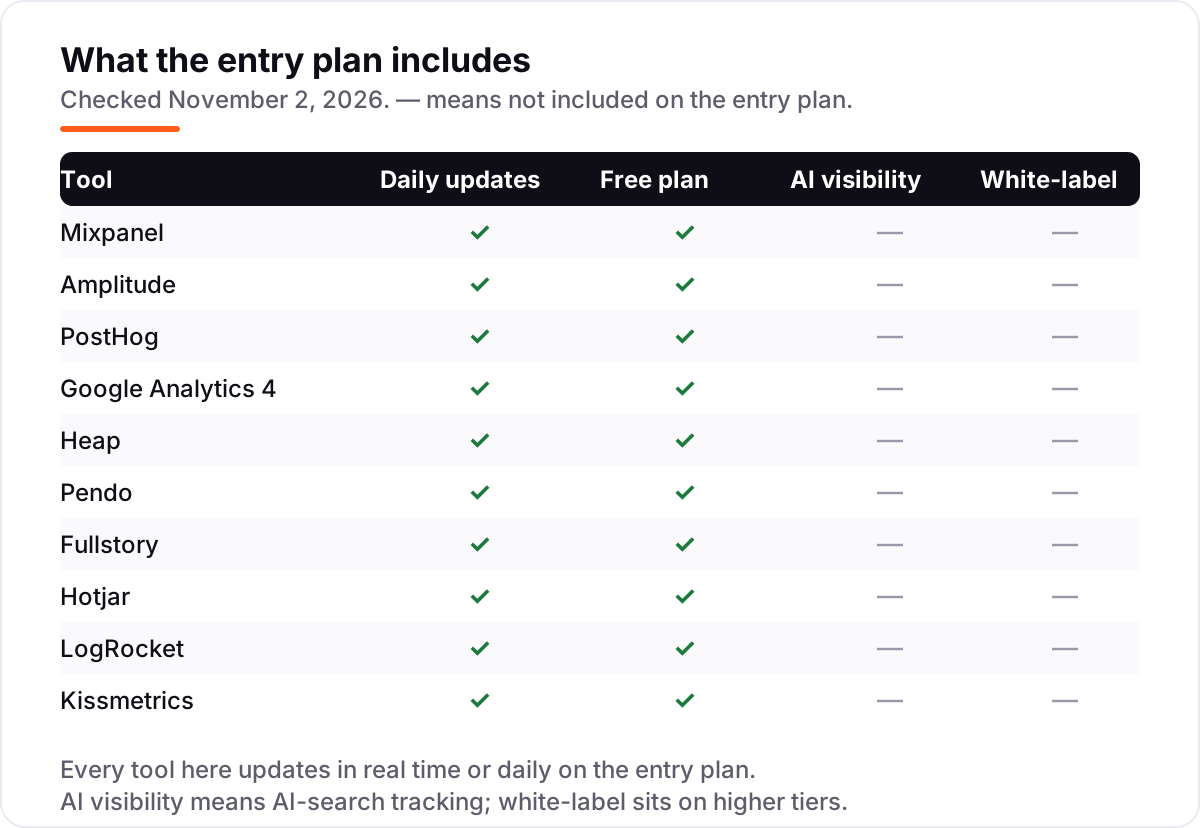
- Check the AI question. None of the entry plans in this list includes AI-search visibility tracking — if you need to know how your brand shows up in AI answers, that is a separate tool. Our guide to AI visibility tools covers what those track.
- Test with real traffic. Every tool in this list has a free plan or a free trial. Run your real product for two weeks and compare the numbers against your current tool before committing.
- Read the retention and export terms. Free plans cap history at 1 to 14 months. If you need year-over-year comparisons, check the paid plan's retention before you buy.
Before you publish new pages for the features you measure, run your titles through the free SERP snippet preview tool — it shows exactly how the title and description will look in Google.
Mistakes to avoid
- Comparing prices without checking the meter. A $0 plan billed on events and a $49 plan billed on sessions are not comparable until you count your own volume in both units.
- Instrumenting everything on day one. Event-based tools get expensive when every click fires an event. Track the ten events that decide revenue first, then add more.
- Paying for a suite when you only need one job. A replay tool plus GA4 beats a $99 platform you only use for funnels.
- Trusting a directory price. Kissmetrics shows $49 to $299 across directories; the vendor-supplied figure on G2 is $99 for Growth. Always check the vendor's own page.
- Forgetting the free plan caps. Fullstory's free plan excludes dashboards, Heap's covers 10,000 sessions, and LogRocket's covers 1,000. The free tier is a trial with a ceiling, not a permanent home for a growing product.
How we chose
We researched each vendor's own pricing page on November 2, 2026, but the direct page opens failed that day — the browser fetch tool returned a local worker error on every attempt, and shell network access to the vendor sites was blocked — so the prices below rest on published reads of those pricing pages from September and October 2026, cross-checked across at least two independent sources where they disagreed. Three prices are not vendor-verified at all: Heap, Pendo and Fullstory publish no starting price, so all three are listed as custom quote, and the reported Heap Growth figure of around $3,600 a year comes from third-party directories, not the vendor. Kissmetrics at $99 a month and LogRocket at $69 a month are vendor-supplied prices shown on G2, not figures we read on the vendor pages ourselves, and one October 2026 source lists LogRocket Core from $176 a month at 25,000 sessions, against $69 at 10,000 sessions. Ratings are omitted entirely because the G2 review pages could not be opened on November 2, 2026. We ranked the tools by fit for the most common buyer — a growing SaaS product team choosing its first or second analytics tool — not by brand size. No vendor paid for a place in this list, and none of the links here are affiliate links.
What to do next
Start with the decision path above: count your volume in the vendor's unit, pick event analytics or replay, and decide whether you need one tool or one of each. Then take the free plan or trial of your top pick and run your real product traffic through it for two weeks. If the funnels match what your support inbox already tells you and the reports make sense to a teammate, you have your tool. If you'd rather have this set up and read for you, request a free SEO + AI visibility audit and get a ranked fix list in 2 business days.
Rather not run the tools yourself?
Tools show you the data. SerpAstra turns it into higher rankings, more map-pack calls and citations in AI answers.
Get a free SEO + AI visibility audit→Sources we checked (12)
- Mixpanel pricing — mixpanel.com/pricing (vendor pricing page)
- Amplitude pricing — amplitude.com/pricing (vendor pricing page)
- PostHog pricing — posthog.com/pricing (vendor pricing page)
- Google Analytics product page — marketingplatform.google.com/about/analytics (vendor page)
- Heap pricing — heap.io/pricing (vendor pricing page)
- Pendo pricing — pendo.io/pricing (vendor pricing page)
- Fullstory plans — fullstory.com/plans (vendor plans page)
- Contentsquare pricing (Hotjar Experience Analytics) — contentsquare.com/pricing (vendor pricing page)
- LogRocket pricing — logrocket.com/pricing (vendor pricing page)
- Kissmetrics pricing — vendor-supplied pricing shown on G2
- LogRocket Team $69/month — vendor-supplied pricing shown on G2
- W3Techs web analytics market share, mid-2025 — via Relevant Audience
Shamim
Founder of SerpAstra
A full-stack SEO and digital marketer who spends most days on Local SEO for dental practices, AI search visibility and lead generation.
Frequently asked questions
What is the best product analytics tool in 2026?
Mixpanel is the best all-round pick for most product teams: free up to 1M events a month, with funnels, retention and cohorts that non-technical teammates can read. Amplitude is deeper for behavioral analysis, and PostHog bundles the most tools for $0. GA4 is the free default for traffic data.
How much does a product analytics tool cost?
From $0 to quote-only. Mixpanel, PostHog and GA4 start free, Amplitude Plus is $61 a month billed monthly, Hotjar Growth is $49, LogRocket Team is $69 and Kissmetrics Growth is $99. Heap, Pendo and Fullstory publish no starting price, so every paid plan is a custom quote.
Is there a free product analytics tool?
Yes, with real limits. GA4 is free at any volume, PostHog gives 1M events a month free, Mixpanel gives 1M events free, Fullstory replays 30,000 sessions a month free and Hotjar covers 200,000 sessions free. Free plans fit a single small product; paid plans start when volume or reporting needs grow.
What is the difference between product analytics and web analytics?
Web analytics counts traffic: sessions, pageviews and sources. Product analytics follows what users do inside the product: which features they use, where they drop out of a funnel and who comes back. GA4 sits between the two, while Mixpanel, Amplitude and PostHog are built for the product side.
Do I need session replay or just event analytics?
Event analytics answers what happened and how often; replay answers why. If users abandon a checkout or a form, a replay shows the exact moment they struggled. Fullstory, Hotjar and LogRocket lead on replay. If you only need funnels and retention, Mixpanel or Amplitude alone is enough.
What should I check before paying for a product analytics tool?
Four things: what you are billed on (events, sessions or users), what the free allowance actually covers, whether the price you see is monthly or annual billing, and whether the features you need sit on the plan you are buying. Heap, Pendo and Fullstory need a sales quote, so get the number in writing first.
Free SEO and AI visibility audit
Find out what is holding your rankings back
Send us your site. Within 2 business days you get a written audit, an AI visibility check and a short fix list ranked by impact. Free, with no contract attached.
Request my free audit→Related guides
 SEO & AI Search11 Best Rank Tracking Tools in 2026 (Free and Paid, Compared)11 best rank tracking tools compared on price, keyword limits, update speed and AI visibility. Prices checked on the vendor pricing page, October 31, 2026.Read guide →
 AI SearchBest AI SEO tools in 2026: honest picks by jobBest AI SEO tools in 2026, picked by job: Semrush and Ahrefs for research, Surfer and Clearscope for content, Otterly for AI tracking, with 2026 prices.Read guide →
 SEO & AI Search8 Best SEO Automation Tools in 2026 (Free and Paid, Compared)8 best SEO automation tools compared on price, automation depth and free plans, with every price checked on the vendor's own pricing page, November 1, 2026.Read guide →