
12 Best Product Analytics Tools for Mobile Apps in 2026, Compared
12 best product analytics tools for mobile apps compared on price, free plans, replay and attribution. Prices checked on vendor pages, November 2, 2026.
 Shamim Mia, Founder, SerpAstraLast verified November 2, 202615 min read
We compare pricing pages, documentation and public reviews. We never accept payment for rankings.

Key takeaways
- Mixpanel is the best overall pick for most app teams: deep funnels and retention from $0 for the first 1M events a month. Amplitude ($49/month) and PostHog ($0) are the closest runners-up.
- Firebase Analytics is free with unlimited reporting on up to 500 distinct events, so every new app should start there before paying for anything.
- The single most important buying factor is the billing unit: events, sessions, conversions and monthly users price the same app very differently, so model your own volume before you compare prices.
- Every price below was checked on the vendor's own pricing page on November 2, 2026. Ratings are G2, except Firebase Analytics, which has no G2 rating shown here.
On this page
Quick comparison
| Tool | Best for | Starting price | Free plan |
|---|---|---|---|
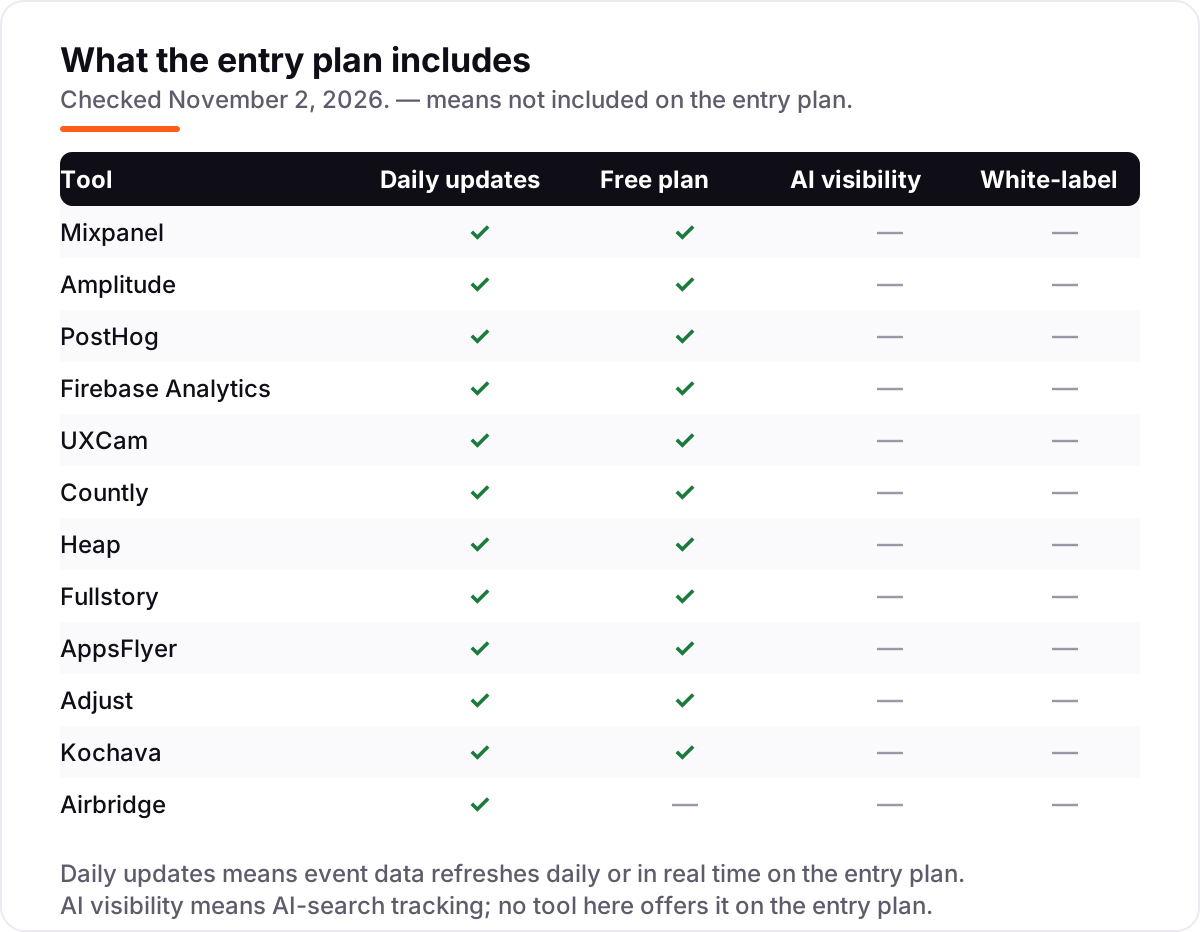
| Mixpanel | App teams that want deep event, funnel and retention analytics with a generous free tier | $0/mo (free tier) | Yes (1M events) |
| Amplitude | Product teams that want the largest free event allowance plus funnels, cohorts and session replay in one platform | $49/mo (annual) | Yes (2M events) |
| PostHog | Small teams and developers who want product analytics, replay, flags and surveys in one open-source platform | $0/mo (free tier) | Yes (1M events) |
| Firebase Analytics | Android and iOS developers who want free, unlimited app analytics inside the Firebase console | $0/mo | Yes (free) |
| UXCam | Mobile product and UX teams that need session replay and heatmaps tied to every funnel and event | Custom quote | Yes (3,000 sessions) |
| Countly | Privacy-focused teams that want to self-host analytics or keep data in their own cloud | $175/mo | Yes (500 MAU) |
| Heap | Teams that want analytics without writing a tracking plan, with every tap and screen view captured automatically | Custom quote | Yes (10K sessions) |
| Fullstory | Mid-market teams that want session replay, frustration signals and funnels in one behavior platform | Custom quote | Yes (30K sessions) |
| AppsFlyer | App marketers running paid campaigns who need attribution across the widest partner network | $0.07/conversion | Yes (Zero plan) |
| Adjust | Growth marketers who want accurate attribution, fraud prevention and automation in one dashboard | Custom quote | Yes (Base plan) |
| Kochava | App advertisers who want published MMP pricing with fraud prevention and deep linking included | $500/mo | Yes (10K conversions) |
| Airbridge | Subscription apps running Meta, Google, TikTok and Apple Ads that want cheap, flat attribution | $40/mo | No (30-day trial) |
Make one of these tools?
We re-check this list every quarter. Send a correction, request a review, or ask about a clearly labeled sponsored spot.
Request a listingThe best product analytics tools for mobile apps

Mixpanel
Best for: App teams that want deep event, funnel and retention analytics with a generous free tier
Mixpanel is the default choice for app teams that live in event data. The free plan covers a million events a month with funnels, retention, flows and 10,000 session replays, which is enough for most apps to run real analysis before paying anything. Growth starts at $0 and bills $0.28 per 1,000 events past the free million, so costs track usage rather than seats.
What earns it the top spot is depth: boards, cohorts, multi-touch attribution and a Query API come with Growth, and the mobile SDKs for iOS, Android, React Native and Flutter are mature. The bill is the honest trade-off, since event volume climbs fast in a chatty app, and Group Analytics costs extra. Start here unless you need session replay as the main job.
What we like
- Free plan covers 1M events a month with funnels, retention, flows and 10,000 session replays
- Growth starts at $0 and bills only for events past the free million, with unlimited seats
- Boards, cohorts and multi-touch attribution are included on Growth, not gated to Enterprise
Watch out for
- Costs climb fast with event volume: $0.28 per 1,000 events past the first million adds up at scale
- Group Analytics and Data Pipelines are paid add-ons, not part of the Growth plan

Amplitude
Best for: Product teams that want the largest free event allowance plus funnels, cohorts and session replay in one platform
Amplitude is the strongest rival to Mixpanel, and its free tier is the reason to look at it first: 2M events a month free, double Mixpanel's allowance, with session replay, feature flags and basic experimentation included. The $49/month Plus plan, billed annually, covers up to 300,000 monthly tracked users or 25M events, which is a low self-serve step up for a growing app.
Where Amplitude wins is breadth. Funnels, retention, behavioral cohorts, custom audiences and a customer data platform sit in the same subscription, so one tool covers analytics, targeting and activation. The catch is the ceiling: past Plus, Growth and Enterprise are custom quote only. Pick Amplitude when the free allowance and the bundled platform matter more than the deepest single report.
What we like
- Starter is free with 2M events a month, double Mixpanel's free allowance, plus session replay and feature flags
- Plus starts at $49/month billed annually for up to 300,000 MTUs or 25M events
- Behavioral cohorts, custom audiences and unlimited product analytics are included on Plus
Watch out for
- Growth and Enterprise are custom quote only, so costs past Plus are not public
- Reviewers note the setup and event taxonomy take real work before the reports pay off

PostHog
Best for: Small teams and developers who want product analytics, replay, flags and surveys in one open-source platform
PostHog is the best value all-in-one in this list. The free tier covers 1M analytics events, 5,000 session replays and 1M feature-flag requests every month, and there are no seat fees or minimums, so a small app can run analytics, replay, flags and surveys without a bill. Past the free tier, analytics costs $0.00005 per event, falling with volume.
It is also the only tool here you can self-host, since the platform is open source. That matters for teams with strict data rules, and the developer experience is strong: SDKs for iOS, Android, React Native and Flutter, plus a warehouse and error tracking in the same login. Watch the metering, though, because each product bills separately and identified-user events cost extra.
What we like
- Free tier covers 1M analytics events, 5,000 session replays and 1M feature-flag requests every month
- Usage-based pricing with no seat fees and billing caps, so small apps often pay nothing
- Open source with a self-hosted option, plus experiments, surveys and error tracking in the same platform
Watch out for
- Each product is metered separately, so replay, flags and surveys each add their own bill
- Events from identified users carry an extra person-profiles charge on top of the event rate

Firebase Analytics
Best for: Android and iOS developers who want free, unlimited app analytics inside the Firebase console
Firebase Analytics is the free starting point every mobile app should use, even if it later buys a dedicated tool. It is Google Analytics for Firebase: free, with unlimited reporting on up to 500 distinct events per app, and it starts collecting automatically for first open, app update, screen view and app remove. There is no event cap to model and no bill to forecast.
It lives inside Firebase, so Crashlytics, Remote Config, A/B Testing and Cloud Messaging share the same console and the same audiences. The limits are real: reporting is simpler than Mixpanel or Amplitude, with no retroactive funnels, and raw export to BigQuery needs the Blaze plan. Use it as the always-on baseline, then add a paid tool when you need deeper funnels.
What we like
- Free with unlimited reporting on up to 500 distinct events per app, at any scale
- Automatic events for first open, app update, screen view and app remove need no instrumentation
- Sits inside Firebase with Crashlytics, Remote Config, A/B Testing and Cloud Messaging in one console
Watch out for
- Reporting is simpler than the dedicated tools: no retroactive funnels or deep cohort analysis
- Raw event export to BigQuery needs the pay-as-you-go Blaze plan, not the free Spark plan

UXCam
Best for: Mobile product and UX teams that need session replay and heatmaps tied to every funnel and event
UXCam is the most mobile-native tool in this list. It was built for apps, not adapted from web analytics: native SDKs for iOS, Android, React Native and Flutter, screenflow analytics that map the journey between screens, and session replay with heatmaps attached to every chart. When a funnel drops, you click through to the recordings of the users who dropped out.
It holds the highest G2 score here at 4.6 from 211 reviews, with ease of setup and support the most praised qualities. The free plan covers 3,000 sessions a month, which is enough to test it on a real app. The drawback is pricing: paid plans are custom quote by monthly sessions, so budget planning needs a sales call. Choose UXCam when replay is the job, not a side feature.
What we like
- Built for mobile first: native iOS, Android, React Native and Flutter SDKs with screenflow analytics
- Session replay and heatmaps link to every chart, so a funnel drop leads straight to the recordings
- Highest G2 score in this list at 4.6, with reviewers praising ease of setup and support
Watch out for
- No published prices, so you need a sales quote before you can budget the paid plans
- No permanent free plan beyond the 3,000-session free tier, and no built-in A/B testing

Countly
Best for: Privacy-focused teams that want to self-host analytics or keep data in their own cloud
Countly is the pick for teams that will not send user data to a third-party cloud. The Lite edition is free and open source, and you run it on your own servers; the Flex cloud edition is a managed private cloud, not shared multi-tenant infrastructure, with data location selectable across regions. It is the only tool here built around data ownership from the start.
Pricing is public and usage-based: Flex starts at $175/month for 5,000 monthly active users and 5M data points, with a free tier at 500 MAU. The platform also bundles crash reporting, push notifications and remote config, so it can replace two or three SDKs. Advanced features are add-ons, and the reviewer base is small, so check the docs carefully before committing.
What we like
- Self-hosted Lite edition is free and open source, so data never leaves your own servers
- Flex cloud pricing is public and usage-based: $175/month covers 5,000 MAU and 5M data points
- One platform covers analytics, crash reporting, push notifications and remote config
Watch out for
- Advanced features such as A/B testing, surveys and push are paid add-ons, not in the base tier
- Only 20 G2 reviews, so there is far less public reviewer evidence than for the bigger tools

Heap
Best for: Teams that want analytics without writing a tracking plan, with every tap and screen view captured automatically
Heap removes the hardest part of product analytics: the tracking plan. Its autocapture records every tap, screen view and gesture automatically, and you define events retroactively from the captured data, so a question you think of next month can be answered with last month's data. No other tool here works this way, and it is why teams with small developer capacity like it.
The free plan covers 10,000 sessions a month with core analytics, SSO and six months of history. Growth adds Sense AI assistance, unlimited users and reports, and a year of history. The price is the problem: there are no published paid prices, and Growth needs an estimate after you install the snippet. Pick Heap when developer time is scarcer than budget.
What we like
- Autocapture records every interaction with no manual event tagging, and events can be defined retroactively
- Free plan covers 10,000 sessions a month with core analytics, SSO and 6 months of history
- Growth adds Sense AI assistance, unlimited users and reports, and 12 months of data history
Watch out for
- No published paid prices: Growth needs an estimate after signup, Pro and Premier are custom
- Session replay is an add-on on Pro, not part of the core analytics plans

Fullstory
Best for: Mid-market teams that want session replay, frustration signals and funnels in one behavior platform
Fullstory is the deepest behavior platform in this list. It pairs session replay with frustration signals: rage clicks, dead clicks and error clicks are flagged automatically, so you find broken flows without watching hours of recordings. Funnels, journey maps and console and network data sit beside the replays, which makes it as much a debugging tool as an analytics one.
The free plan is generous at 30,000 sessions a month with 12 months of retention and up to 10 users. The catch is that mobile analytics is an add-on rather than part of the base plans, and the paid Business, Advanced and Enterprise tiers are all quote-only. Choose Fullstory when understanding why users struggle matters more than counting what they did.
What we like
- Free plan is generous: 30,000 sessions a month with 12 months of retention and up to 10 users
- Frustration signals such as rage clicks and dead clicks surface broken flows without watching hours of replay
- Funnels, journey maps and console and network data sit next to the replays for debugging
Watch out for
- Paid plans are quote-only, so there is no public price to compare against the others here
- Mobile analytics is an add-on, not part of the base web plans

AppsFlyer
Best for: App marketers running paid campaigns who need attribution across the widest partner network
AppsFlyer is the enterprise standard for mobile attribution, and the reason is coverage: it connects to more ad networks and partners than any other MMP in this list, so installs from nearly any paid channel land in one dashboard. Growth is pay-as-you-go at $0.07 per conversion after a 12,000-conversion Welcome Package in year one, and organic installs are free.
It is a measurement platform, not just an attribution one: Protect360 fraud prevention, deep linking, audience segmentation, incrementality testing and ROI reporting are all included. The cost is the trade-off, since per-conversion pricing scales directly with paid volume, and reviewers note it can feel expensive for smaller teams. Pick AppsFlyer when campaign breadth matters most.
What we like
- The widest partner ecosystem of any MMP here, with SKAdNetwork and AdAttributionKit support on all plans
- Growth is pay-as-you-go at $0.07 per conversion after a 12,000-conversion Welcome Package
- Protect360 fraud prevention, deep linking and ROI reporting are part of the platform
Watch out for
- Per-conversion pricing gets expensive fast once paid volume grows, and Enterprise is custom
- The free Zero plan covers owned media only, so paid campaigns need Growth from the start

Adjust
Best for: Growth marketers who want accurate attribution, fraud prevention and automation in one dashboard
Adjust holds the highest G2 score in this list at 4.7 from 730 reviews, and the praise is consistent: accurate attribution, real-time reporting and a dashboard that unifies campaigns across networks. It is owned by AppLovin, and that shows in the pace of releases, from the Growth Copilot AI assistant to InSight incrementality measurement added in 2026.
The free Base plan covers 1,500 conversions a month for up to 12 months, which is enough to test real campaigns. Paid Core and Enterprise are quote-only, so there is no public rate to compare with AppsFlyer's $0.07 per conversion. Choose Adjust when attribution accuracy and automation matter more than a published price.
What we like
- Highest G2 score in this list at 4.7, with reviewers praising attribution accuracy and real-time reporting
- Growth Copilot AI assistant and InSight incrementality measurement are built into the platform
- Fraud Prevention Suite, SKAN tooling and TrueLink deep linking come with the paid plans
Watch out for
- Paid Core and Enterprise plans are quote-only, with no public per-conversion rate
- Reviewers note the dashboard can feel complex for beginners and reports can load slowly

Kochava
Best for: App advertisers who want published MMP pricing with fraud prevention and deep linking included
Kochava is the transparent MMP in this list. It is one of the few that publishes prices: Free App Analytics at $0 for 10,000 attributed conversions a month, Foundation from $500/month for 33,000 conversions, and Enterprise from $2,000/month. That alone makes it the easiest MMP to budget, and the free tier is genuinely usable for a small app.
The paid plans include a fraud console, media cost aggregation, SmartLinks deep linking and CTV attribution, plus a marketing mix modeling platform for larger teams. The trade-off is usability: at 4.1 on G2 it has the lowest score here, with ease of use and setup rated below the rivals. Pick Kochava when a published price and a free tier matter more than polish.
What we like
- One of the few MMPs with public prices: Foundation from $500/month, Enterprise from $2,000/month
- Free App Analytics covers 10,000 attributed conversions a month at $0 with SmartLinks deep linking
- Fraud console, media cost aggregation and CTV attribution are part of the paid plans
Watch out for
- Lowest G2 score in this list at 4.1, with reviewers rating ease of use and setup below the rivals
- The free plan only attributes paid installs from self-attributing networks such as Meta and Google

Airbridge
Best for: Subscription apps running Meta, Google, TikTok and Apple Ads that want cheap, flat attribution
Airbridge is the budget MMP in this list, and it is aimed squarely at subscription apps. The Core plan is $40/month with 500,000 data points included, a 30-day free trial, no annual contract and no sales call. It covers attribution and cost data for Meta, Google, TikTok and Apple Ads, which are the four channels that carry most subscription app ad spend.
Deep linking, SKAN 4.0, revenue and funnel reports and predictive lifetime value are all included in Core, and reviewers praise the responsive support. The limits are scope and evidence: only four ad channels are covered, and with 36 G2 reviews it has the smallest reviewer base here. Pick Airbridge when your spend sits on the big four channels and $40 a month beats a sales call.
What we like
- Core is $40/month with 500,000 data points included, no annual contract and no sales call
- Attribution, cost data, deep linking, SKAN 4.0 and subscription revenue reports are all in Core
- Reviewers praise responsive support and ease of use, with a 4.6 G2 score
Watch out for
- Only 36 G2 reviews, the smallest reviewer base in this list
- Core covers just four ad channels; the other 330+ networks need the custom Growth plan
What a product analytics tool for mobile apps actually does
The best product analytics tools for mobile apps answer one question: what do people actually do inside your app after they install it? A store listing gets the download; analytics tells you whether the onboarding flow finishes, which features get used, where people drop out, and who comes back a week later. Without it, you are guessing from download counts and star ratings.
The tools in this list fall into three jobs. Event analytics tools such as Mixpanel, Amplitude and PostHog record actions — a signup, a purchase, a level completed — and turn them into funnels, retention curves and cohorts. Session replay tools such as UXCam and Fullstory record what the screen looked like while those actions happened, so you can see the confusing button instead of just counting the taps on it. Attribution tools such as AppsFlyer, Adjust, Kochava and Airbridge answer a different question: which ad campaign brought each install in the first place.
One number shows the scale of the free tier on offer here: Firebase Analytics gives free, unlimited reporting on up to 500 distinct events per app, according to Google's own product page. That is the baseline every app gets for nothing, and it is the reason this list is organised by what you actually need rather than by price alone.
Free options first
If your app is new or small, you may not need to pay at all. Firebase Analytics is free with unlimited reporting, Mixpanel covers 1M events a month free, Amplitude covers 2M, and PostHog covers 1M events plus 5,000 session replays. UXCam, Countly, Heap, Fullstory and Kochava all have free tiers too, and Adjust's Base plan is free for 1,500 conversions a month for up to a year.
The free tiers are honest products, not demos, but they cap out on volume. The moment your event or session count passes the free allowance, the billing unit decides what you pay, and that unit differs by tool: Mixpanel and PostHog bill per event, UXCam and Heap bill per session, AppsFlyer bills per conversion, Countly bills per monthly active user. Start free, watch which unit grows fastest in your app, and only then compare paid plans.
Event analytics: funnels, retention and cohorts
Mixpanel, Amplitude, PostHog and Firebase Analytics are the event tools in this list, and they are where most app teams should start. They answer the questions that decide product work: how many new users finish onboarding, what share returns on day 7 and day 30, which features predict a paying subscriber, and where the purchase funnel leaks. If you can only buy one category, buy this one.
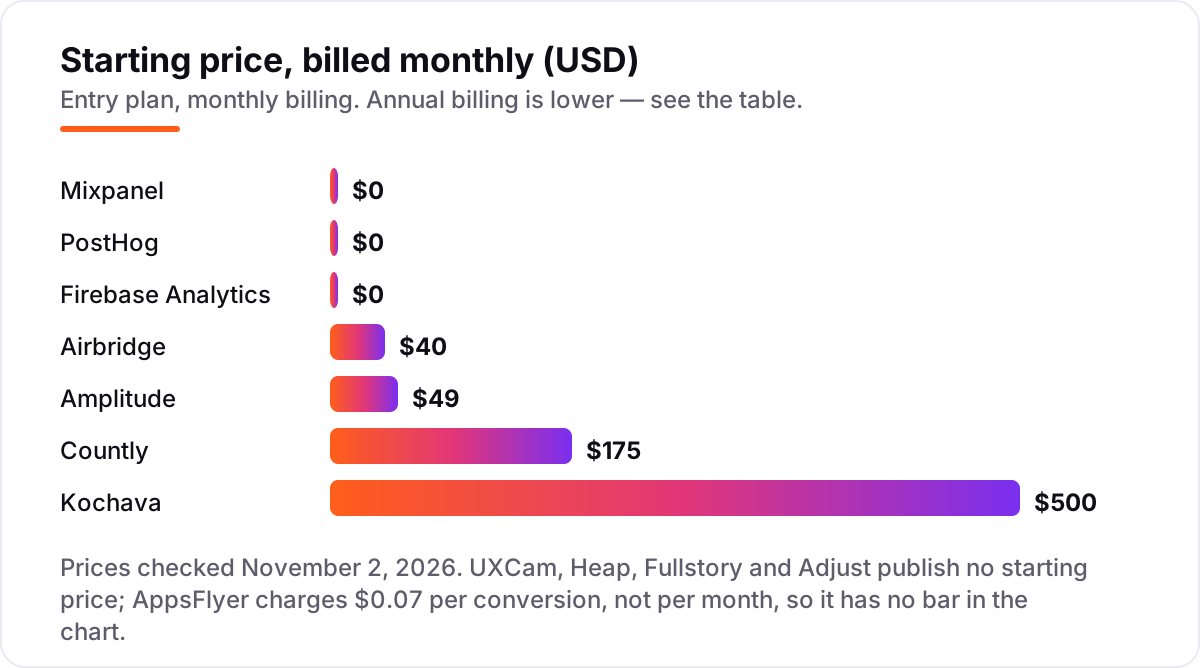
Mixpanel is the deepest of the four, Amplitude has the largest free allowance, PostHog bundles the most adjacent tools, and Firebase Analytics is the free baseline. The differences that matter are practical: Mixpanel charges $0.28 per 1,000 events past the free million, Amplitude's Plus plan is $49/month billed annually, and PostHog's per-event rate falls as volume rises. Count your monthly events before you pick, because the cheapest tool at 1M events is rarely the cheapest at 10M.
Session replay and behavior tools
Event analytics tells you that 40% of users abandon checkout; session replay shows you why. UXCam and Fullstory record the screen, the taps and the gestures, and flag frustration signals such as rage clicks and dead clicks. Heap sits between the two camps: it autocaptures every interaction like a replay tool, but reports it as events you can query retroactively.
Buy replay when the numbers alone cannot explain a drop-off. A funnel tells you the step where users leave; a recording shows the button that does not look tappable, the form field that rejects a valid input, or the crash that fires on one device model. UXCam is the most mobile-native of the three, Fullstory has the deepest behavior signals, and Heap needs the least developer work because there is no tracking plan to write. All three offer free tiers, so test replay on your worst funnel before you pay for it.
Attribution: where installs really come from
If you run paid campaigns, product analytics alone cannot tell you which campaign drove a paying user. That is the job of a mobile measurement partner, or MMP: AppsFlyer, Adjust, Kochava and Airbridge. They match each install to the ad, campaign and creative behind it, handle SKAdNetwork and Apple's AdAttributionKit reporting, prevent install fraud, and provide the deep links that carry users from an ad into the right screen.
The four differ mainly on price and scope. Airbridge is the budget pick at $40/month, but it covers only Meta, Google, TikTok and Apple Ads. Kochava publishes its prices, from $500/month, and includes a free tier. AppsFlyer has the widest partner network at $0.07 per conversion, and Adjust has the highest reviewer rating at 4.7 on G2 with the strongest automation. None of them is a product analytics tool on its own, so most paid-growth teams end up running one MMP next to one event analytics tool.
Quick comparison: tool type by need
| Buyer | Best pick | Why |
|---|---|---|
| New app, no budget yet | Firebase Analytics | Free, unlimited reporting on up to 500 events |
| Best overall event analytics | Mixpanel | Deepest funnels and retention, free to 1M events |
| Largest free tier | Amplitude | 2M events a month free, Plus from $49/month |
| Best value all-in-one | PostHog | Analytics, replay, flags and surveys free to 1M events |
| Need to see why users struggle | UXCam or Fullstory | Mobile-native replay, heatmaps and frustration signals |
| No tracking plan, no developers | Heap | Autocapture records everything, events defined later |
| Must keep data in-house | Countly | Free self-hosted edition, public cloud pricing |
| Paid campaigns to attribute | AppsFlyer, Adjust, Kochava or Airbridge | Attribution, fraud prevention and deep linking |
How to choose the best product analytics tools for mobile apps
- Count your volume in the vendor's own unit. Events, sessions, conversions and monthly users are not interchangeable. Pull your monthly event count from Firebase Analytics or your current tool, then price each candidate in that unit before comparing headline prices.
- Pick event analytics first, replay second, attribution third. If nobody runs paid campaigns, you do not need an MMP yet. If the funnel is healthy, you do not need replay yet. Buy the layer that answers your current question.
- Check the mobile SDKs, not just the feature list. Every tool here supports iOS and Android, but React Native, Flutter and Unity support varies, and some features, such as Fullstory mobile analytics, are add-ons. Confirm your stack is covered on the plan you would actually buy.
- Test the free tier on your worst funnel. Run your real onboarding or checkout funnel for two weeks and compare the numbers against Firebase Analytics. If the paid tool's funnels disagree with the free baseline, find out why before you pay.
- Price the next tier before you commit. Free tiers end, and the jump is steep: Countly goes from $0 to $175/month, Kochava from $0 to $500/month. Before you send paid traffic to a landing page, run its title through the free SERP snippet preview tool so the traffic you buy lands on a page that reads well in search.
Mistakes to avoid
- Comparing prices across different billing units. A $40/month session tool and a $49/month event tool are not $9 apart; the same app can cost ten times more on one than the other depending on how chatty its events are.
- Tracking everything and analysing nothing. Heap's autocapture makes this easy: every tap is recorded, but nobody defines the events that matter. Decide the five funnels you care about before you instrument, or before you open the dashboard.
- Skipping the free baseline. Firebase Analytics costs nothing and runs from day one. Apps that skip it have no history to compare a paid tool against, and no way to check whether the paid tool's numbers are right.
- Buying an MMP before running paid campaigns. Attribution tools earn their keep on paid installs. If all installs are organic, the free Zero or Base plans cover you, and the paid tiers can wait.
- Ignoring data retention and export limits. Free plans often keep data for 30 days to 6 months. If you need year-over-year retention curves, check the retention on your plan, not just the price. Our guide to AI SEO tools covers the same check for search data.
How we chose
We checked each vendor's own pricing page on November 2, 2026 and recorded the starting price exactly as shown. Five tools publish no starting price — UXCam, Heap, Fullstory and Adjust are custom quote, and AppsFlyer charges $0.07 per conversion rather than a monthly fee — so we say so instead of inventing a number, and those tools have no bar in the price chart. Ratings come from G2, except Firebase Analytics, which has no G2 product rating shown here. We ranked the tools by fit for the most common buyer — an app team that needs to understand onboarding, retention and paid-install quality — not by brand size. We also left one tool out on purpose: Smartlook, which Cisco put on end-of-sale on May 31, 2026, is no longer purchasable for new buyers. No vendor paid for a place in this list, and none of the links here are affiliate links.
What to do next
Start with the free baseline: turn on Firebase Analytics if it is not already running, then add the free tier of your top pick and run your real onboarding funnel through it for two weeks. Compare the numbers against the Firebase baseline, watch one session replay of a user who dropped out, and check whether the reports answer the question you actually asked. If they do, you have your tool; if they do not, the next tool on the list costs nothing to try either. And if the app is ready but nobody finds it, request a free SEO audit to see how its store listing and web pages show up in search. If you'd rather have this set up and read for you, request a free SEO + AI visibility audit and get a ranked fix list in 2 business days.
Rather not run the tools yourself?
Tools show you the data. SerpAstra turns it into higher rankings, more map-pack calls and citations in AI answers.
Get a free SEO + AI visibility audit→Sources we checked (24)
- Mixpanel pricing — mixpanel.com/pricing (checked November 2, 2026)
- Mixpanel on G2 — 4.5/5, 1,386 reviews (checked November 2, 2026)
- Amplitude pricing — amplitude.com/pricing (checked November 2, 2026)
- Amplitude on G2 — 4.5/5, 2,977 reviews (checked November 2, 2026)
- PostHog pricing — posthog.com/pricing (checked November 2, 2026)
- PostHog on G2 — 4.5/5, 1,054 reviews (checked November 2, 2026)
- Firebase pricing — firebase.google.com/pricing (checked November 2, 2026)
- Google Analytics for Firebase — firebase.google.com/products/analytics (checked November 2, 2026)
- UXCam pricing — uxcam.com/pricing (checked November 2, 2026)
- UXCam on G2 — 4.6/5, 211 reviews (checked November 2, 2026)
- Countly Flex pricing — flex.countly.com/pricing.html (checked November 2, 2026)
- Countly on G2 — 4.1/5, 20 reviews (checked November 2, 2026)
- Heap pricing — heap.io/pricing (checked November 2, 2026)
- Heap on G2 — 4.4/5, 1,097 reviews (checked November 2, 2026)
- Fullstory pricing — fullstory.com/pricing (checked November 2, 2026)
- Fullstory on G2 — 4.5/5, 1,052 reviews (checked November 2, 2026)
- AppsFlyer pricing — appsflyer.com/pricing (checked November 2, 2026)
- AppsFlyer on G2 — 4.5/5, 780 reviews (checked November 2, 2026)
- Adjust pricing — adjust.com/pricing (checked November 2, 2026)
- Adjust on G2 — 4.7/5, 730 reviews (checked November 2, 2026)
- Kochava pricing — kochava.com/get-started (checked November 2, 2026)
- Kochava on G2 — 4.1/5, 137 reviews (checked November 2, 2026)
- Airbridge pricing — airbridge.io/en/pricing (checked November 2, 2026)
- Airbridge on G2 — 4.6/5, 36 reviews (checked November 2, 2026)
Shamim
Founder of SerpAstra
A full-stack SEO and digital marketer who spends most days on Local SEO for dental practices, AI search visibility and lead generation.
Frequently asked questions
What is the best product analytics tool for mobile apps in 2026?
Mixpanel is the best overall pick: deep funnels, retention and cohorts, free up to 1M events a month. Amplitude is the closest rival with a larger free tier of 2M events. If you want replay as well as analytics, start with UXCam or PostHog; if you only need free basics, Firebase Analytics costs nothing.
How much does product analytics for a mobile app cost?
From $0 to about $500 a month at the entry level. Firebase Analytics, Mixpanel and PostHog start free; Amplitude Plus is $49/month billed annually and Airbridge Core is $40/month. Countly Flex is $175/month and Kochava Foundation is $500/month. Five tools here publish no starting price, so budget them by quote.
Is there a free product analytics tool for mobile apps?
Yes, several. Firebase Analytics is free with unlimited reporting on up to 500 distinct events. Mixpanel covers 1M events a month free, Amplitude 2M and PostHog 1M. UXCam, Countly, Heap, Fullstory and Kochava all have free tiers too. Free plans work until event or session volume outgrows them.
What is the difference between product analytics and mobile attribution?
Product analytics tracks what users do inside your app: screens, taps, funnels and retention. Mobile attribution, from an MMP such as AppsFlyer, Adjust, Kochava or Airbridge, tracks which ad campaign brought each install. Most growing apps need both, since analytics cannot tell you which campaign drove a paying user.
Do I need session replay as well as event analytics?
Not at first. Event analytics answers what happened and how often; replay answers why it happened by showing the taps behind a drop-off. Add replay when a funnel leaks and the numbers alone cannot explain it. UXCam and Fullstory lead on replay, while Mixpanel, Amplitude and PostHog bundle it with analytics.
Can I self-host product analytics for my app?
Yes. Countly offers a free open-source Lite edition you run on your own servers, and PostHog is open source with a self-hosted option. Self-hosting keeps user data in your own infrastructure, which suits strict privacy rules, but you take on the hosting, updates and scaling work yourself.
Free SEO and AI visibility audit
Find out what is holding your rankings back
Send us your site. Within 2 business days you get a written audit, an AI visibility check and a short fix list ranked by impact. Free, with no contract attached.
Request my free audit→Related guides
 AI SearchBest AI SEO tools in 2026: honest picks by jobBest AI SEO tools in 2026, picked by job: Semrush and Ahrefs for research, Surfer and Clearscope for content, Otterly for AI tracking, with 2026 prices.Read guide →
 SEO & AI Search8 Best SEO Automation Tools in 2026 (Free and Paid, Compared)8 best SEO automation tools compared on price, automation depth and free plans, with every price checked on the vendor's own pricing page, November 1, 2026.Read guide →
 MarketingMarketing automation for small businesses: what to automate (and what not to)Marketing automation for small businesses, explained: what to automate first, what to keep human, and the tools that save hours without losing customers.Read guide →