
9 Best Professional Landscape Design Software in 2026, Compared
Compare the 9 best professional landscape design software on price, BIM support, 3D rendering and plant libraries, with every price checked November 8, 2026.
 Shamim Mia, Founder, SerpAstraLast verified November 8, 202614 min read
We compare pricing pages, documentation and public reviews. We never accept payment for rankings.

Key takeaways
- Vectorworks Landmark is the best fit for most landscape architects at $170/month; DynaScape Design follows at $158/month for pure drafting, and PRO Landscape+ at $90/month for design-build firms that sell from photo-based designs.
- The single most important buying factor is what the tool produces: construction documents and plant schedules, or only pretty presentations — a rendering tool cannot replace a CAD tool, and a CAD tool cannot sell the job on its own.
- Subscriptions run $90–$260 a month, while Realtime Landscaping Architect costs $599 once with no subscription — the cheapest seat here over three years of steady use.
- Annual billing saves roughly a quarter on the big subscriptions: Vectorworks Landmark costs $1,530 a year against $2,040 on monthly billing, and AutoCAD $2,095 against $3,120.
On this page
Quick comparison
| Tool | Best for | Starting price | Free plan |
|---|---|---|---|
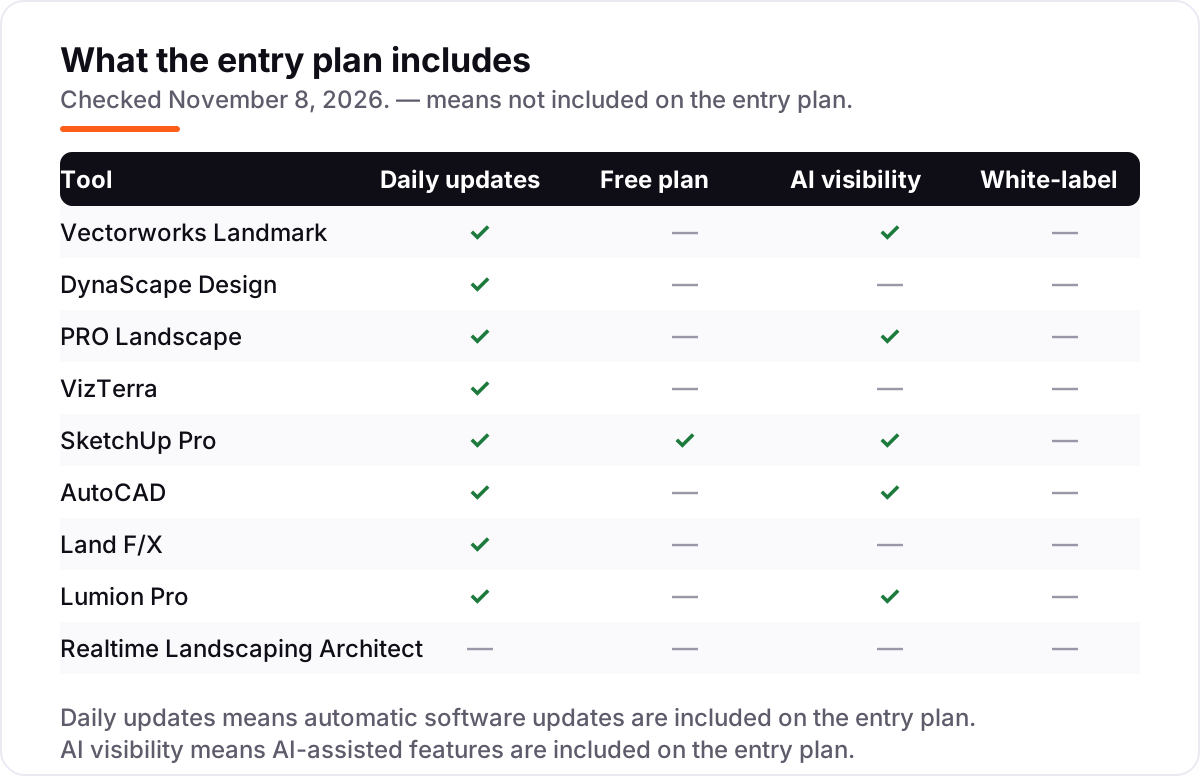
| Vectorworks Landmark | Landscape architects who need BIM, grading, planting and irrigation in one documented workflow | $170/mo | No (7-day trial) |
| DynaScape Design | Landscape designers who draft planting plans and material takeoffs every day and want CAD built for that job | $158/mo | No (free trial) |
| PRO Landscape | Design-build firms that sell from photo-based designs and need CAD, 3D and a formal proposal in one package | $90/mo | No (free Home edition) |
| VizTerra | Hardscape and outdoor-living firms that close sales with interactive 3D presentations and permit plans | $97/mo | No (30-day trial) |
| SketchUp Pro | Designers who model custom structures, pergolas and garden buildings fast and show clients the idea the same day | $99.99/mo | Yes (free web version) |
| AutoCAD | Firms that exchange DWG drawings with architects, engineers and contractors and need the drafting standard | $260/mo | No (30-day trial) |
| Land F/X | Landscape architects already on AutoCAD who want planting, irrigation and detailing inside the DWG workflow | $695/yr | No (free trial) |
| Lumion Pro | Firms that present finished landscapes with photorealistic stills, flythrough videos and 360-degree panoramas | $96/mo | No (14-day trial) |
| Realtime Landscaping Architect | Residential designers who want deep 3D, terrain and irrigation tools for one payment and no subscription | $599 once | No (free trial) |
Make one of these tools?
We re-check this list every quarter. Send a correction, request a review, or ask about a clearly labeled sponsored spot.
Request a listingThe best professional landscape design software

Vectorworks Landmark
Best for: Landscape architects who need BIM, grading, planting and irrigation in one documented workflow
Vectorworks Landmark is the only tool here that treats landscape design as a BIM discipline rather than a drawing exercise. Site modeling, grading, planting design, irrigation and GIS live in one file, so a change to a planting bed updates the schedule, the takeoff and the sections. A single seat costs $170 a month, or $1,530 a year, cheaper than AutoCAD over a year and far more landscape-specific.
The trade-off is the learning curve. Landmark is deep, and reviewers on G2 praise its integrated 2D and 3D workflow while warning that new users need weeks to get fluent. It runs on Windows and Mac, installs on two machines per seat, and includes Vectorworks University training. Buy it when planting plans, grading and documentation are the daily work; buy DynaScape or PRO Landscape when drafting speed or sales matter more.
What we like
- The only full BIM tool built for landscape work: site modeling, grading, planting, irrigation and GIS in one file
- Plant schedules and material takeoffs update automatically when the design changes, so counts stay honest
- Strong support scores on G2, with Vectorworks University training included in the subscription
- Installs on two machines per seat, so a laptop and a desktop share one licence
Watch out for
- The steepest learning curve here — new users should budget weeks, not days, to get fluent
- No monthly discount beyond the annual plan: $170 a month is the price unless you pay $1,530 up front for the year
- Windows and Mac only, with no browser version for quick edits on site

DynaScape Design
Best for: Landscape designers who draft planting plans and material takeoffs every day and want CAD built for that job
DynaScape Design is CAD built for one job: turning a landscape idea into a planting plan a crew can build from. The plant library holds more than 10,000 species, labels count themselves as you draw, and material takeoffs come out of the plan rather than a spreadsheet. Design costs $158 a month, or $1,599 a year — the vendor's comparison page lists that annual figure against AutoCAD plus a planting plugin.
The limits are scope and platform. Design is a Windows program with no Mac version, and 3D presentation needs the separate Sketch3D add-on, which is billed on top. Coloured plans need the Color add-on too, so the headline price is the floor. Pick DynaScape when planting plans and takeoffs are the daily output; pick Vectorworks Landmark when the job also needs grading, BIM and irrigation in the same file.
What we like
- Built for landscape drafting from the ground up: a 10,000-plus plant library, auto-count labels and material takeoffs
- Hand-drawn-style plan output that clients read easily, without a separate graphics pass
- Bundles with Color and Sketch3D when a firm wants coloured plans and 3D from the same file
- The vendor's own comparison puts the annual price at $1,599, well under AutoCAD plus a planting plugin
Watch out for
- The $158 monthly price is high for a single-purpose drafting tool, and the annual $1,599 must be paid up front to save
- Windows only, with no Mac version and no browser editor
- 3D presentation needs the separate Sketch3D add-on, which costs extra on top of Design

PRO Landscape
Best for: Design-build firms that sell from photo-based designs and need CAD, 3D and a formal proposal in one package
PRO Landscape is the established design-build suite: photo imaging, a landscape CAD planner, 3D rendering, lighting design and proposals in one plan. The photo imaging is the selling point — plants and hardscaping drop onto a photograph of the client's own yard, so the client sees the finished garden before a shovel moves. PRO Landscape+ costs $90 a month, or $900 a year, and the current release adds AI design enhancement.
The pricing model changed, and buyers should know it. Directories still list the old $1,495 one-time licence, but the current product is a subscription, so the cost never stops. The desktop core is Windows only, with tablet work done through the Companion app, and G2 carries only four reviews. Pick PRO Landscape when photo-based selling and formal proposals are the job; pick VizTerra for interactive 3D presentations.
What we like
- Photo imaging drops plants onto a photo of the client's own yard, which sells jobs faster than a blank plan
- CAD, 3D rendering, night and holiday lighting design and one-click proposals in a single plan
- AI design enhancement in the current PRO Landscape+ release speeds up the first draft
- Companion app for iPad and Android tablets lets designers work on site with the client
Watch out for
- The $90 monthly price replaced the old $1,495 one-time licence, so long-term users now pay every month
- Windows desktop core, with the tablet work done through the separate Companion app
- G2 carries only 4 reviews and a 3.3-star average, so peer evidence is thin

VizTerra
Best for: Hardscape and outdoor-living firms that close sales with interactive 3D presentations and permit plans
VizTerra is Structure Studios' 3D landscape design tool, built for firms that sell decks, pergolas, outdoor kitchens and pools. The workflow is the pitch: draw the project in 2D, flip the same file into 3D, and walk the client through an interactive presentation without exporting to another program. It costs $97 per user a month, or $997 a year on the annual membership, plus a $95 setup fee.
The same file also produces construction and permit plans, which is what separates VizTerra from prettier tools that only render. The limits are platform and price: it runs on Windows only, and the setup fee plus the subscription make the first year $1,092 for one user. Try the 30-day trial with a real project before paying. Pick VizTerra for hardscape sales presentations; pick PRO Landscape when photo imaging and proposals matter more.
What we like
- Draw in 2D, flip the same file into 3D, and present it interactively to the client without exporting
- Built for decks, pergolas, outdoor kitchens and pools, with construction and permit plans from the same project
- The 3D library is deep for hardscape, which is where most presentation tools look thin
- A genuine 30-day free trial with full access and no credit card required
Watch out for
- A one-time $95 setup fee sits on top of the subscription, and the annual plan is $997 a year
- Windows only, with no Mac version for mixed-platform firms
- No AI-assisted design features on the entry plan

SketchUp Pro
Best for: Designers who model custom structures, pergolas and garden buildings fast and show clients the idea the same day
SketchUp Pro is the speed tool in this list. Mass a pergola, a garden room or a retaining wall, test three versions, and walk the client through the winner the same afternoon — no other tool here models that fast. Pro costs $99.99 a month, or $399 a year, and includes LayOut for 2D presentation sheets, plus 150 AI credits a month for textures and concept imagery.
The catch is the monthly price. Paying month to month costs $99.99, three times the $33.25 monthly equivalent of the annual plan, so a short project pays a steep premium. There is no photorealistic rendering on Pro: that needs Studio at $859 a year, or a separate renderer such as Lumion. Pick SketchUp Pro for concept design and client communication; pair it with Vectorworks Landmark or AutoCAD when the job needs construction documents.
What we like
- The fastest way to mass a garden structure and walk a client through it the same afternoon
- LayOut turns the model into 2D presentation sheets without a second program
- A huge extension library covers landscape, terrain and planting workflows the base tool lacks
- 150 AI credits a month on Pro help generate textures and concept imagery
Watch out for
- Monthly billing costs $99.99, three times the annual rate, so short projects pay a steep premium
- No photorealistic rendering on Pro — that needs Studio at $859 a year or a separate renderer
- LayOut documentation is solid for concept sheets but not a substitute for BIM construction documents

AutoCAD
Best for: Firms that exchange DWG drawings with architects, engineers and contractors and need the drafting standard
AutoCAD is the drafting standard, and in landscape work its job is documentation, not design. If the architects and engineers on a project send DWG files, AutoCAD opens them cleanly, and its seven specialized toolsets cover architecture, mapping and more. A subscription costs $260 a month, or $2,095 a year, with web and mobile access included so drawings open on site as well as at the desk.
The honest assessment is that AutoCAD on its own is not landscape software. It has no planting database, no irrigation tools and no plant schedules — those come from a plugin such as Land F/X, which adds $695 a year for Planting F/X. BIM needs a second subscription to Revit. Buy AutoCAD when DWG exchange is non-negotiable; buy Vectorworks Landmark when the landscape tools should be built in rather than bolted on.
What we like
- DWG is the format most consultants expect, so drawings move without conversion surprises
- Seven specialized toolsets, including architecture and mapping, are included in the subscription
- Web and mobile access are included, so drawings open on site as well as at the desk
- Autodesk AI drafting features are included on the subscription, not held for a higher tier
Watch out for
- The most expensive monthly subscription here at $260, and BIM needs a second subscription to Revit
- No landscape-specific tools: planting and irrigation need a plugin such as Land F/X on top
- Perpetual licences are gone, so the subscription never ends

Land F/X
Best for: Landscape architects already on AutoCAD who want planting, irrigation and detailing inside the DWG workflow
Land F/X is not a standalone program: it is a set of AutoCAD plugins for landscape architects, and Planting F/X is the one most firms start with. It adds a live plant database, planting schedules and detailing to AutoCAD without leaving the DWG workflow, and the vendor's own price letter puts Planting F/X at $695 a year from January 2026. Irrigation F/X is $995 a year and Detail F/X is $295.
The cost that matters is the pair. Planting F/X needs AutoCAD at $2,095 a year, or the vendor's own F/X CAD engine at $775 a year — so the cheapest honest total is $1,470 a year, and the AutoCAD route is $2,790. That still competes with Vectorworks Landmark for firms already on AutoCAD. Buy Land F/X when the firm already lives in AutoCAD; buy Vectorworks Landmark when starting fresh.
What we like
- Planting F/X adds a live plant database, schedules and detailing to AutoCAD without leaving DWG
- Irrigation F/X sizes pipe and places manufacturer equipment from current catalogues
- Detail F/X keeps construction details consistent across every sheet in a set
- The vendor publishes its prices openly, and renewals cost the same as new licences
Watch out for
- Planting F/X is $695 a year on top of an AutoCAD subscription, so the real cost is the pair, not the plugin
- Needs AutoCAD or the separate F/X CAD engine at $775 a year — it is not a standalone program
- No AI-assisted features on the entry plan

Lumion Pro
Best for: Firms that present finished landscapes with photorealistic stills, flythrough videos and 360-degree panoramas
Lumion Pro is the rendering engine in this list: it turns a SketchUp, Revit, Archicad or Rhino model into photorealistic stills, flythrough videos and 360-degree panoramas in real time. A design change shows in the image within seconds, and the library holds more than 10,000 models and materials, including fine-detail nature assets for planting. Pro costs $96 a month billed annually at $1,149 a year, with no monthly plan.
The price is the whole story. Lumion does not draft, document or schedule anything — it renders what another tool modeled, so it is an addition to a design seat, not a replacement for one. It is also Windows only and demands a powerful graphics card. Buy Lumion when client presentations decide whether jobs are won; skip it while the firm still needs its first drafting or documentation tool.
What we like
- Real-time rendering with ray tracing, so a design change shows in the image within seconds
- More than 10,000 models and materials, including fine-detail nature assets for planting
- AI image enhancer, AI material generator and AI upscaler are included in Pro
- LiveSync links the render to SketchUp, Revit, Archicad and Rhino models
Watch out for
- A steep price for a single-purpose tool: $1,149 a year, billed up front
- Windows only, with no Mac version at any price
- Demands a powerful Windows PC with a strong graphics card, or render times drag

Realtime Landscaping Architect
Best for: Residential designers who want deep 3D, terrain and irrigation tools for one payment and no subscription
Realtime Landscaping Architect is the only one-time purchase in this list: $599 once, with no subscription, for the top edition from Idea Spectrum. It covers residential design in depth — 3D modeling, terrain sculpting, retaining walls, irrigation design, CAD import and cost estimates — with a plant library of 5,900 to 8,000 species by edition and growth previews up to 20 years.
The trade-offs are platform and upgrades. It runs on Windows 10 and 11 only, with no Mac version and no mobile app, and new versions are paid upgrades rather than included updates. Very large designs can lag on older hardware. Even so, $599 once beats three years of any subscription here. Pick Realtime Landscaping Architect for residential work when the firm wants to own its software; pick a subscription tool when the job needs BIM or DWG exchange.
What we like
- A single $599 payment with no subscription — the only one-time licence in this list
- The top edition adds terrain sculpting, retaining walls, irrigation design and CAD import
- A plant library of 5,900 to 8,000 species by edition, with growth previews up to 20 years
- Free trial with no time limit, so a firm can learn the interface before paying
Watch out for
- Windows 10 and 11 only, with no Mac version and no mobile app
- New-version upgrades are paid, so the one-time price is not the whole lifetime cost
- Very large designs can lag on older hardware, according to reviewers
The best professional landscape design software does three jobs at once: it draws the plan a crew can build from, it shows the client what the finished garden will look like, and it counts the plants and materials the job needs. We ranked the nine tools below by fit for the most common buyer — a professional landscape designer or design-build firm — starting with the full BIM and drafting tools and ending with the one-time purchase, and every price was checked on November 8, 2026.
How to choose the best professional landscape design software
- Decide what the tool must produce. Construction documents and plant schedules need Vectorworks Landmark, DynaScape or Land F/X; a sales presentation needs VizTerra, PRO Landscape or Lumion. No single tool here does both jobs equally well.
- Check the file format your consultants use. If architects and engineers send DWG files, your tool must open them cleanly — AutoCAD, or Vectorworks Landmark with DWG exchange. A tool that cannot read their files costs hours on every project.
- Count the seats, not the headline price. A three-person firm pays three subscriptions, and the gap between monthly and annual billing is roughly a quarter — $1,530 a year separates the two on Vectorworks Landmark alone.
- Test the plant library against your region. A library of 10,000 species is only useful if it covers the plants you actually specify; DynaScape and Realtime Landscaping both name their counts, so check them against your planting lists.
- Check the platform before you buy. Five of the nine tools here are Windows only. Mac-based firms should shortlist Vectorworks Landmark, SketchUp Pro and AutoCAD first, or budget for a Windows machine.
Design software is only half the stack: it draws the garden, but it does not bring in the clients who pay for it. If the firm also needs to be found online, our local SEO service covers the visibility side. And before you publish new pages for the services you sell, run your titles through the free SERP snippet preview tool — it shows exactly how the title and description will look in Google.
Whatever you shortlist, try it with a real project before you pay. The trials in this list run from 7 days on Vectorworks Landmark to 30 days on VizTerra, and a real project tells you more than any review can. Check two things in the trial: that the plant library covers the species you specify every week, and that the plan output is something a crew can build from without redrawing. If you want a second opinion on the AI side of the category, see our guide to the best AI landscape design software.
Professional landscape design software pricing: what you will actually pay
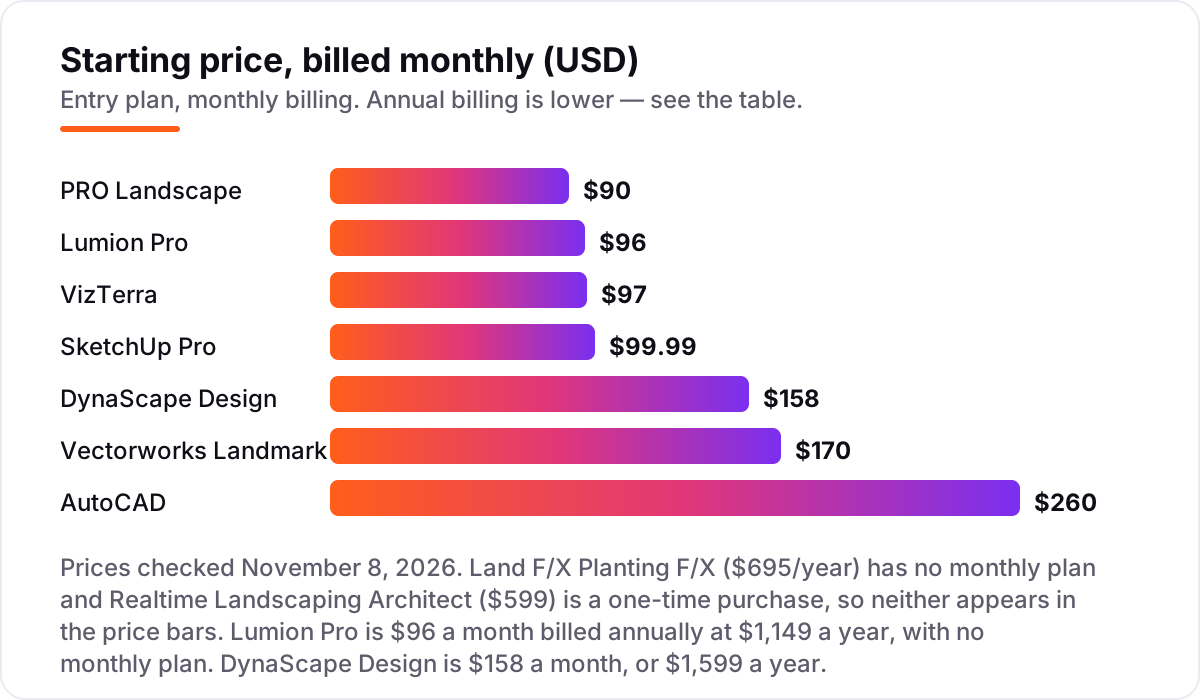
Take a three-person design firm that needs a drafting seat for each designer. On annual billing, three seats cost $1,197 on SketchUp Pro, $2,700 on PRO Landscape+, $2,991 on VizTerra, $4,590 on Vectorworks Landmark, $4,797 on DynaScape Design and $6,285 on AutoCAD. Two of those numbers need adjusting before they are real: VizTerra adds a one-time $95 setup fee per user, so the first year is $3,276, and SketchUp Pro at that price is a concept tool, not a documentation tool — the firm still needs a second program for construction drawings.
Monthly billing on the same three seats costs $3,600 a year on SketchUp Pro, $3,240 on PRO Landscape+, $3,492 on VizTerra, $6,120 on Vectorworks Landmark, $5,688 on DynaScape Design and $9,360 on AutoCAD. Annual billing saves $2,403 on SketchUp Pro, $1,530 on Vectorworks Landmark and $3,075 on AutoCAD — roughly a quarter of the bill, every year, for paying up front.
Three costs sit outside every number above. First, the rendering seat: Lumion Pro is $1,149 a year on top of whatever the firm drafts in, and it needs a powerful Windows PC with a strong graphics card. Second, the plugin route: Land F/X Planting F/X is $695 a year, but it needs AutoCAD at $2,095 a year or F/X CAD at $775 — so the cheapest honest total for that route is $1,470 a year for one seat. Third, the one-time alternative: three copies of Realtime Landscaping Architect cost $1,797 once, with no subscription, though upgrades are paid. If the budget is tight and the work is residential, that one-time route is worth pricing seriously — and if you want the free end of the category first, see our guide to the best free 3D landscape design software.
Know the difference: design software vs business management software
The confusion in this category is between software that draws the garden and software that runs the company. Design software — every tool in this list — produces plans, 3D views, planting schedules and proposals. Business management software — tools such as Jobber, Aspire or DynaScape Manage360 — schedules crews, sends invoices, tracks estimates and manages client records. A design tool will not invoice a client, and a business tool will not draw a planting plan.
There is a second, quieter confusion: rendering tools are not design tools. Lumion Pro produces beautiful images and flythrough videos, but it cannot draft a plan, schedule a plant or produce a construction document — it renders what another program modeled. Firms that buy a renderer first still need a drafting seat, which is why Lumion's $1,149 a year sits on top of the design budget rather than replacing any of it.
A third distinction worth knowing is a plugin versus a program. Land F/X is a plugin: it adds planting and irrigation tools to AutoCAD, but it cannot run without AutoCAD or the vendor's own F/X CAD engine underneath. Budget the pair — $2,790 a year with AutoCAD, $1,470 with F/X CAD — not the $695 plugin price on its own. For the CAD side of the decision, our guide to the best CAD software for architecture covers the broader drafting options.
Quick comparison: tool type by need
| Buyer | Best pick | Why |
|---|---|---|
| Landscape architect needing BIM | Vectorworks Landmark | Grading, planting, irrigation and GIS in one file, from $170/month |
| Daily planting-plan drafting | DynaScape Design | 10,000-plant library with auto-count takeoffs, from $158/month |
| Design-build firm selling from photos | PRO Landscape | Photo imaging, CAD, 3D and proposals in one plan, from $90/month |
| Hardscape sales presentations | VizTerra | 2D plans that flip into interactive 3D, from $97/month |
| Fast concept models | SketchUp Pro | Model a structure in an afternoon, from $99.99/month |
| DWG exchange with consultants | AutoCAD | The drafting standard, from $260/month, plus Land F/X for planting |
| Photorealistic presentations | Lumion Pro | Real-time renders and flythroughs, from $96/month billed annually |
| Residential work, no subscription | Realtime Landscaping Architect | Full 3D with terrain and irrigation, $599 once |
Mistakes to avoid
- Budgeting on the plugin price alone. Land F/X Planting F/X is $695 a year, but it needs AutoCAD or F/X CAD underneath — the real total is $1,470 to $2,790 a year, not $695.
- Buying a renderer before a drafting tool. Lumion Pro makes beautiful images, but it cannot draw a plan or schedule a plant. Buy the design seat first, and add rendering the month presentations start deciding jobs.
- Paying monthly by default. Monthly billing costs roughly a third more than annual on the big subscriptions — $3,075 a year extra on three AutoCAD seats. If the firm will use the tool all year, pay annually.
- Ignoring the platform. Five of the nine tools here are Windows only. A Mac-based firm that buys DynaScape, VizTerra or Lumion without a Windows machine has bought software it cannot run.
- Trusting the old PRO Landscape price. Directories still list the $1,495 one-time licence, but the current product is PRO Landscape+ at $90 a month. Price the subscription, not the listing.
How we chose
We checked each vendor's own pricing page on November 8, 2026 and recorded the starting price exactly as shown, including the annual-billing figure where the page lists one, and we ranked the tools by fit for the most common buyer — a professional landscape designer or design-build firm — not by brand size. Two prices could not be read directly from the vendor's own page on the day, because direct page fetches timed out: DynaScape Design's $158 monthly figure comes from a vendor-sourced directory read dated September 25, 2026, corroborated by the vendor's own comparison page listing $1,599 a year, and PRO Landscape+'s $90 a month comes from vendor-provided G2 pricing and the vendor's own blog. Realtime Landscaping Architect's $599 one-time price comes from the vendor's site as read in October 2026. Ratings come only from G2 review pages with a fresh crawl: DynaScape Design and VizTerra have no G2 rating to show, and Realtime Landscaping's G2 page was last crawled 65 days ago, so we show no rating for those three rather than a stale one. No vendor paid for a place in this list, and none of the links here are affiliate links.
What to do next
Start with the free trial of your top pick and run one real project through it — your site, your planting list, your client. Check that the plant library covers the species you specify every week and that the plan output is something a crew can build from without redrawing. If the trial exposes a gap, the second pick on your shortlist is usually the right answer, not a bigger tier of the same tool. If the design side is sorted but new clients are not finding the firm, our monthly SEO service handles the visibility side — or compare providers in our guide to SEO companies for small business. Once your tools are in place, find out what's holding your rankings back.
Your stack only works if people find you
SerpAstra fixes what keeps your site off page one and makes it easy for AI assistants to recommend.
Get a free audit→Sources we checked (14)
- Vectorworks Landmark pricing — vectorworks.net/pricing/ (checked November 8, 2026)
- DynaScape Design pricing — dynascape.com (checked November 8, 2026)
- PRO Landscape pricing and reviews — g2.com/products/pro-landscape/reviews (checked November 8, 2026)
- VizTerra pricing — structurestudios.com/blog/vizterra-vs-pro-landscape (checked November 8, 2026)
- SketchUp Pro pricing — sketchup.com/plans-and-pricing (checked November 8, 2026)
- AutoCAD pricing — autodesk.com/products/autocad/buy (checked November 8, 2026)
- Land F/X pricing — landfx.com price letter (checked November 8, 2026)
- Lumion Pro pricing — lumion.com (checked November 8, 2026)
- Realtime Landscaping Architect pricing — ideaspectrum.com (checked November 8, 2026)
- Vectorworks Landmark reviews — g2.com/products/vectorworks-landmark/reviews (checked November 8, 2026)
- SketchUp reviews — g2.com/products/sketchup/reviews (checked November 8, 2026)
- AutoCAD reviews — g2.com/products/autocad/reviews (checked November 8, 2026)
- Land F/X reviews — g2.com/products/land-f-x/reviews (checked November 8, 2026)
- Lumion Pro reviews — g2.com/products/lumion-pro/reviews (checked November 8, 2026)
Shamim
Founder of SerpAstra
A full-stack SEO and digital marketer who spends most days on Local SEO for dental practices, AI search visibility and lead generation.
Frequently asked questions
What is the best professional landscape design software?
Vectorworks Landmark is the best fit for most landscape architects: BIM, grading, planting, irrigation and GIS in one file, from $170/month. DynaScape Design is the better pick for pure planting-plan drafting at $158/month, and PRO Landscape+ is the better pick for design-build firms that sell from photo-based designs at $90/month.
How much does professional landscape design software cost?
Subscriptions run $90 to $260 a month, or $900 to $2,095 a year when billed annually. The cheapest long-term seat is Realtime Landscaping Architect at $599 once, with no subscription. Add-on costs matter too: Land F/X needs AutoCAD or F/X CAD underneath, and Lumion Pro is $1,149 a year on top of a design tool.
Is there free professional landscape design software?
There is no free professional tool in this list. SketchUp Free is a genuine free web version for personal use, and PRO Landscape Home is a free limited edition. Every paid tool here offers a free trial instead, from 7 days on Vectorworks Landmark to 30 days on VizTerra, so you can test with a real project before paying.
Vectorworks Landmark or DynaScape Design — which should I choose?
Choose Vectorworks Landmark when the job needs grading, BIM, irrigation and GIS in one documented workflow — it is the broader tool. Choose DynaScape Design when planting plans, auto-count labels and material takeoffs are the daily output and grading is handled elsewhere. Firms that do both often run Landmark for documentation and DynaScape for fast drafting.
Do I need AutoCAD as well as a landscape design tool?
Only if your consultants demand DWG files. Vectorworks Landmark, DynaScape Design and PRO Landscape all produce plans without AutoCAD. If you do need DWG, AutoCAD costs $260 a month, and Land F/X Planting F/X adds $695 a year for the planting tools — or use F/X CAD at $775 a year instead of AutoCAD.
What is the difference between landscape design software and landscape business software?
Design software draws the garden: plans, 3D views, planting schedules and proposals. Business software runs the company: scheduling, invoicing, estimating and crew management, like Jobber or DynaScape Manage360. Most firms need one of each, and the two should not be confused when budgeting — a design tool will not invoice a client.
Can I use professional landscape design software on a Mac?
Some of it, yes. Vectorworks Landmark, SketchUp Pro and AutoCAD all run on Mac. DynaScape Design, PRO Landscape, VizTerra, Lumion Pro and Realtime Landscaping Architect are Windows only, so Mac-based firms should shortlist from the first three — or budget for a Windows machine for the rendering seat.
Free SEO and AI visibility audit
Find out what is holding your rankings back
Send us your site. Within 2 business days you get a written audit, an AI visibility check and a short fix list ranked by impact. Free, with no contract attached.
Request my free audit→Related guides
 Local Business & Vertical Software12 Best AI Landscape Design Software in 2026, ComparedCompare the 12 best ai landscape design software tools on price, free plans, AR previews and AI restyles, with every price checked November 7, 2026.Read guide →
 Local Business & Vertical Software9 Best Free 3D Landscape Design Software in 2026, ComparedCompare the 9 best free 3d landscape design software options on price, free plans and 3D views, with every price checked on November 7, 2026.Read guide →
 Design, Video & Creative9 Best CAD Software for Architecture in 2026, ComparedCompare the 9 best cad software for architecture in 2026 on price, BIM, drafting and free plans, with prices checked November 4, 2026 for US firms.Read guide →