
11 Best Purchasing Software for Small Businesses in 2026, Compared
11 best purchasing software for small businesses compared on price, approvals and free plans, with real starting prices checked November 10, 2026.
 Shamim Mia, Founder, SerpAstraLast verified November 10, 202616 min read
We compare pricing pages, documentation and public reviews. We never accept payment for rankings.

Key takeaways
- Spendwise leads for the smallest budgets at $9 per user a month, with Tradogram at $99 a month and ApprovalMax at $59.40 a month close behind for approval control.
- Ramp is the only free start here — its free plan covers basic approvals, but full procurement is a paid add-on to Plus at $15 per user a month.
- The single most important buying factor is the billing unit: per-user tools are cheapest under 5 buyers, while flat-rate tools like Precoro and ProcureDesk win as headcount grows.
- Three tools publish no price at all — Procurify, Tipalti and Coupa are custom quote only, so budget for a sales process, not a checkout.
- Every price below was checked on November 10, 2026, against the vendor's own pricing page or vendor-supplied pricing data, and every rating is G2 with the review count shown.
On this page
Quick comparison
| Tool | Best for | Starting price | Free plan |
|---|---|---|---|
| Spendwise | Small teams of up to 5 buyers who raise a few orders a week and want purchasing, receiving and AP for $9 per user a month | $9/user/mo | No (30-day trial) |
| Tradogram | Small businesses that want POs, supplier management and invoice matching from $99 a month without an enterprise rollout | $99/mo | No (free trial) |
| ApprovalMax | Xero and QuickBooks Online users who need multi-step purchase-order and bill approvals for one flat monthly fee | $59.40/mo | No (14-day trial) |
| Ramp | US small businesses that want free expense and bill pay now and procurement controls as they grow | $15/user/mo (Plus) | Yes (procurement add-on) |
| Odoo | Small businesses that want purchasing inside a full ERP with inventory, sales and accounting in one database | $31.10/user/mo | Yes (one app) |
| ProcurementExpress.com | Nonprofits, schools and service businesses that want simple PO approvals without learning a procurement suite | $365/mo | No (free trial) |
| Precoro | Growing companies with several departments or locations that want flat-rate purchasing control with a published price | $499/mo (annual) | No (free trial) |
| ProcureDesk | QuickBooks-based companies with up to 200 staff that want purchasing and AP automation with done-for-you setup | $598/mo | No (14-day trial) |
| Procurify | Mid-market finance teams that want the easiest purchasing tool to adopt, with real-time budgets and a mobile app | Custom quote | No (demo only) |
| Tipalti | Finance teams paying many suppliers across borders that need global payments, tax forms and supplier onboarding | Custom quote | No (demo only) |
| Coupa | Larger companies that want sourcing, procurement, invoicing and expenses in one suite and can fund an enterprise rollout | Custom quote | No (demo only) |
Make one of these tools?
We re-check this list every quarter. Send a correction, request a review, or ask about a clearly labeled sponsored spot.
Request a listingThe best purchasing software for small businesses

Spendwise
Best for: Small teams of up to 5 buyers who raise a few orders a week and want purchasing, receiving and AP for $9 per user a month
Spendwise is the cheapest way into real purchasing software, built for small teams, not scaled down from an enterprise suite. The Basic plan costs $9 per user a month for up to 5 users, and it covers purchasing, receiving, accounts payable and reports, with 10 transactions a month. That covers a business raising a handful of orders a week, each approved before money moves.
The limit is the transaction cap. Ten transactions a month runs out fast once ordering turns weekly, and the step up is Pro at $19 per user a month, which adds unlimited transactions, approval workflows, budgets and custom roles. There is no free plan, only a 30-day trial, and no API for integrations. Start here when the budget is tight and volume is low; move up when the cap blocks orders.
What we like
- Basic at $9 per user a month is the lowest starting price in this list, with purchasing, receiving and AP included
- Pro at $19 per user a month adds unlimited transactions, approval limits and workflows, budgets and custom user roles
- 30-day free trial with no credit card required, and setup needs no implementation project
Watch out for
- Basic caps at 10 transactions a month and 5 users, so regular ordering forces Pro at $19 per user a month
- Pro requires a minimum of 5 users, so a 2-person team still pays for 5 seats on Pro
- No API, so connecting Spendwise to other systems takes manual work

Tradogram
Best for: Small businesses that want POs, supplier management and invoice matching from $99 a month without an enterprise rollout
Tradogram is a purchasing suite built for small and mid-size companies, and the Essentials plan at $99 a month covers more than the price suggests: purchase orders, supplier management, AP invoices with matching, TradoPay global payments, TradoScan AI document capture and expense management. The interface is clean, the mobile apps cover approvals on the go, and annual billing cuts the price to $950.40 a year.
The catch is what Essentials leaves out. Requisitions, receiving, real-time budget tracking, contract management and inventory are add-ons at this tier, and only one user is included, with an unpublished fee for each extra seat. That makes the real team price a quote, not $99. Buy Essentials when one person runs purchasing; price Premium before adding the team.
What we like
- Essentials at $99 a month includes POs, supplier management, AP invoices with matching, TradoPay payments and TradoScan AI document capture
- Annual billing cuts Essentials to $950.40 a year, a 20% saving on the monthly rate
- Mobile apps for iOS and Android, so approvals and receiving work away from the desk
Watch out for
- Requisitions, receiving, real-time budget tracking and contract management are add-ons on Essentials, not included
- Only 1 user is included at $99 a month, and the additional-user fee is not published, so team pricing needs a quote
- Chat support is excluded on Essentials, leaving the knowledge base as first-line help

ApprovalMax
Best for: Xero and QuickBooks Online users who need multi-step purchase-order and bill approvals for one flat monthly fee
ApprovalMax is not a purchasing system on its own. It is the approval layer that sits on Xero, QuickBooks Online or NetSuite, and it earns its place here because approvals are where small-business purchasing usually breaks down. Standard costs $59.40 a month per organisation, or $49.50 a month billed annually, and it covers unlimited approvers, multi-step workflows and a full audit trail for bills, purchase orders, sales invoices and credit notes.
The flat fee is the attraction: adding approvers costs nothing extra, and budget checking on Advanced and Premium catches overspend before sign-off. The limits are the platform and the plan size. You must already run Xero or QuickBooks Online, NetSuite pricing is custom, and the plan size follows how many documents you approve. Buy it when the books are already settled and approvals are the gap.
What we like
- One flat monthly fee per organisation covers unlimited approvers on the Xero and QuickBooks Online plans
- Multi-step, multi-role approval workflows with an audit trail, built for bills, POs, sales invoices and credit notes
- Budget checking during approval on Advanced and Premium, so overspend is caught before sign-off
Watch out for
- Only works on top of Xero, QuickBooks Online or NetSuite — it is an approval layer, not a standalone purchasing system
- NetSuite pricing is custom quote, and the plan size follows how many documents you approve
- No free plan, only a 14-day free trial

Ramp
Best for: US small businesses that want free expense and bill pay now and procurement controls as they grow
Ramp is the only free start in this list. The free plan costs $0 and covers corporate cards, expense management, bill pay and basic approvals, with no per-user or annual fee. That is a real finance setup, not a trial. Plus costs $15 per user a month plus a platform fee, and it adds custom procurement approvals, multi-entity management and HRIS integrations, with AI agents running intake and approvals.
Two catches matter. Full procurement is a paid add-on to Plus or Enterprise, and neither the add-on fee nor the Plus platform fee is published, so the real price needs a quote. And Ramp only accepts US-registered corporations, LLCs and limited partnerships that hold a $25,000 minimum bank balance, which rules out sole proprietors. Start free when you qualify; price Plus first.
What we like
- Free plan costs $0 and covers cards, expense management, bill pay and basic approvals with no per-user fee
- Plus at $15 per user a month adds custom procurement approvals, multi-entity management and HRIS integrations
- AI agents handle intake, sourcing and approvals inside the same system as cards and bill pay
Watch out for
- Procurement is a paid add-on to Plus or Enterprise, and the platform fee on Plus is not published, so the real price needs a quote
- Only US-registered corporations, LLCs and limited partnerships qualify, and the account needs a $25,000 minimum bank balance
- Sourcing and supplier-management features are thinner than dedicated procurement suites

Odoo
Best for: Small businesses that want purchasing inside a full ERP with inventory, sales and accounting in one database
Odoo is the ERP option, and it makes sense when purchasing is one job among many. One App Free costs $0 with unlimited users for a single app, so the Purchase app alone can start free. Standard costs $31.10 per user a month on monthly billing, or $24.90 in the first year billed annually, and it unlocks every app: Purchase, Inventory, Sales, Accounting, CRM and more, with hosting included.
The value is the single database. A purchase order flows into inventory and accounting without retyping, and the per-user price covers the whole ERP, not just purchasing. The catches are the user count and the first-year discount. Everyone with backend access is a paid user, the $24.90 rate rises to $31.10 after 12 months, and implementation is a separate bill. Buy Odoo when the business needs an ERP, not just POs.
What we like
- One App Free costs $0 with unlimited users for a single app, so Purchase alone can start free
- Standard at $31.10 per user a month includes every app — Purchase, Inventory, Sales, Accounting, CRM and more — with hosting included
- Purchase orders flow straight into inventory and accounting in one database, so nothing is retyped
Watch out for
- Every person with backend access counts as a paid user, including an accountant working in the books
- The $24.90 annual rate is a first-year discount; the price rises to $31.10 per user a month after 12 months
- Implementation and customisation are a separate bill, and the tool is an ERP, not a quick purchasing add-on

ProcurementExpress.com
Best for: Nonprofits, schools and service businesses that want simple PO approvals without learning a procurement suite
ProcurementExpress.com is built for organisations that find procurement suites intimidating: nonprofits, schools and service businesses that want purchase orders approved without a training course. Basic costs $365 a month with no per-user pricing, and it covers purchase orders, approval workflows and budget tracking. Reviewers rate it 4.7 out of 5 on G2, and a free trial lets a team test the approval flow first.
The price needs a footnote. The $365 figure comes from G2's vendor-supplied pricing data, because the vendor's own site publishes no price list, and there is no published annual rate to discount against. The Basic plan also caps monthly invoice and PO volume at $10,000, and advanced customisation is limited. It fits a small team with modest volume; high-volume buyers should price the higher tiers first.
What we like
- Built for small to mid-size organisations, including nonprofits and schools, with a simple PO approval flow
- Basic at $365 a month covers purchase orders, approvals and budget tracking with no per-user pricing
- Free trial available, and reviewers rate it 4.7 out of 5 on G2
Watch out for
- The $365 starting price comes from G2's vendor-supplied pricing data, not a price list on the vendor's own site
- No published annual rate, so there is no yearly-billing discount to count on
- Limited advanced customisation, and the Basic plan caps monthly invoice and PO volume at $10,000

Precoro
Best for: Growing companies with several departments or locations that want flat-rate purchasing control with a published price
Precoro is the transparent pick in a category that hides its prices. Core costs $499 a month billed annually, with automated approvals, three-way matching, spend and vendor management, reporting and integrations to QuickBooks, NetSuite, Sage Intacct and Xero. There is no per-user maths and no quote to chase, which is rare here. Go-live takes 2 to 8 weeks with full support, and a free trial covers the approval flow.
The price is also the barrier. Annual billing only means a $5,988 minimum commitment, and the features small teams ask about first — real-time budget tracking, AI agents and single sign-on — sit on Automation at $999 a month. Reviewers also report frustrations with purchase-order search and bulk data import. Buy Precoro when the business has outgrown spreadsheets and can justify a flat $499 a month.
What we like
- Core at $499 a month is a published flat rate — rare in this category — with approvals, three-way matching and budget control
- Integrates with QuickBooks, NetSuite, Sage Intacct and Xero, so purchasing syncs with the books
- Go-live in 2 to 8 weeks with full support, and a free trial to test the approval flow
Watch out for
- Annual billing only on the published plans, so the minimum commitment is $5,988 a year
- Real-time budget tracking, AI agents and SSO need Automation at $999 a month
- Reviewers report frustrations with purchase-order search and bulk data import
ProcureDesk
Best for: QuickBooks-based companies with up to 200 staff that want purchasing and AP automation with done-for-you setup
ProcureDesk is built for QuickBooks shops, and the integration is the reason to pick it. Purchasing Automation costs $598 a month on monthly billing, or $498 billed annually, and it includes 10 users, purchase requests, approval workflows, PO tracking, punchout catalogs and budgets, with QuickBooks sync and no double entry. Onboarding is done for you, go-live takes 2 to 4 weeks, and a 14-day trial and 30-day money-back guarantee lower the risk.
The plan structure needs reading. The $498 rate needs an annual commitment, invoice OCR and three-way matching wait for the $850-a-month Purchasing and AP Automation plan, and there is no built-in payment processing, so supplier payments run through a separate system. Buy ProcureDesk when QuickBooks is the system of record and approvals plus AP automation are the goal.
What we like
- Purchasing Automation at $498 a month billed annually includes 10 users, so the price does not grow with every hire
- Deep QuickBooks integration syncs POs and invoices with no double entry, plus 200-plus punchout catalogs
- Done-for-you onboarding and a 2 to 4 week go-live, with a 14-day trial and a 30-day money-back guarantee
Watch out for
- Monthly billing costs $598 a month, so the $498 rate needs an annual commitment
- No built-in payment processing, so supplier payments run through a separate system
- Invoice OCR and three-way matching need the $850-a-month Purchasing and AP Automation plan

Procurify
Best for: Mid-market finance teams that want the easiest purchasing tool to adopt, with real-time budgets and a mobile app
Procurify is the easiest purchasing tool to adopt in this list, at least according to its users. It scores 4.6 out of 5 on G2 with the highest ease-of-use and support marks in its category, and the platform covers purchasing, expenses and accounts payable with real-time budget tracking, Amazon Business punchout and a full mobile app. Requests, approvals and receiving all work from the phone, and onboarding is measured in days.
The price is the problem. Procurify publishes no price list, and third-party comparisons report around $1,000 a month for small businesses and $2,000 for mid-size companies, so budgeting means a sales conversation. There is no free trial, only a demo, no inventory management, and add-on modules can push the price up. Shortlist it when usability matters most and the budget can stretch to a quote.
What we like
- Rated 4.6 out of 5 on G2 with the highest ease-of-use and support scores in its category
- Real-time budget tracking and spend visibility dashboards show what is left before a purchase is approved
- Amazon Business punchout and a full mobile app, so ordering and receiving work from the phone
Watch out for
- No published price — third-party comparisons report around $1,000 a month for small businesses, so budget for a sales process
- No inventory management, so stock control needs another tool
- No free trial, only a demo, and add-on modules can push the price up

Tipalti
Best for: Finance teams paying many suppliers across borders that need global payments, tax forms and supplier onboarding
Tipalti is the pick for businesses that pay suppliers across borders. It handles mass payments in more than 200 countries and 120 currencies with over 50 payment methods, and supplier onboarding, tax-form collection and compliance run in the same workflow as approvals and payments. Procurement, AP and payments connect in one flow, so an approved order becomes a paid invoice without re-entry.
The procurement module is custom quote, and the wider pricing is murky: third-party reports disagree on the AP platform fee, from $99 to $149 a month, so treat any single figure as reported, not confirmed. It is also overkill when suppliers are local and few, and there is no free plan or self-serve trial. Buy Tipalti when the supplier list spans countries and currencies; otherwise a simpler tool costs less.
What we like
- Pays suppliers in more than 200 countries and 120 currencies with 50-plus payment methods
- Supplier onboarding, tax-form collection and compliance run in the same workflow as approvals and payments
- Procurement, AP and payments connect in one flow, so an approved order becomes a paid invoice without re-entry
Watch out for
- Procurement pricing is custom quote, and third-party reports disagree on the AP platform fee, from $99 to $149 a month
- Built for companies paying many suppliers across borders — overkill when suppliers are local and few
- No free plan and no self-serve trial; evaluation starts with a demo and a sales quote

Coupa
Best for: Larger companies that want sourcing, procurement, invoicing and expenses in one suite and can fund an enterprise rollout
Coupa is the enterprise suite in this list, and it belongs here as the ceiling, not the starting point. One platform covers sourcing, procurement, invoicing, contracts, expenses and payments, with community benchmarking that shows how your spend compares with similar companies. It scores 4.2 out of 5 on G2 across 569 reviews, and it is built for companies that want total spend management rather than a single workflow.
Everything about buying Coupa is enterprise-scale. There is no published price, every deployment is a negotiated quote, and G2 reviewers report an average go-live of 7 months, so this is a project with consultants, not a signup. For a small business that only needs purchase orders and approvals, Coupa is overkill. Consider it when the company is growing into sourcing and contracts and can fund the rollout.
What we like
- One suite covers sourcing, procurement, invoicing, contracts, expenses and payments
- Community benchmarking data shows how your spend compares with similar companies
- Go-live is faster than legacy suites, with a focus on getting purchasing running without deep customisation
Watch out for
- No published pricing — every deployment is a negotiated quote, and total cost runs far above the tools above it
- Implementation is measured in months, with G2 reviewers reporting an average go-live of 7 months
- Overkill for a small business that only needs purchase orders and approvals
The best purchasing software for small businesses is the tool that turns a spreadsheet of orders into approvals, purchase orders and paid invoices without hiring a procurement team. This list is sorted by fit for the most common buyer — a small business owner or finance lead replacing email and spreadsheets — not by brand size, and every starting price was checked on November 10, 2026.
How to choose the best purchasing software for small businesses
- Count your buyers and your orders first. A 2-person team raising 10 orders a month fits Spendwise Basic; a 10-person team raising 100 orders needs a flat-rate plan like Precoro or ProcureDesk, because per-user pricing multiplies fast.
- Decide whether you need approvals only or the full flow. If the books already work and sign-off is the gap, ApprovalMax layers approvals on Xero or QuickBooks. If orders, receiving and invoices all need one system, pick Tradogram, Precoro or ProcureDesk.
- Check the billing unit before comparing prices. Per-user tools look cheap until the team grows; flat-rate tools look expensive until the tenth buyer joins. Price your real headcount, not the headline.
- Check the accounting integration. ProcureDesk syncs with QuickBooks, ApprovalMax sits on Xero and QuickBooks Online, and Precoro covers both plus NetSuite and Sage Intacct. Odoo replaces the ledger entirely.
- Check what the entry plan leaves out. Requisitions, invoice OCR, three-way matching, real-time budgets and AI features often sit one tier up, so read the plan you would actually buy.
- Try the free plan or trial first. Ramp and Odoo start free, and every other tool here has a free trial or a demo, so run a real purchase through the approval flow before paying.
Before you put a new supplier portal or ordering page live, check that it reads well in search with the free SERP snippet preview tool — it shows exactly how the title and description will look in Google.
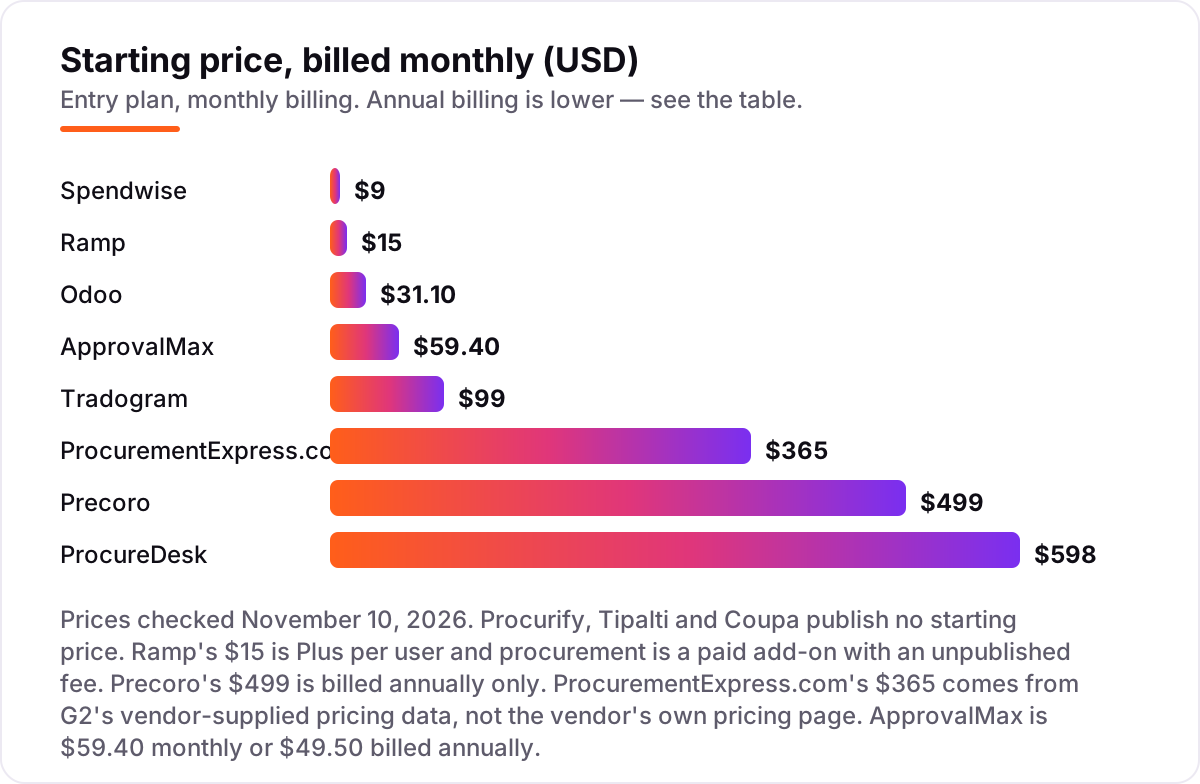
Purchasing software for small businesses pricing: what you will actually pay
Take a 10-person business where 5 people raise and approve purchases, running about 40 purchase orders a month. On Spendwise, Basic cannot handle the volume — it caps at 10 transactions a month — so the team needs Pro at $19 per user a month, which is $95 a month for 5 users with unlimited transactions. On Tradogram Essentials, the plan is $99 a month for the first user, but the additional-user fee is not published, so budget $99 plus a quote for seats 2 to 5. On ApprovalMax Standard, the same team pays $59.40 a month per organisation with unlimited approvers, or $49.50 a month billed annually, which is $594 a year — the cheapest approval control here, as long as the business already runs Xero or QuickBooks Online.
On Odoo Standard, 5 users cost $155.50 a month on monthly billing, or $124.50 a month billed annually in the first year, rising to $155.50 after 12 months. On Ramp Plus, 5 users cost $75 a month, but the platform fee and the procurement add-on fee are both unpublished, so the real bill needs a quote. On Precoro Core, the team pays a flat $499 a month billed annually, or $5,988 a year, and on ProcureDesk it pays $598 a month on monthly billing or $498 a month billed annually, or $5,976 a year, with 10 users included.
The pattern is consistent: per-user tools win under 5 buyers, and flat-rate tools win as headcount grows. At 5 buyers the cheapest compliant setup is ApprovalMax at $59.40 a month on top of Xero or QuickBooks, or Spendwise Pro at $95 a month for a standalone system. At 15 buyers the maths flips, and ProcureDesk at $498 a month with 10 users included, or Precoro at $499 a month flat, costs less than any per-user tool. If the quote-only tools are on your shortlist, get the quote in writing before budgeting the year. And if you want the same discipline applied to winning customers, our SEO audit finds where your site loses them.
Purchasing software vs procurement software vs spend management: know the difference
These three terms get used as if they mean the same thing, and buying the wrong one is the most common mistake in this category. Purchasing software runs the buying workflow: a request is raised, a manager approves it, a purchase order goes to the supplier, the goods are received and the invoice is matched and paid. That is what Spendwise, Tradogram, ProcurementExpress.com, Precoro and ProcureDesk do, and it is what most small businesses actually need.
Procurement software covers the wider discipline around buying: sourcing suppliers, running tenders, negotiating contracts and managing vendor performance over time. Coupa and Procurify sit here, and they make sense when supplier selection and contracts are regular work rather than a one-off. Spend management and AP automation cover the money after the decision: corporate cards, expenses, bill pay and global supplier payments. That is Ramp and Tipalti, and they fit when paying suppliers, not approving orders, is the bottleneck.
Pick the category that matches the pain, then pick the tool inside it. A business drowning in email approvals needs purchasing software with a strong approval flow; a business paying 50 suppliers in 10 currencies needs Tipalti; a business renegotiating supplier contracts every quarter needs procurement software. Buying the wider suite for the narrower problem is the fastest way to pay enterprise prices for a small-business job.
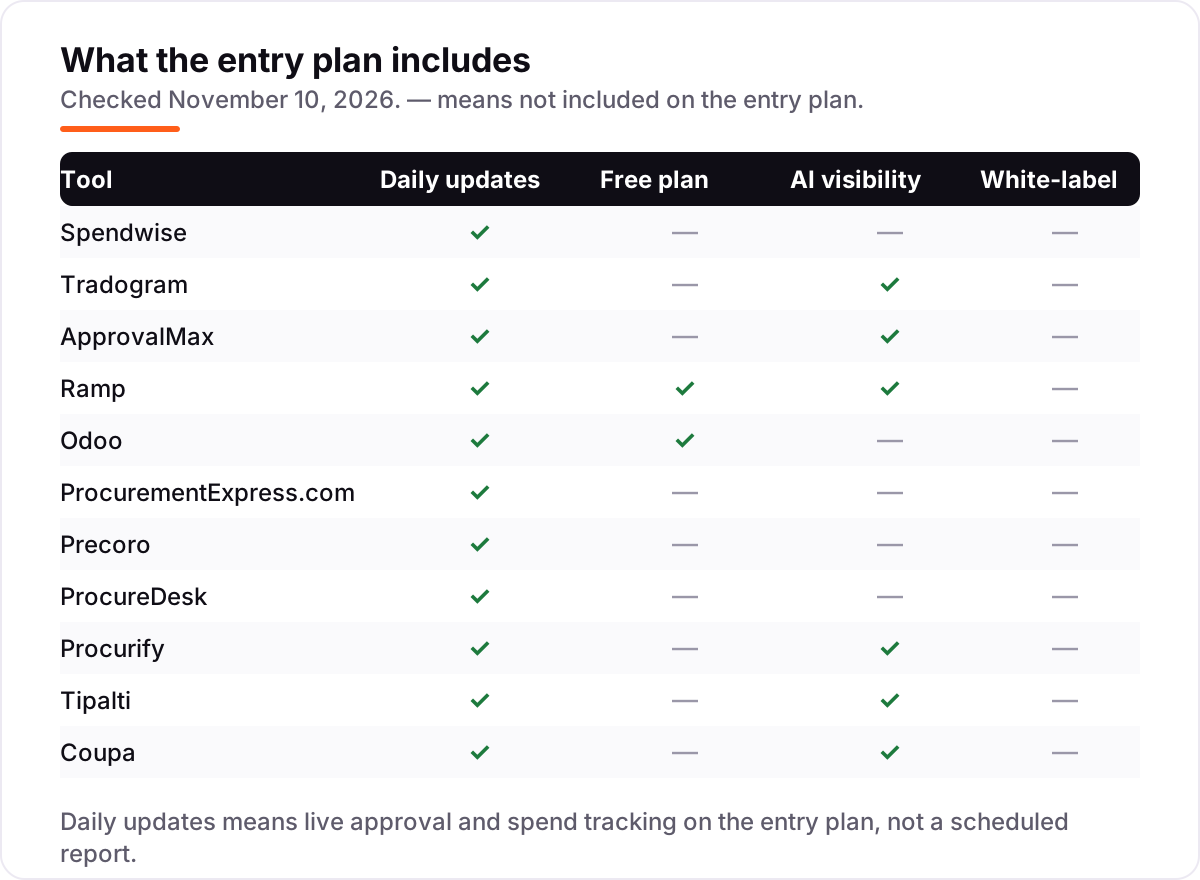
Quick comparison: tool type by need
| Buyer | Best pick | Why |
|---|---|---|
| Smallest budget, a few orders a week | Spendwise | $9 per user a month, purchasing plus AP included |
| Approval control on Xero or QuickBooks | ApprovalMax | Flat $59.40 a month, unlimited approvers |
| Free start with cards and bill pay | Ramp | $0 plan, procurement as an add-on to Plus |
| Purchasing inside a full ERP | Odoo | Every app included from $31.10 per user a month |
| Simple PO approvals for nonprofits | ProcurementExpress.com | $365 a month flat, no per-user pricing |
| Published flat rate, mid-market | Precoro | $499 a month Core, three-way matching included |
| QuickBooks shops | ProcureDesk | $498 a month billed annually, 10 users included |
| Easiest tool to adopt | Procurify | 4.6 out of 5 on G2, custom quote |
One more check before you buy: open the pricing page yourself and read the plan you would actually buy, not the headline on the homepage. Promotional prices expire, free plans cap users or transactions, and per-user pricing multiplies fast on a team plan. The figures in this guide are the list prices as shown on November 10, 2026, so if a checkout page shows a different number, the checkout page is the one that will bill you.
How we chose
We checked each vendor's own pricing page through live web search on November 10, 2026 and recorded the starting price exactly as shown, including the annual-billing figure where the page lists one. Direct page opens were unavailable on the day, so verification ran through fresh search-index crawls of the vendors' own pricing pages, dated within the last few days. Two prices are not vendor-page verified: ProcurementExpress.com's $365 comes from G2's vendor-supplied pricing data, not the vendor's own pricing page, and ApprovalMax's $59.40 monthly and $49.50 annual figures come from the vendor's own December 2025 price update and G2's vendor-supplied pricing data. Procurify, Tipalti and Coupa publish no starting price, so they are listed as custom quote, and any third-party figure for them is flagged as reported, not confirmed. Ratings come from G2, with the review count and the date checked shown on every card. We ranked the tools by fit for the most common buyer — a small business replacing spreadsheets and email approvals — not by brand size. No vendor paid for a place in this list, and none of the links here are affiliate links.
What to do next
Start with the worked example above: count your buyers, count your monthly orders, and price the two or three tools that fit both numbers. Then take the free plan or trial of your top pick and run a real purchase through it, from request to approval to paid invoice, before you pay anything. If you run a small business and want the same discipline applied to winning customers, see how expense management software for small business is judged, and read our guide to accounting software for small businesses once purchasing is under control. Once your tools are in place, find out what's holding your rankings back.
Your stack only works if people find you
SerpAstra fixes what keeps your site off page one and makes it easy for AI assistants to recommend.
Get a free audit→Sources we checked (22)
- Spendwise pricing — spendwise.com purchasing software page (checked November 10, 2026)
- Spendwise on G2 — 4.7/5, 75 reviews (checked November 10, 2026)
- Tradogram pricing — tradogram.com/pricing (checked November 10, 2026)
- Tradogram on G2 — 4.3/5, 37 reviews (checked November 10, 2026)
- ApprovalMax pricing — g2.com vendor-supplied pricing data (checked November 10, 2026)
- ApprovalMax on G2 — 4.6/5, 100 reviews (checked November 10, 2026)
- Ramp pricing — ramp.com/pricing (checked November 10, 2026)
- Ramp on G2 — 4.8/5, 2,430 reviews (checked November 10, 2026)
- Odoo pricing — odoo.com/pricing (checked November 10, 2026)
- Odoo ERP on G2 — 4.2/5, 355 reviews (checked November 10, 2026)
- ProcurementExpress.com pricing — g2.com vendor-supplied pricing data (checked November 10, 2026)
- ProcurementExpress.com on G2 — 4.7/5, 61 reviews (checked November 10, 2026)
- Precoro pricing — precoro.com/pricing (checked November 10, 2026)
- Precoro on G2 — 4.7/5, 222 reviews (checked November 10, 2026)
- ProcureDesk pricing — procuredesk.com (checked November 10, 2026)
- ProcureDesk on G2 — 4.4/5, 41 reviews (checked November 10, 2026)
- Procurify pricing — custom quote, reported from $1,000/month (checked November 10, 2026)
- Procurify on G2 — 4.6/5, 369 reviews (checked November 10, 2026)
- Tipalti pricing — custom quote for procurement (checked November 10, 2026)
- Tipalti on G2 — 4.5/5, 409 reviews (checked November 10, 2026)
- Coupa pricing — custom quote, no published price list (checked November 10, 2026)
- Coupa on G2 — 4.2/5, 569 reviews (checked November 10, 2026)
Shamim
Founder of SerpAstra
A full-stack SEO and digital marketer who spends most days on Local SEO for dental practices, AI search visibility and lead generation.
Frequently asked questions
What is the best purchasing software for a small business?
Spendwise is the cheapest fit at $9 per user a month, and Tradogram at $99 a month is the strongest all-round small-business suite. If you run Xero or QuickBooks Online, ApprovalMax at $59.40 a month adds approval control on top. Ramp is the free start, but full procurement is a paid add-on to Plus.
How much does purchasing software cost for a small business?
Between $9 per user a month and $598 a month at the published entry level. Spendwise starts at $9 per user, Tradogram at $99, Precoro at $499 and ProcureDesk at $598 a month on monthly billing. Procurify, Tipalti and Coupa publish no price, so expect a custom quote instead of a checkout.
Is there free purchasing software for small businesses?
Only with limits. Ramp has a free plan covering cards, expenses and basic approvals, but procurement is a paid add-on. Odoo's One App Free covers a single app, so Purchase alone can start free. Every other tool here offers a free trial or a demo, not a permanent free plan.
What is the difference between purchasing software and procurement software?
Purchasing software runs the buying workflow: requests, approvals, purchase orders and receiving, before money moves. Procurement software covers the wider discipline, including sourcing suppliers, negotiating contracts and managing vendors. Most small businesses need purchasing first and add procurement when sourcing and contracts become regular work.
Do I need approval workflows, or is a purchase order enough?
A purchase order records what was ordered, but it does not stop an unauthorised order going out. An approval workflow routes the request to the right manager before the order is placed, and it creates the audit trail finance needs later. If more than one person buys, approvals matter more than the order form itself.
Can purchasing software work with QuickBooks or Xero?
Yes. ApprovalMax layers approval workflows directly on Xero, QuickBooks Online and NetSuite. ProcureDesk syncs purchase orders and invoices with QuickBooks, and Precoro integrates with QuickBooks, NetSuite, Sage Intacct and Xero. Odoo takes the other route and replaces them with its own accounting ledger.
Can I switch purchasing software later without losing my orders?
Usually yes, but plan the move. Export your open purchase orders, supplier list and approval history before cancelling, and check whether the new tool imports them. Run both tools for one ordering cycle so no order goes unapproved, then close the old account once the last invoice has cleared.
Free SEO and AI visibility audit
Find out what is holding your rankings back
Send us your site. Within 2 business days you get a written audit, an AI visibility check and a short fix list ranked by impact. Free, with no contract attached.
Request my free audit→Related guides
 Accounting, Tax & Finance10 Best Expense Management Software for Small Business in 2026, Compared10 best expense management software for small business options compared on price, cards and receipt automation, with real prices checked November 2, 2026.Read guide →
 Accounting, Tax & Finance7 Best Accounting Software for Small Businesses in 2026, ComparedCompare the 7 best accounting software for small businesses on price, free plans, bank feeds and AI features, with every price checked November 2, 2026.Read guide →
 SEO & AI Search10 Best Accounting Software for Small Business with Inventory in 2026, Compared10 best accounting software for small business with inventory, compared on price, stock depth and free plans. Prices checked November 2, 2026.Read guide →