
11 Best Read IT Later Apps for 2026, Tested on Features and Price
Compare the 11 best read it later app choices for 2026 on price, free plans, offline reading and export, with prices checked November 7, 2026.
 Shamim Mia, Founder, SerpAstraLast verified November 7, 202615 min read
We compare pricing pages, documentation and public reviews. We never accept payment for rankings.

Key takeaways
- Instapaper is the best fit for most former Pocket users at $5.99/month; Readwise Reader follows at $7.99/month for highlight-driven readers, and Raindrop.io at $3/month for readers who also want a bookmark library.
- Pocket shut down on July 8, 2025, so export matters more than any feature: every app here lets you take your library with you, and Wallabag and GoodLinks keep it on your own server or iCloud.
- The single most important buying factor is the limit that forces your next upgrade: note caps, feed caps and search paywalls decide what you actually pay, not the headline price.
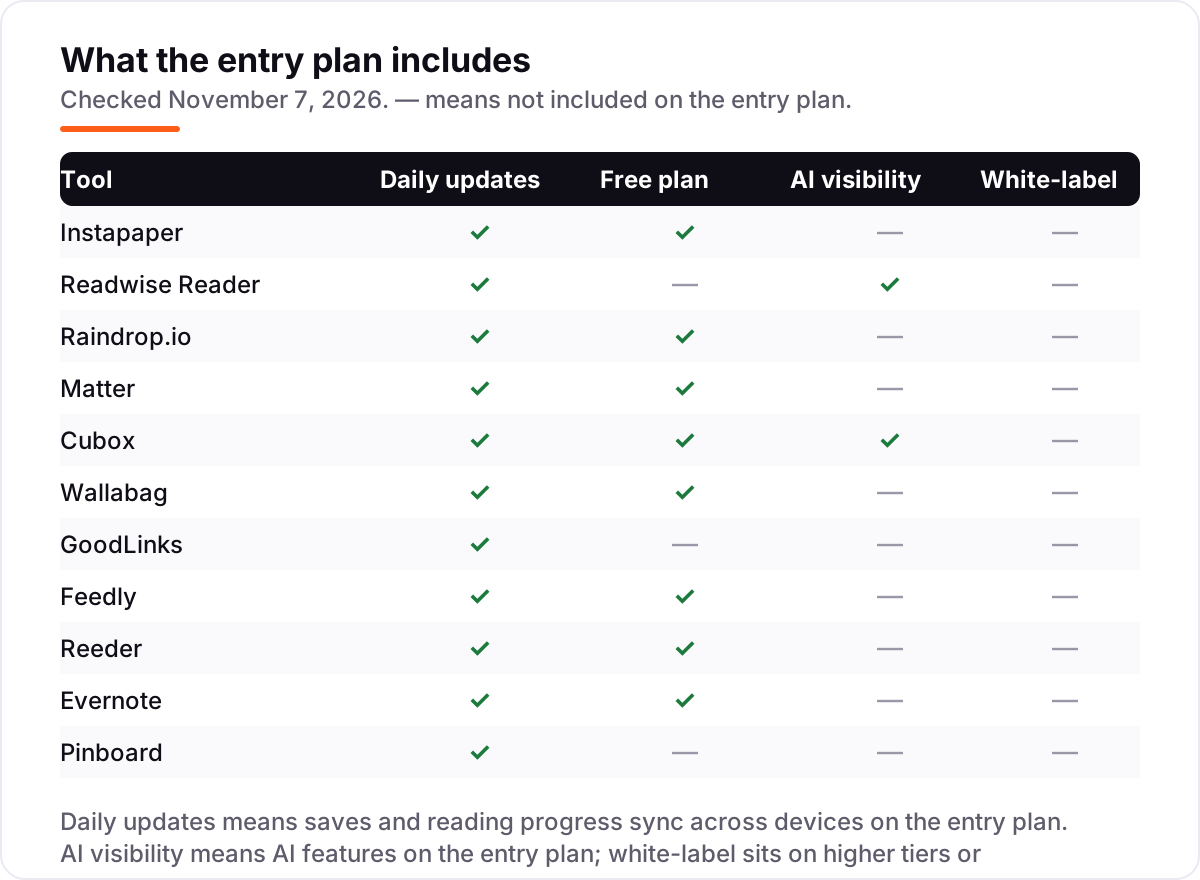
- Free plans are real here: Instapaper, Raindrop.io, Matter, Cubox, Wallabag, Feedly, Reeder and Evernote all let you save and read at $0, with different caps.
On this page
Quick comparison
| Tool | Best for | Starting price | Free plan |
|---|---|---|---|
| Instapaper | Former Pocket users who want the closest replacement — a calm queue, clean text and send-to-Kindle | $5.99/mo | Yes (free plan) |
| Readwise Reader | Researchers, writers and students who highlight heavily and want those highlights resurfaced daily | $7.99/mo | No (30-day trial) |
| Raindrop.io | Readers whose saved links are half reading list and half reference shelf that must stay findable | $3/mo | Yes (free plan) |
| Matter | Apple-first readers who choose an app on typography and want newsletters out of the inbox | $12.99/mo | Yes (free plan) |
| Cubox | Heavy savers whose queue needs AI triage — summaries and tags before they commit an hour | $38.99/yr | Yes (free plan) |
| Wallabag | Technical readers who want to own their archive outright and never depend on a company's roadmap | Free; €11/yr hosted | Yes (free) |
| GoodLinks | Apple-only readers who want a private, one-time-purchase library with no account and no server | $9.99 once | No (one-time) |
| Feedly | Feed readers who follow many sites and want their saved articles in the same place as their subscriptions | $6/mo | Yes (free plan) |
| Reeder | Apple users who read RSS feeds and want a built-in Later list in the same app | $1.99/mo | Yes (free, 10 feeds) |
| Evernote | Note-takers who clip web articles into a searchable archive and want OCR and PDF annotation too | $14.99/mo | Yes (free, limited) |
| Pinboard | Minimalists who want fast, text-dense bookmarking with no ads, no tracking and no social layer | $22/yr | No (paid only) |
Make one of these tools?
We re-check this list every quarter. Send a correction, request a review, or ask about a clearly labeled sponsored spot.
Request a listingThe best read it later apps

Instapaper
Best for: Former Pocket users who want the closest replacement — a calm queue, clean text and send-to-Kindle
Instapaper is the closest thing to Pocket's replacement, and the free tier is the reason to start here: unlimited saves, folders and sync across web, iOS, Android and e-readers, with offline reading included. Premium costs $5.99 a month, or $59.99 a year, and adds the searching and annotation layer — full-text search across your account, a permanent archive of saved pages, unlimited notes, a PDF reader, AI text-to-speech and send-to-Kindle.
The trade-off is scope, and it is deliberate. Instapaper does not want to become your newsletter client, your PDF manager or your spaced-repetition tutor, so there is no newsletter inbox and no highlight-review system. Development has also had quiet stretches in its history. Buy Instapaper when you want a calm queue that does one job well; buy Readwise Reader when your highlights are the work.
What we like
- The oldest name in the category, still doing the original job: clean text, calm reading, no noise
- Free tier covers unlimited saves, folders and sync across web, iOS, Android and e-readers
- Premium adds full-text search, a permanent archive, unlimited notes and send-to-Kindle
- Imported Pocket libraries when Pocket closed, so refugees can bring their archive
Watch out for
- Premium doubled to $5.99/month in 2024 with no matching jump in new features
- No newsletter inbox or highlight-review system — heavy researchers outgrow it
- Development has had quiet stretches, which Pocket veterans notice

Readwise Reader
Best for: Researchers, writers and students who highlight heavily and want those highlights resurfaced daily
Readwise Reader is what read-it-later grows up to be when the reader is serious. It treats saving as the start of a pipeline: triage the inbox, read with highlighting, and let the daily review drill those highlights back into memory over months. Reader only costs $7.99 a month billed yearly; Full Readwise, which adds the Highlights review system, costs $9.99 a month billed yearly or $12.99 billed monthly.
Be honest about your reading life before subscribing. Reader rewards the person who processes a queue weekly and wants notes that return, and it punishes the save-and-forget habit most of us actually have, by charging the category's premium for a beautifully organized pile you never open. Run the 30-day trial honestly: if you open it daily, it is worth every cent.
What we like
- Everything lands in one inbox: articles, newsletters, PDFs, EPUBs and YouTube transcripts
- Highlights sync to Readwise and resurface in a daily review, so reading compounds
- Powerful search, tags and keyboard-driven triage for large queues
- Exports to Notion and Obsidian keep highlights in your notes system
Watch out for
- No free plan — only a 30-day trial, then the subscription starts
- Reader only exists inside a Readwise plan; the cheaper Lite plan does not include it
- The power brings complexity: Reader is a system to learn, not just a button to press

Raindrop.io
Best for: Readers whose saved links are half reading list and half reference shelf that must stay findable
Raindrop.io answers a slightly different question: not just read it later, but find it forever. Its collections hold the article for tonight and the documentation page you will need in March with equal care, and Pro costs $3 a month, or $28 a year. The free plan is generous — unlimited bookmarks, collections, highlights and devices — while Pro adds full-text search, permanent copies, Stella AI beta, annotations, reminders and daily backups.
For many Pocket refugees this is the right scale of tool: more durable than a reading queue, cheaper than a research system, organized like a librarian lives inside it. The reading experience is good rather than Instapaper-calm, and the Pro features that matter most — permanent copies and search — are the ones skipped until a link dies. Buy it when your saved links were always half library.
What we like
- A bookmark manager that reads articles too, so reference links and long reads live in one library
- Free plan is generous: unlimited bookmarks, collections, highlights and devices
- Pro at $28 a year keeps permanent copies, so link rot cannot erase your library
- Excellent organization: nested collections, tags and filters across every platform
Watch out for
- Its centre of gravity is bookmarking, so the reading view is good rather than Instapaper-calm
- Full-text search and permanent page copies need Pro — the free plan has neither
- The everything library becomes an everything junk drawer without discipline

Matter
Best for: Apple-first readers who choose an app on typography and want newsletters out of the inbox
Matter is the designer's read-it-later app: a queue that feels like a magazine made only of things you chose. Its newsletter handling is its quiet triumph, routing subscriptions out of your email and into the reading chair where they belong, and its following features turn solitary saving into a gentle discovery network. The free plan covers unlimited saving, clean parsing and full-text search; Premium costs $12.99 a month, or $59.99 a year at the promotional rate shown in-app.
It serves Apple users best, and readers who value the feel of reading enough to choose an app on typography — you will spend hundreds of hours inside this screen, so that criterion is fair. Just keep the export habit, because beauty is not a backup strategy, and Matter's smaller scale makes the habit prudent rather than paranoid.
What we like
- The most considered reading experience of the modern wave: elegant typography and a calm queue
- Newsletters arrive as a feed inside the app, ending the inbox clutter problem
- Free plan covers unlimited saving, clean parsing and full-text search
- Social layer lets you follow what respected readers save and highlight
Watch out for
- Apple-centred: the best experience is iPhone and iPad, with web beside it; no Android app
- Premium price is shown in-app and has shifted with promotions — check before you pay
- A smaller company, so the Pocket durability question applies; keep exports current

Cubox
Best for: Heavy savers whose queue needs AI triage — summaries and tags before they commit an hour
Cubox is built for the failure mode of this whole category: the queue of four hundred unread articles and the guilt that guards it. Its AI reads first, summarizing and tagging, so triage happens at headline speed and the pieces you open get your full attention. The free plan covers the core saving and reading, with 2,000 bookmarks and 10 AI summaries a month; Pro costs $38.99 a year and Pro+AI costs $68.99 a year, both annual only on the web.
Hold its summaries to their proper rank: signposts, not substitutes. The summary tells you whether to read; it is not the reading. Within that discipline, Cubox is a generous way to test whether machine-assisted triage rescues your queue — and note that its price rose from $29 to $38.99 a year on its own pricing page since October.
What we like
- AI reads first: automatic summaries and tagging tame a large queue at headline speed
- Free tier covers the core saving and reading, with 10 AI summaries a month
- Saves articles, videos and posts with snapshots, highlights and nested folders
- Browser extensions and mobile apps capture from everywhere
Watch out for
- The web store sells annual plans only — there is no monthly billing on the web
- Pro includes only a limited trial of AI features; full AI needs Pro+AI at $68.99/year
- The product is younger and less proven as a decade-scale archive than the older names

Wallabag
Best for: Technical readers who want to own their archive outright and never depend on a company's roadmap
Wallabag is the answer for the reader Pocket burned worst: never again. Run it on a cheap server or a home machine and your reading archive becomes a possession rather than a tenancy. Articles save as clean text, exports are open, and the entire collection survives any headline because the only company involved is you. The software itself is free and open source; the official hosted service at wallabag.it costs €11 a year, with a 14-day free trial.
The trade is effort and polish. Nobody's first run of Wallabag feels like Matter, and when it breaks at 11pm, support is you and a forum. For technical readers that is a fair and even satisfying bargain. For everyone else, it is the insurance policy admired from afar while paying Instapaper. Both responses are rational; only one of them owns the archive.
What we like
- Open source and self-hostable: your archive lives on your server, immune to any closure announcement
- Free to run yourself, with an official hosted option at €11 a year that funds development
- Saves clean article text with tagging, search and export in open formats
- Every plan includes all features; there is no artificial feature gating
Watch out for
- Self-hosting means you are the IT department: installation, updates and backups are yours
- The reading experience is plainer than the designed apps, and mobile apps are functional rather than lovely
- Hosted wallabag.it is cheap but the project moves at open-source pace, not startup pace

GoodLinks
Best for: Apple-only readers who want a private, one-time-purchase library with no account and no server
GoodLinks is the privacy purist's small answer. It sells you an app, once, keeps your library in your iCloud, and does the save, tag, read and highlight jobs without an account, a feed or a company's roadmap. One $9.99 purchase on the App Store covers iPhone, iPad and Mac, and includes every current feature plus new features released within a year of purchase. After Pocket, that ownership shape reads less like a limitation and more like the point.
Its boundaries are hard ones: Apple devices or nothing. Within them, it is close to perfect for its job, and its one-time pricing makes the total cost of a decade's reading lower than a year of the subscriptions above. If your life is Apple-shaped and your needs are links and text, GoodLinks is the quiet correct choice.
What we like
- A one-time $9.99 purchase in a subscription category, covering iPhone, iPad and Mac
- No account and no server holding your library: data stays in your Apple ecosystem via iCloud
- Saves links with a clean reader view, tags and highlights, with Shortcuts and share-sheet saving
- No ads, no tracking pitch, no social layer asking for attention
Watch out for
- Apple only, completely: no Android, no real web app, no Windows version
- No free version or trial — you pay $9.99 before you see it
- Features released more than a year after purchase need the $4.99 Annual Feature Upgrade

Feedly
Best for: Feed readers who follow many sites and want their saved articles in the same place as their subscriptions
Feedly is the feed reader that doubles as a read-it-later app: follow the sites you trust, save the articles worth a second look, and keep both in one polished timeline. The free plan covers 100 feeds in 3 folders, with ads and no search. Pro costs $6 a month billed annually, or $72 a year, and raises the cap to 1,000 feeds while adding search, notes, highlights and integrations with Slack, Teams, IFTTT and Zapier.
It is not dead: the company's main business is now threat intelligence for security teams, but the reader apps were updated in September 2026 and the free plan works. The catch is that Leo AI waits for Pro+, which advertises $99 for the first year against a regular $144 annual price. Buy Feedly when feeds are the habit and saving is the side job.
What we like
- One polished timeline for RSS feeds, newsletters and saved articles, on web, iOS and Android
- Pro raises the cap to 1,000 feeds and adds search, notes, highlights and integrations
- Save-for-later boards sit beside your feeds, so nothing needs a second app
- Actively maintained: the iPhone and Android apps were both updated in September 2026
Watch out for
- Pro is the cheaper reader tier, but Leo AI waits for Pro+ at $99 for the first year
- The free plan shows ads and caps at 100 feeds and 3 folders, with no search
- Feedly's main business is now threat intelligence for teams, so reader features move slowly

Reeder
Best for: Apple users who read RSS feeds and want a built-in Later list in the same app
Reeder is the cheapest subscription in this list, and the most single-minded: one timeline for everything you follow — RSS articles, YouTube videos, podcasts and social posts — with a built-in Later list for the pieces you want to read properly. The free version covers 10 feeds; the subscription costs $1.99 a month or $14.99 a year, and sync runs over iCloud across iPhone, iPad and Mac.
The limits are real and worth knowing before you commit. There are no unread counts or read/unread states at all, paid or free, and there is no Android or web version — Apple devices or nothing. But if your reading life is feeds plus a Later list, and your devices are Apple-shaped, Reeder is the least you can pay for the most pleasant version of that job.
What we like
- One timeline for articles, YouTube videos, podcasts and social posts, not just RSS
- Cheapest subscription here: $1.99 a month or $14.99 a year
- Built-in Later list saves links for reading without a second app
- Clean, minimal design with iCloud sync across Apple devices within seconds
Watch out for
- Apple only, and sync is iCloud only — no Android, no web app, no shared service
- Free version is limited to 10 feeds, with no OPML import on the free tier
- No unread counts or read/unread states at all, paid or free

Evernote
Best for: Note-takers who clip web articles into a searchable archive and want OCR and PDF annotation too
Evernote is the odd one out here and the most powerful archive: the Web Clipper saves a full page into a notebook, OCR makes text in images and scanned PDFs findable, plus calendar, tasks and annotation. Starter costs $14.99 a month, or $8.25 a month billed annually at $99 a year, covering up to 1,000 notes on 3 devices with 10 GB of uploads a month.
It is the priciest pick here for reading alone: you pay for a notes app, not a queue — and the free plan, capped at 50 notes and 1 notebook, is barely a trial. Plan names also changed in late 2025, when Personal and Professional became Starter and Advanced, so older roundups quote prices and tiers that are gone. Buy Evernote when clipped articles become working material, not when you need only a queue.
What we like
- The Web Clipper is still the fastest way to save a full page into a searchable archive
- OCR makes text inside images and scanned PDFs searchable, which no pure queue does
- Unlimited devices and offline access on Starter, with 10 GB of uploads a month
- Calendar, tasks and annotation sit beside the notes, so clipped articles become working material
Watch out for
- The priciest pick here for reading alone — you pay for a notes app, not a queue
- Free plan is heavily limited: 50 notes, 1 notebook and 60 MB of uploads a month
- Plan names changed in late 2025: Personal and Professional became Starter and Advanced

Pinboard
Best for: Minimalists who want fast, text-dense bookmarking with no ads, no tracking and no social layer
Pinboard is a fast, independently run, no-nonsense bookmarking site for people who value privacy and speed. There are no ads and no third-party tracking — not even outside JavaScript on the page. A standard account costs $22 a year and covers unlimited bookmarks with tags, descriptions and privacy controls; a $39-a-year archival account additionally crawls and stores a full copy of every page you save, enables full-text search and flags dead links.
It is the least read-it-later tool in this list and the most honest about it: Pinboard is a personal archive for things you find online and do not want to forget, not a reading queue with typography to admire. Development is famously slow and the extensions date to 2021, but the service still runs and accepts signups. Buy it when speed, privacy and permanence matter more than polish.
What we like
- Deliberately minimalist and fast: tags, descriptions and privacy controls, nothing else
- No ads and no third-party tracking — not even outside JavaScript on the site
- Run by one person since 2009, funded only by users, with no investor roadmap to chase
- Syncs with Instapaper and other services, so it slots into a wider reading setup
Watch out for
- Paid only since 2009: no free plan and no free trial at any price
- Full-text search and saved page copies need the $39/year archival account
- Development is famously slow: the official browser extensions date to 2021
The best read it later app does one job well: it takes the article you found at the wrong moment and holds it in clean, readable text until the right moment arrives, on whatever device you are holding then. We ranked the eleven apps below by fit for the most common buyer — a former Pocket user looking for a new home after Mozilla shut Pocket down on July 8, 2025 — starting with the classic queues and ending with the minimalist bookmarking services, and every price was checked on the vendor's own pricing page on November 7, 2026.
How to choose the best read it later app
- Start with the archive, not the app. Pocket's closure is the standing warning: before you commit, check that the app exports your library in a usable format and that you can leave with it. Wallabag and GoodLinks keep the library on your own server or iCloud, which is the strongest answer.
- Count the caps that bite first. Instapaper Free limits notes to 5 a month, Evernote Free to 50 notes and 1 notebook, Feedly Free to 100 feeds, Reeder Free to 10 feeds. The cap you hit first is your real starting price.
- Decide whether highlights are the work or the garnish. If you highlight to remember, Readwise Reader's daily review is the whole point; if you highlight to mark a passage, Instapaper's free highlighting is enough.
- Check the newsletter question honestly. If half of what you read arrives by email, you need Readwise Reader, Matter or Feedly Pro+, not a classic queue that treats newsletters as an afterthought.
- Match the app to your devices. Matter, GoodLinks and Reeder are Apple-first or Apple-only; there is no point buying the prettiest queue if your daily reader is an Android phone.
Reading is one system in your stack, not the whole stack. If the business behind your reading also needs to be found online, our monthly SEO service handles the visibility side. And before you publish new pages for the services you sell, run your titles through the free SERP snippet preview tool — it shows exactly how the title and description will look in Google.
Whatever you shortlist, try it with real saves before you pay. The free plans and trials in this list are long enough to run one genuine week — your articles, your newsletters, your feeds — and that week tells you more than any review can. Check two things in the trial: that the reading view is calm enough to keep you reading, and that the export file opens somewhere else. Every app here offers export, so there is no reason to buy before you have tested the exit.
Read it later apps pricing: what you will actually pay
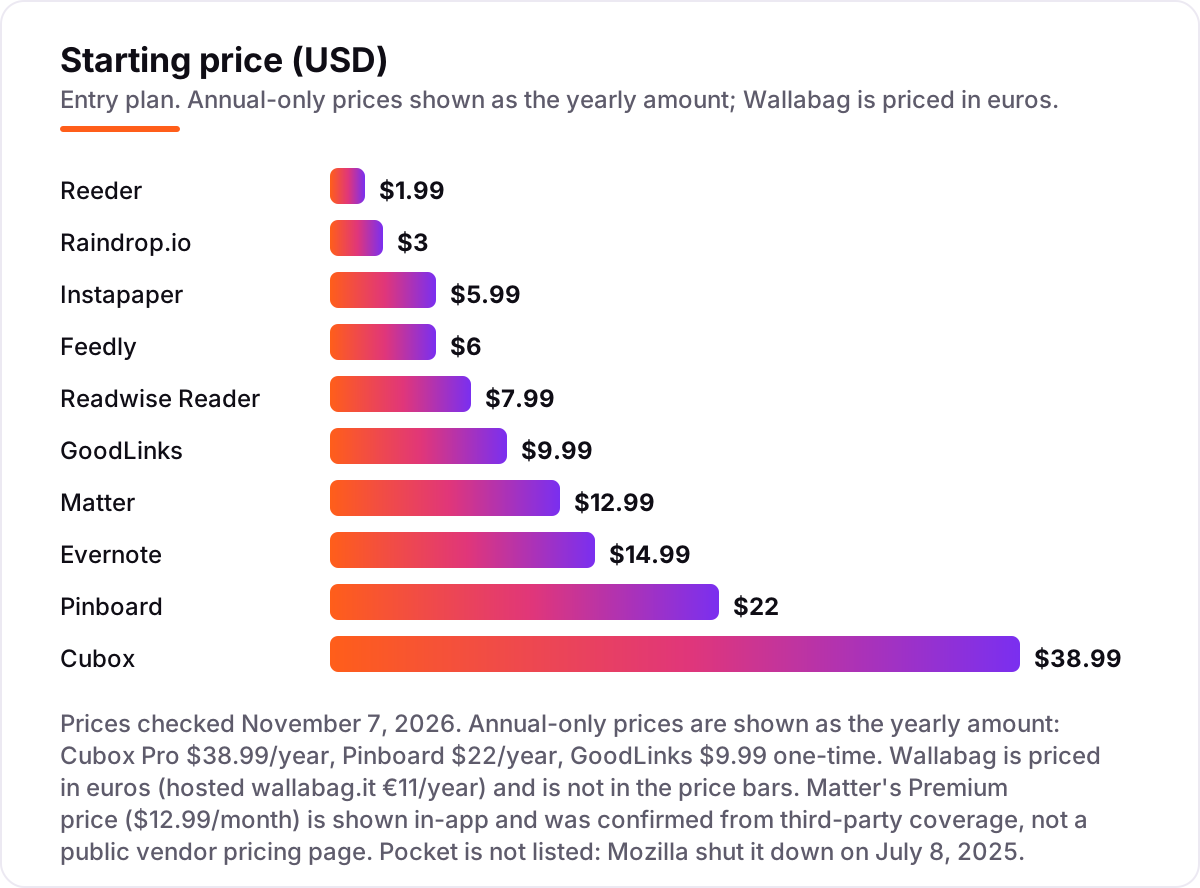
Take a reader who saves about ten articles a week and reads on a phone and a laptop. On list prices, a year of the entry paid plan costs $14.99 on Reeder, $22 on Pinboard, $28 on Raindrop.io Pro, $38.99 on Cubox Pro, $59.99 on Instapaper Premium, $59.99 on Matter Premium at its promotional annual rate, $72 on Feedly Pro, $95.88 on Readwise Reader only, and $99 on Evernote Starter billed annually. GoodLinks costs $9.99 once, and Wallabag costs nothing if you self-host, or €11 a year hosted.
Two of those numbers need adjusting before they are real. First, the monthly-billed price is higher than the annual figure on most tools: Evernote Starter costs $14.99 a month, which is $179.88 over twelve months against $99 billed annually — an $80.88 gap for the same plan — and Instapaper Premium costs $71.88 over twelve monthly payments against $59.99 a year. Second, the step-ups are where the money goes: Readwise Full with Highlights is $119.88 a year against $95.88 for Reader only, Cubox Pro+AI is $68.99 a year against $38.99 for Pro, and Pinboard's archival account is $39 a year against $22 for the standard account.
The cheapest honest year in this list is $0: Instapaper Free, Raindrop.io Free, Matter Free, Cubox Free, Feedly Free and Reeder Free all cover the save-and-read habit without a payment, and Wallabag self-hosted costs nothing but a server you already run. The dearest honest year is Evernote Starter at $179.88 billed monthly — and that buys a notes app, not a queue, so compare it against what a notes app is worth to you, not against the $14.99 Reeder year.
Know the difference: read it later apps vs bookmark managers vs feed readers
The confusion in this category is between three tools that all save links but do different jobs. A read-it-later app saves an article into a clean reading view and queues it for a reading session — Instapaper, Matter and GoodLinks are the pure form. A bookmark manager saves the link itself, organizes it, and keeps it findable forever — Raindrop.io and Pinboard are the pure form, and their reading view is a convenience, not the point. A feed reader follows the sources and brings new articles to you — Feedly and Reeder are the pure form, and their save-for-later list is the side job.
There is a second, quieter confusion: notes apps are not read-it-later apps. Evernote's Web Clipper saves a full page into a searchable notebook with OCR, which no pure queue does — but it charges notes-app prices and caps the free plan at 50 notes, so it is the wrong buy for someone who only needs a queue. All eleven tools in this list save web content into a clean, readable form; the question is which second job you also need — organizing, following, or archiving — and that answer picks the tool.
A third distinction worth knowing is the newsletter inbox versus the queue. Readwise Reader and Matter route newsletter subscriptions into the reading app, so the inbox stops being the reading list. The classic queues focus on web articles; you can save a newsletter edition manually, but it is not their design centre. If half your reading arrives by email, buy the inbox, not the queue.
Quick comparison: tool type by need
| Buyer | Best pick | Why |
|---|---|---|
| Former Pocket user, wants the same feel | Instapaper | Calm queue, clean text, free to start, Premium is $5.99/month |
| Highlights are the work | Readwise Reader | Daily highlight review, Reader only is $7.99/month billed yearly |
| Links and reading in one library | Raindrop.io | Free plan is generous, Pro is $3/month with permanent copies |
| Own the archive outright | Wallabag | Free to self-host, hosted is €11/year, nobody can shut it down |
| Apple only, buy once | GoodLinks | $9.99 once for iPhone, iPad and Mac, library in iCloud |
| Feeds and saved articles together | Feedly | Free for 100 feeds, Pro is $6/month billed annually |
Mistakes to avoid
- Buying on the monthly price and paying it monthly. Annual billing cuts the bill on most tools here: Evernote Starter drops from $179.88 to $99 a year, Instapaper Premium from $71.88 to $59.99, and Reeder from $23.88 to $14.99. The annual figure is the real price.
- Picking the prettiest queue for the wrong device. Matter, GoodLinks and Reeder are Apple-first or Apple-only. If your daily reader is an Android phone or a Windows laptop, the prettiest queue is the one you cannot open.
- Paying for AI triage before you need it. Cubox Pro includes only a limited trial of AI features, and Readwise Reader's Ghostreader is only worth it if you process highlights weekly. If you save and forget, the AI tier is money spent on a pile.
- Ignoring the cap that bites first. A tool can be free and still be the wrong buy: Evernote Free at 50 notes is no bargain once you clip daily, and Feedly Free at 100 feeds is no bargain once you follow widely.
- Forgetting the exit. Pocket's users who had exports lost a weekend; the ones who had not lost a decade. Export your library twice a year, wherever you land, before you need to.
How we chose
We checked each vendor's own pricing page on November 7, 2026 and recorded the starting price exactly as shown, including the annual-billing figure where the page lists one, and we ranked the tools by fit for the most common buyer — a former Pocket user looking for a new home — not by brand size. Two prices carry a caveat: Matter's Premium price is shown in-app rather than on a public pricing page, so we confirmed it from third-party coverage of the vendor's own in-app pricing, and Cubox Pro rose from $29 to $38.99 a year on its own pricing page since October. Pocket is not listed because Mozilla shut it down on July 8, 2025. Ratings appear only where we verified a G2 page on November 7, 2026 — Raindrop.io at 4.2 out of 5 from 13 reviews and Evernote at 4.3 out of 5 from 2,046 reviews — and we show no rating rather than a stale or estimated one anywhere else. No vendor paid for a place in this list, and none of the links here are affiliate links.
What to do next
Start with the free plan or trial of your top pick and run one real week of saves through it. Check that the reading view is calm enough to keep you reading and that the export file opens somewhere else before you commit to a year. If the reading habit is sorted but new customers are not finding you, our monthly SEO service handles the visibility side. Once your tools are in place, find out what's holding your rankings back.
Your stack only works if people find you
SerpAstra fixes what keeps your site off page one and makes it easy for AI assistants to recommend.
Get a free audit→Sources we checked (14)
- Instapaper — instapaper.com (checked November 7, 2026)
- Readwise Reader pricing — readwise.io/pricing/reader (checked November 7, 2026)
- Raindrop.io Pro pricing — raindrop.io/pro (checked November 7, 2026)
- Raindrop.io on G2 — g2.com/products/raindrop-io/reviews (checked November 7, 2026)
- Matter — getmatter.com (checked November 7, 2026)
- Cubox pricing — cubox.cc/pricing (checked November 7, 2026)
- Wallabag — wallabag.org (checked November 7, 2026)
- Wallabag hosted — wallabag.it (checked November 7, 2026)
- GoodLinks press kit — goodlinks.app/press (checked November 7, 2026)
- Feedly Pro pricing — feedly.com/i/pro (checked November 7, 2026)
- Reeder on the App Store — apps.apple.com/us/app/reeder/id6475002485 (checked November 7, 2026)
- Evernote plans — evernote.com/compare-plans (checked November 7, 2026)
- Evernote on G2 — g2.com/products/evernote/reviews (checked November 7, 2026)
- Pinboard — pinboard.in (checked November 7, 2026)
Shamim
Founder of SerpAstra
A full-stack SEO and digital marketer who spends most days on Local SEO for dental practices, AI search visibility and lead generation.
Frequently asked questions
What happened to Pocket?
Mozilla shut Pocket down on July 8, 2025, and the final data export deadline passed on October 8, 2025. It was the category's default for years, and its end is why current guides weigh export options and company durability so heavily. If you missed the export window, the saved articles are gone.
Which app is most like Pocket?
Instapaper, in shape and spirit: save anywhere, read in clean text, archive when done, free for the basics and $5.99 a month for Premium. It also imported Pocket libraries when Pocket closed, which made it the natural first home for former Pocket users.
What is the best free read it later app?
Instapaper's free tier for pure reading, Raindrop.io's free plan for organizing links as well, and Wallabag for the technically confident who will self-host. Cubox's free tier leads if your queue needs AI triage more than calm, and Reeder is free for 10 feeds.
Can these apps handle my newsletters?
Readwise Reader and Matter are built for it, routing newsletter subscriptions into the reading app instead of your email inbox. Feedly Pro+ adds a newsletter inbox too. The classic queues focus on web articles; you can save newsletter editions manually, but it is not their design centre.
Is my archive safe if one of these closes?
Safer if you export regularly. All eleven offer export, and Wallabag and GoodLinks go further by keeping the library on your own server or iCloud. No company's promise replaces a backup: export your library twice a year and keep the file somewhere boring and safe.
How much does a read it later app cost?
Entry prices run from $0 to $14.99 a month. A year of the cheapest paid plans costs $14.99 on Reeder, $22 on Pinboard, $28 on Raindrop.io Pro and $38.99 on Cubox Pro. The priciest, Evernote Starter, is $99 a year billed annually or $179.88 billed monthly.
Can I read offline or send articles to my Kindle?
Yes, with the right pick. Instapaper offers offline reading free and send-to-Kindle on Premium, Matter integrates with Kindle on Premium, and most apps here cache saved articles for offline reading. Check the offline and Kindle details on the vendor's page before you pay.
Free SEO and AI visibility audit
Find out what is holding your rankings back
Send us your site. Within 2 business days you get a written audit, an AI visibility check and a short fix list ranked by impact. Free, with no contract attached.
Request my free audit→Related guides
 Consumer Apps10 Best Apps to Read Books for Free in 2026Compare the 10 best app to read books for free options: library loans, 70,000+ free classics, free audiobooks and no-cost stores, checked November 4, 2026.Read guide →
 Consumer Apps10 Best Apps to Read Books for Free Online in 2026Compare the 10 best app to read books for free online options — free library apps, web readers and pay-per-book stores — with prices checked November 4, 2026.Read guide →
 Consumer Apps10 Best Learn to Read Apps for Kids in 2026: Free and Paid Apps RankedCompare the 10 best learn to read apps for kids for ages 2 to 8 on price, free plans and phonics teaching, with every price checked November 4, 2026.Read guide →