
10 Best Real Estate Video Editing Software in 2026, Compared
Compare the 10 best real estate video editing software tools on price, free plans and AI features, with every price checked November 8, 2026.
 Shamim Mia, Founder, SerpAstraLast verified November 8, 202614 min read
We compare pricing pages, documentation and public reviews. We never accept payment for rankings.

Key takeaways
- CapCut is the best fit for most agents at $19.99/month; Canva follows at $18/month for branded templates, and Premiere Pro at $22.99/month for high-end listing films.
- DaVinci Resolve and Final Cut Pro are the buy-once options — Studio $295 once ($236 on sale until November 20, 2026), Final Cut $299.99 once — while everything else is a subscription.
- The single most important buying factor is the meter that forces your next upgrade: credit pools, media-hour caps and export limits decide what you actually pay, not the headline price.
- Free plans are real but limited: DaVinci Resolve's free version is a full professional editor, while Filmora and Animoto watermark free exports and cap resolution.
On this page
Quick comparison
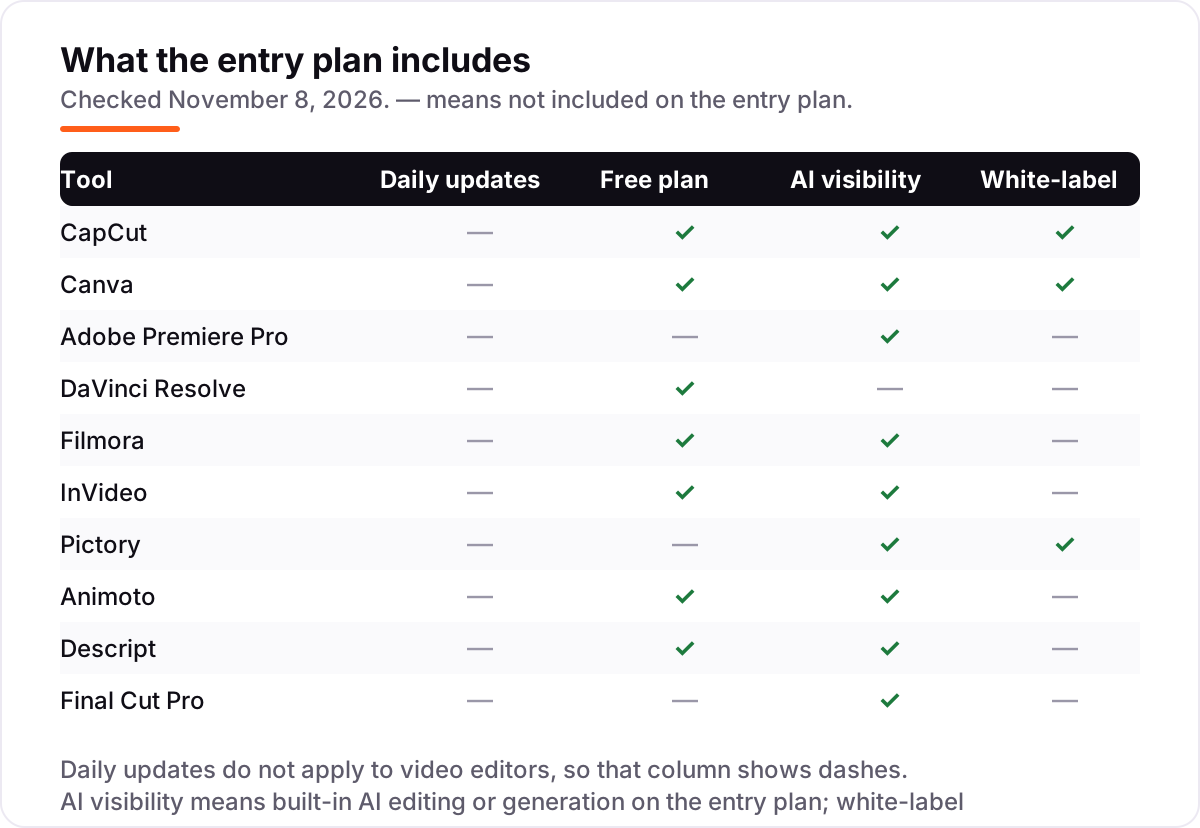
| Tool | Best for | Starting price | Free plan |
|---|---|---|---|
| CapCut | Agents who film walkthroughs on their phone and need a finished vertical reel the same day | $19.99/mo | Yes (free plan) |
| Canva | Agents who want branded listing videos, flyers and social posts from one template library | $18/mo | Yes (free plan) |
| Adobe Premiere Pro | Agents and in-house editors who want cinema-grade polish on high-end listing films | $22.99/mo | No (7-day trial) |
| DaVinci Resolve | Agents who want professional colour grading for luxury listings without a subscription | $295 once | Yes (free version) |
| Filmora | Beginners who want templates, titles and auto-captions without learning a pro timeline | $19.99/mo | Yes (free, watermarked) |
| InVideo | Agents who want a finished listing video generated from a prompt or a property description | $20/mo | Yes (free plan) |
| Pictory | Agents who want to turn a listing description or a long walkthrough into short captioned clips | $29/mo | No (14-day trial) |
| Animoto | Agents who want a polished photo-slideshow tour from listing photos in minutes | $19/mo | Yes (free plan) |
| Descript | Agents who narrate walkthroughs and want to edit the video by editing the transcript | $24/mo | Yes (free plan) |
| Final Cut Pro | Mac-only agents who want to buy once and edit fast on Apple silicon | $299.99 once | No (90-day trial) |
Make one of these tools?
We re-check this list every quarter. Send a correction, request a review, or ask about a clearly labeled sponsored spot.
Request a listingThe best real estate video editing software

CapCut
Best for: Agents who film walkthroughs on their phone and need a finished vertical reel the same day
CapCut is the fastest route from a phone full of listing clips to a finished reel. You shoot the walkthrough on your phone, drop the clips on the timeline, and the app adds auto-captions, trending music and transitions built for vertical video. Pro costs $19.99 a month, or $179.99 a year, and unlocks 4K export, the full AI toolkit and about 1 TB of cloud storage.
The free plan is genuinely usable — basic editing, auto-captions and 1080p export cost nothing — so start there and pay only when you need 4K or premium templates. The catch is the credit system: heavier AI tools draw on a monthly pool of 1,200 credits, and prices vary by region and platform, so confirm the figure at your own checkout before you commit.
What we like
- Phone, desktop and web apps share one project, so a reel started on-site finishes at the desk
- Auto-captions and vertical templates are built for Reels, TikTok and Shorts
- Free plan covers basic editing, auto-captions and 1080p export at $0
- Pro adds 4K export, the full AI toolkit and about 1 TB of cloud storage
Watch out for
- Heavier AI tools draw on a monthly pool of 1,200 credits, not unlimited use
- Prices vary by region and platform, so the checkout figure can differ from the US list price
- No brand kit on the free plan, so agency branding waits for Pro

Canva
Best for: Agents who want branded listing videos, flyers and social posts from one template library
Canva is the branding tool in this list. Start from a real estate template, drop in the listing photos, and the Brand Kit applies the agency logo, colours and fonts without thinking. Pro costs $18 a month, or $144 a year, and adds 141 million premium assets, Background Remover, Magic Resize and 100 GB of storage — enough to run listing videos, flyers and social posts from one place.
The trade-off is the timeline. Canva cuts short branded clips beautifully, but a ten-minute walkthrough with music, captions and B-roll gets awkward fast — that job belongs to CapCut or Premiere. Pro also covers one person only, so a second editor means Business at $25 per person a month. Buy Canva when consistent branding matters more than deep editing.
What we like
- Thousands of real estate templates for listing videos, flyers and social posts in one place
- Brand Kit keeps the agency logo, colours and fonts consistent across every video
- Magic Resize turns one listing video into vertical, square and wide versions
- Free plan is genuinely usable, with 5 GB of storage and basic video editing
Watch out for
- Pro covers one person only — a second editor means Business at $25 per person a month
- Timeline editing is basic next to CapCut or Premiere; long walkthroughs get awkward
- AI video uses are capped each month — up to 200 Premium or 20 Ultra uses on Pro

Adobe Premiere Pro
Best for: Agents and in-house editors who want cinema-grade polish on high-end listing films
Premiere Pro is the professional standard, and it shows in the polish: precise colour, clean audio, multicam for multi-room shoots and Firefly generative tools for extending a shot or cleaning a frame. The single-app plan costs $22.99 a month on an annual plan billed monthly, or $34.49 month to month, and includes the mobile app, Adobe Express Premium, Frame.io review links and 100 GB of storage.
The price is the commitment, not just the money. The annual plan is a 12-month contract, and cancelling early can cost half the remaining term. There is no free plan, only a 7-day trial, and the learning curve is the steepest here. Buy Premiere when the listing is high-end enough that the edit itself sells the home — otherwise CapCut or Filmora gets the video out faster.
What we like
- The deepest timeline editor here, with professional colour, audio and multicam tools
- Generative AI (Firefly) and Speech to Text speed up captions and clean-up
- Frame.io review links let clients approve a cut without a login
- Desktop and mobile apps included, with 100 GB of cloud storage
Watch out for
- Subscription only — stop paying and the editor stops working, with no buy-once option
- Annual plan billed monthly is a 12-month commitment; early cancellation can cost 50% of the remaining term
- Only 25 generative credits a month on the single-app plan

DaVinci Resolve
Best for: Agents who want professional colour grading for luxury listings without a subscription
DaVinci Resolve is the rare professional editor that costs nothing to start: the free version includes the full timeline, colour grading, Fairlight audio and 4K export to 60 frames a second. Studio costs $295 once — $236 in a 20% sale running until November 20, 2026 — and adds 10-bit video, 120 frames a second, resolutions beyond 4K and AI tools such as Magic Mask.
For real estate, the colour tools are the point: graded footage makes a luxury kitchen look like a magazine spread, and the free version already does most of it. The catch is hardware — older laptops struggle with 4K timelines — and there are no listing templates or stock libraries, so you bring your own footage and music. Buy Studio when you shoot log footage or deliver above 4K.
What we like
- Free version is a full professional editor — timeline, colour, Fairlight audio, 4K export
- Best colour grading in this list, which flatters luxury listings
- Studio is a one-time $295 purchase with free updates, not a subscription
- Runs on Mac, Windows, Linux and iPad
Watch out for
- Studio's $236 sale price ends November 20, 2026 — after that it is $295
- Demanding on hardware; older laptops struggle with 4K timelines
- No built-in stock library or listing templates — you bring your own footage and music

Filmora
Best for: Beginners who want templates, titles and auto-captions without learning a pro timeline
Filmora is built for beginners who want a finished video today: drag in the listing clips, pick a template, add titles and transitions, and export. The monthly plan costs $19.99, while the Basic annual plan is $49.99 a year — the cheapest paid desktop editor in this list. Auto-reframe turns a wide walkthrough into vertical clips for Reels and Shorts without re-editing.
Read the price page carefully before you pay. One October 2026 read of Wondershare's shop page identifies the $19.99 monthly figure as the Creative Assets add-on, with the editor itself starting at Basic $49.99 a year — so confirm at checkout which product the monthly price buys. Free exports carry a watermark, and the stock library costs extra. Buy Filmora for simple desktop edits, not for AI-heavy work.
What we like
- Templates, titles and transitions make a finished listing video in an afternoon
- Auto-reframe turns a wide walkthrough into vertical clips for Reels and Shorts
- Annual Basic plan is $49.99 a year — the cheapest paid desktop editor here
- Screen recording included, handy for narrated market updates
Watch out for
- The $19.99 monthly figure is disputed — one October 2026 read of Wondershare's shop page identifies it as the Creative Assets add-on, with the editor starting at Basic $49.99/year
- Free exports carry a watermark, and AI tools on Basic run on credits bought separately
- Stock library is a separate add-on at $19.99 a month after a 7-day trial

InVideo
Best for: Agents who want a finished listing video generated from a prompt or a property description
InVideo works backwards from the other editors here: type a prompt or paste the listing description, and it builds a video from stock footage, music and an AI voiceover. Starter costs $20 a month, or $10 a month billed annually, and includes 400 AI credits a month, watermark-free exports and 200 GB of storage. It is the fastest way to produce a listing video without filming anything.
The limits are the credit meter and the look. Credits do not roll over, so a quiet month wastes them, and AI footage can feel generic next to real photos of the property — use your own photos wherever they matter. Max, the top plan, jumped from $150 to $250 a month in early November 2026, so check step-up prices before you grow into them.
What we like
- Turns a prompt or a listing description into a finished video with stock footage and voiceover
- Starter includes 400 AI credits a month and watermark-free exports
- Multiplayer editing for up to 5 seats on Starter
- Annual billing halves the price to $10 a month
Watch out for
- Credits do not roll over — unused credits expire at month end
- Max jumped from $150 to $250 a month in early November 2026, so step-up pricing moves fast
- AI-generated footage can look generic next to real photos of the property

Pictory
Best for: Agents who want to turn a listing description or a long walkthrough into short captioned clips
Pictory turns words into video: paste a listing description or a script, or upload a long walkthrough, and it cuts captioned clips from stock footage with an AI voiceover. Starter costs $29 a month, or $25 billed annually, and includes 2,000 AI credits a month, about 30 video minutes, one Brand Kit and auto-captions. It suits agents who write good listing copy and want video from it.
The caps decide the fit. Starter stops at 1080p and roughly 30 minutes of video a month, and there is no free plan — only a 14-day trial with 300 credits. All fees are non-refundable, so run the trial on a real listing before paying. Buy Pictory when you have more listing copy than listing footage, and captions matter more than cinematic polish.
What we like
- Turns a listing description, script or long walkthrough into short captioned clips
- AI voiceover and auto-captions included on Starter
- Brand Kit on Starter keeps the agency look on every clip
- Stock footage from Getty and Storyblocks bundled in
Watch out for
- No free plan — only a 14-day trial with 300 credits
- Starter caps output at 1080p and about 30 video minutes a month
- All fees are non-refundable, so use the trial before paying

Animoto
Best for: Agents who want a polished photo-slideshow tour from listing photos in minutes
Animoto is the simplest tool in this list: pick a template, drop in the listing photos, choose music, and you have a polished slideshow tour in minutes. Basic costs $19 a month, or $9 a month billed annually, and removes the watermark with 1080p exports and unlimited downloads. The free plan makes unlimited videos at 720p, watermarked, so you can try it on a real listing first.
Know what it is not: a timeline editor. Animoto shines on photo tours and struggles with filmed walkthroughs, where you need to cut clips and sync narration — that is CapCut or Descript work. 4K export and voice-over wait for Professional at $19 a month billed annually. Buy Animoto when the listing sells on photos and you need the video done today.
What we like
- Fastest slideshow builder here — photos plus music become a tour video in minutes
- 1M+ Getty stock photos and videos on Professional
- Free plan makes unlimited videos at 720p
- Drag-and-drop editing needs no training at all
Watch out for
- Basic is a slideshow tool, not a timeline editor — fine for photo tours, weak for filmed walkthroughs
- 4K export and voice-over wait for Professional at $19 a month billed annually
- Animoto publishes no refund policy, and some reviewers report difficulty cancelling auto-renewal

Descript
Best for: Agents who narrate walkthroughs and want to edit the video by editing the transcript
Descript edits video the way you edit a document: record the walkthrough narration, and the transcript becomes the timeline — delete a sentence and the clip goes with it. Hobbyist costs $24 a month, or $16 billed annually, and includes 10 media hours a month, 400 AI credits, 1080p watermark-free export, Studio Sound and filler-word removal.
The meter is the thing to watch. Every plan counts media hours — the length of audio or video you process — and Hobbyist stops at 10 hours a month, with top-ups only on Creator at $35 a month. The free plan gives 1 media hour a month. Buy Descript when you narrate your tours and want the ums and retakes gone without learning a timeline.
What we like
- Edit the video by editing its transcript — cut a word and the clip follows
- Studio Sound and filler-word removal clean up agent narration in one click
- Captions and audiograms built in for social clips
- Free plan includes 1 media hour a month with transcription
Watch out for
- Every plan meters media hours — Hobbyist stops at 10 hours a month, and top-ups need Creator
- 1080p ceiling on Hobbyist; 4K waits for Creator at $35 a month
- Built for talking-head video first — a photo-heavy tour is not its strength

Final Cut Pro
Best for: Mac-only agents who want to buy once and edit fast on Apple silicon
Final Cut Pro is the buy-once option: $299.99 on the Mac App Store, with free updates, and no subscription ever. The magnetic timeline snaps clips together quickly, rendering on Apple silicon is the fastest here, and ProRes and HDR are built in. The 90-day free trial is the longest in this list, so you can cut several real listings before paying.
The limits are the platform and the ecosystem. It runs on Mac only, the iPad edition is sold separately, and some premium content now needs Apple Creator Studio at $12.99 a month. Templates and stock footage are thinner than in the browser tools. Buy Final Cut when you edit on a Mac, hate subscriptions, and want the fastest render for high-end listing films.
What we like
- One-time $299.99 purchase with free updates — no subscription, ever
- Fastest rendering here on Apple silicon, with ProRes and HDR built in
- Magnetic timeline makes assembling a walkthrough quick once learned
- 90-day free trial, the longest here
Watch out for
- Mac only, and the iPad edition is sold separately
- Some premium content now needs Apple Creator Studio at $12.99 a month
- Smaller template and stock ecosystem than the browser tools
The best real estate video editing software turns a phone full of listing clips into a video that books viewings — captioned, vertical, and posted the same day the photos are taken. We ranked the ten tools below by fit for the most common buyer, a US agent or small team marketing listings on Reels, TikTok and YouTube, and every price was checked on the vendor's own pricing page on November 8, 2026.
How to choose the best real estate video editing software
- Start from the footage you actually shoot. Phone clips point to CapCut or Canva; filmed walkthroughs point to Premiere Pro, DaVinci Resolve or Final Cut Pro; listing copy with no footage points to InVideo or Pictory; listing photos point to Animoto.
- Check the caption situation. Most social video is watched muted, so auto-captions matter: CapCut, Pictory and Descript all include them on the entry plan, but check the caps on the plan you buy.
- Count the exports, not the features. Free plans watermark or cap resolution — Animoto free is 720p, Filmora free is watermarked — so the plan that exports clean 1080p is your real starting price.
- Watch the meters. InVideo charges by AI credits and Descript by media hours, so a busy month of listings can push you up a tier even when the headline price looks cheap.
- Decide subscription vs buy-once. DaVinci Resolve Studio ($295 once, $236 on sale) and Final Cut Pro ($299.99 once) cost more up front and nothing after; subscriptions spread the cost but never end.
- Check the device and the team. Final Cut Pro is Mac only, and Canva Pro covers one person — a second editor means Business at $25 per person a month, while InVideo charges per seat.
Video is one system in your stack, not the whole stack. If the videos are made but new clients are not finding you, our local SEO service covers the visibility side. And before you publish a new listing page for the home in the video, run your title through the free SERP snippet preview tool — it shows exactly how the title and description will look in Google.
Whatever you shortlist, try it on a real listing before you pay. The free plans and trials in this list are long enough to cut one genuine tour — your photos, your walkthrough, your voice — and that one video tells you more than any review can. Check two things in the trial: that captions come out clean without manual fixing, and that the export looks right on a phone, since that is where most buyers will watch it.
Video editing software pricing: what you will actually pay
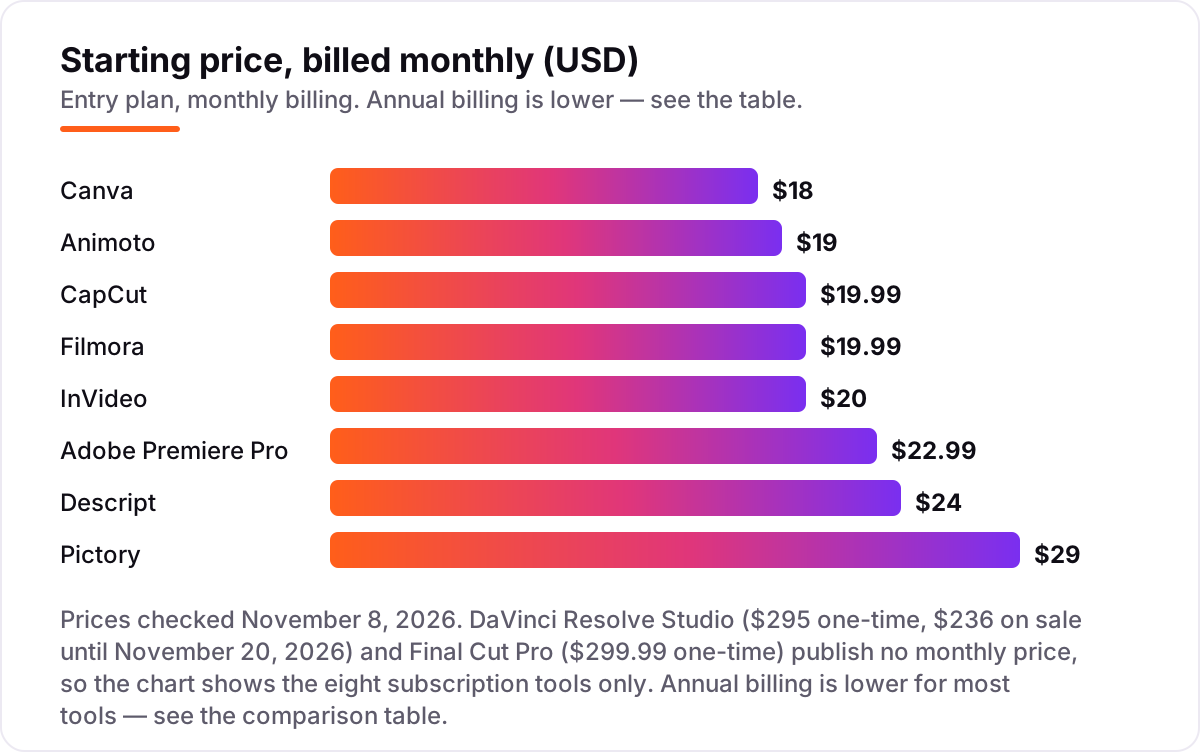
Take an agent who publishes two listing videos a week — about eight a month. On annual billing, a year costs $49.99 on Filmora Basic, $108 on Animoto Basic, $120 on InVideo Starter, $144 on Canva Pro, $179.99 on CapCut Pro, $192 on Descript Hobbyist and $300 on Pictory Starter. Premiere Pro has no annual discount, so a year is $22.99 times 12, or $275.88. The buy-once tools sit outside that maths: DaVinci Resolve Studio is $236 until November 20, 2026, then $295, and Final Cut Pro is $299.99 — each paid once, then $0 a year after.
Paying monthly instead of annually adds up fast: a year of CapCut Pro is $239.88 monthly against $179.99 annual, Canva is $216 against $144, and Animoto is $228 against $108. Three costs sit outside every number above. First, the meters: InVideo credits and Descript media hours can force an upgrade in a busy month. Second, the add-ons: Filmora's stock library is $19.99 a month extra, and Canva's optional AI Pass is $100 a month. Third, the team: Canva Pro covers one person, InVideo charges per seat, and a second editor means a second subscription on most tools here.
One more cost to check before you commit: the plan that looks cheapest can be the dearest once you count the exports. Filmora's Basic annual plan at $49.99 a year is the cheapest paid desktop editor here by a wide margin — but only if you do not need the stock library or AI credits, which are both sold separately. Compare tools on the year-one total for your actual volume, not on the monthly headline.
Know the difference: an AI video generator vs a video editor
The confusion in this category is between two kinds of tool that both call themselves video editors. An AI video generator — InVideo and Pictory here — builds a video from words: you type a prompt or paste the listing description, and the tool assembles stock footage, music and a voiceover. You never pick up a camera. A video editor — CapCut, Premiere Pro, DaVinci Resolve, Final Cut Pro, Filmora and Descript — cuts footage you already shot: your walkthrough, your drone pass, your agent to camera.
Neither kind is better in general; they solve different weeks. A generator is the right buy when the listing has no footage yet — a new instruction, a property you have not visited, a batch of listings that all need a video this week. An editor is the right buy when the footage exists and the job is to make it watchable: trimming the dead air at the front door, grading a dark hallway, syncing the agent's narration to the rooms as they appear.
Between them sit the template tools — Canva and Animoto — which assemble rather than generate or edit. Canva starts from a branded template and your assets; Animoto starts from your photos and music. They are the fastest path when the raw material is photos and a logo, and the wrong path when the raw material is an hour of walkthrough footage that needs real cutting. Pick the kind that matches the material you actually have, not the one with the longest feature list.
Quick comparison: tool type by need
| Buyer | Best pick | Why |
|---|---|---|
| Agent filming on a phone | CapCut | Shoots, captions and posts a reel the same day, Pro is $19.99/month |
| Agent who needs everything on-brand | Canva | Brand Kit and templates for video and flyers, Pro is $18/month |
| High-end listing films | Adobe Premiere Pro | Cinema-grade colour and audio, from $22.99/month |
| No-subscription pro editing | DaVinci Resolve | Full professional editor free, Studio $295 once |
| Video from listing copy | InVideo | Prompt or description becomes a finished video, Starter is $20/month |
| Photo tours from listing shots | Animoto | Photos plus music in minutes, Basic is $19/month |
Mistakes to avoid
- Budgeting on the monthly price without checking what it buys. Filmora's $19.99 monthly figure is disputed — one October 2026 read of Wondershare's shop page identifies it as the Creative Assets add-on, not the editor. Confirm at checkout.
- Buying on the free plan, then finding clean exports cost extra. Filmora free exports carry a watermark and Animoto free stops at 720p. The plan that exports clean 1080p is the real starting price.
- Ignoring the meters. InVideo credits expire at month end and Descript counts every media hour you process. A busy month of listings can push you up a tier without warning.
- Paying for a pro timeline when a template tool would do. Premiere Pro and DaVinci Resolve are superb editors with steep learning curves. If the job is a photo tour or a 60-second reel, Animoto or CapCut finishes it in an afternoon.
- Posting horizontal video to vertical feeds. A walkthrough shot wide looks small and lost in Reels and TikTok. Shoot vertical for social, or use auto-reframe — CapCut and Filmora both do it — before you publish.
How we chose
We checked each vendor's own pricing page on November 8, 2026 and recorded the starting price exactly as shown, including the annual-billing figure where the page lists one, and we ranked the tools by fit for the most common buyer — a US agent or small team marketing listings on Reels, TikTok and YouTube — not by brand size. Two prices carry a caveat. Filmora's $19.99 monthly figure is disputed: one October 2026 read of Wondershare's shop page identifies it as the Creative Assets add-on, with the editor itself starting at Basic $49.99 a year, so confirm at checkout. Animoto's $19/$9 figures come from multiple independent reads of Animoto's own pricing page in October 2026; one checker reported on October 28 that the page did not display plan prices, so we could not re-verify them directly on November 8. VEED was considered and left out: its pricing page no longer shows the Lite ladder used in earlier lists, and the entry plan is now Creator at about $12 a month billed annually, with no monthly-billed figure published — we chose Descript instead, whose $24/$16 Hobbyist price is published and current. This list carries no review ratings because the G2 review pages would not load on November 8, 2026, and we would rather show no rating than a stale or estimated one. No vendor paid for a place in this list, and none of the links here are affiliate links.
What to do next
Start with the free plan or trial of your top pick and cut one real listing video through it. Check that the captions come out clean, the export looks right on a phone, and the tool fits the way you actually shoot — phone, camera or listing copy. If the videos are sorted but buyers are not finding your listings, compare providers in our guide to video marketing platforms. Once your tools are in place, find out what's holding your rankings back.
Your stack only works if people find you
SerpAstra fixes what keeps your site off page one and makes it easy for AI assistants to recommend.
Get a free audit→Sources we checked (10)
- CapCut pricing — capcut.com/pricing (checked November 8, 2026)
- Canva pricing — canva.com/pricing (checked November 8, 2026)
- Adobe Premiere Pro pricing — adobe.com/products/premierepro.html (checked November 8, 2026)
- DaVinci Resolve pricing — blackmagicdesign.com/products/davinciresolve (checked November 8, 2026)
- Filmora pricing — filmora.wondershare.com/shop/buy/buy-video-editor.html (checked November 8, 2026)
- InVideo pricing — invideo.io/pricing (checked November 8, 2026)
- Pictory pricing — pictory.ai/pricing (checked November 8, 2026)
- Animoto pricing — animoto.com/pricing (October 2026 reads; see How we chose)
- Descript pricing — descript.com/pricing (checked November 8, 2026)
- Final Cut Pro pricing — apple.com/final-cut-pro (checked November 8, 2026)
Shamim
Founder of SerpAstra
A full-stack SEO and digital marketer who spends most days on Local SEO for dental practices, AI search visibility and lead generation.
Frequently asked questions
What is the best real estate video editing software?
CapCut is the best fit for most agents: it films, captions and posts vertical listing reels from a phone, with a usable free plan and Pro at $19.99 a month. Canva is the better pick when branding matters, and Premiere Pro when the listing is high-end enough to justify a professional edit. DaVinci Resolve is the best free option.
How much does real estate video editing software cost?
Entry prices run from $0 to $29 a month. CapCut Pro is $19.99, Canva Pro $18, Animoto Basic $19 and InVideo Starter $20 a month, all cheaper on annual billing. DaVinci Resolve Studio costs $295 once ($236 on sale until November 20, 2026) and Final Cut Pro $299.99 once, with no subscription after that.
Is there free real estate video editing software?
Yes, with limits. DaVinci Resolve's free version is a full professional editor with 4K export, and CapCut's free plan covers basic editing, auto-captions and 1080p export. Canva, Filmora, Animoto and Descript also have free plans, but exports are watermarked or capped at 720p on some of them.
Can AI make a listing video from my photos or description?
Yes. InVideo turns a prompt or a listing description into a finished video with stock footage and voiceover, from $20 a month. Pictory does the same from a script or a long walkthrough, from $29 a month. Animoto builds a slideshow tour from your listing photos in minutes, from $19 a month. Use your own photos wherever they matter, since AI footage can look generic.
Do I need a subscription, or can I buy video editing software once?
Both options exist. DaVinci Resolve Studio costs $295 once ($236 on sale until November 20, 2026) and Final Cut Pro $299.99 once, with free updates and no monthly bill. Every other tool here is a subscription, from $18 to $29 a month. Buy once if you edit every week; subscribe if you only make videos in busy months.
What should a good listing video include?
A strong listing video opens on the home's best feature, walks the main rooms in order, and ends with the agent's name and a call to book a viewing. Keep it under 90 seconds for Reels and TikTok, add captions since most viewers watch muted, and export vertical for social feeds and horizontal for YouTube and the listing portal.
Can I switch video editing software later?
Yes, but your projects do not travel with you. Timelines, templates and brand kits are locked to each tool, so switching means rebuilding active projects from the raw clips. Export finished videos before you cancel, keep the original phone footage, and switch between listings rather than in the middle of one.
Free SEO and AI visibility audit
Find out what is holding your rankings back
Send us your site. Within 2 business days you get a written audit, an AI visibility check and a short fix list ranked by impact. Free, with no contract attached.
Request my free audit→Related guides
 Design, Video & Creative10 Best Video Editing Software for Small Business in 2026, ComparedCompare the 10 best video editing software for small business tools on price, free plans and AI features, with prices checked November 4, 2026.Read guide →
 Email, SMS & Social Media10 Best Social Media Platforms for Real Estate Agents in 2026, ComparedCompare the 10 best social media platforms for real estate agents on audience, formats and cost — every platform free to join, checked Nov 6, 2026.Read guide →
 Digital Marketing & Ads12 Best Video Marketing Platforms for 2026 (Pros, Cons and Pricing)Compare the 12 best video marketing platforms on price, free plans, hosting and AI creation for small teams, with every price checked November 5, 2026.Read guide →