
12 Best Video Marketing Platforms for 2026 (Pros, Cons and Pricing)
Compare the 12 best video marketing platforms on price, free plans, hosting and AI creation for small teams, with every price checked November 5, 2026.
 Shamim Mia, Founder, SerpAstraLast verified November 5, 202613 min read
We compare pricing pages, documentation and public reviews. We never accept payment for rankings.

Key takeaways
- Wistia at $19/month is the best all-round pick for marketing teams, with SproutVideo at $12/month the cheapest host and Creatify at $15/month the cheapest AI ad maker.
- Hosting and creation are different jobs: Wistia, Vimeo, SproutVideo and Vidyard host and track video, while Synthesia, Pictory, InVideo, Animoto, Creatify, Descript, HeyGen and Kapwing make and edit it.
- The single most important buying factor is the limit that forces your next upgrade: per-seat pricing, video counts, minute caps and credit allowances decide what you actually pay.
- Vidyard repriced in 2026 — Starter is now $59 a seat a month billed annually, and older guides quoting the $19 Pro plan understate the cost by two-thirds.
On this page
Quick comparison
| Tool | Best for | Starting price | Free plan |
|---|---|---|---|
| Wistia | Marketing teams that want hosting, lead capture and viewer analytics in one place | $19/mo | Yes (free plan) |
| Vimeo | Businesses that want ad-free 4K hosting with review and collaboration tools | $20/mo | Yes (free plan) |
| SproutVideo | Small businesses that want private, white-label hosting with lead capture from the cheapest plan | $12/mo | No (30-day trial) |
| Vidyard | Sales and marketing teams that send personal videos to prospects and track who watched | $59/seat/mo | Yes (free plan) |
| Kapwing | Small teams editing social and marketing video together in the browser | $24/member/mo | Yes (free plan) |
| Synthesia | Training and marketing teams that need presenter videos without filming anyone | $19/mo | Yes (free plan) |
| Pictory | Marketers turning blog posts and scripts into captioned social videos | $29/mo | No (14-day trial) |
| InVideo | Small teams making AI-generated promo and social videos on a tight budget | $20/mo | Yes (free plan) |
| Animoto | Small businesses making quick slideshow videos from photos and short clips | $19/mo | Yes (free plan) |
| Creatify | Ecommerce sellers turning a product page into short video ads | $15/mo | Yes (free plan) |
| Descript | Marketers who edit video by editing the transcript and repurpose long recordings | $24/mo | Yes (free plan) |
| HeyGen | Teams making avatar-led product and explainer videos in many languages | $29/mo | Yes (free plan) |
Make one of these tools?
We re-check this list every quarter. Send a correction, request a review, or ask about a clearly labeled sponsored spot.
Request a listingThe best video marketing platforms

Wistia
Best for: Marketing teams that want hosting, lead capture and viewer analytics in one place
Wistia is the video host built for marketers rather than filmmakers. The player carries your branding, the CTAs sit inside the video, and the analytics show which viewers watched to the end and which ones filled in a lead form. Plus costs $19 a month billed annually and covers the basics: custom player colours, no Wistia branding, clickable CTAs and basic analytics, with a free 10-video plan underneath.
The catch is the ladder. Plus is a small plan: the video count is capped, lead capture forms and heatmaps wait for Pro at $79 a month, and Advanced at $319 adds webinars and an account manager. Buy Wistia when video has to generate leads, not just views; buy SproutVideo when you need the same white-label hosting for less, and Vimeo when review and collaboration matter more than lead capture.
What we like
- Built for marketing: lead capture, CTAs and viewer analytics are core, not add-ons
- Custom player colours and no Wistia branding from the Plus plan
- Turns viewer behaviour into pipeline with marketing automation integrations
- Free plan covers 10 videos, enough to test hosting properly
Watch out for
- Plus caps the video count, so a growing library pushes you to Pro at $79/month
- Lead capture forms and heatmaps wait for Pro, not Plus
- Per-video pricing means the bill grows with every video you add

Vimeo
Best for: Businesses that want ad-free 4K hosting with review and collaboration tools
Vimeo is the safe, recognised choice for business video hosting: an ad-free 4K player, strong privacy controls and a review tool that collects time-stamped comments on a cut. Starter costs $20 a month billed monthly, or $12 a month billed annually, and includes 100 GB of storage, a customisable player, password protection and basic analytics for one seat.
The limits are seats and branding. Starter covers one seat, so a team pays per extra seat, and removing the Vimeo branding and adding lead capture needs Standard at $25 a month billed annually. Vimeo also restructured its plans during 2026, moving some accounts to new Creator, Core and Professional plans at renewal, so confirm which ladder your account is on before you budget. Pick Vimeo for polished hosting and review; pick Wistia when lead capture is the point.
What we like
- Ad-free 4K player with strong privacy controls on every plan
- Vimeo Review collects time-stamped feedback on cuts
- 100 GB of storage on Starter, with live events on higher tiers
- The most recognised name in business video hosting
Watch out for
- Starter covers 1 seat — a team pays per extra seat
- Player branding removal and lead capture wait for Standard at $25/month billed annually
- Vimeo restructured its plans in 2026, so some accounts are moved to new plans at renewal

SproutVideo
Best for: Small businesses that want private, white-label hosting with lead capture from the cheapest plan
SproutVideo is the cheapest honest host in this list. Seed costs $12 a month billed annually and still includes the white-label player, lead capture, live streaming, 150 GB of storage and 2 seats — features Wistia and Vimeo hold for higher tiers. There is a 30-day trial with every feature, and no free plan, so the trial is the way to test it.
The trade-off is bandwidth. Seed includes 1,800 GB a year pooled across the year, and crossing it means per-GB overage charges, so a video that goes viral costs extra. There is also no published monthly-billing price for Seed, so budget on the annual figure. Choose SproutVideo when the budget is tight and the player must carry your brand; choose Wistia when you need deeper marketing analytics.
What we like
- White-label player and lead capture on every plan, including Seed at $12/month
- Transparent storage and bandwidth allowances with no usage caps that stop playback
- 150 GB of storage and 2 seats on the cheapest plan
- Live streaming included from the entry plan
Watch out for
- Bandwidth is metered — 1,800 GB a year on Seed, then per-GB overage charges
- No monthly-billing price is published for Seed, so annual billing is the only listed option
- Smaller brand than Wistia or Vimeo, so fewer third-party integrations

Vidyard
Best for: Sales and marketing teams that send personal videos to prospects and track who watched
Vidyard is video for selling, not for broadcasting. A rep records a personal message in the browser, sends it to a prospect, and sees exactly who watched, for how long, and whether they clicked the CTA. Starter costs $59 a seat a month billed annually, or $89 billed monthly, and includes unlimited recording and hosting, full analytics, branded sharing pages and CTA templates.
The price is the story. Vidyard repriced during 2026: the old Pro plan at $19 a month is gone, Starter is the entry tier, and a five-person team pays $3,540 a year on annual billing. CRM integrations wait for the custom Business tier. Buy Vidyard when personal video drives your pipeline; buy Wistia when you need the same tracking for a third of the price.
What we like
- Viewer-level analytics show exactly who watched and for how long
- Branded sharing pages and CTA templates on the Starter plan
- Built for sales outreach: record, share and track from the browser extension
- Unlimited recording and hosting on the paid plan
Watch out for
- Starter costs $59 a seat a month billed annually — a team of five pays $3,540 a year
- CRM integrations and viewer identification sit on the custom Business tier
- The old $19 Pro plan is gone, so older pricing guides understate the cost badly

Kapwing
Best for: Small teams editing social and marketing video together in the browser
Kapwing is the shared editor in this list: a browser-based workspace where a small team cuts social and marketing video together, with a brand kit, custom fonts and AI tools for captions, clips, dubbing and resizing. Pro costs $24 a member a month billed monthly, or $16 billed annually, and includes 1,000 AI credits a month, 4K watermark-free exports up to 2 hours, and 200 GB of storage.
The catch is the per-member meter. A team of four pays $96 a month, the 1,000 credits reset on the first of the month and do not roll over, and Pro cannot buy top-ups — only the Business plan at $64 a member a month can. The free plan exports watermarked 720p video capped at 4 minutes. Pick Kapwing for collaborative editing; pick Descript when the edit starts from a transcript.
What we like
- Browser-based collaborative editor with a shared workspace and brand kit
- 1,000 AI credits a month for captions, clips, dubbing and resizing
- 4K watermark-free exports up to 2 hours on Pro
- Free plan covers 10 AI credits, enough to test the workflow
Watch out for
- Priced per member, so a team of four pays $96 a month on monthly billing
- Credits do not roll over, and Pro cannot buy top-ups at any price
- Free plan exports are watermarked 720p and capped at 4 minutes

Synthesia
Best for: Training and marketing teams that need presenter videos without filming anyone
Synthesia turns a script into a presenter video: pick one of 240-plus stock avatars, type the script, and get a polished video in 140-plus languages without a camera, a studio or a shoot day. Starter costs $19 a month billed monthly, or $14 billed annually, and unlocks downloads, logo removal, three personal avatars and AI dubbing, with a free Basic plan underneath it.
The catch is the minute cap. Starter covers 10 minutes of video a month — the same allowance as the free plan, so you pay for downloads and dubbing rather than capacity — and Creator at $89 a month is the first tier with real headroom. Output also tops out at 1080p. Choose Synthesia for training and explainers; choose HeyGen when the avatar itself has to look its most lifelike.
What we like
- 240+ stock avatars in 140+ languages, with a consent framework for custom avatars
- Starter unlocks downloads, logo removal and AI dubbing
- Slide-style editor feels familiar to anyone who builds decks
- Largest review base of any avatar tool here
Watch out for
- Starter covers only 10 minutes of video a month — the same as the free plan
- Creator at $89/month is the first tier with real headroom
- Output tops out at 1080p, with no 4K option

Pictory
Best for: Marketers turning blog posts and scripts into captioned social videos
Pictory is the repurposing machine in this list: paste a blog post, a script or a URL and get a captioned video built from stock footage and an AI voiceover in minutes, with no editing skill needed. Starter costs $29 a month billed monthly, or $25 billed annually, and covers 200 video minutes a month, one brand kit, 5 GB of storage and 1080p exports with no watermark.
The weakness is the footage matching. The AI picks clips by keyword rather than by understanding the script, so the visuals often look generic and sometimes miss the point, and the standard voices sound robotic. Annual plans are also prepaid in full and non-refundable. Pick Pictory when you have more written content than video; pick Descript when you start from footage you already shot.
What we like
- Turns a script, blog post or URL into a captioned video in minutes
- 200 video minutes a month on Starter, far more than most rivals
- Getty and Storyblocks clips bundled into the price
- No watermark on paid plans, with 1080p exports
Watch out for
- The AI matches keywords to clips, so footage often misses the script's intent
- Annual plans are prepaid in full and non-refundable
- Standard AI voices sound robotic — better voices cost more credits

InVideo
Best for: Small teams making AI-generated promo and social videos on a tight budget
InVideo rebuilt its pricing in October 2026 around credits and per-seat billing. Starter costs $20 a month billed monthly, or $10 billed annually, and buys 400 credits a month, the Agent Two Lite agent, 200 GB of storage and watermark-free exports. The free plan needs no card, so a team can test the workflow before paying anything.
The credit meter is the thing to watch. Unused credits do not roll over, InVideo reserves the right to change credit costs without notice, and Starter is limited to the Lite agent and older Seedance models — the newest models wait for Plus at $60 a month. The refund window also closes once any credits are used. Choose InVideo for cheap AI generation; choose Pictory when you start from a script or article.
What we like
- Cheapest AI video generation here on annual billing — $10 a month
- 400 credits a month on Starter with watermark-free exports
- Timeline editor plus AI agent in the same tool
- Free plan needs no card, so testing costs nothing
Watch out for
- Credits do not roll over, and InVideo can change credit costs without notice
- Starter allows only Lite agents and older Seedance models
- The refund window closes once any credits are used

Animoto
Best for: Small businesses making quick slideshow videos from photos and short clips
Animoto is the simplest video maker in this list: drag in photos and short clips, pick a template and a music track, and export a polished slideshow video in minutes. Basic costs $19 a month billed monthly, or $9 a month billed annually, and removes the watermark, unlocks 1080p HD exports, and keeps video creation unlimited. The free plan exports at 720p with Animoto branding.
The trade-off is scope. Animoto makes slideshow videos, not avatar presenters or AI-generated scenes, and brand control with your logo waits for Professional at $19 a month billed annually. There is no deep editing toolkit for longer-form work. Pick Animoto for fast social and real-estate videos; pick InVideo or Pictory when the video needs to be generated, not assembled.
What we like
- The simplest editor here: drag, drop and a finished slideshow video
- Basic removes the watermark and unlocks 1080p HD exports
- Unlimited video creation on every plan, including free
- Thousands of licensed music tracks on paid plans
Watch out for
- Slideshow-style output only — no avatar or AI generation on Basic
- Professional at $19/month is needed for brand control and logo
- No inventory of advanced editing tools for longer-form video

Creatify
Best for: Ecommerce sellers turning a product page into short video ads
Creatify starts where ecommerce marketers start: the product page. Paste a URL and it drafts a short video ad with an AI actor, a script and a template, ready to edit. Standard costs $15 a month billed monthly, or $10 billed annually, and includes 55 credits a month, 300 AI actors, 200-plus ad templates and watermark removal. A free plan with 10 credits a month sits underneath.
The credit math is tight. At 5 credits per 15 seconds of video, 55 credits buys under 3 minutes of finished video a month, credits expire after two months, and a re-render after a lip-sync error spends credits again. Payments are also non-refundable. Choose Creatify for product ads at volume; choose HeyGen when the ad needs a more lifelike presenter.
What we like
- Pastes a product URL and drafts a video ad from the page itself
- 300 AI actors and 200+ ad templates on the Standard plan
- Watermark removal included from the first paid plan
- The cheapest paid entry in this list at $15 a month
Watch out for
- 55 credits a month buys under 3 minutes of finished video on Standard
- Credits expire after two months, and re-renders spend credits again
- The free plan's 10 credits cover at most 2 short video ads

Descript
Best for: Marketers who edit video by editing the transcript and repurpose long recordings
Descript edits video the way you edit a document: delete a sentence from the transcript and it disappears from the video. Hobbyist costs $24 a month billed monthly, or $16 billed annually, and covers 10 media hours a month, 400 AI credits, and watermark-free exports. Studio Sound cleans up rough audio, filler-word removal tidies the ums, and captions come built in.
The pricing has two meters, and both bite. Media hours count everything you upload or record, AI credits pay for every AI action, and a weekly show outgrows Hobbyist's 10 hours fast — Creator at $35 a month is the realistic tier. Descript also has no viewer analytics, so pair it with a host like Wistia or SproutVideo when the video has to be tracked.
What we like
- Edit the transcript and the video follows — the fastest rough cut here
- Studio Sound, filler-word removal and captions run on AI credits
- Turns one long recording into clips for every channel
- 4K watermark-free exports on Creator, with top-ups available
Watch out for
- Two meters to watch: media hours and AI credits both cap the month
- Hobbyist covers 10 media hours — a weekly show needs Creator at $35/month
- No viewer analytics: Descript edits video, it does not host or track it

HeyGen
Best for: Teams making avatar-led product and explainer videos in many languages
HeyGen makes the most lifelike avatars in this list. Creator costs $29 a month billed monthly, or $24 billed annually, and includes 600 credits a month, videos up to 30 minutes, 1080p exports, voice cloning and custom digital twins in 175-plus languages. The free plan gives three watermarked videos a month, which is enough to judge the avatar quality before paying.
The credit rates are the catch. The newest Avatar V model costs up to 48 credits a minute, so 600 credits buys about 12 minutes of it, and Creator users cannot buy top-ups — a busy month means upgrading to Pro from $49 a month. HeyGen also warns that rates can vary by account. Pick HeyGen when the presenter has to feel human; pick Synthesia when training volume matters more than realism.
What we like
- The most lifelike avatars in this list, in 175+ languages and dialects
- Voice cloning and custom digital twins on the Creator plan
- Videos up to 30 minutes with 1080p exports
- Free plan gives 3 watermarked videos a month to test with
Watch out for
- 600 credits a month buys little Avatar V video — the best model costs 48 credits a minute
- Creator users cannot buy credit top-ups, so a busy month forces an upgrade
- Payments are non-refundable except where the law requires it
The best video marketing platforms split into two jobs: hosting video so it converts, and creating video fast enough to publish every week. This list covers both — four hosts that track viewers and eight makers that generate and edit the footage — ranked by fit for a small marketing team, with every price checked on November 5, 2026.
How to choose the best video marketing platforms
- Decide which job you are buying. Hosting platforms (Wistia, Vimeo, SproutVideo, Vidyard) put video on your site and track viewers; creation tools (Synthesia, Pictory, InVideo, Animoto, Creatify, Descript, HeyGen, Kapwing) make and edit the video. Most teams need one of each.
- Count the seats, not the plan. Vidyard Starter is $59 a seat a month and Kapwing Pro is $24 a member a month, so a five-person team pays $295 or $120 a month for the same headcount.
- Find the meter that caps you. Video counts on Wistia, minutes on Synthesia, credits on InVideo, Creatify and HeyGen, media hours on Descript — the cap you hit first is your real starting price.
- Check what the free plan actually exports. Most free plans keep the vendor's branding on the player or the video, and several cap exports at 720p. The watermark is the real cost of free.
- Ask where the viewer data goes. Lead capture and CRM integrations are the point of video marketing, and on several tools here they wait for a higher tier — check before you buy, not after.
Video is one part of getting found. If the site the videos live on is not ranking, our monthly SEO service covers the visibility side, and before you publish the landing pages, run your titles through the free SERP snippet preview tool to see exactly how they will look in Google.
Video marketing platforms pricing: what you will actually pay
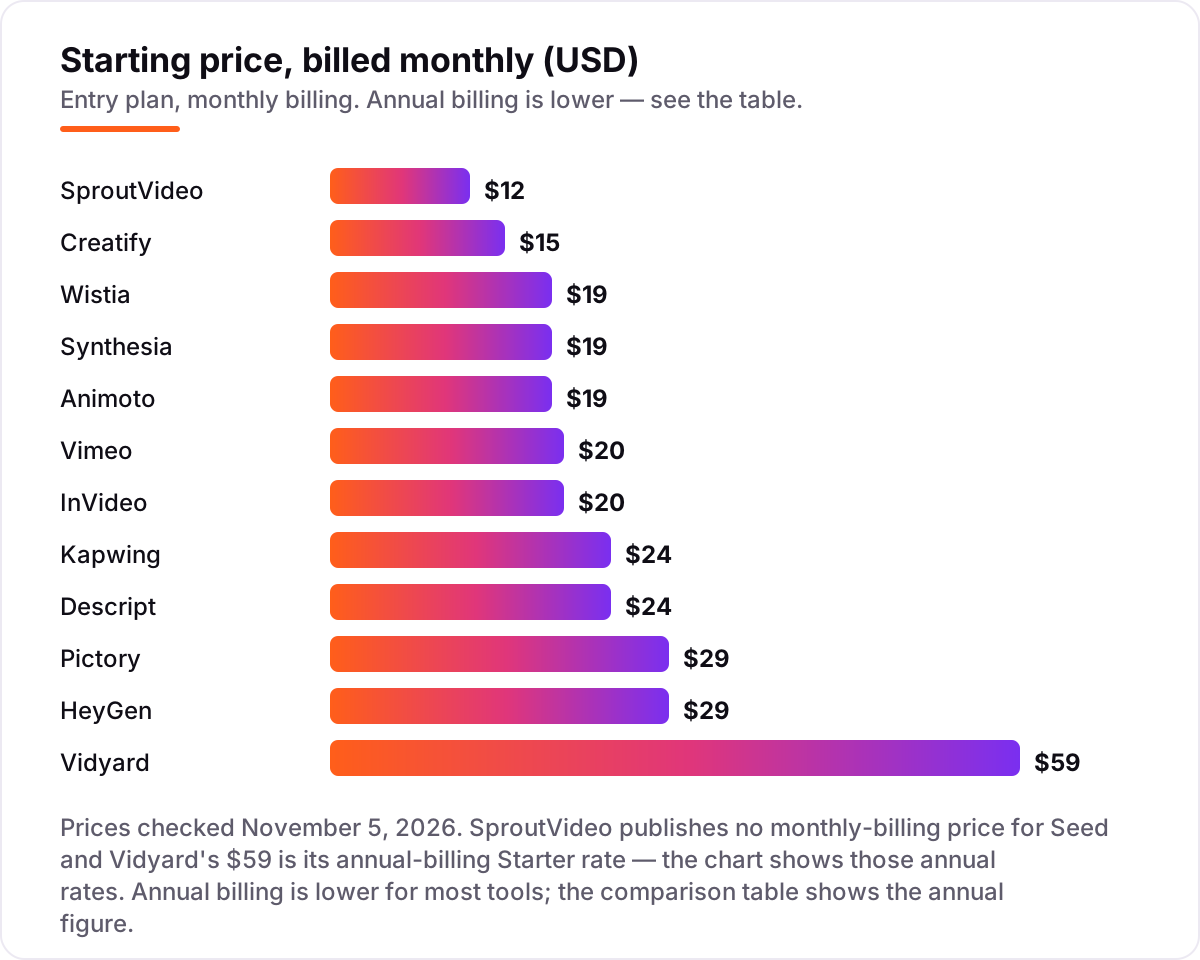
Take one marketer who hosts 20 videos and makes 4 new videos a month. Hosting alone, billed annually, costs $144 a year on SproutVideo Seed, $144 on Vimeo Starter for one seat, $228 on Wistia Plus, $192 on Kapwing Pro for one member, and $708 on Vidyard Starter for one seat. The same single user and the same 20 videos cost $144 at the cheap end and $708 at the dear end — a $564 gap that comes entirely from what each platform counts as its job.
Seats change the math fast. Three Vidyard Starter seats cost $2,124 a year on annual billing, while three Kapwing Pro seats cost $576. Add creation to the stack and the numbers stack too: a Wistia Plus host ($228 a year) plus a Synthesia Starter plan ($168 a year billed annually) comes to $396 a year for one person, while swapping Synthesia for HeyGen Creator ($288 a year billed annually) brings the same stack to $516.
Three costs sit outside every number above. First, the meters: a viral video can push SproutVideo past its 1,800 GB bandwidth allowance into per-GB overage charges, and a busy month can burn through Creatify's 55 credits or HeyGen's 600 credits long before the month ends. Second, the annual prepay: Pictory's annual plans are paid in full up front and are non-refundable. Third, the step-up: Synthesia Starter and Pictory Starter both look cheap until the minute cap bites, and the next tier costs two to three times as much. If you want to see what video actually does for your rankings, our guide to the best video analytics software covers the measurement side.
Know the difference: video hosting vs video creation
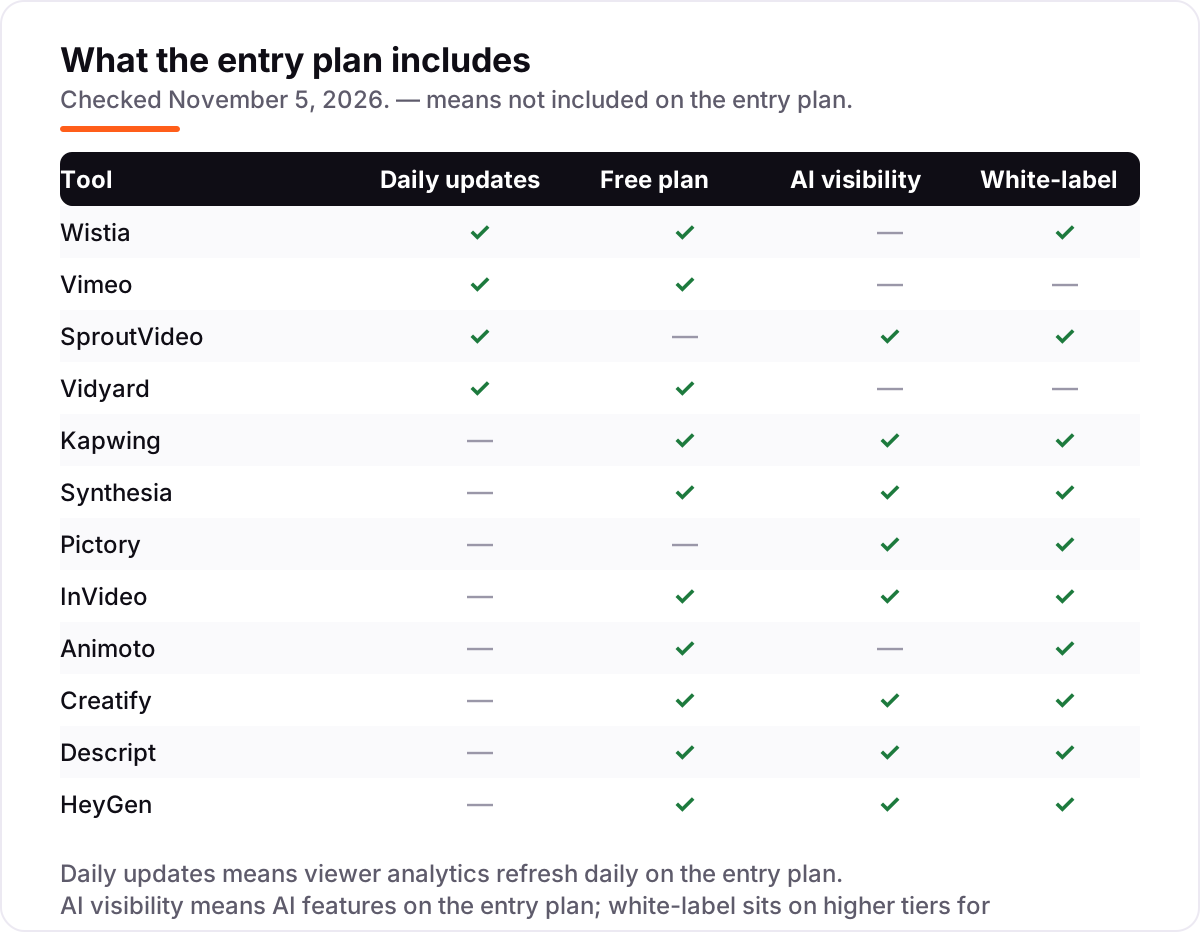
The confusion in this category is between making a video and showing it. A creation tool produces the footage — an avatar presenter, a slideshow, a generated ad — and exports a file. A hosting platform takes that file, puts it on your site in a branded player, and tells you who watched it, for how long, and whether they clicked. Buying one when you needed the other is the most common mistake in this category: a team that buys Synthesia and wonders why it cannot see viewer data, or a team that buys Wistia and wonders why it cannot generate a video.
There is a second, quieter confusion: editing tools are not hosting platforms either. Kapwing cuts and polishes video brilliantly, but it does not host a video library or track viewers — that is the host's job. Vidyard sits in between — it records and hosts — which is why it charges sales-team prices. The clean way to think about it is a two-tool stack: one maker and one host. Our guide to the best video content creation software covers the making side in more depth, and the best AI video ad creation software covers the ad makers specifically.
A third distinction worth knowing is credits versus minutes versus seats. AI makers price by credits (InVideo, Creatify, HeyGen, Kapwing) or minutes (Synthesia, Pictory, Descript), which means your bill depends on how much you make. Hosts price by seats (Vidyard, Vimeo) or by video count and storage (Wistia, SproutVideo), which means your bill depends on how many people publish and how much you keep. A tool can be cheap per month and expensive per finished video — always divide the price by what you actually produce.
Quick comparison: tool type by need
| Buyer | Best pick | Why |
|---|---|---|
| Marketing team that needs leads from video | Wistia | Lead capture and viewer analytics built in, from $19/month |
| Small business on the tightest budget | SproutVideo | White-label hosting and lead capture from $12/month |
| Sales team sending personal videos | Vidyard | Viewer-level tracking, from $59/seat/month |
| Team editing social video together | Kapwing | Browser editor with AI tools, from $24/member/month |
| Training team that needs presenters fast | Synthesia | Stock avatars in 140+ languages, from $19/month |
| Ecommerce seller making product ads | Creatify | Product page to video ad, from $15/month |
Mistakes to avoid
- Buying a host when you need a maker, or the reverse. Synthesia makes video but does not track viewers; Wistia tracks viewers but does not generate video. Decide which job you are buying before you compare prices.
- Budgeting on the per-seat price for one person. Vidyard at $59 a seat and Kapwing at $24 a member look reasonable alone and multiply fast across a team — price the whole team, not one seat.
- Ignoring the meter. Credits, minutes, media hours and video counts all cap the month. Creatify's 55 credits buy under 3 minutes of finished video, and Synthesia Starter's 10 minutes match its free plan.
- Trusting an old pricing guide. Vidyard's $19 Pro plan is gone and Starter is now $59 a seat a month billed annually; Vimeo restructured its plans in 2026 too. Check the vendor's current page, not a guide from last year.
- Paying annually before you have tested the output. Pictory's annual plans are prepaid and non-refundable, and HeyGen's best avatar model costs 48 credits a minute. Run the free plan or trial through one real project first.
How we chose
We checked each vendor's own pricing page on November 5, 2026 through fresh search-index copies of the vendors' own pages and independent October and November 2026 reads, and recorded the starting price exactly as shown, including the annual-billing figure where the page lists one. Two prices need a note: Vidyard repriced during 2026, so its $59-a-seat Starter rate replaces the old $19 Pro plan quoted in older guides, and SproutVideo publishes no monthly-billing price for Seed, so its $12 figure is the annual-billing rate. Wistia's $19 Plus rate is also an annual-billing figure. This list carries no review ratings because the G2 review pages could not be opened on November 5, 2026, and we would rather show no rating than a stale or estimated one. No vendor paid for a place in this list, and none of the links here are affiliate links.
What to do next
Start with the free plan or trial of your top pick and run one real project through it: make the video, host it, and check the viewer data before you pay. If the video is sorted but new customers are not finding the pages it lives on, our monthly SEO service handles the visibility side — or compare providers in our guide to SEO companies for small business. Once your tools are in place, find out what's holding your rankings back.
Your stack only works if people find you
SerpAstra fixes what keeps your site off page one and makes it easy for AI assistants to recommend.
Get a free audit→Sources we checked (12)
- Wistia pricing — wistia.com/pricing (checked November 5, 2026)
- Vimeo pricing — vimeo.com/upgrade-plan (checked November 5, 2026)
- SproutVideo pricing — sproutvideo.com/pricing (checked November 5, 2026)
- Vidyard pricing — vidyard.com/pricing (checked November 5, 2026)
- Kapwing pricing — kapwing.com/pricing (checked November 5, 2026)
- Synthesia pricing — synthesia.io/pricing (checked November 5, 2026)
- Pictory pricing — pictory.ai/pricing (checked November 5, 2026)
- InVideo pricing — invideo.io/pricing (checked November 5, 2026)
- Animoto pricing — animoto.com/pricing (checked November 5, 2026)
- Creatify pricing — creatify.ai/pricing (checked November 5, 2026)
- Descript pricing — descript.com/pricing (checked November 5, 2026)
- HeyGen pricing — heygen.com/pricing (checked November 5, 2026)
Shamim
Founder of SerpAstra
A full-stack SEO and digital marketer who spends most days on Local SEO for dental practices, AI search visibility and lead generation.
Frequently asked questions
What is the best video marketing platform?
Wistia is the best all-round pick for marketing teams: hosting, lead capture and viewer analytics from $19/month, with a free plan for 10 videos. SproutVideo is the cheapest host at $12/month, and Creatify is the cheapest AI ad maker at $15/month. The right pick depends on whether you need hosting, creation or both.
How much does a video marketing platform cost?
Entry prices run from $12 to $59 a month. SproutVideo Seed is $12/month billed annually, Creatify Standard is $15/month, and Vidyard Starter is $59 a seat a month billed annually. Per-seat tools multiply fast: three Vidyard seats cost $2,124 a year, while three Kapwing seats cost $576 a year on annual billing.
Is there a free video marketing platform?
Yes, with limits. Wistia, Vimeo, Kapwing, Synthesia, InVideo, Animoto, Creatify, Descript and HeyGen all have free plans, and Vidyard has a free plan with 5 videos a month. Free plans cap videos, minutes or quality, and most keep the vendor's branding on the player or the export until you pay.
Wistia vs Vimeo: which is better for marketing?
Wistia is better for marketing: lead capture, in-video CTAs and viewer analytics are built in from the $19/month Plus plan. Vimeo is better for polished hosting and review, with an ad-free 4K player and time-stamped feedback from $20/month. Choose Wistia when video must generate leads and Vimeo when it must look flawless.
Can AI video tools replace filming?
For explainers, training and short ads, mostly yes. Synthesia and HeyGen replace a presenter, Pictory and InVideo generate footage from a script, and Creatify turns a product page into an ad. They do not replace real footage of your product, your team or your customers, where trust comes from seeing the real thing.
What is the difference between video hosting and video creation?
Hosting puts a finished video on your site with a branded player and tracks who watched it — Wistia, Vimeo, SproutVideo and Vidyard do this. Creation makes the video itself, from a script, a product page or an avatar — Synthesia, Pictory, InVideo, Animoto, Creatify, Descript, HeyGen and Kapwing do this. Most teams need one of each.
Do I need a separate host if I use an AI video maker?
Usually yes, if the video lives on your site. AI makers like Synthesia and Pictory export a video file, but they do not give you a branded player, lead capture or viewer analytics. Host the export on Wistia or SproutVideo to track it, or publish it straight to YouTube and social channels if tracking does not matter.
Free SEO and AI visibility audit
Find out what is holding your rankings back
Send us your site. Within 2 business days you get a written audit, an AI visibility check and a short fix list ranked by impact. Free, with no contract attached.
Request my free audit→Related guides
 SEO & AI SearchBest Video Analytics Software for 2026: 9 Options Compared by Use Case9 best video analytics software tools compared on price, engagement analytics and free plans. Prices checked on the vendor pricing page, November 2, 2026.Read guide →
 Design, Video & Creative10 Best Video Content Creation Software in 2026, ComparedCompare the 10 best video content creation software tools of 2026 on price, free plans and AI features, with every price checked November 4, 2026.Read guide →
 Digital Marketing & Ads10 Best AI Video Ad Creation Software in 2026, ComparedThe 10 best ai video ad creation software tools compared on price, credits, avatars and free plans, with every price checked November 4, 2026.Read guide →