
11 Best Restaurant Scheduling Software in 2026, Compared
Compare the 11 best restaurant scheduling software options for restaurants on price, free plans and POS links, with every price checked November 8, 2026.
 Shamim Mia, Founder, SerpAstraLast verified November 8, 202614 min read
We compare pricing pages, documentation and public reviews. We never accept payment for rankings.
Key takeaways
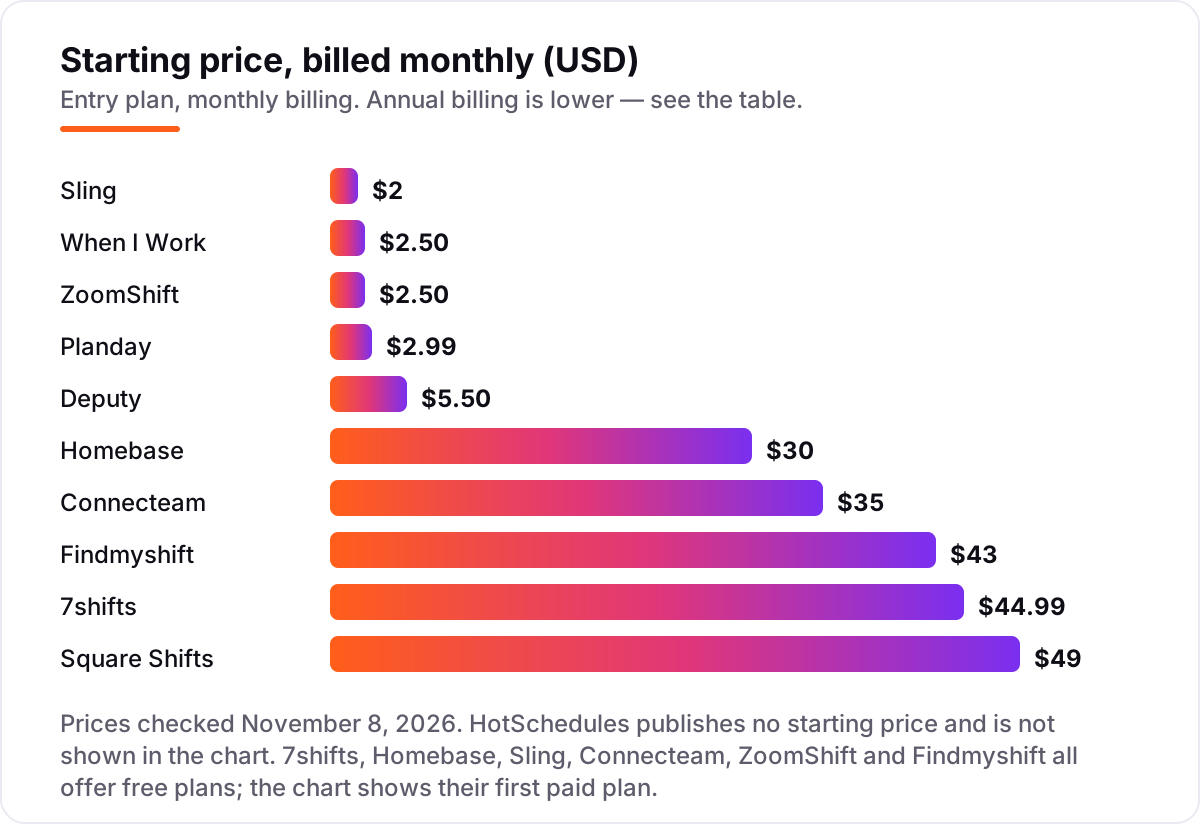
- 7shifts is the best fit for most restaurants at $44.99 a month per location; Homebase follows at $30 a month with a free plan for up to 10 staff, and Sling is the cheapest paid step at $2 per user a month.
- Per-location pricing wins for restaurants with many part-time staff, while per-user pricing wins for small teams — the billing unit matters more than the headline price.
- Six tools here have genuinely free plans, but the free tiers cap headcount at 5 to 30 staff, so check the cap before you build the rota around one.
- Payroll is billed on top of every subscription here, so budget for it separately — add-ons run about $39–$49 a month plus $6 per person paid.
On this page
Quick comparison
| Tool | Best for | Starting price | Free plan |
|---|---|---|---|
| 7shifts | Single restaurants and small groups that want schedules built from POS sales data | $44.99/mo per location | Yes (Comp plan) |
| Homebase | Single-location restaurants that want scheduling, a time clock and payroll from one app | $30/mo per location | Yes (Basic plan) |
| Sling | Budget-minded restaurants that want free scheduling for up to 30 staff | $2/user/mo | Yes (free plan) |
| When I Work | Small hourly teams that want the schedule live the same afternoon | $2.50/user/mo | No (14-day trial) |
| Deputy | Restaurant groups that need labor-law compliance built into the schedule | $5.50/user/mo | No (free trial) |
| Connecteam | Small restaurants that want scheduling, a time clock and team chat in one mobile app | $35/mo per hub | Yes (free plan) |
| Square Shifts | Restaurants already running Square POS that want scheduling inside Square | $49/mo per location | No (30-day trial) |
| Planday | Small restaurant teams that want low per-user pricing with payroll links | $2.99/user/mo | No (30-day trial) |
| ZoomShift | Single-location cafes and restaurants with up to 20 staff that want a free rota | $2.50/user/mo | Yes (Essentials plan) |
| Findmyshift | Tiny crews that want a free drag-and-drop schedule and a free time clock | $43/mo per team | Yes (free plan) |
| HotSchedules | Multi-unit restaurant brands that need predictive scheduling across many locations | Custom quote | No (trial on request) |
Make one of these tools?
We re-check this list every quarter. Send a correction, request a review, or ask about a clearly labeled sponsored spot.
Request a listingThe best restaurant scheduling software

7shifts
Best for: Single restaurants and small groups that want schedules built from POS sales data
7shifts is the restaurant specialist in this list, and that focus shows in the details. It connects to POS systems such as Toast, Square and Clover, pulls in sales history, and forecasts demand so managers schedule to expected covers. Essentials costs $44.99 a month per location, or $39.99 billed annually, for up to 30 employees, with advanced scheduling, team messaging and basic time clocking.
The free Comp plan covers one location with up to 15 employees, which is enough for a small cafe to run its rota at $0. The costs to watch are the step-ups: Pro at $89.99 a month adds labor compliance and PTO accruals, Premium at $149.99 adds tip and task management, and payroll is a separate add-on. Buy 7shifts when the schedule should follow sales, not habit.
What we like
- Built for restaurants from the start, with tip management, a manager log book and training tools on higher tiers
- POS integrations pull sales into labor forecasting, so shifts match expected covers rather than guesswork
- Per-location pricing stays flat as headcount grows, which suits restaurants with many part-time staff
- Free Comp plan covers one location with basic scheduling, availability and time-off requests
Watch out for
- Essentials stops at 30 employees per location, so a large team needs Pro at $89.99/month
- Time clocking on the entry plan is basic; the fuller labor-cost and compliance tools sit on Pro and Premium
- Payroll is a paid add-on at $39.99 a month per location plus $6 per employee paid

Homebase
Best for: Single-location restaurants that want scheduling, a time clock and payroll from one app
Homebase is the practical pick for a single restaurant that wants scheduling, time tracking and messaging without a per-head bill. Basic is free for one location with up to 10 employees, and Essentials costs $30 a month per location, or $24 billed annually, with unlimited employees, GPS time tracking and late-arrival alerts.
The trade-off is the ceiling on the free plan and the step to Plus for AI scheduling, PTO management and hiring. Payroll is available as an add-on on every plan, which suits owners who want one login for the rota and the pay run. Pick Homebase when the restaurant is one site with a small team and the budget starts at $0.
What we like
- Free Basic plan covers scheduling, time tracking and team messaging for up to 10 employees at one location
- Per-location pricing with unlimited employees on paid plans, so the bill does not rise with every hire
- Payroll, hiring and HR tools come from the same company, so a growing restaurant can add them without switching apps
- POS integrations connect the schedule to the till, and GPS time tracking starts on Essentials
Watch out for
- The free plan stops at 10 employees and one location, so an 11th hire or a second site means paying
- AI-assisted scheduling and PTO controls wait for Plus at $70 a month, and hiring tools do too
- Payroll is a paid add-on at $49 a month plus $6 per employee paid, on every plan

Sling
Best for: Budget-minded restaurants that want free scheduling for up to 30 staff
Sling is the budget pick that does not feel like a compromise. The free plan covers shift scheduling, time-off requests, available shifts, news sharing and private messaging for up to 30 users, which is enough for most independent restaurants to run the rota without paying anything at all.
Premium costs $2 per user a month, or $1.70 billed annually, and adds mobile time tracking, labor cost management and overtime tracking. Business at $4 adds kiosk clock-ins, reports and PTO management. Choose Sling when the team is small, the budget is tight, and the rota is the job.
What we like
- The most generous free plan here: shift scheduling, time-off requests and messaging for up to 30 users at $0
- Premium is the cheapest paid step in this list, at $2 per user a month, and adds mobile time tracking and labor cost tools
- Now part of Toast, so Toast restaurants get scheduling inside the ecosystem they already use
- Shift templates, availability and long-term scheduling are included, so a weekly rota takes minutes to build
Watch out for
- No payroll of its own, and no sales forecasting, so staffing levels stay a manager judgment call
- Kiosk time tracking, reports and PTO management wait for Business at $4 per user a month
- Per-user pricing climbs with headcount, so a large team pays more than on a per-location plan

When I Work
Best for: Small hourly teams that want the schedule live the same afternoon
When I Work keeps scheduling deliberately simple, and that is its strength. Managers build a schedule in minutes, post open shifts for staff to claim, and approve swaps from a phone, while employees check schedules, clock in and message the team in the same app. Essentials costs $2.50 per user a month for a single location.
Pro at $5 per user adds multi-location scheduling and role permissions, and Premium at $8 adds API access and forecasting. There is no free plan and no published annual price, so the monthly figure is the whole story. Pick When I Work when speed and simplicity matter more than restaurant-specific features.
What we like
- The fastest setup in this list: add staff, build the schedule and the team sees it on their phones within minutes
- Essentials includes auto-scheduling, shift swaps, multi-week scheduling and team messaging at $2.50 per user
- No base fee and no minimum headcount, so a 10-person team pays $25 a month
- GPS clock-in and payroll and POS integrations keep the schedule, the time clock and pay in one flow
Watch out for
- No free plan, only a 14-day trial, so the cheapest way in still costs from day 15
- The vendor's own pricing page is inconsistent about whether time tracking is included or a paid add-on, so confirm it before you buy
- No published annual rate, so there is no discount for paying yearly

Deputy
Best for: Restaurant groups that need labor-law compliance built into the schedule
Deputy suits restaurant groups and franchises more than a single cafe. It handles scheduling, time tracking and compliance across many locations from one account, with rules for breaks, overtime and local labor laws, plus demand forecasting that builds rosters around expected demand. Lite costs $5.50 per user a month, or $5 billed annually.
The price to plan around is Core at $7.25 a month, or $6.50 annually, because that is where auto-scheduling and wage budgets live. Pro at $10 adds location hierarchies and single sign-on. Choose Deputy when compliance and forecasting matter more than the lowest headline price.
What we like
- Labor-law compliance is built in from Lite, covering breaks, overtime and local labor rules
- Core adds auto-scheduling and demand forecasting that builds rosters around expected demand
- Time clocking with biometric options helps stop buddy punching across locations
- Payroll, HR, messaging and analytics come as add-ons or bundled in Pro, so the platform grows with the group
Watch out for
- A $30 monthly minimum applies on monthly plans, so a very small team pays more than the per-user rate suggests
- Auto-scheduling and demand forecasting wait for Core at $7.25 a month per user
- Per-user pricing rises with every hire, which gets expensive for large part-time teams

Connecteam
Best for: Small restaurants that want scheduling, a time clock and team chat in one mobile app
Connecteam is an all-in-one workforce app for deskless teams, and its scheduling lives inside the Operations hub. The Small Business plan is free for up to 10 users with all three hubs, and Basic costs $35 a month per hub billed monthly, or $29 annually, covering the first 30 users with a small charge per extra user.
The catch is the hub model: one hub is $35, but scheduling, chat and HR together are three hubs at $105 a month. Advanced at $59 adds repeating shifts and geofencing. Pick Connecteam when the whole team lives on phones and one hub covers the job.
What we like
- Free Small Business plan covers up to 10 users across all three hubs, with scheduling, a time clock and chat
- Flat fee for the first 30 users, so a 25-person team pays the same $35 a month as a 12-person team on one hub
- GPS clock-ins, forms and checklists sit in the same app as the schedule, which suits frontline teams
- Mobile-first design means staff see shifts, clock in and message managers from one phone app
Watch out for
- Each hub is sold separately, so scheduling plus chat plus HR costs $87 a month on Basic, not $35
- Repeating shifts need Advanced and auto-scheduling needs Expert, so the entry plan is deliberately basic
- No built-in payroll, only exports and integrations to outside payroll providers

Square Shifts
Best for: Restaurants already running Square POS that want scheduling inside Square
Square Shifts covers scheduling and timecards inside Square, which is the whole point: a restaurant already on Square POS gets the rota in the same system as sales and payments, with no second vendor to manage. Shift scheduling sits on Square Plus at $49 a month per location, with a 30-day trial.
The catch is that Plus is a bundle, not a scheduling-only plan. If the restaurant only needs a rota, $49 a month is a lot next to Sling or ZoomShift. But if the till, the menu and the payments already run on Square, the schedule belonging there is worth real money.
What we like
- Scheduling, timecards and tip pooling live inside Square, next to sales, inventory and payments
- Per-location pricing means crew size does not change the plan fee
- Staff timecards, shift scheduling and time-off handling are included on Plus, with lower card rates than Free
- No separate scheduling login to manage, since staff already use Square for clock-ins and sales
Watch out for
- Square Free has no shift scheduling at all, so a Square seller must pay for Plus to get it
- $49 a month buys the whole Square Plus bundle, so it is poor value if scheduling is the only feature you need
- Payroll is a separate Square product, billed on top of the Plus subscription

Planday
Best for: Small restaurant teams that want low per-user pricing with payroll links
Planday is a straightforward per-user scheduler for shift-based teams, including restaurants, cafes and bars. Starter costs $2.99 per user a month with a five-user minimum, and users are billed in bundles of five, so a 10-person team pays $29.90 a month and a 25-person team pays $74.75.
Plus costs $4.49 a user a month plus a $15 monthly fee, with a 10-user minimum, and adds leave management and payroll integrations, while Pro is custom-priced and adds auto-scheduling. Pick Planday when the team is small, per-user pricing is the cheapest route, and a free plan is not required.
What we like
- One of the lowest per-user entry prices here, at $2.99 a month, with a 5-user minimum
- Users are billed in bundles of five, which keeps the maths simple for small teams
- Plus adds leave management and payroll integrations for $4.49 a user plus a $15 monthly fee
- Built for shift-based businesses, with communication, absence handling and hour registration in one place
Watch out for
- No free plan, and no published annual discount, so the monthly price is the price
- Kiosk clock-ins, time-off tracking and payroll integrations wait for Plus or Pro
- European roots show in the product: US buyers should check overtime and break handling before committing

ZoomShift
Best for: Single-location cafes and restaurants with up to 20 staff that want a free rota
ZoomShift is the low-cost schedule-and-clock option for a small single-site team. The free Essentials plan covers up to 20 users at one location, scheduling up to two weeks ahead with reminders and shift confirmation, which is enough for a small cafe to run its rota at $0.
Starter costs $2.50 per active user a month, or $2 billed annually, and adds unlimited users and locations, swaps, cover requests, timesheets and a time clock. Premium at $5, or $4 annually, adds auto-scheduling and overtime warnings. Choose ZoomShift when the team is small, the site is one, and the rota needs a clock.
What we like
- Free Essentials plan covers up to 20 users at one location, with reminders and shift confirmation
- Starter is cheap at $2 per active user billed annually, and adds swaps, cover requests, timesheets and a time clock
- Only active team members are billed, so seasonal staff who are not scheduled cost nothing
- Premium adds auto-scheduling, overtime warnings and geofenced clock-ins at $4 a user billed annually
Watch out for
- The free plan only schedules two weeks ahead and has no shift swaps or time clock
- A single free location only, so a second site means paying for Starter
- A smaller integration list than Deputy or 7shifts, with no payroll of its own

Findmyshift
Best for: Tiny crews that want a free drag-and-drop schedule and a free time clock
Findmyshift is the simplest tool in this list, and that is the point. The free plan covers up to 5 team members with a drag-and-drop schedule and a free web time clock, which is enough for a tiny crew to run the rota from day one without paying anything.
Business costs $43 a month per team, or $38 billed annually, and covers up to 100 members with a year of history on Starter and five years on Business. The jump from free to $43 is steep for a 6-person team, so count the headcount before you commit. Pick Findmyshift for a small crew that wants the rota done, not a platform.
What we like
- Free plan includes a drag-and-drop schedule and a web time clock for up to 5 team members
- Flat per-team pricing, so the bill does not rise with every hire up to 100 members
- Business covers up to 100 members and 100 managers, with five years of historical data
- Simple to learn, with availability, time-off requests and shift notes in one view
Watch out for
- The free plan stops at 5 team members, so a sixth hire means jumping to the $43-a-month Business plan
- Fewer integrations and no POS sales forecasting, so it stays a scheduler rather than a restaurant suite
- Reporting and payroll links are thinner than on Deputy or 7shifts

HotSchedules
Best for: Multi-unit restaurant brands that need predictive scheduling across many locations
HotSchedules is the enterprise end of restaurant scheduling. It has been in the market since 1999 and now operates inside Fourth, a hospitality workforce platform covering HR, payroll, supply chain and scheduling. Its strength is demand-matched staffing: schedules built from sales and labor data, with predictive forecasting and labor-law alerts across locations.
Pricing is quote-only and billed by active employee count, with a promotional one-year-free offer tied to Fourth HR and payroll purchases. There is no free plan and no public rate card. Choose HotSchedules when the operation spans many locations and the quote is a business decision, not a monthly subscription.
What we like
- One of the longest-running restaurant scheduling platforms, now part of Fourth's hospitality suite
- Predictive scheduling and labor forecasting built from POS sales data across many locations
- Labor-law alerts and compliance tools designed for multi-location and franchise operations
- Deep POS integrations, including Toast, Oracle Micros, NCR Aloha and PAR
Watch out for
- No published price at all, so you cannot compare costs without a sales conversation
- Built for enterprise and franchise groups, so a single restaurant pays for depth it will not use
- Implementation and training are often quoted separately, and terms can run to three years
The best restaurant scheduling software does one job well: it puts the right people on the right shifts, tells everyone before the week starts, and keeps labor costs visible while it does it. We ranked the 11 tools below by fit for the most common buyer — a single restaurant with a mostly part-time team — starting with the restaurant specialists and ending with the enterprise option, and every price was checked on the vendor's own pricing page on November 8, 2026.
How to choose the best restaurant scheduling software
- Count heads, then check the billing unit. Per-location plans (7shifts, Homebase, Square Shifts) stay flat as you hire; per-user plans (When I Work, Deputy, Sling, Planday, ZoomShift) rise with every hire. A 25-person team is cheap on per-location pricing and dear on per-user pricing.
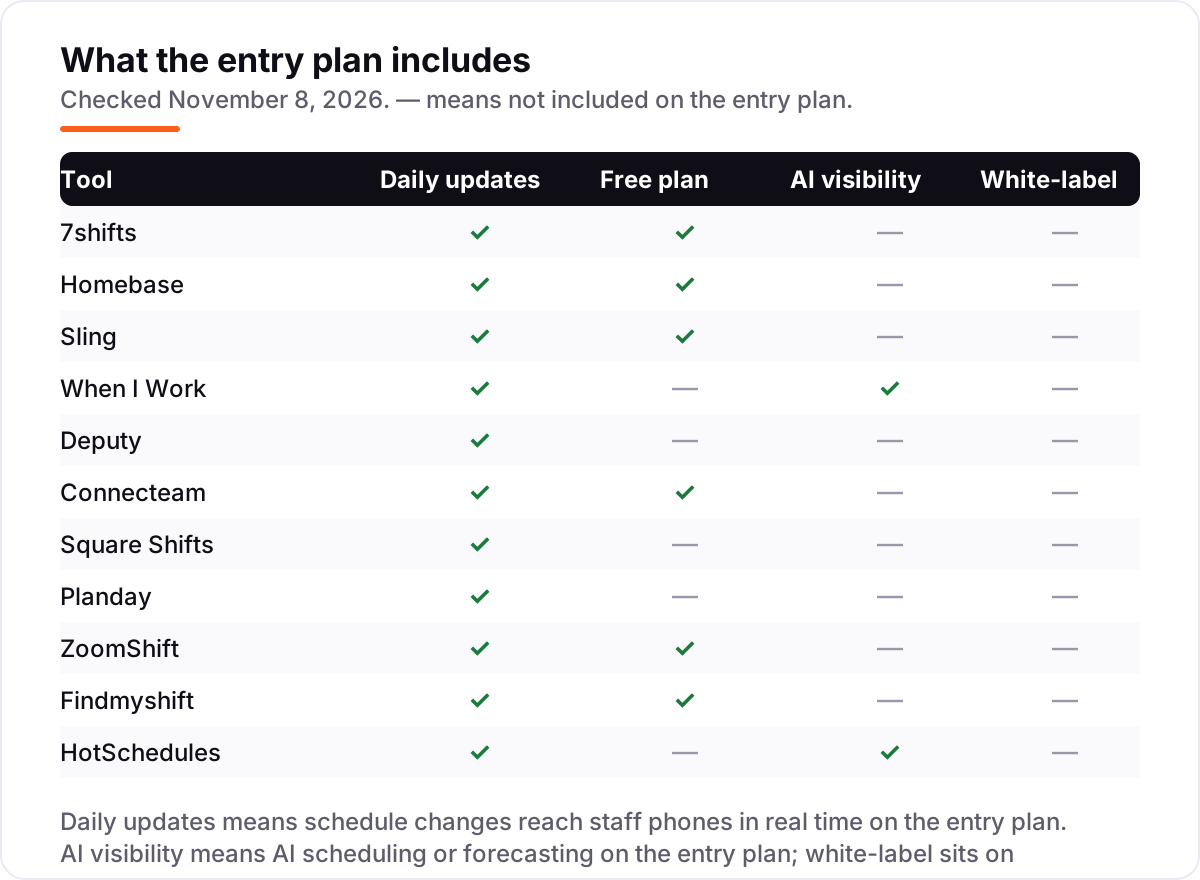
- Check the free plan's headcount cap. Sling covers 30 users free, ZoomShift 20, 7shifts 15 employees, Homebase and Connecteam 10, Findmyshift 5. The cap you hit first is your real starting price.
- Decide whether the schedule should follow sales. Only 7shifts and HotSchedules build rosters from POS sales forecasts. Every other tool here schedules from templates and availability, so the manager still decides staffing levels.
- Check the time clock. A schedule without a clock means hours still get typed into payroll by hand. Sling and ZoomShift keep the clock on paid plans, so count that in the price from day one.
- Think about who else touches the rota. If the restaurant already runs on Square or Toast, scheduling inside that system saves a second login — see our guide to local SEO for restaurants for the visibility side of the same business.
A schedule is one system in the stack, not the whole stack. If the restaurant also needs to be found online, our local SEO service covers the Maps and search side. And before you publish new pages for the menu or the private dining room, run your titles through the free local business schema generator — it builds the structured data that helps Google show the restaurant properly.
Whatever you shortlist, try it with a real week before you pay. The free plans and trials in this list are long enough to run one genuine rota — your staff, your sections, your Friday rush — and that week tells you more than any review can. Check two things in the trial: that shift swaps and cover requests work without the manager in the middle, and that the time clock matches the schedule without daily fixing.
Restaurant scheduling software pricing: what you will actually pay
Take a single restaurant with 25 staff on the rota. On list prices billed monthly, the scheduling bill is $30 a month on Homebase Essentials, $35 on Connecteam Operations Basic, $43 on Findmyshift Business, $44.99 on 7shifts Essentials, $49 on Square Plus, $50 on Sling Premium, $62.50 on When I Work Essentials or ZoomShift Starter, $74.75 on Planday Starter, and $137.50 on Deputy Lite. HotSchedules has no published price, so it cannot be put on the same scale.
Over a year on annual billing, that same 25-person team costs $288 on Homebase Essentials, $348 on Connecteam Basic, $456 on Findmyshift Business, $479.88 on 7shifts Essentials, $510 on Sling Premium, $588 on Square Plus, $600 on ZoomShift Starter, $897 on Planday Starter, and $1,500 on Deputy Lite. When I Work publishes no annual rate, so its $62.50 a month is $750 a year with no discount available. The gap between the cheapest and the dearest annual bill is over $1,200, and it comes entirely from the billing unit — per location against per user — not from features.
Two costs sit outside every number above. First, payroll: 7shifts Payroll adds $39.99 a month plus $6 per employee paid, and Homebase Payroll adds $49 plus $6 per person, so a 25-person team pays roughly $190 to $199 a month for payroll on top of the schedule. Second, the step-ups: the features that usually force an upgrade are the time clock, AI scheduling and PTO controls, which sit one or two tiers above the entry plan on Homebase, Sling, ZoomShift and Connecteam. If the restaurant needs those, price the tier that has them, not the entry tier.
Annual billing cuts the bill on most tools here: 7shifts Essentials drops from $539.88 to $479.88 a year, Homebase Essentials from $360 to $288, Sling Premium from $600 to $510, and ZoomShift Starter from $750 to $600. Deputy Lite drops from $1,650 to $1,500, and Findmyshift Business from $516 to $456. Planday and When I Work publish no annual price, so the monthly figure is the whole story. One more cost to check before you commit: a second location is a second subscription on the per-location tools, and Square Plus is $49 per location too — so a two-site restaurant doubles those bills before a single shift is scheduled.
Know the difference: scheduling software vs a time clock vs payroll
The confusion in this category is between three jobs that sound like one. Scheduling software decides who works when. A time clock records when they actually arrived and left. Payroll turns those hours into pay. Most tools here bundle the first two, none of them bundle the third, and the gaps between them are where the real costs hide.
The first gap is the clock. Sling's free plan schedules without a time clock, and ZoomShift's free plan has no clock either — the clock arrives on Premium at $2 a user and Starter at $2.50 a user. A restaurant that buys on the free plan and then discovers the clock costs extra has bought twice. If hours feed payroll, the clock is not optional, so price the plan that includes it.
The second gap is payroll itself. 7shifts, Homebase, Deputy and Connecteam all sell payroll as an add-on or through a partner, and Sling, When I Work, Planday, ZoomShift and Findmyshift have no payroll at all. Budget roughly $39–$49 a month plus $6 per person paid on top of the scheduling subscription, and check whether your payroll provider accepts hours exports from the scheduler you pick — our guide to the best payroll software for small business covers the other side of that decision.
The third distinction is forecasting against templating. 7shifts and HotSchedules build the rota from POS sales data, so Friday's shifts follow Friday's expected covers. Every other tool here builds the rota from templates and availability, which is faster to set up but leaves staffing levels to the manager's judgment. Neither approach is wrong; they answer different questions, and the price gap between them is the cost of the forecast.
Quick comparison: tool type by need
| Buyer | Best pick | Why |
|---|---|---|
| Most restaurants | 7shifts | Built for restaurants, POS-based forecasting, from $44.99/month per location |
| Single site on a budget | Homebase | Free for up to 10 staff, Essentials is $30/month per location |
| Smallest budget, free plan | Sling | Free scheduling for up to 30 users, Premium is $2/user/month |
| Fastest setup | When I Work | Live in minutes, Essentials is $2.50/user/month |
| Groups needing compliance | Deputy | Labor-law rules built in, Lite is $5.50/user/month |
| Already on Square POS | Square Shifts | Scheduling inside Square, Plus is $49/month per location |
| Multi-unit brands | HotSchedules | Predictive scheduling across locations, custom quote |
Mistakes to avoid
- Budgeting on the per-user headline. A $2.50 per-user price looks cheap until 25 staff turn it into $62.50 a month, while a $30 per-location plan stays $30. Multiply before you compare.
- Buying on the free plan, then finding the time clock costs extra. Sling and ZoomShift both keep the clock on paid plans. If hours feed payroll, count the paid plan in the price from day one.
- Ignoring the cap that bites first. A tool can be free and still be the wrong buy: Findmyshift's free plan stops at 5 team members, and Homebase Basic stops at 10 employees and one location.
- Paying for forecasting before you have the sales data. POS-based forecasting only works when the POS is connected and the sales history exists. A new restaurant with no history gets nothing from it in the first months.
- Forgetting the second location. Per-location tools charge per site, so a second restaurant doubles the bill. Price every location before you commit to a tool for the first.
How we chose
We checked each vendor's own pricing page on November 8, 2026 and recorded the starting price exactly as shown, including the annual-billing figure where the page lists one, and we ranked the tools by fit for the most common buyer — a single restaurant with a mostly part-time team — not by brand size. Where a vendor's pricing page did not render its prices as text, we used fresh October and November 2026 reads of that same vendor page. Three tools carry no review rating here because no verified G2 or Capterra score with a review count was available for the scheduling product itself: Planday, Square Shifts and HotSchedules. No vendor paid for a place in this list, and none of the links here are affiliate links.
What to do next
Start with the free plan or trial of your top pick and run one real week of shifts through it. Check that swaps and cover requests work without the manager in the middle, and that the time clock matches the schedule before you commit to a year. If the rota is sorted but new customers are not finding the restaurant, our monthly SEO service handles the visibility side — or compare providers in our guide to SEO companies for small business. Once your tools are in place, find out what's holding your rankings back.
Your stack only works if people find you
SerpAstra fixes what keeps your site off page one and makes it easy for AI assistants to recommend.
Get a free audit→Sources we checked (19)
- 7shifts pricing — 7shifts.com/pricing (checked November 8, 2026)
- Homebase pricing — joinhomebase.com/pricing (checked November 8, 2026)
- Sling pricing — getsling.com/pricing (checked November 8, 2026)
- When I Work pricing — wheniwork.com/pricing (checked November 8, 2026)
- Deputy pricing — deputy.com/pricing (checked November 8, 2026)
- Connecteam pricing — connecteam.com/pricing (checked November 8, 2026)
- Square pricing — squareup.com/us/en/pricing (checked November 8, 2026)
- Planday pricing — planday.com/pricing (checked November 8, 2026)
- ZoomShift pricing — zoomshift.com/pricing (checked November 8, 2026)
- Findmyshift pricing — findmyshift.com/pricing (checked November 8, 2026)
- HotSchedules by Fourth — fourth.com (checked November 8, 2026)
- 7shifts on G2 — g2.com/products/7shifts/reviews (checked November 8, 2026)
- Homebase on G2 — g2.com/products/homebase/reviews (checked November 8, 2026)
- When I Work on G2 — g2.com/products/when-i-work/reviews (checked November 8, 2026)
- Deputy on G2 — g2.com/products/deputy/reviews (checked November 8, 2026)
- Sling on G2 — g2.com/products/sling/reviews (checked November 8, 2026)
- Connecteam on G2 — g2.com/products/connecteam/reviews (checked November 8, 2026)
- ZoomShift on G2 — g2.com/products/zoomshift/reviews (checked November 8, 2026)
- Findmyshift on Capterra — capterra.com/p/115536/Findmyshift (checked November 8, 2026)
Shamim
Founder of SerpAstra
A full-stack SEO and digital marketer who spends most days on Local SEO for dental practices, AI search visibility and lead generation.
Frequently asked questions
What is the best restaurant scheduling software?
7shifts is the best fit for most restaurants: it is built for restaurants, links schedules to POS sales data, and starts at $44.99 a month per location. Homebase is the better pick for a single site on a budget, with a free plan for up to 10 staff. Sling is the best free option for up to 30 users.
How much does restaurant scheduling software cost?
Entry prices run from $0 to $49 a month per location, or $2 to $5.50 per user a month. A 25-person single restaurant pays $30 to $137.50 a month on list prices, depending on the billing model. HotSchedules is the exception: it publishes no price and quotes each customer individually.
Is there really free restaurant scheduling software?
Yes, with headcount limits. Sling is free for up to 30 users, ZoomShift for up to 20, 7shifts for up to 15 employees at one location, Homebase for up to 10, Connecteam for up to 10 users and Findmyshift for up to 5. The schedule itself is free on all six; time clocks and forecasting usually need a paid plan.
What is the difference between scheduling software and a time clock?
Scheduling software decides who works when; a time clock records when they actually arrived and left. Most tools here bundle both, but not all: Sling's free plan schedules without a time clock, and ZoomShift's free plan has no clock either. If you need hours for payroll, check that the clock is on the plan you buy.
Do I need scheduling software if I already use Square or Toast?
Not necessarily. Square Plus includes shift scheduling at $49 a month per location, and Toast restaurants get Sling through the Toast marketplace. A standalone tool is worth it when you need features your POS does not offer, such as POS-based labor forecasting, compliance rules or multi-location budgeting.
Can I switch restaurant scheduling software later?
Yes, and the move is usually quick because the data is simple: staff lists, roles, availability and one or two weeks of templates. Export the staff list and the current rota from the old tool, rebuild the templates in the new one, and run both side by side for one week. Switch between pay periods, never mid-week.
Free SEO and AI visibility audit
Find out what is holding your rankings back
Send us your site. Within 2 business days you get a written audit, an AI visibility check and a short fix list ranked by impact. Free, with no contract attached.
Request my free audit→Related guides
 Local SEOLocal SEO for restaurants: menus, reservations and reviewsLocal SEO for restaurants: menus, reservations and reviews that win the map pack, plus the pages and profiles that turn nearby searches into bookings.Read guide →
 Accounting, Tax & Finance10 Best Payroll Software for Small Business in 2026, ComparedCompare the 10 best payroll software for small business on base price, tax filing and free trials, with every price checked November 4, 2026.Read guide →
 HR & Recruiting11 Best Workforce Analytics Software in 2026, ComparedCompare the 11 best workforce analytics software tools on price, free plans, people analytics and productivity tracking, with prices checked November 6, 2026.Read guide →