
11 Best Workforce Analytics Software in 2026, Compared
Compare the 11 best workforce analytics software tools on price, free plans, people analytics and productivity tracking, with prices checked November 6, 2026.
 Shamim Mia, Founder, SerpAstraLast verified November 6, 202613 min read
We compare pricing pages, documentation and public reviews. We never accept payment for rankings.
Key takeaways
- Visier is the deepest people analytics platform for large enterprises, by custom quote; at the published-price end, ActivTrak starts at $10 per user a month with a free tier, and Hubstaff is the cheapest paid option at $7 a month.
- The category splits in two: people analytics platforms (Visier, One Model, ChartHop, Workday, SAP SuccessFactors, UKG Pro) that analyze HR data, and productivity analytics tools (ActivTrak, Teramind, Prodoscore, Time Doctor, Hubstaff) that measure how work happens.
- The single most important buying factor is the limit that forces your next upgrade: seat minimums, paid add-ons and the tier that holds the feature you actually need decide what you pay, not the headline price.
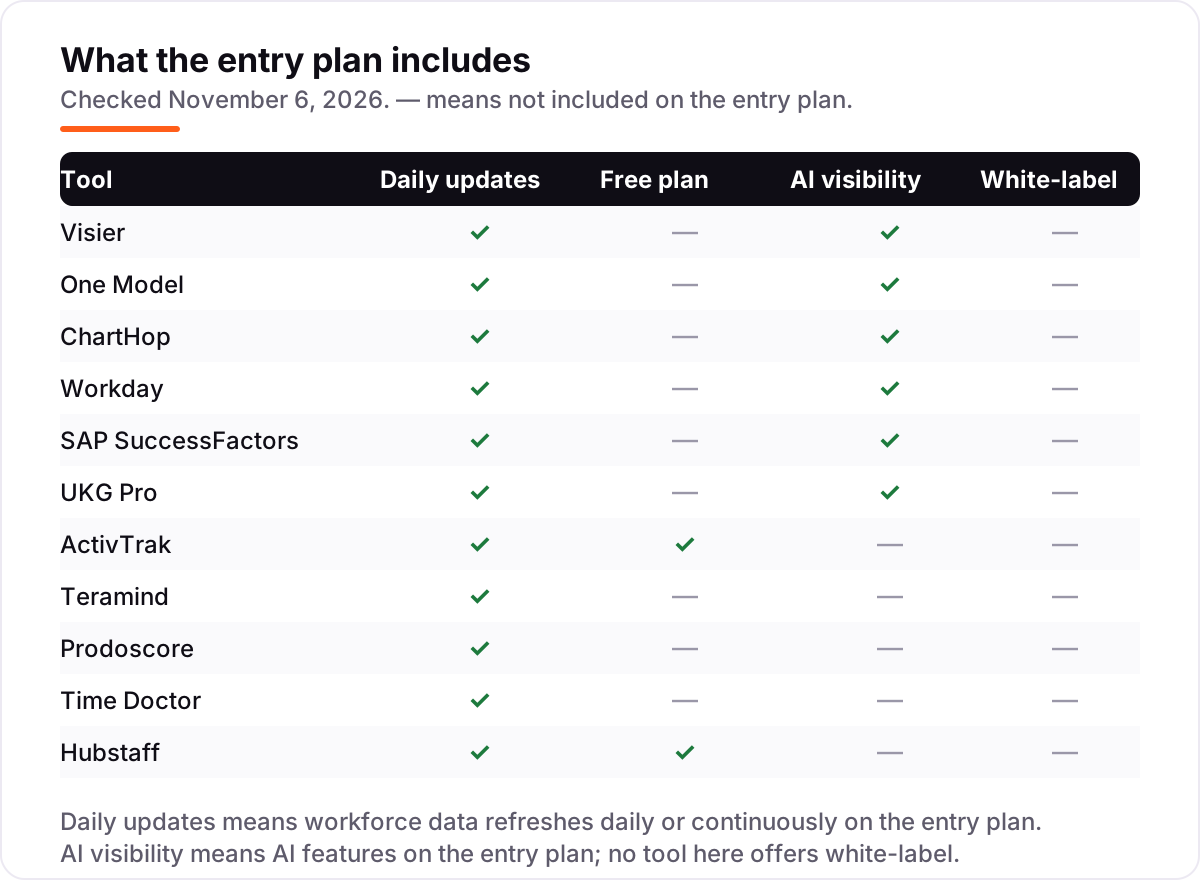
- Free options exist only at the productivity end: ActivTrak is free for up to 3 users and Hubstaff is free for a single user; every people analytics platform here is quote-only.
On this page
Quick comparison
| Tool | Best for | Starting price | Free plan |
|---|---|---|---|
| Visier | Large enterprises that want the deepest people analytics platform, with benchmarks drawn from thousands of companies | Custom quote | No (no free trial) |
| One Model | Companies whose workforce data is scattered across HRIS, ATS, payroll and finance systems that disagree with each other | Custom quote | No (no free trial) |
| ChartHop | Mid-market and enterprise teams that want visual org analytics, headcount planning and scenario modeling in one place | Custom quote | No (no free trial) |
| Workday | Organizations already running Workday HCM that want analytics on the HR and finance data they already hold | Custom quote | No (no free trial) |
| SAP SuccessFactors | SAP HCM customers that need workforce analytics and planning on SuccessFactors Employee Central data | Custom quote | No (no free trial) |
| UKG Pro | Mid-market and enterprise employers that want HR, payroll, talent and people analytics in one HCM suite | Custom quote | No (no free trial) |
| ActivTrak | Teams that want productivity analytics with a real free tier and no keystroke logging | $10/mo | Yes (free plan) |
| Teramind | Regulated industries that need workforce monitoring plus data loss prevention and forensic evidence | $15/mo | No (7-day trial) |
| Prodoscore | Leaders who want one productivity score per employee, built from the tools their teams already use | $19.99/mo | No (no free trial) |
| Time Doctor | Remote teams that need time tracking with productivity analytics, screenshots and distraction alerts | $8/mo | No (14-day trial) |
| Hubstaff | Field and remote teams that need time tracking plus analytics, payroll and proof of work in one tool | $7/mo | Yes (free plan) |
Make one of these tools?
We re-check this list every quarter. Send a correction, request a review, or ask about a clearly labeled sponsored spot.
Request a listingThe best workforce analytics software

Visier
Best for: Large enterprises that want the deepest people analytics platform, with benchmarks drawn from thousands of companies
Visier is the reference product in people analytics. It sits on top of your HRIS, ATS, payroll and engagement systems, maps the data into a workforce model, and ships with hundreds of pre-built metrics: turnover drivers, retention risk, compensation equity, hiring quality and span of control. The benchmark dataset, drawn from thousands of enterprises rather than surveys, is the feature competitors cannot copy.
The honest catch is the buy-in. Pricing is custom and enterprise-grade, implementations run for months, and the platform expects a real people-analytics function on your side to use it well. Companies under 500 employees rarely clear the value bar. For large organizations where a small improvement in retention is worth six figures, Visier is the default shortlist.
What we like
- Purpose-built for HR, with hundreds of pre-built metrics and benchmark data from thousands of enterprises
- Vee AI assistant answers workforce questions in plain language
- Strong predictive modeling for turnover, retention risk and workforce planning
- Connects HRIS, ATS, payroll and engagement data into one governed model
Watch out for
- Enterprise pricing with no published numbers, and implementations run for months
- Needs a real people-analytics function on your side to get value from it
- Overbuilt for companies under a few hundred employees

One Model
Best for: Companies whose workforce data is scattered across HRIS, ATS, payroll and finance systems that disagree with each other
One Model built its reputation on the unglamorous problem: workforce data lives in ten systems and nobody agrees on the numbers. Its People Data Cloud pulls HRIS, ATS, payroll, engagement, performance and finance data into a single governed model, then layers analytics, storyboards and predictive models on top. The storyboard format is the differentiator: instead of dashboards executives ignore, One Model packages findings as narratives with context and recommended actions.
The honest catch is that data orchestration is only as good as the sources. Messy HRIS data, inconsistent job codes and duplicate records surface as problems during implementation, which is healthy but takes time. Pricing is quote-based and sits in the enterprise tier. For companies serious about governing people data as a real data product, One Model is a strong Visier alternative with a more modern feel.
What we like
- People Data Cloud unifies HRIS, ATS, payroll, engagement and finance data into one governed model
- Storyboards turn metrics into narratives executives actually read, with recommended actions
- Transparent forecasting for attrition, hiring and workforce cost
- Modern interface with no rip-and-replace of your existing HR systems
Watch out for
- Custom pricing with no published numbers, in the enterprise tier
- Smaller vendor than Visier, with a narrower analyst footprint
- Requires clean source data to deliver its best work

ChartHop
Best for: Mid-market and enterprise teams that want visual org analytics, headcount planning and scenario modeling in one place
ChartHop calls its category organizational intelligence: a living model of the whole organization that connects people, work, finance and operations. In practice, buyers get three things: a beautiful org chart that is always current, headcount planning with scenario modeling and real-time budget impact, and analytics that leaders can query in plain English. Most teams see live data visualized within weeks, not months.
The honest catch is pricing opacity despite the transparent model. ChartHop charges a per-employee-per-month base fee for only the modules you use, but publishes no actual number, so every buyer still talks to sales. For predictive modeling depth, Visier and One Model have the edge. But for headcount planning, org design and giving executives a current picture of the company, ChartHop is the most approachable of the enterprise group and the fastest to value.
What we like
- A living org model that visualizes people, cost and output together, always current
- Headcount scenario planning with real-time budget impact
- More than 100 integrations and no rip-and-replace of your HRIS
- Plain-English queries let leaders ask workforce questions without building reports
Watch out for
- No published per-employee price, only the pricing model, so every buyer still talks to sales
- Analytics depth for complex predictive use cases trails Visier and One Model
- The platform keeps expanding, so module boundaries shift

Workday
Best for: Organizations already running Workday HCM that want analytics on the HR and finance data they already hold
Workday's people analytics story is simple: if your HR data already lives in Workday, analyze it there. People Analytics delivers pre-built dashboards and metrics, while Prism Analytics adds data preparation, discovery boards and the ability to blend Workday data with external sources. Security follows the same model as the rest of Workday, which compliance teams appreciate.
The honest catch is that nobody buys Workday for analytics alone. This is a platform module inside one of the most expensive HCM contracts in the market, and its analytics depth trails Visier's specialist platform. Teams on Workday should absolutely use what they have before buying a third party. Teams not on Workday should not consider Workday as an analytics purchase; the specialists above are the comparison set.
What we like
- Native analytics on your Workday HR and finance data, with no integration work
- Prism Analytics handles data preparation, discovery boards and blending external sources
- Unified security model across HR, finance and analytics
- Illuminate AI features run across the platform
Watch out for
- Only available to Workday customers, inside one of the most expensive HCM contracts in the market
- Analytics depth trails the best-of-breed specialists
- The total contract cost makes standalone comparison difficult

SAP SuccessFactors
Best for: SAP HCM customers that need workforce analytics and planning on SuccessFactors Employee Central data
SAP SuccessFactors Workforce Analytics is the enterprise pick for the SAP installed base. It offers deep metrics cubes, headcount movement analysis, workforce planning and benchmarking, all wired into SuccessFactors Employee Central data. For organizations standardized on SAP, the data residency and governance story is strong.
The honest catch is complexity. Enabling and configuring Workforce Analytics is a known consultant-heavy exercise, and practitioners report OLAP configuration and permission issues that take SAP expertise to resolve. The interface feels a generation behind Visier and ChartHop. SAP shops should evaluate it against bolting on a specialist; everyone else should ignore it. Like Workday, this is a platform play, not a standalone analytics purchase.
What we like
- Workforce Analytics and Planning run natively on SuccessFactors data
- Deep OLAP-style metrics cubes for complex headcount analysis
- Integrates with SAP Analytics Cloud and the broader SAP stack
- Strong data residency and governance story for SAP-standardized organizations
Watch out for
- Module licensing on top of the SuccessFactors contract
- Configuration is consultant-heavy, with OLAP setup and permissions that take SAP expertise
- Interface feels a generation behind Visier and ChartHop

UKG Pro
Best for: Mid-market and enterprise employers that want HR, payroll, talent and people analytics in one HCM suite
UKG Pro is a human capital management platform that unifies HR, payroll, talent, workforce management and people analytics in a suite. Its analytics run on the same data as payroll and benefits, so headcount, cost and turnover reports never need a separate integration. The reporting is the strength reviewers cite most: highly customizable, with IBM Cognos business intelligence behind it, and global payroll for employers with workers in many countries.
The honest catch is cost and effort. UKG Pro publishes no prices, so every buyer negotiates a custom enterprise quote, and G2 reviewer data puts implementation at around five months. Desirable capabilities sit behind additional module fees, and advanced reporting has a learning curve. It suits mid-market and enterprise employers with 200-plus staff who will use the whole suite; buyers who only need analytics should shortlist the specialists above instead.
What we like
- One suite for HR, payroll, benefits, recruiting, onboarding and people analytics
- Robust, highly customizable reporting, including IBM Cognos business intelligence
- Global payroll capabilities for employers with workers in many countries
- Bryte AI features run across the platform
Watch out for
- No published pricing; every buyer negotiates a custom enterprise quote
- Implementation averages around five months, per G2 reviewer data
- Desirable capabilities sit behind additional module fees, and advanced reporting has a learning curve

ActivTrak
Best for: Teams that want productivity analytics with a real free tier and no keystroke logging
ActivTrak is the productivity-analytics entry point for teams that want visibility into how work happens without surveillance-grade monitoring. It classifies app and website activity as productive or unproductive, tracks focus time and context switching, flags burnout risk and workload imbalance, and reports it all in dashboards managers read. The free plan covers 3 users with 30 days of data history, which is enough to evaluate it honestly.
The honest catch is the add-on ladder. Screenshots cost extra through the Screen Details add-on, API access is an add-on, and extended data history is an add-on. A fully loaded setup can run well above the $10 headline before you reach the $15 and $17 tiers, and billing is annual-only. Even so, for small and mid-market teams that want productivity analytics with published prices, ActivTrak is the most transparent option in the category.
What we like
- Free plan for up to 3 users with basic time tracking and productivity reports
- Privacy-first positioning: no keystroke logging, no email monitoring, no camera access
- Published pricing from $10 per worker per month, with add-ons priced separately
- Classifies app and website activity as productive or unproductive, and flags burnout risk
Watch out for
- Screenshots, API access and extended data history are paid add-ons, not included
- Paid plans bill annually only, with a 5-user minimum and no month-to-month option
- Deeper analytics and AI coaching sit on the higher tiers, from $15 a month

Teramind
Best for: Regulated industries that need workforce monitoring plus data loss prevention and forensic evidence
Teramind is the heavyweight of workforce monitoring. Starter covers activity monitoring and screen recording; the UAM tier adds keystroke logging, email and file monitoring, risk scoring and anomaly detection; the DLP tier adds content-based rules and automatic blocking of sensitive data leaving the company. It records what users do on company-owned devices and flags activity that looks risky, in real time.
The honest catch is that the entry price buys the lightest version. Starter is $15 a seat a month billed monthly, or $14 billed annually, but the monitoring and DLP features Teramind is known for begin at $28 to $32 a seat on annual billing, and every plan carries a five-seat minimum. This is a security platform first and a productivity tool second: buy it for insider risk and compliance, not for gentle productivity coaching.
What we like
- The heaviest monitoring here: screen recording, live view and activity blocking on Starter
- UAM adds keystroke logging, email and file monitoring, risk scoring and anomaly detection
- DLP adds content-based rules, sensitive-data detection and automatic blocking
- Flexible monthly or annual billing, unlike the annual-only rivals
Watch out for
- Keystroke logging and risk scoring start at the UAM tier, $28 a month billed annually
- Every plan carries a 5-seat minimum, so a small team still pays for five seats
- Full DLP is $32 a month billed annually, and OCR search sits on the custom Enterprise plan

Prodoscore
Best for: Leaders who want one productivity score per employee, built from the tools their teams already use
Prodoscore is a workforce intelligence platform that gives leaders one objective, real-time view of employee productivity. It connects to the tools teams already use — CRM, email, chat, project software — and turns activity into a single daily score per employee. There is no agent on the device and no keystroke capture; the score comes from business-system activity.
The honest catch is the floor. Basic starts at $19.99 per user per month, with a $300-a-month minimum for up to 15 seats, and there is no free trial to test the score against your own data first. Premium, with flight-risk signals and org network analysis, is priced by quote. Buy Prodoscore when a single comparable number per person is the goal; buy ActivTrak or Time Doctor when you need the underlying time and app detail instead.
What we like
- One daily productivity score per employee, from activity across 100-plus business tools
- No software installed on employee devices; it reads activity through integrations, not keystrokes
- Employee comparisons and role benchmarks show who needs support, not just who is busy
- Volume and multi-year discounts are available across all plans
Watch out for
- No free trial and no free plan, and the Basic plan starts at $300 a month for up to 15 seats
- Premium and Enterprise pricing is by quote, so the step up is unknown until you talk to sales
- Advanced analytics, flight-risk signals and org network analysis wait for Premium

Time Doctor
Best for: Remote teams that need time tracking with productivity analytics, screenshots and distraction alerts
Time Doctor takes the most active approach to productivity of any tool here. Basic at $8 per user per month billed monthly, or $6.67 billed annually, covers automatic time tracking, tasks, timeline reports and screenshots, with distraction alerts when focus drifts. Standard at $11.67 adds schedules, attendance, payroll and 60-plus integrations, while Premium at $16.70 adds video screen recording, Benchmarks AI and meeting insights.
The honest catch is the stance. This is the most surveillance-oriented tracker in the list, and teams that dislike being watched will push back, so the decision needs a conversation, not a silent rollout. There is no free plan, only a 14-day trial, and the headline rate needs annual billing. Pick Time Doctor when proof of work and distraction alerts matter more than a light touch; pick ActivTrak when employee acceptance is the priority.
What we like
- Screenshots and activity monitoring included on every plan, from Basic
- Distraction alerts and idle-time tracking give managers early warning, not just timesheets
- Standard adds payroll, attendance, scheduling and 60-plus integrations
- Annual billing includes two free months, a 16.6% discount on the monthly price
Watch out for
- No free plan, only a 14-day trial, and annual billing is the only way to get the $6.67 rate
- Payroll, attendance and 60-plus integrations wait for Standard at $11.67 a month billed annually
- Some teams find the monitoring intrusive, and add-ons like Benchmarks AI cost extra on Basic

Hubstaff
Best for: Field and remote teams that need time tracking plus analytics, payroll and proof of work in one tool
Hubstaff is the time-tracking end of workforce analytics, built for field and remote teams that need proof of work. Starter at $7 per user per month billed monthly, or $4.99 billed annually, covers time tracking, timesheets, activity levels and screenshots, while Grow and Team add budgets, GPS and deeper reporting. Payroll and invoicing are built in, so tracked hours flow straight into pay.
The honest catch is the seat math: the free plan covers one user only, and every paid plan needs at least two seats. Screenshots and app tracking are capped on Starter, and GPS needs the Team plan. Even so, Hubstaff is the cheapest paid entry here and the only tool with payroll built in. Pick it when time tracking and paying people are the same job; pick Time Doctor when distraction alerts matter more.
What we like
- Free plan for a single user, with basic time tracking and activity monitoring
- Starter includes timesheets, activity levels, 500 screenshots and 500 app and URL entries a month
- Payroll, invoicing and project budgets built in, so tracked time turns into pay
- The largest review base here, with 2,308 G2 reviews behind its 4.4 rating
Watch out for
- The free plan covers one user only, so any team pays from the first hire
- Starter, Grow and Team plans each need at least 2 seats, so a solo user pays for two
- Screenshots and app tracking are capped on Starter, and GPS needs the Team plan
The best workforce analytics software answers one of two questions: what is happening to your workforce, or how is work actually getting done? The eleven tools below split exactly that way. Six are people analytics platforms that analyze HR data — headcount, turnover, compensation, engagement and hiring — and five are productivity analytics tools that measure app usage, focus time and time tracking. We ranked them by fit for the most common buyer, and every price was checked on the vendor's own site on November 6, 2026.
How to choose the best workforce analytics software
- Pick your side first. If the question is retention, pay equity or headcount planning, you need people analytics: Visier, One Model, ChartHop, Workday, SAP SuccessFactors or UKG Pro. If the question is where the hours go, you need productivity analytics: ActivTrak, Teramind, Prodoscore, Time Doctor or Hubstaff.
- Check whether you already own the answer. Workday, SAP SuccessFactors and UKG Pro customers already hold analytics inside their HCM contract. Use what you have before buying a specialist.
- Count the seats, then the minimums. Teramind and ActivTrak need at least 5 seats, Hubstaff needs at least 2, and Prodoscore starts at $300 a month for 15 seats. A small team pays the minimum, not the headline rate.
- Price the tier that holds the feature you need. Screenshots are an ActivTrak add-on, keystroke logging starts at Teramind UAM, and payroll waits for Time Doctor Standard. The entry price rarely buys the feature that made you look.
- Weigh the privacy trade-off before you buy. Prodoscore scores activity without watching screens; Teramind records sessions and keystrokes. Tell staff what is tracked, and check your local rules first.
Analytics is one system in your stack, not the whole stack. If the business also needs to be found online, our monthly SEO service covers the visibility side, and our guide to the best payroll software for small business covers the pay side of the same workforce. And before you publish new pages for the services you sell, run your titles through the free SERP snippet preview tool — it shows exactly how the title and description will look in Google.
Whatever you shortlist, try it with real data before you pay. The free plans and trials in this list are long enough to run one genuine month — your people, your systems, your reports — and that month tells you more than any review can. Check two things in the trial: that the data refreshes without daily fixing, and that the reports answer the question you actually asked. The quote-only tools offer demos instead of trials, so ask for a demo on your own data, not a slide deck.
Workforce analytics pricing: what you will actually pay
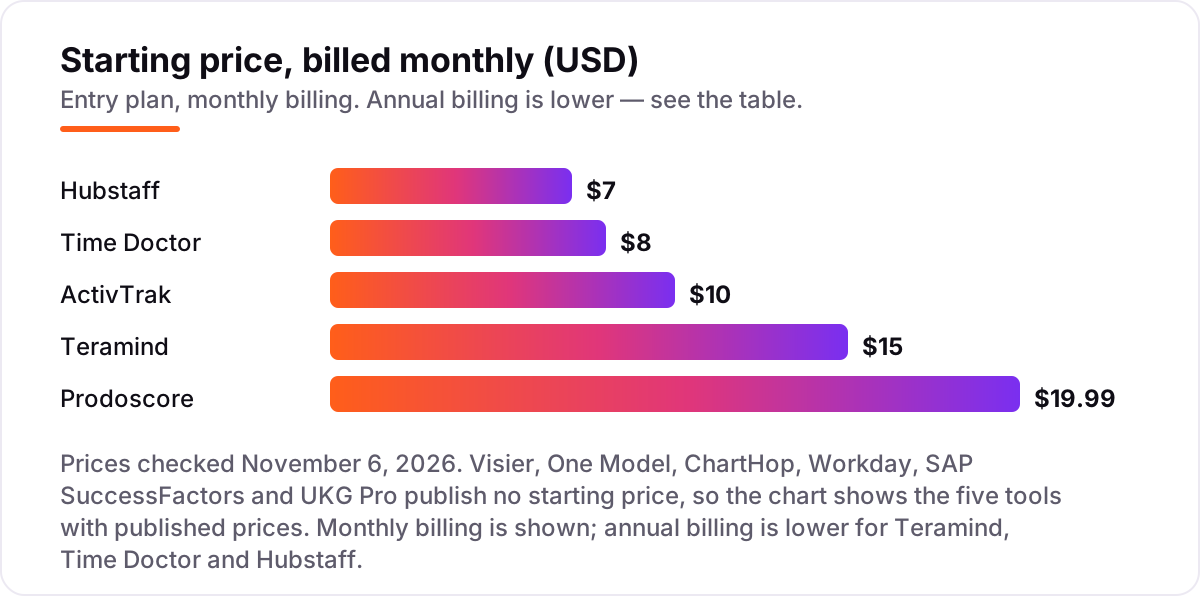
Take a 100-person company and price the five tools that publish a number, on monthly billing first. Hubstaff Starter costs $700 a month, Time Doctor Basic costs $800, ActivTrak Essentials costs $1,000, Teramind Starter costs $1,500 and Prodoscore Basic costs $1,999. Annual billing cuts three of those: Hubstaff drops to $499 a month, Time Doctor to $667 and Teramind to $1,400, while ActivTrak and Prodoscore publish no monthly option, so their figures stay put.
Over a year, that is $5,988 on Hubstaff billed annually, $8,004 on Time Doctor billed annually, $12,000 on ActivTrak, $16,800 on Teramind billed annually and $23,988 on Prodoscore. The same 100 people cost $5,988 a year at the cheap end and $23,988 at the dear end — an $18,000 gap that comes entirely from how much monitoring you buy, not from headcount.
Three costs sit outside every number above. First, the add-ons: ActivTrak charges extra for screenshots, API access and extended history, so a fully loaded setup runs about $16 a worker a month, or $1,600 for 100 people. Second, the tier jump: Teramind UAM is $28 a seat a month billed annually, or $2,800 for 100 people, and that is the tier with the keystroke logging and risk scoring most buyers want. Third, the quote-only six: Visier, One Model, ChartHop, Workday, SAP SuccessFactors and UKG Pro publish no price, so budget for a sales cycle, an implementation project and an annual enterprise contract, not a checkout page.
Know the difference: people analytics vs productivity analytics
The confusion in this category is between two products that share a name. People analytics analyzes the data HR already holds: who works here, who leaves, what they are paid, how engaged they are and who you are hiring. Productivity analytics measures how work happens: which apps people use, how long they focus, when they drift and how time is spent. Visier, One Model and ChartHop live on the first side; ActivTrak, Time Doctor and Hubstaff live on the second. Workday, SAP SuccessFactors and UKG Pro sit on the first side too, because their analytics run on the HCM data they already hold.
There is a second, quieter confusion: productivity analytics is not one level of watching. Prodoscore scores activity from business systems without installing anything on the device. ActivTrak classifies app usage without keystroke logging. Time Doctor and Hubstaff take screenshots. Teramind records sessions, keystrokes and file transfers. The monitoring intensity rises steeply across the five tools, and so does the conversation you owe your staff.
A third distinction worth knowing is the suite versus the specialist. Workday, SAP SuccessFactors and UKG Pro bundle analytics into an HCM contract you may already pay for, which makes their analytics effectively free at the margin — but only as deep as the suite goes. Visier and One Model exist precisely because some buyers outgrow suite analytics. If your HCM already answers the question, the specialist is a cost, not an upgrade.
Quick comparison: tool type by need
| Buyer | Best pick | Why |
|---|---|---|
| Large enterprise, deepest analysis | Visier | The reference people analytics platform, custom quote |
| Data scattered across systems | One Model | One governed people-data model plus storyboards, custom quote |
| Headcount planning and org design | ChartHop | Living org chart with scenario modeling, custom quote |
| Already on Workday or SAP | Workday / SAP SuccessFactors | Analytics on data you already hold, bundled in the contract |
| Productivity analytics, free tier | ActivTrak | Free for up to 3 users, paid from $10 per user a month |
| Cheapest paid entry with payroll | Hubstaff | Starter is $7 per user a month, with payroll built in |
Mistakes to avoid
- Buying on the headline price. The entry tier rarely holds the feature you need: screenshots are an ActivTrak add-on, keystroke logging starts at Teramind UAM, and payroll waits for Time Doctor Standard. Price the tier you will actually use.
- Ignoring the seat minimum. Teramind and ActivTrak need 5 seats, Hubstaff needs 2, and Prodoscore starts at $300 a month for 15 seats. A team of three pays the minimum, not three times the headline.
- Buying a specialist when your HCM already answers the question. Workday, SAP SuccessFactors and UKG Pro customers pay for analytics inside a contract they already hold. Check that first.
- Rolling out monitoring without telling staff. Screenshot and keystroke tools change the employment relationship. Announce what is tracked, why, and who sees it — before the agent is installed.
- Comparing a quote to a price. The six people analytics platforms publish no numbers, so a side-by-side monthly cost is meaningless until every vendor has quoted on the same scope. Get the quotes first, then compare.
How we chose
We checked each vendor's own site on November 6, 2026 and recorded the starting price exactly as shown, or custom quote where the vendor publishes no price, and we ranked the tools by fit for the most common buyer — a team choosing between analyzing HR data and measuring how work happens — not by brand size. Two disclosures: Teramind's standalone pricing page returned a 404 when we checked, so its $15 monthly and $14 annual Starter figures come from Teramind's own site and G2's vendor-supplied pricing rather than the pricing page, and G2 lists a $5 starting figure for ChartHop, which we do not use because ChartHop itself publishes no price. Ratings come from G2 pages crawled within the last nine days, and no vendor paid for a place in this list.
What to do next
Start with the free plan or trial of your top pick and run one real month of your own data through it. Check that the reports answer the question you actually asked, and that the data refreshes without daily fixing, before you commit to a year. If the books are sorted but new customers are not finding you, our monthly SEO service handles the visibility side — or compare hiring tools in our guide to recruitment marketing platforms. Once your tools are in place, find out what's holding your rankings back.
Your stack only works if people find you
SerpAstra fixes what keeps your site off page one and makes it easy for AI assistants to recommend.
Get a free audit→Sources we checked (22)
- Visier pricing — visier.com (checked November 6, 2026)
- One Model pricing — onemodel.co (checked November 6, 2026)
- ChartHop pricing — charthop.com (checked November 6, 2026)
- Workday pricing — workday.com (checked November 6, 2026)
- SAP SuccessFactors pricing — sap.com (checked November 6, 2026)
- UKG Pro pricing — ukg.com (checked November 6, 2026)
- ActivTrak pricing — activtrak.com/pricing (checked November 6, 2026)
- Teramind pricing — teramind.co (checked November 6, 2026)
- Prodoscore pricing — prodoscore.com/pricing (checked November 6, 2026)
- Time Doctor pricing — timedoctor.com/pricing (checked November 6, 2026)
- Hubstaff pricing — hubstaff.com/pricing (checked November 6, 2026)
- Visier reviews — g2.com/products/visier/reviews (checked November 6, 2026)
- One Model reviews — g2.com/products/one-model/reviews (checked November 6, 2026)
- ChartHop reviews — g2.com/products/charthop/reviews (checked November 6, 2026)
- Workday HCM reviews — g2.com/products/workday-hcm/reviews (checked November 6, 2026)
- SAP SuccessFactors HCM reviews — g2.com/products/sap-sap-successfactors-hcm/reviews (checked November 6, 2026)
- UKG Pro reviews — g2.com/products/ukg-pro/reviews (checked November 6, 2026)
- ActivTrak reviews — g2.com/products/activtrak/reviews (checked November 6, 2026)
- Teramind reviews — g2.com/products/teramind/reviews (checked November 6, 2026)
- Prodoscore reviews — g2.com/products/prodoscore/reviews (checked November 6, 2026)
- Time Doctor reviews — g2.com/products/time-doctor/reviews (checked November 6, 2026)
- Hubstaff reviews — g2.com/products/hubstaff/reviews (checked November 6, 2026)
Shamim
Founder of SerpAstra
A full-stack SEO and digital marketer who spends most days on Local SEO for dental practices, AI search visibility and lead generation.
Frequently asked questions
What is the best workforce analytics software?
Visier is the best fit for large enterprises: the deepest people analytics platform, with benchmarks from thousands of companies, by custom quote. For published prices, ActivTrak is the best all-round pick from $10 per user a month with a free tier, and Hubstaff is the cheapest paid option at $7 a month.
How much does workforce analytics software cost?
Published prices run from $7 to $19.99 per user a month: Hubstaff $7, Time Doctor $8, ActivTrak $10, Teramind $15 and Prodoscore $19.99. The six people analytics platforms publish no prices at all, so expect a custom enterprise quote and an implementation project rather than a checkout page.
Is there free workforce analytics software?
Only at the productivity end. ActivTrak is free for up to 3 users with basic time tracking and productivity reports, and Hubstaff is free for a single user. Every people analytics platform in this list — Visier, One Model, ChartHop, Workday, SAP SuccessFactors and UKG Pro — is quote-only with no free plan.
What is the difference between people analytics and productivity analytics?
People analytics analyzes HR data — headcount, turnover, compensation, engagement and hiring — to answer what is happening to your workforce. Productivity analytics measures how work happens: app usage, focus time, time tracking and activity patterns. Most buyers need one side more than the other, so pick your side first.
Do I need workforce analytics if I already have an HCM system?
Often not. If you run Workday, SAP SuccessFactors or UKG Pro, use the analytics already bundled in your contract before buying a third-party tool. A specialist like Visier or One Model only earns its price when you need deeper analysis than your HCM provides, or data from systems outside it.
Is workforce analytics the same as employee monitoring?
No, although the lines blur. People analytics works on HR data and rarely watches individuals in real time. Productivity tools range from light-touch scoring, like Prodoscore, to full monitoring with screenshots and keystroke logging, like Teramind. Check the privacy features and your local rules before rolling any of them out.
Can I switch workforce analytics software later?
Yes, but the cost differs by side. Productivity tools are quick to swap: export your history, install the new agent and retrain managers. People analytics migrations take longer, because the value sits in the data model, metrics library and benchmarks you built up, so plan the move around a quarter boundary.
Free SEO and AI visibility audit
Find out what is holding your rankings back
Send us your site. Within 2 business days you get a written audit, an AI visibility check and a short fix list ranked by impact. Free, with no contract attached.
Request my free audit→Related guides
 Accounting, Tax & Finance10 Best Payroll Software for Small Business in 2026, ComparedCompare the 10 best payroll software for small business on base price, tax filing and free trials, with every price checked November 4, 2026.Read guide →
 Digital Marketing & Ads9 Best Recruitment Marketing Platforms in 2026, ComparedCompare the 9 best recruitment marketing platforms on price, career sites, campaigns and CRM and trial options, with every price checked November 5, 2026.Read guide →
 Accounting, Tax & Finance10 Best Bookkeeping and Payroll Software for Small Business in 2026, ComparedThe 10 best bookkeeping and payroll software for small business, compared on real 2026 prices, per-employee payroll fees and free plans at your headcount.Read guide →