
Best Room Booking Software for 2026: 8 Options Compared by Use Case
Compare the 8 best room booking software options for offices on price, billing model, and room displays, with every price checked November 10, 2026.
 Shamim Mia, Founder, SerpAstraLast verified November 10, 202615 min read
We compare pricing pages, documentation and public reviews. We never accept payment for rankings.
Key takeaways
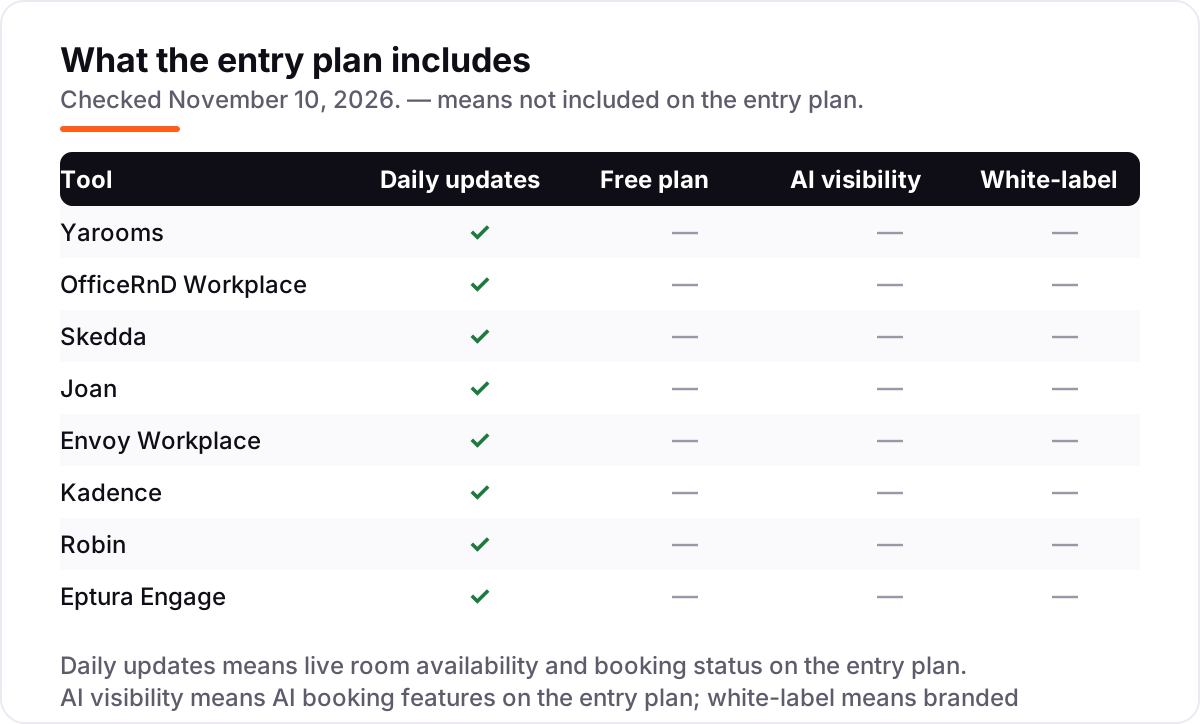
- Yarooms at $99 a month, OfficeRnD Workplace at $99 a month, and Skedda at $249 a month in the US are the shortlist for most offices — all three publish their prices, unlike Robin and Eptura Engage.
- The single most important buying factor is the billing unit — flat, per user, per space, or per room — because the same 10-room office costs $139 a month on Joan and $750 a month on Envoy Premium.
- No tool here has a free plan for room booking; every evaluation runs on a free trial or a demo, so test with your real rooms and calendars before paying.
- Every price below was checked on November 10, 2026. Two prices come from vendor-supplied directory listings rather than the vendors' own pricing pages, and we say so in How we chose.
On this page
Quick comparison
| Tool | Best for | Starting price | Free plan |
|---|---|---|---|
| Yarooms | Mid-size offices on Microsoft 365 that want flat-rate room and desk booking with Teams built in | $99/mo | No (free trial) |
| OfficeRnD Workplace | Hybrid offices with more staff than desks that want the bill tied to rooms, not headcount | $99/mo | No (free trial) |
| Skedda | Single offices with a fixed set of rooms and desks that want per-space pricing and strict booking rules | $249/mo | No (14-day trial) |
| Joan | Small offices that want battery-powered ePaper displays on every door without cabling work | $51/mo | No (30-day trial) |
| Envoy Workplace | Workplaces where visitor screening and front-desk security matter as much as room booking | $3/active user/mo | No (visitors only) |
| Kadence | Hybrid teams that plan in-office days in Teams and want room booking tied to team schedules | $4/user/mo | No (free trial) |
| Robin | Enterprises with 500+ employees running many rooms across several floors or sites | Custom quote | No (demo) |
| Eptura Engage | Large enterprises deep in Outlook and Exchange that need room booking across many countries | Custom quote | No (demo) |
Make one of these tools?
We re-check this list every quarter. Send a correction, request a review, or ask about a clearly labeled sponsored spot.
Request a listingThe best room booking software

Yarooms
Best for: Mid-size offices on Microsoft 365 that want flat-rate room and desk booking with Teams built in
Yarooms is the straightforward pick for a Microsoft-first office: flat monthly plans with no per-user meter running in the background, and booking that lives inside Outlook, Teams, and Google Calendar instead of a separate app staff must remember. Starter costs $99 a month for up to 20 users, one location, and 20 spaces, with desk booking, room displays, and hybrid scheduling included.
The catch is the caps. Once you pass 20 users, or you want the Teams app and the Yarvis AI assistant, you move to Business at $399 a month whether or not you need the extras, and visitor management is another $99 a month per location. For a single office that wants one predictable bill and deep Microsoft 365 integration, it is the easiest yes in this list.
What we like
- Flat monthly plans with no per-user meter: Starter is $99 a month for up to 20 users, 1 location and 20 spaces
- Native Microsoft Teams and Outlook booking, plus Google Calendar and a mobile app
- Room and lobby displays, desk booking, hybrid scheduling and visitor management in one platform
- SOC 2 Type II, ISO 27001 and GDPR compliance with EU data hosting
Watch out for
- Starter caps at 20 users and 20 spaces, so a growing office moves to Business at $399 a month
- The Teams app and the Yarvis AI assistant are not on Starter
- Visitor management is a $99 a month per location add-on, not included

OfficeRnD Workplace
Best for: Hybrid offices with more staff than desks that want the bill tied to rooms, not headcount
OfficeRnD Workplace charges for what you run, not who you hire. The Start plan is $99 a month on annual billing for up to 150 users, and the bill grows with bookable resources: $2 a month per desk and $8 a month per meeting room. Booking happens inside Teams, Slack, Outlook, and Google Workspace, and check-in with auto-release keeps the utilization data honest when people forget to cancel.
The honest catch is that a room-heavy office pays well above the $99 base: ten meeting rooms add $80 a month before you count a single desk. Visitor management is a separate add-on, with no sensors or lease-planning tools. For a hybrid office with far more staff than desks, the per-resource math is the cheapest honest price in this list.
What we like
- Start is $99 a month billed annually for up to 150 users, with the bill driven by bookable resources instead of headcount
- Meeting room booking, desk booking, recurring bookings and hybrid scheduling on the entry plan
- Booking inside Microsoft Teams, Slack, Outlook and Google Workspace, with check-in and auto-release
- Highest G2 score in this list at 4.6 out of 5 from 158 reviews, with a 9.5 quality-of-support score
Watch out for
- Meeting rooms cost extra per room, so a room-heavy office pays well above the $99 base
- Visitor management is a separate add-on, not part of Start
- No sensors or lease and move planning on the platform

Skedda
Best for: Single offices with a fixed set of rooms and desks that want per-space pricing and strict booking rules
Skedda is the booking specialist: priced per space, not per user, so 500 employees sharing 35 rooms pay the same $249 a month as 50 would. The Plus plan covers 35 spaces with unlimited users and unlimited bookings, interactive floor plans, booking rules, quotas, and buffers, and syncs two ways with Microsoft 365 and Google Workspace. It holds the highest G2 score in this list at 4.8 out of 5.
The catch is regional pricing. The $99 Starter plan is sold in EMEA and APAC only; in the US and Canada the entry point is Plus at $249 a month, and Premier at $349 covers 45 spaces. Extra booking administrators cost $99 a month each. For a single office with a fixed set of rooms that wants strict, fair booking rules, Skedda is the most proven tool here.
What we like
- Priced per space, not per user: Plus is $249 a month for 35 spaces with unlimited users and unlimited bookings
- Highest G2 score in this list at 4.8 out of 5 from 284 reviews
- Interactive floor plans, booking rules, quotas, buffers and approvals for fair shared-space use
- Two-way sync with Microsoft 365 room resources and Google Workspace, plus a Teams app
Watch out for
- US plans start at $249 a month, and the $99 Starter plan is sold in EMEA and APAC only
- Per-space pricing climbs as you add rooms, desks and parking spots
- Extra booking administrators cost $99 a month each as an add-on

Joan
Best for: Small offices that want battery-powered ePaper displays on every door without cabling work
Joan is the only tool here that sells the hardware and the software as one system. Its battery-powered ePaper displays show live room availability at the door for months per charge, with no cabling and no tablet to keep charged. Plans start at $51 a month billed annually with every solution included, and people who book from Outlook or Google Calendar are not billed at all.
The catch is the hardware bill. The displays are a separate one-time purchase, and extra device licences cost $10.99 a month each, so a display on every door adds up fast. Joan is a booking platform, not a full workplace suite: no lease management, no maintenance ticketing, no CAD floor plans. For a small office that wants the door display experience without an IT project, nothing else here is this simple.
What we like
- Plans from $51 a month billed annually with every solution included, nothing gated by tier
- Battery-powered ePaper displays show live room availability at the door for months per charge, with no cabling
- People who book from Outlook or Google Calendar are not billed, only app users and screens are
- Room booking, desk booking, visitor management, digital signage, parking and asset reservations in one subscription
Watch out for
- Displays are a separate one-time hardware purchase on top of the subscription
- Extra device licences cost $10.99 a month each, so a door on every room adds up
- Not a full workplace suite: no lease management, maintenance ticketing or CAD floor plan editing

Envoy Workplace
Best for: Workplaces where visitor screening and front-desk security matter as much as room booking
Envoy started at the front desk, and it shows. The visitor management is the most complete in this list: watchlist screening, ID scanning, NDA signing, and badge printing, with access control integrations like Genetec and Brivo. Workplace Standard starts at $3 per active user a month, and you pay only for people who actually come in, which keeps the bill low for offices with many occasional visitors.
The catch is that room booking is not really the $3 plan. Conference room booking sits on Premium at $5 per active user a month, and reservations, screens, deliveries, and notifications are separate modules that stack up fast. Reviewers report a slow mobile app and occasional check-in glitches. Buy Envoy when visitor security is the priority; buy a booking specialist when rooms are the whole job.
What we like
- Workplace Standard starts at $3 per active user a month, and you pay only for people who actually come in
- The most complete visitor management here: watchlist screening, ID scanning, NDA signing and badge printing
- Desk and room reservations, digital signage, deliveries and emergency notifications around the same platform
- Integrations with access control systems like Genetec and Brivo, plus Slack and Microsoft Teams
Watch out for
- Conference room booking sits on Premium at $5 per active user a month, not on the $3 Standard plan
- Reservations, screens, deliveries and notifications are separate paid modules that stack up fast
- Reviewers report a slow mobile app and occasional check-in glitches

Kadence
Best for: Hybrid teams that plan in-office days in Teams and want room booking tied to team schedules
Kadence is built around hybrid planning rather than raw booking: interactive office maps with team neighbourhoods and an employee locator, so people sit near their team, and room booking tied to the same in-office schedule. The Standard plan is $4 per user a month with unlimited active users, desks, and rooms, and booking works inside Microsoft Teams. Reviewers rate it 4.5 out of 5 on G2.
The catch is the price source. The $4 figure comes from Kadence's own listing on G2; its website now routes pricing through sales, so confirm the number in a quote before budgeting. Per-user pricing also climbs with headcount even when most staff rarely come in, and reporting is the most-cited weakness in reviews. For a hybrid team that plans its office days together, Kadence fits the way people actually work.
What we like
- Standard is $4 per user a month, with unlimited active users, desks and rooms on the plan
- Interactive office maps with team neighbourhoods and an employee locator, so people sit near their team
- Hybrid scheduling and AI booking inside Microsoft Teams
- Rated 4.5 out of 5 on G2 from 143 reviews, with ease of use the most-mentioned strength
Watch out for
- The $4 a user figure comes from Kadence's listing on G2; its own site now routes pricing through sales, so confirm by quote
- Per-user pricing climbs with headcount even when most staff rarely come in
- Reporting is the most-cited weakness in G2 reviews

Robin
Best for: Enterprises with 500+ employees running many rooms across several floors or sites
Robin is the enterprise standard for room scheduling, and it has been since 2014. It covers desk and room booking, visitor management, and workplace analytics, with room displays, status boards, and abandoned-meeting release that frees a room when nobody shows up. Booking works from Outlook, Google Calendar, Teams, and Slack, and the analytics go deep enough for multi-site planning.
The catch is access. Robin publishes no pricing and is built for organizations with 500 or more employees, so smaller offices are simply not the target buyer, and third-party contract data puts typical deals in five figures a year. Floor plan edits often need Robin's own team, and availability can lag at busy times. For a large estate with a dedicated workplace team, it is the most mature option here; for anyone smaller, it is the wrong shortlist.
What we like
- The enterprise standard for room scheduling, with room displays, status boards and abandoned-meeting release
- Deep video conferencing integration and booking from Outlook, Google Calendar, Teams and Slack
- Workplace analytics and scenario planning for multi-site estates
- Rated 4.4 out of 5 on G2 from 211 reviews, with the reservation process the most-praised feature
Watch out for
- No published pricing: every deal is a custom annual quote, and third-party contract data puts typical deals in five figures a year
- Built for 500 or more employees, so smaller offices are not the target buyer
- Floor plan edits often need help from Robin's own team, and availability can lag at busy times

Eptura Engage
Best for: Large enterprises deep in Outlook and Exchange that need room booking across many countries
Eptura Engage is the former Condeco, with 20 years of room booking history behind it and deployments in 115 countries. It is the deepest Outlook and Exchange integration in this list: staff book rooms from Outlook, Teams, or the mobile app, and the platform also covers desks, parking, lockers, and meeting services like catering. Global support and multi-country rollouts are where it earns its place.
The catch is everything around the software. There is no published pricing, contracts are annual with professional services, and rollout typically takes 6 to 12 weeks. G2 reviewers praise the booking experience but flag complex admin configuration and an Outlook add-in that struggles with recurring bookings, and visitor management needs the separate Eptura Visitor product. For a large enterprise already living in Outlook, it fits; for a single office, it is far too much.
What we like
- Formerly Condeco, with 20 years of room booking history and deployments in 115 countries
- Deep Microsoft 365 and Exchange integration, with booking from Outlook, Teams and the mobile app
- Room, desk, parking and locker booking plus meeting services like catering in one platform
- Rated 4.3 out of 5 on G2 from 179 reviews, with ease of use the most-praised quality
Watch out for
- No published pricing: every deal is a custom quote with annual contracts and professional services
- Admin configuration is complex, and the Outlook add-in is unreliable for recurring bookings, per G2 reviewers
- Visitor management needs the separate Eptura Visitor product
The best room booking software ends the daily hunt for a free meeting room: staff see live availability, book from the calendar they already use, and the room releases itself when nobody shows up. We ranked the eight tools below by fit for the most common buyer — a mid-size office with a handful of meeting rooms and staff who split the week between home and the office — and every price was checked on November 10, 2026.
How to choose the best room booking software
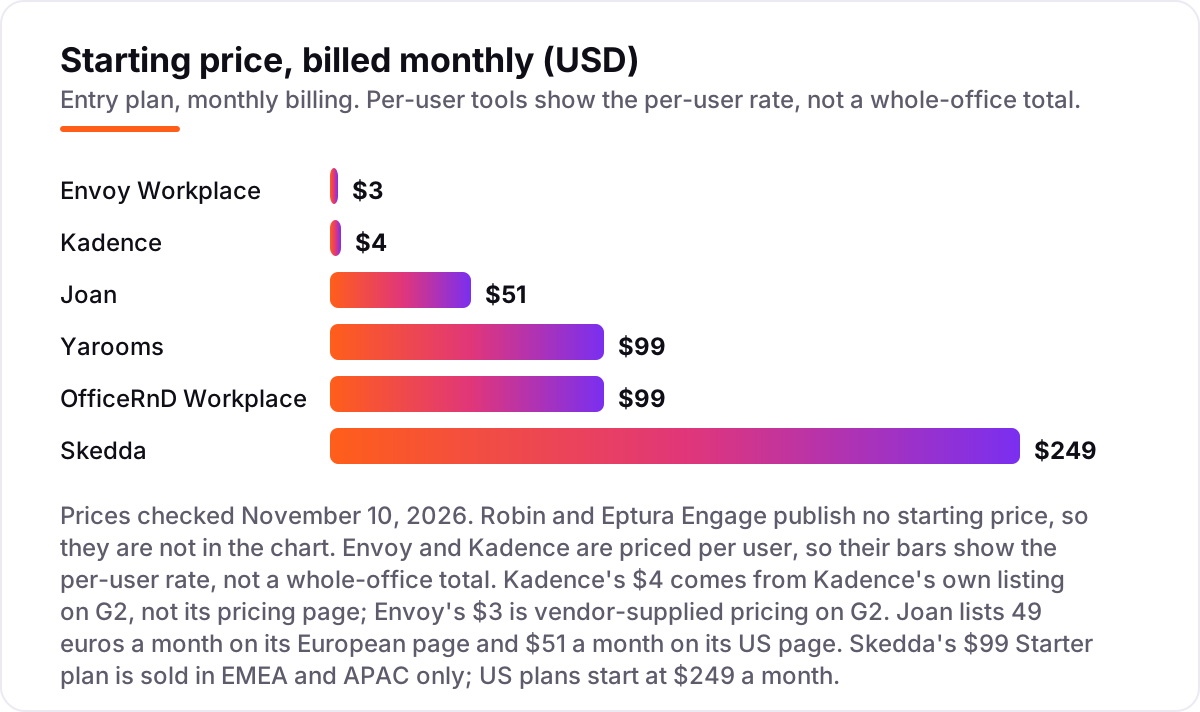
- Count your rooms and your people first. Flat plans (Yarooms $99, Joan $51) ignore headcount, per-space plans (Skedda $249 for 35 spaces) ignore it too, and per-user plans (Envoy $3, Kadence $4) multiply by every person who comes in. The billing unit decides your real price.
- Check the calendar integration. Staff book where they already live, so the tool must sync two ways with Outlook or Google Calendar and offer a Teams or Slack app — otherwise adoption dies in week one.
- Decide whether you need door displays. A display on every door shows live availability to people walking the halls, but Joan's ePaper screens and Skedda's tablets are hardware you buy separately, plus a licence per screen.
- Check no-show handling. Check-in and auto-release free a room when nobody turns up; without it, the calendar says busy while the room sits empty.
- Ask about visitors and services. If guests, catering, or parking matter, check whether they are included or paid add-ons — Yarooms charges $99 a month per location for visitor management, and Envoy sells reservations and deliveries as separate modules.
Choosing software is one decision; getting found is another. An office that clients cannot find on Google Maps loses walk-ins no matter how smooth its rooms run, so read our local SEO service alongside this list. Before you put a new location page live, check that your name, address, and phone number match everywhere with the free NAP consistency checker — mismatched listings cost more visits than any booking tool saves.
Whatever you shortlist, try it with your real rooms before you pay. The free trials in this list are long enough to run one genuine week — your rooms, your calendars, your no-shows — and that week tells you more than any review can. Check two things in the trial: that an empty room releases itself after a no-show, and that a booking made in Outlook shows up on the door display without staff touching anything.
Room booking software pricing: what you will actually pay
Take an office with 10 meeting rooms and 150 employees, on annual billing. On list prices, the software costs $399 a month on Yarooms Business — Starter caps at 20 users, so a 150-person office needs the $399 tier — $179 a month on OfficeRnD Workplace Start ($99 base plus 10 rooms at $8 each), $249 a month on Skedda Plus (10 rooms fit inside the 35-space allowance), about $139 a month on Joan ($51 base plus 8 extra door displays at $10.99 each, with staff booking from Outlook or Google Calendar not billed), $750 a month on Envoy Premium (150 active users at $5 each, since conference room booking is not on the $3 Standard plan), and $600 a month on Kadence (150 users at $4 each). Robin and Eptura Engage publish no price, so their cost is whatever the quote says.
Over a year, that is $4,788 on Yarooms, $2,148 on OfficeRnD, $2,988 on Skedda, $1,668 on Joan, $9,000 on Envoy, and $7,200 on Kadence. The same office costs five times more on Envoy Premium than on Joan — not because Envoy is a worse tool, but because per-user billing multiplies by headcount while Joan charges for screens. The cheapest option for a room-heavy office with many occasional visitors is usually a flat or per-space plan; the cheapest for a small team that comes in rarely is a per-user plan.
Three costs sit outside every number above. First, hardware: Joan's ePaper displays and Skedda's tablet displays are separate purchases, and Envoy charges $12 per screen a month on top of the platform. Second, add-ons: visitor management on Yarooms costs $99 a month per location, and Envoy sells reservations, deliveries, and notifications as separate modules. Third, implementation: Robin and Eptura Engage need weeks of rollout and professional services, while Yarooms, Skedda, and Joan can be live in days.
Know the difference: room booking vs desk booking
The confusion in this category is between two jobs that look alike. Room booking reserves a shared meeting space for a time slot — a 10-person room from 2 to 3 pm, with the room free again at 3. Desk booking assigns one person a seat for the day, so they know where to sit when they arrive. Most tools in this list do both, but they bill the two jobs differently: Yarooms and Skedda charge by space, so a room and a desk cost the same kind of money, while Envoy and Kadence charge by user, so the bill follows headcount either way.
The practical consequence is that a tool can be strong at one job and weak at the other. Envoy's $3 Standard plan covers desks and scheduling but not conference room booking — that sits on Premium — so an office that buys on the headline price finds its rooms unbookable. Skedda, by contrast, treats every bookable item as a space and prices them the same. Before you compare prices, decide which job you are buying: rooms, desks, or both, and check that the plan you pick includes it.
There is a second, quieter confusion: a shared Outlook calendar is not room booking software. A calendar shows who booked what, but it cannot release a room after a no-show, show live status on a door display, enforce booking rules and quotas, or report which rooms sit empty all week. If the problem is ghost meetings and double bookings, the calendar is the cause, not the fix.
Quick comparison: tool type by need
| Buyer | Best pick | Why |
|---|---|---|
| Small office, tight budget | Joan | $51/month, everything included, ePaper displays on the door |
| Mid-size office on Microsoft 365 | Yarooms | Flat $99/month, Teams-native booking, no per-user meter |
| Hybrid office, more staff than desks | OfficeRnD Workplace | $99/month, bill follows rooms not headcount |
| Fixed rooms, strict booking rules | Skedda | $249/month for 35 spaces, highest G2 score here |
| Visitors matter as much as rooms | Envoy Workplace | $3/active user/month, strongest front desk |
| Hybrid day planning in Teams | Kadence | $4/user/month, team neighbourhoods and in-office days |
| Enterprise, 500+ staff, many sites | Robin or Eptura Engage | Quote only, deepest analytics and Outlook integration |
Mistakes to avoid
- Comparing a per-user price with a flat price. Envoy at $3 a user and Yarooms at $99 a month look close until you multiply: 150 people cost $750 a month on Envoy Premium and $399 on Yarooms Business. Always price your headcount and your rooms.
- Assuming the entry plan includes room booking. Envoy's $3 Standard plan does not include conference room booking — that is Premium at $5 a user. Read the plan table, not the headline.
- Forgetting the hardware. Door displays are never in the software price: Joan's screens are a one-time purchase, Skedda's tablets are bought separately, and Envoy charges $12 per screen a month.
- Ignoring the caps. Yarooms Starter stops at 20 users and 20 spaces, Skedda Plus at 35 spaces, and OfficeRnD Start at 150 users. Crossing a cap moves you to the next tier whether or not you want its features.
- Signing an annual contract before trialling. Every tool here offers a trial or a demo, and the quote-only two need a sales process. Run one real week on your rooms first, and get the hardware and add-on costs in writing before you sign.
How we chose
We checked each vendor's own pricing page on November 10, 2026 and recorded the starting price exactly as shown, or as custom quote where the vendor publishes none. Two prices come from vendor-supplied directory listings rather than the vendors' own pricing pages, and we say so plainly: Kadence at $4 a user a month comes from Kadence's own listing on G2, and Envoy Workplace at $3 per active user a month is vendor-supplied pricing published on G2. Skedda's $249 a month Plus plan and its EMEA-only $99 Starter were verified on Skedda's own pricing page on November 10, 2026, and Joan's $51 a month is the US figure; the same plan is 49 euros a month in Europe. Ratings come from G2 pages checked on November 10, 2026. We ranked the tools by fit for the most common buyer — a mid-size office booking a handful of meeting rooms — not by brand size. No vendor paid for a place in this list, and none of the links here are affiliate links.
What to do next
Start with the worked example above: count your rooms, count the people who actually come in, and price the shortlist on your numbers, not the headline. Then take the free trial or demo of your top pick and run one real week of meetings through it — check that no-shows release the room, that the calendar sync holds, and that the invoice matches the quote. If the rooms are sorted but new clients are not finding the office, our monthly SEO service handles the visibility side. Once your tools are in place, find out what's holding your rankings back.
Your stack only works if people find you
SerpAstra fixes what keeps your site off page one and makes it easy for AI assistants to recommend.
Get a free audit→Sources we checked (16)
- Yarooms room booking — yarooms.com/product/room-booking (checked November 10, 2026)
- Yarooms on G2 — 4.3/5, 100 reviews (checked November 10, 2026)
- OfficeRnD Workplace pricing — officernd.com/pricing/hybrid (checked November 10, 2026)
- OfficeRnD Workplace on G2 — 4.6/5, 158 reviews (checked November 10, 2026)
- Skedda pricing — skedda.com/pricing (checked November 10, 2026)
- Skedda on G2 — 4.8/5, 284 reviews (checked November 10, 2026)
- Joan room booking — getjoan.com/lg-room-booking (checked November 10, 2026)
- Joan on G2 — 4.5/5, 283 reviews (checked November 10, 2026)
- Envoy Workplace pricing on G2 — g2.com/products/envoy-workplace/pricing (checked November 10, 2026)
- Envoy Workplace on G2 — 4.4/5, 163 reviews (checked November 10, 2026)
- Kadence pricing on G2 — g2.com/products/kadence-kadence/pricing (checked November 10, 2026)
- Kadence on G2 — 4.5/5, 143 reviews (checked November 10, 2026)
- Robin pricing — robinpowered.com/pricing (checked November 10, 2026)
- Robin on G2 — 4.4/5, 211 reviews (checked November 10, 2026)
- Eptura Engage pricing — no published prices, custom quote (checked November 10, 2026)
- Eptura Engage on G2 — 4.3/5, 179 reviews (checked November 10, 2026)
Shamim
Founder of SerpAstra
A full-stack SEO and digital marketer who spends most days on Local SEO for dental practices, AI search visibility and lead generation.
Frequently asked questions
How much does room booking software cost?
From $51 a month on Joan to $99 a month on Yarooms and OfficeRnD Workplace, with per-user tools from $3 to $4 a month and enterprise platforms on custom quotes. The headline rarely equals the bill: per-user tools scale with headcount, per-space tools scale with rooms, and displays and add-ons sit outside the subscription. Price the shortlist on your rooms and your headcount, as in the worked example above.
Is there free room booking software?
No tool in this list has a free plan for room booking. Every option here offers a free trial — 14 days on Skedda, 30 days on Joan — or a demo, and Envoy has a free tier for visitors only, not rooms. Treat the trial as the real test: run your actual rooms and calendars through it for a week before you pay.
What is the difference between room booking software and desk booking software?
Room booking reserves a shared meeting space for a time slot; desk booking assigns one person a seat for the day. Most tools here do both, but the billing differs: Yarooms and Skedda charge by space, Envoy and Kadence by user. Check that the plan you pick includes the half you actually need — Envoy's $3 Standard plan, for example, does not include conference room booking.
Do I need room displays, or is an app enough?
An app is enough if everyone books from a calendar. Displays earn their keep when people walk the halls looking for a free room: Joan's battery-powered ePaper screens and Skedda's tablet displays show live availability at the door and let people book on the spot. Budget for the hardware separately — Joan's displays are a one-time purchase on top of the subscription.
Per-user, per-space, or flat pricing — which is cheapest?
It depends on your ratio of people to rooms. Per-user pricing (Envoy $3, Kadence $4) is cheapest when few people come in; per-space pricing (Skedda $249 for 35 spaces) wins when hundreds of staff share a few rooms; flat plans (Yarooms $99, Joan $51) are the most predictable. The worked example above prices the same 10-room office on all six published prices.
Can room booking software connect to Outlook or Google Calendar?
Yes — every tool in this list syncs with Microsoft 365 and Outlook or Google Workspace, and most add a Teams or Slack app. The depth varies: Yarooms and Eptura Engage book natively inside Outlook and Teams, while others sync events two ways. Joan does not bill people who book from Outlook or Google Calendar, only app users and screens.
How do I switch from a shared calendar to room booking software?
Start with a room audit: list every bookable room, who books it, and which bookings go unused. Pick the tool that matches your billing model, run its trial on two or three rooms first, and connect it to your Outlook or Google calendars so staff keep booking where they already live. Keep the shared calendar as a fallback for a month, then retire it once the no-show rate drops.
Free SEO and AI visibility audit
Find out what is holding your rankings back
Send us your site. Within 2 business days you get a written audit, an AI visibility check and a short fix list ranked by impact. Free, with no contract attached.
Request my free audit→Related guides
 Digital Marketing & AdsBest Spa Booking Software for 2026: 10 Options Compared by Use CaseCompare the 10 best spa booking software options on price, free plans, marketplace commissions and multi-location support, with prices checked November 5, 2026.Read guide →
 Local Business & Vertical Software11 Best Booking Software for Salons in 2026, ComparedCompare the 11 best booking software for salons on price, free plans, marketplace fees and no-show tools, with every price checked November 7, 2026.Read guide →
 Consumer AppsBest Hotel Booking Apps (2026): 10 Apps Worth DownloadingCompare the 10 best hotel booking apps on choice, rewards and price alerts — every app free to download, with each one checked November 4, 2026.Read guide →