
12 Best SAAS Backup Software for Small Businesses in 2026, Compared
Compare the 12 best saas backup software for small businesses on price, coverage and restore speed, with every price checked November 7, 2026.
 Shamim Mia, Founder, SerpAstraLast verified November 7, 202614 min read
We compare pricing pages, documentation and public reviews. We never accept payment for rankings.

Key takeaways
- Backupify is the best fit for most small businesses, with Veeam Data Cloud next at $3.50/user/month and Spanning reported at $48/user/year; Rewind is the pick for Shopify stores at $19/month.
- Five of the twelve tools publish no starting price at all, so expect a quote from Backupify, AvePoint, Druva, Acronis and Keepit.
- The single most important buying factor is the minimum that applies before the per-user price matters: SpinOne needs $5,000 a year and SysCloud needs 100 licenses.
- Microsoft 365 and Google Workspace do not back up your data the way most small businesses assume, so a third-party backup is the safety net, not an extra.
On this page
Quick comparison
| Tool | Best for | Starting price | Free plan |
|---|---|---|---|
| Backupify | Small businesses that live in Microsoft 365 or Google Workspace and want backup to run itself | Custom quote | No (free trial) |
| Veeam Data Cloud for Microsoft 365 | Small businesses that want the deepest Microsoft 365 coverage with published per-user pricing | $3.50/user/mo | No (free trial) |
| Spanning Backup | Small teams that want the simplest setup for Google Workspace, Microsoft 365 or Salesforce | $48/user/yr | No (14-day trial) |
| AvePoint Cloud Backup | Growing businesses that want Microsoft 365 backup plus governance and compliance reporting | Custom quote | No (free trial) |
| Rewind | Shopify stores that need automated backup and item-level restore of products, themes and orders | $19/mo | No (7-day trial) |
| SysCloud | Google Workspace and Microsoft 365 teams that want ransomware checks on every backup snapshot | $4/user/mo | No (30-day trial) |
| Druva | Mid-size businesses that want one platform for SaaS, endpoint and cloud backup with ransomware response | Custom quote | No (free trial) |
| Acronis Cyber Protect Cloud | Small businesses that want backup and endpoint security in one agent instead of two subscriptions | Custom quote | No (free trial) |
| Keepit | Security-minded businesses that want backups stored outside Microsoft's own cloud | Custom quote | No (free trial) |
| SpinOne | Small businesses that want backup plus ransomware response, if they can clear the $5,000 yearly minimum | $3/user/mo | No (15-day trial) |
| IDrive | Budget-conscious small businesses that want one flat storage pool for every device and user | $8.29/mo (annual) | Yes (Basic, 10 GB) |
| CrashPlan | Small businesses that want unlimited endpoint storage per user with Microsoft 365 as an add-on | $7.33/user/mo | No (free trial) |
Make one of these tools?
We re-check this list every quarter. Send a correction, request a review, or ask about a clearly labeled sponsored spot.
Request a listingThe best saas backup software for small businesses

Backupify
Best for: Small businesses that live in Microsoft 365 or Google Workspace and want backup to run itself
Backupify, now Datto SaaS Protection, is the workhorse pick for a small business that lives in Microsoft 365 or Google Workspace. Connect the tenant once, and automated backups run three times a day, so a deleted mailbox, a ransomware event or an admin error can be rolled back without rebuilding the account. Granular restore lets an admin recover one email or file rather than restoring a mailbox over current data.
The platform is sold largely through Datto partners and MSPs, which means a very small team may buy through a reseller rather than a simple self-serve checkout. That is also a strength for teams that want help, since setup and restore testing can be handled for them. At around $3 per user per month in published comparisons, Backupify is among the cheapest serious options, if the quote matches that figure.
What we like
- Automated cloud-to-cloud backup for Microsoft 365 and Google Workspace, three times a day
- Granular restore down to a single email or file, without rolling back a whole mailbox
- Unlimited retention by default, so old mail and files stay recoverable
- Backed by Datto's MSP channel, so a local provider can run setup and restores
Watch out for
- No published price — budgeting needs a quote, usually through a Datto partner
- Sold largely through MSPs, so a very small team may not get a simple self-serve checkout
- Support quality is mixed in reviews, with billing complaints from some users

Veeam Data Cloud for Microsoft 365
Best for: Small businesses that want the deepest Microsoft 365 coverage with published per-user pricing
Veeam Data Cloud for Microsoft 365 is the managed SaaS version of the backup brand most IT teams already know, and it is one of the few tools here with published per-user pricing. Foundation costs $3.50 per user per month for 10 to 50 users when billed annually, dropping to $2.63 at 251 or more users, and covers Exchange, SharePoint, OneDrive and Teams with unlimited storage included. Advanced adds Entra ID protection, and Premium adds disaster recovery.
The catch is coverage: every Microsoft 365 user in the tenant must be protected, so you cannot protect only the five people with critical mail. Setup also takes more decisions than a pure cloud-to-cloud tool. The free Community Edition of the self-managed product covers up to 10 users at no cost.
What we like
- Published per-user pricing: Foundation is $3.50/user/month for 10–50 users, $2.63 at 251+ users
- Covers Exchange, SharePoint, OneDrive and Teams with unlimited storage included
- Advanced adds Entra ID protection for $3.33/user/month at volume
- The self-managed Veeam Backup for Microsoft 365 has a free Community Edition for up to 10 users
Watch out for
- The $3.50 rate is the 10–50 user tier; larger tenants pay less per user, smaller ones cannot pay less
- Every Microsoft 365 user in the tenant must be protected, so there is no partial coverage
- Setup is more involved than a pure cloud-to-cloud tool, with storage and retention choices to make

Spanning Backup
Best for: Small teams that want the simplest setup for Google Workspace, Microsoft 365 or Salesforce
Spanning is the easiest backup on this list to actually use. Connect a Google Workspace or Microsoft 365 tenant, or Salesforce, and daily automated backups start with no infrastructure to manage. The standout touch is self-service restore: end users can recover their own deleted emails without filing an IT ticket, which saves a small team real admin time each week.
Point-in-time recovery covers mail, calendars, Drive and Salesforce depending on the module, and the 14-day trial includes all features so restores can be validated before paying. Two caveats apply. Pricing is not published, so budgeting requires a quote, and some long-time users report slower support since Kaseya acquired the company. For a company that wants backup to be boring and invisible, Spanning remains a solid pick.
What we like
- The easiest setup here: connect the tenant and daily automated backups start
- End users can restore their own deleted emails without filing an IT ticket
- Covers Google Workspace, Microsoft 365 and Salesforce from one console
- Point-in-time recovery for mail, calendars, Drive and Salesforce
Watch out for
- Spanning publishes no price, so the $48/user/year figure is third-party reported, not vendor-verified
- No monthly billing — Spanning requires a yearly subscription paid at activation
- Some long-time users report slower support since Kaseya acquired the company

AvePoint Cloud Backup
Best for: Growing businesses that want Microsoft 365 backup plus governance and compliance reporting
AvePoint Cloud Backup covers Microsoft 365 and Google Workspace with a focus on the workloads small businesses actually lose: Exchange, SharePoint, OneDrive and Teams. Published comparisons put entry pricing around $3 per user per month with a minimum of 10 seats, which suits a team of ten or more better than a three-person shop. Granular restore, retention controls and compliance reporting sit alongside backup, so the same purchase can support audit needs.
The trade-off is platform breadth. AvePoint sells a wider data protection and governance suite, and a buyer who only wants simple backup may find the console and sales process heavier than Spanning or Backupify. For a growing business that expects compliance questions soon, that breadth becomes an advantage rather than overhead, and the platform scales without a later migration.
What we like
- Strong Microsoft 365 coverage including Teams, SharePoint and OneDrive
- Governance and compliance reporting sit alongside backup in the same platform
- Backups run up to four times a day with unlimited storage and retention
- Scales from small teams to enterprise without a later migration
Watch out for
- No published price — AvePoint prices by quote, so budgeting needs a sales conversation
- Minimum seat counts can apply on entry plans, which suits 10+ person teams better than tiny ones
- The wider platform can feel large for a team that only needs backup

Rewind
Best for: Shopify stores that need automated backup and item-level restore of products, themes and orders
Rewind answers a different question from the email-first tools: what backs up the rest of the SaaS stack. A Shopify store, a GitHub organization, a Jira workspace or a monday.com board all hold business-critical data that Microsoft 365 backup does not touch. Rewind backs those apps up daily and restores only what changed, so a bad bulk import or an automation misfire does not force a full rollback.
Pricing is listed per app family on its own pages, starting from $19 a month for Shopify Backups up to 300 orders a month, with Protection Suite from $99 adding uptime monitoring and automated QA testing. For a small business whose revenue runs through Shopify or whose product runs through GitHub, Rewind is often the only tool in this list that covers the data that matters most.
What we like
- Covers Shopify, GitHub, Jira, Confluence and more — the apps other tools here do not touch
- Item-level restore without rolling back a whole store after a bad bulk import
- Real-time backups with a 365-day history on the entry Shopify plan
- Staging previews for theme and bulk changes before they go live
Watch out for
- Pricing is per app family, so a team using several Rewind apps must price each one separately
- The $19 plan covers up to 300 orders a month; busier stores move to higher order bands
- Less focused on pure Microsoft 365 backup than the email-first tools here

SysCloud
Best for: Google Workspace and Microsoft 365 teams that want ransomware checks on every backup snapshot
SysCloud focuses on automated, immutable backups for Google Workspace, Microsoft 365 and a growing list of SaaS apps including Slack, Salesforce and HubSpot. Its ransomware handling stands out: backup snapshots are inspected for encrypted or malicious files, and admins can restore a safe version rather than guessing which snapshot predates an attack. eDiscovery search across backup archives helps a small team answer legal or audit requests without exporting everything.
The 30-day trial is longer than most rivals, which gives time to test restores properly. Pricing is published at $4 per user per month, or $36 per user per year billed annually, but a 100-license minimum applies when upgrading from trial to paid, so a ten-person team pays for 100 licenses. For Google Workspace-heavy teams in education or healthcare, SysCloud is a strong specialist pick.
What we like
- Published pricing: $4/user/month billed monthly, or $36/user/year billed annually
- Backup snapshots are inspected for ransomware, so admins restore a clean version, not a guess
- eDiscovery search across backup archives helps answer legal or audit requests
- Covers Google Workspace, Microsoft 365, Slack, Salesforce, HubSpot and QuickBooks Online
Watch out for
- A 100-license minimum applies when upgrading from the free trial to a paid plan
- Pooled storage is 75 GB per license, so very large mailboxes need extra licenses
- Restore speeds can be slow for large datasets, according to reviewers

Druva
Best for: Mid-size businesses that want one platform for SaaS, endpoint and cloud backup with ransomware response
Druva runs backup as a fully managed service, so a small business never manages storage, servers or backup software updates. Coverage spans Microsoft 365, Google Workspace, Salesforce, endpoints and cloud workloads, with deduplication and global data management that keep storage costs in check as data grows. Ransomware detection, legal hold and compliance reporting are part of the same console.
The catch is pricing and fit. Druva is quote-based and positioned for growing and mid-size organizations, so a ten-person team may find the sales process and minimums heavier than a $3-per-user tool. Third-party comparisons report pricing from around $2 per user per month plus per-GB storage charges. For a business that plans to grow past 50 staff and wants one platform for SaaS, endpoints and cloud, Druva avoids a later migration.
What we like
- Fully managed SaaS platform — no storage, servers or backup software to run
- Covers Microsoft 365, Google Workspace, Salesforce, endpoints and cloud workloads
- Ransomware detection, legal hold and compliance reporting in the same console
- Air-gapped immutable archives with a 10-minute recovery point for SaaS apps
Watch out for
- No published price — Druva prices by quote, with per-GB storage charges on top of the per-user rate
- The credit-based billing for enterprise workloads is hard to predict before a contract
- Positioned for growing and mid-size organizations, so a ten-person team may find the sales process heavy

Acronis Cyber Protect Cloud
Best for: Small businesses that want backup and endpoint security in one agent instead of two subscriptions
Acronis Cyber Protect Cloud combines backup with cyber protection, so a small business gets anti-malware, patching and endpoint management alongside cloud backup in one agent. That bundle suits teams without a separate security tool, since one console covers device backup, SaaS backup and threat protection. The MSP channel also means many small businesses can buy Acronis through a local provider who handles setup.
Backup-only buyers should check the total. Business pricing is quote-based, and the security features add settings that a pure backup tool does not require. Storage is billed per gigabyte on top of the per-workload license, so the total moves with data volume. For a team that would otherwise buy backup and endpoint security separately, the bundle can save money and admin time.
What we like
- Backup plus anti-malware, patching and endpoint management in one agent
- Covers devices, servers, virtual machines, Microsoft 365 and Google Workspace
- Malware scanning on restore, so a recovered file does not reintroduce an infection
- A strong MSP channel means many small businesses can buy through a local provider
Watch out for
- Business pricing is quote-based through partners, so there is no self-serve starting price
- The security features add settings a pure backup buyer does not need
- Storage is billed per GB on top of the per-workload license, so the total moves with data volume

Keepit
Best for: Security-minded businesses that want backups stored outside Microsoft's own cloud
Keepit takes the most uncompromising stance on security in this group. It runs on its own dedicated, vendor-independent cloud — your backups do not live in Azure alongside the data they protect — and stores them in an immutable, Merkle-tree structure so attackers or rogue admins cannot quietly alter or delete them. Coverage spans Microsoft 365, Google Workspace, Salesforce, Jira and GitHub in one platform.
Pricing is quote-based, so buyers talk to Keepit or a partner rather than self-serving a published per-seat rate, and third-party comparisons report around $4.95 per seat per month. The bill moves only with headcount: no storage caps, no egress fees and no per-gigabyte charges. For a compliance-minded business, that independence from Microsoft's cloud is the reason to choose Keepit over a cheaper tool.
What we like
- Backups live on Keepit's own independent cloud, not in Azure alongside the live data
- Immutable storage built on a Merkle-tree structure, so backups cannot be quietly altered
- Covers Microsoft 365, Google Workspace, Salesforce, Jira and GitHub in one platform
- No storage caps, no egress fees and no per-GB charges — the bill moves only with headcount
Watch out for
- No published price — Keepit prices by quote through its sales team or partners
- Per-seat pricing grows with headcount even when data volume stays flat
- Unlimited retention is a paid add-on, so indefinite retention means a higher tier

SpinOne
Best for: Small businesses that want backup plus ransomware response, if they can clear the $5,000 yearly minimum
SpinOne, from Spin.AI, pairs SaaS backup with ransomware protection and security posture management in one console. Backups run up to three times daily for Google Workspace, Microsoft 365, Salesforce, Slack and, after its 2026 acquisition of Revyz, Atlassian Jira and Confluence. The ransomware layer monitors live SaaS data for attack behavior, isolates affected data and restores clean versions, backed by a two-hour recovery service level for ransomware cases.
That security depth is the reason to choose SpinOne over a plain backup tool, especially for teams worried about third-party OAuth apps and browser extensions reaching corporate data. The trade-off is the $5,000-a-year minimum subscription on SpinBackup: at $3 per user per month, a team needs about 139 users before the per-user price, rather than the floor, sets the bill. Below that size, SpinOne is effectively a $5,000-a-year purchase.
What we like
- SpinBackup is $3/user/month with daily backups and a 99.9% recovery service level
- Ransomware monitoring watches live SaaS data and restores clean versions after an attack
- Covers Google Workspace, Microsoft 365, Salesforce, Slack and Atlassian apps
- A two-hour recovery service level for ransomware cases on the full platform
Watch out for
- The $5,000/year minimum subscription applies to SpinBackup, so small teams hit the floor first
- Per-user licensing can be costly for larger organizations, according to reviewers
- The full SpinOne platform is broader than backup, so backup-only buyers pay for security features too

IDrive
Best for: Budget-conscious small businesses that want one flat storage pool for every device and user
IDrive charges by storage pool, not by user, which makes it the cheapest way to back up many devices on a small budget. Business starts at $99.50 a year for 250 GB, or $8.29 a month billed annually, and covers unlimited users, computers, servers and NAS devices in one shared pool. The free Basic plan gives 10 GB with no credit card required, the only free plan in this list.
The catch for this list is scope: IDrive is endpoint backup first, and SaaS backup for Microsoft 365 and Google Workspace is a $20-per-seat-per-year add-on. Going over the storage limit costs $0.50 per gigabyte a month on Business. Pick IDrive when the business needs to back up laptops, servers and files cheaply, and add the SaaS module only for the seats that need it.
What we like
- One flat storage pool covers unlimited users, computers, servers and NAS devices
- The only free plan here: Basic gives 10 GB free with no credit card required
- Server backup is included on Business, where rivals charge extra for it
- Keeps up to 30 versions of each file, with private-key encryption available
Watch out for
- SaaS backup for Microsoft 365 and Google Workspace is a $20/seat/year add-on, not included
- Going over the storage limit costs $0.50 per GB a month on Business plans
- The interface looks dated and first uploads can be slow, according to reviewers

CrashPlan
Best for: Small businesses that want unlimited endpoint storage per user with Microsoft 365 as an add-on
CrashPlan is endpoint backup with unlimited storage per user: one price covers a laptop however much data it holds, and continuous backup runs silently in the background with no schedules to manage. The small-business plan costs $7.33 per user per month billed annually at $88 a year, or $8 billed monthly, and covers up to 249 users before custom volume pricing applies.
For this list, the important detail is the add-on. Microsoft 365 and Google Workspace backup costs $2.50 per user per month billed annually, but needs a 50-user minimum, so a ten-person team cannot buy the SaaS module on its own. Each user also covers one device, so a second laptop needs a second seat. Pick CrashPlan when endpoint backup is the main job and SaaS backup is a bonus for a larger team.
What we like
- Unlimited storage per user — the bill never grows because one laptop holds more data
- Continuous backup runs in the background with no schedules to manage
- Microsoft 365 and Google Workspace backup is available as a $2.50/user/month add-on
- Centralized management of users, groups and single sign-on from one console
Watch out for
- The Microsoft 365 add-on needs a 50-user minimum, so very small teams cannot buy it alone
- Each user covers one device on the entry plan, so a second laptop needs a second user
- Restore times can be slow for large restores, according to reviewers
The best saas backup software for small businesses covers the apps where your work actually lives — Microsoft 365 or Google Workspace first, then Shopify, Salesforce or GitHub if your business runs on those. We ranked the twelve tools below by fit for the most common buyer, a small team with no dedicated IT staff, starting with the email-first workhorses and ending with the endpoint-first options, and every price was checked on the vendor's own pricing page on November 7, 2026.
How to choose the best saas backup software for small businesses
- Start with the app that holds your money. If revenue runs through Shopify, Rewind covers it; if it runs through email and files, start with Backupify, Veeam or Spanning.
- Check the minimum before the per-user price. SpinOne needs a $5,000-a-year subscription and SysCloud needs 100 licenses to move from trial to paid, so a ten-person team pays the floor, not the headline rate.
- Count the apps, not just the users. A tool that covers only Microsoft 365 leaves a Salesforce or GitHub account unprotected, and each extra app is usually a separate price.
- Test a restore, not a backup. Every tool here backs up; the difference is how fast one file, one mailbox or one store comes back, and whether an end user can do it alone.
- Check retention and storage caps. Unlimited retention is standard on Backupify and AvePoint, while SysCloud pools 75 GB per license and IDrive charges $0.50 per gigabyte over the limit.
Backup is one system in your stack, not the whole stack. If the business also needs to be found online, our guide to online data backup services covers the wider backup picture, and our email backup guide goes deeper on mailbox protection. And before you publish new pages for the services you sell, run your titles through the free SERP snippet preview tool — it shows exactly how the title and description will look in Google.
Whatever you shortlist, try it with real data before you pay. The free trials in this list run 7 to 30 days, which is long enough to run one genuine backup cycle and one test restore — your mailbox, your Drive, your store — and that restore tells you more than any review can. Check two things in the trial: that a single deleted email comes back without an admin ticket, and that the retention window covers the oldest file you would ever need back.
SaaS backup pricing: what you will actually pay
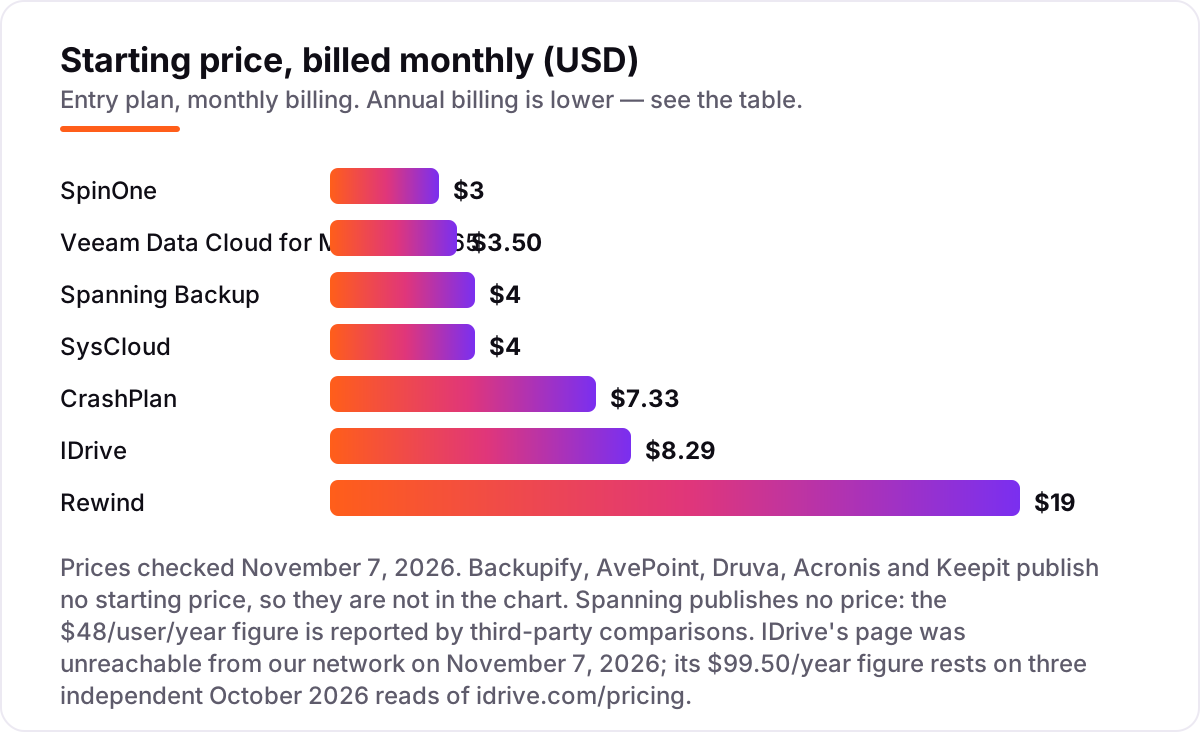
Take a ten-person business on Microsoft 365. On list prices, the subscription costs $35 a month on Veeam Data Cloud Foundation at $3.50 per user, $40 a month on SysCloud at $4 per user, and $40 a month on Spanning at $48 per user per year. Two of those numbers need adjusting before they are real: SysCloud needs 100 licenses to upgrade from trial to paid, so a ten-person team pays for 100 licenses at $36 a year each, which is $3,600 a year, not $360. SpinOne lists $3 per user a month, but its $5,000-a-year minimum subscription means the same ten people cost $5,000 a year, not $360.
Over a year, that is $420 on Veeam Foundation, $480 on Spanning, $3,600 on SysCloud at its minimum, and $5,000 on SpinOne at its minimum. Backupify, AvePoint, Druva, Acronis and Keepit publish no price, so their cost is whatever the quote says — budget for a sales conversation and a per-user rate in the $3 to $5 range that third-party comparisons report, then confirm it in writing before signing.
Three costs sit outside every number above. First, the add-ons: IDrive charges $20 per seat per year for Microsoft 365 backup on top of its $99.50-a-year Business plan, and CrashPlan charges $2.50 per user per month for Microsoft 365 backup with a 50-user minimum, so a ten-person team cannot buy it alone. Second, storage overage: SysCloud pools 75 GB per license and IDrive charges $0.50 per gigabyte a month over the limit. Third, the apps beyond email: Rewind costs $19 a month for one Shopify store, and a team protecting Shopify, GitHub and Jira pays Rewind once per app family.
Know the difference: backup, archive and sync
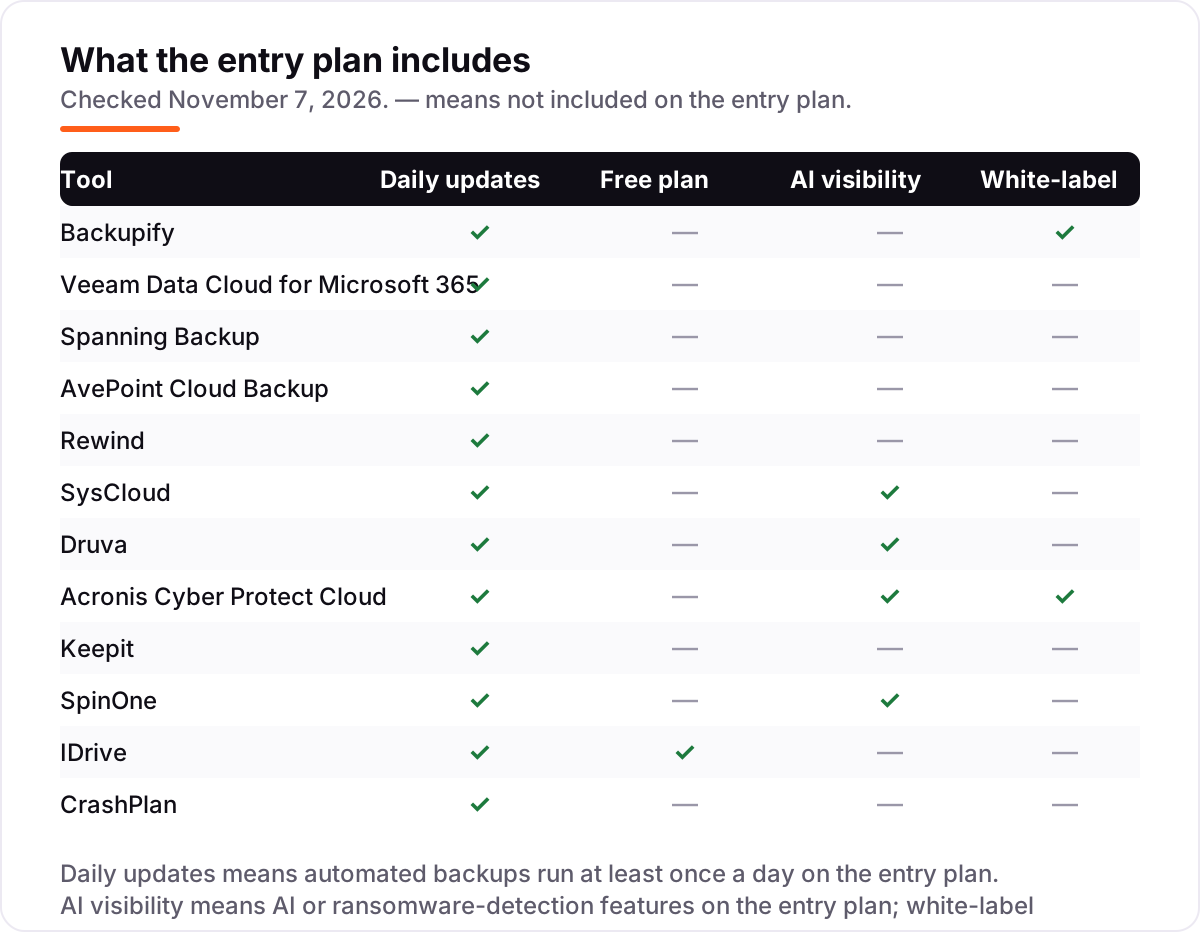
The confusion in this category is between three things that all copy files somewhere else. Backup keeps separate, versioned copies on a schedule, with point-in-time restore and retention measured in months or years. An archive is long-term storage for data you rarely touch, usually kept for compliance, and it is slow to restore. Sync, like OneDrive or Google Drive, mirrors your live files: delete a file locally and the synced copy deletes too, usually within 30 days.
Microsoft 365 and Google Workspace give you sync plus a short recycle bin, not a backup. Microsoft keeps deleted items for about 30 days and protects its own infrastructure, not your data. After that window, a deleted mailbox, a ransomware-encrypted SharePoint library or an admin error is permanent unless a third-party backup holds a separate copy. That is the gap every tool in this list exists to close.
A second distinction worth knowing is per-user pricing versus per-app pricing. Most tools here charge per user per month for one suite, usually Microsoft 365 or Google Workspace. Rewind charges per app family instead: one price for Shopify, another for GitHub, another for Jira. A business that protects three app families pays three Rewind subscriptions, while a business on one suite pays one per-user price. Count the apps before you compare the headline rates.
Quick comparison: tool type by need
| Buyer | Best pick | Why |
|---|---|---|
| Most small businesses on Microsoft 365 or Google | Backupify | Automated backup three times a day with granular restore, priced by quote |
| Microsoft 365 only, with a published price | Veeam Data Cloud for Microsoft 365 | Foundation is $3.50/user/month with unlimited storage included |
| Simplest setup, no IT staff | Spanning Backup | Daily backups with self-service restore, reported at $48/user/year |
| Shopify store or GitHub org | Rewind | Backs up the apps email tools ignore, from $19/month |
| Ransomware checks on every snapshot | SysCloud | Inspected snapshots and eDiscovery, $4/user/month with a 100-license minimum |
| Cheapest flat rate for many devices | IDrive | One storage pool for unlimited devices, $8.29/month billed annually |
Mistakes to avoid
- Budgeting on the per-user price and missing the minimum. SpinOne lists $3 a user a month but needs $5,000 a year, and SysCloud lists $4 a user a month but needs 100 licenses. The floor is the price for a small team.
- Assuming Microsoft 365 backs itself up. It keeps deleted items for about 30 days and protects its own infrastructure. After that window, only a third-party backup brings data back.
- Buying backup for one app and forgetting the rest. A Microsoft 365 backup does not cover Salesforce, Shopify or GitHub. List every SaaS app that holds business data before you buy.
- Never testing a restore. A backup that has never been restored is a hope, not a plan. Use the trial to restore one email, one file and one full folder, and time each one.
- Ignoring storage and retention caps. SysCloud pools 75 GB per license, IDrive charges $0.50 per gigabyte over the limit, and Keepit charges extra for unlimited retention. Check the cap before the mailbox grows past it.
How we chose
We checked each vendor's own pricing page on November 7, 2026 and recorded the starting price exactly as shown, including the annual-billing figure where the page lists one, and we ranked the tools by fit for the most common buyer — a small business with no dedicated IT staff — not by brand size. Five tools publish no starting price, so they are listed as custom quote rather than estimated. Spanning's $48/user/year figure is reported by third-party comparisons, not by Spanning, and is disclosed as such. IDrive's pricing page was unreachable from our network on November 7, 2026, so its $99.50/year figure rests on three independent October 2026 reads of idrive.com/pricing. Ratings come from G2 pages checked the same day, and no vendor paid for a place in this list.
What to do next
Start with the free trial of your top pick and run one real backup cycle plus one test restore through it. Check that a single deleted email comes back without an admin ticket and that the retention window covers the oldest file you would ever need. If the data is protected but new customers are not finding you, our monthly SEO service handles the visibility side — or compare providers in our guide to antivirus software. Once your tools are in place, find out what's holding your rankings back.
Your stack only works if people find you
SerpAstra fixes what keeps your site off page one and makes it easy for AI assistants to recommend.
Get a free audit→Sources we checked (24)
- Datto SaaS Protection (Backupify) — datto.com/products/saas-protection (checked November 7, 2026)
- Veeam Data Cloud purchasing options — veeam.com (checked November 7, 2026)
- Spanning Backup — spanning.com (checked November 7, 2026)
- AvePoint Cloud Backup — avepoint.com (checked November 7, 2026)
- Rewind Backups for Shopify pricing — rewind.com (checked November 7, 2026)
- SysCloud backup pricing — syscloud.com/cloud-backup-pricing (checked November 7, 2026)
- Druva — druva.com (checked November 7, 2026)
- Acronis Cyber Protect Cloud — acronis.com (checked November 7, 2026)
- Keepit — keepit.com (checked November 7, 2026)
- SpinOne pricing — spin.ai/pricing (checked November 7, 2026)
- IDrive pricing — idrive.com/pricing (checked November 7, 2026)
- CrashPlan pricing — crashplan.com/pricing (checked November 7, 2026)
- Backupify on G2 — g2.com (checked November 7, 2026)
- Veeam Data Cloud for Microsoft 365 on G2 — g2.com (checked November 7, 2026)
- Spanning Backup on G2 — g2.com (checked November 7, 2026)
- AvePoint Confidence Platform on G2 — g2.com (checked November 7, 2026)
- Rewind Backups on G2 — g2.com (checked November 7, 2026)
- SysCloud on G2 — g2.com (checked November 7, 2026)
- Druva Data Security Cloud on G2 — g2.com (checked November 7, 2026)
- Acronis Cyber Protect Cloud on G2 — g2.com (checked November 7, 2026)
- Keepit on G2 — g2.com (checked November 7, 2026)
- SpinOne on G2 — g2.com (checked November 7, 2026)
- IDrive on G2 — g2.com (checked November 7, 2026)
- CrashPlan SMB on G2 — g2.com (checked November 7, 2026)
Shamim
Founder of SerpAstra
A full-stack SEO and digital marketer who spends most days on Local SEO for dental practices, AI search visibility and lead generation.
Frequently asked questions
What is the best SaaS backup software for small businesses?
Backupify is the best fit for most small businesses: automated Microsoft 365 and Google Workspace backup three times a day with granular restore. Veeam Data Cloud is the best pick when Microsoft 365 is the whole stack, from $3.50/user/month. Rewind is the best pick for Shopify stores, from $19/month.
How much does SaaS backup cost for a small business?
Published per-user prices run from $3 to $4 a month: Veeam Foundation at $3.50, SpinOne at $3 and SysCloud at $4. Spanning is reported at $48/user/year. Five tools publish no price, so expect a quote. Watch the minimums: SpinOne needs $5,000 a year and SysCloud needs 100 licenses.
Does Microsoft 365 back up my data automatically?
Not in the way most small businesses assume. Microsoft keeps deleted items for a short window, typically 30 days, and protects its own infrastructure, not your data. A deleted mailbox, a ransomware event or an admin error after that window is permanent without a third-party backup.
What is the difference between SaaS backup and cloud storage?
Cloud storage syncs your live files; deleting a file locally deletes the synced copy too. SaaS backup keeps separate, versioned copies on a schedule, with point-in-time restore and retention measured in months or years. Storage is where work lives; backup is how you get it back.
Is there free SaaS backup software for small businesses?
Almost none with real coverage. IDrive has a free 10 GB Basic plan, and Veeam's self-managed Backup for Microsoft 365 has a free Community Edition for up to 10 users. Every other tool here offers a free trial of 7 to 30 days, not a free plan.
Can I switch SaaS backup providers later?
Yes, but plan the move carefully. Keep the old backup running until the new one has completed a full first backup and you have tested a restore. Export or transfer retention history where the new vendor supports it, and confirm the new tool covers every app the old one did before cancelling.
Free SEO and AI visibility audit
Find out what is holding your rankings back
Send us your site. Within 2 business days you get a written audit, an AI visibility check and a short fix list ranked by impact. Free, with no contract attached.
Request my free audit→Related guides
 Digital Marketing & Ads11 Best Online Data Backup Services in 2026Compare the 11 best online data backup services on price, storage caps, device limits and encryption, with every price checked November 5, 2026.Read guide →
 Digital Marketing & AdsBest Email Backup Software for 2026: 9 Options Compared by Use CaseCompare the 9 best email backup software options for Microsoft 365 and Google Workspace on price and storage, with every price checked November 5, 2026.Read guide →
 IT, Security & DevOpsBest Antivirus Software Review for 2026: 10 Options Compared by Use CaseCompare the best antivirus software review picks for 2026: 10 suites with prices, renewal costs, free plans and device limits, checked November 6, 2026.Read guide →