
Best Email Backup Software for 2026: 9 Options Compared by Use Case
Compare the 9 best email backup software options for Microsoft 365 and Google Workspace on price and storage, with every price checked November 5, 2026.
 Shamim Mia, Founder, SerpAstraLast verified November 5, 202614 min read
We compare pricing pages, documentation and public reviews. We never accept payment for rankings.

Key takeaways
- Veeam Data Cloud leads for Microsoft 365 shops at $3.50/user/month, Dropsuite and CloudAlly follow at $3/user/month, and CrashPlan is the cheapest per-user pick at $2.50/user/month with 50 GB included.
- No tool here has a free plan — every option is paid, but Veeam, Spanning and Keepit all offer free trials of 14 to 30 days.
- The single most important buying factor is the storage model: per-user plans with capped storage get expensive fast once mailboxes grow, while unlimited-storage plans stay flat.
- Microsoft 365 and Google Workspace do not back up your email themselves — deleted mail is only recoverable inside a short retention window, so a third-party copy is the only real safety net.
On this page
Quick comparison
| Tool | Best for | Starting price | Free plan |
|---|---|---|---|
| Veeam Data Cloud for Microsoft 365 | Microsoft 365 teams that want the deepest backup coverage — Exchange, SharePoint, OneDrive, Teams and Entra ID — from a managed service | $3.50/mo | No (14-day trial) |
| Dropsuite | Small businesses and MSPs that want simple per-user email backup for Microsoft 365 and Google Workspace | $3/mo | No (trial on request) |
| CloudAlly | Teams running a mix of Microsoft 365, Google Workspace, Salesforce, Box and Dropbox who want one backup bill | $3/mo | No (free trial) |
| Spanning Backup | Google Workspace and Microsoft 365 teams that want end users to restore their own mail without calling IT | $48/yr | No (14-day trial) |
| Keepit | Mid-size teams that want immutable backups on infrastructure independent of Microsoft and Google | $4.95/mo | No (30-day trial) |
| CrashPlan | Small businesses that want the cheapest per-user Microsoft 365 backup with a clear storage allowance | $2.50/mo | No (free trial) |
| CodeTwo Backup for Office 365 | Admins who want backup copies stored on their own drives, not in another vendor's cloud | $147/yr | No (free trial) |
| Hornetsecurity 365 Total Backup | Microsoft 365 teams that want backup bundled with email security, archiving and compliance in one suite | Custom quote | No (free trial) |
| AvePoint Cloud Backup | Large Microsoft 365 estates that need deep coverage — including Teams, Dynamics 365 and Salesforce — with governance alongside backup | Custom quote | No (free trial) |
Make one of these tools?
We re-check this list every quarter. Send a correction, request a review, or ask about a clearly labeled sponsored spot.
Request a listingThe best email backup software

Veeam Data Cloud for Microsoft 365
Best for: Microsoft 365 teams that want the deepest backup coverage — Exchange, SharePoint, OneDrive, Teams and Entra ID — from a managed service
Veeam Data Cloud for Microsoft 365 is the managed-service version of the backup software most Microsoft shops already know, and the most complete cover in this list: Exchange, SharePoint, OneDrive, Teams and Entra ID all sit under one subscription, with unlimited storage included. Foundation costs $3.50 per user per month for 10 to 50 users when billed annually, and the rate falls to $2.63 once you pass 250 users.
Advanced adds Entra ID protection, and Premium adds disaster recovery at $7 per user per month. Backups are immutable and stored apart from Microsoft, and restores go down to a single email with point-in-time recovery. A 14-day free trial lets you test it on a real tenant. Choose Veeam when Microsoft 365 is the whole estate; choose Dropsuite or CloudAlly when Google Workspace is in the mix.
What we like
- Covers Exchange, SharePoint, OneDrive, Teams and Entra ID in one subscription
- Unlimited storage included, with immutable copies stored apart from Microsoft
- Volume pricing drops Foundation to $2.63/user/month once you pass 250 users
- Granular restore down to a single email, with point-in-time recovery
Watch out for
- The $3.50 starting price only applies to 10–50 users, and Entra ID protection waits for the Advanced tier
- No free plan, and the 14-day trial is short for a full evaluation
- Microsoft 365 only — Google Workspace mailboxes need a different tool

Dropsuite
Best for: Small businesses and MSPs that want simple per-user email backup for Microsoft 365 and Google Workspace
Dropsuite is the simplest buy in this list: one flat price of $3 per user per month, unlimited storage and retention, and cover for Microsoft 365, Google Workspace, Entra ID and QuickBooks Online from a single console. It is sold mainly through managed service providers, so setup is quick: connect the tenant, pick the users, and backups run on their own.
The backup tier covers mail, calendars, contacts, OneDrive, SharePoint and Teams; the Backup Plus Archiving tier adds journaling-based archiving with legal hold and eDiscovery for regulated industries. End users can restore their own mail without opening an IT ticket. The catch: Dropsuite publishes no pricing page, so the $3 figure comes from review directories rather than the vendor. Pick Dropsuite when you want the cheapest simple cover for both Microsoft and Google mail.
What we like
- One flat $3/user/month price with unlimited storage and retention
- Backs up Microsoft 365, Google Workspace, Entra ID and QuickBooks Online from one console
- Journaling-based email archiving with legal hold for regulated industries
- End users can restore their own mail without an admin ticket
Watch out for
- No published pricing page — the $3 figure comes from review directories, not Dropsuite's own site
- Some reviewers say restores run slower than competing tools
- Now part of NinjaOne, so the roadmap follows NinjaOne's MSP platform

CloudAlly
Best for: Teams running a mix of Microsoft 365, Google Workspace, Salesforce, Box and Dropbox who want one backup bill
CloudAlly is the breadth pick: one subscription backs up Microsoft 365, Google Workspace, Salesforce, Box and Dropbox, so a team spread across several SaaS apps needs only one backup bill. The entry price is $3 per user per month, and paying yearly drops it to $30 per user per year. Backups are immutable and stored on AWS S3, with the option to bring your own storage instead.
Restore is granular — a single email, calendar event or file — without pulling down a whole mailbox. The limits to watch are frequency and storage: backups run once a day on the entry plan, and storage-heavy workloads such as SharePoint and OneDrive are charged per 5 GB block on top of the per-user price. Choose CloudAlly when your data lives on several platforms; choose Dropsuite when email alone is the job.
What we like
- Covers five SaaS platforms — Microsoft 365, Google Workspace, Salesforce, Box and Dropbox — in one subscription
- Annual billing drops the price to $30/user/year, about $2.50 a month
- Immutable backups stored on AWS S3, with the option to use your own storage
- Granular restore down to a single email, calendar event or file
Watch out for
- Backups run once a day on the entry plan — no intraday backup runs
- Storage-heavy workloads such as SharePoint and OneDrive are charged per 5 GB block on top of the per-user price
- Small review base — 27 G2 reviews — so peer feedback is thin

Spanning Backup
Best for: Google Workspace and Microsoft 365 teams that want end users to restore their own mail without calling IT
Spanning Backup, from Kaseya, protects Microsoft 365, Google Workspace and Salesforce with automated daily backups and unlimited storage, for $48 per user per year. Its standout feature is self-service restore: end users recover their own mail, calendars and contacts without an admin ticket, which is why IT teams with many users like it. A 14-day free trial covers up to 100 users.
Restore is granular and point-in-time, so you can roll a mailbox back to a specific day rather than restoring everything. The trade-offs are billing and reporting: the price is annual-only, so the first invoice is the full year, and reviewers say the reporting is thinner than enterprise tools offer. Choose Spanning when Google Workspace is a first-class citizen and users should help themselves; choose Veeam when Microsoft 365 is the whole estate.
What we like
- Automated daily backups for Microsoft 365, Google Workspace and Salesforce from one console
- End-user self-service restore cuts IT tickets — users recover their own mail
- Unlimited storage included in the $48/user/year price
- Granular restore and point-in-time recovery for mail, calendars and contacts
Watch out for
- Annual-only billing at $48/user/year — no monthly option, so the first bill is the full year
- Reporting is thinner than enterprise tools, reviewers say
- Some Microsoft 365 components fall outside the backup coverage

Keepit
Best for: Mid-size teams that want immutable backups on infrastructure independent of Microsoft and Google
Keepit is the independent-cloud pick: your backups live on Keepit's own infrastructure in seven regions, not on AWS, Azure or Google Cloud, so a problem at your SaaS vendor cannot touch your backup copies. One per-seat price of $4.95 a month includes unlimited always-hot storage, with no fees for ingress, egress or restores, and retention can be set as long as 99 years.
Coverage runs to 17 or more SaaS workloads — Microsoft 365, Google Workspace, Salesforce, Dynamics 365 and others — from one console, with up to ten backups a day and point-in-time restore. The price is the highest monthly rate in this list, and Keepit publishes no pricing page, so the $4.95 figure comes from review directories. Choose Keepit when independence and immutability matter more than the lowest price.
What we like
- Backups are immutable and stored on Keepit's own independent cloud, not on AWS or Azure
- One per-seat price includes unlimited always-hot storage with no egress or restore fees
- Covers 17+ SaaS workloads — Microsoft 365, Google Workspace, Salesforce and more — from one console
- Retention can be set up to 99 years, which suits regulated industries
Watch out for
- No published pricing page — the $4.95 figure comes from review directories, not Keepit's own site
- The per-seat price is the highest of the monthly-billed tools here
- Reviewers note licensing costs climb steeply as team size grows

CrashPlan
Best for: Small businesses that want the cheapest per-user Microsoft 365 backup with a clear storage allowance
CrashPlan's Microsoft 365 backup is the cheapest per-user price in this list: $2.50 per user per month, billed annually at $30 per user per year, covering Exchange Online, SharePoint and OneDrive. Each user gets 50 GB of pooled storage, and extra storage costs $90 a year per 250 GB block. The same platform also backs up endpoints and servers, so small IT teams get one tool for both jobs.
Note the price history: roundups still quote $44 a year for this plan, but CrashPlan's own pricing page now lists $30 a year — the older figure is out of date. The published price covers up to 249 users; larger tenants go through sales. Choose CrashPlan when the budget is tight and 50 GB per user is enough; choose an unlimited-storage tool when mailboxes carry large archives.
What we like
- The lowest per-user price here — $30/user/year for Microsoft 365 backup
- 50 GB of pooled storage per user is included, with extra storage at $90/year per 250 GB
- Covers Exchange Online, SharePoint and OneDrive, plus endpoints and servers on the same platform
- Two-year billing drops the price further, to $60 for two years
Watch out for
- The 50 GB pooled allowance can run out on mailboxes with large archives — then you pay for more storage
- The published price covers up to 249 users; larger tenants go through sales
- Microsoft 365 backup is one module of a broader endpoint platform, not a dedicated email tool

CodeTwo Backup for Office 365
Best for: Admins who want backup copies stored on their own drives, not in another vendor's cloud
CodeTwo Backup for Office 365 is the only tool here that keeps your backup copies on your own drives instead of a vendor's cloud. It is a desktop application that backs up Microsoft 365 mailboxes, public folders, SharePoint Online, OneDrive and Teams — plus on-premises Exchange and SharePoint — to local storage, with automatic incremental backups keeping the copies current. Pricing starts at $147 a year.
One licence covers one user, and the per-licence price falls with volume: the vendor's calculator prices 100 licences at $1,019 a year, about $10.19 each. Archive, shared, room and equipment mailboxes need no licence at all. You supply the storage and a Windows machine to run it on. Choose CodeTwo when you want physical control of the backup copies; choose a cloud service when you want nothing to run.
What we like
- Backups live on your own local storage — no third-party cloud holds your mail
- Covers mailboxes, public folders, SharePoint, OneDrive and Teams in one licence
- Per-licence price falls with volume — about $10.19 per licence per year at 100 users
- Automatic incremental backups keep copies current without manual runs
Watch out for
- Annual subscription only — $147 a year is the smallest entry, with no monthly billing
- You supply and manage the storage, so large mailboxes need real disk space
- Desktop application, not a cloud console — it needs a Windows machine to run on

Hornetsecurity 365 Total Backup
Best for: Microsoft 365 teams that want backup bundled with email security, archiving and compliance in one suite
Hornetsecurity 365 Total Backup is a managed backup service for Microsoft 365: backups of mailboxes, Teams chats, Planner, OneNote, Entra ID users and groups, OneDrive and SharePoint run automatically several times a day, and the copies are stored on Hornetsecurity infrastructure independent of Microsoft. Storage and retention are unlimited, and the backups are immutable and encrypted with an individual AES 256-bit key.
It is sold as one all-inclusive fee covering the solution, storage and around-the-clock support, with no published per-user price — you request a quote. It is also available inside the 365 Total Protection Enterprise Backup bundle, alongside email security and archiving. Choose Hornetsecurity when you want backup, security and compliance from one vendor; choose a standalone tool when you only need backup and want a published price.
What we like
- Backups run automatically several times a day, stored on Hornetsecurity infrastructure independent of Microsoft
- Unlimited storage and retention included in the one fee
- Covers mailboxes, Teams chats, Planner, OneNote, Entra ID, OneDrive and SharePoint
- Immutable backups with AES 256-bit encryption per customer key
Watch out for
- No published price — you have to request a quote, so comparison shopping takes longer
- Microsoft 365 only — Google Workspace mailboxes are not covered
- Setup can feel complex, reviewers say, with many modules to configure

AvePoint Cloud Backup
Best for: Large Microsoft 365 estates that need deep coverage — including Teams, Dynamics 365 and Salesforce — with governance alongside backup
AvePoint Cloud Backup is the enterprise pick: a fully managed SaaS backup for Microsoft 365, Dynamics 365 and Salesforce that runs automatically up to four times a day, with unlimited retention and granular restore down to a single item. It also integrates Microsoft's own backup service, so core workloads get ultra-fast bulk recovery while AvePoint covers the workloads Microsoft does not, such as Teams conversations and Planner.
Compliance options include bring-your-own-key and bring-your-own-storage, and data can sit in the Azure region of your choice. There is no published pricing — everything is quoted — and the platform is built for mid-market and enterprise scale, so smaller teams may find it more than they need. Choose AvePoint when the estate is large and governance matters as much as backup; choose Veeam or CrashPlan when the budget needs a published number.
What we like
- Backs up Microsoft 365, Dynamics 365 and Salesforce from one console, up to four times a day
- Unlimited retention with granular restore down to a single item
- Now integrates Microsoft's own backup service for ultra-fast bulk recovery of core workloads
- Bring-your-own-key and bring-your-own-storage options for strict compliance needs
Watch out for
- No published pricing — everything is quoted, so small teams cannot budget from the website
- Built for mid-market and enterprise scale, so smaller teams may find it more than they need
- Reviewers say pricing becomes less favorable for smaller customers
The best email backup software does one job: it keeps a copy of your mail outside the system that holds the originals, so a deleted mailbox, a ransomware hit or a failed migration does not mean the email is gone for good. Microsoft 365 and Google Workspace do not back up your mail themselves — they keep deleted items for a short window and then they are gone. We ranked the nine tools below by fit for the most common buyer — a small or mid-size team on Microsoft 365, some with Google Workspace too — and every price was checked on November 5, 2026.
How to choose the best email backup software
- Start with your platform. Veeam, Hornetsecurity, AvePoint and CodeTwo are Microsoft 365 only; Dropsuite, CloudAlly, Spanning, Keepit and CrashPlan also cover Google Workspace, so mixed teams should shortlist from the second group.
- Check the storage model, not just the price. Unlimited-storage plans stay flat as mailboxes grow; CrashPlan caps pooled storage at 50 GB per user and CloudAlly charges storage workloads per 5 GB, so both get more expensive with large archives.
- Count only the mailboxes you pay for. Veeam and CodeTwo do not charge for shared, resource or archive mailboxes — only licensed users count — so a team with many shared mailboxes pays for fewer seats than it protects.
- Decide how fast recovery must be. All nine tools restore single emails, but only some back up more than once a day: Hornetsecurity runs several times a day, AvePoint up to four times, and Keepit up to ten, while CloudAlly and Spanning run once daily.
- Test the restore before you pay. Every tool here offers a free trial. During it, restore one deleted email and one whole mailbox, and time both — the restore is the product, not the backup.
Email backup is one system in your stack, not the whole stack. If email is also your sales channel, our guide to email marketing software for small business covers the sending side. And before you publish new pages for the services you sell, run your titles through the free SERP snippet preview tool — it shows exactly how the title and description will look in Google.
Whatever you shortlist, try it with real data before you pay. The free trials in this list run 14 to 30 days, which is long enough for a full backup cycle and two restore tests — one single email, one whole mailbox. Check two things in the trial: that the first backup completes without errors on your largest mailbox, and that a restore lands back in the right folder with attachments intact. Every tool here lets you do that before spending anything.
Email backup software pricing: what you will actually pay
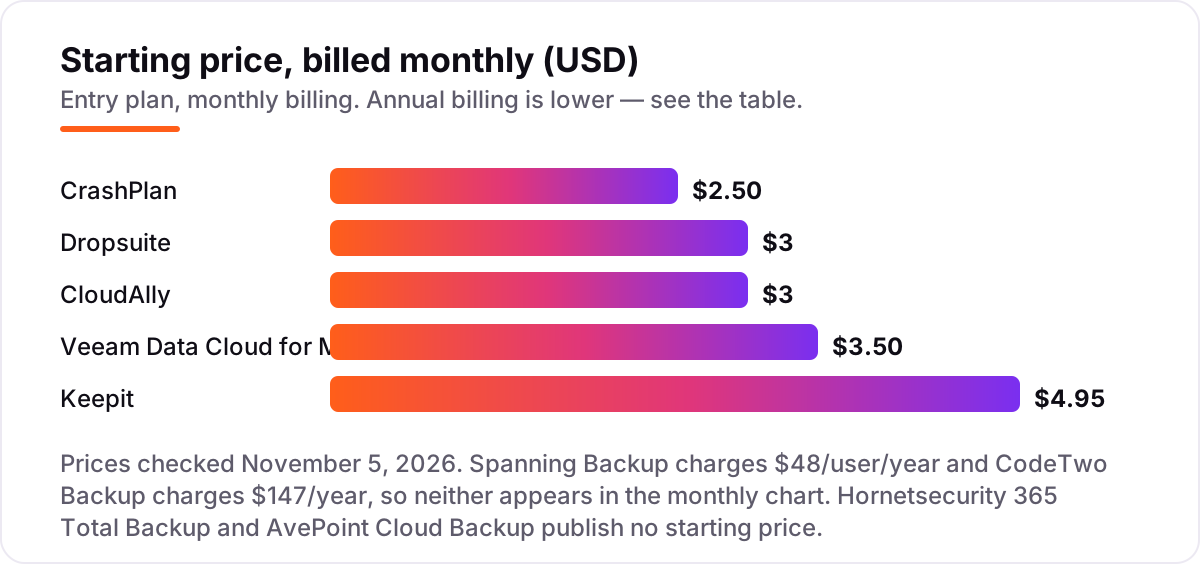
Take a 25-user team on Microsoft 365. On list prices, the subscription costs $750 a year on CrashPlan ($2.50 per user per month billed annually), $750 a year on CloudAlly ($30 per user per year), $900 a year on Dropsuite ($3 per user per month), $1,050 a year on Veeam Data Cloud Foundation ($3.50 per user per month), $1,200 a year on Spanning Backup ($48 per user per year) and $1,485 a year on Keepit ($4.95 per seat per month). The same 25 people and the same mailboxes cost $750 a year at the cheap end and $1,485 at the dear end — a $735 gap that comes from the storage model and the billing interval, not from the feature list.
Two numbers need adjusting before they are real. First, CrashPlan's $750 buys 50 GB of pooled storage per user — 1,250 GB for the team — and mailboxes with large archives will need extra storage at $90 a year per 250 GB block. Second, CloudAlly's $750 covers mail only; SharePoint and OneDrive libraries are charged per 5 GB block on top, so a team with heavy file libraries pays more than the chart shows.
Three tools sit outside this math. CodeTwo starts at $147 a year, and the vendor's calculator prices 100 licences at $1,019 a year, about $10.19 per licence — but you also supply the disk space, so add the cost of the storage. Hornetsecurity and AvePoint are custom-quoted, so the only honest budget for them is the quote itself. For scale, Microsoft's own backup service charges $0.15 per GB per month: the same 25 users with 50 GB each would cost about $187.50 a month, or $2,250 a year — more than any per-user plan in this list.
Annual billing is the norm here, not the exception: Veeam, CloudAlly and CrashPlan all bill yearly by default, and Spanning and CodeTwo sell annual subscriptions only. That means the first invoice is the full year, so run the trial first and confirm the restore works before the money leaves the account.
Know the difference: email backup vs Microsoft 365's built-in retention
The confusion in this category is between retention and backup. Microsoft 365 keeps deleted mail recoverable for a short window — deleted items sit in the recoverable folder for 14 days by default, configurable to 30 — and retention policies can hold copies longer for compliance. That is not a backup: there is no independent copy, no point-in-time restore of a whole mailbox, and no protection if an admin account is compromised or a retention policy is changed by mistake.
Microsoft does sell its own backup service, Microsoft 365 Backup, at $0.15 per GB per month with a default one-year retention window. It is fast and it lives inside the Microsoft trust boundary, which is also its weakness: the backup sits on the same infrastructure as the data it protects. Third-party tools keep the copy elsewhere — Veeam, Hornetsecurity and Keepit all store backups on infrastructure independent of Microsoft — and they restore single emails, whole mailboxes and Teams data to any point in time.
Google Workspace has the same gap with a different shape: admins can restore deleted Gmail messages for about 25 days, and Google Vault, included with some Workspace editions, is an archiving and eDiscovery tool rather than a backup. The rule is the same on both platforms: the cloud provider keeps your data available, not backed up. If losing a mailbox would hurt, a third-party copy is the only cover.
Quick comparison: tool type by need
| Buyer | Best pick | Why |
|---|---|---|
| Microsoft 365 team that wants the deepest coverage | Veeam Data Cloud | Exchange, SharePoint, OneDrive, Teams and Entra ID from $3.50/user/month |
| Small business that wants the simplest $3 backup | Dropsuite | Flat $3/user/month, unlimited storage, Microsoft 365 and Google Workspace |
| Team on several SaaS apps at once | CloudAlly | Microsoft 365, Google Workspace, Salesforce, Box and Dropbox from $3/user/month |
| Google Workspace team that wants self-service restores | Spanning Backup | $48/user/year, users restore their own mail without an IT ticket |
| Team that wants backups outside Microsoft and Google | Keepit | Immutable copies on Keepit's own cloud, $4.95/seat/month |
| Budget buyer who wants the lowest per-user price | CrashPlan | $2.50/user/month with 50 GB pooled storage included |
| Admin who wants copies on their own drives | CodeTwo Backup | $147/year, backups stored locally instead of a vendor cloud |
| Team that also wants email security in the same suite | Hornetsecurity 365 Total Backup | Backup plus security and archiving, one all-inclusive fee |
| Large estate that needs governance with backup | AvePoint Cloud Backup | Deep Microsoft 365 cover with compliance options, custom quote |
Mistakes to avoid
- Assuming Microsoft 365 or Google Workspace backs up your mail. Neither does. Deleted mail is recoverable only inside a short window — 14 to 30 days on Microsoft 365, about 25 days for Gmail — and then it is gone.
- Buying on the per-user price and ignoring the storage cap. CrashPlan's 50 GB pooled allowance and CloudAlly's per-5-GB storage charges both add cost once archives grow. Price the storage, not just the seat.
- Paying to back up mailboxes that need no licence. Shared, resource and archive mailboxes are free on Veeam and CodeTwo, so count only licensed users when you size the bill.
- Picking a Microsoft-only tool when half the team is on Gmail. Veeam, Hornetsecurity, AvePoint and CodeTwo do not cover Google Workspace. If the team is mixed, shortlist from Dropsuite, CloudAlly, Spanning, Keepit or CrashPlan.
- Never testing a restore. A backup you have never restored is a hope, not a safety net. Restore one email and one whole mailbox during the trial, and time both before you pay for a year.
How we chose
We checked each vendor's own pricing page on November 5, 2026 where one exists: Veeam's purchasing page, CrashPlan's pricing page and CodeTwo's pricing page all list their prices openly. Four prices come from review directories rather than the vendor, because the vendor publishes no pricing page or no per-user price: Dropsuite at $3/user/month, CloudAlly at $3/user/month, Spanning Backup at $48/user/year and Keepit at $4.95/seat/month — each is corroborated by at least two independent directories, and the post says so wherever the figure appears. Hornetsecurity and AvePoint publish no starting price at all, so both are listed as custom quote. Ratings are shown only where a fresh G2 copy from the last three days gave a score and a review count — Veeam 4.5 from 251 reviews, Keepit 4.7 from 160 and Spanning 4.2 from 235 — and every other rating is omitted rather than estimated. We ranked the tools by fit for the most common buyer, a small or mid-size team on Microsoft 365, not by brand size. No vendor paid for a place in this list, and none of the links here are affiliate links.
What to do next
Shortlist two tools from the comparison table — one monthly-billed, one that fits your platform — and run both free trials on the same mailboxes. Restore one deleted email and one whole mailbox from each, compare the time it takes, and check the storage bill before the trial ends. If the mail is sorted but new customers are not finding you, our monthly SEO service handles the visibility side — or compare providers in our guide to SEO companies for small business. Once your tools are in place, find out what's holding your rankings back.
Your stack only works if people find you
SerpAstra fixes what keeps your site off page one and makes it easy for AI assistants to recommend.
Get a free audit→Sources we checked (13)
- Veeam Data Cloud pricing — veeam.com/products/veeam-data-cloud/purchasing-options.html (checked November 5, 2026)
- Veeam Data Cloud for Microsoft 365 reviews — g2.com (checked November 5, 2026)
- Dropsuite pricing — softwareadvice.com (third-party; Dropsuite publishes no pricing page) (checked November 5, 2026)
- CloudAlly pricing — selecthub.com (third-party; CloudAlly publishes no pricing page) (checked November 5, 2026)
- Spanning Backup pricing — selecthub.com (third-party; Spanning publishes no per-user price) (checked November 5, 2026)
- Spanning Backup reviews — g2.com (checked November 5, 2026)
- Keepit pricing — selecthub.com (third-party; Keepit publishes no pricing page) (checked November 5, 2026)
- Keepit reviews — g2.com (checked November 5, 2026)
- CrashPlan pricing — crashplan.com/pricing (checked November 5, 2026)
- CodeTwo Backup pricing — codetwo.com/backup-for-exchange/pricing (checked November 5, 2026)
- Hornetsecurity 365 Total Backup — hornetsecurity.com/en/services/365-total-backup (checked November 5, 2026)
- AvePoint Cloud Backup — avepoint.com/products/m365-recovery (checked November 5, 2026)
- Microsoft 365 Backup pricing ($0.15/GB/month) — microsoft.com (via eon.io comparison, checked November 5, 2026)
Shamim
Founder of SerpAstra
A full-stack SEO and digital marketer who spends most days on Local SEO for dental practices, AI search visibility and lead generation.
Frequently asked questions
What is the best email backup software?
Veeam Data Cloud for Microsoft 365 is the best fit for most Microsoft 365 teams: the deepest coverage at $3.50/user/month. Dropsuite and CloudAlly are the simplest picks at $3/user/month and also cover Google Workspace. CrashPlan is the cheapest per-user option at $2.50/user/month.
How much does email backup software cost?
Monthly-billed plans run $2.50 to $4.95 per user per month. Spanning Backup charges $48/user/year and CodeTwo Backup charges $147/year, while Hornetsecurity and AvePoint are custom-quoted. A 25-user team pays roughly $750 to $1,485 a year for the monthly-billed tools here.
Does Microsoft 365 back up my email?
No. Microsoft 365 keeps deleted mail only inside short retention windows, and its own backup service costs $0.15 per GB per month with data stored on Microsoft infrastructure. A third-party backup keeps an independent, immutable copy you control, with point-in-time restore after the retention window closes.
Is there free email backup software?
None of the nine tools here has a free plan — all are paid, with free trials of 14 to 30 days. Google Vault, included with some Google Workspace editions, covers retention and eDiscovery but is an archiving tool rather than a backup. For real backup cover, budget for a paid plan.
What is the difference between email backup and email archiving?
Backup creates restorable copies so you can recover mail after deletion, corruption or ransomware. Archiving stores mail long-term for search and compliance, usually with legal hold. Some tools do both — Dropsuite and Hornetsecurity combine backup with journaling-based archiving — but most tools here are backup-first.
Can I back up Gmail as well as Outlook?
Yes, with the right tool. Dropsuite, CloudAlly, Spanning Backup, Keepit and CrashPlan all cover Google Workspace as well as Microsoft 365. Veeam, Hornetsecurity, AvePoint and CodeTwo are Microsoft 365 only, so check the platform list before you buy if your team runs on Gmail.
How often should email be backed up?
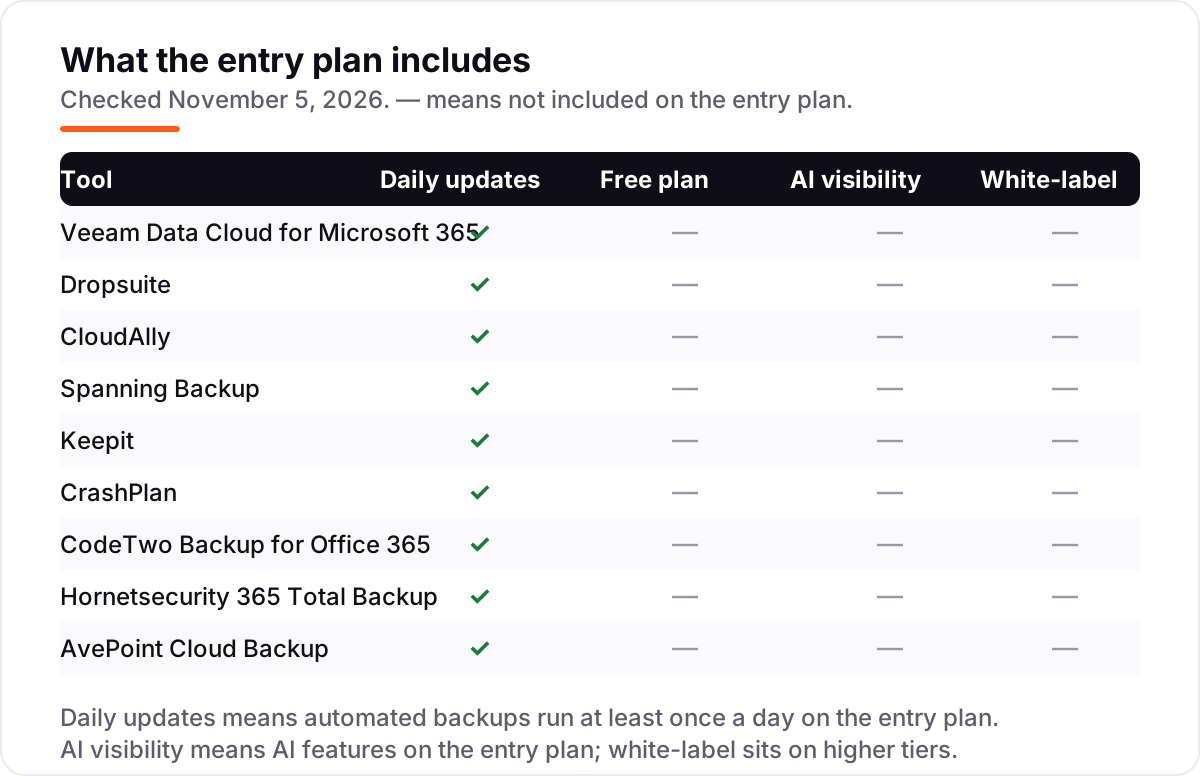
At least once a day — every tool here manages that. Several back up more often: Hornetsecurity runs several times a day, AvePoint up to four times, and Keepit up to ten times. Intraday backups matter most after ransomware or a mass deletion, when a day-old copy can still lose a full day of mail.
Free SEO and AI visibility audit
Find out what is holding your rankings back
Send us your site. Within 2 business days you get a written audit, an AI visibility check and a short fix list ranked by impact. Free, with no contract attached.
Request my free audit→Related guides
 Digital Marketing & Ads11 Best Email Marketing Software for Small Business in 2026, ComparedThe 11 best email marketing software for small business, compared on real 2026 prices, free plans and automation — Brevo starts at $9/month.Read guide →
 Digital Marketing & Ads10 Best Email Drip Campaign Software in 2026, Compared10 best email drip campaign software tools compared on price, automation depth and free plans. Real starting prices checked November 4, 2026.Read guide →
 Digital Marketing & Ads12 Best CRM Email Marketing Software in 2026, Compared12 best crm email marketing software tools compared on price, CRM depth and automation, with real starting prices checked on November 4, 2026.Read guide →