
7 Best SAAS Software in 2026: Pricing, Features and Pros & Cons
Compare the 7 best SaaS software tools for small business on price, free plans and AI features, with every price checked on November 10, 2026.
 Shamim Mia, Founder, SerpAstraLast verified November 10, 202614 min read
We compare pricing pages, documentation and public reviews. We never accept payment for rankings.
Key takeaways
- HubSpot is the best starting point for most small businesses: a free CRM for up to 2 users, with Sales Hub Starter at $20 per seat a month at list price. Slack follows at $7.25 per user a month billed annually, and ClickUp at $9.
- Five of the seven tools here have real free plans — HubSpot, Slack, ClickUp, Zoom and Canva — so a small business can run the core stack for $0 before paying anything.
- The single most important buying factor is what the price is per: per seat, per contact or per sale. A cheap headline price becomes expensive when it scales with your team, your list or your revenue.
- Every price below was checked on the vendor's own pricing page on November 10, 2026, through fresh search-index copies of those pages. Ratings are G2, with review counts shown.
On this page
Quick comparison
| Tool | Best for | Starting price | Free plan |
|---|---|---|---|
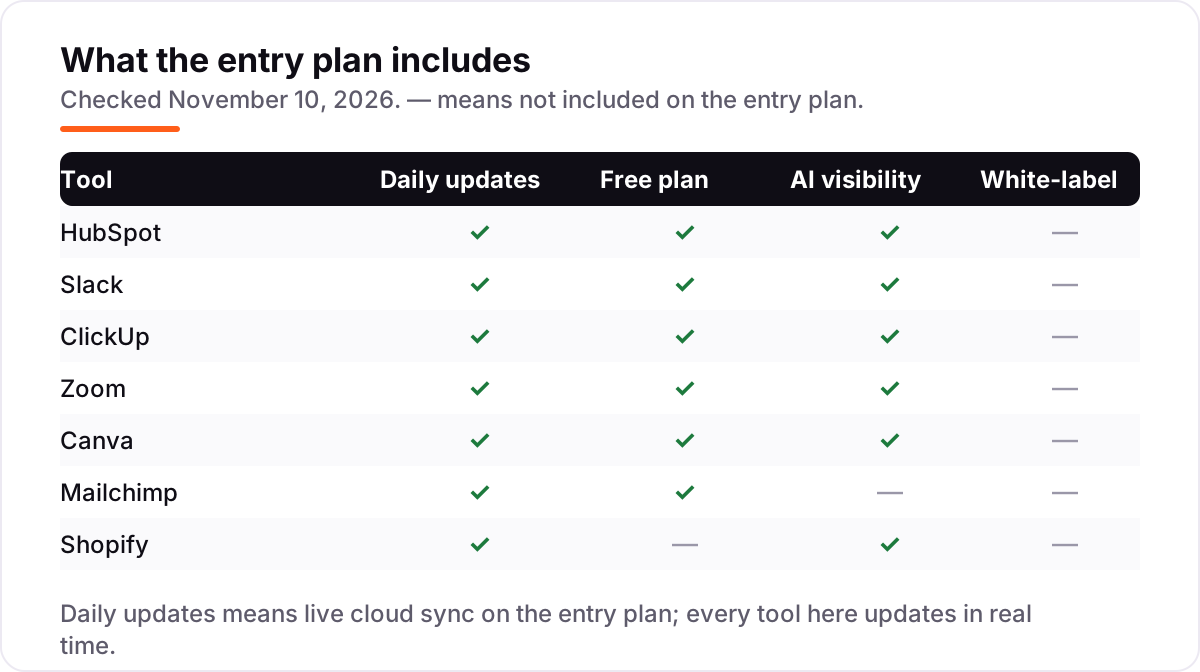
| HubSpot | Small businesses that want one CRM for contacts, sales and marketing, starting free | $20/mo per seat | Yes (free CRM) |
| Slack | Small teams that live in chat and want searchable conversations instead of email threads | $7.25/mo (annual) | Yes (90-day history) |
| ClickUp | Small teams that want tasks, docs, goals and automations in one workspace | $9/mo (annual) | Yes (Free Forever) |
| Zoom | Freelancers and small teams that run client calls and need long meetings with recordings | $14.16/mo (annual) | Yes (40-min meetings) |
| Canva | Solo owners and small teams that need professional graphics without hiring a designer | $12/mo (annual) | Yes (free plan) |
| Mailchimp | Small businesses starting email marketing with a list under 500 contacts | $13/mo | Yes (250 contacts) |
| Shopify | Small businesses opening their first online store and selling physical products | $29/mo (annual) | No (3-day trial) |
Make one of these tools?
We re-check this list every quarter. Send a correction, request a review, or ask about a clearly labeled sponsored spot.
Request a listingThe best SaaS software

HubSpot
Best for: Small businesses that want one CRM for contacts, sales and marketing, starting free
HubSpot is the safe default here because it is also a system of record: contacts, deals, emails and support tickets live in one place, and the free CRM covers two users at $0. Sales Hub Starter costs $20 a seat a month at list price — new customers see a $7 a seat annual promotion — and adds deal pipelines, 500 HubSpot Credits a month for AI agents, calling minutes and meeting scheduling.
The cost to watch is the step up. Professional costs $90 a seat a month and adds a $1,500 one-time onboarding fee, so a team that outgrows Starter pays more than four times as much per seat. Start on the free CRM while two people run sales, move to Starter for pipelines and calling, and budget Professional as a separate decision, not an inevitable upgrade.
What we like
- Free CRM for up to 2 users covers contacts, deals and email tracking at $0
- One system for CRM, marketing and service, so customer data never lives in three tools
- Starter includes 500 HubSpot Credits a month for AI agents, plus calling and meeting scheduling
Watch out for
- Per-seat pricing adds up fast: 10 Starter seats cost $200 a month at list price
- The jump to Professional is steep at $90 per seat a month, plus a $1,500 one-time onboarding fee
- The free CRM covers only 2 users, so a third person who edits records needs a paid seat

Slack
Best for: Small teams that live in chat and want searchable conversations instead of email threads
Slack replaces the email thread with channels, and for a small team that is the whole value: a question asked once is answered where everyone can find it, not buried in five inboxes. Pro costs $7.25 a user a month billed annually, or $8.75 month to month, and adds unlimited message history, unlimited apps, group huddles and basic AI summaries to the free plan.
Two details decide the real bill. First, Fair Billing means you pay only for members active in the last 28 days, so a team with seasonal staff pays less than the headcount suggests. Second, the free plan keeps only 90 days of history, so the moment you need a decision from last quarter, Pro pays for itself. Buy Slack when chat is where work happens; skip it if your team still lives in email.
What we like
- Cheapest paid entry here at $7.25 per user a month billed annually, with unlimited message history
- Fair Billing means you only pay for members active in the last 28 days
- Unlimited apps and integrations on Pro, plus group huddles and basic AI summaries
Watch out for
- Per-user pricing climbs with headcount: 25 users cost $181.25 a month on Pro billed annually
- The free plan keeps only 90 days of message history, so older decisions vanish
- Heavy notification defaults can overwhelm a team until channels and alerts are tuned

ClickUp
Best for: Small teams that want tasks, docs, goals and automations in one workspace
ClickUp is the all-in-one pick in this list: tasks, docs, whiteboards, goals and dashboards in a single workspace, so a small team stops paying for five separate tools. Core costs $9 a user a month billed annually, or $12 month to month, and includes unlimited storage, Gantt charts, custom fields, 1,000 automation actions a month and 1,000 AI credits a user a month.
The trade-off is setup time. ClickUp's flexibility is real, but reviewers consistently say the learning curve is steep, and a team that configures every view and status before doing any work will stall. Start with one list, one board and one dashboard, and add structure only when the team asks for it. Choose ClickUp when one workspace should hold the whole operation; choose a simpler tool when tasks alone are the job.
What we like
- Core replaces five tools at once: tasks, docs, whiteboards, goals and dashboards in one workspace
- Unlimited storage, Gantt charts and custom fields from Core at $9 a user a month billed annually
- 1,000 automation actions and 1,000 AI credits a user a month included on Core
Watch out for
- Deep customization means setup takes real time; reviewers call the learning curve steep
- Every workspace member is billed, including people who only check tasks occasionally
- Full AI features need Business at $17 a user a month; Core includes only 1,000 AI credits a user

Zoom
Best for: Freelancers and small teams that run client calls and need long meetings with recordings
Zoom is the meeting standard for a reason: clients already know how to join, the audio holds up on weak connections, and Pro removes the 40-minute group limit that makes the free plan unusable for real client work. Pro costs $14.16 a user a month billed annually, or $16.99 month to month, and adds 30-hour meetings, 10 GB of cloud recording per licence and unlimited AI notes and summaries.
The limit to plan around is participants, not minutes. Pro still caps meetings at 100 people, so webinars and all-hands calls need Business at $18.33 a user a month billed annually. The 10 GB recording allowance also runs out fast if every call is recorded. Buy Zoom Pro when client calls are daily work; stay on the free Basic plan when calls are short, one-to-one and infrequent.
What we like
- Pro lifts meetings from 40 minutes to 30 hours and adds unlimited AI meeting notes and summaries
- 10 GB of cloud recording per licence, plus Zoom Mail and Calendar in the same subscription
- The most-reviewed video tool here, with 4.5 stars from more than 56,000 G2 reviews
Watch out for
- Pro still caps meetings at 100 participants; larger calls need Business at $18.33 a user a month
- Cloud recording is only 10 GB per licence on Pro, so heavy recorders pay for more storage
- Prices exclude tax, and the annual figure is charged as one upfront payment

Canva
Best for: Solo owners and small teams that need professional graphics without hiring a designer
Canva is the design shortcut in this list: a non-designer can make a social post, a flyer or a presentation that looks professional in minutes, using templates instead of starting from a blank page. Pro costs $18 a month, or $144 a year — about $12 a month — for one person, and adds more than 141 million premium assets, Background Remover, Magic Resize, 5 Brand Kits and 100 GB of storage.
The catch is the seat. Pro covers exactly one person, so the moment a colleague needs their own login, the price jumps to Business at $25 a person a month. The free plan is genuinely usable for occasional graphics, and the 30-day Pro trial is long enough to test the premium templates. Buy Canva Pro when one person owns design; buy Business when design is a team job.
What we like
- The highest G2 score here at 4.7 stars, praised most for ease of use and templates
- 141 million-plus premium assets, Background Remover and Magic Resize from $12 a month billed annually
- 5 Brand Kits, 100 GB storage and social scheduling keep a small brand consistent
Watch out for
- Pro covers one person only; a second user means Business at $25 a person a month
- Premium and Ultra AI uses are capped each month (200 Premium or 20 Ultra uses on Pro)
- Prices vary by country and Canva has raised Pro prices twice since 2025, so budget for changes

Mailchimp
Best for: Small businesses starting email marketing with a list under 500 contacts
Mailchimp is the email starting point in this list because the free plan is a real test: 250 contacts and 500 sends a month, with no time limit, so a small business can learn whether email earns its keep before paying. Essentials costs $13 a month for 500 contacts and adds A/B testing, 3 users, 3 audiences and basic automations, with 10 sends per contact each month.
The price to plan for is the list, not the plan. Essentials costs $45 a month at 2,500 contacts and $75 at 5,000, and unsubscribed contacts still count toward the tier until you archive them. There is also no annual discount on the marketing plans, so the monthly figure is the price. Start free, move to Essentials when the list passes 250 contacts, and clean the list before every upgrade.
What we like
- Free plan covers 250 contacts and 500 sends a month, enough to test email properly
- Essentials adds A/B testing, 3 users and 3 audiences from $13 a month for 500 contacts
- 10 sends per contact a month, with basic automations and scheduling included
Watch out for
- The bill rises with the list: Essentials costs $45 a month at 2,500 contacts and $75 at 5,000
- Generative AI tools start on Standard at $20 a month, not on Essentials
- Unsubscribed contacts still count toward the billing tier until you archive or delete them
Shopify
Best for: Small businesses opening their first online store and selling physical products
Shopify is the store builder in this list: a small business can open a real online store — products, checkout, discount codes, abandoned cart recovery — without hiring a developer. Basic costs $29 a month billed annually, or $39 month to month, and new stores start with a 3-day free trial followed by $1 a month for the first three months.
The subscription is only half the bill. Every online sale through Shopify Payments costs 2.9% plus 30 cents on Basic, and paid apps and a premium theme can double the monthly cost before the first sale. Basic also adds no staff accounts, so a team needs the Grow plan at $79 a month billed annually. Buy Shopify when you sell physical products online; skip it if you only need a payment link.
What we like
- The most-reviewed ecommerce platform here, rated 4.4 stars from more than 5,100 G2 reviews
- Unlimited products, discount codes and abandoned checkout recovery from the entry plan
- Shopify Magic AI tools and an app store with thousands of add-ons for shipping and marketing
Watch out for
- No free plan, only a 3-day trial followed by $1 a month for 3 months
- Card fees sit on top of the subscription: 2.9% + 30 cents per online sale on Basic
- Basic adds no staff accounts, and paid apps and a theme can double the monthly bill
The best SaaS software for a small business is not the biggest brand or the cheapest subscription: it is the set of tools your team will actually open every day. We ranked the seven tools below by fit for the most common buyer — a small business of about ten people buying its first real software stack — and every price was checked on the vendor's own pricing page on November 10, 2026.
How to choose the best SaaS software for your business
- Start with the job, not the tool. A CRM holds customers, chat holds conversations, a workspace holds tasks, video holds meetings, design holds graphics, email holds the list and a store holds products. Buy the job you do daily first.
- Check what the price is per. HubSpot, Slack, ClickUp and Zoom charge per seat; Mailchimp charges per contact; Shopify charges per sale on top of the subscription. A cheap headline price becomes expensive when it scales with your team, your list or your revenue.
- Try the free plan with real work. Five tools here have free plans. Run one genuine week — real contacts, real tasks, real calls — before paying, and check the export works before you commit to a year.
- Ask what the next tier costs. HubSpot jumps from $20 to $90 a seat, Canva Pro covers one person only, and Shopify Basic adds no staff accounts. The upgrade, not the entry price, is usually what breaks the budget.
- Count the seats honestly. ClickUp bills every workspace member and HubSpot's free CRM covers two users. A tool priced per seat costs what your headcount says it costs, not what the homepage suggests.
Once the stack is chosen, the next job is getting found: our guide to the best all-in-one marketing platform covers the visibility side, and our monthly SEO service keeps the site visible month after month. And before you publish new pages for the services you sell, run your titles through the free SERP snippet preview tool — it shows exactly how the title and description will look in Google.
SaaS software pricing: what you will actually pay
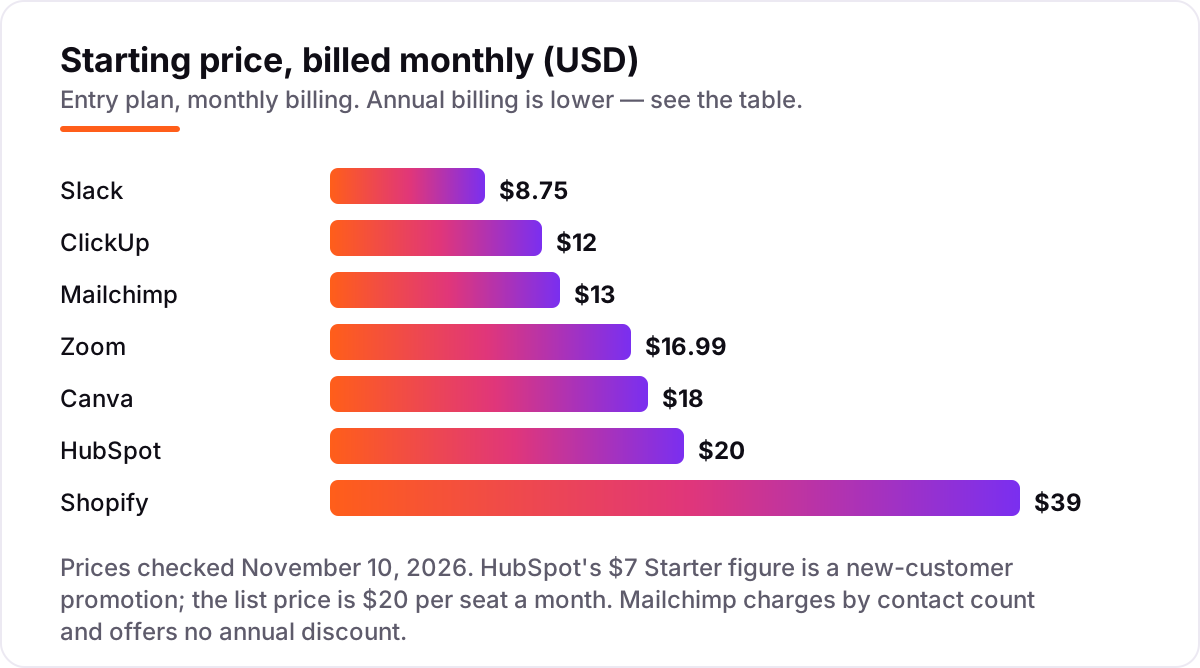
Take a 10-person small business buying the whole stack in this list. On annual billing where the vendor publishes one, the year costs $870 for Slack Pro at $7.25 a user a month, $1,080 for ClickUp Core at $9, $1,699.20 for Zoom Pro at $14.16, $144 for Canva Pro at $144 a year, $156 for Mailchimp Essentials at $13 a month for 500 contacts, and $348 for Shopify Basic at $29 a month. HubSpot is the awkward one: Sales Hub Starter lists at $20 a seat a month, so 10 seats cost $2,400 a year at list price — though new customers see a $7 a seat annual promotion that brings the first year to $840.
Add those up and the full stack costs $6,697.20 a year at list prices, or about $558 a month. Three costs sit outside that number. First, Shopify's card fees: 2.9% plus 30 cents per online sale on Basic, so a store selling $5,000 a month pays about $175 a month in card fees alone. Second, Mailchimp's bill rises with the list — $45 a month at 2,500 contacts, $75 at 5,000 — so the $13 figure only holds while the list stays under 500 contacts. Third, the promotions: HubSpot's $7 Starter price and Shopify's $1-a-month first three months both end, so budget on the list price from year two.
Annual billing cuts the bill on most tools here: Slack Pro drops from $105 to $87 a user a year, ClickUp Core from $144 to $108, Zoom Pro from $203.88 to $169.92, Canva Pro from $216 to $144, and Shopify Basic from $468 to $348. Mailchimp offers no annual discount on its marketing plans, so the monthly figure is the whole story, and HubSpot's $7 figure is a new-customer promotion rather than a standard annual rate. If the business also needs bookkeeping, the accounting side follows the same per-seat and per-plan logic — see our guide to the best accounting software for SaaS.
Know the difference: SaaS vs installed software
The confusion in this category is the word itself. SaaS — software as a service — means the software runs on the vendor's computers and you use it through a browser or an app, paying a monthly or annual subscription. Installed software runs on your own computer: you pay once or per licence, and you handle updates, backups and security yourself. Every tool in this list is SaaS, which is why none of them asks you to download an installer or buy a licence key.
The trade is simple. SaaS costs less up front — five tools here start free — and the vendor handles updates, backups and security patches, so a small business gets enterprise-grade infrastructure for the price of a subscription. The cost is that the bill never stops: stop paying and you lose access, and the vendor can raise the price at renewal, as Canva has done twice since 2025. Installed software costs more up front but keeps working after you pay, and nobody can raise its price — though nobody patches it for you either.
There is a second, quieter difference: your data lives on someone else's servers with SaaS. That is fine for most small businesses — every tool here lets you export your core data — but it means reading the export and deletion pages before you commit, and exporting regularly. A business that cannot accept its customer list living outside its own office should look at installed or self-hosted software instead; everyone else will find SaaS cheaper, faster to start and easier to keep updated.
Quick comparison: tool type by need
| Buyer | Best pick | Why |
|---|---|---|
| Small business starting from zero | HubSpot | Free CRM for 2 users, Starter is $20 per seat a month at list price |
| Team that lives in chat | Slack | $7.25 per user a month billed annually, and you only pay for active members |
| Team that needs one workspace | ClickUp | Tasks, docs and goals from $9 per user a month billed annually |
| Business built on client calls | Zoom | 30-hour meetings and AI notes from $14.16 per user a month billed annually |
| Owner who does their own design | Canva | Pro graphics for one person at $144 a year |
| Business starting email marketing | Mailchimp | Free plan for 250 contacts, Essentials from $13 a month |
| Business opening an online store | Shopify | Full store from $29 a month billed annually, plus card fees per sale |
Mistakes to avoid
- Budgeting on the promo price. HubSpot's $7 Starter rate is a new-customer promotion and Shopify's $1-a-month offer lasts three months. The list price is what you pay in year two, so compare tools on that number.
- Buying on the headline, then finding the seat count. ClickUp bills every workspace member, HubSpot's free CRM covers two users, and Canva Pro covers one person. Count the people who will actually use the tool before you compare prices.
- Ignoring what the price is per. Mailchimp charges per contact and Shopify per sale, so a growing list or a good month raises the bill. Price the tool at next year's size, not this year's.
- Paying for a year before the free plan runs out. Five tools here have free plans and Shopify has a trial. Use them with real work first; a yearly plan bought in week one is the most expensive way to learn a tool does not fit.
- Forgetting the second cost. Card fees, payroll-style add-ons, extra seats and AI credits all sit outside the subscription. Budget the stack, not the plan — the worked example above puts the full stack at about $558 a month.
How we chose
We checked each vendor's own pricing page on November 10, 2026, through fresh search-index copies of those pages crawled within the last few days, and recorded the starting price exactly as shown, including the annual-billing figure where the page lists one. Ratings come from G2, with the score and review count as shown on G2's own comparison pages. We ranked the tools by fit for the most common buyer — a small business of about ten people buying its first software stack — not by brand size. HubSpot's $7 Starter figure is a new-customer promotion, not the list price, and we say so wherever it appears. No vendor paid for a place in this list, and none of the links here are affiliate links.
What to do next
Start with the free plan or trial of your top pick and run one real week of work through it — real contacts, real tasks, real calls — before you pay for a year. Check that the export works and that the next tier's price makes sense at your headcount, then add the next tool only when the first one is earning its keep. If email is the first job, our guide to the best email marketing software for small business goes deeper on the list side. Once your tools are in place, find out what's holding your rankings back.
Your stack only works if people find you
SerpAstra fixes what keeps your site off page one and makes it easy for AI assistants to recommend.
Get a free audit→Sources we checked (14)
- HubSpot pricing — hubspot.com/pricing/sales (checked November 10, 2026)
- HubSpot Sales Hub on G2 — 4.4/5, 14,365 reviews (checked November 10, 2026)
- Slack pricing — slack.com/pricing (checked November 10, 2026)
- Slack on G2 — 4.5/5, 39,274 reviews (checked November 10, 2026)
- ClickUp pricing — clickup.com/pricing (checked November 10, 2026)
- ClickUp on G2 — 4.6/5, 13,719 reviews (checked November 10, 2026)
- Zoom pricing — zoom.us/pricing (checked November 10, 2026)
- Zoom Workplace on G2 — 4.5/5, 56,560 reviews (checked November 10, 2026)
- Canva pricing — canva.com/pricing (checked November 10, 2026)
- Canva on G2 — 4.7/5, 7,529 reviews (checked November 10, 2026)
- Mailchimp pricing — mailchimp.com/pricing/marketing (checked November 10, 2026)
- Mailchimp on G2 — 4.3/5, 12,999 reviews (checked November 10, 2026)
- Shopify pricing — shopify.com/pricing (checked November 10, 2026)
- Shopify on G2 — 4.4/5, 5,109 reviews (checked November 10, 2026)
Shamim
Founder of SerpAstra
A full-stack SEO and digital marketer who spends most days on Local SEO for dental practices, AI search visibility and lead generation.
Frequently asked questions
What is the best SaaS software for a small business?
HubSpot is the best starting point for most small businesses: the free CRM covers two users, and Sales Hub Starter adds pipelines and calling from $20 per seat a month. Add Slack for chat, ClickUp for work and Zoom for calls as the team grows — all four have free plans or trials.
How much does SaaS software cost for a small business?
Entry prices in this list run from $0 to $39 a month. A 10-person team on the annual prices — HubSpot Starter at list, Slack Pro, ClickUp Core, Zoom Pro, Canva Pro, Mailchimp Essentials and Shopify Basic — pays about $6,697 a year, or roughly $558 a month, before card fees and add-ons.
Is there really free SaaS software for small businesses?
Yes, with limits. HubSpot's free CRM covers two users, Slack's free plan keeps 90 days of history, ClickUp's Free Forever plan has no time limit, Zoom Basic allows 40-minute group meetings, and Canva's free plan covers everyday graphics. Shopify is the only tool here with no free plan.
What is the difference between SaaS and installed software?
SaaS runs in your browser and the vendor hosts, updates and backs it up; you pay a monthly or annual subscription and log in from anywhere. Installed software runs on your own computer, you pay once or per licence, and you handle updates and backups yourself. SaaS costs less up front but never stops billing.
Can I switch SaaS software later?
Yes, but export first. Download your contacts, tasks, files and billing history from the old tool before cancelling, then import them into the new one and check that nothing is missing. Most tools in this list offer free export; Shopify and HubSpot both export products and contacts to CSV.
Do I own my data in SaaS software?
Your data is yours, but it lives on the vendor's servers. Every tool in this list lets you export your core data — contacts, tasks, designs, products and orders — though the format varies. Export regularly, and read the vendor's data export and deletion pages before you commit to a yearly plan.
What should I check before paying for SaaS software?
Four things: what the price is per (seat, contact or sale), what the free plan leaves out, whether the annual price is a list price or a new-customer promotion, and what the next tier costs. HubSpot's $7 Starter price, for example, is a new-customer promotion; the list price is $20 per seat.
Free SEO and AI visibility audit
Find out what is holding your rankings back
Send us your site. Within 2 business days you get a written audit, an AI visibility check and a short fix list ranked by impact. Free, with no contract attached.
Request my free audit→Related guides
 Digital Marketing & Ads11 Best Email Marketing Software for Small Business in 2026, ComparedThe 11 best email marketing software for small business, compared on real 2026 prices, free plans and automation — Brevo starts at $9/month.Read guide →
 Digital Marketing & Ads8 Best All-In-One Marketing Platforms in 2026, ComparedCompare the 8 best all-in-one marketing platforms on price, free plans and automation, with every price verified in November 2026 and sorted by buyer.Read guide →
 SEO & AI Search12 Best Accounting Software for SAAS in 2026, Compared12 best accounting software for saas tools compared with real 2026 prices, from $0 billing layers to full ledgers and ERP, sorted by what your SaaS needs.Read guide →