
Best SEO Software Download for 2026: 12 Options Compared by Use Case
Compare the 12 best SEO software download options for 2026 — desktop crawlers, free extensions, self-hosted tools — with real annual prices checked Nov 2, 2026.
 Shamim Mia, Founder, SerpAstraLast verified November 2, 202614 min read
We compare pricing pages, documentation and public reviews. We never accept payment for rankings.

Key takeaways
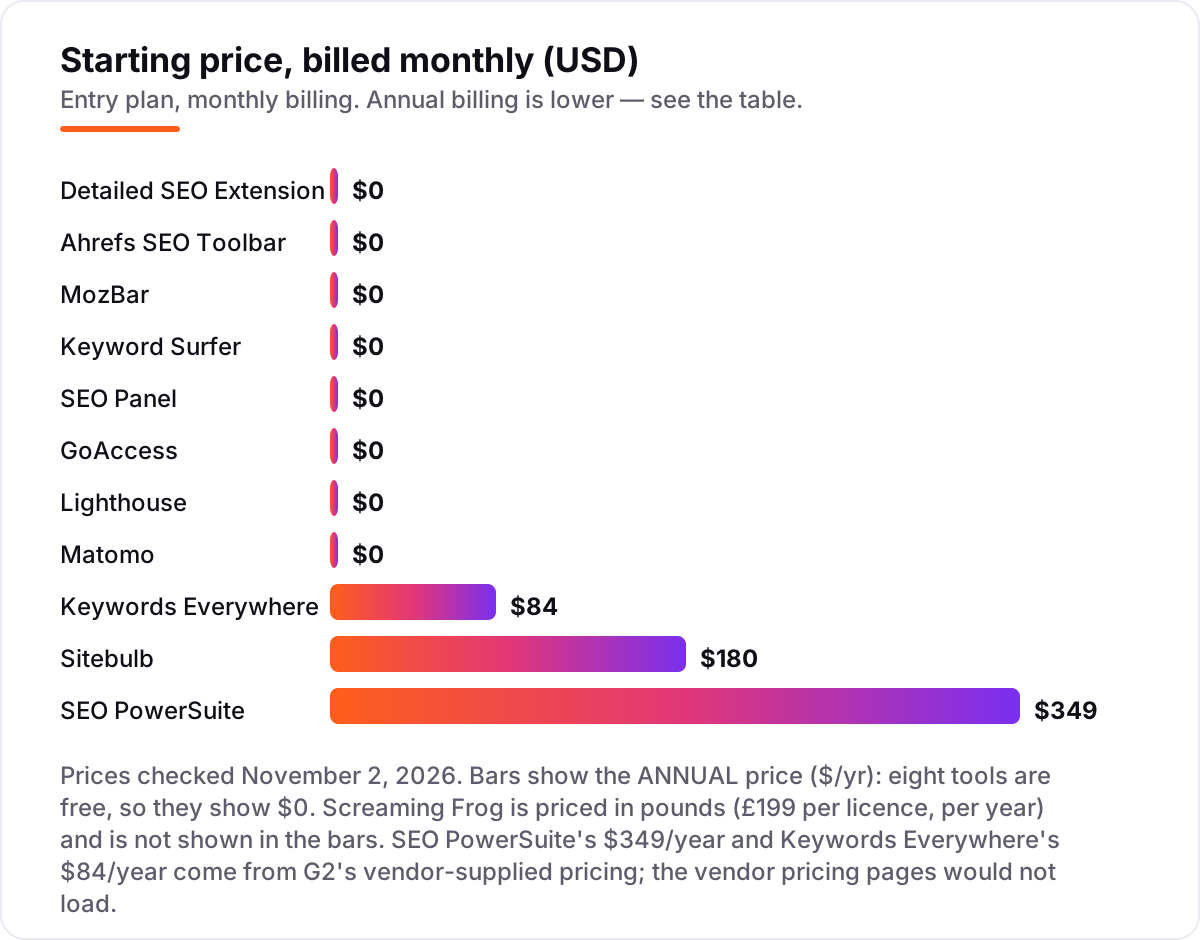
- Screaming Frog (£199/year), Sitebulb ($180/year) and SEO PowerSuite ($349/year) lead this list — and 8 of the 12 tools here are completely free.
- The most important buying factor is the install type: a desktop crawler for site-wide audits, an extension for page checks, and self-hosted software when you want to own your data.
- Paid tools here sell annual licences, not monthly subscriptions, so the price bars show dollars per year — free tools show $0.
- Every price below was checked on November 2, 2026. Two prices come from G2's vendor-supplied pricing because the vendor pages would not load.
On this page
Quick comparison
| Tool | Best for | Starting price | Free plan |
|---|---|---|---|
| Screaming Frog SEO Spider | Technical SEOs and agencies that need a deep desktop crawl of any site, from a 500-URL free version up | £199/yr | Yes (500 URLs) |
| Sitebulb | Freelancers and small agencies that want prioritized, client-readable audit reports from a desktop crawl | $180/yr (annual) | No (14-day trial) |
| SEO PowerSuite | Solo consultants and small agencies that want rank tracking, audits, backlinks and outreach in one desktop suite | $349/yr | Yes (free version) |
| Detailed SEO Extension | Site owners who want a one-click on-page check of any page without an account or a subscription | Free | Yes (free) |
| Keywords Everywhere | Keyword researchers who want search volume, CPC and competition data inside Google, YouTube and Amazon results | $84/yr | Yes (limited free) |
| Ahrefs SEO Toolbar | Ahrefs users who want backlink and on-page data overlaid on every page and SERP they visit | Free | Yes (free) |
| MozBar | SEOs who want Domain Authority and Page Authority scores on every page and SERP without opening a dashboard | Free | Yes (free) |
| Keyword Surfer | Content writers and bloggers who want keyword volumes beside Google results while they research | Free | Yes (free) |
| SEO Panel | Small agencies that want a free, self-hosted SEO control panel with rank tracking for unlimited websites | Free | Yes (free) |
| GoAccess | Technical SEOs who want to see what Googlebot actually crawls, straight from the server log | Free | Yes (free) |
| Lighthouse | Anyone who wants a free, one-page SEO and performance audit without installing anything | Free | Yes (free) |
| Matomo | Privacy-conscious site owners who want Google Analytics-style data hosted on their own server | Free | Yes (free) |
Make one of these tools?
We re-check this list every quarter. Send a correction, request a review, or ask about a clearly labeled sponsored spot.
Request a listingThe best SEO software downloads
Screaming Frog SEO Spider
Best for: Technical SEOs and agencies that need a deep desktop crawl of any site, from a 500-URL free version up
Screaming Frog SEO Spider is the desktop crawler other crawlers get compared with, and for most technical SEOs it is the first download. Install it on Windows, Mac or Linux, point it at a site, and it returns every URL with its status code, title, meta description, canonical, hreflang and internal links — the raw material of a technical audit. The free version crawls 500 URLs, which covers most small sites end to end.
The paid licence lifts the cap and adds JavaScript rendering, scheduled crawls, crawl comparison and custom extraction, plus integrations with Search Console, Analytics and PageSpeed Insights. The output is raw data — long tables with no plain-English fix list — so a junior will need guidance to turn a crawl into a job list. If you audit sites for a living, start here.
What we like
- Audits a site for over 300 SEO issues — broken links, redirects, duplicates, hreflang, structured data and more
- JavaScript rendering, custom extraction via XPath or regex, crawl comparison and scheduled crawls on the paid licence
- GA, Search Console and PageSpeed Insights integrations pull traffic and performance data into the crawl
Watch out for
- Desktop software, so crawl size is limited by your machine's memory and storage, and there is no cloud version
- Raw data tables with no plain-English fix guidance, so juniors need a senior to interpret the output
- Interface looks dated next to newer tools, per multiple Capterra reviewers
Sitebulb
Best for: Freelancers and small agencies that want prioritized, client-readable audit reports from a desktop crawl
Sitebulb is the desktop crawler for people who have to explain the findings to someone else. It crawls the same technical ground as Screaming Frog — broken links, duplicates, redirects, metadata, structured data — but every issue arrives as a prioritized Hint with a plain-English explanation of what is wrong and how to fix it. The visual crawl maps make site structure obvious in a way a spreadsheet never does.
Lite costs $18 a month, or $180 a year, and covers 10,000 URLs per audit, which is enough for most small and mid-size sites. The catch is the ceiling — scheduling, audit comparisons and custom PDF reports need Pro at $42 a month — and there is no permanent free tier, only a 14-day trial. Pick Sitebulb when the report has to make sense to a client.
What we like
- Every finding arrives as a prioritized Hint with a plain-English explanation of what is wrong and how to fix it
- JavaScript crawling, crawl maps and Search Console, Analytics and Sheets integrations on every plan
- Pro covers 500,000 URLs per audit, raisable to 2 million, with 300+ Hints
Watch out for
- No free plan, only a 14-day trial, and Lite audits cap at 10,000 URLs per audit
- Scheduling, audit comparisons and customized PDF reports need Pro ($42/month)
- Desktop software, so crawl size is limited by your machine and there is no cloud version on Lite

SEO PowerSuite
Best for: Solo consultants and small agencies that want rank tracking, audits, backlinks and outreach in one desktop suite
SEO PowerSuite is four desktop programs sold as one licence — Rank Tracker for positions, WebSite Auditor for technical and on-page checks, SEO SpyGlass for backlinks, and LinkAssistant for outreach. Install them on Windows, Mac or Linux and everything runs locally, with no per-keyword credits and no per-project limits. That flat annual price is the whole appeal for a solo consultant watching costs.
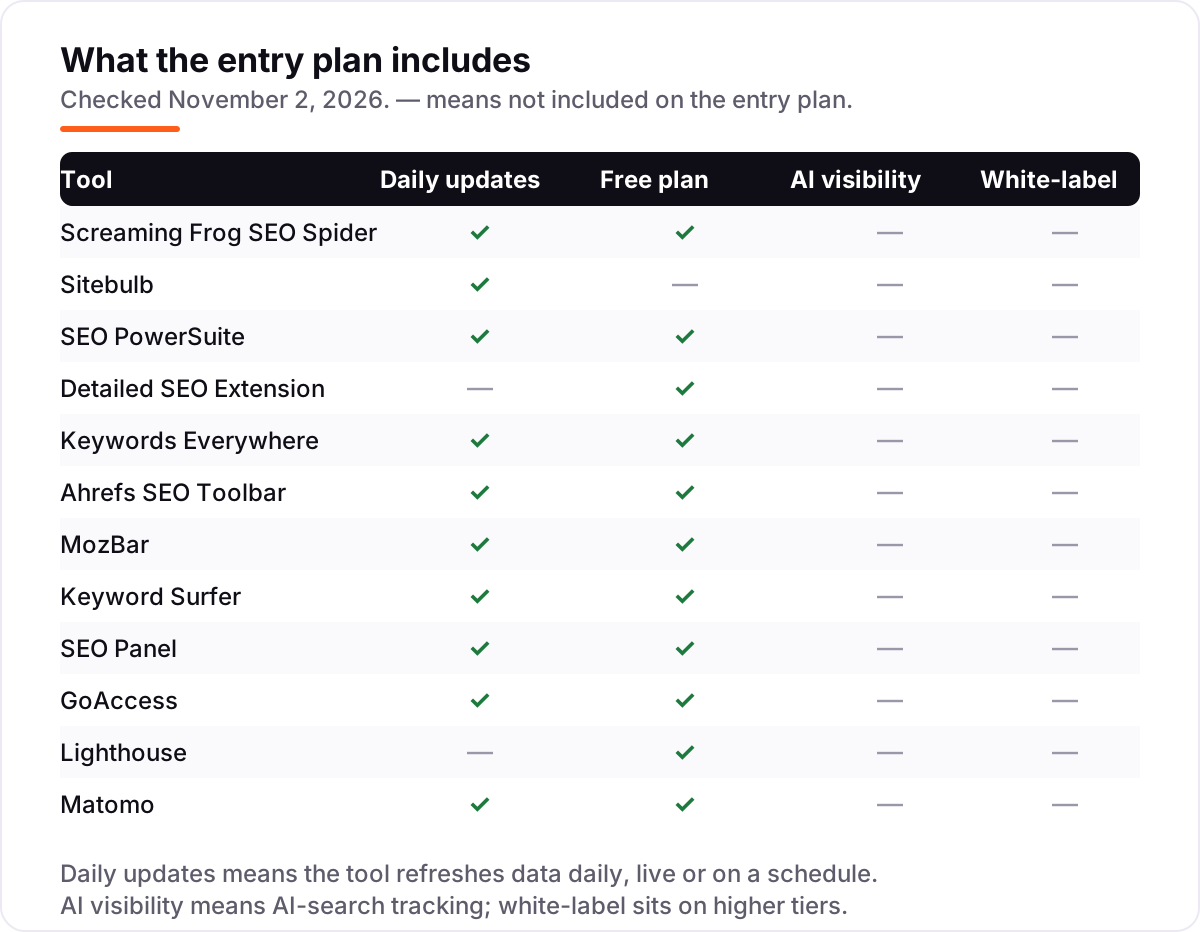
The Professional licence costs $349 a year, and a limited free version covers the basics. Two honest caveats: the four apps feel like four apps, with a dated interface and a learning curve, and the backlink and ranking data refreshes less often than the big cloud suites. Buy it when you want one licence to cover the whole workflow, not the freshest data.
What we like
- Four desktop apps in one licence: Rank Tracker, WebSite Auditor, SEO SpyGlass and LinkAssistant
- Unlimited keywords, projects and reports with no credit caps, for one annual price
- Scheduled checks and white-label reports, with Google Search Console and Analytics integrations
Watch out for
- Desktop software, so large projects depend on your machine's RAM and storage, and there is no cloud sync
- Four separate apps with an interface reviewers call dated, so the workflow takes time to learn
- Backlink and ranking data is less frequently updated than Ahrefs or Semrush, per G2 reviewers

Detailed SEO Extension
Best for: Site owners who want a one-click on-page check of any page without an account or a subscription
The Detailed SEO Extension is the fastest way to see what is wrong with a single page. Install it from the Chrome Web Store, click the icon, and one panel shows the title and meta tags, the heading structure from H1 to H6, robots directives, the canonical tag and the schema markup. It also exports every link and image on the page, and jumps straight to robots.txt or sitemap.xml.
It is completely free, with no account and no premium tier — Ahrefs acquired Detailed in 2025 and kept the extension free. More than 450,000 people use it every week, according to Ahrefs. The limit is scope: it checks one page at a time, so it will never replace a crawler for a site-wide audit. Keep it installed and use it on every page you publish.
What we like
- One click shows title and meta tags, heading structure, robots directives, canonicals and schema
- No account, no setup and no upsells — install it and it works on any page
- Export all links or images from a page, and jump straight to robots.txt or sitemap.xml
Watch out for
- On-page data only — no backlink analysis, domain authority or off-page metrics
- No rank tracking, site crawl or keyword research built in
- Deeper data in its Quick Access panel links out to other tools rather than showing it inline
Keywords Everywhere
Best for: Keyword researchers who want search volume, CPC and competition data inside Google, YouTube and Amazon results
Keywords Everywhere is a browser extension that overlays keyword data on the search results you already look at. Search Google, YouTube or Amazon and it adds monthly search volume, cost per click, competition and a 12-month trend beside every keyword — no separate dashboard, no copying terms into another tool. It is the cheapest paid keyword data in this list, and the only paid tool here that is not a subscription.
Bronze costs $84 a year for 100,000 credits, and one credit buys the volume, CPC, competition and trend for one keyword. The catch is the burn rate: a single Google search can use 10 to 50 credits once related keywords and widgets load, so heavy researchers will chew through the pool. Turn the extension off when you are not researching, or the credits will go while you browse.
What we like
- Shows volume, CPC, competition and 12-month trends beside every Google, YouTube and Amazon search
- Bronze costs $84 a year for 100,000 credits — about $0.84 per 1,000 keyword lookups
- Same extension and REST API on every plan, with a simple credit pool and no monthly subscription
Watch out for
- Credits burn fast: a single Google search can use 10 to 50 credits, so 100,000 credits goes quicker than it sounds
- Volume, CPC and competition data need paid credits — the free features are limited
- Credits expire 12 months after purchase, and a renewal does not carry leftovers forward

Ahrefs SEO Toolbar
Best for: Ahrefs users who want backlink and on-page data overlaid on every page and SERP they visit
The Ahrefs SEO Toolbar puts Ahrefs data where you already work — in the browser. Open any page and the on-page report shows its title, meta tags, headings, canonical, hreflang and schema. Search Google and the SERP overlay adds Domain Rating, URL Rating and backlink counts beside every result, so you can judge a competing page without leaving the results. A broken-link checker and redirect tracer are built in.
The extension itself is free, and a free Ahrefs account adds DR and UR to the overlay. Full SERP metrics need a paid Ahrefs plan from $29 a month, and heavy use eats report credits, so it is best for people who already pay for Ahrefs. If you do not, the Detailed SEO Extension covers the on-page half for nothing.
What we like
- On-page report for any URL: title, meta, headings, canonicals, hreflang and schema in one panel
- SERP overlay shows Domain Rating, URL Rating and backlink counts beside every Google result
- Broken-link checker and redirect tracing run directly in the browser, with no separate app
Watch out for
- Full SERP metrics need a paid Ahrefs plan from $29/month — the free toolbar shows only basic data
- On-page and SERP data only; it is not a crawler, rank tracker or audit tool
- Some metrics refresh slowly, and heavy SERP use eats Ahrefs report credits

MozBar
Best for: SEOs who want Domain Authority and Page Authority scores on every page and SERP without opening a dashboard
MozBar is the oldest tool in this list, and it still does one job well: it puts Moz's authority metrics on every page you visit. Install it, open any site, and the toolbar shows Domain Authority, Page Authority and Spam Score for that page. On a Google results page it overlays the same scores on every result, highlights followed and nofollowed links, and exports the whole SERP to a CSV file.
The extension is free with a Moz account, though the full Domain Authority and Page Authority scores now sit behind MozBar Premium, which needs Moz Pro Starter at $49 a month. That paywall is the honest catch — the free bar is thinner than it used to be. Use it for quick authority checks during outreach and competitor scans, not as a research tool.
What we like
- Shows Domain Authority, Page Authority and Spam Score for any page in the browser toolbar
- SERP overlay highlights followed and nofollowed links and exports the SERP to CSV
- One-click access to page analysis, link metrics and on-page elements while you browse
Watch out for
- Domain Authority and Page Authority now need Moz Pro — the free bar shows only basic metrics
- Free version has usage limits, and some reviewers report the scores load slowly on busy SERPs
- No keyword data, crawl or audit features — it is a metrics overlay, not a research tool

Keyword Surfer
Best for: Content writers and bloggers who want keyword volumes beside Google results while they research
Keyword Surfer is Surfer's free Chrome extension, and it answers the most common keyword question without opening a tool: how many people search for this? Google anything and it adds estimated monthly search volume beside the query, plus related keyword ideas with their own volumes, word counts for the ranking pages, and on-page data — all inside the results page.
It needs no account, covers 70 countries, and Surfer says the core keyword data stays free forever. The numbers are estimates from Surfer's own model, not Google Ads data, so treat them as directional and cross-check the important ones in Keyword Planner. For fast research while you browse, it is the lightest tool in this list.
What we like
- Shows estimated monthly search volume and related keyword ideas beside every Google search
- Word-count and on-page data for ranking pages, plus keyword collections you can export as CSV
- Covers 70 countries, needs no Surfer account and stays free for its core keyword data
Watch out for
- Volume estimates are approximate, not Google Ads data, so cross-check before big decisions
- No keyword difficulty scores, SERP history or bulk export on the free extension
- Chrome only, and the newer AI features need a paid Surfer plan

SEO Panel
Best for: Small agencies that want a free, self-hosted SEO control panel with rank tracking for unlimited websites
SEO Panel is a free, open-source SEO control panel you install on your own server. Once it is running, it bundles the everyday toolkit in one place: a keyword position checker, a site audit, a sitemap generator, a backlink checker, a meta tag generator and a directory submission tool, with rank tracking for unlimited websites. Plugins extend it further, and every byte of data stays on your server.
The price is $0 forever, and the cost is your time: installation, updates and security are yours to handle, the interface looks dated, and there is no support team to call. It is still actively downloaded — SourceForge records new releases in 2026. Pick it when data ownership matters more than polish, and you have a server to run it on.
What we like
- Free forever under an open-source licence, with rank tracking for unlimited websites
- Bundles a keyword position checker, site audit, sitemap generator, backlink checker and more
- Plugin system extends it with extra tools, and you keep all your data on your own server
Watch out for
- You host it yourself, so you handle installation, updates and server security
- Dated interface, and some built-in metrics rely on older data sources
- No official support team — help comes from the community and documentation

GoAccess
Best for: Technical SEOs who want to see what Googlebot actually crawls, straight from the server log
GoAccess answers a question no crawler can: what did Googlebot actually do on your server? Point it at an Apache or Nginx access log and it parses the file in real time, showing which pages the bots hit, how often, which URLs returned 404s, and which crawlers waste your crawl budget. It runs in the terminal or outputs a clean HTML report you can share with a client.
It is free and open source, installs with one package-manager command on Linux or Homebrew on a Mac, and needs no account, no tracking code and no third-party service. The trade-off is the command line — there is no hosted dashboard — and it only reads the logs you feed it. For log-file analysis on a zero budget, nothing else in this list comes close.
What we like
- Parses Apache, Nginx and other server logs in real time and shows bot hits, 404s and top URLs
- Generates a shareable HTML report with no tracking code or third-party service involved
- Installs from most Linux package managers or Homebrew, and runs on a single command
Watch out for
- Command-line tool with no hosted version, so non-technical users face a real learning curve
- No rank tracking, keyword data or crawl scheduling — it only reads the logs you feed it
- Windows users need Cygwin or WSL, since it is built for Linux and macOS
Lighthouse
Best for: Anyone who wants a free, one-page SEO and performance audit without installing anything
Lighthouse is Google's free, open-source auditor, and it is already sitting in your browser. Open Chrome DevTools, run it on any page, and it scores performance, accessibility, best practices, SEO and PWA checks from 0 to 100, with each failed audit naming the fix. It is the fastest way to check whether a page has a viewport, a valid title, crawlable links and readable tap targets.
There is also a free Chrome extension and a Node command-line version for automated runs. The limits are scope and stability: it audits one page at a time, never a whole site, and scores move a few points between runs as network conditions change. Run it three times and take the middle score, and use a desktop crawler when you need the whole site.
What we like
- Scores performance, accessibility, best practices, SEO and PWA checks from 0 to 100 per page
- Built into Chrome DevTools, with a free extension and a Node command-line version for automation
- Each failed audit names the fix, so the report doubles as a punch list for developers
Watch out for
- Audits one page at a time — it cannot crawl a whole site like Screaming Frog or Sitebulb
- Scores vary between runs with network conditions, so a single score is not a verdict
- Lab data only: it simulates a visit rather than measuring what real users experience

Matomo
Best for: Privacy-conscious site owners who want Google Analytics-style data hosted on their own server
Matomo is the self-hosted alternative to Google Analytics, and it earns its place here because SEO reporting starts with traffic data you trust. Download the On-Premise version free, install it on your own server, and it tracks sessions, sources, goals, funnels and ecommerce with no data sampling — the numbers are the real numbers, not an estimate. Your data never leaves your server.
The free download includes funnels, goals and custom reports, and G2 rates Matomo 4.2 out of 5 from 96 reviews. The catch is ownership: updates, backups and security are yours, the interface takes longer to learn than Google Analytics, and heatmaps and session recordings are paid add-ons. If you want analytics without handing your data to Google, this is the download.
What we like
- Open-source analytics with no data sampling, so the numbers you see are the real numbers
- You own the data on your own server, which keeps it GDPR-friendly without a cookie banner debate
- Funnels, goals, ecommerce tracking and custom reports are included in the free download
Watch out for
- Self-hosting means you own updates, backups and security — the free version has no managed support
- Interface is less intuitive than Google Analytics, per G2 reviewers, and setup needs technical knowledge
- Some advanced features, like heatmaps and session recordings, are paid add-ons
What the best seo software download actually does
When people search for the best seo software download, they usually want one thing: a program they install once and own, instead of another monthly subscription that lives on someone else's server. Downloadable SEO software comes in three kinds. A desktop crawler installs on your computer and audits whole sites. A browser extension lives in Chrome or Firefox and checks the page you are looking at. A self-hosted tool installs on your own server and keeps every byte of data under your control.
One number shows how big the free side of this market is: the Detailed SEO Extension has more than 450,000 weekly users, according to Ahrefs, which acquired Detailed in 2025 — and the extension still costs nothing. Eight of the twelve tools in this list are free. The four you pay for sell annual licences, not monthly subscriptions, which is why the price bars in this guide show dollars per year.
Desktop crawlers first
If you audit websites, start with a desktop crawler. Screaming Frog, Sitebulb and SEO PowerSuite all install on your machine, crawl a site from your connection, and store the results locally. That matters for two reasons: nobody else sees your client's data, and there are no per-keyword credits to ration. The trade-off is your hardware — a million-URL crawl needs RAM and disk space, and a slow laptop will feel it.
Screaming Frog is the standard choice, and its free version covers any site under 500 URLs. Sitebulb is the friendlier one: its Hints explain each issue in plain English, which is what you want when a client has to read the report. SEO PowerSuite is the whole workflow in one licence — rank tracking, audits, backlinks and outreach — for a single annual price. For the audit side of this work, our SEO audit service runs the same kind of crawl these tools produce, then turns the raw output into a ranked fix list.
Free browser extensions
Five of the twelve tools here are browser extensions, and they solve a different problem from the crawlers: they check the page in front of you, right now. The Detailed SEO Extension is the one to install first — one click shows the title, meta tags, headings, canonical and schema of any page, with no account. Keyword Surfer adds search volumes to Google results, Keywords Everywhere adds volume, CPC and competition for $84 a year, and the Ahrefs toolbar and MozBar overlay authority metrics on every page and SERP.
Extensions are light, fast and mostly free, but they only see one page at a time. Do not expect them to find the broken links three levels deep in your site — that is the crawler's job. And watch the paywalls: MozBar's Domain Authority and Page Authority now need Moz Pro, and the Ahrefs toolbar's full SERP metrics need a paid Ahrefs plan. The free half of each extension is still useful; the paid half is where the depth lives.
Self-hosted tools you install on your server
The last four tools run on hardware you control. SEO Panel is a free, open-source control panel you install on your own server, with rank tracking for unlimited websites. GoAccess reads your server logs and shows what Googlebot actually crawled — something no cloud tool can tell you, because only your logs know. Lighthouse is Google's free auditor, built into Chrome DevTools, and Matomo is the self-hosted analytics platform for people who do not want their traffic data on Google's servers.
Self-hosting trades money for responsibility. You pay nothing, but you own the installation, the updates, the backups and the security. That is a good trade when data ownership matters — a client site, a regulated industry, or a team that simply does not want its analytics in someone else's cloud. It is a bad trade when nobody on the team wants to maintain a server, in which case the desktop tools above are the safer download.
Quick comparison: tool type by need
| Buyer | Best pick | Why |
|---|---|---|
| First desktop crawler | Screaming Frog | £199/year, free to 500 URLs, 300+ checks |
| Guided audits for clients | Sitebulb | Plain-English Hints from $180/year |
| Whole workflow, one licence | SEO PowerSuite | Four apps, unlimited tracking, $349/year |
| Fastest free on-page check | Detailed SEO Extension | Free, no account, one click |
| Cheapest keyword data | Keywords Everywhere | $84/year for 100,000 credits |
| Authority scores while browsing | MozBar | Free, DA and PA on every page |
| Self-hosted everything | SEO Panel or Matomo | Free, your server, your data |
How to choose: a short decision path
- Name the job first. Site-wide audit means a desktop crawler; a single page means an extension; log analysis means GoAccess; traffic data you own means Matomo. The job picks the install type, not the other way around.
- Start with the free version. Screaming Frog's free tier covers 500 URLs, Detailed, Lighthouse, Keyword Surfer and GoAccess cost nothing at all, and Sitebulb has a 14-day trial. Run your real site through the free version before you pay.
- Check what the free version really covers. MozBar's authority scores and the Ahrefs toolbar's full SERP metrics both sit behind paid plans, and Keywords Everywhere's volume data needs credits. Free to install is not the same as free to use.
- Price the second year, not the first. Every paid tool here is an annual licence — £199, $180, $349 or $84 a year — so compare the renewal price, and check whether credits or seats expire.
- Test on your real site. Crawl your own domain, open your top pages in the extensions, and compare what you find against Search Console. Before you publish new pages for the keywords you find, run your titles through the free SERP snippet preview tool to see exactly how they will look in Google.
Mistakes to avoid
- Comparing an annual licence to a monthly subscription. £199 a year is not £199 a month, and $84 a year is not $84 a month — divide a yearly licence by twelve and you will overpay in your head.
- Installing every free extension at once. Five extensions slow the browser and overlap each other. Install two or three, use them for a week, and remove the ones you never click.
- Trusting a directory price. SEO PowerSuite shows $299 a year on some comparison sites and $349 a year on G2's vendor-supplied pricing, and Keywords Everywhere's old $10 one-time packs no longer exist. Always check the vendor's own page before buying.
- Forgetting that desktop tools need your hardware. A big crawl on a small laptop will crawl slowly or run out of memory. Check RAM and disk space before you point a crawler at a large site.
- Expecting an extension to audit a site. Extensions check one page at a time. If you need broken links, duplicates and redirects across a whole domain, you need a crawler — the extension will never find them.
How we chose
We checked each vendor's own pricing page on November 2, 2026 where it would load, and recorded the starting price exactly as shown. Two vendor pages would not load — Link-Assistant's pricing page and Keywords Everywhere's pricing page — so those two prices come from G2's vendor-supplied pricing instead: SEO PowerSuite Professional at $349 a year and Keywords Everywhere Bronze at $84 a year. Note that some comparison sites still show SEO PowerSuite at $299 a year and Keywords Everywhere's old $10 one-time credit packs; both figures are stale. Price bars show the annual price because eight of the twelve tools are free and the paid ones sell annual licences, not monthly subscriptions. Ratings come from G2 or Capterra pages opened on November 2, 2026. Five tools have no rating because no G2 or Capterra page exists for them, and the Ahrefs toolbar and MozBar carry their parent product's G2 rating because neither toolbar has its own G2 page. We ranked the tools by fit for the most common buyer — someone who wants software they install and own — not by brand size. No vendor paid for a place in this list, and none of the links here are affiliate links.
What to do next
Download the free tier of your top pick first — Screaming Frog for crawls, Detailed for page checks, or Lighthouse for a quick audit — and run it on your own site today. If the free version finds real issues, pay for the licence that removes its limits; if it finds nothing, you have spent nothing and learned your site is in decent shape. If you'd rather have this set up and read for you, request a free SEO + AI visibility audit and get a ranked fix list in 2 business days.
Rather not run the tools yourself?
Tools show you the data. SerpAstra turns it into higher rankings, more map-pack calls and citations in AI answers.
Get a free SEO + AI visibility audit→Sources we checked (17)
- Screaming Frog pricing — screamingfrog.co.uk/pricing (checked November 2, 2026)
- Screaming Frog on Capterra — 4.9/5, 134 reviews (checked November 2, 2026)
- Sitebulb pricing — sitebulb.com/subscriptions/pricing (checked November 2, 2026)
- Sitebulb on G2 — 4.5/5, 13 reviews (checked November 2, 2026)
- SEO PowerSuite on G2 — 4.5/5, 559 reviews; vendor-supplied Professional $349/year (checked November 2, 2026)
- SEO PowerSuite $299/year list price — TrustRadius (checked November 2, 2026)
- Detailed SEO Extension — detailed.com (free; checked November 2, 2026)
- Detailed SEO Extension, 450,000 weekly users — Ahrefs blog (checked November 2, 2026)
- Keywords Everywhere on G2 — 5.0/5, 8 reviews; vendor-supplied Bronze $84/year (checked November 2, 2026)
- Ahrefs on G2 — 4.5/5, 723 reviews (checked November 2, 2026)
- Moz Pro on G2 — 4.3/5, 608 reviews (checked November 2, 2026)
- Keyword Surfer — surferseo.com/keyword-surfer-extension (free; checked November 2, 2026)
- SEO Panel — seopanel.org (free; checked November 2, 2026)
- GoAccess — goaccess.io (free; checked November 2, 2026)
- Lighthouse — developers.google.com/web/tools/lighthouse (free; checked November 2, 2026)
- Matomo pricing — matomo.org/pricing (checked November 2, 2026)
- Matomo on G2 — 4.2/5, 96 reviews (checked November 2, 2026)
Shamim
Founder of SerpAstra
A full-stack SEO and digital marketer who spends most days on Local SEO for dental practices, AI search visibility and lead generation.
Frequently asked questions
What is the best SEO software to download in 2026?
Screaming Frog is the best first download for technical audits: a free version crawls 500 URLs and the paid licence is £199 a year. For guided, client-readable reports, Sitebulb is the better pick at $180 a year. If you only want quick page checks, install the Detailed SEO Extension — it is free and takes one click.
Is there really free SEO software worth downloading?
Yes — 8 of the 12 tools in this list are free. Lighthouse audits any page for free, the Detailed SEO Extension checks on-page SEO in one click, and GoAccess reads your server logs at no cost. The free tools cover page checks, log analysis and analytics; you only pay when you need site-wide crawls or keyword data.
What is the difference between desktop SEO software and a browser extension?
Desktop software installs on your computer and crawls whole sites — Screaming Frog, Sitebulb and SEO PowerSuite work this way. A browser extension lives in Chrome or Firefox and checks the page you are looking at, like Detailed, MozBar and Keyword Surfer. Crawlers audit sites; extensions audit pages.
How much does downloadable SEO software cost?
Between $0 and $349 a year at the entry level. Eight tools here are free, Keywords Everywhere costs $84 a year, Sitebulb costs $180 a year and SEO PowerSuite costs $349 a year. Screaming Frog is £199 a year per licence. There are no monthly subscriptions in this list except Sitebulb's $18 a month option.
Do I still need a desktop crawler if I already pay for Ahrefs or Semrush?
Often yes. Cloud suites audit from their own servers, while a desktop crawler checks your site from your machine, with custom extraction, JavaScript rendering and crawl comparison. Screaming Frog's free 500-URL version is enough to test whether a local crawl finds issues your suite missed before you pay.
Will these tools work on Mac and Windows?
Most of them will. Screaming Frog, Sitebulb and SEO PowerSuite run on Windows, Mac and Linux, and the browser extensions work in Chrome and Firefox on any desktop. GoAccess is the exception — it is built for Linux and macOS, so Windows users need Cygwin or WSL to run it.
What should I check before installing SEO software?
Four things: your operating system and version, how much RAM and disk space the tool needs for large crawls, whether it needs an account or an API key, and where your data goes. Desktop crawlers store data locally, extensions read the pages you visit, and self-hosted tools need a server you maintain.
Free SEO and AI visibility audit
Find out what is holding your rankings back
Send us your site. Within 2 business days you get a written audit, an AI visibility check and a short fix list ranked by impact. Free, with no contract attached.
Request my free audit→Related guides
 SEO & AI Search11 Best Open Source SEO Software in 2026, Compared11 best open source seo software compared on price, features and what each one actually does. Every price checked on the vendor's own site, November 1, 2026.Read guide →
 SEO & AI SearchBest SEO Audit Software for 2026: 10 Options Compared by Use Case10 best SEO audit software tools compared on price, crawl depth and AI visibility. Prices checked on vendor pricing pages, November 1, 2026.Read guide →
 SEO & AI Search11 Best Free SEO Keyword Research Tools in 2026, Compared11 best free SEO keyword research tools compared with real prices and free limits — Google Keyword Planner, Ahrefs, Semrush, Moz and more, sorted by need.Read guide →