
11 Best Small Business Accounting Software in 2026, Compared
Compare the 11 best small business accounting software tools on price, free plans, bank feeds and payroll, with every price checked November 4, 2026.
 Shamim Mia, Founder, SerpAstraLast verified November 4, 202615 min read
We compare pricing pages, documentation and public reviews. We never accept payment for rankings.

Key takeaways
- QuickBooks Online is the best fit for most small businesses at $38/month; Xero follows at $27/month with unlimited users, and Zoho Books now starts at $20/month, with a free plan while revenue stays under $50,000.
- Wave and Zoho Books both offer genuinely free plans — Wave with no revenue cap, Zoho Books while annual revenue stays under $50,000 — and Square Invoices starts free for sellers who only need billing.
- The single most important buying factor is the limit that forces your next upgrade: user caps, invoice caps and client caps decide what you actually pay, not the headline price.
- Desktop still has a place: AccountEdge at $20/month and Sage 50 at $132.17/month suit businesses that want their data on their own machines, while BILL at $49 per user suits bill-heavy teams.
- Payroll and card processing are billed on top of every subscription here, so budget for them separately — payroll runs about $17–$50 a month plus a per-person fee.
On this page
Quick comparison
| Tool | Best for | Starting price | Free plan |
|---|---|---|---|
| QuickBooks Online | US small businesses that want the ledger their accountant already uses, with payroll and inventory to grow into | $38/mo | Yes (Free plan) |
| Xero | Small teams that want unlimited users on every plan and no per-seat fees | $27/mo | No (30-day trial) |
| FreshBooks | Freelancers and service businesses that bill by the hour and want invoicing to lead | $23/mo | No (30-day trial) |
| Zoho Books | Small businesses that want a free ledger now and the cheapest paid step up later | $20/mo | Yes (free plan) |
| Wave | Sole traders and freelancers who want real accounting free, with no invoice or revenue caps | Free; Pro $19/mo | Yes (free) |
| Patriot Accounting | US small businesses that want plain, low-cost accounting with payroll from the same company | $20/mo | No (30-day trial) |
| Kashoo | Owners who want one flat price, unlimited users and every feature included | $30/mo | No (14-day trial) |
| AccountEdge | Businesses that want desktop accounting with inventory, on Mac or Windows, and their data on their own machines | $20/mo | No (30-day trial) |
| Square Invoices | Sellers who already take payments with Square and want invoicing in the same account | $49/mo | Yes (Free plan) |
| BILL | Businesses that pay a lot of vendor bills and want approvals and payments automated | $49/user/mo | No (demo available) |
| Sage 50 | Established businesses with an in-house bookkeeper that need desktop depth, inventory and job costing | $132.17/mo | No (30-day trial) |
Make one of these tools?
We re-check this list every quarter. Send a correction, request a review, or ask about a clearly labeled sponsored spot.
Request a listingThe best small business accounting software

QuickBooks Online
Best for: US small businesses that want the ledger their accountant already uses, with payroll and inventory to grow into
QuickBooks Online earns its default status from the network around it. Most American accountants already work in it, so finding help is easy, and switching accountants rarely means switching software. One subscription covers the whole job — invoices, bills, bank feeds and reports — and Simple Start costs $38 a month for a single user. The price climbs with headcount: Essentials is $85 for three, Plus is $140 for five, and Advanced is $340 for 25.
That headcount ladder is also the catch. Intuit raised Essentials, Plus and Advanced again for renewals from August 1, 2026, and payroll is a paid add-on on every plan. The limited Free tier covers one user and two invoices a month. Choose QuickBooks Online when you want the standard your accountant knows; choose Xero or Zoho Books when per-seat pricing is the deal-breaker.
What we like
- Most US accountants already work in QuickBooks Online, so finding help or switching accountants is straightforward
- Full double-entry accounting with invoicing, bills, bank feeds and reporting on every paid plan
- Intuit Intelligence AI features come with Simple Start instead of being held for the top tier
- An integration list of more than 800 apps covers payroll, payments, inventory and industry tools
Watch out for
- Price rises most years — Essentials, Plus and Advanced all went up again for renewals from August 1, 2026
- Hard user caps force upgrades: a second user means Essentials at $85/month, and payroll is a paid add-on
- No free plan beyond the limited QuickBooks Free tier (1 user, 2 invoices a month, no accountant access)
Xero
Best for: Small teams that want unlimited users on every plan and no per-seat fees
Xero sells one idea: a flat price per plan and as many users as you like. Early costs $27 a month and covers quotes, 20 invoices and 5 bills a month, with bank reconciliation and receipt capture included. Growing costs $59 a month, drops the invoice and bill caps and adds automated reconciliation, while Established costs $97 and adds multi-currency, projects and expense claims.
The number to watch is 20. Most active businesses pass 20 invoices a month quickly, which makes Growing at $59 the real starting price for them, and the 90%-off-for-6-months offer on Xero's pricing page expired on November 2, 2026. US payroll runs through Gusto at $36 a month plus $6 per person. Pick Xero when several people touch the books and you refuse to pay per seat.
What we like
- Unlimited users on every plan, including Early at $27/month — no per-seat fees at any tier
- Bank reconciliation and Hubdoc receipt capture included from the entry plan
- More than 1,000 app integrations, the widest marketplace in this list
- Single flat price per plan with no annual-billing maze — the monthly price is the price
Watch out for
- Early caps at 20 invoices and 5 bills a month — most active businesses need Growing at $59/month
- Multi-currency, projects and expense claims wait for Established at $97/month
- No native US payroll; payroll comes through Gusto at $36/month plus $6 per person paid

FreshBooks
Best for: Freelancers and service businesses that bill by the hour and want invoicing to lead
FreshBooks is built for service businesses that bill for time. Invoicing, estimates, expenses and time tracking sit at the front, and the accounting sits behind them. Lite costs $23 a month and covers 5 billable clients; Plus costs $43 for 50 clients and adds double-entry reports, bank reconciliation and free accountant access; Premium costs $70 and removes the client cap. Annual billing takes 10% off.
The client cap is the thing that decides your bill. A sixth client moves you from Lite to Plus, and every extra team member costs $11 a month on top of the plan. There is no inventory tracking and no free plan, only a 30-day trial. Pick FreshBooks when invoicing and time billing are the job; pick QuickBooks Online or Xero when you sell products or need deeper accounting.
What we like
- The easiest invoicing in this list: clean invoices, estimates, recurring billing and payment reminders
- Time tracking and expense tracking built in, so billable hours flow straight onto invoices
- Plus adds double-entry reports, bank reconciliation and free accountant access for $43/month
- Phone, email and chat support with a reputation reviewers praise most in this list
Watch out for
- Lite covers only 5 billable clients — a sixth client forces Plus at $43/month
- Every extra team member costs $11/month on top of the plan price
- No inventory tracking, and bank reconciliation and double-entry reports start on Plus, not Lite

Zoho Books
Best for: Small businesses that want a free ledger now and the cheapest paid step up later
Zoho Books is the value pick in this list: Standard costs $20 a month, or $15 a month billed annually. The free plan is a real ledger, not a demo — full double-entry accounting, invoicing and bank reconciliation at $0 while annual revenue stays under $50,000. Standard covers 3 users and 5,000 invoices a year, and Professional costs $50 a month and adds multi-currency, inventory and project billing.
The ceilings are the catch. The free plan stops at 1,000 invoices a year, extra users cost $3 a month each, and there is no payroll module on any Zoho Books plan — payroll is a separate Zoho product. Accountants also recommend it less often than QuickBooks Online or Xero. Choose Zoho Books when the budget matters most and you already live in the Zoho ecosystem.
What we like
- A real free plan: full double-entry accounting, invoicing and bank reconciliation at $0 while revenue stays under $50,000 a year
- Cheapest paid step up here — Standard is $20/month for 3 users and 5,000 invoices a year
- Deep Zoho ecosystem: CRM, Inventory, Expense and Payroll connect without third-party tools
- Client portal and payment reminders included, so clients can pay from the invoice itself
Watch out for
- Free plan stops at 1,000 invoices a year and only while annual revenue stays under $50,000
- Multi-currency and inventory wait for Professional at $50/month, and there is no payroll module on any plan
- Accountants recommend it less often than QuickBooks Online or Xero, so finding outside help takes more effort

Wave
Best for: Sole traders and freelancers who want real accounting free, with no invoice or revenue caps
Wave is the only tool here whose free plan has no revenue cap and no invoice cap. Starter costs $0 and includes unlimited estimates, invoices, bills and bookkeeping records, with real double-entry accounting underneath. Pro costs $19 a month, or $190 a year, and adds automatic bank imports, receipt scanning, multi-user access and payment reminders.
The free plan's weakness is manual work. Starter has no automatic bank feed, so every transaction is typed in or uploaded by hand, and that gets old fast past fifty transactions a month. There is no inventory tracking and no multi-currency invoicing at any price, and Wave serves the US and Canada only. Start on Wave when the business is small and the budget is $0; upgrade to Pro the month manual entry starts costing you evenings.
What we like
- The only genuinely free full ledger here: unlimited invoices, bills and bookkeeping records at $0 with no revenue cap
- Pro is a single $19/month upgrade that adds automatic bank imports, receipt scanning and unlimited users
- Payments and payroll are pay-as-you-go add-ons, so a business that only invoices pays nothing at all
- Simple enough for an owner with no accounting background to run the books alone
Watch out for
- Automatic bank imports, receipt scanning and extra users all need Pro at $19/month — Starter means manual entry
- No inventory tracking and no multi-currency invoicing at any price
- US and Canada only, and support on the free plan is limited to help articles and community answers

Patriot Accounting
Best for: US small businesses that want plain, low-cost accounting with payroll from the same company
Patriot Accounting keeps things plain: two plans, flat prices, no caps to trip over. Basic costs $20 a month and covers unlimited customers, invoices, vendors and bills, with automatic bank imports and 1099 creation included. Premium costs $30 and adds unlimited users with permissions, recurring invoices, reminders, estimates and receipt capture. New customers get 50% off for three months after a 30-day trial.
The limits are scope, not price. Basic covers one user, so a team needs Premium; there is no inventory tracking, and the integration list is far shorter than QuickBooks Online or Xero. Payroll is a separate product from the same company, which suits US businesses that want accounting and pay in one login. Pick Patriot when you want the cheapest honest ledger from a US company and your needs are straightforward.
What we like
- Flat $20/month for unlimited customers, invoices, vendors and bills — no caps to trip over
- Automatic bank imports and 1099 creation included on the entry plan
- Payroll from the same US company (Basic Payroll $17/month plus $4 per worker) keeps accounting and pay in one login
- US-based support with a reputation for answering the phone, at a price well under the big suites
Watch out for
- Basic covers one user — a team needs Premium at $30/month for unlimited users with permissions
- No inventory tracking and fewer third-party integrations than QuickBooks Online or Xero
- Reports and customization are plainer than the bigger suites, and there is no free plan

Kashoo
Best for: Owners who want one flat price, unlimited users and every feature included
Kashoo sells one plan and nothing else: $30 a month, or $324 a year, with every feature and unlimited users included. There are no tiers to compare and no upgrade to be pushed into — invoicing, expenses, bank feeds, project cost tracking and reporting all come in the single price, and the software is built to be run by an owner with no accounting background. A 14-day free trial comes before any payment.
The simplicity has edges. There is no inventory tracking, no time tracking and no workflow automation, the integration list is the shortest here, and US payroll is not offered — payroll integration serves Canada only. Pick Kashoo when you want a single flat price and a simple ledger; pick Xero or QuickBooks Online when the business needs inventory, payroll or a deep integration marketplace.
What we like
- One plan at $30/month with every feature and unlimited users included — no tiers, no upgrade decisions
- Simple double-entry ledger with invoicing, expenses, bank feeds and project cost tracking
- Automatic transaction categorization that learns from how you code expenses
- Annual billing drops the price to $324 a year, about $27 a month
Watch out for
- No inventory tracking, no time tracking and no workflow automation for growing teams
- No US payroll — payroll integration serves Canada only
- Smallest integration list here, with no Shopify or WooCommerce connection

AccountEdge
Best for: Businesses that want desktop accounting with inventory, on Mac or Windows, and their data on their own machines
AccountEdge is the desktop option in this list, and the cheapest way into serious accounting with inventory. Pro costs $20 a month for a single user and covers the full ledger, invoicing, inventory, time billing and payroll, with ten company files included in the subscription. Network Edition costs $30 a month for two users, and the Hosted plan at $50 a month per user puts the same desktop software in the cloud.
The trade-off is the desktop itself. There is no web login on Pro, bank transactions often arrive by manual CSV import rather than a live feed, and the interface looks its age. Payroll has no per-employee fee, which is rare. Pick AccountEdge when the business wants its data on its own machines, sells stocked products, or has a bookkeeper running several clients from one subscription.
What we like
- Real desktop accounting for $20/month: full ledger, inventory, time billing and payroll in one install
- Network Edition at $30/month covers 2 users, and payroll has no per-employee fee
- Ten company files included in a subscription, so a bookkeeper can run several clients
- Works offline and runs on both Mac and Windows
Watch out for
- Desktop software: no web access without the Hosted plan at $50/month per user
- Cloud collaboration is limited — bank transactions often arrive by manual CSV import
- Dated interface, and form customizations can need redoing after upgrades

Square Invoices
Best for: Sellers who already take payments with Square and want invoicing in the same account
Square Invoices is the billing half of the Square account many sellers already have. The Free plan costs $0 per location and covers unlimited invoices, estimates and recurring billing — you only pay processing fees when a client pays. Square Plus costs $49 a month per location and adds custom invoice templates, payment schedules, estimates, marketing and loyalty tools, with a 30-day free trial.
The limit to understand is scope: Square Invoices is not a full ledger. There is no double-entry bookkeeping, no balance sheet and no accountant-ready close, so a business that needs real books still needs accounting software beside it. And the Plus price is per location, so two shops pay $98 a month. Pick Square Invoices when billing and getting paid are the job; pick a ledger from this list when the books are.
What we like
- Invoicing, estimates, recurring billing and payment schedules in the same account as Square payments
- Free plan covers unlimited invoices — you only pay processing fees when a client pays
- Plus adds custom invoice templates, payment schedules and a $10 cap on ACH transfers
- Clients can pay by card, ACH or Cash App Pay straight from the invoice
Watch out for
- Not a full ledger — there is no double-entry bookkeeping, balance sheet or accountant-ready close
- The $49/month Plus price applies per location, so two shops pay twice
- Card processing is charged on top, at 2.6% + 15¢ in person and 2.9% + 30¢ online

BILL
Best for: Businesses that pay a lot of vendor bills and want approvals and payments automated
BILL is not a ledger; it is the machine that pays the bills a ledger records. Essentials costs $49 per user a month, with Team at $65 and Corporate at $89. It captures invoices by email, codes them with AI, routes them through approval workflows, and pays vendors by ACH, virtual card, check or international wire. Transaction fees sit on top: 59 cents for ACH or ePayment, $1.99 for a mailed check, free for virtual card.
The per-user price is the thing to model first: a three-person finance team pays $147 a month on Essentials before any transaction fees, which is more than QuickBooks Online Essentials itself. The Corporate plan adds approver-only user discounts and multi-entity support. Pick BILL when vendor bills eat hours every week; pick a ledger first when the books themselves are not yet in order.
What we like
- AI invoice coding and approval workflows cut bill entry from minutes to seconds per bill
- Pays vendors by ACH, virtual card, check or international wire from one dashboard
- Two-way sync with QuickBooks Online, Xero, NetSuite and Sage Intacct keeps the ledger current
- Published per-user pricing, so a finance team can estimate the subscription before booking a sales call
Watch out for
- Priced per user, so a three-person finance team pays $147/month on Essentials before any transaction fees
- Not a full ledger — it sits beside QuickBooks Online or Xero rather than replacing them
- Approvals and multi-entity features wait for the Corporate plan at $89/user/month

Sage 50
Best for: Established businesses with an in-house bookkeeper that need desktop depth, inventory and job costing
Sage 50 is the heavyweight of this list: Pro Accounting costs $132.17 a month for one user, with a minimum one-year commitment, and Select costs $182.50. What that buys is depth the cloud tools skip — inventory with serialized stock, job costing, departmental reporting and a strong audit trail — plus payroll and Microsoft 365 integration in the same install. A 30-day free trial comes first.
That depth comes with desktop habits. The interface looks its age, new users face a real learning curve, and there is no web login without the cloud-connected version. Pro covers one user, so a team means a higher tier. Pick Sage 50 when the business has an in-house bookkeeper, sells stocked products and needs job costing; pick QuickBooks Online Plus when the same job can live in the cloud for less.
What we like
- Deep desktop accounting: inventory, job costing, serialized stock and multi-user company files
- Payroll, advanced reporting and Microsoft 365 integration in the same install
- Strong audit trail and departmental reporting for businesses with real complexity
- Thirty years of history means most accountants have met it before
Watch out for
- The dearest entry price here at $132.17/month, and Pro covers one user only
- Desktop software with a dated interface and a real learning curve for new users
- A minimum one-year commitment is required, and extra users mean a higher tier
The best small business accounting software records every dollar in and out, reconciles the bank, and produces the reports a tax return needs, without making the owner learn accounting. We ranked the eleven tools below by fit for the most common buyer — a US owner doing their own books — from the free plans to the desktop workhorses, and every price was checked on the vendor's own pricing page on November 4, 2026.
How to choose the best small business accounting software
- Count your users first. QuickBooks Online charges by user tier — one user on Simple Start, three on Essentials — while Xero, Wave Pro and Kashoo include unlimited users at the entry price, and BILL charges $49 per user.
- Count your invoices and clients. Xero Early stops at 20 invoices a month, FreshBooks Lite at 5 billable clients, and Zoho Books Free at 1,000 invoices a year. The cap you hit first is your real starting price.
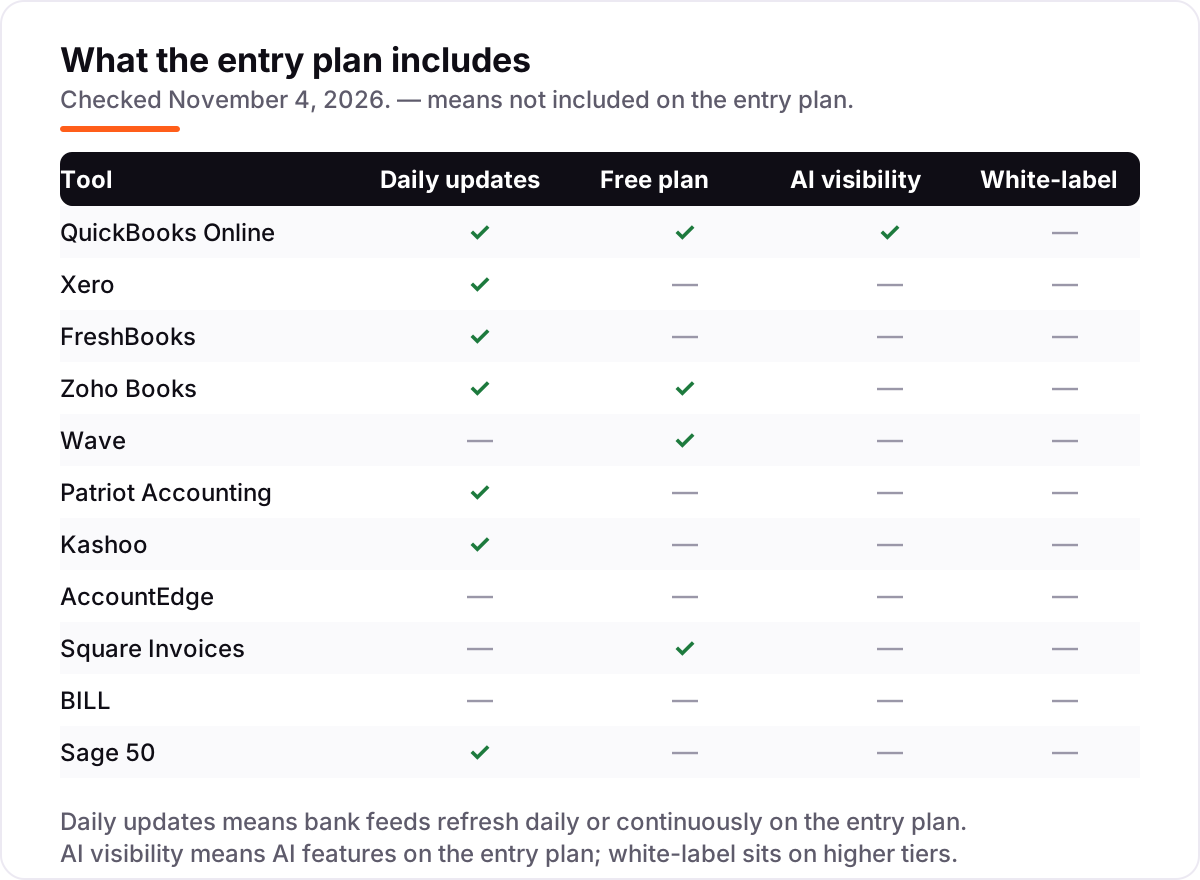
- Check the bank feed. Daily automatic bank imports save hours of manual entry; Wave Starter is the only tool here that makes you type transactions in by hand unless you pay for Pro, and AccountEdge often needs a manual CSV import.
- Decide whether you need payroll in the same place. QuickBooks Online, Wave and Patriot Accounting sell payroll as an add-on; Xero routes US payroll through Gusto, Zoho Books has no payroll module at all, and Sage 50 and AccountEdge include payroll in the install.
- Think about who else touches the books. If your accountant already lives in QuickBooks Online, picking anything else means paying them to learn a new system — ask before you buy.
Accounting is one system in your stack, not the whole stack. If the business also needs to be found online, our guide to marketing platforms for small business SEO covers the visibility side. And before you publish new pages for the services you sell, run your titles through the free SERP snippet preview tool — it shows exactly how the title and description will look in Google.
Whatever you shortlist, try it with real data before you pay. The free plans and trials in this list are long enough to run one genuine month — your invoices, your bank feed, your clients — and that month tells you more than any review can. Check two things in the trial: that the bank feed reconciles without daily fixing, and that your accountant can get in for free. Every full ledger here gives your accountant access at no extra charge, so there is no reason to buy before they have looked at it.
Small business accounting software pricing: what you will actually pay
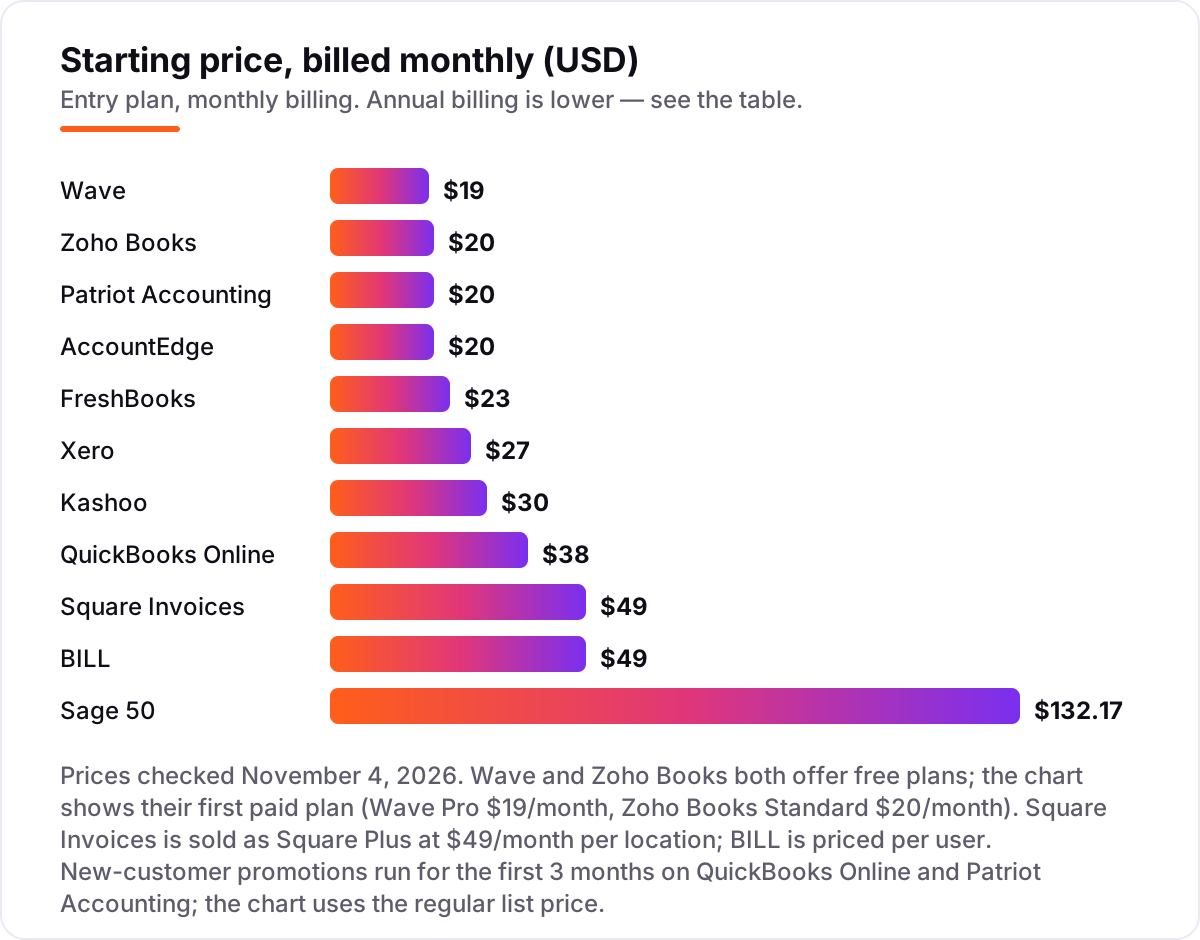
Take a three-person service business that sends about 40 invoices a month. On list prices, the subscription costs $20 a month on Zoho Books Standard, $19 on Wave Pro, $30 on Patriot Accounting Premium or Kashoo or AccountEdge Network Edition, $43 on FreshBooks Plus, $49 on Square Plus, $59 on Xero Growing, $85 on QuickBooks Online Essentials, $132.17 on Sage 50 Pro, and $147 on BILL Essentials at $49 per user. Three of those numbers need adjusting before they are real: FreshBooks Plus covers one user, so two extra team members at $11 each bring it to $65 a month; AccountEdge Network covers two users, so a third seat costs extra; and Sage 50 Pro covers one user, so a team means a higher tier.
Over a year, that is $180 on Zoho Books Standard billed annually, $190 on Wave Pro billed annually, $324 on Kashoo billed annually, $360 on Patriot Premium or AccountEdge Network, $588 on Square Plus, $708 on Xero Growing, $780 on FreshBooks Plus with two extra seats, $1,020 on QuickBooks Online Essentials, $1,586 on Sage 50 Pro for one user, and $1,764 on BILL Essentials for three users. For a straight ledger, the same three people and the same 40 invoices cost $180 a year at the cheap end and $1,020 at the dear end — a $840 gap that comes entirely from user caps and billing choices, not from features. BILL and Sage 50 sit outside that range because they solve different problems: BILL automates payables, Sage 50 is desktop depth.
Three costs sit outside every number above. First, the introductory discounts — 50% off for three months on QuickBooks Online and Patriot Accounting, 80% off for four months on FreshBooks — end, so budget on the list price. Xero's 90%-off-for-6-months offer expired on November 2, 2026. Second, payroll: $17–$50 a month plus $4–$7 per person paid, depending on the provider. Third, card processing on the invoices you send, which is charged per transaction rather than per month — typically 2.9% plus 30 cents, or 2.6% plus 15 cents in person on Square. If you run a finance firm rather than a general small business, the visibility tools differ too — see our guide to the best SEO platform for finance.
Annual billing cuts the bill on most tools here: Zoho Books Standard drops from $240 to $180 a year, Wave Pro from $228 to $190, Kashoo from $360 to $324, and FreshBooks takes 10% off. Xero publishes no annual price, so the monthly figure is the whole story. One more cost to check before you commit: a second business is a second subscription on most tools in this list. Wave Pro is priced per business, Square Plus is priced per location, and BILL is priced per user — so an owner with two businesses or two shops pays double whatever the chart shows.
Know the difference: accounting software vs invoicing tools vs a bookkeeper
The first confusion in this category is between a ledger and a billing tool. An invoicing tool sends bills and tracks payments; it does not keep a double-entry ledger, produce a balance sheet, or give your accountant a tax-ready set of books. Square Invoices is the example in this list: excellent at billing, not a ledger at all. BILL is a second case — it automates paying vendor bills, but it sits beside QuickBooks Online or Xero rather than replacing them. If a tool only invoices, or only pays bills, it belongs in a different list from the ledgers.
The second confusion is between a tool and a service. Accounting software records transactions and produces reports; a bookkeeper does the recording for you. Done-for-you bookkeeping services typically cost $200 or more a month — roughly ten times a software subscription — and they suit owners who will not spend an hour a week on the books. If you will do that hour, software is the cheaper buy by a wide margin.
A third distinction worth knowing is desktop versus cloud. Cloud tools like QuickBooks Online, Xero and Zoho Books live in the browser, update themselves and let your accountant log in from anywhere. Desktop tools like Sage 50 and AccountEdge live on your own machine, work offline and keep your data in your hands — but you install the updates, you make the backups, and remote access costs extra. Neither is wrong; they fit different owners.
Quick comparison: tool type by need
| Buyer | Best pick | Why |
|---|---|---|
| Solo freelancer on a budget | Wave | Free Starter plan, unlimited invoices, Pro is $19/month when you want bank feeds |
| Most small businesses | QuickBooks Online | The standard choice accountants know, from $38/month |
| Team that hates per-seat pricing | Xero | Unlimited users on every plan, Growing is $59/month |
| Service business that lives on invoices | FreshBooks | Invoicing-first design, Lite is $23/month for 5 clients |
| Best value with a free plan | Zoho Books | Free under $50,000 revenue, Standard is $20/month |
| Cheapest plain US ledger | Patriot Accounting | Flat $20/month, unlimited invoices, Premium is $30/month |
| Desktop with inventory | AccountEdge | Full ledger plus inventory for $20/month, data on your own machine |
| Bill-heavy team | BILL | Automated approvals and payments, from $49/user/month |
| Desktop powerhouse | Sage 50 | Inventory and job costing, Pro is $132.17/month |
Mistakes to avoid
- Budgeting on the promo price. The 50% and 80% introductory discounts in this list last three to four months. The list price is what you pay in month five, so compare tools on that number.
- Buying on the free plan, then finding the bank feed costs extra. Wave Starter is free, but automatic bank imports need Pro at $19 a month. If you process more than fifty transactions a month, count Pro in the price from day one.
- Ignoring the cap that bites first. A tool can be cheap and still be the wrong buy: Xero Early at $27 is no bargain once you pass 20 invoices a month, FreshBooks Lite at $23 is no bargain once you pass 5 clients, and BILL at $49 a user is no bargain once the whole team needs a seat.
- Paying for payroll before you have employees. Payroll is a separate subscription on every cloud tool here. Buy the accounting first, and add payroll the month you hire — not before.
- Forgetting the second business — or the second location. If you run two businesses, you pay for two subscriptions, and Square Plus charges per location. Price the second set of books before you commit to a tool for the first.
How we chose
We checked each vendor's own pricing page on November 4, 2026 and recorded the starting price exactly as shown, including the annual-billing figure where the page lists one, and we ranked the tools by fit for the most common buyer — a US small business owner doing their own books — not by brand size. Two prices needed a note: Kashoo's $324 annual figure is confirmed by the vendor-provided pricing on its G2 page, because Kashoo's own pricing page would not load in the browser today, and Square's Plus price is the per-location subscription that now carries invoicing after Square's January 2026 pricing redesign. Two ratings are missing on purpose: G2's Patriot profile covers the company's payroll product rather than its accounting software, and Square Invoices has no product-specific G2 page, so we show no rating for either rather than a misleading one. Zoho Books Standard is $20 a month on the vendor's own pricing page ($15 billed annually); the $12 figure quoted in some guides is the UK price (£12) mistaken for US dollars. No vendor paid for a place in this list, and none of the links here are affiliate links.
What to do next
Start with the free plan or trial of your top pick and run one real month of invoices through it. Check that the bank feed reconciles and the reports match what your accountant expects before you commit to a year. If invoicing is the whole job rather than the books, compare the billing-first options in our guide to invoicing software for small business. If the books are sorted but new customers are not finding you, our monthly SEO service handles the visibility side. Once your tools are in place, find out what's holding your rankings back.
Your stack only works if people find you
SerpAstra fixes what keeps your site off page one and makes it easy for AI assistants to recommend.
Get a free audit→Sources we checked (20)
- QuickBooks Online pricing — quickbooks.intuit.com/pricing (checked November 4, 2026)
- Xero pricing — xero.com/us/pricing-plans (checked November 4, 2026)
- FreshBooks pricing — freshbooks.com/pricing (checked November 4, 2026)
- Zoho Books pricing — zoho.com/us/books/pricing (checked November 4, 2026)
- Wave pricing — waveapps.com/pricing (checked November 4, 2026)
- Patriot Accounting pricing — patriotsoftware.com/pricing (checked November 4, 2026)
- Kashoo pricing — kashoo.com/pricing (checked November 4, 2026)
- AccountEdge pricing — accountedge.com/pricing (checked November 4, 2026)
- Square pricing — squareup.com/us/en/online-store/plans (checked November 4, 2026)
- BILL pricing — bill.com/product/pricing (checked November 4, 2026)
- Sage 50 pricing — sage.com/en-us/products/sage-50/pricing (checked November 4, 2026)
- QuickBooks Online on G2 — g2.com/products/quickbooks-online/reviews (checked November 4, 2026)
- Xero on G2 — g2.com/products/xero/reviews (checked November 4, 2026)
- FreshBooks on G2 — g2.com/products/freshbooks/reviews (checked November 4, 2026)
- Zoho Books on G2 — g2.com/products/zoho-books/reviews (checked November 4, 2026)
- Wave on G2 — g2.com/products/wave/reviews (checked November 4, 2026)
- Kashoo on G2 — g2.com/products/kashoo-kashoo/reviews (checked November 4, 2026)
- AccountEdge on G2 — g2.com/products/accountedge/reviews (checked November 4, 2026)
- BILL on G2 — g2.com/products/bill-com/reviews (checked November 4, 2026)
- Sage 50 on G2 — g2.com/products/sage-50/reviews (checked November 4, 2026)
Shamim
Founder of SerpAstra
A full-stack SEO and digital marketer who spends most days on Local SEO for dental practices, AI search visibility and lead generation.
Frequently asked questions
What is the best small business accounting software?
QuickBooks Online is the best fit for most small businesses: the widest accountant support, full double-entry accounting and room to grow, from $38/month. Xero is the better pick when several people touch the books, since every plan includes unlimited users. Wave is the best free option.
How much does small business accounting software cost?
Entry prices run from $0 to $132.17 a month. Wave and Zoho Books both have free plans, and the first paid plans cost $20–$30 a month. A three-person team typically pays $120–$1,020 a year for a straight ledger, before payroll, card processing and any per-user tools like BILL.
Is there really free accounting software for small businesses?
Yes, with limits. Wave Starter is free with unlimited invoices and no revenue cap, but bank feeds need the $19/month Pro plan. Zoho Books is free while annual revenue stays under $50,000, capped at 1,000 invoices a year. Square Invoices is free for billing alone, but it is not a full ledger.
What is the difference between accounting software and a bookkeeper?
Accounting software records the transactions; you or your accountant still do the judging. A bookkeeper — or a done-for-you service — does the recording for you and typically costs $200 or more a month. Software suits owners who will spend an hour a week on the books; a service suits owners who will not.
Do I still need an accountant if I use accounting software?
Yes, at least at year-end. The software keeps the ledger straight and produces the reports, but an accountant checks the tax position, handles filings and spots errors. Every full ledger in this list gives your accountant free access, so the software and the accountant work on the same books.
Can I switch accounting software later?
Yes, but plan the move for your year-end. Export your chart of accounts, customer and vendor lists, open invoices and transaction history from the old tool, then import them into the new one and reconcile the bank before going live. Switching mid-year means running two systems through tax season.
Does accounting software include payroll?
Usually not. QuickBooks Online, Wave and Patriot Accounting sell payroll as a paid add-on, Xero routes US payroll through Gusto, and Zoho Books has no payroll module at all. Budget roughly $17–$50 a month plus $4–$7 per person paid, on top of the accounting subscription.
Free SEO and AI visibility audit
Find out what is holding your rankings back
Send us your site. Within 2 business days you get a written audit, an AI visibility check and a short fix list ranked by impact. Free, with no contract attached.
Request my free audit→Related guides
 Accounting, Tax & Finance11 Best Invoicing Software for Small Business in 2026, Compared11 best invoicing software for small business compared on price, free plans and payment fees. Prices checked on vendor pricing pages, November 2, 2026.Read guide →
 Accounting, Tax & Finance10 Best Bookkeeping and Payroll Software for Small Business in 2026, ComparedThe 10 best bookkeeping and payroll software for small business, compared on real 2026 prices, per-employee payroll fees and free plans at your headcount.Read guide →
 SEO & AI Search8 Best SEO Platforms for Finance in 2026 (Pros, Cons and Pricing)8 best SEO platform for finance options compared on price, YMYL content tools, branch tracking and AI visibility. All prices checked November 1, 2026.Read guide →