
12 Best Software for Content Creation in 2026, Compared
12 best software for content creation compared with real 2026 prices, free plans and G2 ratings, sorted by what you make: writing, design, video or publishing.
 Shamim Mia, Founder, SerpAstraLast verified November 10, 202612 min read
We compare pricing pages, documentation and public reviews. We never accept payment for rankings.

Key takeaways
- Short-list first: Canva from $12/month billed annually for design, Jasper Pro from $59/month per seat billed annually for writing, and Frase from $39/month billed annually for briefs and optimization.
- The single most important buying factor is format: pick the tool built for what you actually make most — articles, graphics, video or a published blog — not the one with the longest feature list.
- Free plans are real here: Canva, Adobe Express, Descript, InVideo and Synthesia all let you start free, but paid plans remove watermarks, caps and premium assets.
- Every price below was checked on the vendor's own pricing page on November 10, 2026. Ratings are G2, with review counts shown.
On this page
Quick comparison
| Tool | Best for | Starting price | Free plan |
|---|---|---|---|
| Canva | Solo creators and small teams who need social graphics, presentations and short videos from one design tool | $12/mo (annual) | Yes (free plan) |
| Jasper | Marketing teams that need on-brand blog posts, ads and campaign copy at volume | $59/mo (annual) | No (7-day trial) |
| Frase | Solo content creators and small teams who want research, briefs and AI search tracking in one workflow | $39/mo (annual) | No (7-day trial) |
| Surfer | Bloggers and small SEO teams who optimize articles against the live SERP every week | $49/mo (annual) | No (7-day trial) |
| Writesonic | Freelancers and small teams who want fact-checked AI articles with SEO checks in one subscription | $16/mo (annual) | No (25-credit trial) |
| Adobe Express | Small businesses that need quick social graphics and short videos with Adobe Stock assets | $9.99/mo | Yes (free plan) |
| Descript | Podcasters and YouTubers who edit video and audio by editing the transcript | $16/mo (annual) | Yes (1 hour/mo) |
| InVideo | Solo creators who turn scripts and blog posts into short social videos every week | $10/mo (annual) | Yes (watermarked) |
| Pictory | Creators who repurpose long videos and blog posts into captioned short clips | $25/mo (annual) | No (14-day trial) |
| Synthesia | Teams that need presenter-led training and explainers in many languages without filming | $14/mo (annual) | Yes (Basic plan) |
| Clearscope | Content teams that optimize high-value pages and need AI visibility tracking on the entry plan | $129/mo | No (free trial) |
| Ghost | Independent publishers who want a fast blog and newsletter under their own brand | $15/mo (annual) | No (14-day trial) |
Make one of these tools?
We re-check this list every quarter. Send a correction, request a review, or ask about a clearly labeled sponsored spot.
Request a listingThe best software for content creation

Canva
Best for: Solo creators and small teams who need social graphics, presentations and short videos from one design tool
Canva is the broadest starting point in this list because it covers the visual half of content creation in one place: social graphics, presentations, documents, thumbnails and short videos, all from templates a non-designer can finish in minutes. Pro adds Brand Kit, Magic Resize and 141 million premium elements, so one design becomes every size without rebuilding it, and the free plan is usable enough to test the workflow before paying.
The trade-off is depth. Canva will not write your articles, score them for search or publish them, so written content still needs a writing tool and a publishing home. Large, page-heavy projects can also slow down. Buy Canva first when your bottleneck is visuals; add a writing tool second, not the other way round.
What we like
- Huge template library covers social posts, presentations, documents and short video in one editor
- Magic Resize and Brand Kit turn one design into every size and keep colours and fonts consistent
- Free plan is genuinely usable, and Pro adds 141 million premium elements plus 10x more AI use
Watch out for
- Premium templates, stock assets and Brand Kit sit behind the Pro paywall, so the free plan feels thin fast
- No built-in SEO or content scoring, so written content still needs a separate writing or optimization tool
- Large projects with many pages can slow down, per G2 reviewers

Jasper
Best for: Marketing teams that need on-brand blog posts, ads and campaign copy at volume
Jasper is the writing engine for teams that publish a lot and need every draft to sound like the same brand. Brand Voices and Knowledge assets feed the model your style, facts and product details, and the Canvas workspace carries a piece from brief to campaign without switching tools. The Pro plan includes one seat, two Brand Voices and five Knowledge assets, which is enough for a small team to run its core content from one login.
The price is the honest catch. At $59 per seat billed annually, a three-person team pays $177 a month, and the output still needs a human to check facts and tone. Jasper also scores nothing and publishes nothing, so pair it with an optimization tool and a publishing platform. Buy it when volume and brand consistency are the job.
What we like
- Brand Voices and Knowledge assets keep drafts on voice across campaigns and writers
- Canvas workspace and marketing agents cover briefs, drafts and campaign planning in one place
- Rated 4.7/5 on G2 from 1,319 reviews, with ease of use the most cited strength
Watch out for
- Per-seat pricing means a three-person team pays three times the headline price
- Output still needs a human edit for facts and tone, per G2 reviewers
- No content scoring or publishing, so ranking and distribution need other tools

Frase
Best for: Solo content creators and small teams who want research, briefs and AI search tracking in one workflow
Frase is the only tool in this list that runs the whole article loop in one place: research the SERP, build a brief, draft, score the draft for search and AI answers, then watch the published page and fix it when it slips. AI search tracking is included from the $39-a-month Starter plan, which is rare at this price, and the 4.8/5 G2 score is the joint highest for a writing tool here.
The limit is volume. Starter allows 10 articles and 50 audits a month for one seat on one site, so a team publishing daily will need Professional at $129 a month. Extra seats cost $29 each on the higher plans. Buy Frase when you publish a few careful articles a month and want them to rank and get cited.
What we like
- AI search tracking across ChatGPT, Perplexity, Claude, Gemini and more is included from Starter
- Research, briefs, writing, optimization and republishing run in one loop instead of five tools
- Rated 4.8/5 on G2 from 311 reviews, with easy setup the most cited strength
Watch out for
- Starter covers only 10 articles and 50 audits a month, so volume teams outgrow it quickly
- Extra seats cost $29/month each on Professional and Scale, on top of the base price
- One G2 reviewer notes years of stagnation and paid add-ons, so check the current feature list before buying

Surfer
Best for: Bloggers and small SEO teams who optimize articles against the live SERP every week
Surfer is the specialist for one job: making a draft score well against the pages already ranking. The Content Editor watches your terms, headings and structure as you write and scores the draft against the live SERP, which is more useful than a generic readability grade. Discovery covers 120 documents a year and tracks 10 pages, enough for a blog publishing about two articles a week.
The gap is AI visibility. Discovery tracks zero AI prompts, so if clients ask about ChatGPT and AI Overviews you need Standard at $99 a month billed annually. The document cap also bites fast for heavy publishers. Buy Surfer when ranking existing-style articles is the main goal; buy Frase when AI tracking matters from day one.
What we like
- Content Editor scores drafts against the live SERP with term and structure guidance as you write
- Rated 4.8/5 on G2 from 547 reviews, with content creation the most cited strength
- Tracks 10 pages and includes rank tracking hooks, so optimization and measurement stay together
Watch out for
- Discovery includes zero AI visibility tracking; that starts on Standard at $99/month billed annually
- 120 documents a year is about 10 a month, so heavy publishers hit the cap
- G2 reviewers frequently cite high pricing, especially on the entry plan

Writesonic
Best for: Freelancers and small teams who want fact-checked AI articles with SEO checks in one subscription
Writesonic is the cheapest full writing suite in this list: $16 a month billed annually for Article Writer 6.0, an SEO checker, brand voice controls and more than 80 writing tools. The fact-checking and citations are the real selling point — drafts arrive closer to publishable than a bare chatbot output, and real-time data keeps fast-moving topics current.
The meter is the catch. Individual gives you 100 credits a month, and heavy months cost extra, which is why G2 reviewers complain about the credit system. AI visibility tracking is also a separate GEO product, not part of this plan. Buy Writesonic when budget matters most and you publish a modest number of articles.
What we like
- Article Writer 6.0 drafts fact-checked, SEO-shaped articles with citations and real-time data
- Brand voice customization and 80+ AI writing tools cover blogs, ads and social posts
- Rated 4.7/5 on G2 from 2,114 reviews, with content creation the most cited strength
Watch out for
- 100 credits a month on Individual caps how much you can generate, and extra credits cost more
- G2 reviewers frequently cite high costs and an expensive credit system
- AI visibility tracking sits in the separate GEO product, not in the Individual writing plan

Adobe Express
Best for: Small businesses that need quick social graphics and short videos with Adobe Stock assets
Adobe Express is the quick-job tool: open a template, swap in your words and brand colours, resize it for each channel and export. Premium costs $9.99 a month, the cheapest paid plan in this list, and it unlocks Adobe Stock assets, Adobe Fonts, Resize and Brand Kits. The free plan covers the basics, so you can learn the editor before spending anything.
It is deliberately shallow. If you need layered design, print control or deep photo editing, a full design app is the right tool, and the AI templates are still hit and miss. Buy Adobe Express when you need a steady stream of simple, on-brand social graphics and short videos without a learning curve.
What we like
- Cheapest paid plan in this list at $9.99/month, with a usable free plan underneath it
- Premium unlocks Adobe Stock assets, Adobe Fonts, Resize and Brand Kits in one place
- Rated 4.5/5 on G2 from 855 reviews, with ease of use and speed the most cited strengths
Watch out for
- Most good templates and stock assets are locked behind Premium
- Customization is shallow next to full design apps, per G2 reviewers
- AI template quality disappoints some reviewers, and the AI assistant is still in beta

Descript
Best for: Podcasters and YouTubers who edit video and audio by editing the transcript
Descript changes how editing feels: instead of cutting on a timeline, you edit the transcript like a document, and the video and audio follow your edits. Studio Sound, filler-word removal and Overdub clean up a rough recording in the same project, and the free plan gives you one media hour a month to learn the workflow. Watch the two prices called $24 — Hobbyist on monthly billing and Creator on annual billing cost the same.
The meters need attention. Hobbyist covers 10 media hours and 400 AI credits a month, and serious creators will want Creator at $24 a month billed annually for 30 hours, 800 credits and 4K export. Buy Descript when you record talking-head video or podcasts and editing time is your bottleneck.
What we like
- Text-based editing: delete a word in the transcript and the video and audio follow
- Studio Sound, filler-word removal and Overdub clean up recordings without a separate audio tool
- Rated 4.6/5 on G2 from 936 reviews, with easy editing the most cited strength
Watch out for
- Hobbyist covers only 10 media hours a month, and the two meters (hours plus AI credits) confuse new buyers
- The app can feel slow or glitchy on large projects, per G2 reviewers
- Creator at $24/month billed annually is the practical entry for serious creators, not Hobbyist

InVideo
Best for: Solo creators who turn scripts and blog posts into short social videos every week
InVideo is the fastest route from a script to a finished short video. Give it a prompt or a blog post and it assembles voiceover, stock footage and captions, then hands you a full timeline editor to fix what the AI got wrong. Starter costs $10 a month per seat billed annually for 400 credits, and the free plan gives you 10 AI minutes a week to test the output.
Credits are the recurring complaint: generation burns through them faster than the plan page suggests, and several G2 reviewers call the system misleading. Free exports also carry a watermark. Buy InVideo when you need a weekly flow of short social videos and you are willing to watch the credit meter.
What we like
- AI turns a script or prompt into a finished video with voiceover, stock footage and captions
- 400 credits a month on Starter, with a full timeline editor on every plan including Starter
- Free plan lets you test the workflow before paying, with 10 AI minutes a week
Watch out for
- Credit-based pricing frustrates reviewers: generation burns credits faster than the plan suggests
- Free exports carry a watermark, and the free plan covers only 10 AI minutes a week
- G2's own listing shows conflicting Plus and Max prices, so confirm the plan at checkout

Pictory
Best for: Creators who repurpose long videos and blog posts into captioned short clips
Pictory is built for repurposing: feed it a long video, a script or a blog URL and it cuts captioned short clips with matched stock footage from Getty Images and Storyblocks. Starter costs $25 a month billed annually, includes one Brand Kit and ElevenLabs AI voices, and the 14-day trial gives you 300 AI credits to test the full workflow.
The allowance is the thing to plan around. Annual plans grant all credits upfront, so the 360-minute yearly allowance can run out in a busy month, and the AI voices are limited in range and emotion. Buy Pictory when you already have long content and need short clips from it every week.
What we like
- Script-to-video and blog-to-video with Getty Images and Storyblocks footage built in
- Auto-captions and one Brand Kit on Starter, with ElevenLabs AI voices included
- Rated 4.6/5 on G2 from 82 reviews, with ease of use and rapid video creation the most cited strengths
Watch out for
- Annual plans grant all credits upfront, so the 360-minute yearly allowance runs out in a busy month
- AI voice quality and voice options are limited, per G2 reviewers
- No permanent free plan, only a 14-day trial with watermarked downloads

Synthesia
Best for: Teams that need presenter-led training and explainers in many languages without filming
Synthesia makes presenter video without a camera, a studio or a shoot day. Type a script, pick an avatar, and it renders a talking-head video in more than 140 languages, which is why training and enablement teams use it for content that changes often. Starter costs $14 a month billed annually, and the first month is $9 before the standard $19 monthly rate applies.
Minutes are the limit. Starter covers about 22 minutes of video a month including the free 10, so anyone publishing weekly will need Pro at $89 a month. Avatars also have limits on styling and pronunciation. Buy Synthesia when you need many presenter videos in many languages and filming is not practical.
What we like
- Realistic AI avatars in 140+ languages turn a script into a presenter video with no camera or studio
- Re-edits do not cost a full re-render, so fixing a line is cheap compared with reshooting
- Rated 4.6/5 on G2 from 2,755 reviews, with ease of use the most cited strength
Watch out for
- Starter covers about 22 minutes of video a month in total, so regular publishers need Pro at $89/month
- Avatar and pronunciation limits frustrate reviewers, and narration can drift from on-screen timing
- Credit costs are the same whatever avatar model you use, so premium avatars add no extra value

Clearscope
Best for: Content teams that optimize high-value pages and need AI visibility tracking on the entry plan
Clearscope is the quality pick in this list and the highest rated, at 4.9/5 on G2 from 92 reviews. Essentials grades your draft against the pages already ranking, with term coverage and readability guidance that is easy to act on, and it includes 50 tracked prompts for AI visibility — the feature Surfer charges more to add. For a page that has to earn revenue, that depth is the point.
It is also the most expensive way in, at $129 a month, with only 20 drafts a month on Essentials and no free plan. The $99 rate on the pricing page lasts six months, then the standard price applies. Buy Clearscope when a small number of high-value pages matter more than publishing volume.
What we like
- Highest rated tool in this list at 4.9/5 on G2, with content quality the most cited strength
- Essentials includes 50 tracked prompts for AI visibility, 50 tracked queries and 50 pages
- Content reports grade drafts against top-ranking pages with clear term and readability guidance
Watch out for
- Highest starting price in this list at $129/month, and only 20 drafts a month on Essentials
- The $99/month rate on the pricing page lasts only 6 months, then the standard $129 applies
- No free plan, and white-label reporting sits on higher tiers

Ghost
Best for: Independent publishers who want a fast blog and newsletter under their own brand
Ghost is the publishing home the other tools feed into: a fast blog with memberships and email newsletters built in, under your own domain, with 0% transaction fees on your revenue. Managed hosting starts at $15 a month billed annually, and the software itself is open source, so you can self-host it free if you have the technical skill. The editor is clean and built for reading, not for page building.
Starter is deliberately limited: no paid tiers and no custom themes, so monetization needs the $29-a-month Publisher plan. There is also no free plan on managed hosting, only a 14-day trial. Buy Ghost when publishing is the business, not just a channel, and you want to own the audience.
What we like
- Publishing, memberships and email newsletters are built in, with 0% transaction fees on your revenue
- Clean, fast editor and themes built for reading, with a custom domain included
- Open-source software is free to self-host, so you are never locked into managed hosting
Watch out for
- Starter allows no paid tiers or custom themes, so monetization needs Publisher at $29/month
- No free plan on managed hosting, only a 14-day trial; self-hosting is free but needs technical setup
- G2 reviewers cite limits on lower tiers and cost concerns for advanced features
What content creation software actually covers
The best software for content creation covers four jobs that used to need four different people: writing the words, designing the visuals, making the video, and publishing it somewhere people can find it. The 12 tools in this list split across those four jobs, and none of them does all four well. That is the first thing to accept before you compare prices: you are choosing a stack, not a single winner.
A writing tool drafts and polishes text. A design tool makes the graphics, thumbnails and slides. A video tool turns scripts or recordings into finished clips. A publishing platform puts the result on your own site with a newsletter attached. Most small businesses need one tool from two or three of those groups, and the right combination depends on which format they publish most. Our guide to content marketing software covers the wider planning side if you need it.
Quick comparison: tool type by need
| Buyer | Best pick | Why |
|---|---|---|
| Solo creator who needs everything | Canva | $12/month billed annually, design, documents and short video in one place |
| Marketing team writing at volume | Jasper | Brand Voices and campaign agents from $59/month per seat billed annually |
| Bloggers who want articles to rank | Frase or Surfer | Frase from $39/month billed annually with AI tracking; Surfer from $49/month |
| Tight budget, mostly writing | Writesonic | Fact-checked articles from $16/month billed annually |
| Quick social graphics and video | Adobe Express | $9.99/month, the cheapest paid plan in this list |
| Podcasts and talking-head video | Descript | Edit by editing the transcript, from $16/month billed annually |
| Short social videos from scripts | InVideo or Pictory | InVideo from $10/month billed annually; Pictory from $25/month |
| Presenter videos without filming | Synthesia | AI avatars in 140+ languages from $14/month billed annually |
| High-value pages that must rank | Clearscope | 4.9/5 on G2, AI visibility included, from $129/month |
| Publishing under your own brand | Ghost | Blog, newsletter and memberships from $15/month billed annually |
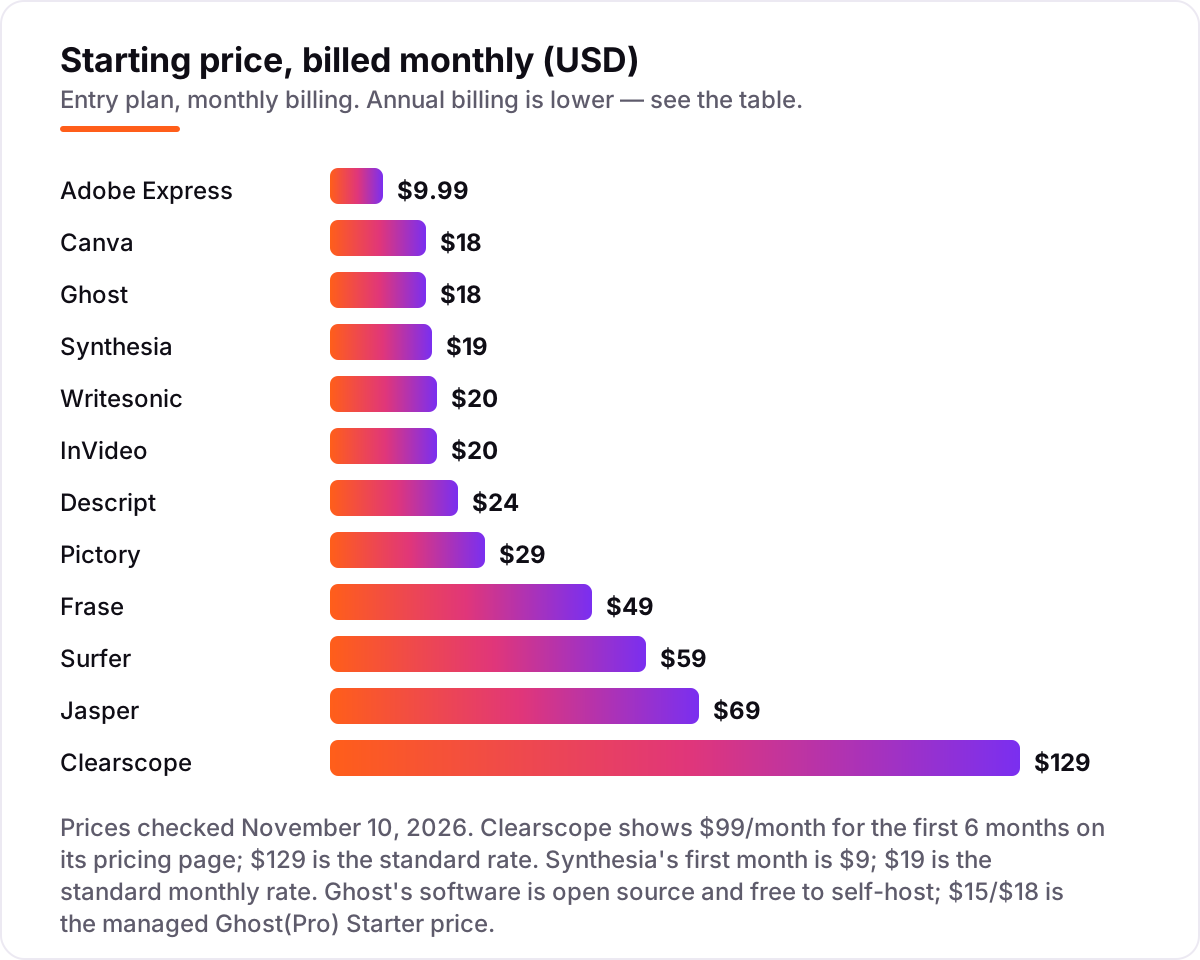
How to choose the best software for content creation
- Start with your main format. If you publish articles, start with a writing or optimization tool. If you publish social posts, start with a design tool. If you publish video, start with a video tool. The format you make most decides the first purchase.
- Read the allowance, not the headline. Every tool here meters something: articles, documents, minutes or credits. A $10 plan that covers 10 articles a month is cheaper than a $25 plan that covers 100, but only if you publish fewer than 10.
- Check the free plan honestly. Watermarked exports, capped minutes and locked templates are fine for testing, but they are not a publishing plan. If the free tier cannot produce your normal weekly output, budget for the paid plan from day one.
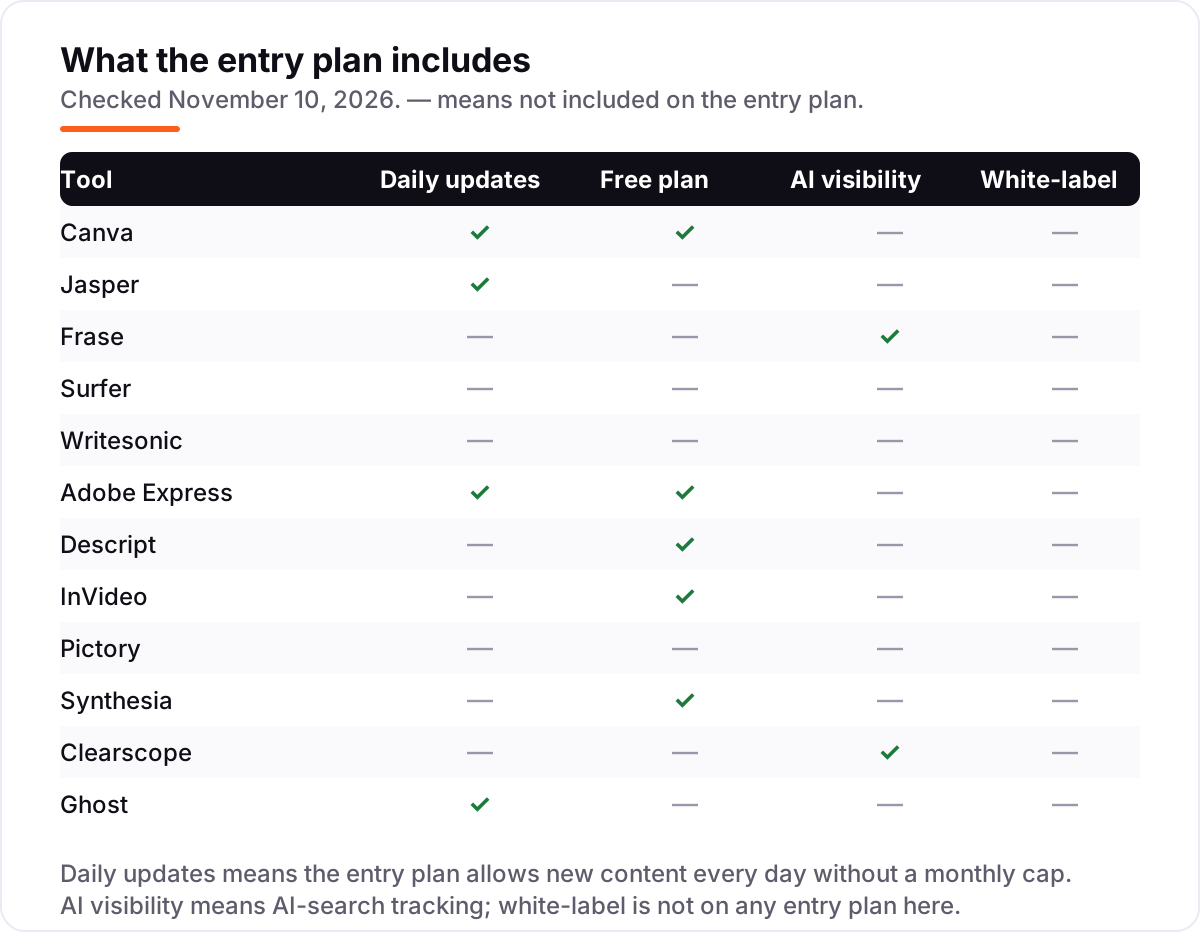
- Ask where it ranks and gets cited. Frase and Clearscope track AI visibility on their entry plans; Surfer does not. If search and AI answers bring your customers, that difference matters more than a $10 price gap.
- Try the real workflow for a week. Every tool in this list has a free plan or a free trial. Make your actual content — your article, your thumbnail, your clip — and check whether the output is good enough to publish before you pay.
Before you publish the articles these tools help you write, run your titles through the free SERP snippet preview tool — it shows exactly how the title and description will look in Google.
Content creation software pricing: what you will actually pay
A solo creator's starter stack on annual billing costs $76 a month: Canva Pro at $12, Frase Starter at $39 and Pictory Starter at $25. That covers design, writing and optimization, and short video, with a free Adobe Express plan underneath for quick graphics. Swap Pictory for InVideo Starter at $10 and the stack drops to $61 a month, but you lose Pictory's repurposing workflow.
A three-person marketing team pays more because of seats. Jasper Pro at $59 per seat billed annually costs $177 a month for three seats, and adding Canva Pro at $12 brings the pair to $189 a month before any video tool. That is why per-seat pricing deserves its own line in your budget: the headline price is rarely the team price. Our AI content generation tools guide breaks down the writing-only options if you want to compare that part of the stack separately.
Know the difference: creation software, marketing suites and publishing platforms
Creation software makes the thing: the article, the graphic, the video. A marketing suite plans, schedules and measures the thing, and a publishing platform hosts it under your brand. The confusion costs money because the categories overlap at the edges — Canva schedules posts, Jasper plans campaigns, Ghost sends newsletters — but none of them replaces the other category.
The practical test is simple. If the tool's main output is a file you can download — a draft, a design, a video — it is creation software. If its main output is a calendar, a report or a scheduled post, it is a marketing suite. If its main output is a live page on your domain, it is a publishing platform. Buy creation software first, because without content there is nothing to schedule or publish. Our video content creation software guide goes deeper on the video half of this list.
How we chose
We checked each vendor's own pricing page on November 10, 2026 and recorded the starting price exactly as shown, including the annual-billing figure where the page lists one. Ratings come from G2, with the review count shown for every tool. Two prices carry a note: Clearscope shows $99/month for the first 6 months before its standard $129 rate, and Synthesia's first month is $9 before its standard $19 monthly rate. Descript's entry plan is Hobbyist, not Creator, and its two $24 prices — Hobbyist monthly and Creator annual — are easy to mix up. We ranked the tools by fit for the most common buyer — a solo creator or small team making articles, graphics and short video — not by brand size. No vendor paid for a place in this list, and none of the links here are affiliate links. If search visibility is the reason you are creating content, our AI search optimization service is the next step after the tools are in place.
What to do next
Start with the decision path above: name your main format, read the allowance on the entry plan, and try the free plan or trial with your real content for a week. Then buy the one tool that covers your main format and add the second tool only when the first one is earning its keep. If the numbers match your weekly output and the reports make sense to a client, you have your stack. Once your tools are in place, find out what's holding your rankings back.
Your stack only works if people find you
SerpAstra fixes what keeps your site off page one and makes it easy for AI assistants to recommend.
Get a free audit→Sources we checked (24)
- Canva pricing — canva.com/pricing (checked November 10, 2026)
- Canva on G2 — 4.7/5, 7,660 reviews (checked November 10, 2026)
- Jasper pricing — jasper.ai/pricing (checked November 10, 2026)
- Jasper on G2 — 4.7/5, 1,319 reviews (checked November 10, 2026)
- Frase pricing — frase.io/pricing (checked November 10, 2026)
- Frase on G2 — 4.8/5, 311 reviews (checked November 10, 2026)
- Surfer pricing — surferseo.com/pricing (checked November 10, 2026)
- Surfer on G2 — 4.8/5, 547 reviews (checked November 10, 2026)
- Writesonic pricing — writesonic.com/pricing (checked November 10, 2026)
- Writesonic on G2 — 4.7/5, 2,114 reviews (checked November 10, 2026)
- Adobe Express pricing — adobe.com/express/plans (checked November 10, 2026)
- Adobe Express on G2 — 4.5/5, 855 reviews (checked November 10, 2026)
- Descript pricing — descript.com/pricing (checked November 10, 2026)
- Descript on G2 — 4.6/5, 936 reviews (checked November 10, 2026)
- InVideo pricing — invideo.io/pricing (checked November 10, 2026)
- InVideo on G2 — 4.2/5, 184 reviews (checked November 10, 2026)
- Pictory pricing — pictory.ai/pricing (checked November 10, 2026)
- Pictory on G2 — 4.6/5, 82 reviews (checked November 10, 2026)
- Synthesia pricing — synthesia.io/pricing (checked November 10, 2026)
- Synthesia on G2 — 4.6/5, 2,755 reviews (checked November 10, 2026)
- Clearscope pricing — clearscope.io/pricing (checked November 10, 2026)
- Clearscope on G2 — 4.9/5, 92 reviews (checked November 10, 2026)
- Ghost pricing — ghost.org/pricing (checked November 10, 2026)
- Ghost on G2 — 4.0/5, 40 reviews (checked November 10, 2026)
Shamim
Founder of SerpAstra
A full-stack SEO and digital marketer who spends most days on Local SEO for dental practices, AI search visibility and lead generation.
Frequently asked questions
What is the best software for content creation in 2026?
Canva is the best starting point for most buyers because it covers design, documents and short video from $12/month billed annually. For writing, Jasper leads on brand consistency and Frase leads on the full research-to-publish loop. Pick by format first: the tool built for what you make most usually wins.
How much does content creation software cost?
Between $9.99 and $129 a month at the entry level. Adobe Express starts at $9.99, Canva Pro at $12 billed annually, and Clearscope at $129. Most solo creators land between $25 and $60 a month for one writing tool plus one design tool, before any video tool.
Is there free content creation software?
Yes, with limits. Canva, Adobe Express, Descript, InVideo and Synthesia all have free plans, and Ghost's software is free to self-host. Free plans usually add watermarks, cap monthly output or lock premium assets, so they suit testing and light use rather than daily publishing.
What is the difference between Jasper and Frase?
Jasper is a writing engine: it drafts on-brand marketing copy fast, but it scores nothing and publishes nothing. Frase runs the whole article loop — research, briefs, drafting, SEO and GEO scoring, and AI search tracking — from $39/month billed annually. Choose Jasper for volume and voice, Frase for ranking.
Do I need separate tools for writing, design and video?
Usually, yes — no single tool in this list does all three well. A common stack is one writing tool, Canva or Adobe Express for design, and one video tool. Start with the format you publish most, add the second tool when that format is covered, and keep the stack to three tools.
Which content creation tool is best for video?
Descript is best if you record real video or podcasts, because you edit by editing the transcript. InVideo and Pictory are best for turning scripts into finished clips without filming, and Synthesia is best for presenter videos in many languages. Check the monthly minute or credit cap before you buy.
What should I check before paying for content creation software?
Four things: what counts against your monthly allowance (articles, documents, minutes or credits), whether the price is monthly or annual billing, whether exports carry a watermark on the plan you pick, and whether AI visibility tracking is included or a paid add-on. All four vary widely across this list.
Free SEO and AI visibility audit
Find out what is holding your rankings back
Send us your site. Within 2 business days you get a written audit, an AI visibility check and a short fix list ranked by impact. Free, with no contract attached.
Request my free audit→Related guides
 Digital Marketing & Ads10 Best Content Marketing Software in 2026, Compared10 best content marketing software tools compared on price, planning, optimization and publishing, with starting prices and the right pick for every team size.Read guide →
 AI, Data & Analytics11 Best AI Content Generation Tools in 2026 (Free and Paid, Compared)11 best ai content generation tools compared on price, free plans, SEO scoring and AI visibility. Prices checked on the vendor pricing page, November 2, 2026.Read guide →
 Design, Video & Creative10 Best Video Content Creation Software in 2026, ComparedCompare the 10 best video content creation software tools of 2026 on price, free plans and AI features, with every price checked November 4, 2026.Read guide →