
7 Best Software for Creating Newsletters in 2026, Compared
Compare the 7 best software for creating newsletters on price, free plans and monetization, with every starting price checked November 6, 2026.
 Shamim Mia, Founder, SerpAstraLast verified November 6, 202612 min read
We compare pricing pages, documentation and public reviews. We never accept payment for rankings.

Key takeaways
- Mailchimp is the best fit for most senders at $13/month; beehiiv is the newsletter-native pick at $59/month for publishers who monetize, and MailerLite is the value pick at $12/month with a real free plan.
- Five of the seven tools have free plans — Kit to 10,000 subscribers, beehiiv to 2,500, Mailchimp and MailerLite to 250 — while Constant Contact and AWeber offer only a free trial.
- The single most important buying factor is how you are billed: most tools charge by contacts stored, Brevo charges by emails sent, and the cap you hit first decides what you actually pay.
- Annual billing cuts the bill on most tools here: Constant Contact Lite drops to $10.20 a month, MailerLite Comfort to $10.80 and beehiiv Lite to $49 — but Mailchimp offers no annual discount at all.
On this page
Quick comparison
| Tool | Best for | Starting price | Free plan |
|---|---|---|---|
| Mailchimp | Small businesses that want the most widely known newsletter tool, with templates and integrations for every job | $13/mo | Yes (Free plan) |
| beehiiv | Newsletter publishers who want to grow and monetize a publication with referrals, recommendations and ads | $59/mo | Yes (Free plan) |
| MailerLite | Small businesses and solo senders who want a capable newsletter tool at the lowest honest price | $12/mo | Yes (Free plan) |
| Constant Contact | Small businesses and nonprofits that want the simplest setup, live phone support and event tools | $12/mo | No (30-day trial) |
| Kit | Creators who run an email-first business and want automations, sequences and selling built in | $39/mo | Yes (Free plan) |
| Brevo | Senders with a large list but modest volume who want to pay by emails sent, not contacts stored | $9/mo | Yes (Free plan) |
| AWeber | Small businesses that want a long-running, plain email tool with 24/7 human support | $15/mo | No (14-day trial) |
Make one of these tools?
We re-check this list every quarter. Send a correction, request a review, or ask about a clearly labeled sponsored spot.
Request a listingThe best software for creating newsletters

Mailchimp
Best for: Small businesses that want the most widely known newsletter tool, with templates and integrations for every job
Mailchimp is the default recommendation for a reason: it is the easiest newsletter tool to start, the templates look good out of the box, and it connects to everything a small business uses. Essentials costs $13 a month for up to 500 contacts and includes A/B testing, scheduling, pre-built templates and 24/7 email and chat support. The free plan covers 250 contacts and 500 sends a month, which suits a brand-new list.
The catch is how the bill grows. Mailchimp counts every contact toward the tier, including unsubscribed addresses you have not archived, so a list with years of dead addresses costs real money. Full automation flows need Standard at $20 a month, and there is no annual-billing discount on the marketing plans. Buy Mailchimp when you want the tool everyone already knows; buy MailerLite when the budget matters more.
What we like
- The most widely known newsletter tool, so freelancers, agencies and virtual assistants already know it
- Free plan covers 250 contacts and 500 sends a month, enough to test a real newsletter
- Integrations cover Shopify, WordPress, Canva and Zapier, so the list connects to the rest of the stack
- A/B testing, scheduling and pre-built templates included from Essentials
Watch out for
- Counts unsubscribed and non-subscribed contacts toward the billing tier until you archive them
- No annual-billing discount on the marketing plans — the monthly price is the price
- Full automation flows need Standard at $20/month; Essentials caps flows at 4 steps

beehiiv
Best for: Newsletter publishers who want to grow and monetize a publication with referrals, recommendations and ads
beehiiv was built by newsletter operators for newsletter operators, and it shows: referrals, recommendations, an ad network and paid subscriptions are built in rather than bolted on. Lite costs $59 a month for up to 1,000 subscribers and adds paid subscriptions at a 0% take rate, ad monetization, automations and A/B testing. The free plan covers up to 2,500 subscribers with unlimited sends.
The trade-off is the price. Lite is the dearest entry plan in this list, and the bill climbs as the subscriber count rises — $139 a month at 10,000 subscribers. Removing beehiiv branding waits for Pro at $109 a month, and the design options are plainer than Mailchimp's. Choose beehiiv when the newsletter itself is the business; choose Mailchimp when it is one channel among many.
What we like
- Built for newsletters first: referrals, recommendations, an ad network and paid subscriptions are built in
- Takes 0% of paid subscription revenue — only Stripe's 2.9% + $0.30 processing fee applies
- Free plan covers up to 2,500 subscribers with unlimited sends, the most generous free tier here
- Paid subscriptions, automations and A/B testing all arrive on Lite, the first paid plan
Watch out for
- Lite at $59/month is the dearest entry price in this list, and it rises with subscriber count
- Removing beehiiv branding waits for Pro at $109/month
- Design flexibility trails Mailchimp and MailerLite, with fewer polished templates

MailerLite
Best for: Small businesses and solo senders who want a capable newsletter tool at the lowest honest price
MailerLite is the value pick in this list because Comfort gives you the full toolset at the lowest honest price: $12 a month for up to 500 subscribers, with unlimited templates, landing pages, forms, automations and the AI writing assistant. The free plan covers 250 subscribers and 2,500 emails a month, with all three email editors included. Removing the MailerLite logo is included on Comfort, not held for a higher tier.
The limits are the ones that come with a cheap plan. The free plan was cut to 250 subscribers in June 2026, so a growing list moves to paid quickly, and sending on Comfort caps at ten times your subscriber tier each month. Advanced automation and reporting trail Mailchimp and Kit. Pick MailerLite when the budget matters most and the newsletter is straightforward.
What we like
- Cheapest capable paid plan here: Comfort is $12/month for up to 500 subscribers
- AI writing assistant, landing pages, forms and a website included from Comfort
- Free plan is a real starter: 250 subscribers, 2,500 emails a month, automations and all three editors
- Removing the MailerLite logo is included on Comfort, not held for a higher tier
Watch out for
- Free plan was cut to 250 subscribers in June 2026, so growing lists move to paid quickly
- Advanced automation and reporting trail Mailchimp and Kit; complex journeys need workarounds
- Sending on Comfort caps at 10 times the subscriber tier each month

Constant Contact
Best for: Small businesses and nonprofits that want the simplest setup, live phone support and event tools
Constant Contact is the simplest tool here, and the one most likely to answer the phone: phone and chat support come on every plan, including Lite at $12 a month for up to 500 contacts. Lite includes the drag-and-drop editor, an AI copy generator, templates, social posting, sign-up forms and event tools, so one login runs the newsletter and the event list. Annual billing drops Lite to $10.20 a month.
The catch is that there is no free plan — only a 30-day trial — so every sender pays from day one. Lite is thin on automation: one automation template, no scheduling and no A/B testing, which arrive on Standard at $35 a month. The price rises with the list, reaching $30 a month past 500 contacts. Choose Constant Contact when simple setup and support matter more than automation depth.
What we like
- Live phone and chat support on every plan, including Lite — rare at this price
- Event marketing and social posting sit next to email, so one login covers the newsletter and the event
- Annual billing cuts Lite to $10.20/month, and nonprofits save up to 30% on prepay
- Simple setup suits owners with no email experience; templates and an AI copy generator do the heavy lifting
Watch out for
- No free plan — only a 30-day trial — so every sender pays from day one
- Automation is thin on Lite: one automation template and no scheduling or A/B testing
- Price rises with contact count, reaching $30/month past 500 contacts

Kit
Best for: Creators who run an email-first business and want automations, sequences and selling built in
Kit, formerly ConvertKit, is built for creators whose business is the email list: visual automations, sequences, landing pages and selling sit in one place. The free plan covers up to 10,000 subscribers with unlimited sends — the easiest free start in this list. Creator costs $39 a month for up to 1,000 subscribers and adds unlimited visual automations, sequences, integrations and Kit commerce, plus a free migration service.
The price is the problem. Creator more than doubled in September 2025, from about $15 to $39 a month at 1,000 subscribers, and there is no paid plan below that tier — the jump from free to Creator is $39 a month. Email design is functional rather than beautiful, with fewer polished templates than Mailchimp. Pick Kit when you sell from your list; pick MailerLite when you only send a newsletter.
What we like
- Free plan covers up to 10,000 subscribers with unlimited sends, landing pages and forms
- Visual automations and sequences included from Creator, built for creators who sell
- Paid newsletters, digital products and tip jars built in, with only 3.5% + 30c per sale
- Free migration service rebuilds forms, templates and automations when you switch
Watch out for
- Creator more than doubled in price in September 2025, from about $15 to $39/month at 1,000 subscribers
- No paid plan below 1,000 subscribers — the jump from free to Creator is $39/month
- Email design is functional rather than beautiful, with a smaller template library than Mailchimp

Brevo
Best for: Senders with a large list but modest volume who want to pay by emails sent, not contacts stored
Brevo is the cheapest paid plan in this list because it bills by emails sent rather than contacts stored: Starter costs $9 a month for 500 contacts and 5,000 emails a month, with the drag-and-drop editor, templates, an AI content generator, segmentation and forms included. The free plan stores up to 100,000 contacts with 300 emails a day, so a large list that sends rarely costs nothing at all.
The structure has edges. Starter covers only 500 contacts, so storing a bigger list costs more before you send a single email, and removing the Brevo logo costs another $10.80 a month on top. Automation and A/B testing wait for Standard at $18 a month. Choose Brevo when your list is large but your sending is modest, and the per-email price beats every per-contact plan here.
What we like
- Cheapest paid plan here at $9/month, and it bills by emails sent rather than contacts stored
- Free plan stores up to 100,000 contacts with 300 emails a day, so a big quiet list costs nothing
- Transactional email, SMS and WhatsApp sit in the same account as the newsletter
- AI content generator, segmentation and forms included from Starter
Watch out for
- Starter covers only 500 contacts, so storing a bigger list costs more before you send a single email
- Removing the Brevo logo costs another $10.80/month on top of Starter
- Automation and A/B testing wait for Standard at $18/month

AWeber
Best for: Small businesses that want a long-running, plain email tool with 24/7 human support
AWeber has sent email for small businesses since 1998, and it still does the job plainly: Lite costs $15 a month for up to 500 subscribers and includes landing pages, automations, ecommerce tools, an AI subject line assistant and 24/7 live support. RSS-to-email turns a blog feed into a newsletter automatically, which suits a business that already publishes. The 14-day trial lets you send real campaigns before paying.
The limits are the ones that come with the entry plan. Lite caps the account at one list, one segment, three automations and three landing pages, and AWeber branding stays on every email until Plus at $30 a month. The templates and interface also feel dated next to MailerLite and beehiiv. Pick AWeber when you want a steady, plain tool with human support on call.
What we like
- 24/7 live support on every plan, including Lite, with phone, chat and email
- RSS-to-email turns a blog feed into a newsletter automatically
- Ecommerce tools and landing pages included from Lite, so a small shop can sell from email
- AI subject line assistant and AI email builder included on the entry plan
Watch out for
- No free plan — only a 14-day trial — and Lite keeps AWeber branding on every email
- Lite caps the account at one list, one segment, three automations and three landing pages
- Templates and the interface feel dated next to MailerLite and beehiiv
The best software for creating newsletters does three jobs at once: it makes the email look good, it grows the list, and it gets the email into the inbox. We ranked the seven tools below by fit for the most common buyer — a small business or creator sending a regular newsletter — starting with the most widely known and ending with the longest-running option, and every price was checked on the vendor's own pricing page on November 6, 2026.
How to choose the best software for creating newsletters
- Decide what the newsletter is for. A sales newsletter needs templates, automation and ecommerce; a paid publication needs subscriptions, referrals and an ad network. beehiiv and Kit are built for the second job; Mailchimp, MailerLite and Constant Contact for the first.
- Check how you are billed. Mailchimp, MailerLite, Constant Contact, Kit and AWeber charge by contacts or subscribers; Brevo charges by emails sent. A large list that sends rarely is cheaper on Brevo; a small list that sends often is cheaper on MailerLite.
- Count the free plan's real limits. Kit's free plan covers 10,000 subscribers, beehiiv's 2,500, Mailchimp's and MailerLite's 250. Constant Contact and AWeber have no free plan, only a trial.
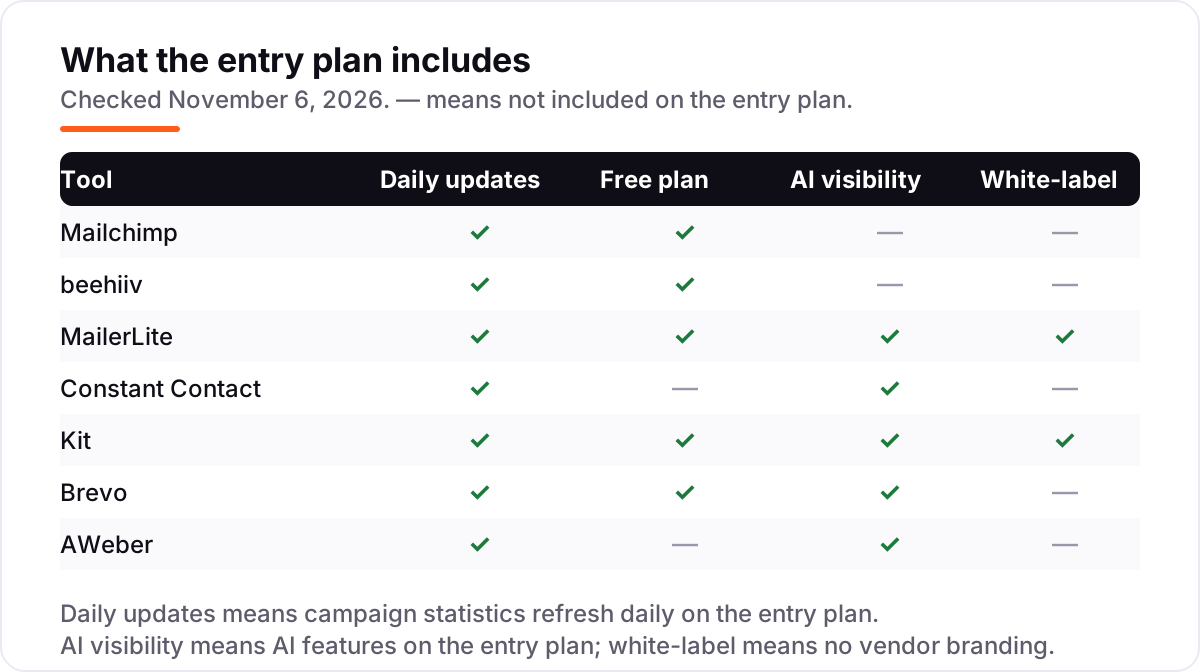
- Check what the entry plan leaves out. Automation, A/B testing and branding removal sit on higher tiers on several tools here — the feature that forces your upgrade is your real starting price.
- Test deliverability before you commit. Set up SPF, DKIM and DMARC on your sending domain, then send to a small segment and check the spam rate before you move the whole list.
A newsletter is one system in your stack, not the whole stack. If the business also needs to be found online, our monthly SEO service handles the visibility side. And before you publish the archive page for your newsletter, run your titles through the free SERP snippet preview tool — it shows exactly how the title and description will look in Google.
Whatever you shortlist, try it with real subscribers before you pay. The free plans and trials in this list are long enough to send two or three genuine issues, and those issues tell you more than any review can. Check two things in the trial: that the editor builds the layout you want without fiddling, and that the reports show opens and clicks clearly.
Newsletter software pricing: what you will actually pay
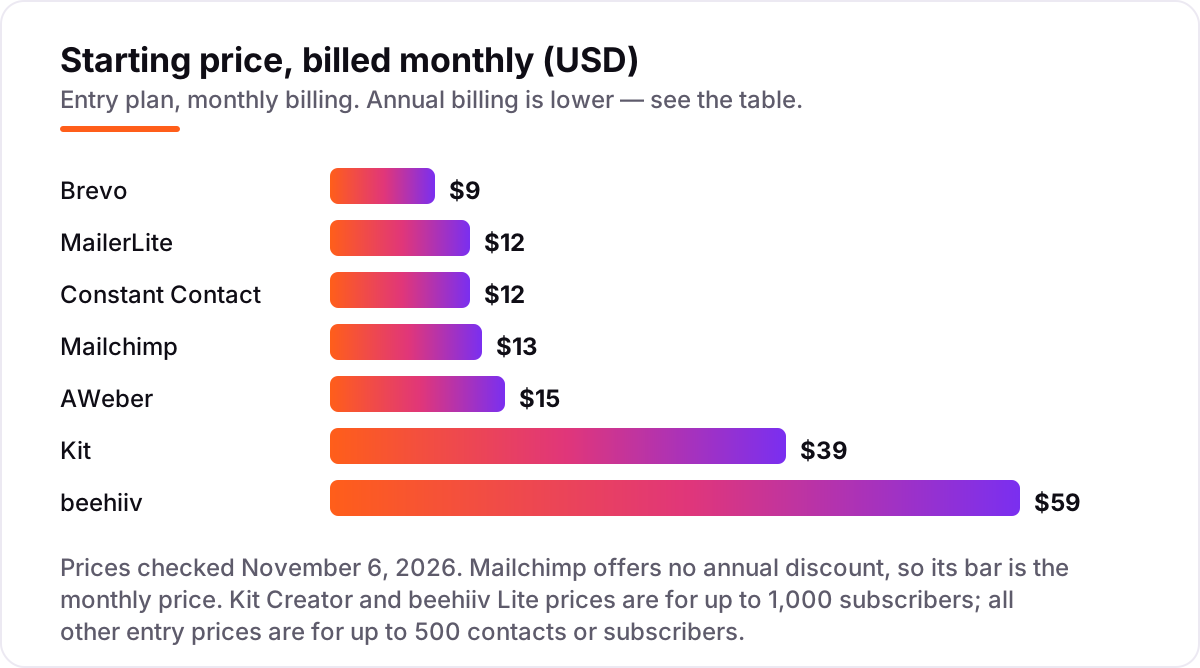
Take a 500-subscriber newsletter sent once a week — about 2,000 sends a month. On list prices, the monthly cost is $0 on Kit's free plan, $9 on Brevo Starter, $12 on MailerLite Comfort or Constant Contact Lite, $13 on Mailchimp Essentials, $15 on AWeber Lite, $39 on Kit Creator and $59 on beehiiv Lite. Three of those numbers need adjusting before they are real: Mailchimp's free plan stops at 250 contacts, so a 500-subscriber list cannot stay free; Kit's free plan covers the whole list, but the first welcome sequence needs Creator at $39; and beehiiv's $59 buys monetization tools the others charge extra for or do not offer.
Over a year, that is $0 on Kit Free, $97 on Brevo Starter billed annually, $122 on Constant Contact Lite billed annually, $130 on MailerLite Comfort billed annually, $150 on AWeber Lite billed annually, $156 on Mailchimp Essentials, $390 on Kit Creator billed annually and $588 on beehiiv Lite billed annually. The same 500 subscribers and the same four issues a month cost $0 a year on Kit's free plan and $588 on beehiiv Lite billed annually — and among the paid plans, $97 at the cheap end and $588 at the dear end, a $491 gap that comes from what each tool includes, not from the size of the list.
Three costs sit outside every number above. First, the subscriber count: every tool except Brevo raises the price as the list grows — Mailchimp Essentials reaches $75 a month at 5,000 contacts, and beehiiv Lite reaches $139 a month at 10,000 subscribers. Second, sending limits: Brevo Starter caps at 5,000 emails a month, so a daily sender outgrows it fast. Third, the revenue cut: beehiiv takes 0% of paid subscription revenue and Kit takes 3.5% + 30c per sale, while a platform that takes a percentage of revenue costs more as the newsletter earns. If you run a paid newsletter, compare providers in our guide to email marketing platforms for newsletters.
Know the difference: newsletter software vs email marketing platforms
The confusion in this category is between a tool built for newsletters and a tool built for email marketing. Newsletter software — beehiiv, Kit and Substack — treats the publication as the product: a hosted archive page, paid subscriptions, referrals and recommendations. Email marketing platforms — Mailchimp, Constant Contact, MailerLite, Brevo and AWeber — treat the email as one channel among many, next to automation, CRM and ecommerce. Most small businesses need the second kind; most paid publications need the first.
There is a second confusion: a free plan is not a free business. Kit's free plan covers 10,000 subscribers but has no sequences or visual automations, so the first welcome series forces the $39 Creator upgrade. beehiiv's free plan covers 2,500 subscribers but no paid subscriptions or ads, so the first paying reader forces Lite at $59. Read the free plan's limits before you build a list on it — the upgrade trigger is the real price.
A third distinction worth knowing is billing by contacts versus billing by sends. Mailchimp, MailerLite, Constant Contact, Kit and AWeber charge for the size of the list, so a list full of people who never open still costs money. Brevo charges for the emails sent, so a large list that hears from you once a month is cheap. Count your subscribers and your sending frequency together before you compare the headline prices.
Quick comparison: tool type by need
| Buyer | Best pick | Why |
|---|---|---|
| Small business starting out | Mailchimp | The tool everyone knows, from $13/month |
| Newsletter as the business | beehiiv | Growth and monetization built in, from $59/month |
| Tightest budget | MailerLite | Capable paid plan from $12/month, free to 250 subscribers |
| Simplest setup with phone support | Constant Contact | Live support on every plan, from $12/month |
| Creator selling from email | Kit | Free to 10,000 subscribers, Creator is $39/month |
| Large list, light sending | Brevo | Pay by emails sent, from $9/month |
| Steady tool with 24/7 support | AWeber | Plain email service with human help, from $15/month |
Mistakes to avoid
- Building the list on a free plan without reading its limits. Kit's free plan has no sequences, beehiiv's has no paid subscriptions, and Mailchimp's stops at 250 contacts. The feature you need first is the one that forces the upgrade.
- Budgeting on the entry tier. Every tool here except Brevo raises the price as the list grows. Price the tool at 5,000 subscribers, not 500, before you commit.
- Ignoring the subscriber count. Mailchimp counts unsubscribed contacts until you archive them, and MailerLite counts anyone active during the cycle. A dirty list costs real money on every per-contact plan.
- Paying for monetization before you have readers. beehiiv Lite at $59 a month only pays for itself once paid subscriptions or ads earn more than that. Start on a free plan, add monetization when the audience is there.
- Skipping domain authentication. SPF, DKIM and DMARC are what keep the newsletter out of the spam folder. Set them up before the first real send, not after the first complaint.
How we chose
We checked each vendor's own pricing page on November 6, 2026 and recorded the starting price exactly as shown, including the annual-billing figure where the page lists one. Kit's pricing page renders its prices through a subscriber slider, so the text copy of the page shows no figures; the $39 monthly and $33 annual Creator rates are the entry-tier prices at 1,000 subscribers, confirmed by fresh October 2026 reads of the vendor's own pricing page. Mailchimp publishes no annual discount, so its bar is the monthly price. Ratings are G2 scores checked the same day. No vendor paid for a place in this list, and none of the links here are affiliate links.
What to do next
Start with the free plan or trial of your top pick and send two or three real issues to a small segment. Check that the editor builds the layout you want, the reports show opens and clicks clearly, and the price at your actual list size matches the entry tier. If the newsletter is sorted but new readers are not finding you, our monthly SEO service handles the visibility side — or compare options in our guide to email marketing software for small business. Once your tools are in place, find out what's holding your rankings back.
Your stack only works if people find you
SerpAstra fixes what keeps your site off page one and makes it easy for AI assistants to recommend.
Get a free audit→Sources we checked (14)
- Mailchimp pricing — mailchimp.com/pricing (checked November 6, 2026)
- Mailchimp reviews — g2.com/products/mailchimp/reviews (checked November 6, 2026)
- beehiiv pricing — beehiiv.com/pricing (checked November 6, 2026)
- beehiiv reviews — g2.com/products/beehiiv/reviews (checked November 6, 2026)
- MailerLite pricing — mailerlite.com/pricing (checked November 6, 2026)
- MailerLite reviews — g2.com/products/mailerlite/reviews (checked November 6, 2026)
- Constant Contact pricing — constantcontact.com/pricing (checked November 6, 2026)
- Constant Contact reviews — g2.com/products/constant-contact/reviews (checked November 6, 2026)
- Kit pricing — kit.com/pricing (checked November 6, 2026)
- Kit reviews — g2.com/products/convertkit/reviews (checked November 6, 2026)
- Brevo pricing — brevo.com/pricing (checked November 6, 2026)
- Brevo reviews — g2.com/products/sendinblue/reviews (checked November 6, 2026)
- AWeber pricing — aweber.com/pricing.htm (checked November 6, 2026)
- AWeber reviews — g2.com/products/aweber/reviews (checked November 6, 2026)
Shamim
Founder of SerpAstra
A full-stack SEO and digital marketer who spends most days on Local SEO for dental practices, AI search visibility and lead generation.
Frequently asked questions
What is the best software for creating newsletters?
Mailchimp is the best fit for most senders: the widest recognition, solid templates and a free plan to 250 contacts, from $13 a month. beehiiv is the better pick when the newsletter itself is the business, with referrals, recommendations and an ad network built in. MailerLite is the best value, with a capable paid plan from $12 a month.
How much does newsletter software cost?
Entry prices run from $0 to $59 a month. Kit, beehiiv, MailerLite, Brevo and Mailchimp all have free plans, and the first paid plans cost $9–$15 a month except beehiiv Lite at $59 and Kit Creator at $39. A 500-subscriber list costs $97–$588 a year depending on the tool and the billing cycle.
Is there really free newsletter software?
Yes, with limits. Kit is free to 10,000 subscribers, beehiiv to 2,500, and MailerLite and Mailchimp to 250. Brevo's free plan stores up to 100,000 contacts with 300 emails a day. Constant Contact and AWeber have no free plan, only a free trial. Every free plan holds back something — automations, paid subscriptions or branding removal.
What is the difference between newsletter software and email marketing software?
Newsletter software treats the publication as the product, with a hosted archive, paid subscriptions and growth tools — beehiiv and Kit work this way. Email marketing software treats email as one channel among many, next to automation and ecommerce — Mailchimp, Constant Contact, MailerLite, Brevo and AWeber work this way. Pick by what the newsletter has to do.
Can I switch newsletter software later?
Yes. Every tool here exports your subscriber list, and most offer a free migration service — Kit rebuilds your forms, templates and automations for you. Export the list, the tags and the past issues before you cancel, then import and send a test issue to a small segment before you move the whole list.
Which newsletter tool is best for paid subscriptions?
beehiiv is the strongest pick: paid subscriptions start on Lite at $59 a month and beehiiv takes 0% of the revenue, only Stripe's processing fee. Kit also sells paid newsletters from Creator at $39 a month, taking 3.5% + 30c per sale. Mailchimp, MailerLite, Constant Contact, Brevo and AWeber have no native paid-subscription billing.
Free SEO and AI visibility audit
Find out what is holding your rankings back
Send us your site. Within 2 business days you get a written audit, an AI visibility check and a short fix list ranked by impact. Free, with no contract attached.
Request my free audit→Related guides
 Digital Marketing & Ads7 Best Email Marketing Platforms for Newsletters in 2026, Compared7 best email marketing platforms for newsletters compared on price, free plans and monetization. Prices checked on vendor pricing pages, November 4, 2026.Read guide →
 Digital Marketing & Ads11 Best Email Marketing Software for Small Business in 2026, ComparedThe 11 best email marketing software for small business, compared on real 2026 prices, free plans and automation — Brevo starts at $9/month.Read guide →
 Digital Marketing & Ads7 Best Email Marketing Platforms for Creators in 2026, Compared7 best email marketing platforms for creators compared on price, free plans and monetization. Real prices checked November 4, 2026, sorted by creator need.Read guide →