
11 Best Software for Small Business Management in 2026, Compared
Compare the 11 best software for small business management on real 2026 prices, free plans and fit — from all-in-one suites to accounting, CRM and work tools.
 Shamim Mia, Founder, SerpAstraLast verified November 10, 202611 min read
We compare pricing pages, documentation and public reviews. We never accept payment for rankings.

Key takeaways
- Short list: Zoho One from $37 per employee a month billed annually, QuickBooks Online from $38 a month, and Wave free forever for core accounting.
- Free plans are real here — Wave, Square, HubSpot, monday.com, ClickUp, Asana and Odoo all start at $0 — but the paid tier usually decides the fit.
- The single most important buying factor is what you will actually run on it: money, selling, customers or team work — no one tool leads on all four.
- Every price below was checked on November 10, 2026. QuickBooks, FreshBooks, ClickUp, Asana and Wave were read on the vendor's own pricing page today; the rest were corroborated by fresh November reads of the vendor pages.
On this page
Quick comparison
| Tool | Best for | Starting price | Free plan |
|---|---|---|---|
| Zoho One | Small teams of 5 to 25 staff who want CRM, accounting, support and HR in one subscription | $37/mo (annual) | No (30-day trial) |
| QuickBooks Online | Small businesses that want the accounting package most accountants already know | $38/mo | Yes (free plan) |
| Xero | Small businesses that want unlimited users on every plan and clean bank reconciliation | $27/mo | No (30-day trial) |
| FreshBooks | Freelancers and service firms that live on invoicing, time tracking and client payments | $23/mo | No (30-day trial) |
| Wave | Brand-new businesses with zero budget that need real double-entry bookkeeping | $0 | Yes (free forever) |
| Square | Shops, cafes and service businesses that sell in person and online from one till | $0 | Yes (free plan) |
| HubSpot | Small sales teams that want a free CRM to start and paid seats only when the team grows | $20/seat/mo | Yes (free CRM) |
| monday.com | Small teams that want visual boards, timelines and automations for everyday work | $9/seat/mo (annual) | Yes (2 seats) |
| ClickUp | Small teams that want tasks, docs, goals and chat in one workspace | $9/user/mo (annual) | Yes (free plan) |
| Asana | Small teams that run structured projects with deadlines, owners and dashboards | $10.99/user/mo (annual) | Yes (2 users) |
| Odoo | Growing businesses that want one modular system for CRM, sales, inventory and accounting | $24.90/user/mo (yr 1 annual) | Yes (one app free) |
Make one of these tools?
We re-check this list every quarter. Send a correction, request a review, or ask about a clearly labeled sponsored spot.
Request a listingThe best small business management software

Zoho One
Best for: Small teams of 5 to 25 staff who want CRM, accounting, support and HR in one subscription
Zoho One is the closest thing to a whole back office in one subscription: more than 50 apps covering CRM, accounting with Books, support, HR, projects and marketing, all under one login and one invoice. For a small team that wants to stop stitching tools together, that breadth is the point. The Essentials plan covers the basics at a low per-user price, while Standard adds the full enterprise editions of the apps.
The catch is the licensing model. Standard's low $37 rate only applies when every employee on payroll holds a licence; licensing only the people who use it costs $90 per user. Pick Zoho One when you want one vendor for everything and can live inside Zoho's world; pick separate best-of-breed tools if you need a specific app Zoho does not match.
What we like
- More than 50 apps in one subscription: CRM, Books, Desk, People, Projects, Mail and Analytics
- One login, one admin console and one invoice for the whole back office
- Essentials plan starts at $9/user/month billed annually for 15+ core apps
Watch out for
- The low $37 rate only applies when every employee on payroll holds a licence; licensing selected users costs $90 each
- Living inside one vendor's world makes switching away later a large migration project
- Some apps in the bundle are lighter than the best standalone tool in that category

QuickBooks Online
Best for: Small businesses that want the accounting package most accountants already know
QuickBooks Online is the accounting default for small business, and that familiarity is worth real money: almost any accountant can open your books without a learning curve, and most bookkeepers already know the workflow. Simple Start at $38 a month covers invoicing, expenses and profit-and-loss reporting for a one-person operation, and the free plan handles two invoices a month at no cost.
The limits are the user caps. A second person who needs to post means Essentials at $85, and a fifth means Plus at $140, so the price jumps in steps rather than smoothly. Payroll is also a separate add-on. Buy QuickBooks when you want the safest accounting choice; buy Xero when unlimited users matter more than accountant familiarity.
What we like
- The widest accountant support of any tool here, so year-end help is easy to find
- Simple Start covers invoicing, expenses and profit-and-loss reporting from $38/month
- Free plan handles 2 invoices a month with no credit card required
Watch out for
- User caps force upgrades: Simple Start allows 1 user, Essentials 3, Plus 5
- Prices rose in August 2026 and reviewers note frequent increases
- Payroll is a separate add-on with its own base fee plus per-person charges
Xero
Best for: Small businesses that want unlimited users on every plan and clean bank reconciliation
Xero's selling point is simple: unlimited users on every plan, with no per-user licence fee. A five-person team pays the same $27 a month on Early as a solo owner, which makes it the cheapest real accounting option once more than one person touches the books. Bank reconciliation is strong, and the integration library covers more than 1,000 apps.
The Early plan's caps are the catch: 20 invoices and 5 bills a month is tight for a busy firm, and Growing at $59 is the realistic starting point for most. Multi-currency and projects wait for Established at $97. Choose Xero when the whole team needs access; choose QuickBooks when your accountant's familiarity matters more.
What we like
- Unlimited users on every plan, with no per-user licence fee at any tier
- Strong bank reconciliation and more than 1,000 app integrations
- Growing removes the invoice and bill caps and adds automatic reconciliation
Watch out for
- Early caps at 20 invoices and 5 bills a month, so busy firms need Growing at $59
- Multi-currency, projects and expense claims need Established at $97/month
- US prices rose on October 1, 2026, and there is no annual-billing discount

FreshBooks
Best for: Freelancers and service firms that live on invoicing, time tracking and client payments
FreshBooks is built around one job: turning tracked time into a paid invoice. The invoicing is the cleanest in this list, with estimates, recurring invoices, late-payment reminders and online payments, and time tracking, expenses and mileage tracking come with Lite at $23 a month. For a freelancer or a small service firm, that loop is the whole business.
The client cap is the limit to watch. Lite covers only 5 billable clients, so most growing firms land on Plus at $43, and each extra team member costs $11 a month on top. There is also no inventory tracking. Pick FreshBooks when you bill clients for your time; pick QuickBooks or Xero when the books themselves are the priority.
What we like
- The cleanest invoicing in this list, with estimates, recurring invoices and late-payment reminders
- Time tracking, expenses and mileage tracking included from Lite
- Double-entry reports and accountant access start on Plus at $43/month
Watch out for
- Lite covers only 5 billable clients, so most growing firms need Plus at $43
- Every plan includes only 1 user; each extra team member costs $11/month
- No inventory tracking, so product sellers need another tool for stock

Wave
Best for: Brand-new businesses with zero budget that need real double-entry bookkeeping
Wave is the only tool in this list with a genuinely free accounting core: unlimited invoices, estimates, bills and double-entry bookkeeping records for $0, forever, with no trial clock and no invoice caps. For a brand-new business that needs real books and has no budget yet, there is nothing else like it. Pro at $19 a month adds the missing pieces when the business can pay.
The free plan's trade-off is manual work. Automatic bank import, unlimited receipt capture and extra users all sit behind Pro, so Starter users enter transactions by hand or upload statements. There is also no inventory tracking. Start on Wave when money is tight; move to QuickBooks or Xero when the books outgrow it.
What we like
- Genuinely free core: unlimited invoices, estimates, bills and bookkeeping records at $0
- Pro at $19/month adds bank auto-import, unlimited receipts and multi-user access
- No invoice or bill caps on either plan, unlike the capped entry plans elsewhere
Watch out for
- Automatic bank import, unlimited receipt capture and extra users need Pro at $19/month
- No inventory tracking and no built-in payroll on the core plans
- Card payments cost 2.9% plus $0.60 per transaction on the free Starter plan

Square
Best for: Shops, cafes and service businesses that sell in person and online from one till
Square is the selling-first tool in this list: the free plan gives a shop the POS app, an item library, sales reporting and a basic online store for $0 a month per location, and you pay only the card fee on each sale. In-person cards cost 2.6% plus 15 cents on Free, and online payments cost 3.3% plus 30 cents. For a counter-first business, that is the lowest-risk way to start taking payments.
The cost model changes as you grow. Plus at $49 a month per location adds inventory management, loyalty and staff scheduling, and the per-location fee means a second store doubles it. High-volume sellers should compare the card fees against a flat subscription. Pick Square when selling is the job; pick an accounting tool when the books are.
What we like
- Free plan includes the POS app, item library, sales reporting and a basic online store
- Plus at $49/month adds inventory management, loyalty and staff scheduling
- One system for till, online store, invoicing and appointments
Watch out for
- Plus and Premium are charged per location, so costs climb with every store
- Card fees apply on every sale, so high-volume sellers pay more than a flat subscription
- Advanced reporting and 24/7 phone support need Premium at $149/month

HubSpot
Best for: Small sales teams that want a free CRM to start and paid seats only when the team grows
HubSpot is the customer-first tool in this list, and its free CRM is the reason to try it: contacts, deals and pipelines for up to 2 users, with no expiry date and no credit card required. A small sales team can run its whole pipeline on the free plan, then pay per seat only when a third person needs to edit deals. Starter adds up to 15 pipelines and basic workflows.
The pricing turns steep higher up. The $7 a seat annual Starter price is a new-customer promotion on a $20 list price, and sequences and forecasting wait for Professional at $90 a seat a month. Pick HubSpot when customers and pipeline are the centre of the business; pick an accounting tool when money is.
What we like
- Free CRM with no expiry date: contacts, deals and pipelines for up to 2 users
- Starter adds up to 15 pipelines and basic workflows from $20/seat/month
- One platform for CRM, marketing, sales and service as the business grows
Watch out for
- Free CRM stops at 2 users and 1,000 contacts, so a third editor needs a paid seat
- The $7/seat annual Starter price is a new-customer promotion on a $20 list price
- Real sales features such as sequences and forecasting sit on Professional at $90/seat/month

monday.com
Best for: Small teams that want visual boards, timelines and automations for everyday work
monday.com is the visual work tool in this list: boards, timelines, Gantt charts and calendar views that a non-technical team can read at a glance. Basic costs $9 a seat a month billed annually, and the free plan covers two seats, so a tiny team can try the real product before paying. The boards suit teams that track work in the open, where everyone sees status without asking.
The seat model is the catch. Paid plans need a 3-seat minimum and then sell in multiples of five, so a four-person team pays for five seats. Basic also has no automations or integrations; those start on Standard at $12 a seat. Pick monday.com when visual boards fit how your team works; pick ClickUp or Asana when per-seat costs matter more.
What we like
- Visual boards, timelines, Gantt and calendar views that non-technical teams pick up fast
- Standard adds 250 automation and integration actions a month plus timeline and Gantt
- 1,000 AI credits a month included from Basic, rising on higher plans
Watch out for
- Paid plans need a 3-seat minimum, then sell in multiples of 5, so small teams pay for empty seats
- Basic has no automations or integrations; those start on Standard at $12/seat/month
- Per-seat pricing adds up fast once the team passes 10 people

ClickUp
Best for: Small teams that want tasks, docs, goals and chat in one workspace
ClickUp tries to be the one workspace for everything a small team does: tasks, docs, goals, chat, Gantt charts and time tracking in a single login. The Free Forever plan is generous, covering unlimited tasks, docs and members, and Core at $9 a user a month billed annually adds unlimited storage, custom fields and 1,000 automations a month. Brain AI is built into every plan.
The billing rule to know is that the whole workspace upgrades together, so every member becomes a paid seat; there is no way to pay for one person only. Business also rose to $17 a user a month billed annually. Pick ClickUp when one workspace for all team work appeals; pick Asana when you want a calmer, more focused project tool.
What we like
- Free Forever plan covers unlimited tasks, docs, boards and members with 60MB storage
- Core adds unlimited storage, custom fields, Gantt charts and 1,000 automations a month
- Brain AI is built into every plan, with 1,000 pooled AI credits per user on Core
Watch out for
- The whole workspace upgrades together, so every member becomes a paid seat
- Business jumped to $17/user/month billed annually, up from $12 on the old plan
- White-labeling sits on Enterprise, and the interface can feel busy for simple teams

Asana
Best for: Small teams that run structured projects with deadlines, owners and dashboards
Asana is the structured-projects tool in this list: timelines, Gantt views, dashboards and unlimited automations from Starter at $10.99 a user a month billed annually. It suits teams that run work as projects with deadlines, owners and clear handoffs, and unlimited free guests mean clients and contractors can follow along without a licence. AI Teammates and Asana Dash come with the paid plans.
The ceiling arrives on Advanced. Portfolios, goals, workload planning and native time tracking cost $24.99 a user a month billed annually, so a team that needs capacity planning pays more than double the Starter rate. Pick Asana when structured projects are the work; pick ClickUp when docs and chat in the same workspace matter more.
What we like
- Timeline and Gantt views, dashboards and unlimited automations from Starter
- AI Teammates and Asana Dash included on paid plans, with 50,000 AI Studio credits a month
- Unlimited free guests, so clients and contractors join without a licence
Watch out for
- Free Personal plan caps at 2 users, so any real team pays from Starter
- Portfolios, goals, workload and native time tracking need Advanced at $24.99/user/month
- Per-user pricing means a 10-person team pays about $110 a month on Starter billed annually

Odoo
Best for: Growing businesses that want one modular system for CRM, sales, inventory and accounting
Odoo is the modular system in this list: dozens of apps for CRM, sales, inventory, manufacturing, accounting and more, all sharing one database and one per-user price. The One App Free plan gives unlimited users a single app forever at no licence cost, which makes it the cheapest honest way to test the system. Standard unlocks every app for $24.90 a user a month billed annually in year one.
The price rises after year one to $31.10 a user a month billed annually, and real implementations usually need paid setup help that the licence does not include. Setup also takes longer than a single-purpose tool. Pick Odoo when you expect to outgrow separate tools; pick Zoho One when you want the suite ready to use on day one.
What we like
- One App Free gives unlimited users a single app forever, with no licence cost
- Standard unlocks every app: CRM, sales, inventory, manufacturing, accounting and more
- Custom adds Studio, multi-company support and external API access for $61/user/month billed annually
Watch out for
- Standard is $24.90/user/month billed annually in year one, then rises to $31.10
- Real implementations usually need paid setup help, which is not in the licence price
- The range of apps is large, so setup takes longer than a single-purpose tool
The best software for small business management is the one that covers the job you actually do every day — money, selling, customers or team work — without charging you for the parts you never touch. This list of 11 tools is sorted by fit for the most common buyer: a small business owner who needs the books, the pipeline and the team's work in one place, or at least in tools that talk to each other.
The tools fall into four groups. Zoho One and Odoo are all-in-one suites. QuickBooks Online, Xero, FreshBooks and Wave handle the money. Square handles selling. HubSpot handles customers, and monday.com, ClickUp and Asana handle the team's work. Most small businesses end up with one tool from two or three of those groups, not one tool for everything.
Quick comparison: tool type by need
| Buyer | Best pick | Why |
|---|---|---|
| One subscription for everything | Zoho One | 50+ apps from $37 per employee a month billed annually |
| Accounting the accountant knows | QuickBooks Online | $38 a month, widest accountant support, free plan included |
| Accounting with unlimited users | Xero | $27 a month, every plan covers the whole team |
| Invoicing and time tracking | FreshBooks | $23 a month, cleanest path from time to paid invoice |
| Zero budget to start | Wave | Free forever for core accounting; Pro is $19 a month |
| Selling in person and online | Square | $0 a month per location, pay only card fees |
| Customers and pipeline | HubSpot | Free CRM for two users, paid seats from $20 a month |
| Team work and projects | ClickUp or Asana | $9 and $10.99 a user a month billed annually |
How to choose the best software for small business management
- Name the centre first. If the books are the mess, start with accounting. If missed follow-ups cost sales, start with a CRM. If deadlines slip, start with project software. One centre, one tool first.
- Count the people who will actually use it. Per-user pricing means a $9 tool costs $90 a month for ten people, while Xero's flat $27 covers everyone. Count seats before you compare prices.
- Check the free plan's real limits. A free plan that caps at two users or five clients is a trial in disguise. Wave's free plan has no such caps on invoices, which is why it leads on value.
- Look at the second tier, not the first. The entry plan is a doorway. Check what the next plan costs and what it unlocks, because that is where most businesses land within a year.
- Test your real workflow. Every tool here has a free plan or a free trial. Run a real week — a real invoice, a real project, a real customer — before you pay for a year.
Before you publish new pages for the business, run your titles through the free SERP snippet preview tool — it shows exactly how the title and description will look in Google.
Software pricing: what you will actually pay
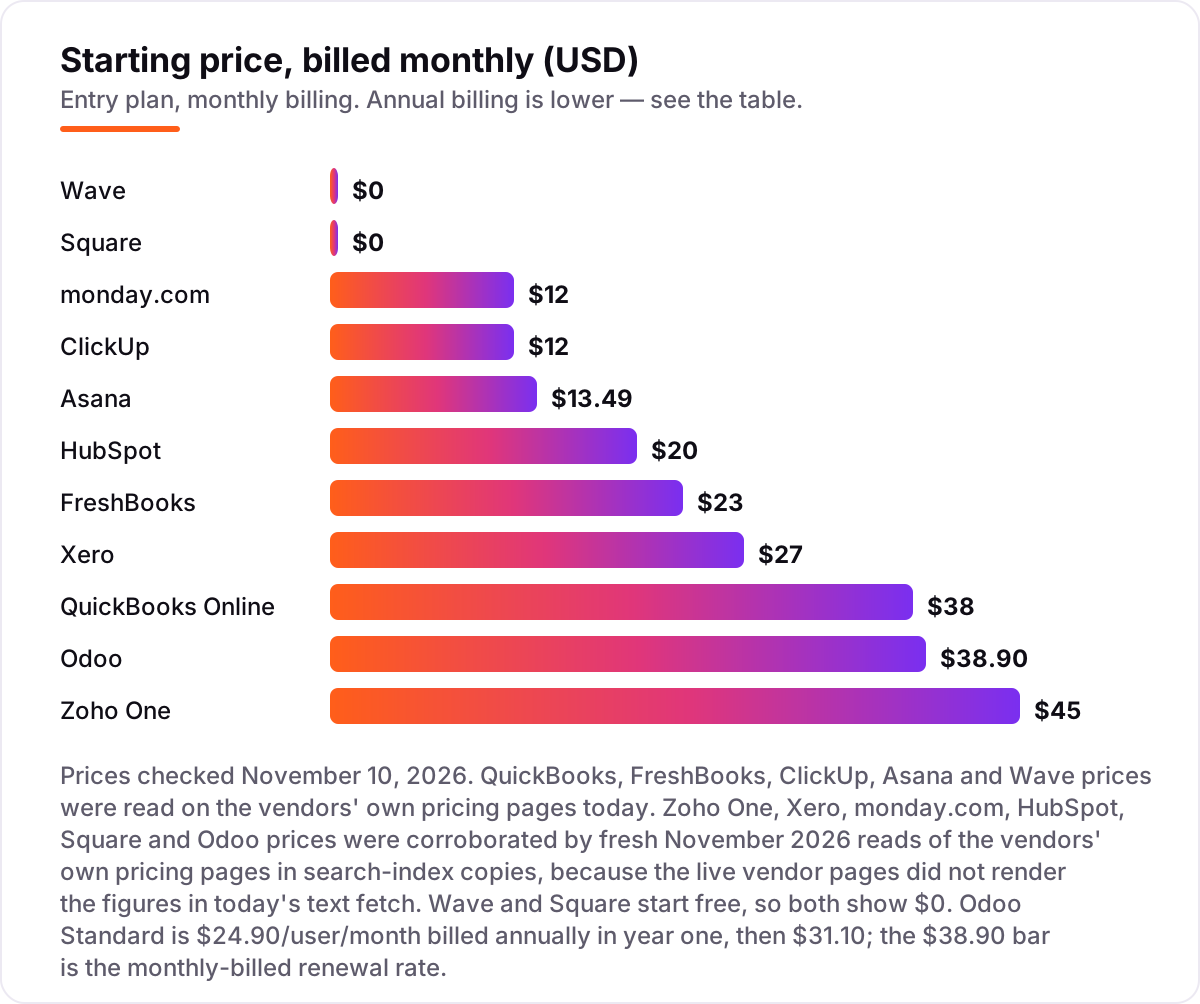
Take a five-person service business as the example. On annual billing, Zoho One Standard All-Employee costs 5 × $37, or $185 a month, and covers CRM, accounting, support and HR in one subscription. The separate-tools route costs more in pieces: QuickBooks Online Plus at $140 a month plus Asana Starter at 5 × $10.99, or $54.95 a month, comes to $194.95 a month — and that still leaves the CRM out.
The cheapest honest start is Wave Pro at $19 a month for the books, HubSpot's free CRM for two users, and ClickUp's Free Forever plan for the team's work: $19 a month in subscriptions. The trade-off is three tools to manage instead of one. The middle route — Xero Growing at $59 a month plus ClickUp Core at 5 × $9, or $45 a month — costs $104 a month and covers money and team work with room to grow.
Know the difference: all-in-one suite vs best-of-breed tools
The biggest confusion in this category is whether to buy one suite or several specialist tools. An all-in-one suite such as Zoho One or Odoo gives you one login, one invoice and data that already connects: a customer in the CRM is the same customer on the invoice. That saves hours a week on admin and on copying data between tools.
Separate tools give you the best app for each job. QuickBooks is a better accounting tool than the accounting inside most suites, and Asana is a better project tool than the project module inside most suites. The cost is real, though: several subscriptions, several logins, and integrations that need setting up and sometimes break.
The rule that works for most small businesses is simple. If you have fewer than ten people and no strong opinion about any single app, start with a suite — Zoho One if you want it ready to use, Odoo if you expect to grow into a bigger system. If one job already has a clear winner in your mind, buy that tool first and add the rest around it.
How we chose
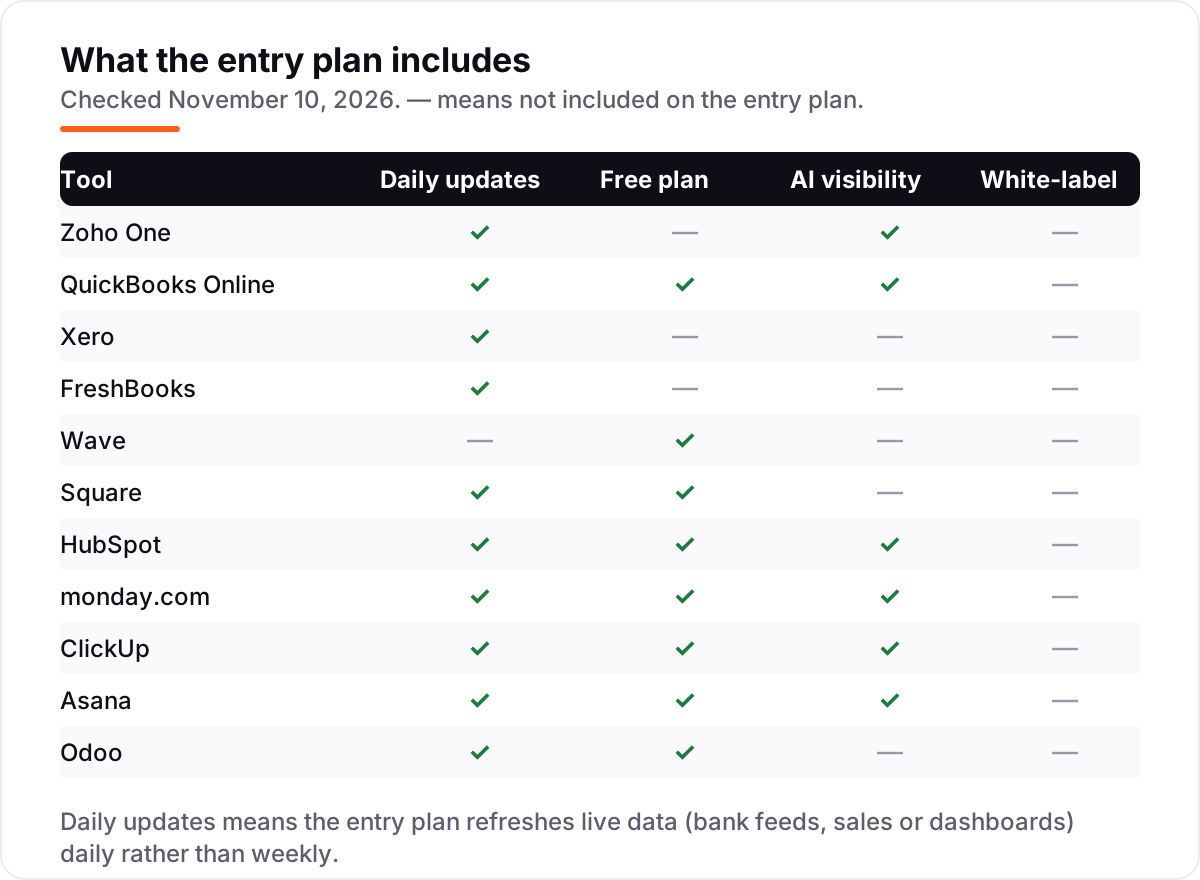
We checked each vendor's own pricing page on November 10, 2026 and recorded the starting price exactly as shown, including the annual-billing figure where the page lists one. QuickBooks, FreshBooks, ClickUp, Asana and Wave prices were read on the vendor's own pricing page today. For Zoho One, Xero, monday.com, HubSpot, Square and Odoo, the live vendor pages did not render the price figures in today's text fetch, so those prices were corroborated by fresh November 2026 reads of the vendors' own pricing pages in search-index copies, and are disclosed as such here. Ratings come from G2 where a G2 page crawled in the last three days showed a score and review count; four tools carry no rating because no fresh product-level G2 page was available. We ranked the tools by fit for the most common buyer — a small business owner who needs money, customers and team work covered — not by brand size. No vendor paid for a place in this list, and none of the links here are affiliate links.
What to do next
Start with the centre of your business: pick the one job that hurts most, then take the free plan or trial of the tool that leads for it and run a real week of work through it. If the numbers match your books and the team actually uses it, that is your tool — add the second tool only when the first one is settled. If you want help with the other half of the job, getting found, our monthly SEO service covers it. Once your tools are in place, find out what's holding your rankings back.
Your stack only works if people find you
SerpAstra fixes what keeps your site off page one and makes it easy for AI assistants to recommend.
Get a free audit→Sources we checked (18)
- Zoho One pricing — zoho.com/one/pricing (checked November 10, 2026)
- QuickBooks Online pricing — quickbooks.intuit.com/pricing (checked November 10, 2026)
- QuickBooks Online on G2 — 4.0/5, 3,870 reviews (checked November 10, 2026)
- Xero pricing — xero.com/us/pricing-plans (checked November 10, 2026)
- Xero on G2 — 4.4/5, 1,736 reviews (checked November 10, 2026)
- FreshBooks pricing — freshbooks.com/pricing (checked November 10, 2026)
- FreshBooks on G2 — 4.5/5, 981 reviews (checked November 10, 2026)
- Wave pricing — waveapps.com/pricing (checked November 10, 2026)
- Wave on G2 — 4.3/5, 328 reviews (checked November 10, 2026)
- Square pricing — squareup.com/us/en/pricing (checked November 10, 2026)
- HubSpot Sales Hub pricing — hubspot.com/pricing/sales (checked November 10, 2026)
- monday.com pricing — monday.com/pricing (checked November 10, 2026)
- ClickUp pricing — clickup.com/pricing (checked November 10, 2026)
- ClickUp on G2 — 4.6/5, 12,507 reviews (checked November 10, 2026)
- Asana pricing — asana.com/pricing (checked November 10, 2026)
- Asana on G2 — 4.4/5, 13,867 reviews (checked November 10, 2026)
- Odoo pricing — odoo.com/pricing (checked November 10, 2026)
- Odoo on G2 — 4.2/5, 355 reviews (checked November 10, 2026)
Shamim
Founder of SerpAstra
A full-stack SEO and digital marketer who spends most days on Local SEO for dental practices, AI search visibility and lead generation.
Frequently asked questions
What is the best software for small business management?
Zoho One is the best all-in-one pick, covering CRM, accounting, support and HR from $37 per employee a month billed annually. QuickBooks Online is the best accounting choice, and Wave is the best free start. The right pick depends on whether money, selling, customers or team work is the centre of your business.
How much does small business management software cost?
From $0 to about $45 a month at the entry level. Wave and Square start free, HubSpot's CRM is free for two users, and monday.com and ClickUp start at $9 a seat a month billed annually. Zoho One Standard is $37 per employee a month billed annually, and QuickBooks Online starts at $38 a month.
Is there free small business management software?
Yes. Wave's Starter plan is free forever for core accounting, Square Free covers selling at $0 a month per location, and HubSpot's CRM is free for up to two users. monday.com, ClickUp, Asana and Odoo also have free plans. Free tiers work for a solo owner; a team usually needs a paid plan within months.
What is the difference between an all-in-one suite and separate tools?
An all-in-one suite such as Zoho One or Odoo puts CRM, accounting and projects under one login and one invoice, which is simpler but locks you into one vendor. Separate tools such as QuickBooks plus Asana let you pick the best app for each job, but you pay for several subscriptions and keep the data in sync yourself.
Do I need accounting software and project software, or just one?
Most small businesses need both, but not always from day one. If you bill clients, start with accounting and invoicing, then add project software when deadlines and handoffs get hard to track in a spreadsheet. An all-in-one suite covers both at once if you would rather manage one vendor than two.
Can I switch small business software later without losing my data?
Usually yes, but it takes work. Accounting tools export invoices, customers and transactions, and project tools export tasks and files, but the formats differ and history rarely moves cleanly. Before you buy, check that the tool exports your data in a standard format, and keep a backup of the original files.
What should I check before paying for business management software?
Four things: what the entry plan actually includes, whether the price is per user, per location or flat, what the next tier costs when you outgrow the first, and whether there is a free plan or trial. Check the vendor's own pricing page, not a directory, and try your real workflow for a week before you commit.
Free SEO and AI visibility audit
Find out what is holding your rankings back
Send us your site. Within 2 business days you get a written audit, an AI visibility check and a short fix list ranked by impact. Free, with no contract attached.
Request my free audit→Related guides
 Accounting, Tax & Finance7 Best Accounting Software for Small Businesses in 2026, ComparedCompare the 7 best accounting software for small businesses on price, free plans, bank feeds and AI features, with every price checked November 2, 2026.Read guide →
 Accounting, Tax & Finance11 Best Invoicing Software for Small Business in 2026, Compared11 best invoicing software for small business compared on price, free plans and payment fees. Prices checked on vendor pricing pages, November 2, 2026.Read guide →
 Consumer Apps10 Best Small Business Apps for 2026, Tested on Features and PriceCompare the 10 best small business apps for 2026 on price, free plans and AI features, with every price checked on the vendor's own page on November 4, 2026.Read guide →