
8 Best Software to Run a Small Business in 2026, Compared
8 best software to run a small business, compared on price, free plans and coverage — suites, accounting, CRM and payments. Prices checked November 10, 2026.
 Shamim Mia, Founder, SerpAstraLast verified November 10, 202611 min read
We compare pricing pages, documentation and public reviews. We never accept payment for rankings.
Key takeaways
- Zoho One is the best value for most small businesses: 15+ apps from $9 a user a month billed annually, with QuickBooks Online ($38/month) as the money core and HubSpot's free CRM as the customer core.
- Free plans are real here: Square costs $0 a month, HubSpot's CRM is free for 2 users, and Odoo gives one app to unlimited users free.
- The single most important buying factor is whether you want one suite or a best-of-breed stack — a suite is cheaper, a stack fits each job better.
- Every price below was checked against the vendor's own pricing page on November 10, 2026. Ratings are G2, with review counts shown.
On this page
Quick comparison
| Tool | Best for | Starting price | Free plan |
|---|---|---|---|
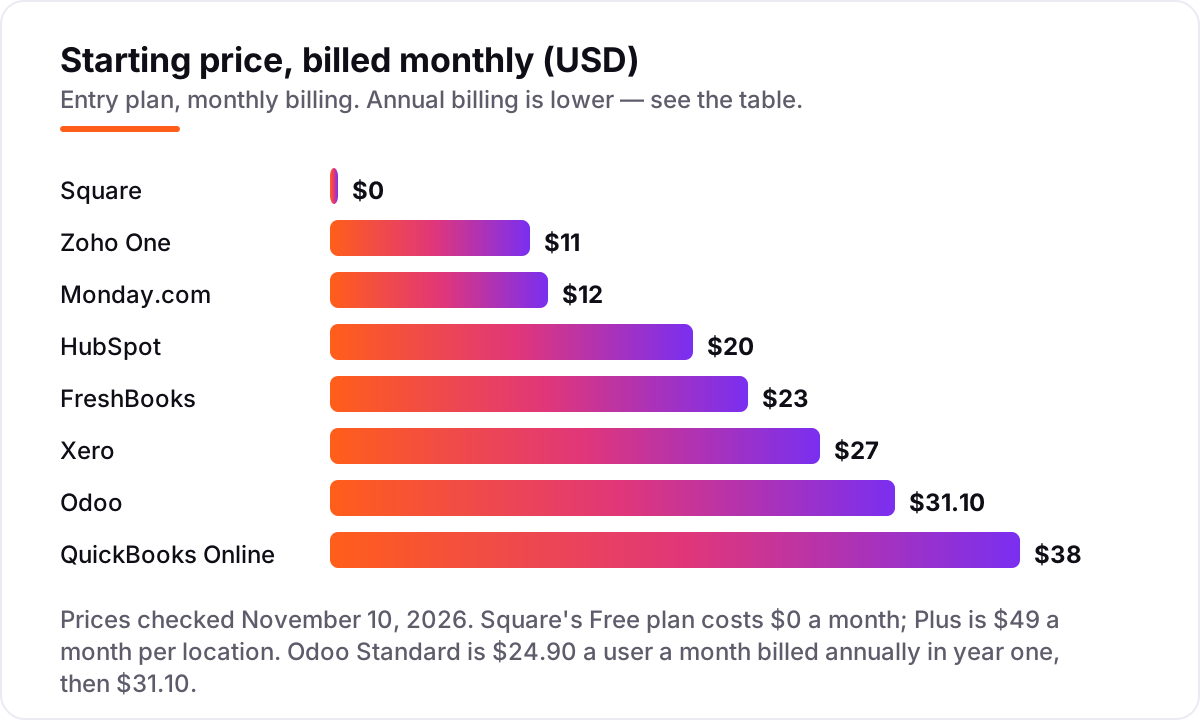
| Zoho One | A small business owner who wants CRM, accounting, support, HR and projects under one subscription | $9/user/mo (annual) | No (30-day trial) |
| QuickBooks Online | A solo owner or small team that needs proper double-entry books, invoicing and bank feeds | $38/mo | Yes (Free plan) |
| HubSpot | A small sales-led team that wants a free CRM now and paid sales automation later | $20/seat/mo | Yes (free CRM) |
| Odoo | A product or inventory business that wants CRM, accounting, stock and sales in one modular system | $24.90/user/mo (annual, yr 1) | Yes (One App Free) |
| Square | A shop, cafe or market stall that takes card payments in person and sends invoices from the same account | $0 (Free) | Yes (Free) |
| Monday.com | A team of 3 to 20 that runs projects, clients and deadlines on shared visual boards | $9/seat/mo (annual) | Yes (2 seats) |
| Xero | A small business whose accountant prefers Xero, or a team that needs unlimited users at a flat price | $27/mo | No (30-day trial) |
| FreshBooks | A freelancer or small service firm that bills by the hour and wants the fastest path from time tracked to invoice paid | $23/mo | No (30-day trial) |
Make one of these tools?
We re-check this list every quarter. Send a correction, request a review, or ask about a clearly labeled sponsored spot.
Request a listingThe best software to run a small business

Zoho One
Best for: A small business owner who wants CRM, accounting, support, HR and projects under one subscription
Zoho One is the cheapest way to buy the whole back office in one subscription. The Essentials plan covers 15+ apps — CRM, Books, Desk, People and Projects among them — from $9 a user a month billed annually, while Standard adds 50+ apps, central admin and mobile device management. One invoice replaces five or six separate subscriptions, and the apps share the same customer and finance data instead of passing it between systems.
The catch is the licensing model. Standard's headline $37 a user a month billed annually only applies if you license every employee on payroll; licensing only the people who use it costs $90 a user a month. Essentials is the right start for a team under ten; growing businesses should price Standard on the all-employee model before they commit.
What we like
- Essentials covers 15+ apps — CRM, Books, Desk, People, Projects — from $9 a user a month billed annually
- One invoice and one admin console replace five or six separate subscriptions
- Standard adds 50+ apps, centralised admin and mobile device management
Watch out for
- Standard's $37 rate only applies if you license every employee; flexible licensing costs $90 a user a month
- Setup across so many apps takes longer than a single-purpose tool

QuickBooks Online
Best for: A solo owner or small team that needs proper double-entry books, invoicing and bank feeds
QuickBooks Online is the money core of this list: invoicing, expenses, bank feeds and profit-and-loss reporting in one set of books, from $38 a month on Simple Start. It is the system most US accountants already know, which matters at tax time, and the free plan covers two invoices a month for a business that is just starting to bill.
The user caps force the upgrades. Simple Start allows one user, so a second person posting entries means Essentials at $85 a month, and payroll is a paid add-on on top of every plan. New customers get 50% off for three months, but budget on the list price — the discount ends and the renewal rate is what you live with.
What we like
- Simple Start at $38 a month covers invoicing, expenses, bank feeds and profit-and-loss reporting
- The system most US accountants already use, which helps at tax time
- Free plan covers 2 invoices a month with no credit card required
Watch out for
- Simple Start allows one user — a second person means Essentials at $85 a month
- Payroll is a paid add-on, and new-customer discounts end after three months

HubSpot
Best for: A small sales-led team that wants a free CRM now and paid sales automation later
HubSpot is the customer core: a genuinely free CRM for up to two users and 1,000 contacts, with paid Sales Hub seats from $20 a month when you need pipelines, sequences and automation. Contacts, deals, email and support tickets share one database, so a quote, a sale and a support reply all see the same customer record.
The price ladder is steep. Starter is affordable, but Professional jumps to $90 a seat a month billed annually plus a $1,500 one-time onboarding fee, and the marketing, sales and service hubs are priced separately. Start on the free CRM, pay for Starter when two users is no longer enough, and treat Professional as a deliberate step up.
What we like
- Free CRM for up to 2 users and 1,000 contacts, with no time limit
- Contacts, deals, email and support share one database across the hubs
- Starter adds pipelines, sequences and automation from $20 a seat a month
Watch out for
- Professional jumps to $90 a seat a month billed annually plus a $1,500 onboarding fee
- Marketing, sales and service hubs are priced separately, so the full platform costs more than Starter

Odoo
Best for: A product or inventory business that wants CRM, accounting, stock and sales in one modular system
Odoo is the modular alternative to a single-vendor suite: one subscription covers CRM, accounting, inventory, point of sale, eCommerce, projects and more, and you switch apps on as the business grows. One App Free gives a single app to unlimited users at no cost, while Standard unlocks every app from $24.90 a user a month billed annually in the first year.
The first-year price is a discount, not the list price: Standard renews at $31.10 a user a month, and monthly billing costs $31.10 in year one and $38.90 after it. Setup also takes longer than a single-purpose tool, and the Studio builder and agentic AI features sit on the $49 Custom plan. Pick Odoo when you want one system that grows from a shop into a warehouse.
What we like
- One App Free gives a single app to unlimited users at no cost, forever
- Standard unlocks every app — CRM, accounting, inventory, POS, eCommerce — for one per-user fee
- Open-source Community edition can be self-hosted at no licence cost
Watch out for
- Standard's $24.90 first-year rate renews at $31.10 a user a month; monthly billing is higher still
- Studio builder and agentic AI features sit on the $49 Custom plan, not Standard

Square
Best for: A shop, cafe or market stall that takes card payments in person and sends invoices from the same account
Square is the selling core: take card payments in person, send unlimited invoices and run a basic online store from one free account, with no monthly fee until you choose a paid plan. Invoices, point-of-sale sales and customer records share the same account, so a customer who pays at the counter and one who pays an invoice are the same record.
You pay per sale instead of per month. Online and invoice card payments cost 3.3% plus 30 cents on the free plan, and Plus at $49 a month per location only pays for itself once online volume passes about $12,250 a month. Square is the right pick for a business that sells in person; a business that only invoices should compare FreshBooks first.
What we like
- Free plan with no monthly fee: unlimited invoices, POS sales and a basic online store
- One account for in-person payments, invoices and customer records
- Plus lowers the online card rate from 3.3% to 2.9% and caps ACH fees at $10
Watch out for
- You pay per sale: 3.3% plus 30 cents on every online or invoice card payment on the free plan
- Plus only pays for itself above about $12,250 a month in online card volume

Monday.com
Best for: A team of 3 to 20 that runs projects, clients and deadlines on shared visual boards
Monday.com is the work core of this list: visual boards for projects, clients, deadlines and handoffs, from $9 a seat a month billed annually on Basic. The free plan covers two seats, and the board, timeline and dashboard views make it easy for a small team to see who owes what and when.
Basic is deliberately limited: no automations, no integrations and no timeline or Gantt views, so most teams land on Standard at $12 a seat a month. Paid plans also carry a three-seat minimum, so a two-person team pays for three seats. Choose Monday when the work itself — not the money — is what needs organising.
What we like
- Free plan for up to 2 seats; Basic from $9 a seat a month billed annually
- Visual boards, timelines and dashboards keep deadlines visible to the whole team
- 1,000 AI credits a month included on Basic
Watch out for
- Basic has no automations, integrations or timeline and Gantt views
- Three-seat minimum on paid plans, so a two-person team pays for three seats
Xero
Best for: A small business whose accountant prefers Xero, or a team that needs unlimited users at a flat price
Xero is the accounting alternative to QuickBooks, and its flat pricing is the attraction: every plan includes unlimited users, so a five-person team pays the same $27 a month on Early as a solo owner. Early covers 20 invoices and 5 bills a month with bank reconciliation and basic reporting, and Growing at $59 removes the caps.
The limits are the thing to watch. A business that sends its twenty-first invoice in a month has already outgrown Early, and US payroll runs through a Gusto integration rather than inside Xero. New US customers get 80% off for the first three months. Pick Xero when unlimited users matter more than the deepest feature set.
What we like
- Unlimited users on every plan, so a team pays the same flat monthly price
- Early at $27 a month covers invoicing, bank reconciliation and basic reporting
- 30-day free trial and 80% off for the first three months for new US customers
Watch out for
- Early caps at 20 invoices and 5 bills a month — the twenty-first invoice forces an upgrade
- No built-in US payroll; it runs through a Gusto integration at extra cost

FreshBooks
Best for: A freelancer or small service firm that bills by the hour and wants the fastest path from time tracked to invoice paid
FreshBooks is built around one job: turning tracked time into a paid invoice. Lite costs $23 a month and covers 5 billable clients with invoicing, expenses, time tracking and payment reminders, and the workflow from timer to invoice to payment is the smoothest in this list for a service business.
The billable-client cap is the trap: a sixth active client forces the move to Plus at $43 a month, and each extra team member costs $11 a month on top. Lite also has no accountant access and no double-entry reports, so a bookkeeper will ask for Plus. Choose FreshBooks when invoicing for time is the business, not a side task.
What we like
- Lite at $23 a month with invoicing, time tracking, expenses and payment reminders
- Fastest path from tracked time to paid invoice in this list
- 30-day free trial with no credit card required
Watch out for
- Lite caps at 5 billable clients; a sixth client forces Plus at $43 a month
- No accountant access or double-entry reports on Lite, and extra team members cost $11 a month each
Running a small business means four jobs at once: the money, the customers, the work and the selling. The best software to run a small business covers as many of those four jobs as possible for one price, and this list is sorted by how much of the business each tool actually runs — all-in-one suites first, then the strongest single-job tools.
What "run the business" software covers
Four jobs, and every tool here covers at least one of them. The money job is invoicing, expenses, bank feeds and reporting — QuickBooks Online, Xero and FreshBooks live here. The customer job is contacts, deals and support — HubSpot's free CRM is the starting point. The work job is projects, deadlines and handoffs — Monday.com's boards. The selling job is taking payments in person and online — Square. The suites, Zoho One and Odoo, cover all four in one subscription, and that is why they lead this list. None of the eight is a toy: each one is actively sold in 2026, takes card or bank payments, and is used by real small businesses rather than built for a demo.
Quick comparison: tool type by need
| Buyer | Best pick | Why |
|---|---|---|
| Solo owner who wants one subscription | Zoho One | 15+ apps from $9 a user a month billed annually |
| Service business that invoices for time | FreshBooks | $23 a month, fastest time-to-invoice |
| Business that sells in person | Square | $0 a month, POS plus invoices in one account |
| Team that needs projects organised | Monday.com | $9 a seat a month billed annually, visual boards |
| Business outgrowing one app | Odoo | Every app for one per-user fee from $24.90 a month |
| Team that needs unlimited accounting users | Xero | $27 a month flat, unlimited users |
| Business that wants the accountant's standard | QuickBooks Online | $38 a month, most US accountants already use it |
| Sales-led team starting from zero | HubSpot | Free CRM, Starter $20 a seat a month |
How to choose the best software to run a small business
- Count the jobs first. If you only invoice and track expenses, FreshBooks or Xero is enough. If you also need customers, projects and selling covered, start with a suite — Zoho One or Odoo — instead of buying four tools.
- Decide suite or stack. A suite costs less and shares data; a stack fits each job better. The stack in this list — QuickBooks, HubSpot and Monday — costs more per month than Zoho One Standard for the same five people.
- Count users and seats. Per-seat tools multiply with every hire: five seats on HubSpot Starter is $100 a month. Flat-price tools like Xero and Square do not change when a teammate joins.
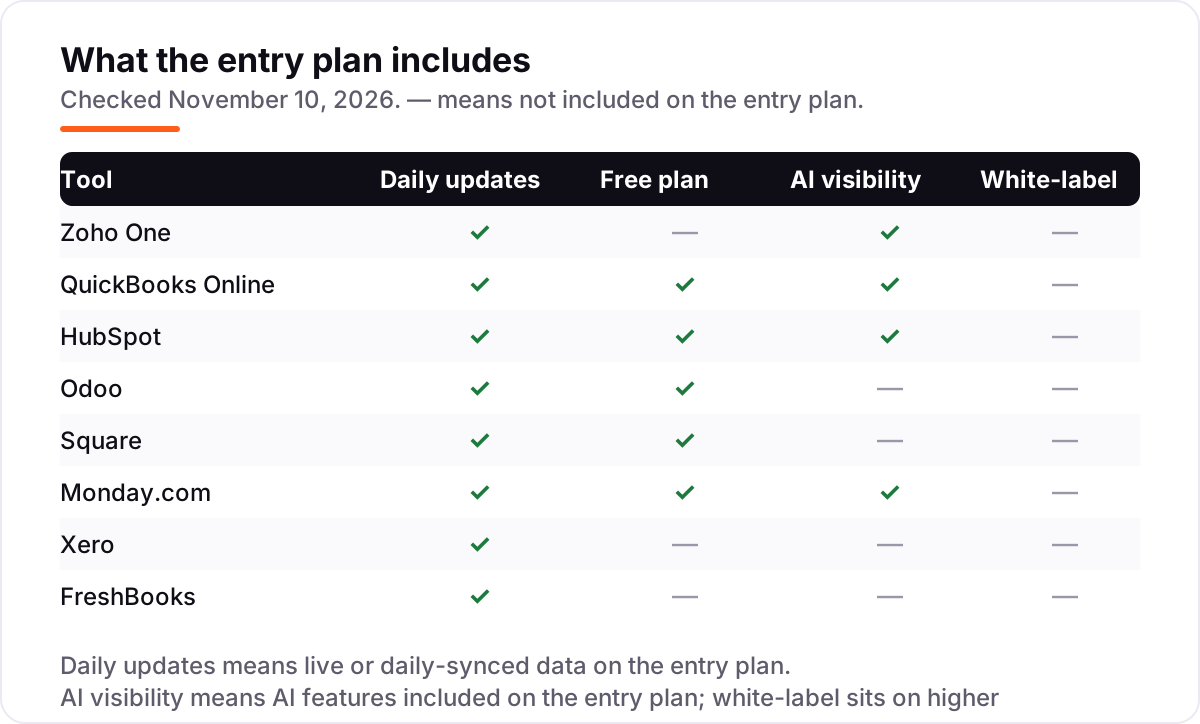
- Check the caps on the entry plan. FreshBooks Lite allows 5 billable clients, Xero Early allows 20 invoices a month, and Monday Basic needs three seats. The cap that forces the upgrade is the real price.
- Try it on real work. Every tool here has a free plan or a free trial. Run one real week — real invoices, real customers, real deadlines — before you pay. Before you publish new pages for the business, check how they will look in search with the free SERP snippet preview tool.
Small business software pricing: what you will actually pay
Take a five-person service business and price it two ways, at list prices. The best-of-breed stack is QuickBooks Essentials at $85 a month (Simple Start only allows one user), HubSpot Sales Hub Starter at $100 a month for five seats, and Monday Basic at $45 a month for five seats billed annually — $230 a month, or $2,760 a year. The suite route is Zoho One Standard on all-employee pricing at $185 a month for the same five people, or $2,220 a year; Essentials drops it to $45 a month, or $540 a year, with fewer apps. Odoo Standard sits between the two: $124.50 a month in year one, or $1,494 a year, rising to $155.50 a month, or $1,866 a year, at renewal.
The cheapest honest start is smaller still: Square at $0 a month for selling, HubSpot's free CRM for customers, and Xero Early at $27 a month for the books — $27 a month in subscriptions, plus Square's 3.3% plus 30 cents on each card payment. The lesson is the same either way: the subscription is only half the bill, and the other half is seats, caps and payment fees.
Know the difference: one suite or a best-of-breed stack
A suite is one vendor, one invoice and one login: Zoho One and Odoo bundle CRM, accounting, projects and more, and the data flows between the apps without integrations. A best-of-breed stack is the strongest tool for each job — QuickBooks for the books, HubSpot for customers, Monday for work, Square for selling — connected by integrations or by hand. Suites win on price and simplicity; stacks win on depth, because each tool does its one job better than a suite's version of it. The confusion to avoid is thinking a suite replaces the specialists entirely: Zoho One's accounting is solid but lighter than QuickBooks, and Odoo's CRM is lighter than HubSpot's paid plans. If one job is the business — say, invoicing for time — buy the specialist for that job and let the suite cover the rest. The other mistake is buying the stack before the business needs it: a solo owner with ten customers does not need four subscriptions, and the free plans in this list cover that stage honestly.
How we chose
We checked each vendor's own pricing page on November 10, 2026 and recorded the starting price exactly as shown, including the annual-billing figure where the page lists one. QuickBooks Online and Odoo were read directly from their pricing pages; Zoho One's page renders its prices dynamically, so its figures were confirmed against independent reads of the same page, and the remaining prices were checked against fresh copies of the vendors' own pages plus independent October and November 2026 reads. Ratings come from G2, except Zoho One, which has no G2 product rating of its own — G2 rates Zoho CRM separately, so no rating is shown for it. HubSpot's rating is for Sales Hub specifically, Square's is for Square Point of Sale, and Odoo's is for Odoo ERP. We ranked the tools by fit for the most common buyer — a small business owner who wants one stack to run the money, the customers, the work and the selling — not by brand size. No vendor paid for a place in this list, and none of the links here are affiliate links.
What to do next
Start with the decision path above: count the jobs, pick a suite or a stack, and check the caps before you pay. Then take the free plan or trial of your top pick and run one real week of invoices, customers and deadlines through it. If the numbers match your bank feed and the team actually opens it every day, you have your tool. If the stack is running but customers are not finding you, our monthly SEO service can take it from there. Once your tools are in place, find out what's holding your rankings back.
Your stack only works if people find you
SerpAstra fixes what keeps your site off page one and makes it easy for AI assistants to recommend.
Get a free audit→Sources we checked (15)
- Zoho One pricing — zoho.com/one/pricing (checked November 10, 2026)
- QuickBooks Online pricing — quickbooks.intuit.com/pricing (checked November 10, 2026)
- QuickBooks Online on G2 — 4.0/5, 3,870 reviews (checked November 10, 2026)
- HubSpot Sales Hub pricing — hubspot.com/pricing/sales (checked November 10, 2026)
- HubSpot Sales Hub on G2 — 4.4/5, 14,386 reviews (checked November 10, 2026)
- Odoo pricing — odoo.com/pricing (checked November 10, 2026)
- Odoo ERP on G2 — 4.2/5, 355 reviews (checked November 10, 2026)
- Square pricing — squareup.com/us/en/pricing (checked November 10, 2026)
- Square Point of Sale on G2 — 4.6/5, 1,211 reviews (checked November 10, 2026)
- Monday.com pricing — monday.com/pricing (checked November 10, 2026)
- Monday Work Management on G2 — 4.7/5, 15,428 reviews (checked November 10, 2026)
- Xero pricing — xero.com/us/pricing-plans (checked November 10, 2026)
- Xero on G2 — 4.4/5, 1,736 reviews (checked November 10, 2026)
- FreshBooks pricing — freshbooks.com/pricing (checked November 10, 2026)
- FreshBooks on G2 — 4.5/5, 975 reviews (checked November 10, 2026)
Shamim
Founder of SerpAstra
A full-stack SEO and digital marketer who spends most days on Local SEO for dental practices, AI search visibility and lead generation.
Frequently asked questions
What is the best software to run a small business?
Zoho One is the best value for most small businesses: 15+ apps from $9 a user a month billed annually. If you only need the money side, QuickBooks Online at $38 a month is the standard most accountants know. Businesses that sell in person should start with Square, which costs $0 a month.
How much does software to run a small business cost?
From $0 to about $230 a month for a five-person team. A best-of-breed stack — QuickBooks Essentials at $85, HubSpot Starter at $100 for five seats and Monday Basic at $45 — runs $230 a month. One suite is cheaper: Zoho One Standard costs $185 a month for the same five people.
Is there free software to run a small business?
Yes, with limits. Square's free plan covers unlimited invoices and point-of-sale sales, HubSpot's CRM is free for two users, Odoo gives one app to unlimited users free, and QuickBooks has a free plan for two invoices a month. Free plans cover a solo owner; a team of three or more usually needs a paid plan.
Do I need one suite or separate tools for each job?
A suite is cheaper and simpler: one invoice, one login, shared data. Separate tools fit each job better — QuickBooks for books, HubSpot for customers, Monday for work — but the bill adds up and data sits in three places. Pick a suite if you want simplicity; pick a stack if one job, like accounting, needs the deepest tool.
QuickBooks vs Xero: which is better for a small business?
QuickBooks Online is the safer default in the US: more accountants use it, and Simple Start costs $38 a month. Xero costs $27 a month on Early and includes unlimited users on every plan, which wins for teams. If your accountant prefers one of them, follow your accountant — switching books later is painful.
Can one tool handle accounting, CRM and projects?
Yes. Zoho One covers all three from $9 a user a month billed annually on Essentials, and Odoo covers them from $24.90 a user a month billed annually in year one. Both trade depth for breadth: their accounting is solid but lighter than QuickBooks, and their CRM is lighter than HubSpot's paid plans.
What should I check before paying for business software?
Four things: what counts as a user, since per-seat pricing multiplies fast; the caps on the entry plan, like invoice or client limits; whether the annual price is a first-year discount, as Odoo's is; and whether payroll, extra users or payment fees sit outside the headline price. Run the free plan or trial on real work first.
Free SEO and AI visibility audit
Find out what is holding your rankings back
Send us your site. Within 2 business days you get a written audit, an AI visibility check and a short fix list ranked by impact. Free, with no contract attached.
Request my free audit→Related guides
 Accounting, Tax & Finance7 Best Accounting Software for Small Businesses in 2026, ComparedCompare the 7 best accounting software for small businesses on price, free plans, bank feeds and AI features, with every price checked November 2, 2026.Read guide →
 Consumer Apps10 Best Small Business Apps for 2026, Tested on Features and PriceCompare the 10 best small business apps for 2026 on price, free plans and AI features, with every price checked on the vendor's own page on November 4, 2026.Read guide →
 Accounting, Tax & Finance11 Best Invoicing Software for Small Business in 2026, Compared11 best invoicing software for small business compared on price, free plans and payment fees. Prices checked on vendor pricing pages, November 2, 2026.Read guide →