
Best Subcontractor Software for 2026: 8 Options Compared by Use Case
Compare the 8 best subcontractor software options on price, free plans, job costing and field tools, with live prices checked November 10, 2026.
 Shamim Mia, Founder, SerpAstraLast verified November 10, 202614 min read
We compare pricing pages, documentation and public reviews. We never accept payment for rankings.

Key takeaways
- Contractor Foreman is the best fit for most subcontractors at $49/month billed annually; Knowify follows at $149/month billed monthly ($99 billed annually) for trade contractors, and JobTread at $199/month for the best-reviewed job costing.
- Fieldwire is the only genuinely free plan here — $0 for 5 users and 3 projects — while Buildxact's free Go plan covers AI estimating before you pay.
- The single most important buying factor is the pricing unit: per user, per company, per project or by construction volume. The unit, not the headline price, decides what a 4-person office actually pays.
- Two tools publish no price at all: Buildertrend and Procore are custom quotes based on annual construction volume, so budget from a written quote, not a directory figure.
On this page
Quick comparison
| Tool | Best for | Starting price | Free plan |
|---|---|---|---|
| Contractor Foreman | Small subcontractors that want the cheapest all-in-one system for estimates, scheduling and job costing | $49/mo | No (30-day trial) |
| Knowify | Trade subcontractors in electrical, plumbing and HVAC that bill on AIA forms and live in QuickBooks | $149/mo | No (14-day trial) |
| JobTread | Custom-home and remodeling subcontractors that need tight job costing and estimate-to-actual tracking | $199/mo | No (no trial) |
| Fieldwire | Subcontractors whose crews work from drawings and need tasks, punch lists and photos on site | Free; Pro $54/mo | Yes (free) |
| Houzz Pro | Remodeling subcontractors who win work through the Houzz marketplace and need client-facing proposals | $99/mo | Yes (free) |
| Buildxact | Residential builders and remodeling subcontractors who estimate from plans and track costs against the estimate | $199/mo | Yes (free Go) |
| Buildertrend | Residential builders and remodeling subcontractors running several jobs at once with a client portal | Custom quote | No (demo only) |
| Procore | Large commercial subcontractors working on Procore-run jobs with general contractors who require it | Custom quote | No (demo only) |
Make one of these tools?
We re-check this list every quarter. Send a correction, request a review, or ask about a clearly labeled sponsored spot.
Request a listingThe best subcontractor software

Contractor Foreman
Best for: Small subcontractors that want the cheapest all-in-one system for estimates, scheduling and job costing
Contractor Foreman is the cheapest way into a full subcontractor system, and the price is the reason to pick it. Basic costs $49 a month billed annually for one user and covers estimates, bids, invoices, online payments, scheduling and a client portal. The flat company-wide tiers are the real advantage: higher plans cover more users for one fee, so the bill does not climb every time a new person logs in.
The catch is what Basic leaves out. Daily logs, change orders, purchase orders and time cards are not included, so a subcontractor that needs them starts at Standard at $105 a month billed annually, and QuickBooks sync through Zapier starts on Plus. Basic is also sold on annual billing only. Buy Contractor Foreman when the budget is tight and the whole company needs one system.
What we like
- Cheapest all-in-one here: estimates, scheduling, daily logs, change orders and job costing from $49/month
- Flat company-wide tiers, so adding field staff on higher plans does not raise the bill per head
- 30-day free trial and a 100-day money-back guarantee on annual plans, the longest in this list
- Price-lock guarantee keeps the rate fixed at signup, so renewals do not jump without warning
Watch out for
- Basic covers 1 user only and is sold on annual billing; it is not available month to month
- Daily logs, change orders and purchase orders are not on Basic — a subcontractor that needs them starts at Standard ($105/month)
- QuickBooks integration runs through Zapier and starts on Plus, not on the entry plan

Knowify
Best for: Trade subcontractors in electrical, plumbing and HVAC that bill on AIA forms and live in QuickBooks
Knowify is built for trade contractors, and it shows in the billing. Core costs $149 a month billed monthly, or $99 billed annually, for one user, and covers estimates, proposals, contracts, progress billing and licensed AIA G702/G703 pay applications. The QuickBooks sync is the deepest in this list: a native two-way connection across QuickBooks Online, Desktop, Payments, Time and Payroll, built with the Intuit team.
The limits are the user count and the step up to real job costing. Core covers one user and each extra user costs $29 a month, so a four-person office pays $236 a month billed monthly. Job costing, daily logs, subcontracts and work orders need Advanced at $399 a month billed monthly. Pick Knowify when AIA billing and QuickBooks depth matter most.
What we like
- Only tool here with licensed AIA G702/G703 pay applications on the entry plan
- Deepest QuickBooks sync in this list: native two-way sync across QuickBooks Online, Desktop, Payments, Time and Payroll
- Published pricing with a 14-day free trial and no contract or implementation fee
- Progress billing, retainage tracking and change orders are built in from Core
Watch out for
- Core covers 1 user; each extra user costs $29/month, so a 4-person office pays $236/month billed monthly
- Job costing, daily logs and subcontracts need Advanced at $399/month billed monthly
- Service dispatch is a paid add-on (Service Pro), not part of the base plans

JobTread
Best for: Custom-home and remodeling subcontractors that need tight job costing and estimate-to-actual tracking
JobTread is the best-reviewed tool in this list, at 4.9 out of 5 on G2, and it earns that score with job costing. One plan costs $199 a month billed monthly, or $159 billed annually, and includes every feature: estimating, takeoff, job costing, budgets, change orders, daily logs, scheduling and time tracking. Subcontractors, vendors and customers get free portal access, so only internal users count toward the bill.
The price is the barrier. At $199 a month plus $20 per extra internal user, a four-person office pays $259 a month billed monthly, and anyone who tracks time counts as an internal user. There is no free trial, only a 30-day money-back guarantee on monthly plans. Choose JobTread when the estimate-to-actual numbers decide whether a job made money.
What we like
- Highest G2 score here at 4.9 out of 5, with support reviewers praise most
- Every feature is included on the one plan — estimating, job costing, change orders, daily logs and client portal
- Subcontractors, vendors and customers get free portal access, so only internal users count toward the bill
- Published pricing with no contract, no setup fee and implementation and training included
Watch out for
- $199/month plus $20 per extra internal user makes it pricey for a small office: 4 users cost $259/month
- No free trial, so the only way to test it is to pay and use the 30-day money-back guarantee
- Anyone who tracks time counts as an internal user, which pushes field-heavy teams up the per-user ladder

Fieldwire
Best for: Subcontractors whose crews work from drawings and need tasks, punch lists and photos on site
Fieldwire is the only genuinely free plan in this list, and the natural pick for a subcontractor whose crews work from drawings. Basic costs $0 for up to 5 users, 3 projects and 100 sheets, and covers plan viewing, tasks, punch lists, specifications, files, photos and checklists. The drawing-first workflow is the draw: the current plan set on any device, with markups and photos pinned to the sheet.
The free plan's gaps are the reports. Reports and exports start on Pro at $54 a user a month billed monthly, and RFIs, submittals, change orders and budget tools need Business Plus at $104 a user a month billed monthly. Per-user pricing also adds up fast: four users on Pro cost $216 a month billed monthly. Start on Fieldwire when the field work starts from the drawings.
What we like
- Only genuinely free plan here: 5 users, 3 projects and 100 sheets at $0
- Plan viewing, tasks, punch lists and photo markups are built for the field, with offline access on paid plans
- Strongest drawing-first workflow here: the current plan set on any device, with sheet compare on Pro
- Per-user pricing with no company-wide minimum, so a small crew starts cheap
Watch out for
- Reports and exports start on Pro at $54/user/month billed monthly, so the free plan cannot produce daily reports
- RFIs, submittals, change orders and budget tools need Business Plus at $104/user/month billed monthly
- Per-user pricing adds up fast: 4 users on Pro cost $216/month billed monthly

Houzz Pro
Best for: Remodeling subcontractors who win work through the Houzz marketplace and need client-facing proposals
Houzz Pro is the marketplace pick in this list: the only tool where clients find the firm while browsing homes on Houzz. Design costs $99 a month for one user and covers 3D floor plans, selections, mood boards, CRM, estimates, proposals, invoices and online payments, plus a free plan for the basics. Subcontractor access is free and unlimited on every plan, so the subs on a job cost nothing extra.
The catch is that the subcontractor tools are not on Design. Takeoffs, bid management, change orders, budget management, contracts, project schedules and daily logs all need Pro at $199 a month, and plans are 12-month contracts that cannot be cancelled early. Advertising is a separate $499 a month on top. Pick Houzz Pro when Houzz is where the firm's clients come from.
What we like
- Only tool here with a homeowner marketplace: clients find the firm on Houzz and book through it
- Subcontractor access is free and unlimited on every plan, so subs on a job cost nothing extra
- Houzz AI is included on every paid plan, and Pro adds takeoffs, bid management, change orders and daily logs
- Free plan covers the 3D floor planner, estimates and invoicing at $0
Watch out for
- The subcontractor tools — takeoffs, bid management, contracts, daily logs — need Pro at $199/month, not the $99 entry plan
- Plans are 12-month contracts that cannot be cancelled early, and the trial converts into an annual subscription
- Advertising is a separate $499/month add-on, so marketplace visibility costs far more than the software

Buildxact
Best for: Residential builders and remodeling subcontractors who estimate from plans and track costs against the estimate
Buildxact is the estimating pick in this list, built for residential builders and remodelers who price jobs from plans. Foundation costs $199 a month billed monthly, or $169 billed annually, with unlimited users, and covers digital takeoffs, supplier price lists, estimating, quotes and purchase orders. The estimate that wins the job becomes the cost baseline during construction, so actuals are tracked against it line by line.
The limits are the step up to real job management. Schedules, the Onsite mobile app and Xero and QuickBooks sync all start on Pro at $399 a month, and the Blu Estimate Generator and Takeoff Assistant are paid add-ons below Master. The free Go plan covers AI estimating before any payment. Choose Buildxact when the estimate is the firm's main selling tool.
What we like
- Unlimited users on every plan, so the whole team costs the same flat fee
- Digital takeoff with live dealer pricing turns the estimate into the job-cost baseline automatically
- Blu AI tools draft and review estimates, with the Assembly Assistant included on Foundation
- Free Go plan covers AI estimating and proposals before any payment
Watch out for
- Job management, scheduling and the Onsite mobile app start on Pro at $399/month, not Foundation
- Xero and QuickBooks sync starts on Pro, so Foundation users export by hand
- Blu Estimate Generator and Takeoff Assistant are paid add-ons ($99-$149/month) below Master

Buildertrend
Best for: Residential builders and remodeling subcontractors running several jobs at once with a client portal
Buildertrend is the residential all-rounder in this list, built for builders and remodelers running several jobs at once. Pricing is a custom quote based on annual construction volume, with unlimited users and unlimited projects on every quote and every feature from day one: scheduling, daily logs, change orders, budgets, selections and a client portal. Daily virtual training and a 24/7 help centre are included.
The weakness is price transparency. There is no published price and no free trial, so the only way in is a sales call and a demo, and reviewers report sharp price rises at renewal — the terms allow increases of up to 10% a year. Get the quote in writing and pin down the renewal terms before signing. Pick Buildertrend when one platform must run the whole residential job, client portal included.
What we like
- Unlimited users and unlimited projects on every quote, so headcount never raises the bill
- One platform with every feature from day one — scheduling, daily logs, change orders, budgets and client portal
- Strongest client portal in this list, built for homeowners who want photos, selections and payments in one place
- Daily virtual training and a 24/7 help centre are included
Watch out for
- No published price: every quote is custom and scales with annual construction volume
- No free trial, so the only way in is a sales call and demo
- Reviewers report sharp price rises at renewal — the terms allow increases of up to 10% a year

Procore
Best for: Large commercial subcontractors working on Procore-run jobs with general contractors who require it
Procore is the enterprise pick in this list, and the standard on large commercial jobs. Pricing is a custom quote: an annual fee per product based on annual construction volume, with unlimited users, storage and support included. The core platform covers project management, document control, RFIs, submittals, daily logs and drawings, and preconstruction and financial management are separate modules. General contractors already run it, so a sub on a Procore job fits straight in.
The price is the obvious barrier: third-party trackers put the starting point around $10,000 a year, and the per-product pricing means the full suite costs far more than the core alone. It is built for large commercial work, so a small subcontractor pays enterprise money for scale it does not use. Choose Procore when the general contractors you work for require it.
What we like
- Highest review volume here: 4.6 out of 5 across more than 4,100 G2 reviews
- Unlimited users, storage and support on every quote, so the whole company can log in
- The industry standard on large commercial jobs — general contractors already run it, so subs fit straight in
- Deepest module set here: project management, financials, quality and safety, and field productivity
Watch out for
- No published price; third-party trackers put the starting point around $10,000 a year
- Priced per product, so preconstruction and financial management are separate paid modules
- Built for large commercial work — overkill and overpriced for a small subcontractor
The best subcontractor software does more than track a job: it turns a bid into a budget, the budget into a schedule, and the schedule into invoices that get paid, so a small crew spends the day building instead of chasing paperwork. We ranked the eight tools below by fit for the most common buyer — a small to mid-sized subcontractor with a handful of office staff and crews in the field — starting with the cheapest published prices and ending with the two custom-quote platforms, and every price was checked on November 10, 2026.
How to choose the best subcontractor software
- Work out the pricing unit first. Contractor Foreman charges per company tier, Knowify and JobTread per office user, Fieldwire per user, Buildxact one flat fee, and Buildertrend and Procore by construction volume. The unit decides the real bill.
- Count the office users on the plan you would actually buy. A 4-person office pays $199 a month on Contractor Foreman Plus, $236 on Knowify Core, $259 on JobTread and $216 on Fieldwire Pro — four very different bills from four similar headline prices.
- Check whether the subcontractor tools are on the plan you would buy. Houzz Pro keeps takeoffs, bid management and daily logs for the $199 Pro plan, Knowify keeps job costing for Advanced, and Contractor Foreman keeps daily logs off Basic. The entry price is not the price of the tools a subcontractor actually needs.
- Check the accounting sync before you fall for the interface. Knowify syncs natively with QuickBooks Online and Desktop, Buildxact syncs with QuickBooks and Xero from Pro, and Contractor Foreman connects through Zapier from Plus. A tool that cannot talk to the books creates a second job.
- Try the field app on a real job. The office buys the software, but the crew lives in it. Run one job through the trial — log time, photograph a defect, file a daily log — and if the crew will not use it in the rain, it is the wrong tool.
A subcontractor also needs to be found by the general contractors who hand out the work, not just run the jobs it already has. Our guide to general contractor software covers the other side of the bid, and before you publish new service pages, run your titles through the free SERP snippet preview tool — it shows exactly how the title and description will look in Google.
Whatever you shortlist, try it with a real job before you pay. The trials in this list run 14 to 30 days, which is long enough to run one genuine job — your estimate, your crew, your invoices — and that job tells you more than any review can. Check two things in the trial: that a sub or crew member can log time and photos from a phone without a phone call, and that the invoice that comes out matches the estimate that went in.
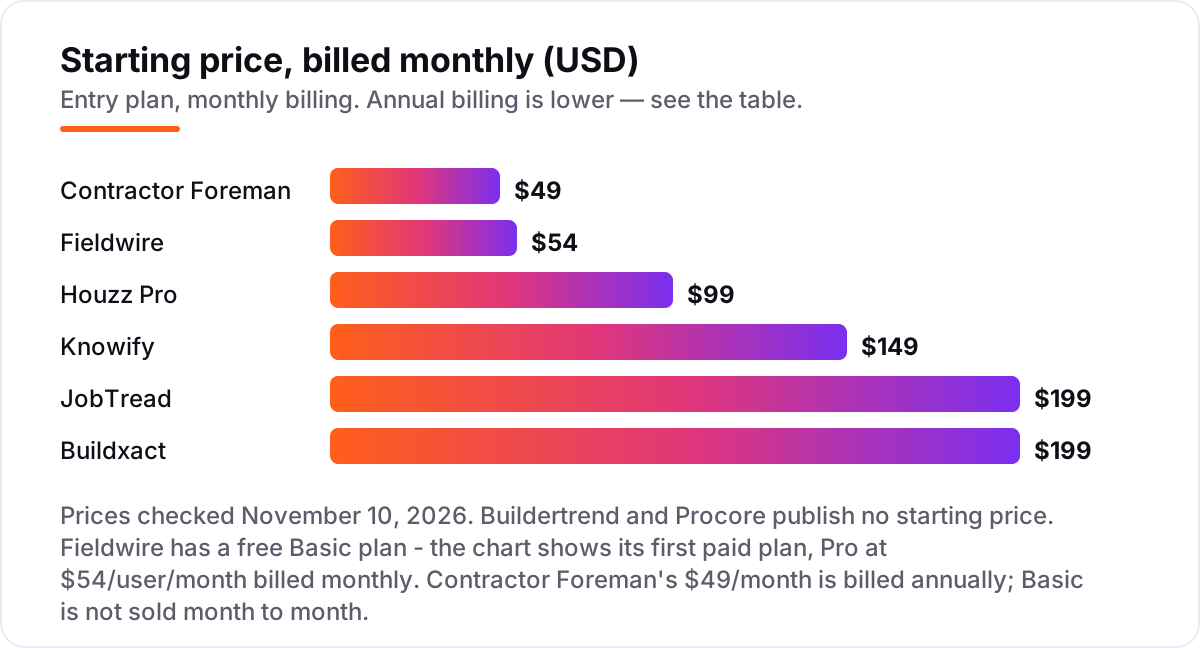
Subcontractor software pricing: what you will actually pay
Take a subcontractor with a 4-person office — owner, estimator, project manager and bookkeeper — at one location. On list prices billed monthly, the subscription costs $199 a month on Contractor Foreman Plus, $199 on Buildxact Foundation, $216 on Fieldwire Pro, $236 on Knowify Core, $259 on JobTread and $349 on Houzz Pro Pro. Buildertrend and Procore give no number at all: both quote against annual construction volume, so budget from a written quote.
Over a year on monthly billing, that is $2,388 on Contractor Foreman Plus, $2,388 on Buildxact Foundation, $2,592 on Fieldwire Pro, $2,832 on Knowify Core, $3,108 on JobTread and $4,188 on Houzz Pro Pro. The same four people cost $2,388 a year at the cheap end and $4,188 at the dear end — a $1,800 gap that comes entirely from the pricing unit and the plan tier, not from features.
Annual billing cuts the bill on most tools here: Fieldwire Pro drops from $2,592 to $1,872 a year, Contractor Foreman Plus from $2,388 to $1,992, Buildxact Foundation from $2,388 to $2,028, Knowify Core from $2,832 to $2,232 and JobTread from $3,108 to $2,484. Houzz Pro publishes no separate annual rate for its Pro plan, so $349 a month is the figure to budget. One more cost to check before you commit: the field crew. JobTread and Houzz Pro give subcontractors and customers free portal access, but Fieldwire charges for every user who needs a full login, so a crew of ten on Pro adds $540 a month billed monthly.
Three costs sit outside every number above. First, card processing on invoices paid online, which runs about 3% on most tools here. Second, the add-ons: Knowify's Service Pro dispatch, Buildxact's Blu AI tools at $99 to $149 a month below Master, and Houzz Pro's advertising at $499 a month. Third, the quote-only tools: a Buildertrend or Procore quote can run into five figures a year, and neither publishes a number to compare against. If the firm also needs estimating depth, see our guide to estimating software for contractors for the estimating-led side.
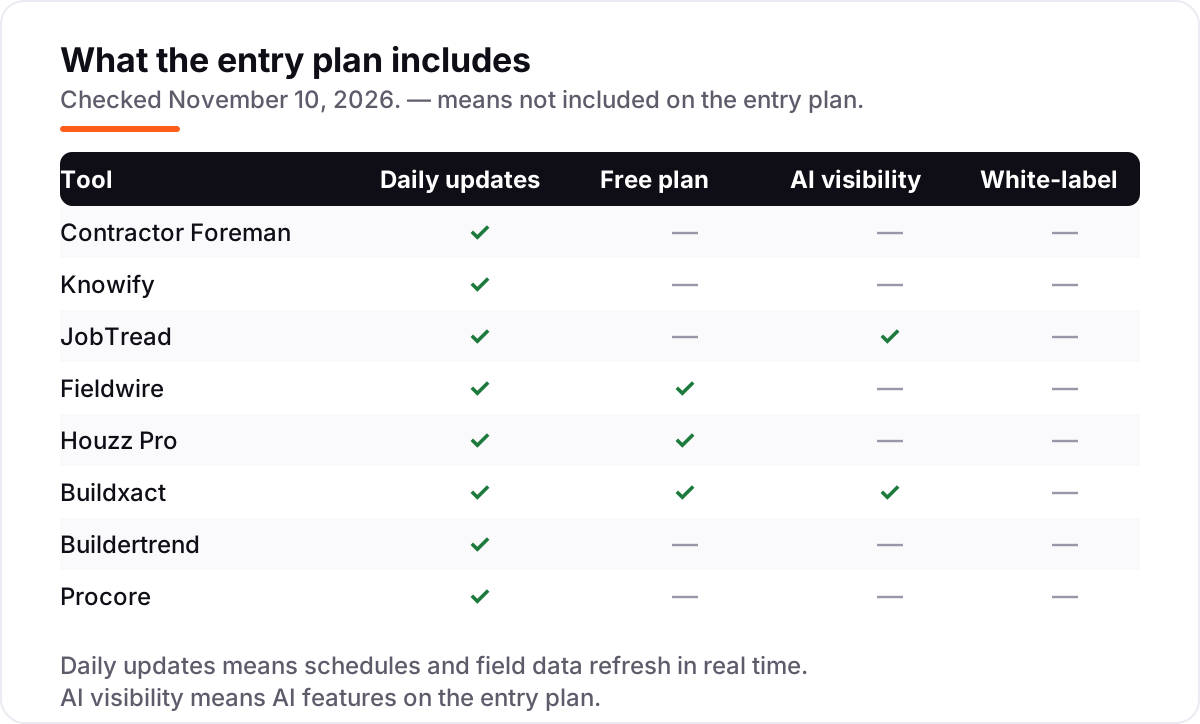
Know the difference: subcontractor software vs general contractor software
The confusion in this category is which side of the bid the tool is built for. General contractor software runs the whole project: the client portal, selections, warranties and the full-project budget, and it is sold to the firm that owns the job. Subcontractor software covers one firm's side of that job: winning the bid from the general contractor, running its own scope, tracking its own costs and billing progress — often through AIA pay applications — for the work it performed.
Most tools in this list serve both sides, which is where buyers go wrong. A subcontractor that buys Houzz Pro Design gets a design and client-facing tool, not a subcontractor tool: the takeoffs, bid management and daily logs it needs sit on the $199 Pro plan. A subcontractor that buys Contractor Foreman Basic gets estimates and invoices, but not daily logs or change orders. Check the plan, not the brand, for the tools your side of the bid needs.
There is a second, quieter confusion: estimating tools and project tools. Buildxact is an estimating tool first — takeoff to quote to cost tracking — while Fieldwire is a field tool first, built around drawings, tasks and punch lists. A firm that prices jobs from plans needs the first; a firm that executes someone else's plans needs the second. Buying the wrong one means paying for a strength the firm never uses.
Quick comparison: tool type by need
| Buyer | Best pick | Why |
|---|---|---|
| Small sub on a budget | Contractor Foreman | Cheapest all-in-one at $49/month billed annually, flat company tiers |
| Trade sub billing on AIA forms | Knowify | Licensed AIA pay apps and native QuickBooks sync from $149/month |
| Best-reviewed job costing | JobTread | 4.9 out of 5 on G2, every feature on one plan from $199/month |
| Crews working from drawings | Fieldwire | Free Basic plan, drawing-first tasks and punch lists |
| Remodeler winning work on Houzz | Houzz Pro | Homeowner marketplace plus free subcontractor access from $99/month |
| Residential builder estimating from plans | Buildxact | Takeoff to estimate to job cost, unlimited users, from $199/month |
| Multi-job residential builder | Buildertrend | Unlimited users and projects on one platform, custom quote |
| Large commercial sub | Procore | The standard on large commercial jobs, custom quote by volume |
Mistakes to avoid
- Budgeting on the headline price alone. A $49 tool can cost $199 a month once the team is counted, and a $99 tool can cost $199 once the subcontractor features are counted. Price the tool for your actual headcount, on the plan that has the features you need.
- Buying on the annual price, then paying monthly. Knowify Core is $99 a month billed annually but $149 month to month, JobTread is $159 billed annually but $199 monthly, and Fieldwire Pro is $39 billed annually but $54 monthly. Compare tools on the billing cycle you will actually use.
- Paying per user for people who only need a portal. JobTread and Houzz Pro give subcontractors and customers free portal access. Fieldwire charges for every full login, so count the crew before you count the cost.
- Assuming the general contractor's tool covers you. A Procore login on a GC-run job is the GC's system, not yours. Your own estimating, job costing and invoicing still need a tool of your own.
- Ignoring the accounting sync. Knowify syncs natively with QuickBooks, Buildxact syncs from Pro, and Contractor Foreman connects through Zapier from Plus. A tool that cannot talk to the books creates a second job at month end.
How we chose
We checked each vendor's own pricing page and recorded the starting price exactly as shown, including the annual-billing figure where the page lists one, and we ranked the tools by fit for the most common buyer — a small to mid-sized subcontractor — not by brand size. Our browser reader was unavailable on November 10, 2026, so prices were verified from fresh search-index copies of the vendors' own pricing pages crawled November 9–10, 2026, corroborated by independent October and November reads of the same pages. Ratings are shown only where a fresh G2 page gave a clear score and review count on November 10, 2026: Contractor Foreman, Knowify, JobTread, Fieldwire, Buildxact, Buildertrend and Procore. Houzz Pro carries no rating here because G2 pages gave conflicting scores and counts for it (4.1 out of 5 from 62 reviews against 4.2 from 78), and we would rather show no rating than a stale or estimated one. Buildertrend and Procore publish no starting price, so both are shown as custom quotes and left out of the price chart. No vendor paid for a place in this list, and none of the links here are affiliate links.
What to do next
Start with the free plan or trial of your top pick and run one real job through it. Check that the estimate matches the invoice, that the crew can log time and photos from a phone, and that the books balance at the end of the job before you commit to a year. If the jobs are sorted but new general contractors are not finding you, our local SEO service handles the visibility side — or compare providers in our guide to project management software for contractors. Software runs the business; search brings the customers. See where you rank locally, free.
New software won't fill your calendar on its own
Before you pay for another tool, see how your local business shows up on Google Maps and in AI answers.
Get a free local SEO audit→Sources we checked (15)
- Contractor Foreman pricing — contractorforeman.com/plans/ (checked November 10, 2026)
- Knowify pricing — knowify.com/pricing (checked November 10, 2026)
- JobTread pricing — jobtread.com/pricing (checked November 10, 2026)
- Fieldwire pricing — fieldwire.com/pricing (checked November 10, 2026)
- Houzz Pro pricing — pro.houzz.com/pricing (checked November 10, 2026)
- Buildxact pricing — buildxact.com/pricing (checked November 10, 2026)
- Buildertrend pricing — buildertrend.com/pricing (checked November 10, 2026)
- Procore pricing — procore.com/pricing (checked November 10, 2026)
- Contractor Foreman on G2 — 4.5/5, 386 reviews (checked November 10, 2026)
- Knowify on G2 — 4.5/5, 104 reviews (checked November 10, 2026)
- JobTread on G2 — 4.9/5, 118 reviews (checked November 10, 2026)
- Fieldwire on G2 — 4.5/5, 585 reviews (checked November 10, 2026)
- Buildxact on G2 — 4.3/5, 66 reviews (checked November 10, 2026)
- Buildertrend on G2 — 4.3/5, 232 reviews (checked November 10, 2026)
- Procore on G2 — 4.6/5, 4,174 reviews (checked November 10, 2026)
Shamim
Founder of SerpAstra
A full-stack SEO and digital marketer who spends most days on Local SEO for dental practices, AI search visibility and lead generation.
Frequently asked questions
What is the best subcontractor software?
Contractor Foreman is the best fit for most subcontractors: the cheapest all-in-one system at $49/month billed annually, with estimates, scheduling and job costing. Knowify is the pick for trade contractors that bill on AIA forms and live in QuickBooks, and JobTread is the best-reviewed tool at 4.9 out of 5 on G2.
How much does subcontractor software cost?
Published prices run from $0 to $199 a month. Fieldwire has a free plan, Contractor Foreman starts at $49/month billed annually and Knowify at $149/month billed monthly. A 4-person office pays $199 to $349 a month on list prices, or $2,388 to $4,188 a year. Buildertrend and Procore are custom quotes with no published price.
Is there free subcontractor software?
Yes, with limits. Fieldwire's Basic plan is free for 5 users and 3 projects, Buildxact's free Go plan covers AI estimating, and Houzz Pro has a free plan for estimates and invoicing. None of the free plans includes job costing, daily logs or RFIs, so a subcontractor doing real project work still needs a paid plan.
What is the difference between subcontractor software and general contractor software?
General contractor software runs the whole project: the client portal, selections, warranties and the full-project budget. Subcontractor software covers one firm's side of the job: winning the bid from the general contractor, running its own scope, tracking its own costs and billing progress. Many tools serve both, so check which side of the bid the plan is built for.
Do I need Procore or Buildertrend as a subcontractor?
Only if the general contractors you work for require it, or you run large commercial or multi-job residential work. Most subcontractors are better served by Contractor Foreman, Knowify or JobTread, which publish prices and cover estimating, job costing and billing for $49 to $199 a month. Procore and Buildertrend are custom quotes priced by construction volume.
Can I switch subcontractor software later?
Yes, but plan the move for a quiet week. Export client records, job lists, budgets, open change orders and future schedules from the old tool, then import them and test estimating and invoicing before going live. Switching mid-project means running two systems while crews rebook, so finish open jobs on the old tool where you can.
Free SEO and AI visibility audit
Find out what is holding your rankings back
Send us your site. Within 2 business days you get a written audit, an AI visibility check and a short fix list ranked by impact. Free, with no contract attached.
Request my free audit→Related guides
 Local Business & Vertical Software12 Best General Contractor Software in 2026, ComparedCompare the 12 best general contractor software tools on price, free plans, estimating and field features, with every price checked November 7, 2026.Read guide →
 Local Business & Vertical Software10 Best Project Management Software for Contractors in 2026, ComparedCompare the 10 best project management software for contractors on price, free plans, field tools and AI features, with every price checked November 8, 2026.Read guide →
 Local Business & Vertical Software8 Best Estimating Software for Contractors in 2026, ComparedCompare the 8 best estimating software for contractors on price, takeoff, cost databases and free trials, with every price checked November 7, 2026.Read guide →